
Yes! You can use AI to fill out Schwab MoneyLink® Electronic Funds Transfer Form (12/15)
Don't type 71 fields by hand. Tell our AI about yourself, or upload a document you already have, and it fills every field in seconds. You check it, then download, print or sign.
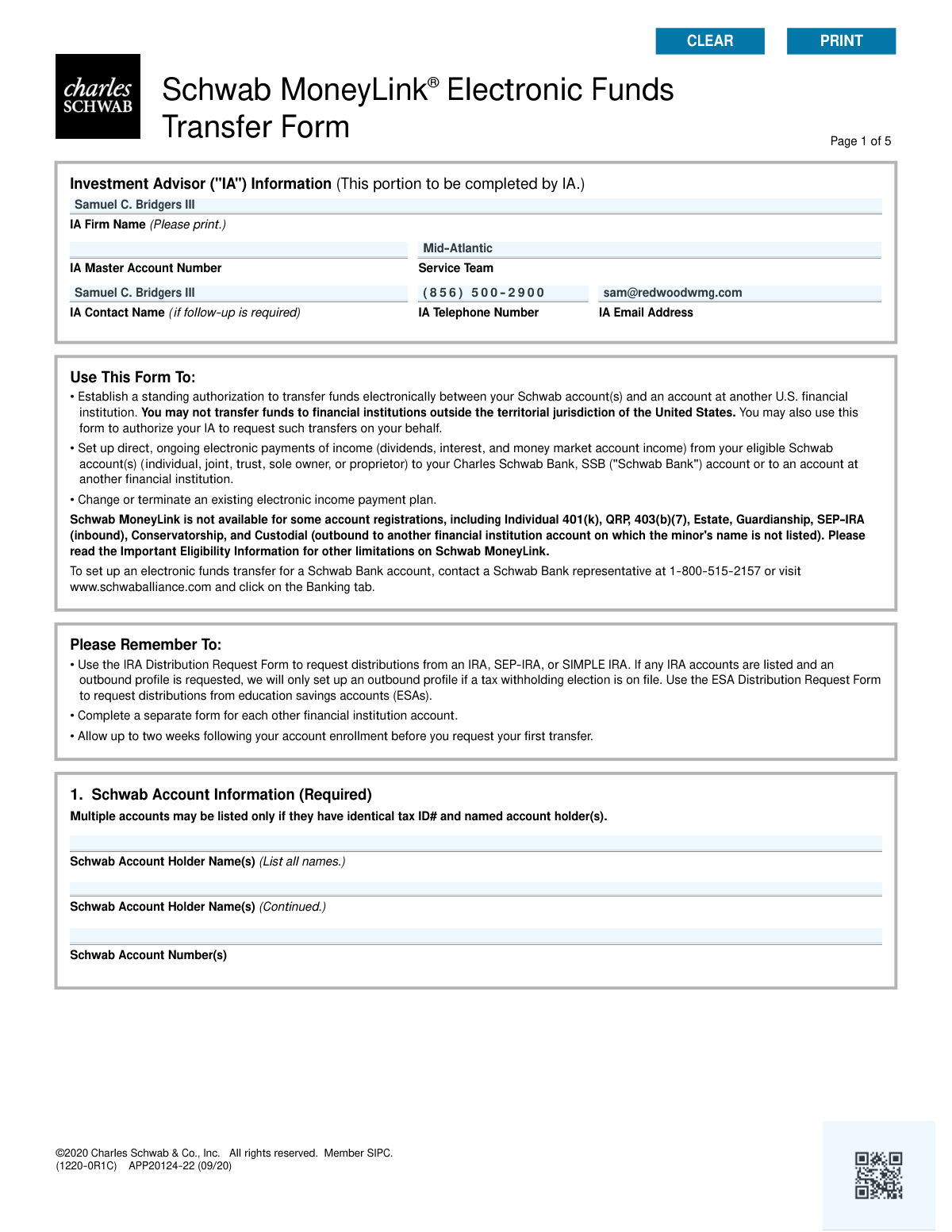
The AI does the filling. You just check it.
No typing into boxes, nothing to install.
What this form asks for
The AI fills all of it, from your answers or your documents.
The AI checks your answers before you download
13 checks built for this form, so a wrong date or a missing answer is caught before anyone else sees it.
This check verifies that the Schwab Account Number(s) provided in Section 1 are valid and eligible for the MoneyLink service, excluding prohibited types like Individual 401(k), QRP, or SEP-IRA (for inbound). It also confirms that if multiple accounts are listed, they all share identical tax ID numbers and named account holders. This is critical to prevent setup failures on ineligible accounts and ensure funds are linked to the correct legal entity. A failure would result in form rejection, requiring the user to correct the account numbers or submit separate forms.
Validates that the user has selected an option from either Section 2A ('Set up or terminate') or Section 2B ('Change existing'), but not from both. The form structure requires a single, unambiguous instruction for processing. Selecting options from both sections creates a logical conflict. If validation fails, the form would be flagged as ambiguous and returned to the user for clarification on their intended action.
This check ensures the ABA Transit Routing Number in Section 3 is exactly 9 digits and passes the standard checksum algorithm. An incorrect routing number is a primary cause of ACH transfer failures, leading to delays and potential fees. This validation is crucial for ensuring the electronic transfer can be successfully routed to the correct financial institution. A failure would halt processing until a valid routing number is provided.
Verifies that the submission includes the required documentation, such as a voided check or an accepted alternative like a bank letter, as specified in Section 3. This documentation is necessary to manually verify the account details (name, account number, routing number) of the other financial institution. Without this proof, the link cannot be established securely, and the form submission will be considered incomplete and rejected.
If a 'Recurring Transfer' is selected in Section 4, this check ensures that a transfer amount, a frequency, and a valid start date are all provided. Missing any of these components makes the recurring instruction impossible to execute. This validation prevents the setup of incomplete or ambiguous automated transfers. A failure would require the user to provide all necessary details for the recurring schedule.
When a recurring transfer is designated for an IRA contribution in Section 4, this validation ensures the 'tax year' is entered as a valid four-digit year (YYYY). This is essential for correct tax reporting and ensuring the contribution is applied to the intended year. An invalid format could lead to tax complications or misapplication of funds. The form would be rejected pending correction of the year.
And 7 more checks
- Dividend Plan Selection Logic
- Signature Requirement for IA Authorization
- Standard Signature Completeness
- Date Field Format and Plausibility
- Conditional Termination Account Number
- On-Request Transfer Direction Selection
- External Account Type Specification
Let AI fill out your Schwab MoneyLink Form
No typing. Every field filled in seconds, checked, ready to sign.
How to Fill Out Schwab MoneyLink Form Online for Free in 2026
What the AI walks you through.
- Navigate to Instafill.ai and upload the Schwab MoneyLink® Electronic Funds Transfer Form or select it from their template library.
- Provide your Schwab account information in Section 1, including the account holder names and account numbers.
- In Section 2, specify the transfer instructions, such as setting up a new transfer, changing an existing one, or terminating instructions.
- Enter the other financial institution's details in Section 3, including the ABA routing number and account number, and attach a voided check or other required documentation.
- Define the type of transfer in Section 4, choosing between on-request or recurring transfers and specifying amounts, frequency, and start dates.
- Complete the authorization in Section 7 by providing the required digital signatures and dates for all necessary account holders.
- Review the completed form for accuracy and submit it electronically to Charles Schwab as per their instructions.
Common Mistakes in Completing Schwab MoneyLink Form
The ones the AI is built to catch.
Forgetting to Attach a Voided Check or Equivalent
Missing Required Signatures for All Account Holders
Incorrectly Entering Bank Routing or Account Numbers
Using the MoneyLink Form for Ineligible IRA Distributions
Listing Schwab Accounts with Mismatched Ownership
Using a Checkmark Instead of Initials for IA Authorization
Providing Ambiguous or Contradictory Transfer Instructions
Mismatched Account Registrations Without Proper Documentation
Setting an Unrealistic Start Date for Recurring Transfers
Making Contradictory Selections in the Income Payment Plan
Providing an Illegible or Mismatched Signature
Frequently Asked Questions About Schwab MoneyLink Form
Is it really free for 7 days?
Can I fill other forms too?
How do I cancel?
How does the AI fill out Schwab MoneyLink Form?
What happens to my information?
How complex is Schwab MoneyLink Form to fill out?
What is the Schwab MoneyLink® form used for?
Who needs to fill out this form?
What documents do I need to provide with this form?
How long does it take to set up MoneyLink after I submit the form?
What is the difference between 'On-Request' and 'Recurring' transfers in Section 4?
What does authorizing my Investment Advisor (IA) in Section 6 do?
Are there any accounts that are not eligible for Schwab MoneyLink?
Can I use this form to request a distribution from my IRA?
Can I link more than one Schwab account on a single form?
Who is required to sign the form in Section 7?
Can I use this form to transfer funds to a bank outside the United States?
Can AI tools help me fill out this form?
How can I fill out this Schwab MoneyLink form online?
What should I do if my PDF copy of the form is not fillable?
Get your Schwab MoneyLink Form filled out by AI
$0 today. Cancel before Nov 18 and you pay nothing.
Other forms like this one
Schwab forms: Schwab One® Account Application for Personal Accounts, Move Assets from My Schwab Brokerage Account, Form APP13017-29, Transfer Your Account to Schwab, Charles Schwab & Co., Inc. Account Transfer Form, Schwab Charitable Fund Transfer of Assets, Letter of Authorization (LOA) For Movement of Funds in Schwab Accounts, Open a Schwab One® Brokerage Account, Schwab OpenView Workflow Library: Close Account Process, Charles Schwab PCRA Self-Directed Brokerage Account, Open a Schwab IRA, Charles Schwab Electronic Approvals FAQs, Charles Schwab Charitable Gift Donation - Letter Of Authorization for DTC Transfer, Charles Schwab Wire Transfer Letter of Authorization, Charles Schwab IRA Distribution Form, Schwab Health Savings Brokerage Account (HSBA) to HSA Invest Choice Account Transfer Form, Schwab IRA Account Application, Schwab Personal Choice Retirement Account® (PCRA) Limited Power of Attorney (LPOA) Form For a Participant, Charles Schwab Charitable Gift Transfer Letter of Authorization, Charles Schwab IRA Account Application, Schwab One® Account Application for Incorporated Organizations
transfer forms: Form REG 227, Application for Replacement or Transfer of Title, City of Harvey Real Estate Transfer Declaration & Application (with Certificate for Exemption), DBPR ABT-6002 – Application for Transfer of Ownership of an Alcoholic Beverage License, DBPR ABT-6002, Division of Alcoholic Beverages and Tobacco Application for Transfer of Ownership of an Alcoholic Beverage License, Request for Transfer of Records (Adelaide Health Care) – AHC-0013-05-PS (Version 2), DBPR Form ABT-6002, Division of Alcoholic Beverages and Tobacco Application for Transfer of Ownership of an Alcoholic Beverage License, Pfändungs- und Überweisungsbeschluss (Garnishment and Transfer Order) – German Civil Enforcement Court Form, Fidelity Funds Account Transfer of Assets Form, Fidelity Stock Plan Services (SPS) Transfer Request Form, How to Transfer Assets from Morgan Stanley to Fidelity Investments (Fidelity Stock Plan Services Guide), Transfer Due to Divorce — IRA/HSA/529, Fidelity Investments Transfer/Rollover/Exchange Form, Fidelity Investments Standing Transfer Instructions Form, Fidelity Investments Transfer/Rollover Form, Group Transfer Form Fidelity Health Savings Account (HSA), Plan–to-Plan Transfer, Plan Exchange, or Service Credit Authorization Form, Beneficiaries — Nonretirement Transfer on Death, Transfer Shares as a Gift — Nonretirement, Form APP13017-29, Transfer Your Account to Schwab, Transfer of Assets Out - Partial Account or Charitable Gift Transfers
money transfer forms: Schwab MoneyLink® Electronic Funds Transfer Form (09/20)
funds transfer forms: Fidelity Funds Account Transfer of Assets Form, Electronic Funds Transfer (EFT) Authorization, Easy Transfer Form: Moving Funds to an Employer-Sponsored Retirement Plan at TIAA, Merrill Funds Transfer Service Enrollment Form, Funds Transfer Service Enrollment Form, Authorization to transfer funds from a bank retirement account, ACH and Electronic Funds Transfer Instructions and Agreement, Thrivent Funds Transfer of Assets, Form MF11502, Form CMS-588, Electronic Funds Transfer (EFT) Authorization Agreement, Electronic Funds Transfer (EFT) Form, eMedNY Electronic Funds Transfer Authorization Form (EMEDNY-701101), CMS-588 Electronic Funds Transfer (EFT) Authorization Agreement Checklist, Form CMS-588, Electronic Funds Transfer (EFT) Authorization Agreement for Accountable Care Organizations, Schwab MoneyLink® Electronic Funds Transfer Form (09/20)
electronic funds transfer forms: ACH and Electronic Funds Transfer Instructions and Agreement, Electronic Funds Transfer (EFT) Authorization, Form CMS-588, Electronic Funds Transfer (EFT) Authorization Agreement, Electronic Funds Transfer (EFT) Form, eMedNY Electronic Funds Transfer Authorization Form (EMEDNY-701101), CMS-588 Electronic Funds Transfer (EFT) Authorization Agreement Checklist, Form CMS-588, Electronic Funds Transfer (EFT) Authorization Agreement for Accountable Care Organizations, Schwab MoneyLink® Electronic Funds Transfer Form (09/20)
fund transfer forms: Authorization to transfer funds from a bank retirement account, Fidelity Funds Account Transfer of Assets Form, Schwab Charitable Fund Transfer of Assets, Electronic Funds Transfer (EFT) Authorization, Easy Transfer Form: Moving Funds to an Employer-Sponsored Retirement Plan at TIAA, Merrill Funds Transfer Service Enrollment Form, Funds Transfer Service Enrollment Form, ACH and Electronic Funds Transfer Instructions and Agreement, Thrivent Funds Transfer of Assets, Form MF11502, Form CMS-588, Electronic Funds Transfer (EFT) Authorization Agreement, Electronic Funds Transfer (EFT) Form, eMedNY Electronic Funds Transfer Authorization Form (EMEDNY-701101), CMS-588 Electronic Funds Transfer (EFT) Authorization Agreement Checklist, Form CMS-588, Electronic Funds Transfer (EFT) Authorization Agreement for Accountable Care Organizations, Schwab MoneyLink® Electronic Funds Transfer Form (09/20)
Let AI fill out your Schwab MoneyLink Form
Your trial starts once a card is added. You pay nothing before Nov 18.
Your bank declined that card, so the trial did not start and nothing was charged. Please try another card.
Our AI already knows this form, all 71 fields of it. Skip the typing: tell it about yourself, or upload what you have, and it fills the whole form in seconds.
- AI fills every field on all 5 pages, checkboxes included
- No typing into boxes: answer a few questions, or upload a document you already have, an old copy of this form, a photo of a document
- The AI checks the answers; you review and change anything before you download
- Download the finished PDF, print it, or sign it online
- Encrypted, and never used to train AI
Cancel before Nov 18 and you pay nothing.
A card is needed to start the trial. We check it with a $19.99 hold that is released right away. Cancel in two clicks from your account.
Terms · Privacy