Yes! You can use AI to fill out Stadtsparkasse Schwedt Selbstauskunft / Vermögensaufstellung
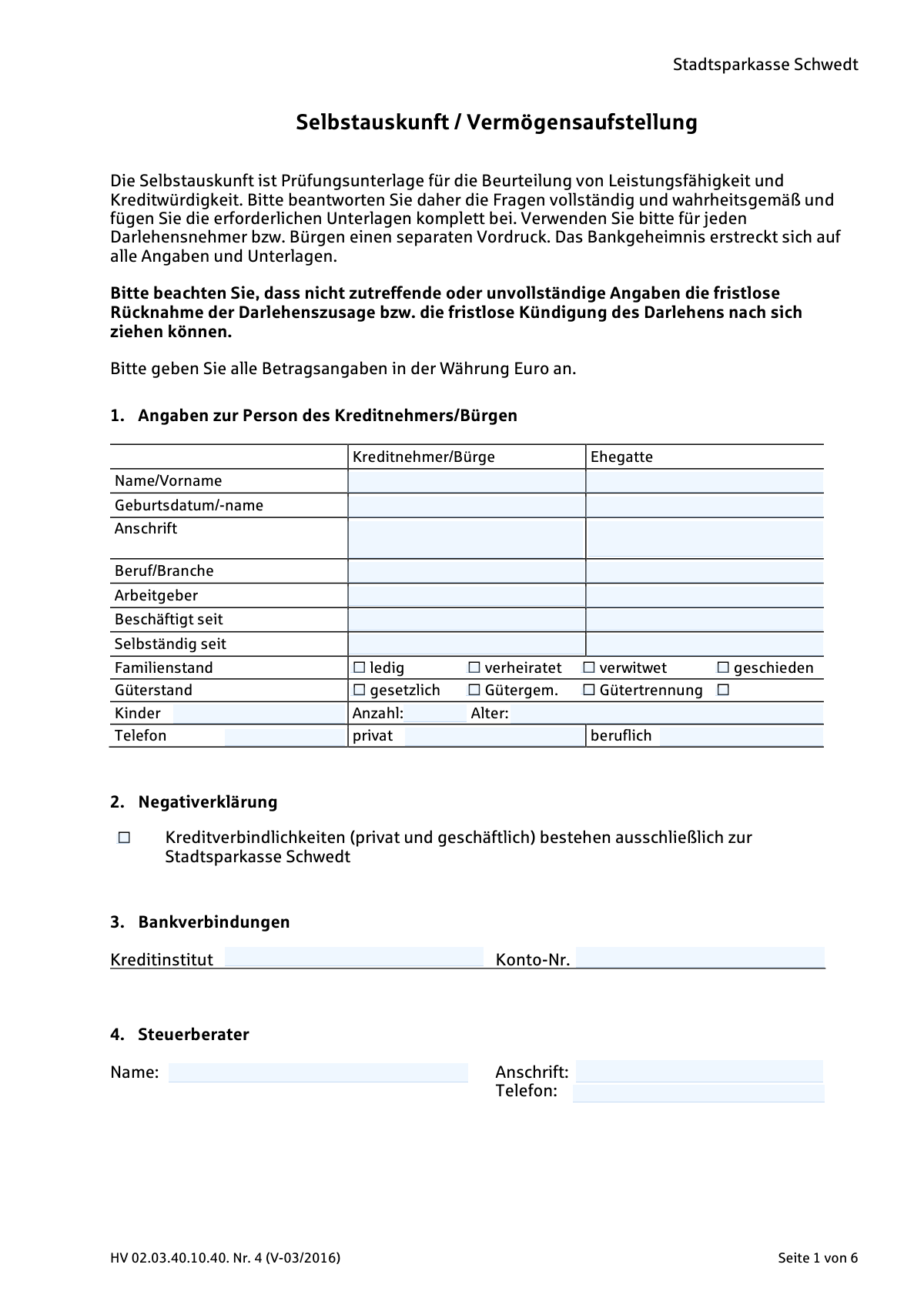
The 'Selbstauskunft / Vermögensaufstellung' is a detailed financial disclosure document required by German banks, such as Stadtsparkasse Schwedt, from individuals applying for a loan or acting as a guarantor. It serves as a primary tool for the bank to evaluate the applicant's financial stability and creditworthiness by collecting comprehensive information on personal details, income, assets (like property and investments), and liabilities (like existing debts). Today, this form can be filled out quickly and accurately using AI-powered services like Instafill.ai, which can also convert non-fillable PDF versions into interactive fillable forms.
Our AI automatically handles information lookup, data retrieval, formatting, and form filling.
It takes less than a minute to fill out HV 02.03.40.10.40. Nr. 4 (V-03/2016) using our AI form filling.
Securely upload your data. Information is encrypted in transit and deleted immediately after the form is filled out.
Form specifications
| Form name: | Stadtsparkasse Schwedt Selbstauskunft / Vermögensaufstellung |
| Number of pages: | 6 |
| Language: | English |
Instafill Demo: How to fill out PDF forms in seconds with AI
How to Fill Out HV 02.03.40.10.40. Nr. 4 (V-03/2016) Online for Free in 2026
Are you looking to fill out a HV 02.03.40.10.40. NR. 4 (V-03/2016) form online quickly and accurately? Instafill.ai offers the #1 AI-powered PDF filling software of 2026, allowing you to complete your HV 02.03.40.10.40. NR. 4 (V-03/2016) form in just 37 seconds or less.
Follow these steps to fill out your HV 02.03.40.10.40. NR. 4 (V-03/2016) form online using Instafill.ai:
- 1 Navigate to Instafill.ai and upload or select the 'Selbstauskunft / Vermögensaufstellung' form.
- 2 Use the AI assistant to automatically populate personal information for the borrower and spouse, including employment and marital status, in Section 1.
- 3 Enter detailed information about current and future net income from all sources for both spouses in Section 6.
- 4 List all assets in Section 7, including real estate (Grundbesitz), building savings contracts (Bausparverträge), life insurance policies, bank deposits, and securities.
- 5 Detail all liabilities in Section 8, such as existing loans, leasing obligations, and other debts, and list any guarantees provided.
- 6 Summarize all monthly expenses in Section 10, including loan payments, rent, and insurance premiums.
- 7 Carefully review all the information entered by the AI for accuracy, make any necessary corrections, and then sign and date the form to certify its correctness.
Our AI-powered system ensures each field is filled out correctly, reducing errors and saving you time.
Why Choose Instafill.ai for Your Fillable HV 02.03.40.10.40. Nr. 4 (V-03/2016) Form?
Speed
Complete your HV 02.03.40.10.40. Nr. 4 (V-03/2016) in as little as 37 seconds.
Up-to-Date
Always use the latest 2026 HV 02.03.40.10.40. Nr. 4 (V-03/2016) form version.
Cost-effective
No need to hire expensive lawyers.
Accuracy
Our AI performs 10 compliance checks to ensure your form is error-free.
Security
Your personal information is protected with bank-level encryption.
Frequently Asked Questions About Form HV 02.03.40.10.40. Nr. 4 (V-03/2016)
This form is a self-disclosure and statement of assets used by Stadtsparkasse Schwedt to assess your financial capacity and creditworthiness when you apply for a loan or act as a guarantor.
Every loan applicant (Kreditnehmer) and guarantor (BĂŒrge) must complete a separate copy of this form. If you are applying with a spouse, you will both need to provide your details.
You should attach copies of recent income tax assessments, tax declarations, financial statements, and account or depot statements to verify the information you provide on assets and income.
Yes, the form requires details about your spouse's personal data, income, and assets. This information is necessary for the bank to evaluate your household's complete financial situation.
This is a declaration where you confirm if all your private and business credit liabilities are exclusively with Stadtsparkasse Schwedt. If this is true, you should check the box.
In this section, you should list other valuable assets you own that are not covered in other categories, such as your car, valuable art, or significant household furnishings.
The form explicitly states that providing false or incomplete information can lead to the immediate withdrawal of a loan commitment or the termination of an existing loan agreement.
Yes, the instructions specify that a separate form ('separaten Vordruck') must be used for each individual loan applicant and for each guarantor.
By providing these details and signing the form, you authorize your tax advisor to provide the bank with necessary information to verify your financial data as part of the credit assessment.
The 'Reinvermögen' is your net worth. It is calculated by subtracting your total liabilities (Schulden) from your total assets (Vermögen) as listed in sections 7 and 8.
Yes, you can use services like Instafill.ai, which leverage AI to accurately auto-fill form fields from your documents, saving you time and helping to prevent errors.
If you have a non-fillable PDF, you can use a service like Instafill.ai. Simply upload the document, and the platform will convert it into an interactive, fillable form that you can complete online.
You can upload the 'Selbstauskunft' form to Instafill.ai to fill it out digitally. The platform makes the fields interactive, and its AI can help auto-fill information, making the process faster and more convenient.
Compliance HV 02.03.40.10.40. Nr. 4 (V-03/2016)
Validation Checks by Instafill.ai
1
Date of Birth Format and Plausibility
This check ensures that the 'Geburtsdatum' (Date of Birth) for both the applicant and spouse is a valid date in DD.MM.YYYY format and is in the past. It prevents invalid data entry and confirms the applicant is of a plausible age to apply for credit (e.g., over 18). A failure would block submission until a valid, historical date is entered.
2
Marital Status and Spouse Data Consistency
If the 'verheiratet' (married) checkbox is selected, the system must verify that key information for the spouse ('Ehegatte'), such as 'Name/Vorname' and 'Geburtsdatum', is provided. This is crucial for a complete assessment of the household's financial situation, as the spouse's income and liabilities directly impact creditworthiness. If the spouse's data is missing, a warning should prompt the user to either fill it in or change the marital status.
3
Marital Status and Property Regime Requirement
This validation checks that if 'verheiratet' (married) is selected, one of the 'GĂŒterstand' (marital property regime) options ('gesetzlich', 'GĂŒtergem.', 'GĂŒtertrennung') is also selected. The property regime is legally significant as it determines ownership and liability for assets and debts within the marriage. A failure to select a regime would prevent form submission, as this information is essential for the bank's risk assessment.
4
Employment and Self-Employment Exclusivity
The system should validate that an applicant does not have overlapping entries for 'BeschÀftigt seit' (employed since) and 'SelbstÀndig seit' (self-employed since). While a person can have sequential periods of each, providing both as current statuses is contradictory. This check ensures the employment status is clear and unambiguous for income verification purposes. A validation failure would require the user to clarify their primary current employment status.
5
Children Count and Age Details Match
This check verifies that the number entered in 'Anzahl' (Number) of children corresponds to the number of ages listed in the 'Alter' (Age) field. For example, if 'Anzahl' is 3, there must be three ages provided. This ensures the data regarding dependents is consistent and complete, which is important for calculating household living expenses. A mismatch would trigger an error requiring the user to correct the entries.
6
Annual Income Summation Verification
This validation automatically calculates the sum of the individual income components (a-d) in section 6.1 and compares it to the user-entered 'Gesamteinkommen' (Total Income) for both the applicant and spouse. This ensures the mathematical accuracy of the declared income figures. If the sum does not match the total, the system should flag the discrepancy and prompt the user to review and correct the values.
7
Net Worth Calculation Accuracy
The system must perform a critical cross-check by summing all assets from sections 7.1 to 7.6 and all liabilities from sections 8.1 to 8.3. It then subtracts the total liabilities from total assets and compares the result to the 'Reinvermögen' (Net Worth) value entered in Section 9. This validation ensures the entire financial statement is arithmetically sound. A mismatch indicates a calculation error on the form and must be corrected.
8
Liability and Expense Cross-Reference
This check ensures that the monthly payments ('Monatsrate') listed in Section 10 for loans, real estate debt, and leasing correspond to specific liabilities detailed in Section 8. For instance, if there is a 'Kapitaldienst aus Darlehen/Krediten' in Section 10, there must be at least one corresponding entry in Section 8.1. This links monthly cash flow to the balance sheet, ensuring a consistent and verifiable financial picture. A failure would highlight an inconsistency between declared debts and declared payments.
9
Statement 'As Of' Date Consistency
The validation verifies that the 'per' (as of) date for the 'Vermögensaufstellung' (Statement of Assets) in Section 7 is present and identical to the 'per' date for 'Verbindlichkeiten' (Liabilities) in Section 8. All financial data must be reported from the same point in time to create an accurate and meaningful snapshot of the applicant's financial position. If the dates are missing or do not match, the form should be considered incomplete.
10
Future Date Prohibition for Historical Fields
This check ensures that dates entered for 'BeschÀftigt seit' (Employed since) and 'SelbstÀndig seit' (Self-employed since) are not in the future. These fields represent the start of a historical event and cannot logically occur after the present day. This basic check prevents nonsensical data entry and ensures the timeline of the applicant's career history is plausible. An invalid entry would block submission until corrected.
11
Completeness of Primary Applicant Identification
This validation confirms that the core identification fields for the primary applicant ('Kreditnehmer/BĂŒrge')âspecifically 'Name/Vorname', 'Geburtsdatum/-name', and 'Anschrift'âare not empty. This information is the absolute minimum required to identify the individual and process the application. The form cannot be submitted without this fundamental data.
12
Total Monthly Expenses Calculation
The system should automatically sum all individual monthly expense items (a through h) in Section 10 and verify that the result matches the value entered in the 'Gesamt' (Total) field. This is a final check on the applicant's declared monthly cash outflow. If the calculated sum and the entered total do not match, an error must be flagged to ensure the final expense figure is accurate.
Common Mistakes in Completing HV 02.03.40.10.40. Nr. 4 (V-03/2016)
Section 6.1 asks for annual ('Jahr') net income, but applicants often mistakenly enter their monthly net income. This leads to a gross understatement of their financial capacity and will be immediately flagged when compared with submitted tax records, causing significant delays. To avoid this, use your annual tax statement ('Einkommensteuerbescheid') or sum up 12 months of net pay to get the correct annual figure.
In Section 8 ('Verbindlichkeiten'), applicants frequently forget to list smaller debts like credit card balances, overdraft facilities ('Dispokredite'), or 'buy now, pay later' financing. This omission is a misrepresentation that can lead to loan rejection or legal consequences if discovered later. It is crucial to gather all statements and list every single debt to present a complete and honest financial picture.
Section 7.3 asks for the 'Aktueller RĂŒckkaufswert' (current surrender value), which is the cash value available today. Many people incorrectly enter the 'Versicherungssumme' (sum insured), the much larger payout upon death, thus significantly inflating their liquid assets. Always check the latest policy statement for the correct surrender value to ensure your asset declaration is accurate.
The checkbox in Section 2 is a 'NegativerklÀrung,' a binding declaration that you have no loans other than with Stadtsparkasse Schwedt. Accidentally ticking this box when you have loans at other banks is a serious false statement that can lead to immediate loan cancellation. This box should only be checked if it is 100% factually correct; otherwise, it must be left blank.
Section 11 contains a statement about past enforcement measures where the applicant must strike out either 'haben' or 'haben nicht' stattgefunden. Leaving both options unmarked creates legal ambiguity and forces the bank to seek clarification, delaying the application. To prevent this, carefully read the sentence and clearly cross out the part that does not apply to your situation.
The form requires full details for a spouse and the marital property regime ('GĂŒterstand') in Section 1. Applicants often provide incomplete spousal information or are unsure of their 'GĂŒterstand' and leave it blank. This information is mandatory for assessing the household's financial situation, and missing details will halt the review process until clarified.
Section 9 ('Reinvermögen') requires the applicant to manually sum all assets from Section 7 and subtract all liabilities from Section 8. Simple arithmetic mistakes are very common here and can misrepresent the final net worth, casting doubt on the entire application's accuracy. To avoid this, double-check all calculations. AI-powered form filling tools like Instafill.ai can prevent these errors by performing calculations automatically.
Sections 7 ('Vermögensaufstellung') and 8 ('Verbindlichkeiten') require a specific date ('per ______') to which all financial figures refer. Forgetting to enter this 'Stichtag' (effective date) makes the entire financial snapshot invalid, as asset values and loan balances change over time. Always specify a recent date and ensure all provided figures are accurate as of that day.
This form is a non-fillable PDF, often leading to submissions with illegible handwriting. This can cause data entry errors by the bank, misinterpretation of names and numbers, and processing delays. To avoid this, it is best to use a tool like Instafill.ai, which can convert the flat PDF into a digitally fillable form, ensuring all entries are clean, legible, and correctly aligned.
Section 10 asks for monthly expenses to be broken down into interest ('Zinsen') and principal ('Tilgung'). Many applicants do not know this split and either leave the fields blank or guess, entering only the total monthly payment. This incomplete data prevents the bank from accurately analyzing debt service capacity, so it's important to refer to your latest loan statement for the correct figures.
Saved over 80 hours a year
âI was never sure if my IRS forms like W-9 were filled correctly. Now, I can complete the forms accurately without any external help.â
Kevin Martin Green
Your data stays secure with advanced protection from Instafill and our subprocessors

Robust compliance program
Transparent business model
Youâre not the product. You always know where your data is and what it is processed for.
ISO 27001, HIPAA, and GDPR
Our subprocesses adhere to multiple compliance standards, including but not limited to ISO 27001, HIPAA, and GDPR.
Security & privacy by design
We consider security and privacy from the initial design phase of any new service or functionality. Itâs not an afterthought, itâs built-in, including support for two-factor authentication (2FA) to further protect your account.
Fill out HV 02.03.40.10.40. Nr. 4 (V-03/2016) with Instafill.ai
Worried about filling PDFs wrong? Instafill securely fills stadtsparkasse-schwedt-selbstauskunft-vermgensaufstellung forms, ensuring each field is accurate.