Yes! You can use AI to fill out Vendor Data Form
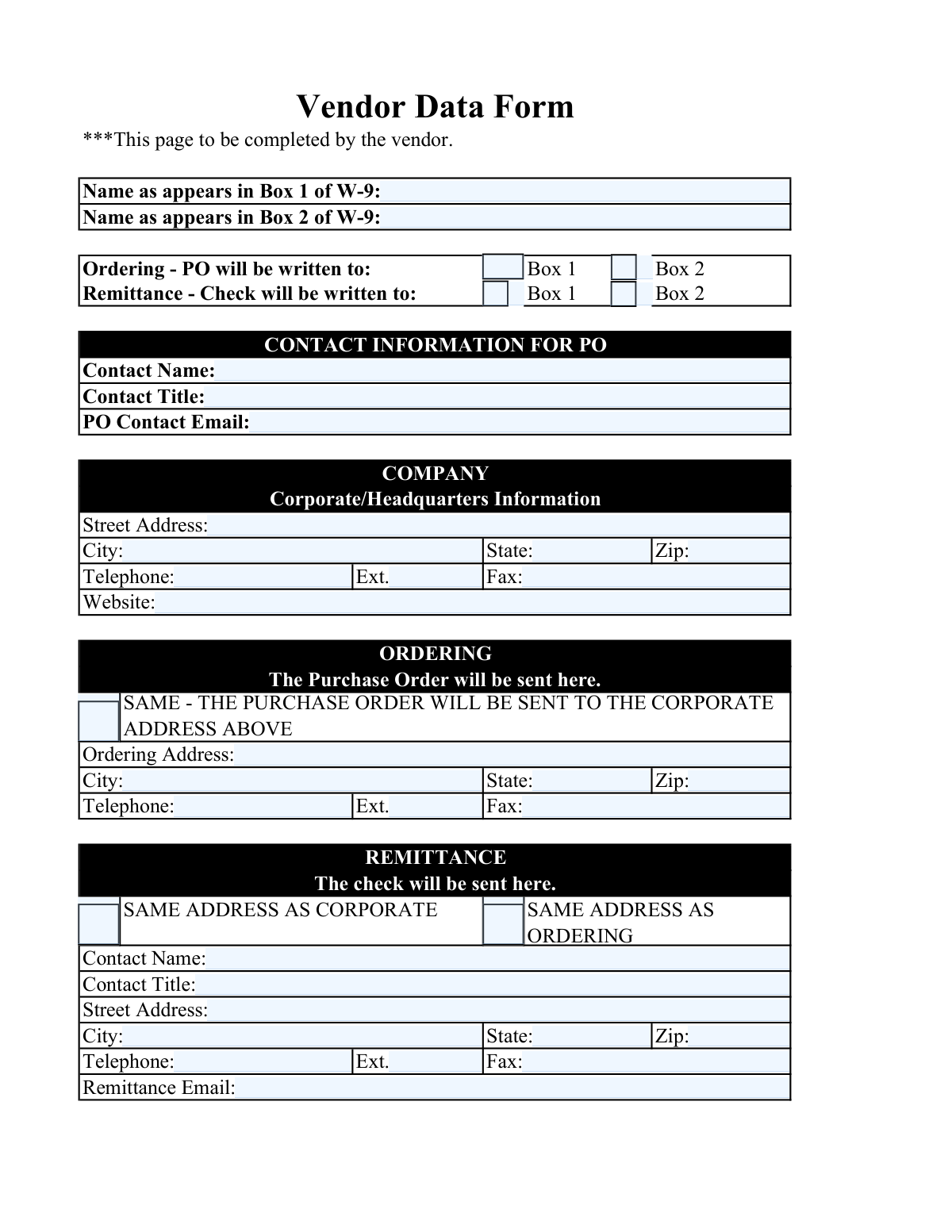
A Vendor Data Form is a document used by businesses to onboard new suppliers and maintain accurate records for existing ones. It captures critical information such as legal business names from the W-9, corporate headquarters details, and specific addresses for purchase orders and payment remittances, ensuring smooth procurement and payment processes. Today, this form can be filled out quickly and accurately using AI-powered services like Instafill.ai, which can also convert non-fillable PDF versions into interactive fillable forms.
Vendor Data Form is part of the
vendor forms category on Instafill.
Our AI automatically handles information lookup, data retrieval, formatting, and form filling.
It takes less than a minute to fill out Vendor Data Form using our AI form filling.
Securely upload your data. Information is encrypted in transit and deleted immediately after the form is filled out.
Form specifications
| Form name: | Vendor Data Form |
| Number of fields: | 37 |
| Number of pages: | 1 |
| Language: | English |
Instafill Demo: How to fill out PDF forms in seconds with AI
How to Fill Out Vendor Data Form Online for Free in 2026
Are you looking to fill out a VENDOR DATA FORM form online quickly and accurately? Instafill.ai offers the #1 AI-powered PDF filling software of 2026, allowing you to complete your VENDOR DATA FORM form in just 37 seconds or less.
Follow these steps to fill out your VENDOR DATA FORM form online using Instafill.ai:
- 1 Navigate to Instafill.ai and upload or select the Vendor Data Form.
- 2 Use the AI assistant to automatically populate your corporate/headquarters information, including address, phone, and website.
- 3 Provide your legal business name and DBA name exactly as they appear on your IRS Form W-9 when prompted.
- 4 Specify your ordering address and contact details, or simply check the box if they are the same as your corporate address.
- 5 Enter your remittance (payment) address and contact information, or select the appropriate checkbox if it's the same as the corporate or ordering address.
- 6 Review all the AI-populated and manually entered information for accuracy, paying close attention to the W-9 details and address selections.
- 7 Download, print, or securely share the completed Vendor Data Form directly from the platform.
Our AI-powered system ensures each field is filled out correctly, reducing errors and saving you time.
Why Choose Instafill.ai for Your Fillable Vendor Data Form Form?
Speed
Complete your Vendor Data Form in as little as 37 seconds.
Up-to-Date
Always use the latest 2026 Vendor Data Form form version.
Cost-effective
No need to hire expensive lawyers.
Accuracy
Our AI performs 10 compliance checks to ensure your form is error-free.
Security
Your personal information is protected with bank-level encryption.
Frequently Asked Questions About Form Vendor Data Form
This form is used to collect essential information from new vendors, including company details, contact information, and addresses for sending purchase orders and payments.
This form must be completed by the vendor or supplier who wishes to do business with the company that provided the form.
The form requires your legal business name and 'doing business as' (DBA) name to match your W-9 exactly. This ensures that purchase orders and payments are processed correctly for tax and accounting purposes.
If Box 2 on your W-9 is blank, you should also leave the 'Name as appears in Box 2 of W-9' field on this form blank.
The Corporate address is your main headquarters, the Ordering address is where purchase orders should be sent, and the Remittance address is where payment checks will be mailed.
No, you can save time by checking the 'SAME' boxes in the Ordering and Remittance sections. This will automatically use the Corporate address you already provided.
You should list the full name and title of the individual in your organization who is responsible for receiving and managing purchase order inquiries.
If your company does not have a fax number, you can leave the fax number fields blank as indicated in the form instructions.
You should enter the 10-digit telephone number including the area code, with digits separated by hyphens (e.g., 123-456-7890). Any extension should be entered in the separate 'Ext.' field.
The form does not specify submission instructions. You should return the completed form to the department or individual who requested it from you.
Yes, services like Instafill.ai use AI to accurately auto-fill form fields with your saved information, which saves time and helps prevent errors.
Simply upload the form to Instafill.ai. The AI will identify the fields and help you fill them in instantly using your securely stored company profile.
You can use a service like Instafill.ai, which can convert flat, non-fillable PDFs into interactive forms that you can easily complete and sign online.
Compliance Vendor Data Form
Validation Checks by Instafill.ai
1
Legal Business Name Presence
This check ensures that the 'Legal Business Name (IRS W-9 Box 1)' field is not empty. This field is the primary legal identifier for the vendor in financial systems. If this field is left blank, the form submission will be rejected, as a valid legal name is mandatory for creating a vendor profile and processing payments.
2
State Abbreviation Format
Validates that all state fields (Corporate, Ordering, and Remittance) contain a two-letter, uppercase U.S. postal abbreviation. This is crucial for mail deliverability and maintaining a standardized address database. A failed validation would prompt the user to correct the entry to a valid format like 'CA' or 'NY', preventing address-related errors.
3
ZIP Code Structure Validation
This check verifies that all ZIP code fields follow the standard five-digit (12345) or ZIP+4 (12345-6789) format. Correct ZIP code formatting is essential for accurate mail routing and delivery of purchase orders or payments. If the format is incorrect, the system will prevent submission and require the user to enter a valid numeric ZIP code.
4
Required Telephone Number Format
Ensures that all required telephone number fields (Corporate, Remittance) are entered in the specific '123-456-7890' format. This standardization aids in data consistency and ensures that automated dialing or contact systems can correctly parse the number. A validation failure would require the user to re-enter the number with hyphens in the correct positions.
5
Purchase Order Contact Email Validity
This validation confirms that the 'Purchase Order Contact Email' field contains a string in a valid email format (e.g., [email protected]). Since this is a required field for sending purchase orders, ensuring its validity is critical for business communication. An invalid format would block form submission until a correctly formatted email address is provided.
6
Corporate Website URL Format
Verifies that if a URL is entered in the 'Corporate/Headquarters Website URL' field, it begins with 'http://' or 'https://'. This ensures that any stored links are functional and complete. If a user enters a partial URL like 'www.example.com', the validation will fail and prompt them to add the required prefix.
7
Conditional Requirement of Ordering Address
This logical check enforces that if the 'SAME - THE PURCHASE ORDER WILL BE SENT TO THE CORPORATE ADDRESS ABOVE' checkbox is *not* selected, the Ordering Address fields (Street, City, State, ZIP) become mandatory. This prevents incomplete submissions where a separate ordering address is intended but not provided. Failure to provide the address will result in an error message prompting the user to complete the required fields.
8
Conditional Requirement of Remittance Address
This validation checks that if *neither* the 'SAME ADDRESS AS CORPORATE' nor the 'SAME ADDRESS AS ORDERING' checkbox is selected, the Remittance Address fields (Street, City, State, ZIP, and Contact Telephone) are required. This ensures that a payment location is always specified. If the checkboxes are unchecked and the address is missing, the submission will be blocked until the remittance details are filled in.
9
Mutually Exclusive Remittance Address Selection
This check prevents a user from selecting both 'SAME ADDRESS AS CORPORATE' and 'SAME ADDRESS AS ORDERING' simultaneously in the Remittance section. These options are logically mutually exclusive, and allowing both would create ambiguity in where payments should be sent. If a user tries to select the second option while the first is already selected, the system should either prevent it or automatically deselect the first option.
10
W-9 Box 2 Name Dependency for Ordering
This validation ensures that if the user checks the 'Ordering – Box 2' box, the 'Box 2 Name (IRS Form W-9)' field must contain a value. This prevents a situation where a purchase order is designated to be written to a non-existent name. If the 'Box 2 Name' field is empty, the user will be prompted to either provide the name or uncheck the 'Ordering – Box 2' option.
11
W-9 Box 2 Name Dependency for Remittance
This check verifies that if the 'Remittance – Box 2' checkbox is selected, the 'Box 2 Name (IRS Form W-9)' field is not blank. This is critical to ensure that checks are not issued to an empty or null payee name. A validation failure would require the user to populate the W-9 Box 2 name before proceeding.
12
Data Integrity for 'Same As' Ordering Address
This check ensures that if the 'SAME - THE PURCHASE ORDER WILL BE SENT TO THE CORPORATE ADDRESS ABOVE' checkbox is selected, any data in the individual Ordering Address fields is cleared or ignored upon submission. This prevents storing conflicting or redundant address information. It maintains data integrity by ensuring the system only uses the Corporate Address for ordering as intended.
13
Telephone Extension Numeric-Only Validation
This validation confirms that all telephone extension fields (Corporate, Ordering, Remittance) contain only numeric digits. The field description explicitly states this rule to ensure compatibility with phone systems. If a user enters non-numeric characters like 'x' or '#', the validation will fail and prompt for a numbers-only entry.
14
PO Contact Name Character Set
This check validates that the 'PO Contact Name' field contains only alphabetic characters and spaces, as specified in the instructions. This rule prevents the inclusion of titles, credentials, or special characters, ensuring the name field contains only the person's name for clean data entry. An invalid entry would trigger an error asking the user to remove any non-alphabetic characters or spaces.
Common Mistakes in Completing Vendor Data Form
Users often check a 'SAME AS' box (e.g., 'SAME ADDRESS AS CORPORATE') but then proceed to fill out the address fields in that same section. This creates ambiguity and forces the form processor to guess the user's intent. This can lead to significant delays or purchase orders and checks being sent to the wrong location. To avoid this, if you check a 'SAME AS' box, you must leave the corresponding address fields below it completely blank.
A frequent error is entering a trade name, abbreviation, or 'Doing Business As' (DBA) name in the 'Legal Business Name (IRS W-9 Box 1)' field. This field must match Box 1 of your W-9 form exactly for tax and legal purposes. Mismatches can lead to payment holds, tax reporting issues with the IRS, and rejection of the vendor application. Always copy the name precisely from your W-9 document.
When the Ordering or Remittance address is different from the Corporate address, users sometimes forget to fill in the new address details after leaving the 'SAME AS' box unchecked. This results in an incomplete form with critical missing information. The consequence is that the system defaults to an incorrect address or the form is rejected, preventing orders or payments. Always double-check that you have provided a complete address if it differs from the corporate one.
The form specifies a hyphenated format for telephone numbers (e.g., 123-456-7890), but many people enter numbers using parentheses like (123) 456-7890 or as a continuous string of digits. This can cause data validation errors in automated systems or require manual correction. To prevent this, enter the 10-digit number using only hyphens as separators as instructed.
The instructions require a two-letter, uppercase U.S. postal abbreviation for the state (e.g., 'CA', 'NY'). Common mistakes include writing out the full state name, using lowercase letters ('ca'), or incorrect abbreviations. This can cause address validation failures and lead to mail delivery delays for critical documents like purchase orders and checks. Always use the standard two-character uppercase postal code for the state.
Users often omit crucial details like suite, unit, or floor numbers from the street address field, or they incorrectly include the city and state in the same line. An incomplete address is a primary cause of returned mail. This can mean lost checks or delayed purchase orders, disrupting business operations. Ensure the 'Street Address' field contains the full street number, name, and any suite/unit number, and nothing else.
People frequently append an extension to the main telephone number field (e.g., '123-456-7890 x123') instead of using the separate 'Ext.' field. This can prevent automated dialing systems from connecting the call correctly. The main phone number field should only contain the 10-digit number, and the extension digits should be entered in the dedicated 'Ext.' field to ensure calls are routed properly.
The form asks for the contact's name, but people often include prefixes (Mr., Ms.) or professional credentials (CPA, PhD). The instructions specifically state to enter only the first and last name. Including extra titles can cause data parsing errors in the vendor management system and may look unprofessional in automated communications that combine the name field with other text. Stick to the requested format for seamless integration.
When entering a website, many users type the address without the 'http://' or 'https://' prefix (e.g., 'mycompany.com' instead of 'https://www.mycompany.com'). This can result in a broken link within the company's vendor portal or procurement system, making it difficult for them to access your site. To ensure the link is functional, always copy the full URL directly from your browser's address bar.
In the Ordering and Remittance sections, there are checkboxes to designate whether the PO or check should be made out to the name in 'Box 1' or 'Box 2' of the W-9. A common error is to check both boxes, check neither, or check a box that contradicts the name provided in the address details. This ambiguity forces manual intervention and can lead to payments or POs being issued to the incorrect legal entity. Make a single, clear selection that aligns with your company's financial structure.
Saved over 80 hours a year
“I was never sure if my IRS forms like W-9 were filled correctly. Now, I can complete the forms accurately without any external help.”
Kevin Martin Green
Your data stays secure with advanced protection from Instafill and our subprocessors

Robust compliance program
Transparent business model
You’re not the product. You always know where your data is and what it is processed for.
ISO 27001, HIPAA, and GDPR
Our subprocesses adhere to multiple compliance standards, including but not limited to ISO 27001, HIPAA, and GDPR.
Security & privacy by design
We consider security and privacy from the initial design phase of any new service or functionality. It’s not an afterthought, it’s built-in, including support for two-factor authentication (2FA) to further protect your account.
Fill out Vendor Data Form with Instafill.ai
Worried about filling PDFs wrong? Instafill securely fills vendor-data-form forms, ensuring each field is accurate.