Yes! You can use AI to fill out CMS Public Meeting Presentation Submission Form

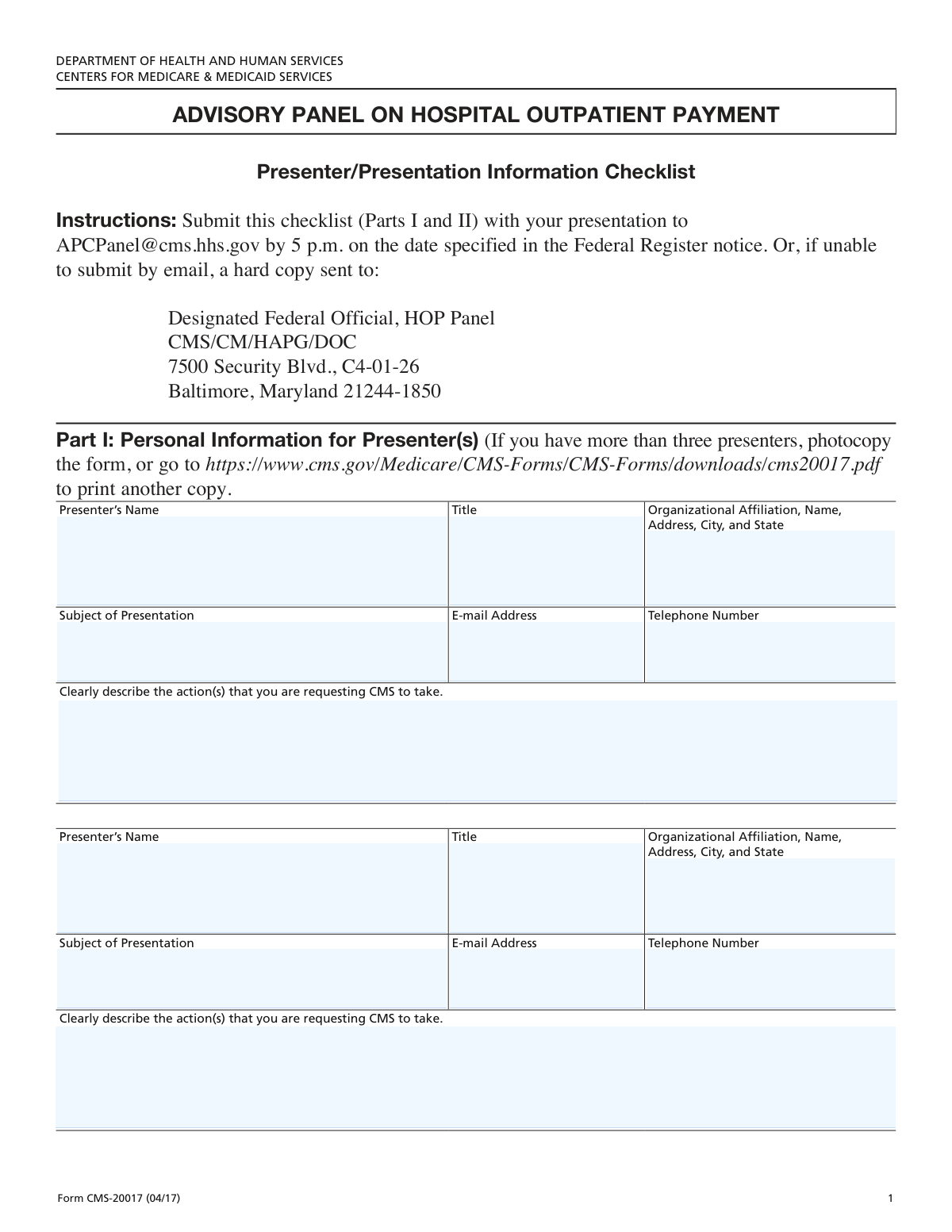
The CMS Public Meeting Presentation Submission Form is a document used by individuals or organizations to formally request a slot to present at a public meeting hosted by the Centers for Medicare & Medicaid Services (CMS). It is crucial for stakeholders who wish to provide input, recommend changes, or discuss issues related to healthcare policies, such as updates to Ambulatory Payment Classifications (APCs) and medical billing codes. Today, this form can be filled out quickly and accurately using AI-powered services like Instafill.ai, which can also convert non-fillable PDF versions into interactive fillable forms.
Our AI automatically handles information lookup, data retrieval, formatting, and form filling.
It takes less than a minute to fill out CMS Presentation Submission Form using our AI form filling.
Securely upload your data. Information is encrypted in transit and deleted immediately after the form is filled out.

Form specifications

Form name: CMS Public Meeting Presentation Submission Form
Number of fields: 22
Number of pages: 2
Language: English
Categories: CMS forms
main-image

Instafill Demo: How to fill out PDF forms in seconds with AI

How to Fill Out CMS Presentation Submission Form Online for Free in 2026

Are you looking to fill out a CMS PRESENTATION SUBMISSION FORM form online quickly and accurately? Instafill.ai offers the #1 AI-powered PDF filling software of 2026, allowing you to complete your CMS PRESENTATION SUBMISSION FORM form in just 37 seconds or less.
Follow these steps to fill out your CMS PRESENTATION SUBMISSION FORM form online using Instafill.ai:
  1. 1 Navigate to Instafill.ai and upload or select the CMS Public Meeting Presentation Submission Form.
  2. 2 Enter the primary presenter's information, including name, title, organizational affiliation, and contact details.
  3. 3 Clearly describe the subject of the presentation and the specific action you are requesting from CMS.
  4. 4 Provide a detailed description of the issue, including any relevant CPT/HCPCS codes and affected Ambulatory Payment Classifications (APCs).
  5. 5 Explain the potential consequences of not implementing the change and disclose any financial relationships.
  6. 6 If applicable, provide the information for a second presenter.
  7. 7 Review all entered information for accuracy with AI-powered validation before submitting the form to CMS.

Our AI-powered system ensures each field is filled out correctly, reducing errors and saving you time.

Why Choose Instafill.ai for Your Fillable CMS Presentation Submission Form Form?

Speed

Complete your CMS Presentation Submission Form in as little as 37 seconds.

Up-to-Date

Always use the latest 2026 CMS Presentation Submission Form form version.

Cost-effective

No need to hire expensive lawyers.

Accuracy

Our AI performs 10 compliance checks to ensure your form is error-free.

Security

Your personal information is protected with bank-level encryption.

Frequently Asked Questions About Form CMS Presentation Submission Form

This form is used to formally request a specific action or change from the Centers for Medicare & Medicaid Services (CMS) regarding medical procedures, coding, or payment classifications.

This form should be completed by individuals or organizations, referred to as 'presenters,' who wish to propose changes to CMS. This often includes healthcare providers, medical associations, or coding experts.

You will need contact information for up to two presenters, a detailed description of the issue, the specific action you are requesting, and relevant medical codes like CPT and HCPCS. You should also prepare a rationale for the change.

The form provides dedicated sections for a first and second presenter. If you have more than two presenters, you should check the official submission guidelines or contact CMS for instructions on how to include additional information.

The 'Description of Issue(s)' section is where you explain the problem or inconsistency you have identified. The 'Requested Action Description' is where you state the specific solution or change you want CMS to implement.

CPT and HCPCS are standardized codes for medical services, while APCs (Ambulatory Payment Classifications) are used by Medicare for payment. Providing these codes helps CMS precisely identify the services and payment systems your request affects.

Identifying the correct APC(s) is crucial for your request to be evaluated properly. If you are unsure, consult with a billing expert or research the relevant APCs on the official CMS website.

You must disclose any financial ties the presenter(s) have with companies whose products or services are related to your request. This ensures transparency and helps identify potential conflicts of interest.

In these sections, you should present a well-supported argument for your proposed change. Clearly state your recommendation and provide the clinical, financial, or administrative reasoning behind it.

Submission instructions and processing times are typically provided by CMS on their official website or alongside the form. Always refer to the most current guidelines to ensure your submission is handled correctly.

Yes, services like Instafill.ai use AI to accurately auto-fill form fields, which can save you significant time and reduce errors. This is especially helpful for entering presenter details and other repetitive information.

Simply upload the form to the Instafill.ai platform. Its AI will identify the fields, allowing you to quickly fill them in, save your progress, and download the completed document.

You can use a service like Instafill.ai, which can convert flat, non-fillable PDFs into interactive, fillable forms. This allows you to type your answers directly into the fields instead of printing and filling by hand.

Compliance CMS Presentation Submission Form
Validation Checks by Instafill.ai

1
First Presenter Name Required
This check ensures that the 'Presenter's Name' field for the first presenter is not left blank. This information is essential for identifying the primary contact and speaker for the submission. If this field is empty, the form cannot be processed as the main point of contact is unknown.
2
Validates First Presenter's Email Format
This validation verifies that the value entered in the 'E-mail Address' field for the first presenter follows the standard email format (e.g., [email protected]). A valid email is crucial for all official communication, including submission confirmation and follow-up questions. An invalid format will prevent the system from sending critical notifications.
3
Validates First Presenter's Telephone Number Format
This check ensures the 'Telephone Number' for the first presenter is entered in a recognizable US format (e.g., (XXX) XXX-XXXX or XXXXXXXXXX). A correctly formatted phone number is necessary for direct contact if email communication is insufficient or urgent matters arise. Failure to provide a valid number could delay the review process if immediate clarification is needed.
4
Ensures Subject of Presentation is Provided
This validation confirms that the 'Subject of Presentation' field is not empty. The subject is a critical piece of information that summarizes the submission's topic and is used for routing and initial assessment. A missing subject makes it impossible to categorize and assign the submission for review, leading to an automatic rejection.
5
Conditional Requirement for Requested Action Description
This is a logical check that ensures the 'Requested Action Description' field is filled out if the 'Subject of Presentation' field has been completed. The action description details the specific outcome the presenter is seeking from CMS, which is a necessary complement to the subject. If the subject is provided but the requested action is not, the submission is incomplete and lacks a clear purpose.
6
Second Presenter Information Group Consistency
This validation ensures that if a 'Second Presenter Name' is provided, then the associated fields ('Second Presenter Title', 'Email Address', 'Telephone Number', and 'Organizational Affiliation') are also completed. Providing only a name without contact or affiliation details is insufficient for processing. This check prevents incomplete records for secondary presenters, ensuring all listed individuals are fully identified.
7
Validates Second Presenter's Email Format
This check verifies that, if provided, the 'Second Presenter Email Address' conforms to a standard email format. This is important for maintaining a valid point of contact for all listed presenters. An invalid email format for a second presenter would be flagged to ensure all communication channels are viable.
8
CPT and HCPCS Code Format Validation
This validation inspects the 'CPT and HCPCS Codes' field to ensure the entered codes adhere to their standard formats (e.g., 5-digit CPT codes, or a letter followed by 4 digits for HCPCS). Correctly formatted codes are essential for the system to accurately identify the procedures under discussion and link them to the correct data. Incorrectly formatted codes will cause processing errors and require manual correction.
9
Affected APC Code Format Validation
This check verifies that the codes entered in the 'Affected APC(s)' field follow the standard format for Ambulatory Payment Classifications, which is typically a 4-digit number. Accurate APC information is critical for CMS to evaluate the financial and policy impact of the requested change. Invalid formats would prevent the system from correctly analyzing the submission's context.
10
Ensures Description of Issue is Complete
This validation confirms that the 'Description of Issue(s)' field contains a detailed explanation and is not left empty. This narrative is the core of the submission, explaining the problem that needs to be addressed. A submission without a clear issue description cannot be evaluated and will be rejected for being incomplete.
11
Ensures Potential Consequences are Described
This check ensures the 'Potential Consequences of Not Making the Change' field is filled out. This information helps reviewers understand the urgency and impact of the issue from the presenter's perspective. Omitting this rationale weakens the proposal and may lead to it being deprioritized or misunderstood.
12
Financial Relationship Disclosure Requirement
This validation ensures the 'Financial Relationship' field is not left blank to maintain transparency. Presenters must disclose any relevant financial relationships or explicitly state that none exist (e.g., by entering 'None'). A blank field creates ambiguity regarding potential conflicts of interest and will halt the submission until a clear statement is provided.
13
Clinical Service Description Requirement
This validation ensures the 'Clinical Description of Service' field is not left empty. This description provides the necessary clinical context for reviewers to understand the service being discussed, especially in comparison to other services. Without this information, the technical and clinical merits of the proposal cannot be properly assessed.
14
Recommendations and Rationale (Item 6) Requirement
This check confirms that the 'Recommendations and Rationale for Change (Item 6)' field is completed as required. This section contains the presenter's specific, actionable recommendations based on the checklist item. A failure to provide this information means the submission lacks a clear, proposed solution, making it impossible for reviewers to act upon.

Common Mistakes in Completing CMS Presentation Submission Form

Confusing the Issue Description with the Requested Action

Users often provide the same information for both 'Description of Issue(s)' and 'Requested Action Description'. The 'Issue' field requires a detailed background of the problem, while the 'Action' field needs a specific, concise request for what CMS should do (e.g., 'Reassign CPT code X to APC Y'). This confusion can lead to an unclear submission, causing delays or rejection as reviewers struggle to understand the core request. To avoid this, clearly separate the problem's context from the proposed solution in your writing.

Using Incorrect or Outdated CPT/HCPCS Codes

The 'CPT and HCPCS Codes' and 'Affected APC(s)' fields are critical, but applicants frequently enter incorrect, incomplete, or outdated codes. Medical coding systems are updated annually, and using an old code invalidates the request. This error immediately undermines the submission's credibility and can lead to an automatic rejection. Always verify codes against the latest official CPT, HCPCS, and APC references before submission.

Providing Vague or Incomplete Justifications

Fields like 'Clinical Service Description' and 'Potential Consequences of Not Making the Change' require detailed explanations but are often filled with brief, unsupported statements. A submission lacking in-depth clinical rationale or a clear impact analysis is unlikely to be persuasive, resulting in the request being denied due to insufficient evidence. To prevent this, provide comprehensive narratives supported by data, clinical evidence, and specific examples.

Submitting an Incomplete or Vague Financial Disclosure

The 'Financial Relationship' section is often filled out improperly, with presenters either omitting relationships or describing them too vaguely (e.g., 'consultant for a device company'). Failure to provide a complete and specific list of all relevant financial ties can lead to questions about conflicts of interest and may result in the presentation being disqualified. It is crucial to list every relevant company by name and the nature of the relationship to ensure full transparency.

Omitting Information Referencing an External Checklist

The form includes fields like 'Recommendations and Rationale for Change (Item 6)' and '(Item 7),' which refer to an external checklist not included with the form itself. Applicants who don't have this checklist may leave these critical fields blank, rendering the submission incomplete. This often leads to rejection and requires the applicant to find the checklist and resubmit. Always ensure you have all accompanying documents before starting the form.

Providing Inconsistent or Incomplete Presenter Details

Applicants often make simple data entry errors in the presenter sections, such as typos in names or email addresses, or providing an incomplete address for the 'Organizational Affiliation.' If there are two presenters, information may be entered in the wrong section or be inconsistent between the two. These errors can cause significant communication delays and reflect poorly on the submission's professionalism. Double-checking all contact and affiliation details for accuracy is essential.

Mismatching Information for Multiple Presenters

When a submission involves two presenters, it's common for information to be mismatched, such as attributing the wrong title, email, or presentation subject to a presenter. This creates confusion for the reviewers and can delay processing while they seek clarification. To avoid this, carefully fill out the sections for the 'First Presenter' and 'Second Presenter' separately, ensuring all details in each block correspond to the correct individual.

Entering Data in an Incorrect Format

Fields like 'Telephone Number' or lists of CPT codes may have implicit formatting requirements (e.g., (555) 555-5555 vs. 5555555555). Submitting data in a non-standard format can cause processing errors in automated systems or require manual correction, slowing down the review. AI-powered form filling tools like Instafill.ai can help prevent these errors by automatically validating and formatting data correctly as you enter it.

Missing Conditionally Required Information

The form states that the 'Requested Action Description' should only be filled if 'Subject of Presentation' is filled. Users might fill the subject but forget to describe the requested action, leaving the submission without a clear purpose. This oversight makes it impossible for reviewers to act on the request, leading to rejection. Always review form instructions and dependencies to ensure all necessary fields are completed based on the information you've provided.

Manually Filling a Non-Interactive Form

Often, complex forms are only available as flat, non-fillable PDFs, forcing users to print and fill them by hand or use clunky PDF editors. This leads to illegible handwriting, formatting issues, and an increased likelihood of making other data entry mistakes. To overcome this, tools like Instafill.ai can convert a non-fillable PDF into an interactive, fillable form, making the process faster and more accurate.
Saved over 80 hours a year

“I was never sure if my IRS forms like W-9 were filled correctly. Now, I can complete the forms accurately without any external help.”

Kevin Martin Green

Your data stays secure with advanced protection from Instafill and our subprocessors

Robust compliance program

Transparent business model

You’re not the product. You always know where your data is and what it is processed for.

ISO 27001, HIPAA, and GDPR

Our subprocesses adhere to multiple compliance standards, including but not limited to ISO 27001, HIPAA, and GDPR.

Security & privacy by design

We consider security and privacy from the initial design phase of any new service or functionality. It’s not an afterthought, it’s built-in, including support for two-factor authentication (2FA) to further protect your account.

Fill out CMS Presentation Submission Form with Instafill.ai

Worried about filling PDFs wrong? Instafill securely fills cms-public-meeting-presentation-submission-form forms, ensuring each field is accurate.