Yes! You can use AI to fill out Defendant's Plea and Statement Form
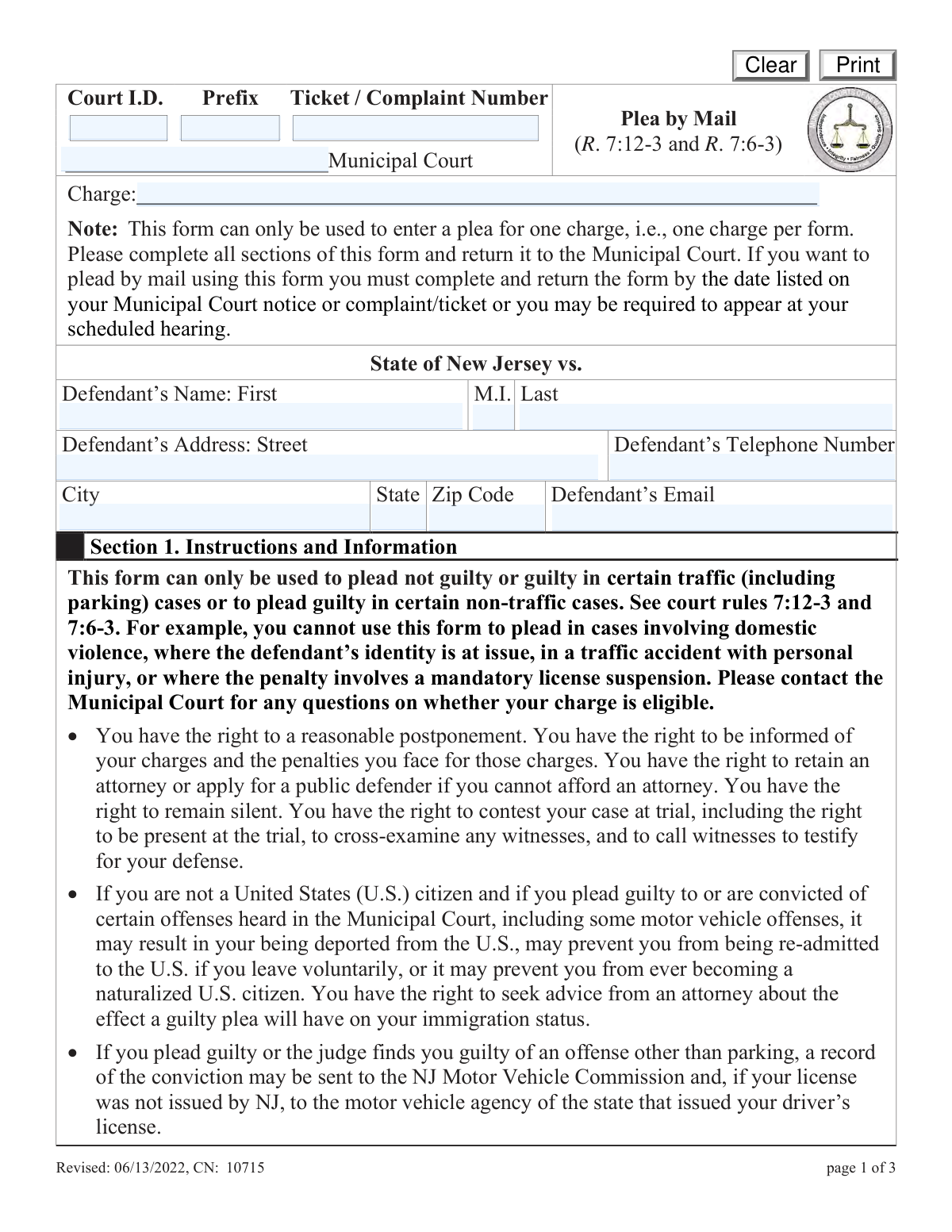
A Defendant's Plea and Statement Form is a legal document submitted to a court, allowing an individual to respond to a ticket or complaint, such as a traffic violation, by mail. It provides a way to formally enter a plea of 'Guilty' or 'Not Guilty' and submit a written statement explaining the circumstances or defense. This process is crucial for handling minor offenses efficiently without needing to appear in person. Today, this form can be filled out quickly and accurately using AI-powered services like Instafill.ai, which can also convert non-fillable PDF versions into interactive fillable forms.
Plea by Mail Form is part of the
NJ state forms, PA state forms and state ID forms categories on Instafill.
Our AI automatically handles information lookup, data retrieval, formatting, and form filling.
It takes less than a minute to fill out Plea by Mail Form using our AI form filling.
Securely upload your data. Information is encrypted in transit and deleted immediately after the form is filled out.
Form specifications
| Form name: | Defendant's Plea and Statement Form |
| Number of fields: | 24 |
| Number of pages: | 3 |
| Language: | English |
More forms in NJ state forms
Instafill Demo: How to fill out PDF forms in seconds with AI
How to Fill Out Plea by Mail Form Online for Free in 2026
Are you looking to fill out a PLEA BY MAIL FORM form online quickly and accurately? Instafill.ai offers the #1 AI-powered PDF filling software of 2026, allowing you to complete your PLEA BY MAIL FORM form in just 37 seconds or less.
Follow these steps to fill out your PLEA BY MAIL FORM form online using Instafill.ai:
- 1 Navigate to Instafill.ai and upload the Plea by Mail form or select it from a template library.
- 2 Use the AI assistant to accurately enter the court information, including the court name, ID, and the specific ticket or complaint number from your citation.
- 3 Provide your personal details, such as your full name, address, and contact information, letting the AI guide you to the correct fields.
- 4 Select the appropriate checkbox to plead 'Guilty' or 'Not Guilty' based on the type of case (e.g., Traffic/Parking or Non-Traffic).
- 5 Write your statement of defense (for a not guilty plea) or your statement in mitigation (for a guilty plea) in the designated text area.
- 6 Electronically sign and date the form in the required fields to certify your plea and statement.
- 7 Review the completed form for accuracy, then download the document to print and mail to the court as instructed on your citation.
Our AI-powered system ensures each field is filled out correctly, reducing errors and saving you time.
Why Choose Instafill.ai for Your Fillable Plea by Mail Form Form?
Speed
Complete your Plea by Mail Form in as little as 37 seconds.
Up-to-Date
Always use the latest 2026 Plea by Mail Form form version.
Cost-effective
No need to hire expensive lawyers.
Accuracy
Our AI performs 10 compliance checks to ensure your form is error-free.
Security
Your personal information is protected with bank-level encryption.
Frequently Asked Questions About Form Plea by Mail Form
This form is used to officially enter a plea of 'Guilty' or 'Not Guilty' for a specific charge from a ticket or complaint, allowing you to respond to the court without an initial in-person appearance.
Anyone who has received a ticket or court complaint and wishes to enter a plea by mail or electronically, as permitted by the court, should use this form.
The Court ID, prefix, and the full ticket or complaint number are all printed on the citation or court paperwork you received. It is important to copy these numbers exactly as they appear to identify your case correctly.
You should enter the name of the offense or the specific statute/code number you are charged with, as it is written on your ticket or complaint.
The form has separate checkboxes because traffic and non-traffic offenses can have different legal procedures and penalties. You must select the option that correctly matches the type of charge you are pleading guilty to.
In the 'reasonNG' section, you should provide a brief and clear statement of facts explaining why you believe you are not guilty of the charge. This section is for your defense in traffic or parking cases.
The court will process your plea. If you plead guilty, you will likely receive instructions for paying fines and penalties; if you plead not guilty, the court will notify you of a future hearing or trial date.
This form is designed to address a single charge at a time. If your ticket includes multiple charges, you will likely need to complete a separate form for each one, unless the court has instructed you otherwise.
While not always mandatory, providing an email address is highly recommended. The court can use it to send you important notices, updates, and communications about your case quickly and efficiently.
The Court ID Prefix is any short code, typically letters or a mix of letters and numbers, that appears directly before your main ticket or complaint number on the citation. Be sure to enter it exactly as shown.
Yes, services like Instafill.ai use AI to accurately auto-fill form fields, which saves time and helps prevent errors. This is especially useful for ensuring details like your ticket number and personal information are entered correctly.
You can upload the form to the Instafill.ai platform. The AI will identify the fields, allowing you to provide your information once and have it automatically and accurately placed in all the correct spaces on the form.
If you have a non-fillable or 'flat' PDF, you can upload it to a service like Instafill.ai. Its technology can convert the document into an interactive, fillable form that you can complete easily on your computer.
Compliance Plea by Mail Form
Validation Checks by Instafill.ai
1
Ensures only one plea option is selected
This validation checks that the defendant has selected exactly one plea option from the available checkboxes ('Not Guilty - Traffic/Parking', 'Guilty - Traffic/Parking', 'Guilty - Non-Traffic'). A plea is a fundamental and required part of the form, and selecting multiple or no options would make the submission ambiguous and legally invalid. If this check fails, the user must be prompted to select one and only one plea before proceeding.
2
Validates ZIP Code is in 5-digit or ZIP+4 format
This check ensures the 'ZIP Code' field contains either a 5-digit number (e.g., '90210') or a 9-digit ZIP+4 format (e.g., '90210-1234'). Correctly formatted ZIP codes are essential for mail delivery and address verification by the court system. An invalid format could lead to returned mail and missed court communications, so the user must correct the entry before submission.
3
Verifies State is a valid US state name or abbreviation
This validation confirms that the entry in the 'State' field is a recognized US state or territory, either as a full name or a standard two-letter postal abbreviation. This prevents typos and ensures the address is valid and locatable for official correspondence. If the entry does not match a valid state, the form should not be submitted and the user should be asked to correct it.
4
Ensures Defendant Email Address is a valid format
This check verifies that the text entered in the 'Defendant Email Address' field follows the standard format for an email address (e.g., '[email protected]'). Since email is a primary method for court notices, a valid address is critical to ensure the defendant receives important communications. An invalid format would prevent submission and prompt the user to enter a correctly structured email address.
5
Validates Defendant Telephone Number format
This check ensures the 'Defendant Telephone Number' is entered in a recognizable 10-digit format, with or without common separators like parentheses, hyphens, or spaces. A valid phone number is crucial for the court to contact the defendant directly if needed. If the entry does not appear to be a valid phone number, the system should flag it and require the user to correct it.
6
Confirms Signature Date is in MM/DD/YYYY format
This validation ensures the date entered for the signature is in the specific 'mm/dd/yyyy' format. This standardization is crucial for accurate record-keeping and legal document processing, as an improperly formatted date can cause ambiguity or processing errors. If the date format is incorrect, the user must be prompted to re-enter it correctly before the form can be signed and submitted.
7
Ensures Signature Date is not in the future
This check verifies that the signature date is not a future date. A legal document cannot be signed on a date that has not yet occurred, which prevents user error and ensures the legal validity of the document's execution date. If a future date is entered, the form will be rejected and the user must provide the current date or a past date.
8
Validates Middle Initial is a single letter
This check confirms that if a value is entered in the 'Defendant Middle Initial' field, it is only a single alphabetic character. This maintains data consistency and aligns with the common format for middle initials in legal and identification documents. If more than one character is entered, the user should be notified to enter only their single middle initial or leave the field blank.
9
Ensures Ticket or Complaint Number is provided
This validation confirms that the 'Ticket / Complaint Number' field is not empty. This number is the primary identifier for the specific case and is absolutely essential for the court to locate and process the plea correctly. Without this number, the submission is useless, so the form cannot be submitted until a value is entered.
10
Verifies Defendant First and Last Name are provided
This check ensures that both the 'Defendant First Name' and 'Defendant Last Name' fields are filled out. A full name is required for legal identification and to match the submission to the correct individual in the court's records. A submission with a missing first or last name is incomplete and must be rejected until the user provides the required information.
11
Checks for completeness of the full address
This validation ensures that the 'Street Address', 'City', 'State', and 'ZIP Code' fields are all filled in. A complete and valid mailing address is mandatory for the court to send official notices and other critical correspondence. An incomplete address would render the submission invalid, as the court could not reliably communicate with the defendant.
12
Ensures both Court Name and Court ID are provided
This check verifies that both the 'Court Name / Venue' and 'Court I.D.' fields have been completed. This information is critical for routing the plea to the correct jurisdiction and court system. A submission missing either piece of information could be lost or misfiled, so the form must require both fields to be completed.
13
Verifies that the Charge Description is provided
This validation confirms that the 'Charge' field is not left blank. The defendant must specify the exact charge to which they are pleading, as it appears on their ticket or complaint. Submitting a plea without identifying the charge is legally meaningless, so this field is mandatory for a valid submission.
14
Ensures the Defendant's Signature field is not empty
This check verifies that the defendant's signature field ('sigDef') has been completed, whether by a digital signature action or by typing their name. The signature is a legal attestation that the information provided is true and that the plea is being entered voluntarily. A form without a signature is legally non-binding and must be rejected until it is properly signed.
Common Mistakes in Completing Plea by Mail Form
People often abbreviate the court name (e.g., 'Muni Court') or misenter the Court I.D. number found on their citation. This happens when rushing or when the information on the ticket is unclear. An error here can cause the form to be rejected or sent to the wrong jurisdiction, leading to significant delays and potentially a 'failure to appear' notice. To avoid this, carefully copy the full court name and identification number exactly as they appear on your paperwork.
This form has separate fields for the 'Court ID Prefix' and the 'Ticket / Complaint Number'. A common mistake is to enter the entire string (prefix and number) into the main ticket number field, leaving the prefix field blank. This formatting error can cause automated court systems to fail when processing the form, leading to manual review delays or outright rejection. Always check the citation carefully and enter the prefix and number into their respective dedicated fields to ensure smooth processing.
Defendants may write a generic description like 'speeding ticket' instead of the specific statute or code cited on the complaint (e.g., 'VC 22350 - Speeding'). This ambiguity forces court clerks to manually look up the case file, delaying the processing of the plea. To prevent this, you must copy the exact offense name or the statute/code number directly from your ticket onto the form.
A person might enter a nickname (e.g., 'Mike' instead of 'Michael') or omit a middle initial or suffix that is present on their driver's license and the original citation. This name mismatch can cause significant processing delays as the court clerk may be unable to locate the case file. It is crucial to enter your full legal name exactly as it appears on the court documents to ensure the plea is correctly associated with your case.
Failing to include an apartment number, using a P.O. Box when a street address is required, or providing an old address are frequent mistakes. Since all official court correspondence, including hearing notices and fine payment information, will be sent to this address, an error can lead to missed deadlines and even a warrant for failure to appear. Always double-check that the address is current, complete, and exactly where you receive mail from the court.
Simple typos in a phone number or email address are extremely common but have serious consequences. An incorrect digit or a misspelled domain (e.g., '.con' instead of '.com') can prevent the court from sending important electronic notices or making contact about your case. Carefully proofread your phone number and email address before submitting the form to ensure you receive all communications.
In a state of confusion, individuals might check both the 'Guilty' and 'Not Guilty' boxes, or fail to select any plea at all. This form also has separate 'Guilty' pleas for traffic and non-traffic cases, which can be easily confused. An invalid plea selection will result in the form being rejected, forcing the defendant to start over and potentially miss their appearance deadline. You must carefully read and select only one, single, appropriate plea box for your specific case type.
An unsigned or undated form is legally invalid and will be immediately rejected by the court clerk. This is a simple oversight that often happens when people are in a hurry to complete the paperwork. Forgetting to sign and date the form nullifies the entire submission, which can lead to a 'failure to appear' charge if the deadline passes before the error is corrected. Always perform a final review to ensure the signature and date fields are properly completed.
When manually copying long strings of characters like a 'Ticket / Complaint Number' or 'Court I.D.', it is very easy to transpose digits or letters (e.g., entering '8172' instead of '8712'). This data entry error will prevent the system from finding your case, causing your submission to be rejected. To prevent this, slowly read the number aloud as you type it or use an AI-powered form filling tool like Instafill.ai, which can scan and accurately populate these fields for you.
If the form is printed and filled out by hand, poor handwriting can make names, numbers, and addresses unreadable. A court clerk unable to decipher a ticket number or a last name cannot process the plea, leading to the rejection of the form. If the form is only available as a non-fillable PDF, tools like Instafill.ai can convert it into a fillable version, allowing you to type your information for perfect clarity and avoid any handwriting issues.
Saved over 80 hours a year
“I was never sure if my IRS forms like W-9 were filled correctly. Now, I can complete the forms accurately without any external help.”
Kevin Martin Green
Your data stays secure with advanced protection from Instafill and our subprocessors

Robust compliance program
Transparent business model
You’re not the product. You always know where your data is and what it is processed for.
ISO 27001, HIPAA, and GDPR
Our subprocesses adhere to multiple compliance standards, including but not limited to ISO 27001, HIPAA, and GDPR.
Security & privacy by design
We consider security and privacy from the initial design phase of any new service or functionality. It’s not an afterthought, it’s built-in, including support for two-factor authentication (2FA) to further protect your account.
Fill out Plea by Mail Form with Instafill.ai
Worried about filling PDFs wrong? Instafill securely fills defendants-plea-and-statement-form forms, ensuring each field is accurate.