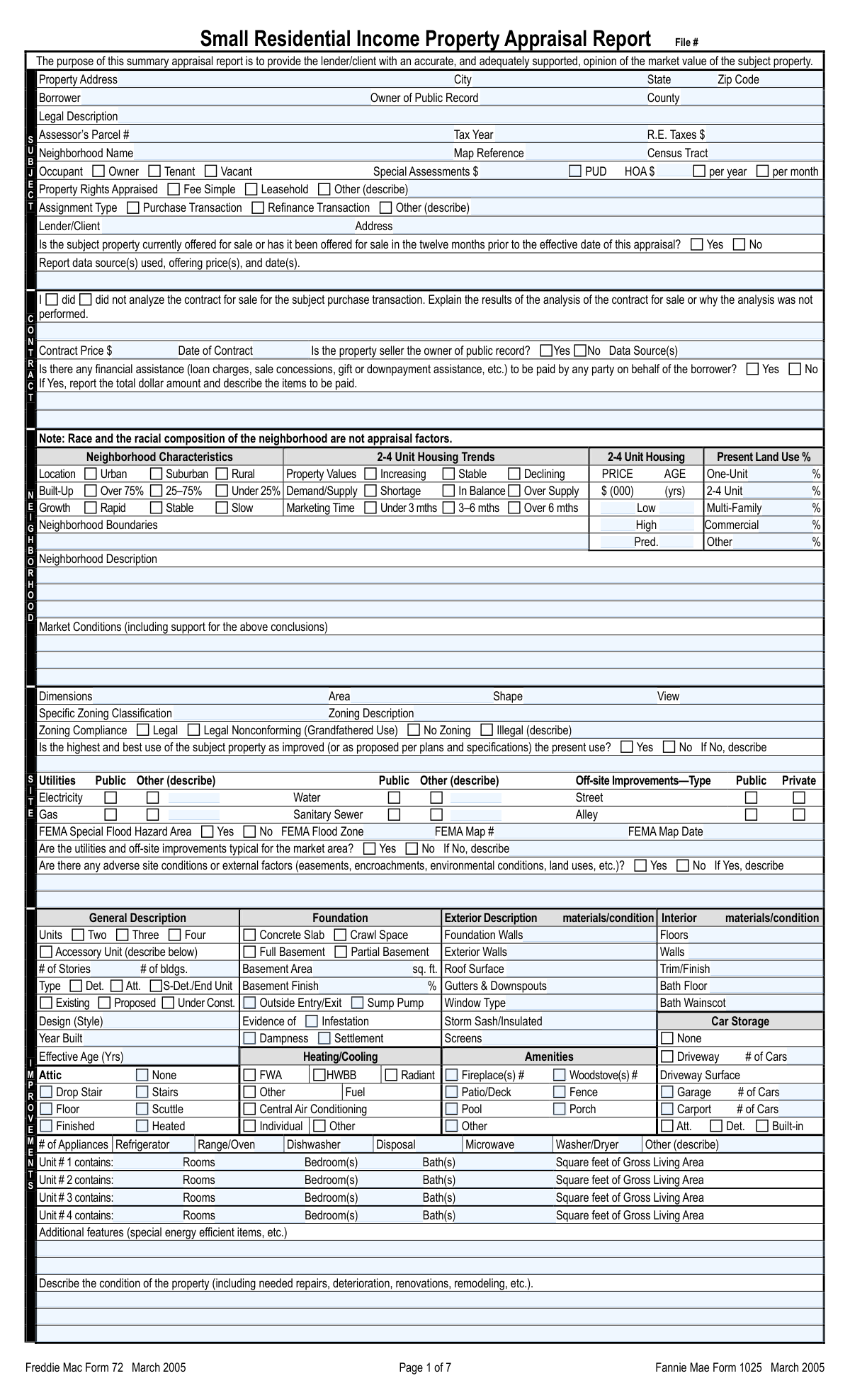
Yes! You can use AI to fill out Form 1025 / Form 72, Small Residential Income Property Appraisal Report

Form 1025 / 72, the Small Residential Income Property Appraisal Report, is a standardized document required by lenders like Fannie Mae and Freddie Mac to determine the market value of a residential property containing two to four separate housing units. This comprehensive report is crucial for underwriting mortgage loans, as it provides a detailed analysis of the property's condition, features, and income potential based on comparable market data. Today, this form can be filled out quickly and accurately using AI-powered services like Instafill.ai, which can also convert non-fillable PDF versions into interactive fillable forms.
Our AI automatically handles information lookup, data retrieval, formatting, and form filling.
It takes less than a minute to fill out Form 1025 / 72 using our AI form filling.
Securely upload your data. Information is encrypted in transit and deleted immediately after the form is filled out.

Form specifications

Form name: Form 1025 / Form 72, Small Residential Income Property Appraisal Report
Number of fields: 901
Number of pages: 8
Language: English
Categories: income forms, property forms
main-image

Instafill Demo: How to fill out PDF forms in seconds with AI

How to Fill Out Form 1025 / 72 Online for Free in 2026

Are you looking to fill out a FORM 1025 / 72 form online quickly and accurately? Instafill.ai offers the #1 AI-powered PDF filling software of 2026, allowing you to complete your FORM 1025 / 72 form in just 37 seconds or less.
Follow these steps to fill out your FORM 1025 / 72 form online using Instafill.ai:
  1. 1 Navigate to Instafill.ai and upload or select the Small Residential Income Property Appraisal Report (Form 1025 / 72).
  2. 2 Use the AI assistant to complete the Subject Property sections, including address, legal description, tax information, and contract details.
  3. 3 Describe the neighborhood, site, and improvements, filling in details about zoning, utilities, building characteristics, and individual unit layouts.
  4. 4 Enter data for the Small Residential Income Property Comparable Rental Schedule (Form 1007) and the Sales Comparison Approach grid, using AI tools to streamline data entry for comparable properties.
  5. 5 Complete the valuation sections, including the Income Approach using the Gross Rent Multiplier (GRM) and the final reconciliation of value.
  6. 6 Provide any necessary comments, details on the cost approach if applicable, and information for the PUD Information addendum.
  7. 7 Review the entire report for accuracy, then enter appraiser and supervisor details before applying a digital signature to finalize the appraisal.

Our AI-powered system ensures each field is filled out correctly, reducing errors and saving you time.

Why Choose Instafill.ai for Your Fillable Form 1025 / 72 Form?

Speed

Complete your Form 1025 / 72 in as little as 37 seconds.

Up-to-Date

Always use the latest 2026 Form 1025 / 72 form version.

Cost-effective

No need to hire expensive lawyers.

Accuracy

Our AI performs 10 compliance checks to ensure your form is error-free.

Security

Your personal information is protected with bank-level encryption.

Frequently Asked Questions About Form Form 1025 / 72

This is a Small Residential Income Property Appraisal Report, used by professional appraisers to determine the market value of a 2-4 unit property. Lenders typically require this form for financing purchase or refinance transactions.

A state-licensed or certified real estate appraiser must complete this form. The appraiser provides an independent and impartial analysis of the property's value based on a physical inspection and market data.

The property's legal description can be found on the official deed, a recent title report, or in public land records from the county recorder's office. It is a more precise identifier than the street address.

'Year Built' is the calendar year the property was constructed. 'Effective Age' is the appraiser's opinion of the property's age based on its current condition and updates, which may be younger than its actual age if it has been renovated.

This indicates the property's current use was permitted under previous zoning laws but does not conform to the current regulations. The use is allowed to continue because it was 'grandfathered in'.

This section requires detailed information on at least three recently sold properties that are similar to the subject property. You will need their addresses, sale prices, features, and financing details to perform a comparative market analysis.

The Income Approach is a valuation method based on the property's ability to generate income. It is essential for appraising investment properties like 2-4 unit buildings, as it analyzes rental data to help determine market value.

This section requires disclosure of any financial contributions paid on behalf of the borrower, such as seller concessions, loan charges, or down payment assistance from any party. You must report the total dollar amount and describe the assistance.

The Cost Approach section is typically developed for proposed or newly constructed properties. It estimates value by calculating the cost to build a replacement, subtracting depreciation, and adding the land value.

Yes, services like Instafill.ai use AI to accurately auto-fill form fields, which can save a significant amount of time on data entry. This allows appraisers to focus more on analysis and reconciliation.

Simply upload your form to the Instafill.ai platform. The AI will identify all the fields, allowing you to quickly and accurately input data for the subject property, comparables, and valuation sections.

Instafill.ai can convert flat, non-fillable PDFs into interactive forms. After uploading, the platform makes it possible to type directly into the fields and check boxes, streamlining the completion process.

'Actual Rent' is the amount the tenant is currently paying according to their lease. 'Market Rent' is the appraiser's opinion of the potential rent the unit could command on the open market at the time of the appraisal.

Compliance Form 1025 / 72
Validation Checks by Instafill.ai

Common Mistakes in Completing Form 1025 / 72

Entering an Incorrect Legal Description or Assessor's Parcel Number (APN)

These fields require precise data from official documents like deeds or tax records, which can be long and complex. Users often make typos, truncate the information, or confuse it with the property's street address. An incorrect legal description or APN can lead to a flawed appraisal, title search issues, and significant delays or rejection of the loan application. Always copy this information directly from the official source documents and double-check for accuracy. AI-powered tools like Instafill.ai can help by validating such data formats to catch potential errors.

Selecting an 'Other (describe)' option without providing a description

Many sections, such as 'Property Rights Appraised' or 'Assignment Type,' have an 'Other' checkbox that requires a corresponding text explanation. It's a very common oversight to check the box but forget to fill in the description. This leaves critical information missing, rendering the selection meaningless and forcing the reviewer to request clarification, which delays the entire process. To avoid this, always ensure that if you check an 'Other' box, you immediately fill in the required narrative in the associated field.

Ignoring conditional fields triggered by a 'Yes' answer

The form contains numerous conditional dependencies, such as providing details about a 'Prior Sale Offering' only if the 'Yes' box is checked. Users frequently check 'Yes' but then neglect to fill in the required 'Prior Sale Offering Details' like data sources and prices. This omission creates an incomplete record and suggests a lack of thoroughness, potentially leading to the report being rejected. Intelligent form fillers like Instafill.ai can help by highlighting or automatically navigating to dependent fields when a condition is met.

Mismatching the HOA Fee amount with its payment frequency

The form asks for the 'HOA Fees' amount and then requires checking 'Per Year' or 'Per Month.' A frequent error is to enter the monthly fee amount but accidentally check the 'Per Year' box, or vice-versa. This simple mistake drastically misrepresents the property's carrying costs, which can impact the borrower's debt-to-income ratio and the overall loan approval. Always verify that the dollar amount entered corresponds correctly to the selected payment frequency.

Providing 'Present Land Use Percentages' that do not sum to 100%

The section for 'Present Land Use Percentages' (One-Unit, 2-4 Unit, Commercial, etc.) requires the user to estimate the composition of the neighborhood. A common mathematical error is for these percentages not to add up to exactly 100%. This indicates a lack of attention to detail and can call the accuracy of the entire neighborhood analysis into question. After filling in the percentages, always perform a quick calculation to ensure they total 100%. Some advanced form-filling tools can perform these validations automatically.

Confusing 'Actual Age' with 'Effective Age'

'Year Built' determines the property's actual chronological age, while 'Effective Age' is an appraiser's estimate of the property's age based on its condition and updates. A well-maintained and renovated older home can have a much lower effective age than its actual age. Entering the same value for both, or misinterpreting the concepts, leads to an inaccurate assessment of depreciation and value. It is vital to understand the distinction and provide a realistic effective age based on a thorough inspection.

Incomplete or Inconsistent Comparable Sales Adjustments

The sales comparison approach is the cornerstone of the appraisal, requiring detailed adjustments for differences between the subject property and comparables. Appraisers sometimes provide a dollar adjustment without a clear description in the corresponding field, or the narrative doesn't logically support the adjustment value. This lack of transparency can lead to the underwriter challenging the valuation. Every adjustment must be clearly described and logically supported to create a defensible report.

Stating a property does not conform to the neighborhood without explanation

In the 'Neighborhood Conformity' section, if the appraiser checks 'No,' they must provide a detailed explanation in the 'Non-Conformity Explanation' field. A common mistake is to check 'No' but provide a vague or missing explanation. This is a significant red flag for underwriters, as a non-conforming property can present a higher risk. The explanation must clearly detail how the property deviates (e.g., in style, size, or use) and what impact that has on its marketability and value.

Omitting Supervisory Appraiser details when one was used

This form is often completed by a trainee or licensed appraiser under the guidance of a certified supervisory appraiser. If a supervisor is involved, their complete information, including license details and signature, is mandatory. Forgetting to fill out this entire section or missing key details like the inspection level can invalidate the appraisal report for compliance purposes. It is essential to complete all supervisory fields accurately if the appraisal was not performed solely by the primary appraiser.

Inconsistent Gross Living Area (GLA) entries across the form

The Gross Living Area is a critical metric used in multiple calculations, including price per square foot and adjustments. Mistakes occur when entering inconsistent values across different sections of the form (e.g., the unit details vs. the sales comparison grid). Such errors undermine the credibility of the valuation and suggest carelessness. If the form is a non-fillable PDF, tools like Instafill.ai can convert it to a fillable version and use data validation to ensure consistency for critical fields like GLA across the document.
Saved over 80 hours a year

“I was never sure if my IRS forms like W-9 were filled correctly. Now, I can complete the forms accurately without any external help.”

Kevin Martin Green

Your data stays secure with advanced protection from Instafill and our subprocessors

Robust compliance program

Transparent business model

You’re not the product. You always know where your data is and what it is processed for.

ISO 27001, HIPAA, and GDPR

Our subprocesses adhere to multiple compliance standards, including but not limited to ISO 27001, HIPAA, and GDPR.

Security & privacy by design

We consider security and privacy from the initial design phase of any new service or functionality. It’s not an afterthought, it’s built-in, including support for two-factor authentication (2FA) to further protect your account.

Fill out Form 1025 / 72 with Instafill.ai

Worried about filling PDFs wrong? Instafill securely fills form-1025-form-72-small-residential-income-property-appraisal-report forms, ensuring each field is accurate.