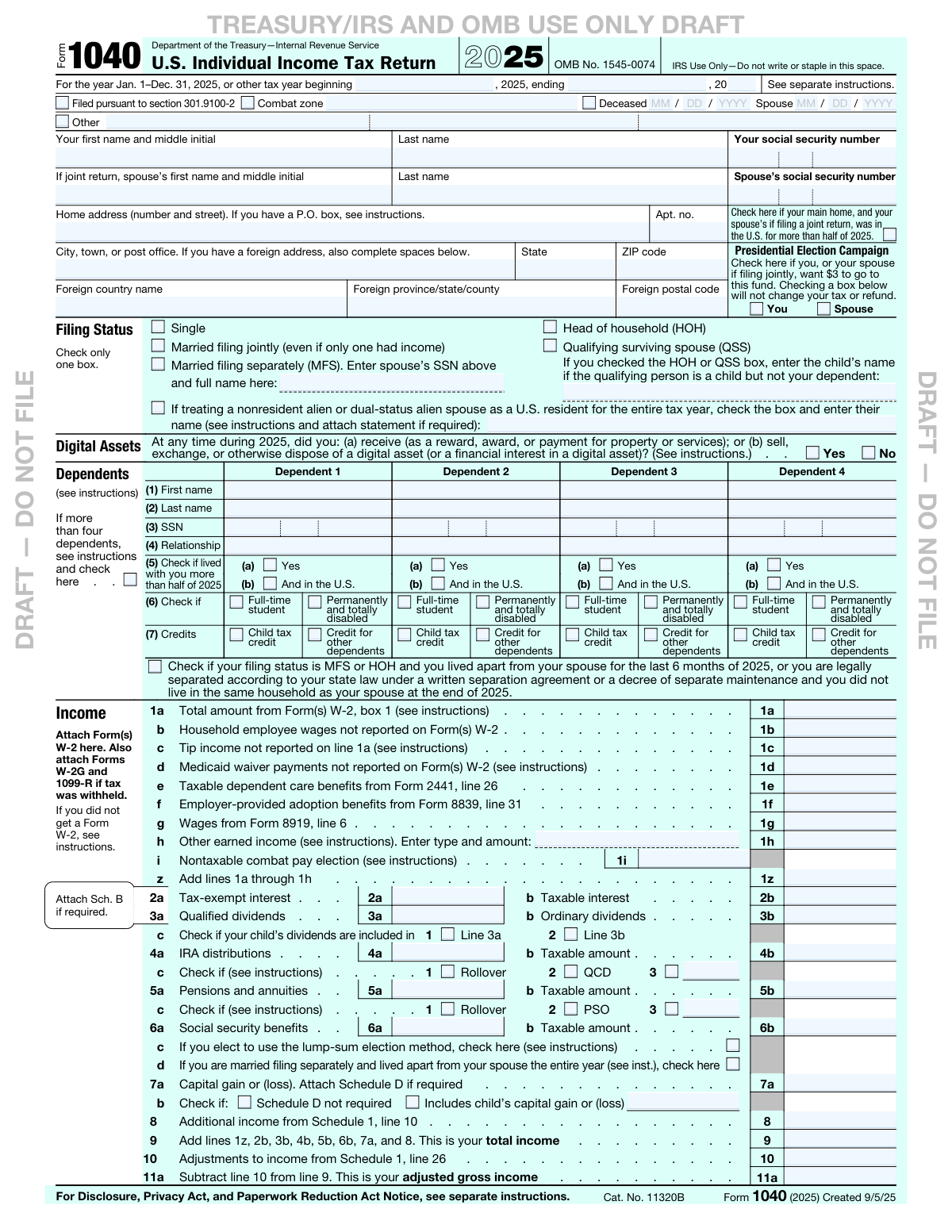
Yes! You can use AI to fill out Form 1040, U.S. Individual Income Tax Return

IRS Form 1040, the U.S. Individual Income Tax Return, is the standard federal form used by taxpayers to report their annual income, claim deductions and credits, and calculate their tax liability or refund. It is a cornerstone of the U.S. tax system, essential for all individual taxpayers to fulfill their yearly tax obligations to the federal government. Today, this form can be filled out quickly and accurately using AI-powered services like Instafill.ai, which can also convert non-fillable PDF versions into interactive fillable forms.
Our AI automatically handles information lookup, data retrieval, formatting, and form filling.
It takes less than a minute to fill out Form 1040 using our AI form filling.
Securely upload your data. Information is encrypted in transit and deleted immediately after the form is filled out.

Form specifications

Form name: Form 1040, U.S. Individual Income Tax Return
Number of fields: 199
Number of pages: 3
Language: English
Categories: income forms, income tax forms, individual tax forms, tax forms
main-image

Instafill Demo: How to fill out PDF forms in seconds with AI

How to Fill Out Form 1040 Online for Free in 2026

Are you looking to fill out a FORM 1040 form online quickly and accurately? Instafill.ai offers the #1 AI-powered PDF filling software of 2026, allowing you to complete your FORM 1040 form in just 37 seconds or less.
Follow these steps to fill out your FORM 1040 form online using Instafill.ai:
  1. 1 Navigate to Instafill.ai and upload or select the IRS Form 1040 for the correct tax year.
  2. 2 Provide your personal information, including your name, address, Social Security Number, and filing status, with AI guidance ensuring all fields are correctly filled.
  3. 3 Enter your income details from various sources like W-2s, 1099s, and other financial statements. Instafill.ai can help extract this data automatically from uploaded documents.
  4. 4 List all eligible dependents and provide their information to claim credits such as the Child Tax Credit and the Credit for Other Dependents.
  5. 5 Input your deductions and adjustments to income. The AI-powered platform will automatically calculate your adjusted gross income (AGI) and taxable income.
  6. 6 Review the completed form summary. The AI will flag any potential errors, inconsistencies, or missing information to ensure accuracy before submission.
  7. 7 Electronically sign the form, then download the completed document for your records or to proceed with e-filing.

Our AI-powered system ensures each field is filled out correctly, reducing errors and saving you time.

Why Choose Instafill.ai for Your Fillable Form 1040 Form?

Speed

Complete your Form 1040 in as little as 37 seconds.

Up-to-Date

Always use the latest 2026 Form 1040 form version.

Cost-effective

No need to hire expensive lawyers.

Accuracy

Our AI performs 10 compliance checks to ensure your form is error-free.

Security

Your personal information is protected with bank-level encryption.

Frequently Asked Questions About Form Form 1040

Form 1040 is the U.S. Individual Income Tax Return used by U.S. taxpayers to file their annual income tax returns with the IRS. You generally need to file if your gross income is above a certain threshold for your filing status, age, and dependency status.

This means the form is an early release version provided by the IRS for informational purposes only and is subject to change. You must not use a draft form to file your taxes; you must wait for the final, official version to be released.

You will need personal information like Social Security numbers for yourself, your spouse, and any dependents. You will also need income documents such as Forms W-2 and 1099, and records of any expenses you plan to deduct.

Your filing status is based on your marital and family situation on the last day of the tax year. The main options are Single, Married Filing Jointly, Married Filing Separately, Head of Household (HOH), and Qualifying Surviving Spouse (QSS).

This question requires you to disclose whether you received, sold, exchanged, or otherwise disposed of any digital assets, such as cryptocurrency, during the tax year. You must check either 'Yes' or 'No' based on your financial activities.

If you have more than four dependents, check the box on the form indicating this. You will then need to attach a separate statement to your return with the required information for each additional dependent.

The standard deduction is a fixed dollar amount that reduces your taxable income, with the amount varying by filing status, age, and other factors. Itemized deductions are specific expenses listed on Schedule A; you should choose whichever method gives you a larger deduction.

To get your refund deposited directly into your bank account, you must fill out the 'Refund' section (lines 35b-35d) with your bank's routing number, your account number, and specify whether it is a checking or savings account.

If line 37 shows an amount you owe, you must pay the IRS by the tax filing deadline to avoid penalties and interest. The IRS provides several payment options on its website, www.irs.gov/Payments.

A Third Party Designee is a person you authorize to discuss your tax return with the IRS. If you check 'Yes' in this section, you must provide the designee's name, phone number, and a Personal Identification Number (PIN) for them to use.

Yes, services like Instafill.ai use AI to auto-fill form fields accurately and save time. These tools can extract information from your supporting documents, like W-2s, and place it directly into the correct fields on the form.

To fill out the form online, upload the Form 1040 PDF to the Instafill.ai platform. The service will make the form interactive, allowing you to type in your information and even auto-fill data from other uploaded documents.

If you have a non-fillable or 'flat' PDF, you can use a service like Instafill.ai to convert it into an interactive, fillable form. This allows you to easily type your information directly into the document online without needing to print it.

Compliance Form 1040
Validation Checks by Instafill.ai

1
Validates Social Security Number Format and Uniqueness
This check ensures that the Social Security Numbers (SSNs) for the taxpayer, spouse, and all dependents are exactly nine digits long and contain only numeric characters. It also cross-references all entered SSNs to confirm that no number is used more than once on the form. This is critical for correct taxpayer identification and to prevent processing errors or rejections by the IRS. Failure to provide a valid, unique SSN can result in denied credits and a delayed return.
2
Ensures Filing Status and Spouse Information Consistency
This validation verifies that if the filing status is 'Married filing jointly' or 'Married filing separately', the spouse's name and Social Security Number fields are completed. Conversely, if the filing status is 'Single', these fields should be empty. This check maintains logical consistency on the return, as spousal information is mandatory for joint or separate married filings. An inconsistency will lead to an IRS rejection, requiring the filer to amend the return.
3
Verifies Dependent Credit Exclusivity
For each dependent listed, this check confirms that either the 'Child tax credit' box or the 'Credit for other dependents' box is checked, but not both. A single dependent cannot qualify for both credits simultaneously. This validation prevents incorrect credit claims which could lead to an audit, adjustments to the tax liability, and potential penalties. If both are checked, the system should flag an error and require the user to select the correct credit.
4
Confirms Total Income Calculation on Line 9
This check performs a mathematical verification to ensure that the value on Line 9 ('Total income') is the correct sum of the specified income lines (1z, 2b, 3b, 4b, 5b, 6b, 7a, and 8). Accurate calculation of total income is fundamental to the entire tax return, as it is the basis for subsequent calculations like adjusted gross income and taxable income. A miscalculation here will cause all subsequent financial figures on the form to be incorrect, leading to an inaccurate tax assessment.
5
Validates Taxable Income Calculation on Line 15
This validation ensures that the amount on Line 15 ('Taxable income') is correctly calculated by subtracting Line 14 from Line 11b. It also confirms that the result is not a negative number; if the calculation results in a value less than zero, Line 15 must be entered as '-0-'. This is a crucial step as taxable income is the figure used to determine the final tax liability. An incorrect value will result in an incorrect tax calculation and potential notices from the IRS.
6
Enforces Mutual Exclusivity of Refund and Amount Owed
This check verifies that either Line 34 ('Amount you overpaid') or Line 37 ('Amount you owe') has a value, but not both. The system determines which line to populate by comparing total payments (Line 33) to total tax (Line 24). This logic is fundamental to the return's outcome, indicating whether the filer gets money back or needs to pay. Having values in both fields is a logical impossibility and would cause immediate processing failure.
7
Verifies Refund Allocation Accuracy
This validation ensures that the sum of the amount to be refunded (Line 35a) and the amount to be applied to next year's estimated tax (Line 36) is exactly equal to the total overpayment amount on Line 34. This check guarantees that the filer has accounted for the entire overpayment amount. If the amounts do not reconcile, the IRS system will not be able to process the refund or credit application as requested, causing delays and requiring clarification from the taxpayer.
8
Ensures Completeness of Direct Deposit Information
If an amount is entered on Line 35a for a refund and the direct deposit fields are used, this check validates that the Routing Number (Line 35b), Account Number (Line 35d), and account type ('Checking' or 'Savings') are all provided. The routing number must be 9 digits. Incomplete or invalid information will cause the direct deposit to fail, forcing the IRS to mail a paper check, which significantly delays the taxpayer's receipt of their refund.
9
Validates Conditional Requirement for Third Party Designee
This check ensures that if the 'Yes' box is checked in the 'Third Party Designee' section, then the designee's name, phone number, and a 5-digit Personal Identification Number (PIN) are all filled out. Conversely, it verifies that these fields are empty if the 'No' box is checked. This prevents incomplete authorizations and protects taxpayer privacy. Failure to provide the required information after checking 'Yes' makes the authorization invalid.
10
Requires Qualifying Person's Name for HOH or QSS Status
This validation confirms that if the 'Head of household (HOH)' or 'Qualifying surviving spouse (QSS)' filing status is selected, and the qualifying person is a child who is not being claimed as a dependent on this return, then the child's name must be entered in the designated space. This information is required by the IRS to verify eligibility for these advantageous filing statuses. Missing this name can lead to the disallowance of the filing status, resulting in a higher tax liability.
11
Validates Domestic vs. Foreign Address Fields
This check ensures that a filer provides either a complete U.S. address (State and ZIP code) or a complete foreign address (Foreign country name, province, and postal code), but not conflicting elements of both. For example, if 'Foreign country name' is filled, the 'State' and 'ZIP code' fields should be empty. This prevents address ambiguity and ensures tax documents and correspondence are mailed to the correct location. An invalid or ambiguous address will cause processing delays and returned mail.
12
Checks for Deceased Date When Box is Checked
This validation rule verifies that if the 'Deceased' checkbox is marked for either the taxpayer or the spouse, a valid date in MM/DD/YYYY format is entered in the corresponding date of death field. The date must be a plausible calendar date. This is essential for the IRS to correctly process a final return for a decedent. Missing the date after checking the box will halt processing and require correction.

Common Mistakes in Completing Form 1040

Incorrect Name and Social Security Number (SSN)

This mistake often happens due to a simple typo or not using the exact name as it appears on the Social Security card. The IRS matches the name and SSN provided with the Social Security Administration's database. A mismatch will cause an e-filed return to be rejected immediately and will significantly delay the processing of a paper return and any associated refund. To avoid this, carefully double-check that the first name, last name, and SSN for yourself, your spouse, and any dependents are entered exactly as they appear on the official cards.

Selecting the Wrong Filing Status

Choosing a filing status can be confusing, leading people to select one that is incorrect for their situation, such as claiming 'Head of Household' without meeting the strict support and residency tests. This mistake can result in paying more tax than necessary or, conversely, claiming tax benefits you aren't entitled to, which can lead to an audit, back taxes, and penalties. To prevent this, carefully review the IRS criteria for each status (Single, Married Filing Jointly, Married Filing Separately, Head of Household, and Qualifying Surviving Spouse) before making a selection.

Errors in the Dependents Section

Mistakes in this section are frequent and include misspelling a dependent's name, entering an incorrect SSN, or failing to check the correct box for the Child Tax Credit. These errors occur due to data entry mistakes or misunderstanding the complex rules for claiming a dependent. The consequence is the disallowance of valuable credits, leading to a smaller refund or a higher tax bill, and processing delays while the IRS requests clarification. Always verify dependent information against their Social Security card and confirm they meet all eligibility tests for the credits you are claiming.

Incorrectly Answering the Digital Assets Question

Many people are unsure what constitutes a 'digital asset' transaction, leading them to incorrectly check 'No' at the top of the form. This question covers not just selling crypto, but also receiving it as payment, exchanging one crypto for another, or receiving it as a reward. Answering incorrectly can be seen as misrepresenting your financial activities to the IRS, which could trigger an audit and result in penalties for unreported income. To avoid this, review all your financial activities for the year; if you interacted with digital assets in any way, you must check 'Yes' and report any taxable transactions.

Failing to Report All Income

Filers often forget to include income from side jobs, freelance work (Form 1099-NEC), interest from savings accounts (Form 1099-INT), or wages from a short-term job (Form W-2). The IRS receives copies of these forms from the payers and uses an automated system to match them to your return. Failing to report this income will result in a CP2000 notice from the IRS for underreported income, which includes the owed tax plus penalties and interest. Gather all W-2s, 1099s, and other income statements before you begin filing to ensure everything is included.

Mistakes with Standard vs. Itemized Deductions

People often fail to choose the deduction method that saves them the most money or forget to check boxes that increase their standard deduction, such as for age or blindness. This can happen from a lack of awareness or a failure to calculate both options. The result is paying more tax than legally required. To avoid this, calculate your itemized deductions on Schedule A and compare the total to the standard deduction for your filing status, choosing whichever is larger. AI-powered tools like Instafill.ai can help automatically determine the most advantageous deduction for you.

Incorrect Bank Account Information for Direct Deposit

Transposing a single digit in the routing or account number (Lines 35b and 35d) is a very common and costly error. This happens when rushing or entering the numbers from memory. An incorrect number can cause your refund to be sent to the wrong account, significantly delayed while the bank rejects the transfer, or converted to a paper check that is mailed to your address, taking weeks longer to arrive. To prevent this, carefully copy the routing and account numbers directly from a check or an official bank statement and double-check your entry.

Forgetting to Sign the Return

Forgetting to sign the form is one of the most basic yet frequent errors, especially on paper-filed returns. For joint returns, both spouses must sign. An unsigned tax return is considered invalid by the IRS and will not be processed. This will delay your refund and can result in late-filing penalties if the signed return is not submitted by the deadline. Always perform a final review of the 'Sign Here' section to ensure all required signatures and dates are present before mailing.

Simple Mathematical Errors

When filling out a form manually, it's easy to make simple arithmetic mistakes when adding or subtracting lines to calculate total income, adjusted gross income, or the final tax due. While the IRS will often correct minor math errors, this can alter your expected refund or balance due and may delay processing. If the form is a non-fillable PDF, tools like Instafill.ai can convert it into a fillable version that performs calculations automatically, eliminating the risk of manual math errors and ensuring accuracy.

Missing or Incomplete Schedules

Filers often check a box or enter an amount on the Form 1040 that requires a supporting schedule (e.g., Schedule A for itemized deductions, Schedule D for capital gains) but then forget to attach the schedule itself. This renders the return incomplete in the eyes of the IRS. The consequence is a processing delay and a notice from the IRS requesting the missing information, holding up any refund until the complete documentation is received. To avoid this, create a checklist of all required schedules as you fill out the 1040 and verify they are all attached before you file.
Saved over 80 hours a year

“I was never sure if my IRS forms like W-9 were filled correctly. Now, I can complete the forms accurately without any external help.”

Kevin Martin Green

Your data stays secure with advanced protection from Instafill and our subprocessors

Robust compliance program

Transparent business model

You’re not the product. You always know where your data is and what it is processed for.

ISO 27001, HIPAA, and GDPR

Our subprocesses adhere to multiple compliance standards, including but not limited to ISO 27001, HIPAA, and GDPR.

Security & privacy by design

We consider security and privacy from the initial design phase of any new service or functionality. It’s not an afterthought, it’s built-in, including support for two-factor authentication (2FA) to further protect your account.

Fill out Form 1040 with Instafill.ai

Worried about filling PDFs wrong? Instafill securely fills form-1040-us-individual-income-tax-return-1 forms, ensuring each field is accurate.