Yes! You can use AI to fill out Form 1040-X, Amended U.S. Individual Income Tax Return

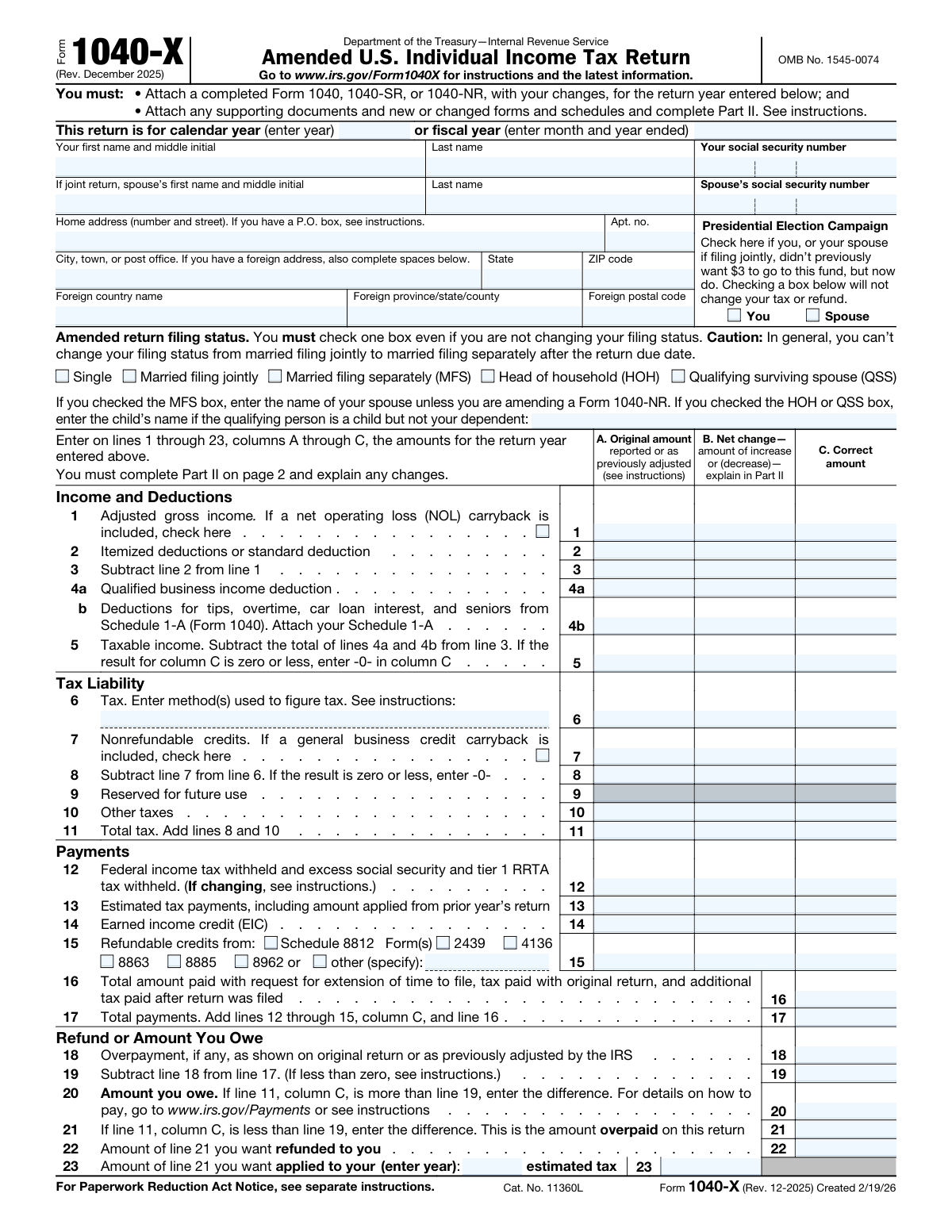
Form 1040-X, Amended U.S. Individual Income Tax Return, is the official IRS document used by taxpayers to correct errors or make changes to their previously filed federal income tax returns. Common reasons for filing include correcting income, deductions, credits, or filing status after the original return has been submitted. It is crucial for ensuring tax compliance and receiving the correct refund or paying the proper amount of tax. Today, this form can be filled out quickly and accurately using AI-powered services like Instafill.ai, which can also convert non-fillable PDF versions into interactive fillable forms.
Our AI automatically handles information lookup, data retrieval, formatting, and form filling.
It takes less than a minute to fill out 1040-X using our AI form filling.
Securely upload your data. Information is encrypted in transit and deleted immediately after the form is filled out.

Form specifications

Form name: Form 1040-X, Amended U.S. Individual Income Tax Return
Number of fields: 166
Number of pages: 2
Language: English
Categories: income forms, income tax forms, individual tax forms, tax forms
main-image

Instafill Demo: How to fill out PDF forms in seconds with AI

How to Fill Out 1040-X Online for Free in 2026

Are you looking to fill out a 1040-X form online quickly and accurately? Instafill.ai offers the #1 AI-powered PDF filling software of 2026, allowing you to complete your 1040-X form in just 37 seconds or less.
Follow these steps to fill out your 1040-X form online using Instafill.ai:
  1. 1 Navigate to Instafill.ai and upload your PDF of Form 1040-X or select it from the form library.
  2. 2 Provide your personal details, including name, address, Social Security Number, and the tax year you are amending. The AI can assist in pre-filling this information.
  3. 3 Indicate your filing status for the amended return and provide details about any dependents if that information is being changed.
  4. 4 Use the three-column format to enter the original amounts from your previous return, the net changes you are making, and the final corrected amounts for income, deductions, and tax liability.
  5. 5 Complete Part II of the form by providing a clear and detailed explanation for each change you have made.
  6. 6 Review all the information auto-filled by the AI for accuracy, then sign and date the form electronically.
  7. 7 Download the completed Form 1040-X, attach any necessary supporting forms or schedules, and submit it to the IRS as instructed.

Our AI-powered system ensures each field is filled out correctly, reducing errors and saving you time.

Why Choose Instafill.ai for Your Fillable 1040-X Form?

Speed

Complete your 1040-X in as little as 37 seconds.

Up-to-Date

Always use the latest 2026 1040-X form version.

Cost-effective

No need to hire expensive lawyers.

Accuracy

Our AI performs 10 compliance checks to ensure your form is error-free.

Security

Your personal information is protected with bank-level encryption.

Frequently Asked Questions About Form 1040-X

Form 1040-X, Amended U.S. Individual Income Tax Return, is used to correct a previously filed Form 1040, 1040-SR, or 1040-NR. You should file it if you need to change your filing status, correct income, or adjust deductions or credits after your original return has been accepted.

Yes, you generally must file Form 1040-X within three years from the date you filed your original return or within two years from the date you paid the tax, whichever is later. Filing after this period may prevent you from receiving a refund.

In Column A, enter the figures from your original return. In Column B, enter the net increase or decrease for each line you are changing. In Column C, show the corrected amount by adding or subtracting the amount in Column B from Column A.

You must attach a copy of the corrected return (e.g., Form 1040) for the year you are amending. You also need to attach any new or changed forms and schedules, and any supporting documents for the changes you made.

In Part II, you must clearly explain each change you are making and the reason for it. For example, 'I am now claiming the child tax credit for my dependent' or 'I received an additional W-2 form after filing'.

Generally, you cannot change your filing status from married filing jointly to married filing separately after the original due date of the return has passed. However, you can change from a separate return to a joint return in certain situations.

Processing a Form 1040-X can take up to 16 weeks or longer. You can track the status of your amended return using the 'Where's My Amended Return?' tool on the IRS website.

Yes, you must use a separate Form 1040-X for each tax year you need to correct. Be sure to enter the correct year at the top of each form and mail them in separate envelopes.

If you owe additional tax, you should file Form 1040-X and pay the tax as soon as possible to minimize interest and penalties. You can pay online, by phone, or by mail.

Yes, services like Instafill.ai use AI to help you accurately fill out forms like the 1040-X. These tools can auto-fill fields, which saves time and helps reduce manual entry errors.

Simply upload the Form 1040-X PDF to the Instafill.ai platform. The AI will make the document interactive, allowing you to easily type your information into the correct fields before downloading the completed form.

If you have a non-fillable or 'flat' PDF, you can use Instafill.ai to make it interactive. Upload the file, and the service will convert it into a fillable form that you can complete on your computer.

You must complete Part I on page 2 of Form 1040-X to change any information about your dependents. You will list the corrected number of dependents and provide all required information for each dependent you are claiming on the amended return.

Compliance 1040-X
Validation Checks by Instafill.ai

1
Exclusive Tax Year Entry
This check ensures that the filer has entered either a calendar year or a fiscal year, but not both. The form requires one of these to identify the tax period being amended. If both are filled, the system cannot determine the correct tax year, leading to processing errors or rejection.
2
Mandatory and Singular Filing Status Selection
Validates that exactly one filing status checkbox (Single, MFJ, MFS, HOH, QSS) has been selected. The form explicitly states 'You must check one box,' making this a critical completeness requirement for calculating the correct tax. Failure to select one, or selecting multiple, would make the tax liability impossible to determine.
3
Spouse Information for Joint/Separate Filers
This check verifies that if the filing status is 'Married filing jointly' or 'Married filing separately', the spouse's name and Social Security Number fields are completed. Conversely, it ensures these fields are empty if the status is 'Single'. This is crucial for correctly identifying all parties to the return and preventing data mismatches or processing delays.
4
SSN Format and Uniqueness
Ensures that the Social Security Numbers for the taxpayer, spouse, and all dependents are in a valid 9-digit format (XXX-XX-XXXX or XXXXXXXXX). It also cross-references all entered SSNs to confirm that no number is used for more than one person on the return. This prevents identity conflicts and ensures credits and deductions are applied to the correct individuals.
5
U.S. vs. Foreign Address Consistency
This validation checks that if a U.S. address is provided, the 'State' and 'ZIP code' fields are filled while the foreign address fields are empty. If a foreign address is indicated, it ensures 'Foreign country name' is filled and 'State' and 'ZIP code' are empty. This logic prevents address ambiguity and ensures mail from the IRS is routed correctly.
6
Mandatory Explanation of Changes
Verifies that Part II, 'Explanation of Changes,' contains text and is not empty. The form instructions mandate that any change must be explained in this section for the amendment to be processed. An empty explanation would result in an incomplete filing and likely cause the IRS to reject the form or request more information.
7
Columnar Calculation Integrity (A+B=C)
This check confirms the mathematical relationship across the main financial lines (1-15), where Column A (Original Amount) plus Column B (Net Change) must equal Column C (Correct Amount). For example, it validates that Line 1A + Line 1B = Line 1C. This is a fundamental check to ensure the amended figures are calculated correctly before further processing.
8
Line 5 Taxable Income Calculation
Validates that the value for Taxable Income on Line 5 is correctly calculated by subtracting the total of lines 4a and 4b from line 3 (Line 5 = Line 3 - (Line 4a + Line 4b)). This check is performed for all three columns (A, B, and C) to ensure the core taxable income figure is accurate at each stage. An incorrect calculation here would invalidate the entire tax assessment.
9
Line 17 Total Payments Calculation
This validation ensures that the amount on Line 17 (Total payments) is the correct sum of lines 12, 13, 14, and 15 from Column C, plus the amount from line 16. This is a critical summation to accurately determine if the taxpayer has overpaid or owes more tax. A miscalculation would lead to an incorrect refund or balance due.
10
Mutually Exclusive Owe/Overpayment Status
This check ensures that a value appears on either Line 20 (Amount you owe) or Line 21 (Amount overpaid), but not both. The system verifies the logic: if Line 11C is greater than Line 19, Line 20 should be filled; otherwise, Line 21 should be. Having amounts in both fields is a logical contradiction that would halt processing.
11
Overpayment Allocation Verification
This check confirms that the sum of the amount to be refunded (Line 22) and the amount to be applied to next year's estimated tax (Line 23) equals the total overpayment amount on Line 21. This ensures the taxpayer has fully accounted for how they want their overpayment distributed. A mismatch would leave the disposition of funds ambiguous.
12
Dependent Count Consistency
Validates that the total number of dependents listed in the grid on Line 30 matches the 'Correct number' totals from Part I (specifically, the sum of Line 25C and Line 27C). This ensures the detailed dependent data aligns with the summary counts used for calculating certain credits and deductions. Discrepancies can lead to incorrect tax calculations and require manual review.
13
Dependent Credit Exclusivity
For each dependent listed in the Part I grid, this validation ensures that the filer has not checked both the 'Child tax credit' and the 'Credit for other dependents' boxes. A dependent can only qualify for one of these credits, not both. This check prevents a common error that would lead to an incorrect tax credit calculation.
14
Joint Return Signature Requirement
Verifies that if the 'Married filing jointly' status is selected, both the 'Your signature' and 'Spouse’s signature' fields are completed. A joint return is considered invalid without the signatures of both spouses. This check is essential for legal and compliance purposes, and a missing signature will cause the return to be rejected.

Common Mistakes in Completing 1040-X

Entering the Wrong Tax Year

Filers often enter the current year instead of the year of the tax return they are amending. Form 1040-X is used to correct a past return, so you must enter the year of that original return at the top of the form. Entering the wrong year will cause the IRS to try and match it to the wrong tax period, leading to significant processing delays or outright rejection of the amendment.

Leaving Part II (Explanation of Changes) Blank or Vague

Many people make changes in the columns but fail to provide a clear, detailed explanation in Part II. The IRS requires you to explain each change, why you are making it, and reference the specific line numbers affected. Without a sufficient explanation, the IRS may reject the amendment or delay processing while they request more information from you.

Misusing the Three-Column Format (A, B, C)

This is the most common source of errors on Form 1040-X. Filers confuse the columns, putting original figures in Column C or new figures in Column A. Column A is for the amounts from your original (or previously adjusted) return, Column B is for the net change (the difference), and Column C is the final, correct amount. Incorrectly using these columns will result in a mathematically incorrect return that the IRS will have to manually correct, delaying your refund or creating a billing notice.

Failing to Attach Supporting Documents and Forms

The instructions require you to attach a new, corrected version of the main tax form (like Form 1040) and any new or changed schedules that support your amendment. For example, if you are now itemizing, you must attach a new Schedule A. Submitting the 1040-X by itself without the required attachments will cause the IRS to deem it incomplete, and they will return it or send a letter requesting the missing documents.

Using Incorrect Figures in Column A

Filers must enter the figures from their originally filed return in Column A. However, if the IRS has already adjusted your return or you have previously amended it, you must use the figures from that most recently adjusted return. Using numbers that don't match what the IRS has on record will cause a mismatch in their system, flagging your return for manual review and causing long delays.

Omitting Original Payments or Overpayments

People often forget to fill in Line 16 (tax paid with the original return) and Line 18 (overpayment or refund from the original return). These lines are critical for calculating the final amount you owe or are due. Forgetting to include your original refund on Line 18, for example, will make it appear you are owed a much larger refund than you actually are, which the IRS will correct.

Improperly Updating Dependent Information

When adding or removing a dependent, many filers only list the new or changed dependent in Part III. The instructions require you to list ALL dependents you are claiming on the corrected return, not just the ones being changed. You must also correctly update the dependent counts in Part I using the three-column format. Failure to do this correctly can cause confusion and potential rejection of dependent-related credits.

Missing a Spouse's Signature on a Joint Return

If the original return was filed as Married Filing Jointly, the amended return must also be signed by both spouses, even if the changes only relate to one spouse's income or credits. A missing signature invalidates the return. The IRS cannot process a joint 1040-X with only one signature, and it will be sent back to you for completion.

Making Calculation Errors Across Columns

Simple arithmetic mistakes are frequent when calculating the figures for Form 1040-X. A common error is incorrectly calculating the 'Net change' in Column B (Column C minus Column A) or making a mistake when summing the columns. While the IRS will eventually correct the math, it can lead to an unexpected balance due or a smaller refund, accompanied by a notice explaining the adjustment. AI-powered tools like Instafill.ai can prevent these errors by performing the calculations automatically.

Failing to Check a Filing Status Box

The form explicitly states that you must check one of the filing status boxes, even if you are not changing your filing status from the original return. Many filers overlook this instruction because the status hasn't changed, but it is a required field. Leaving it blank renders the form incomplete and can lead to processing delays until the information is provided. Using a tool like Instafill.ai can help by validating that all required fields are completed before submission.
Saved over 80 hours a year

“I was never sure if my IRS forms like W-9 were filled correctly. Now, I can complete the forms accurately without any external help.”

Kevin Martin Green

Your data stays secure with advanced protection from Instafill and our subprocessors

Robust compliance program

Transparent business model

You’re not the product. You always know where your data is and what it is processed for.

ISO 27001, HIPAA, and GDPR

Our subprocesses adhere to multiple compliance standards, including but not limited to ISO 27001, HIPAA, and GDPR.

Security & privacy by design

We consider security and privacy from the initial design phase of any new service or functionality. It’s not an afterthought, it’s built-in, including support for two-factor authentication (2FA) to further protect your account.

Fill out 1040-X with Instafill.ai

Worried about filling PDFs wrong? Instafill securely fills form-1040-x-amended-us-individual-income-tax-return-1 forms, ensuring each field is accurate.