Yes! You can use AI to fill out Form IL-1040-X, Amended Individual Income Tax Return

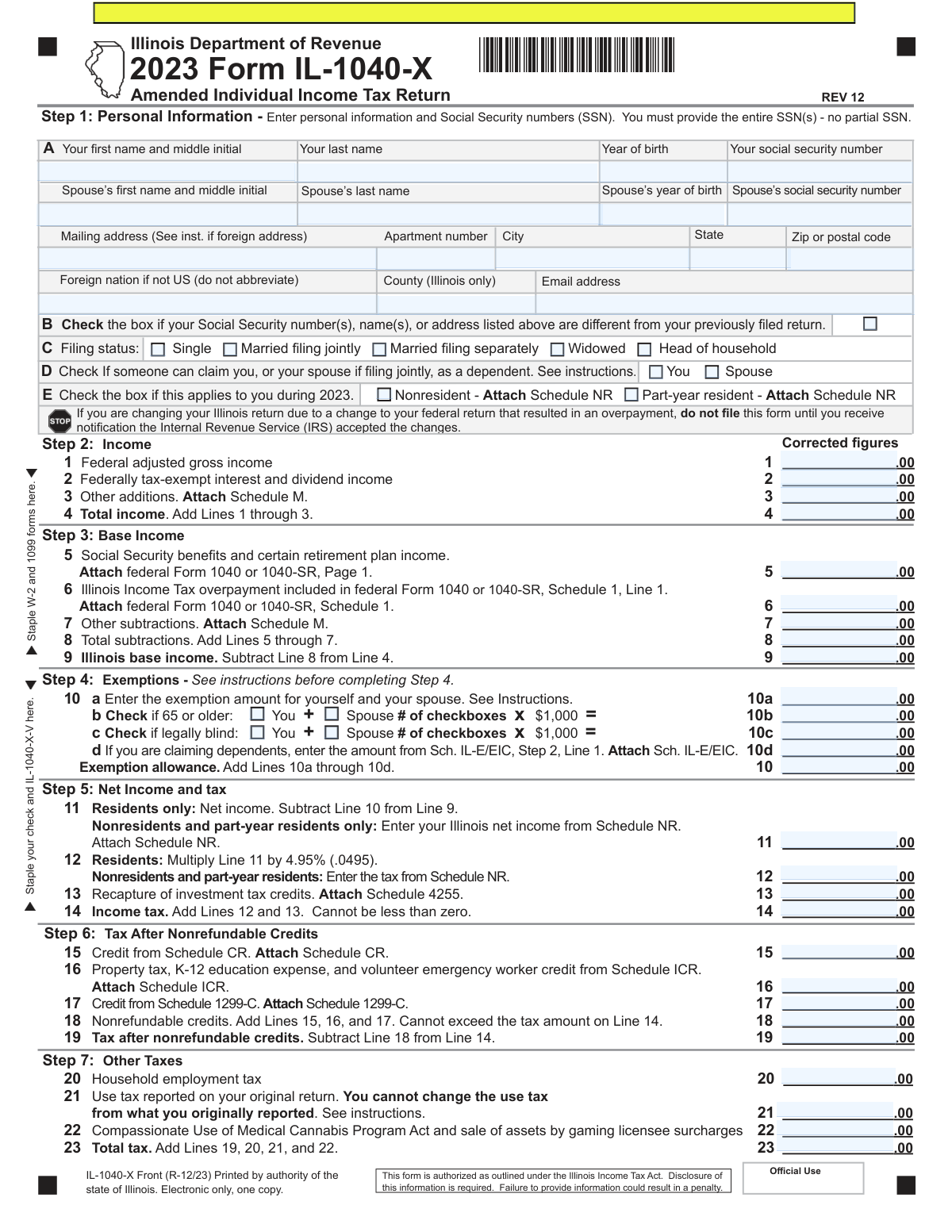
Form IL-1040-X is the Amended Individual Income Tax Return for the state of Illinois. Taxpayers use this form to correct errors or report changes on their originally filed Form IL-1040, such as changes to income, deductions, credits, or filing status, often after amending their federal return. It is crucial for ensuring tax compliance and calculating the correct refund or amount owed. Today, this form can be filled out quickly and accurately using AI-powered services like Instafill.ai, which can also convert non-fillable PDF versions into interactive fillable forms.
Our AI automatically handles information lookup, data retrieval, formatting, and form filling.
It takes less than a minute to fill out IL-1040-X using our AI form filling.
Securely upload your data. Information is encrypted in transit and deleted immediately after the form is filled out.

Form specifications

Form name: Form IL-1040-X, Amended Individual Income Tax Return
Number of fields: 114
Number of pages: 2
Language: English
Categories: income forms, income tax forms, individual tax forms, tax forms
main-image

Instafill Demo: How to fill out PDF forms in seconds with AI

How to Fill Out IL-1040-X Online for Free in 2026

Are you looking to fill out a IL-1040-X form online quickly and accurately? Instafill.ai offers the #1 AI-powered PDF filling software of 2026, allowing you to complete your IL-1040-X form in just 37 seconds or less.
Follow these steps to fill out your IL-1040-X form online using Instafill.ai:
  1. 1 Navigate to Instafill.ai and upload your Form IL-1040-X or select it from the template library.
  2. 2 Provide your personal information, such as name, SSN, and address, and indicate if it has changed from your original return.
  3. 3 Enter the corrected figures for income, subtractions, and exemptions, referencing your original IL-1040 and your amended federal return (Form 1040-X).
  4. 4 Input the corrected amounts for tax, credits, payments, and any overpayment from the original return to calculate the adjusted refund or amount owed.
  5. 5 Explain the reason for the amendment in the designated section and attach all required documents, such as a copy of your federal Form 1040-X.
  6. 6 Review all the information pre-filled by the AI for accuracy, then securely e-sign and date the form before printing and mailing it to the Illinois Department of Revenue.

Our AI-powered system ensures each field is filled out correctly, reducing errors and saving you time.

Why Choose Instafill.ai for Your Fillable IL-1040-X Form?

Speed

Complete your IL-1040-X in as little as 37 seconds.

Up-to-Date

Always use the latest 2026 IL-1040-X form version.

Cost-effective

No need to hire expensive lawyers.

Accuracy

Our AI performs 10 compliance checks to ensure your form is error-free.

Security

Your personal information is protected with bank-level encryption.

Frequently Asked Questions About Form IL-1040-X

Form IL-1040-X is the Amended Individual Income Tax Return for the state of Illinois. It is used to correct errors or make changes to an IL-1040 tax return that you have already filed.

You should file this form if you need to correct your previously filed Illinois income tax return due to changes in your income, subtractions, exemptions, or credits.

If your federal change resulted in an overpayment, you must wait until you receive notification that the IRS has accepted the changes before filing Form IL-1040-X. You will need to attach a copy of the federal finalization notice.

You must attach any corrected W-2s, 1099s, and any Illinois schedules that have changed (e.g., Schedule NR, CR, ICR). If you also filed a federal Form 1040X, you must attach a copy of it.

In Step 11, you must check the box that identifies why you are making the change, provide the date you filed your original return, and write a detailed explanation for the amendment.

On Line 36, you can choose to receive your refund via direct deposit by providing your bank's routing and account number, or you can opt to receive a paper check.

Yes, if you are filing a joint return, both you and your spouse must sign and date the form in Step 12 for it to be considered valid.

No, the instructions for Line 21 state that you cannot change the use tax amount from what you originally reported on your Form IL-1040.

If you have an amount you owe on Line 38, you should submit your payment along with the form. The instructions mention stapling your check and the IL-1040-X-V payment voucher to the return.

Form IL-1040-X requires you to enter the corrected figures for each line item. You will then use these new amounts to calculate your adjusted overpayment or underpayment.

Yes, services like Instafill.ai use AI to accurately auto-fill form fields from your existing data, which can save you significant time and help prevent errors.

You can upload the IL-1040-X PDF to Instafill.ai, and its AI will identify all the fields. You can then fill out the form online, and the service can help auto-fill your personal information to speed up the process.

You can use a service like Instafill.ai, which can convert flat, non-fillable PDFs into interactive, fillable forms online, making it easy to complete, sign, and print.

Compliance IL-1040-X
Validation Checks by Instafill.ai

1
SSN Format and Uniqueness Validation
This check ensures that the Social Security Numbers (SSN) for both the primary taxpayer and spouse are entered in the correct 9-digit format without dashes or spaces. It also verifies that the primary taxpayer's SSN is not identical to the spouse's SSN. This is critical for correct taxpayer identification and to prevent processing errors or rejections by the revenue department.
2
Conditional Requirement for Spouse Information
Validates that if the 'Married filing jointly' filing status is selected, the spouse's first name, last name, SSN, and year of birth fields are all completed. This check ensures data completeness for joint filers, which is essential for calculating exemptions and determining tax liability correctly. A failure would prompt the user to complete the required spouse information before submission.
3
Line 4 Total Income Calculation
This validation performs an arithmetic check to confirm that the value on Line 4 (Total income) is exactly equal to the sum of Line 1 (Federal AGI), Line 2 (Tax-exempt interest), and Line 3 (Other additions). This ensures the foundational income figure is calculated correctly before any subtractions are made. If the sum does not match, the form is considered to have a calculation error and will be flagged.
4
Line 9 Base Income Calculation
This check verifies that the Illinois base income on Line 9 is correctly calculated by subtracting Line 8 (Total subtractions) from Line 4 (Total income). This is a fundamental calculation in determining the taxable income base for Illinois. An incorrect value here would lead to errors in all subsequent tax calculations, so this check is vital for accuracy.
5
Line 10b/10c Exemption Amount Calculation
This validation confirms that the amounts on Line 10b and Line 10c are calculated correctly based on the corresponding checkboxes. The value on Line 10b must equal the number of '65 or older' boxes checked multiplied by $1,000, and the same logic applies to Line 10c for the 'legally blind' checkboxes. This prevents manual entry errors and ensures the taxpayer receives the correct exemption amounts.
6
Line 14 Income Tax Non-Negative Constraint
This check enforces the rule stated on the form that the value on Line 14 (Income tax) cannot be less than zero. Even if calculations result in a negative number, the value entered must be zero. This is important because a negative tax liability is not permissible at this stage and must be floored at zero before applying credits.
7
Line 18 Nonrefundable Credits Limit
This validation ensures that the total nonrefundable credits on Line 18 do not exceed the tax amount on Line 14, as explicitly stated on the form. Nonrefundable credits can only reduce tax liability to zero, not create a refund. If Line 18 is greater than Line 14, the system should cap the value of Line 18 at the amount on Line 14 to prevent an invalid tax calculation.
8
Line 24 Total Tax Consistency Check
This is a simple but crucial cross-field validation ensuring that the value entered on Line 24 is identical to the value calculated on Line 23 (Total tax). This field serves as a carry-forward value to the next section of the form. A mismatch indicates a data entry or transcription error that must be corrected to ensure the subsequent payment and refund calculations are based on the correct total tax.
9
Mutually Exclusive Overpayment and Underpayment
This logical check verifies that only one of Line 32 (Adjusted overpayment) or Line 33 (Adjusted underpayment) contains a value greater than zero. A taxpayer cannot have both an overpayment and an underpayment on the same amended return. If both fields have a value, it indicates a severe calculation error that must be resolved.
10
Line 36 Refund Amount Limit
This validation ensures that the refund amount requested on Line 36 does not exceed the total overpayment available on Line 35. A taxpayer cannot request a refund for more money than they overpaid. If the value on Line 36 is greater than Line 35, the submission should be blocked until the requested refund is corrected.
11
Direct Deposit Conditional Field Requirement
This check ensures that if the 'direct deposit' option is selected for a refund, the Routing Number, Account Number, and an Account Type (Checking or Savings) are all provided. These fields are mandatory for processing an electronic refund. If the box is checked but the information is missing, the form submission should be halted with a message prompting the user to provide the bank details.
12
Bank Routing Number Format Validation
This validation verifies that the 'Routing number' field, if filled, contains exactly 9 digits. It may also perform a checksum validation to ensure the number is a mathematically valid routing number. This is critical to prevent refund delays or misdirected funds due to typographical errors in the bank information.
13
Amended Return Reason Selection
This check ensures that at least one of the checkboxes in Step 11, Section A ('Federal change', 'NOL accepted', or 'State change') is selected. The form requires the taxpayer to specify the reason for the amendment. A failure to select a reason would result in an incomplete filing and potential processing delays.
14
Joint Return Signature Requirement
This validation confirms that if the filing status is 'Married filing jointly', both the 'Your signature' and 'Spouse’s signature' fields (or their digital equivalents) are completed. The law requires both spouses to sign a joint return to attest to its accuracy. A missing spouse's signature would render the return invalid.
15
Schedule NR Attachment for Nonresidents
This check verifies that if the 'Nonresident' or 'Part-year resident' box is checked in Step 1, an accompanying Schedule NR is attached or included with the submission. The form explicitly states 'Attach Schedule NR' for these statuses, as the calculations on that schedule are required to determine the correct Illinois net income on Line 11. A failure would flag the submission as incomplete.

Common Mistakes in Completing IL-1040-X

Forgetting Required Attachments and Schedules

This form requires attaching numerous other documents depending on the changes made, such as federal Form 1040X, Schedules NR, CR, M, IL-E/EIC, and W-2s. Filers often overlook these requirements, leading to processing delays and correspondence from the Department of Revenue requesting the missing information. To avoid this, create a checklist of all required attachments mentioned on the lines you are amending and ensure they are included before mailing. AI-powered tools like Instafill.ai can help by identifying required attachments based on your entries.

Providing a Vague Explanation for the Amendment

In Step 11, Box D, filers must explain in detail why they are amending their return. Many people write vague statements like "Made a mistake" or "Correcting income," which are insufficient for the tax authority. This lack of detail forces the department to send a notice requesting clarification, delaying the processing of the refund or payment. A proper explanation should specify which lines are changing and the exact reason for the change (e.g., "Received a corrected W-2 from my employer, changing the wage amount on Line 1").

Incorrectly Reporting the Original Overpayment

Line 34 asks for the overpayment from the original return, but filers often mistakenly enter the actual refund amount they received, which may include interest. This error disrupts the final calculation on Lines 35 and 38, leading to an incorrect refund or amount owed. To prevent this, refer directly to your original Form IL-1040, Line 31, for the precise overpayment amount, and do not include any interest paid to you by the state.

Missing Spousal Signature on a Joint Return

When filing a joint amended return, both spouses must sign and date the form in Step 12. It is a common oversight for only one spouse to sign, which invalidates the return. An unsigned or improperly signed return cannot be processed and will be sent back, significantly delaying any expected refund. Always double-check that both signatures are present before mailing.

Failing to Indicate a Federal Change Finalization

If the amendment is due to a change on the federal return (e.g., an IRS audit), Step 11, Box A, must be checked and the date the federal change was accepted must be entered. Filers often forget to check this box or enter the date, and they may also fail to attach the required federal finalization notice. This omission can lead to the rejection of the state amendment or significant processing delays while the department verifies the federal change.

Calculation Errors in the Final Amount Owed or Refund

The logic for calculating the final amount you owe (Line 38) or your adjusted overpayment (Line 35) is complex, involving multiple additions and subtractions based on previous lines. Manual calculation errors are very common here, resulting in an incorrect payment or refund request. Using tax software or an AI-powered form filler like Instafill.ai can prevent these mistakes by performing the calculations automatically and ensuring accuracy.

Incorrectly Amending Use Tax

Line 21 for Use Tax explicitly states, "You cannot change the use tax from what you originally reported." Despite this clear instruction, some individuals attempt to correct or change this amount on their amended return. Any change to this line will be disregarded by the department and may cause confusion or delays, as the system will revert to the originally filed amount.

Incomplete or Incorrect Direct Deposit Information

When requesting a refund via direct deposit on Line 36, filers may enter an incorrect routing or account number, or forget to check the box for 'Checking' or 'Savings'. This simple data entry error will cause the direct deposit to fail. The state will then have to issue a paper check, which can add weeks to the time it takes to receive your refund. Carefully double-check your bank information before finalizing the form.

Failure to Check Box B for Changed Personal Information

Box B in Step 1 is used to notify the department that your name, SSN, or address has changed since you filed your original return. Forgetting to check this box when your information is different can cause record-matching problems and may result in important notices being sent to your old address. This is a simple but crucial step to ensure your account is properly updated and you receive all correspondence.

Filing Prematurely Before IRS Acceptance

The form clearly warns filers not to submit the IL-1040-X for a federal change resulting in an overpayment until they receive notification that the IRS has accepted the changes. Impatient filers may submit the state amendment as soon as they file their federal 1040X. This can lead to the state return being processed and potentially denied before the federal change is finalized, creating a more complicated situation to resolve later.

Miscalculating Exemption Allowances

In Step 4, filers may correctly check the boxes for being 65 or older or legally blind (Lines 10b and 10c) but then forget to multiply the number of checkboxes by $1,000 and enter the result on the corresponding line. This oversight leads to an incorrect total exemption allowance on Line 10 and an overstatement of net income and tax. It is essential to complete both the checkbox and the calculation for each applicable exemption. If the form is a non-fillable PDF, a tool like Instafill.ai can convert it to a fillable version with automatic calculations to prevent such errors.
Saved over 80 hours a year

“I was never sure if my IRS forms like W-9 were filled correctly. Now, I can complete the forms accurately without any external help.”

Kevin Martin Green

Your data stays secure with advanced protection from Instafill and our subprocessors

Robust compliance program

Transparent business model

You’re not the product. You always know where your data is and what it is processed for.

ISO 27001, HIPAA, and GDPR

Our subprocesses adhere to multiple compliance standards, including but not limited to ISO 27001, HIPAA, and GDPR.

Security & privacy by design

We consider security and privacy from the initial design phase of any new service or functionality. It’s not an afterthought, it’s built-in, including support for two-factor authentication (2FA) to further protect your account.

Fill out IL-1040-X with Instafill.ai

Worried about filling PDFs wrong? Instafill securely fills form-il-1040-x-amended-individual-income-tax-return forms, ensuring each field is accurate.