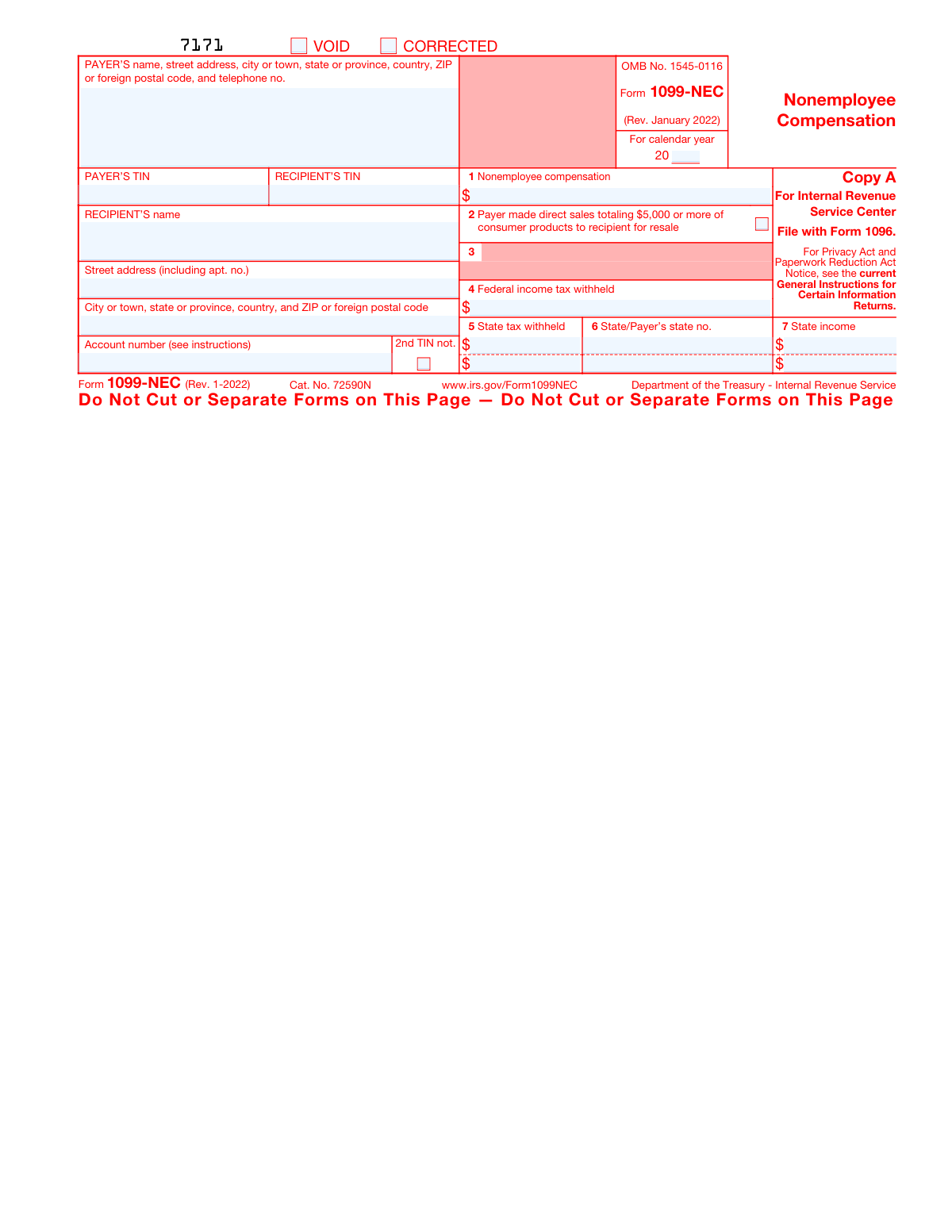
Yes! You can use AI to fill out Form 1099-NEC, Nonemployee Compensation

IRS Form 1099-NEC, Nonemployee Compensation, is an information return used by businesses to report payments of $600 or more made to individuals who are not employees. This form is crucial for self-employed individuals to accurately report their income and for businesses to document their deductible expenses. Today, this form can be filled out quickly and accurately using AI-powered services like Instafill.ai, which can also convert non-fillable PDF versions into interactive fillable forms.
Our AI automatically handles information lookup, data retrieval, formatting, and form filling.
It takes less than a minute to fill out 1099-NEC using our AI form filling.
Securely upload your data. Information is encrypted in transit and deleted immediately after the form is filled out.

Form specifications

Form name: Form 1099-NEC, Nonemployee Compensation
Number of fields: 96
Number of pages: 7
Language: English
Categories: employee forms, 1099 forms
main-image

Instafill Demo: How to fill out PDF forms in seconds with AI

How to Fill Out 1099-NEC Online for Free in 2026

Are you looking to fill out a 1099-NEC form online quickly and accurately? Instafill.ai offers the #1 AI-powered PDF filling software of 2026, allowing you to complete your 1099-NEC form in just 37 seconds or less.
Follow these steps to fill out your 1099-NEC form online using Instafill.ai:
  1. 1 Navigate to Instafill.ai and upload your PDF or select the Form 1099-NEC from the template library.
  2. 2 Provide the Payer's information, including name, address, and Taxpayer Identification Number (TIN).
  3. 3 Enter the Recipient's information, such as their name, address, and TIN (SSN or EIN).
  4. 4 Input the total nonemployee compensation paid during the year into Box 1.
  5. 5 Fill in any federal or state income tax withheld in the designated boxes (Box 4 for federal, Boxes 5-7 for state).
  6. 6 Review all the auto-filled information for accuracy and make any necessary corrections before finalizing.
  7. 7 Download, print, or e-file the completed Form 1099-NEC to send to the recipient and file with the IRS.

Our AI-powered system ensures each field is filled out correctly, reducing errors and saving you time.

Why Choose Instafill.ai for Your Fillable 1099-NEC Form?

Speed

Complete your 1099-NEC in as little as 37 seconds.

Up-to-Date

Always use the latest 2026 1099-NEC form version.

Cost-effective

No need to hire expensive lawyers.

Accuracy

Our AI performs 10 compliance checks to ensure your form is error-free.

Security

Your personal information is protected with bank-level encryption.

Frequently Asked Questions About Form 1099-NEC

Form 1099-NEC is used to report nonemployee compensation. Businesses (payers) must file this form for each person to whom they have paid at least $600 during the year for services performed by someone who is not their employee.

As the recipient, you use the information on Form 1099-NEC to report your income on your tax return. The amount in Box 1 is typically reported as self-employment income on Schedule C of Form 1040.

No, you cannot file the Copy A downloaded from the IRS website because it is not scannable and may result in a penalty. You must order official scannable forms from the IRS or file electronically.

Copy A is filed with the IRS, Copy 1 is for the State Tax Department, Copy B is for the recipient's records, and Copy C is for the payer's records. Copy 2 is for the recipient to file with their state tax return if required.

You will need the payer's and recipient's full name, address, and Taxpayer Identification Number (TIN), such as an SSN or EIN. You also need the total compensation paid and any federal or state tax that was withheld.

Box 1 shows the total payments made to you for services as an independent contractor during the tax year. This amount is considered taxable income and is generally subject to self-employment taxes.

Box 4 shows backup withholding, which occurs if you did not provide a correct Taxpayer Identification Number (TIN) to the payer. This amount should be reported on your income tax return as tax paid.

To fix an error, you must prepare a new Form 1099-NEC with the correct information and check the 'CORRECTED' box at the top. File the corrected form with the IRS and send a copy to the recipient.

If you believe you were misclassified, you can report the income and file Form 8919, Uncollected Social Security and Medicare Tax on Wages, with your tax return. This allows you to pay your share of Social Security and Medicare taxes while reporting the potential misclassification.

Yes, services like Instafill.ai use AI to help you accurately auto-fill form fields, which saves time and helps prevent common errors. This is especially useful when preparing multiple forms.

You can use a service like Instafill.ai to upload the form PDF and fill it out directly on your computer. The platform guides you through the required fields to ensure all necessary information is entered correctly before you print or save the document.

If you have a non-fillable or 'flat' PDF, you can use a tool like Instafill.ai to convert it into an interactive, fillable form. This allows you to easily type your information into the fields online.

Box 5 shows any state income tax withheld, Box 6 shows the payer's state ID number, and Box 7 shows the amount of income reported to that state. This information is necessary for filing your state income tax return.

Compliance 1099-NEC
Validation Checks by Instafill.ai

1
Payer's TIN Format Validation
This check verifies that the Payer's Taxpayer Identification Number (TIN) is in a valid format, either a 9-digit Employer Identification Number (EIN) as XX-XXXXXXX or a Social Security Number (SSN) as XXX-XX-XXXX. Correct TIN formatting is critical for the IRS to accurately identify the paying entity and process the form. A failure will result in a rejection or processing delay, potentially leading to penalties for incorrect filing.
2
Recipient's TIN Format Validation
This check ensures the Recipient's Taxpayer Identification Number (TIN) conforms to a valid 9-digit format for an SSN, ITIN, or EIN. This number is the primary key for matching the reported income to the recipient's tax return. An invalid TIN will cause a filing error and likely trigger a B-Notice from the IRS, requiring the payer to solicit a correct TIN from the recipient.
3
Mutually Exclusive VOID and CORRECTED Status
This validation ensures that the 'VOID' and 'CORRECTED' checkboxes are not selected at the same time. A form can either be a correction of a previous submission or a void of a previous submission, but it cannot be both simultaneously. Selecting both creates an ambiguous and unprocessable filing status, which would cause the submission to be rejected.
4
Federal Withholding Does Not Exceed Compensation
This check confirms that the amount in Box 4 (Federal income tax withheld) is not greater than the amount in Box 1 (Nonemployee compensation). It is logically impossible to withhold more tax than the total income paid to the recipient. If this validation fails, it indicates a significant data entry error that must be corrected before filing.
5
Completeness of Payer Information
This validation verifies that all required components of the Payer's information are present: name, full street address, city, state, and ZIP code. Complete and accurate payer information is a legal requirement for information returns. Missing data can lead to filing rejections and difficulty for the recipient and tax agencies to contact the payer if issues arise.
6
Completeness of Recipient Information
This check ensures that the recipient's name, full street address, city, state, and ZIP code are all provided. This information is essential for the form's delivery to the recipient and for proper identification by tax authorities. Failure to provide a complete address can result in the recipient not receiving their copy and potential filing issues for both parties.
7
State Data Consistency
This validation ensures that if an amount is entered for a state in Box 5 (State tax withheld) or Box 7 (State income), then the corresponding Box 6 (State/Payer's state no.) must be populated for that same state row. State tax agencies require all three pieces of information to be reported together for proper processing. Incomplete state data will cause the state portion of the filing to be rejected.
8
Total State Income Limit
This check verifies that the sum of all amounts entered in Box 7 (State income) does not exceed the total nonemployee compensation reported in Box 1. The portion of income attributable to a state cannot be greater than the total income paid. A failure indicates a data entry or allocation error that misrepresents the recipient's taxable income at the state level.
9
Total Withholding Limit
This validation ensures that the sum of Box 4 (Federal income tax withheld) and all Box 5 amounts (State tax withheld) is less than or equal to the total nonemployee compensation in Box 1. The total amount of tax withheld cannot exceed the total payment made to the recipient. This check prevents fundamental logical errors in financial reporting on the form.
10
Tax Year Format and Plausibility
This check validates that the 'For calendar year' field is a valid two-digit year (e.g., '22' for 2022) and falls within a plausible range, such as the current or immediately preceding year. This prevents filings for incorrect or nonsensical tax periods. An invalid year would cause the entire form to be misapplied by the IRS and state tax agencies.
11
Nonemployee Compensation Value Presence
This check ensures that Box 1 (Nonemployee compensation) contains a valid, non-negative monetary value. As this is the primary financial data point on the form, it must be present and correctly formatted unless the form is being filed solely to check Box 2. A missing or improperly formatted value makes the form useless for income reporting and will result in rejection.
12
ZIP Code Format Validation
This check verifies that the ZIP codes for both the Payer and Recipient are in a valid US format (either 5 digits like '90210' or 9 digits like '90210-1234'). Correctly formatted ZIP codes are essential for mail delivery and data validation by processing systems. An invalid format can lead to returned mail and processing exceptions.
13
State Withholding Does Not Exceed State Income
This validation checks each state reporting row to ensure the amount in Box 5 (State tax withheld) is not greater than the amount in Box 7 (State income). A state cannot withhold more tax than the income attributable to that state. This logical check prevents data entry errors and ensures the state-level financial data is coherent and plausible.

Common Mistakes in Completing 1099-NEC

Filing a Non-Scannable Copy A

The IRS requires a special, scannable version of Copy A, which is printed in red ink. A common mistake is printing the informational PDF version from the IRS website and filing it. This version is not scannable and will likely be rejected, resulting in penalties and processing delays. To avoid this, you must order official scannable forms from the IRS or file electronically.

Incorrect Taxpayer Identification Number (TIN)

Entering an incorrect Payer or Recipient TIN by transposing digits or using a wrong number is a frequent and critical error. The TIN must match the IRS database exactly. A mismatch leads to filing rejections, IRS B-Notices, and can require the payer to start backup withholding on future payments. Always verify the recipient's TIN against their Form W-9.

Mismatched Recipient Name and TIN

Filers often enter a DBA ('doing business as') name or an abbreviation when the recipient's TIN is registered under their legal individual or business name. This mismatch between the name and TIN causes the IRS to flag the form as incorrect. This can result in penalties for the payer and significant tax reporting problems for the recipient. The name in the 'RECIPIENT’S name' box must be the one associated with the TIN provided.

Improper Formatting of Monetary Amounts

When entering amounts in boxes like 'Nonemployee compensation' or 'Federal income tax withheld', users may incorrectly include dollar signs ($) or commas (,). While the example shows a comma, machine-scanned forms require a specific format, typically just numbers and a decimal point (e.g., 152282.00). Incorrect formatting can cause data entry errors during IRS processing, leading to notices and mismatches. AI-powered tools like Instafill.ai can automatically format these fields correctly.

Forgetting to Check the 'CORRECTED' Box

When a filer needs to correct a previously filed 1099-NEC, they must submit a new form with the 'CORRECTED' box checked. A common oversight is submitting the corrected information on a new form without checking this box. The IRS then processes this as a second, separate payment, effectively doubling the reported income for the recipient and creating a major tax issue. Always ensure the 'CORRECTED' box is checked when amending a return.

Incomplete State Tax Information

The form allows for reporting state tax information in Boxes 5, 6, and 7. If a payer withholds state tax (Box 5), they often forget to also include the Payer's State ID number (Box 6) and the amount of state income (Box 7). Leaving these related fields blank can cause the state tax agency to reject the filing, leading to compliance issues and potential penalties. All three fields are typically required if state tax is withheld.

Entering the Wrong Tax Year

Payers sometimes mistakenly enter the year they are preparing the form (e.g., '24' for a form filed in January 2024) instead of the calendar year the payments were made in (e.g., '23'). This simple error misaligns the income with the correct tax period, causing reporting discrepancies for both the IRS and the recipient. Always double-check that the year on the form corresponds to the year the compensation was paid.

Using an Incomplete or Outdated Recipient Address

Leaving out an apartment or suite number, or using an old address from a previous year, is a frequent problem. This can prevent the recipient from receiving their Copy B in a timely manner, which they need to file their own taxes. This can lead to frustrated contractors and requests for duplicate forms. It is best practice to confirm the recipient's current mailing address each year, perhaps by having them complete a new W-9.

Failing to File Form 1096 with Paper Submissions

The instructions on the 1099-NEC state 'File with Form 1096.' Form 1096 is a summary and transmittal document that must accompany paper filings of Form 1099 to the IRS. Many first-time filers are unaware of this requirement and only send the 1099-NEC forms, resulting in an incomplete filing. This does not apply to electronic filings.

Using a Non-Fillable PDF

The form provided is a flat, non-fillable PDF intended for informational purposes, which can lead to messy, unreadable handwritten submissions or attempts to type over the fields with misaligned text. This can cause processing errors and rejections by the IRS. To avoid this, use official fillable versions or a service like Instafill.ai, which can convert non-fillable PDFs into an interactive, fillable format, ensuring all data is clean, aligned, and legible.
Saved over 80 hours a year

“I was never sure if my IRS forms like W-9 were filled correctly. Now, I can complete the forms accurately without any external help.”

Kevin Martin Green

Your data stays secure with advanced protection from Instafill and our subprocessors

Robust compliance program

Transparent business model

You’re not the product. You always know where your data is and what it is processed for.

ISO 27001, HIPAA, and GDPR

Our subprocesses adhere to multiple compliance standards, including but not limited to ISO 27001, HIPAA, and GDPR.

Security & privacy by design

We consider security and privacy from the initial design phase of any new service or functionality. It’s not an afterthought, it’s built-in, including support for two-factor authentication (2FA) to further protect your account.

Fill out 1099-NEC with Instafill.ai

Worried about filling PDFs wrong? Instafill securely fills form-1099-nec-nonemployee-compensation-1 forms, ensuring each field is accurate.