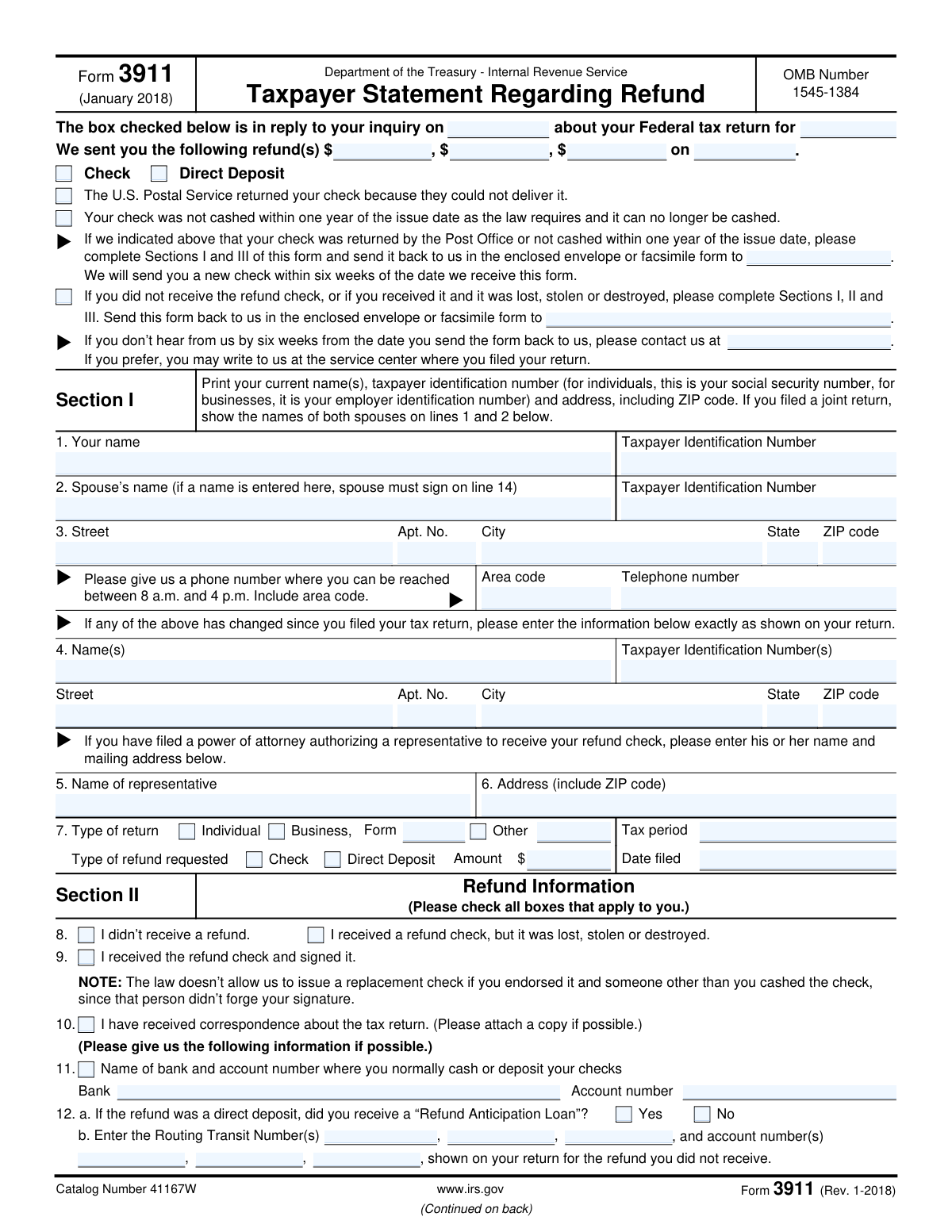
Yes! You can use AI to fill out Form 3911, Taxpayer Statement Regarding Refund

Form 3911, Taxpayer Statement Regarding Refund, is an Internal Revenue Service (IRS) document used by taxpayers to initiate a trace on a missing tax refund. You should file this form if you did not receive your refund check, if the check was lost, stolen, or destroyed, or if a direct deposit was not credited to your account. Completing this form allows the IRS to investigate the status of your refund and issue a replacement if necessary. Today, this form can be filled out quickly and accurately using AI-powered services like Instafill.ai, which can also convert non-fillable PDF versions into interactive fillable forms.
Our AI automatically handles information lookup, data retrieval, formatting, and form filling.
It takes less than a minute to fill out Form 3911 using our AI form filling.
Securely upload your data. Information is encrypted in transit and deleted immediately after the form is filled out.

Form specifications

Form name: Form 3911, Taxpayer Statement Regarding Refund
Number of pages: 2
Language: English
Categories: tax forms, state tax forms, PA state forms, NJ state forms
main-image

Instafill Demo: How to fill out PDF forms in seconds with AI

How to Fill Out Form 3911 Online for Free in 2026

Are you looking to fill out a FORM 3911 form online quickly and accurately? Instafill.ai offers the #1 AI-powered PDF filling software of 2026, allowing you to complete your FORM 3911 form in just 37 seconds or less.
Follow these steps to fill out your FORM 3911 form online using Instafill.ai:
  1. 1 Navigate to an AI-powered form-filling service like Instafill.ai and upload or select Form 3911.
  2. 2 In Section I, provide your current name, Taxpayer Identification Number (TIN), and address. If filing a joint return, include your spouse's information. If your information has changed since you filed, provide the old details as well.
  3. 3 Complete Section II by checking the boxes that describe your refund situation, such as not receiving the refund or the check being lost or stolen. Provide any requested refund or bank details.
  4. 4 Proceed to Section III to certify the statement. Sign and date the form. If it was a joint return, both spouses must sign.
  5. 5 Carefully review all the information populated by the AI to ensure it is accurate and complete.
  6. 6 Download the completed Form 3911 and mail or fax it to the IRS service center as indicated in the form's instructions or the correspondence you received.

Our AI-powered system ensures each field is filled out correctly, reducing errors and saving you time.

Why Choose Instafill.ai for Your Fillable Form 3911 Form?

Speed

Complete your Form 3911 in as little as 37 seconds.

Up-to-Date

Always use the latest 2026 Form 3911 form version.

Cost-effective

No need to hire expensive lawyers.

Accuracy

Our AI performs 10 compliance checks to ensure your form is error-free.

Security

Your personal information is protected with bank-level encryption.

Frequently Asked Questions About Form Form 3911

Form 3911 is used to trace a missing tax refund from the IRS. You should file it if you did not receive your refund check, if the check was lost, stolen, or destroyed, or if it was returned to the IRS as undeliverable.

You should fill out this form if the IRS has notified you that they sent a refund, but you have not received it. This applies to situations where a paper check or direct deposit is missing.

The IRS will typically send you a new check within six weeks from the date they receive your completed form. If you don't hear from them within that timeframe, you should contact the IRS again.

Send the completed form to the IRS service center where you filed your return, using the envelope provided with your notice, or fax it to the number indicated. Do not send the form to the address listed in the Paperwork Reduction Act Notice.

You will need your current name, address, and taxpayer identification number (SSN or EIN), the tax period of the refund, and the refund amount. If your address has changed, you will also need the address from your original return.

Yes, if the refund was from a joint tax return, both spouses must sign Section III of the form before the IRS can process the refund trace.

Enter your current address in Section I (lines 1-3) and provide the old address exactly as it appeared on your tax return in Section I, line 4.

You must complete Sections I, II, and III of Form 3911. In Section II, check the box for 'I received a refund check, but it was lost, stolen or destroyed' to initiate a trace and request a replacement.

The law does not allow the IRS to issue a replacement check if you endorsed it and someone else cashed it. Since your signature was not forged, the IRS considers the payment complete.

Yes, this form can be used to trace a missing direct deposit. Be sure to complete Section II and provide the routing transit and account numbers that were listed on your tax return.

If your check was returned to the IRS by the post office, complete Sections I and III. If you never received the check or it was lost, stolen, or destroyed, you must complete Sections I, II, and III.

Yes, services like Instafill.ai use AI to accurately auto-fill form fields, which can save you time and help prevent errors. This is especially useful for ensuring your personal details are entered correctly.

To fill Form 3911 online, upload the PDF to the Instafill.ai platform. The AI will make the form fillable, allowing you to type your information directly into the fields before downloading and printing the completed document.

If your PDF is not interactive, you can use a tool like Instafill.ai to convert it into a fillable form. This allows you to easily type your information instead of filling it out by hand.

Compliance Form 3911
Validation Checks by Instafill.ai

1
Validates Taxpayer Identification Number (TIN) Format
This check ensures that the 'Taxpayer Identification Number (TIN)' and 'Spouse's Taxpayer Identification Number (TIN)' fields adhere to the standard IRS formats for a Social Security Number (NNN-NN-NNNN) or an Employer Identification Number (NN-NNNNNNN). This is critical for accurately locating the taxpayer's account and tax records. If the TIN format is invalid, the system cannot process the request as it cannot match the form to a taxpayer account.
2
Ensures Spouse's Signature for Joint Returns
This validation verifies that if a 'Spouse's name' is entered in Section I, the 'Spouse's signature' field in Section III is also completed. For joint returns, both spouses' signatures are legally required to authorize the refund trace and replacement. Failure to provide the second signature on a joint filing will result in the form being rejected as incomplete.
3
Verifies Completeness of Section I Taxpayer Information
This check confirms that essential fields in Section I, including 'Taxpayer name', 'Taxpayer Identification Number', and the full current mailing address (Street, City, State, ZIP code), are all filled out. This information is the absolute minimum required to identify the taxpayer and mail a replacement check. An incomplete Section I will prevent the IRS from processing the request.
4
Conditional Requirement for Business Form Number
This validation ensures that if the 'Business' checkbox is selected under 'Type of return' in Section II, the corresponding 'Form number' field is not empty. Specifying the form number (e.g., 1120, 1065) is essential for the IRS to locate the correct tax return for a business entity. Without this information, the request may be delayed or rejected due to an inability to find the relevant records.
5
Validates All Date Fields for Format and Plausibility
This check scrutinizes all date fields on the form (e.g., 'Date Filed', 'Date signed') to ensure they are in a valid format (like MM/DD/YYYY) and represent a plausible date (e.g., not a future date). Correct dates are crucial for establishing a timeline for the refund issue and the taxpayer's claim. An invalid or future date will cause the form to be rejected for data inconsistency.
6
Logical Consistency Check for Refund Status Checkboxes
This validation ensures that the user does not select logically conflicting options in Section II, such as checking both 'I didn’t receive a refund' (Box 8) and 'I received the refund check and signed it' (Box 9). Contradictory statements make the taxpayer's situation unclear and prevent the IRS from taking the correct action. The form will be flagged for manual review or rejected if conflicting statuses are selected.
7
Validates ZIP Code Format
This check verifies that the 'ZIP code' fields in both the current and changed address sections contain a valid 5-digit or 9-digit (ZIP+4) numeric format. A correct ZIP code is essential for the U.S. Postal Service to deliver the replacement check. An invalid format will lead to delivery failure, repeating the very problem this form is meant to solve.
8
Mandatory Primary Signature and Date
This validation confirms that the primary 'Signature' field (line 13) and its corresponding 'Date' field are both completed. The signature serves as a legal declaration under penalties of perjury, making the form an official request. A missing signature or date renders the entire form invalid and it will not be processed.
9
Validates Routing Transit Number (RTN) Format
This check ensures that any 'Routing Transit Number' entered in Section II, Box 12b, consists of exactly 9 digits. The 9-digit RTN is a banking standard required to identify a specific financial institution for a direct deposit. An incorrectly formatted RTN will cause any attempt to trace or reissue an electronic refund to fail.
10
Conditional Requirement for Spouse's Signature Date
This validation ensures that if the 'Spouse's signature' field (line 14) is filled, the corresponding 'Date' field next to it is also completed. Similar to the primary signature, the date authenticates when the signature was provided. A missing date for a required signature makes the certification incomplete and will cause the form to be rejected.
11
Ensures Return Type Selection
This check verifies that at least one option under 'Type of return' (Individual, Business, or Other) in Section II is selected. This information is fundamental as it directs the IRS to the correct system of records for individual or business taxes. Without a selected return type, the IRS cannot begin to search for the tax period in question.
12
Validates Refund Amount is a Numeric Value
This check ensures that the 'Amount' field in Section II, where the refund amount is requested, contains a valid numeric or currency value. This is necessary for the system to record the value of the refund being traced. Non-numeric characters would cause a data processing error and prevent the request from being fulfilled.
13
Conditional Requirement for Direct Deposit Information
This validation enforces the rule that the Routing Transit Number and Account Number fields in Box 12b are only filled if the 'I didn't receive a refund' box is checked. This logic assumes this information is only relevant for tracing a failed direct deposit. Providing this data under other circumstances could lead to processing confusion or errors.

Common Mistakes in Completing Form 3911

Incomplete or Missing Signatures in Section III

A very common error is forgetting to sign the form, or for joint returns, failing to obtain the spouse's signature on line 14. The IRS requires both signatures on a joint return to process a trace request. An unsigned or incompletely signed form will be rejected, leading to significant delays in receiving a replacement refund. Always ensure all required signature and date fields are completed exactly as you signed the original return.

Confusing Current vs. Original Address Information

Taxpayers often mistakenly enter their old address in the 'current address' section (Line 3) or fail to provide their previous address in Line 4 after moving. This can cause the replacement check to be sent to the wrong location or delay processing while the IRS attempts to verify your identity. To avoid this, enter your current mailing address in Line 3, and only fill out Line 4 with the address from your original tax return if you have moved.

Mismatched Name or Taxpayer Identification Number (TIN)

The names and TINs (SSN or EIN) entered in Section I must perfectly match the information on the original tax return. Simple typos, transposed numbers in a TIN, or using a nickname instead of a legal name will cause an identity verification failure. This prevents the IRS from locating your account and forces them to reject the form. AI-powered tools like Instafill.ai can help prevent these errors by validating data formats and saving correct information.

Entering an Incorrect Tax Period or Refund Amount

In Section I, Line 7, taxpayers must specify the correct tax period (e.g., the year '2022,' not the date filed) and the exact refund amount. People sometimes guess the amount or enter the year they filed the return, which makes it difficult for the IRS to identify the specific transaction. This incorrect data requires manual intervention and significantly delays the trace. Always refer to your copy of the tax return or the IRS notice to ensure this information is precise.

Providing Incorrect Bank Details for a Direct Deposit Trace

When tracing a missing direct deposit, Line 12 requires the routing and account numbers exactly as they appeared on the original tax return. A frequent mistake is providing current bank information, especially after switching banks, instead of the details used for the initial filing. The IRS needs the original account information to trace where the funds were sent; providing the wrong details will result in a failed trace and require you to start the process over.

Failing to Complete Section I, Line 4 After Moving

If your address has changed since you filed your tax return, you must complete Line 4 with the name and address information exactly as it was on that return. Many people who have moved overlook this crucial step, which is necessary for the IRS to verify their identity against the original filing. Omitting this information will halt the processing of your request. Smart form-fillers like Instafill.ai can prompt you to complete this section if it detects your address has changed.

Selecting Contradictory Options in Section II

Section II asks for the status of your refund, and taxpayers sometimes check conflicting boxes, such as both 'I didn’t receive a refund' (Line 8) and 'I received the refund check and signed it' (Line 9). This creates confusion and makes it impossible for the IRS to understand the actual situation, leading to processing delays or rejection. Carefully read each option and check only the box or boxes that accurately describe your specific circumstance.

Misunderstanding the 'Signed Check' Rule

The note for Line 9 clearly states that a replacement check cannot be issued if you endorsed (signed) the original and someone else cashed it. Some taxpayers submit the form anyway, hoping for a different outcome, but this request will be denied. This wastes time and effort, as the issue is then a matter to be resolved with your bank or law enforcement, not the IRS. Do not submit this form if you endorsed the check that was subsequently cashed by another party.

Omitting Business Title or Form Number

When filing for a business refund, it is crucial to specify the business tax form number (e.g., 1120, 1065) in Line 7 and for the authorized signer to include their title (e.g., President, Owner) in Line 14. Forgetting these details is a common omission that delays the request, as the IRS cannot easily route the form to the correct department or verify the signer's authority. Ensure all business-specific fields are completed accurately.

Submitting a Blank, Non-Fillable PDF

This form is often available online as a flat, non-fillable PDF, leading people to print it and fill it out by hand, which can result in illegible handwriting and data entry errors. This can cause the IRS's automated systems to fail when scanning the document, requiring manual data entry and increasing the chance of processing delays. To avoid this, use a tool like Instafill.ai, which can convert any non-fillable PDF into an interactive, fillable form for clean, accurate, and legible submission.
Saved over 80 hours a year

“I was never sure if my IRS forms like W-9 were filled correctly. Now, I can complete the forms accurately without any external help.”

Kevin Martin Green

Your data stays secure with advanced protection from Instafill and our subprocessors

Robust compliance program

Transparent business model

You’re not the product. You always know where your data is and what it is processed for.

ISO 27001, HIPAA, and GDPR

Our subprocesses adhere to multiple compliance standards, including but not limited to ISO 27001, HIPAA, and GDPR.

Security & privacy by design

We consider security and privacy from the initial design phase of any new service or functionality. It’s not an afterthought, it’s built-in, including support for two-factor authentication (2FA) to further protect your account.

Fill out Form 3911 with Instafill.ai

Worried about filling PDFs wrong? Instafill securely fills form-3911-taxpayer-statement-regarding-refund forms, ensuring each field is accurate.