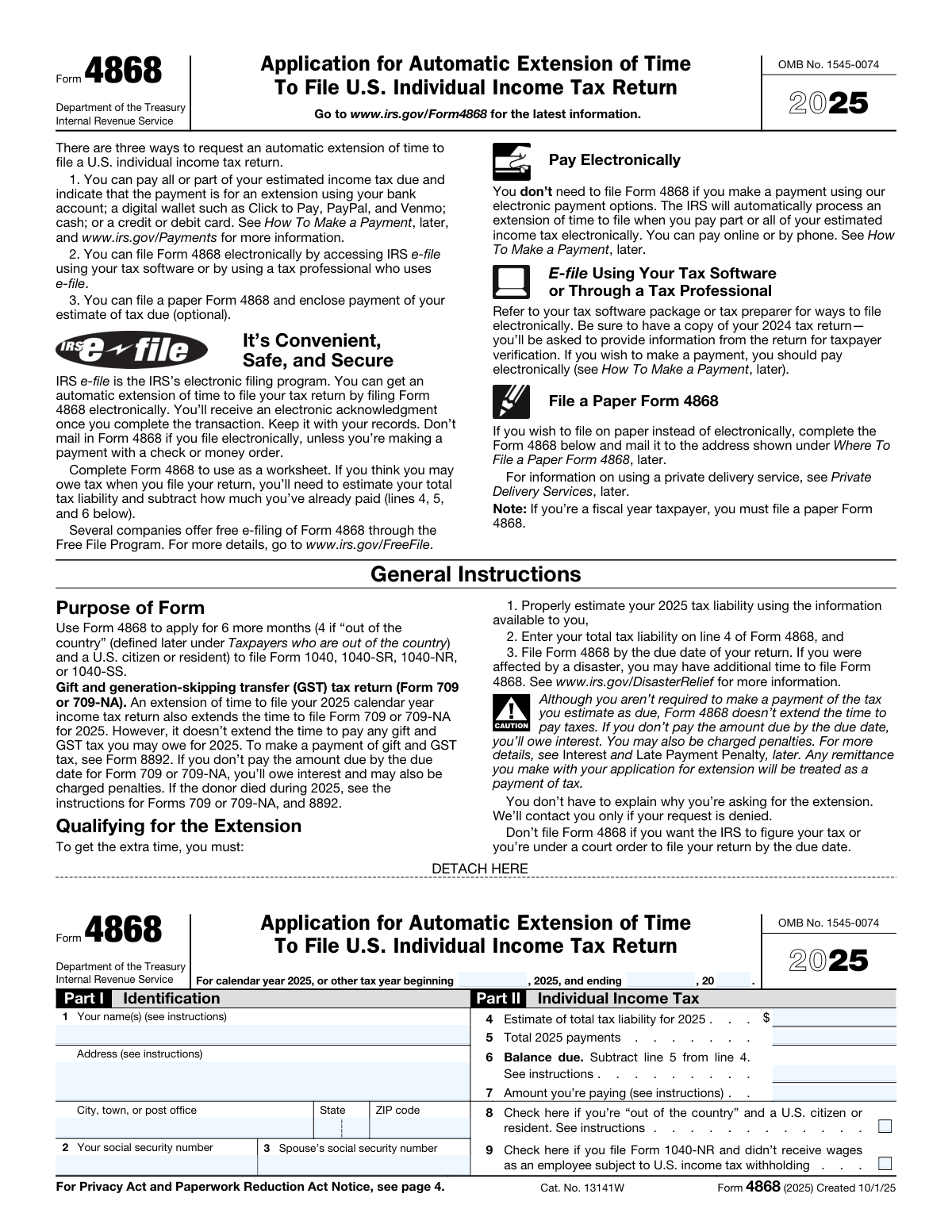
Yes! You can use AI to fill out Form 4868, Application for Automatic Extension of Time To File U.S. Individual Income Tax Return

IRS Form 4868, Application for Automatic Extension of Time To File U.S. Individual Income Tax Return, allows individual taxpayers to get an automatic six-month extension for filing their federal income tax return. It is crucial to understand this is an extension to file, not an extension to pay; you must still estimate your tax liability and pay any amount due by the original deadline to avoid penalties. Today, this form can be filled out quickly and accurately using AI-powered services like Instafill.ai, which can also convert non-fillable PDF versions into interactive fillable forms.
Our AI automatically handles information lookup, data retrieval, formatting, and form filling.
It takes less than a minute to fill out Form 4868 using our AI form filling.
Securely upload your data. Information is encrypted in transit and deleted immediately after the form is filled out.

Form specifications

Form name: Form 4868, Application for Automatic Extension of Time To File U.S. Individual Income Tax Return
Number of fields: 17
Number of pages: 4
Language: English
Categories: income forms, income tax forms, individual tax forms, tax forms
main-image

Instafill Demo: How to fill out PDF forms in seconds with AI

How to Fill Out Form 4868 Online for Free in 2026

Are you looking to fill out a FORM 4868 form online quickly and accurately? Instafill.ai offers the #1 AI-powered PDF filling software of 2026, allowing you to complete your FORM 4868 form in just 37 seconds or less.
Follow these steps to fill out your FORM 4868 form online using Instafill.ai:
  1. 1 Navigate to Instafill.ai and upload your Form 4868 or select it from the template library.
  2. 2 Provide your personal identification details, including your name, address, and Social Security Number (and spouse's, if applicable).
  3. 3 Enter your estimated total tax liability for the tax year and the total tax payments you have already made.
  4. 4 Allow the AI to automatically calculate the balance due based on the figures you provided.
  5. 5 Specify the amount you intend to pay with your extension request.
  6. 6 Indicate your filing status by checking the appropriate boxes if you are out of the country or a Form 1040-NR filer.
  7. 7 Review all entered information for accuracy, then download the completed form to print and mail, or use it for e-filing.

Our AI-powered system ensures each field is filled out correctly, reducing errors and saving you time.

Why Choose Instafill.ai for Your Fillable Form 4868 Form?

Speed

Complete your Form 4868 in as little as 37 seconds.

Up-to-Date

Always use the latest 2026 Form 4868 form version.

Cost-effective

No need to hire expensive lawyers.

Accuracy

Our AI performs 10 compliance checks to ensure your form is error-free.

Security

Your personal information is protected with bank-level encryption.

Frequently Asked Questions About Form Form 4868

This form is used to request an automatic extension of time to file your U.S. individual income tax return. It gives you more time to file your return, but it does not extend the time to pay any taxes you may owe.

You should fill out this form if you are unable to file your individual income tax return by the original due date and need more time. This applies to filers of forms like the 1040 and 1040-NR.

You will need your personal information (name, address), your Social Security Number, your spouse's SSN if filing jointly, and a reasonable estimate of your total tax liability and payments for the tax year.

To calculate your estimated tax liability, you should use your available information like W-2s, 1099s, and last year's tax return to make the most accurate estimate of your total tax for the year. This is your best guess of what you will owe.

Yes, an extension to file is not an extension to pay. You must estimate your tax liability and pay any amount due by the original deadline to avoid potential penalties and interest charges.

The 'Balance Due' is your total estimated tax minus any payments you've already made. The 'Amount You Are Paying' is the payment you are submitting along with this extension request, which should be as much of the balance due as possible.

You should check this box if you are a U.S. citizen or resident whose main place of business and home are outside the United States and Puerto Rico on the regular due date of your return. This may qualify you for a special extension.

You only need to enter your spouse's Social Security Number if you plan on filing a joint tax return. If you are filing separately, you can leave this field blank.

The confirmation number is provided after you make an electronic payment for your taxes online or by phone through an official IRS payment channel. You enter that number on this form as a record of your payment.

Yes, services like Instafill.ai use AI to help you accurately auto-fill form fields with your saved information, which can save you time and reduce errors.

To fill this form with Instafill.ai, simply upload the PDF to their platform. The AI will make the form interactive, and you can either type in your information or use the auto-fill feature to complete it from your secure profile.

If you have a non-fillable or 'flat' PDF, you can use a service like Instafill.ai. Upload the file, and their technology will convert it into an interactive, fillable form that you can complete and sign online.

Compliance Form 4868
Validation Checks by Instafill.ai

Common Mistakes in Completing Form 4868

Entering an Incorrect Social Security Number

Transposing digits or entering an incorrect SSN is a frequent and critical error, often due to a simple typo. An SSN that does not match the taxpayer's name in IRS records will cause an immediate rejection of the extension request. This can lead to processing delays and potential failure-to-file penalties if not corrected before the deadline. Always double-check each digit of your and your spouse's SSN against your official cards before submitting.

Miscalculating Estimated Tax and Balance Due

Filers often make arithmetic errors when subtracting total payments from their estimated tax liability to find the balance due. Additionally, some may improperly underestimate their total tax liability to reduce the payment sent with the extension. A 'good faith' estimate is required; an unreasonable estimate can invalidate the extension and result in penalties and interest on the underpaid amount from the original due date.

Using an Incomplete or Informal Name

Using a nickname, initials, or an abbreviated name instead of the full legal name as it appears on the Social Security card is a common mistake. This name mismatch can cause the IRS's automated systems to flag or reject the form, delaying the processing of your extension. To prevent validation failures, ensure the name(s) provided exactly match official government records.

Omitting the Apartment or Suite Number

A very common oversight is forgetting to include an apartment, suite, or unit number in the street address field. This can result in the IRS being unable to deliver important correspondence, such as confirmation of your extension or notices about your tax account. AI-powered form filling tools like Instafill.ai can help prevent this by validating addresses and prompting for missing components to ensure accuracy.

Incorrectly Formatting the Tax Year

The form specifically asks for the last two digits of the tax year (e.g., '25' for 2025), but people often write the full four-digit year out of habit. This formatting error can cause data entry problems and processing delays on the IRS's end. It is crucial to read field-specific instructions carefully to ensure data is entered in the required format.

Confusing 'Balance Due' with 'Amount You Are Paying'

Filers often mistakenly believe the 'Amount You Are Paying' must equal the 'Balance Due'. While you should pay as much as you can to minimize penalties and interest, you are allowed to pay less than the full balance due with your extension. Remember, an extension to file is not an extension to pay your taxes, and interest will still accrue on any unpaid balance.

Forgetting Spouse's Information on a Joint Filing

When filing a joint extension, it is easy to overlook entering the spouse's name or Social Security Number. The IRS requires both sets of information for a joint filing to be considered valid. Omitting the spouse's details will lead to processing errors and could invalidate the extension for the second taxpayer, potentially resulting in penalties.

Misunderstanding the 'Out of the Country' Status

People may check the 'Out of the Country' box if they were on vacation on the tax deadline, but this status has a specific legal definition (e.g., your main place of work is outside the U.S.). Incorrectly claiming this status can lead to issues, while failing to claim it when eligible means missing out on a potential automatic two-month extension. Always consult the form instructions to verify if you meet the specific criteria.

Leaving the Payment Confirmation Number Blank

If you pay your estimated tax online or by phone, you receive a confirmation number that must be entered on the form. Filers often forget to enter this number or do not realize its importance. This number is the primary way the IRS links your electronic payment to your extension request, and omitting it can cause your payment to be misapplied, leading to erroneous balance-due notices.

Working with a Non-Fillable PDF Version

Many government forms are only available as flat, non-fillable PDFs, leading to manual entry errors, poor handwriting, and formatting mistakes. This makes the form difficult for both the user to complete and the IRS to process. Advanced tools like Instafill.ai can convert any flat PDF into an interactive, fillable form, which helps prevent these issues by enabling clean, typed entries and automated data validation.
Saved over 80 hours a year

“I was never sure if my IRS forms like W-9 were filled correctly. Now, I can complete the forms accurately without any external help.”

Kevin Martin Green

Your data stays secure with advanced protection from Instafill and our subprocessors

Robust compliance program

Transparent business model

You’re not the product. You always know where your data is and what it is processed for.

ISO 27001, HIPAA, and GDPR

Our subprocesses adhere to multiple compliance standards, including but not limited to ISO 27001, HIPAA, and GDPR.

Security & privacy by design

We consider security and privacy from the initial design phase of any new service or functionality. It’s not an afterthought, it’s built-in, including support for two-factor authentication (2FA) to further protect your account.

Fill out Form 4868 with Instafill.ai

Worried about filling PDFs wrong? Instafill securely fills form-4868-application-for-automatic-extension-of-time-to-file-us-individual-income-tax-return forms, ensuring each field is accurate.