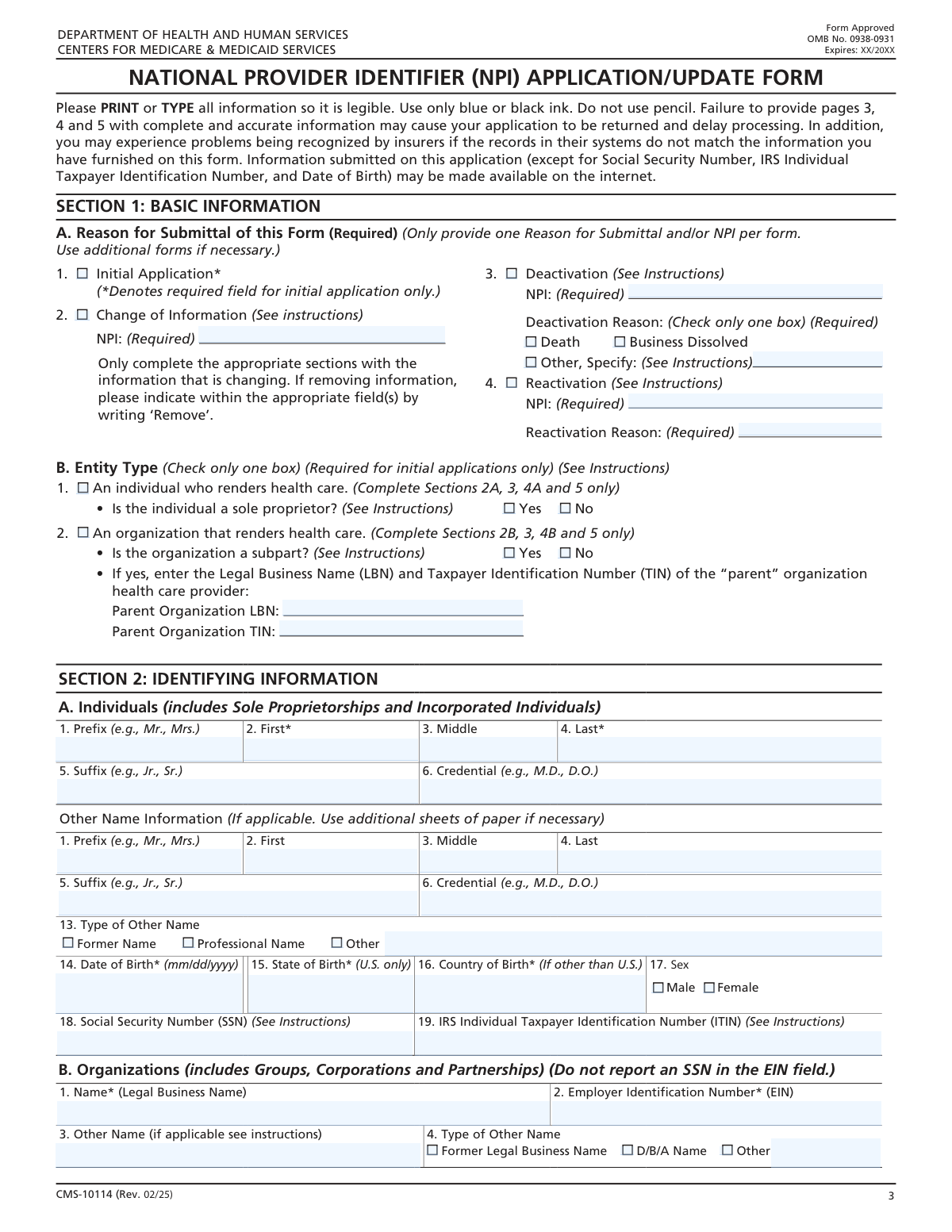
Yes! You can use AI to fill out Form CMS-10114, NPI Application/Update Form

Form CMS-10114 is the standard application used by the Centers for Medicare & Medicaid Services (CMS) for health care providers to obtain a National Provider Identifier (NPI). The NPI is a unique 10-digit identification number for covered health care providers, essential for administrative and financial transactions under HIPAA. Today, this form can be filled out quickly and accurately using AI-powered services like Instafill.ai, which can also convert non-fillable PDF versions into interactive fillable forms.
Our AI automatically handles information lookup, data retrieval, formatting, and form filling.
It takes less than a minute to fill out CMS-10114 using our AI form filling.
Securely upload your data. Information is encrypted in transit and deleted immediately after the form is filled out.

Form specifications

Form name: Form CMS-10114, NPI Application/Update Form
Number of fields: 118
Number of pages: 6
Language: English
Categories: CMS forms
main-image

Instafill Demo: How to fill out PDF forms in seconds with AI

How to Fill Out CMS-10114 Online for Free in 2026

Are you looking to fill out a CMS-10114 form online quickly and accurately? Instafill.ai offers the #1 AI-powered PDF filling software of 2026, allowing you to complete your CMS-10114 form in just 37 seconds or less.
Follow these steps to fill out your CMS-10114 form online using Instafill.ai:
  1. 1 Navigate to Instafill.ai and upload your CMS-10114 form or select it from the platform's template library.
  2. 2 Select the reason for submission: Initial Application, Change of Information, Deactivation, or Reactivation of an NPI.
  3. 3 Specify the entity type (Individual or Organization) and provide all required identification details, such as name, SSN/EIN, and personal or business information.
  4. 4 Enter the correspondence mailing address and the business practice location address, along with associated contact phone numbers and email.
  5. 5 Input your provider taxonomy codes, state license numbers, and any other relevant provider identifiers like Medicaid numbers.
  6. 6 Provide details for a contact person and, if applicable, an authorized official for the organization. Let the AI assist in populating recurring information.
  7. 7 Review all auto-filled information for accuracy, then digitally sign and date the form to certify its contents and complete the submission.

Our AI-powered system ensures each field is filled out correctly, reducing errors and saving you time.

Why Choose Instafill.ai for Your Fillable CMS-10114 Form?

Speed

Complete your CMS-10114 in as little as 37 seconds.

Up-to-Date

Always use the latest 2026 CMS-10114 form version.

Cost-effective

No need to hire expensive lawyers.

Accuracy

Our AI performs 10 compliance checks to ensure your form is error-free.

Security

Your personal information is protected with bank-level encryption.

Frequently Asked Questions About Form CMS-10114

This form is used to apply for a new National Provider Identifier (NPI), update information for an existing NPI, or to deactivate or reactivate an NPI.

Any individual health care provider, such as a doctor or therapist, or any health care organization, such as a hospital or clinic, that is a HIPAA-covered entity needs to complete this form to obtain an NPI.

You should apply as an 'Individual Entity'. The form has a specific checkbox to indicate that you are a sole proprietor under the Individual Entity section.

You will need your personal or business identification (SSN/ITIN or EIN), legal name, addresses, contact information, professional license numbers, and provider taxonomy codes.

The 'Correspondence Mailing Address' is where you will receive all official mail regarding your NPI. The 'Business Practice Location Address' is the physical street address where you provide services to patients.

To deactivate your NPI, check the 'Deactivation' box, enter the NPI to be deactivated, and select the reason for deactivation, such as 'Death' or 'Business Dissolved'.

A Taxonomy Code is a standard code that identifies your provider type and specialty. You can find the correct code for your practice by searching the official Health Care Provider Taxonomy code set list online.

When applying as an organization, check 'Yes' for 'Is the organization a subpart?'. You must then provide the Legal Business Name and Taxpayer Identification Number (TIN) of the parent organization.

An Authorized Official is a person with the legal authority to make binding commitments on behalf of the organization, such as a CEO, CFO, or managing partner. This individual must sign the application for an organization.

Yes, services like Instafill.ai use AI to accurately auto-fill form fields from your saved information, which can save you time and help prevent errors.

Simply upload the form to the Instafill.ai platform. It will become an interactive, fillable form that you can complete quickly using AI-powered suggestions and auto-fill capabilities.

You can use a service like Instafill.ai, which can convert flat, non-fillable PDFs into interactive forms that you can easily complete and sign electronically.

If you are applying as an individual provider, you are required to provide either your Social Security Number (SSN) or an IRS Individual Taxpayer Identification Number (ITIN).

The 'Other Name' section is for reporting any other names you or your organization have used, such as a former name, professional name, or a 'Doing Business As' (D/B/A) name.

Compliance CMS-10114
Validation Checks by Instafill.ai

1
Exclusive Application Type Selection
This check ensures that only one of the primary application type checkboxes ('Initial Application', 'Deactivation', 'Change of Information', 'Reactivation') is selected. These actions are mutually exclusive, and selecting more than one would create an ambiguous request. If multiple options are selected, the form submission should be rejected with an error message prompting the user to select only one application type.
2
Conditional NPI Provision for Existing Records
Validates that an NPI is provided if the application type is 'Deactivation', 'Change of Information', or 'Reactivation'. These actions require an existing NPI to modify, whereas an 'Initial Application' does not. This prevents incomplete requests for existing records. If the condition is not met, an error should indicate that the NPI is required for the selected action.
3
NPI Number Format Validation
This check verifies that any provided National Provider Identifier (NPI) is a 10-digit number. NPIs have a standard, fixed-length format, and this validation ensures data integrity and successful record lookups. If the entered value is not exactly 10 digits or contains non-numeric characters, the submission should fail, and the user should be prompted to enter a valid NPI.
4
Exclusive Entity Type Selection
Ensures that the applicant selects either 'Individual Entity' or 'An organization that renders health care', but not both. The application requirements and data fields differ significantly between individuals and organizations. This validation prevents data conflicts and ensures the correct subsequent fields are enabled and required. A failure would require the user to clarify the entity type before proceeding.
5
Conditional Deactivation Reason Specification
If the 'Deactivation' checkbox is selected, this validation ensures that a reason is provided by selecting 'Death', 'Business Dissolved', or 'Other, Specify'. Furthermore, if 'Other, Specify' is checked, the 'Other Reason for Deactivation' text field must not be empty. This is crucial for regulatory and record-keeping purposes. Failure to provide a reason or specify an 'Other' reason will result in a validation error.
6
Individual vs. Organization Required Fields
This check logically validates that required fields for the selected entity type are filled. If 'Individual Entity' is chosen, 'Last Name', 'First Name', 'Date of Birth', and 'Social Security Number' (or ITIN) must be provided. If 'An organization that renders health care' is chosen, 'Legal Business Name' and 'Employer Identification Number (EIN)' are mandatory. This ensures the fundamental identifying information for the entity is captured.
7
Taxpayer ID Number Format (SSN/EIN)
Verifies that the 'Social Security Number' (SSN) and 'Employer Identification Number (EIN)' fields adhere to their standard 9-digit format. This is critical for correct identification with the IRS and other government agencies. The validation should check for exactly 9 digits, ignoring hyphens, and reject any input that does not meet this criterion, prompting the user for correction.
8
Date of Birth Validity
This validation confirms that the 'Date of Birth' is a real, valid date and is not in the future. This prevents typographical errors and ensures the applicant is a person who has been born. The check should parse the date format (e.g., MM/DD/YYYY) and compare it against the current date. An invalid format or a future date should trigger an error.
9
Birth Location Exclusivity
Ensures that for an individual provider, either 'State of Birth' (for U.S. born) or 'Country of Birth' (for non-U.S. born) is filled, but not both. This prevents contradictory data entry for the provider's place of birth. If both fields are filled or neither is filled (if required), the form should prompt the user to provide information in only one of the two fields.
10
Parent Organization Details for Subparts
If an organization applicant checks 'Is the organization a subpart? Yes', this validation mandates that the 'Parent Organization Legal Business Name' and 'Parent Organization TIN' fields are completed. This information is essential for understanding the organizational hierarchy and relationships. If these fields are empty for a subpart, the submission should be blocked until the parent organization's details are provided.
11
Address Block Completeness
For both the 'Correspondence Mailing Address' and 'Business Practice Location Address', this check ensures that if 'Address Line 1' is filled, then 'City/Town', 'State/Territory', and 'ZIP or Foreign Postal Code' are also filled. An incomplete address is unusable for mailing or location purposes. This validation enforces the entry of a complete, minimal address block, preventing submissions with partial address data.
12
Taxonomy and License Dependency
This validation ensures that for any taxonomy entry, if a 'License Number' is provided, the corresponding 'State/Territory Issued' field must also be completed. A license number is meaningless without the context of its issuing authority. This check prevents incomplete professional credential information. If a license number is present without a state, an error should be displayed.
13
Entity-Specific Signature Requirement
Validates that the correct signature section is completed based on the selected entity type. If 'Individual Entity' is selected, the 'Practitioner's Signature' and 'Signature Date' fields are mandatory. If 'An organization that renders health care' is selected, the 'Authorized Official Signature' and 'Authorized Official Signature Date' fields are required. This is a critical legal requirement for the application to be valid.
14
Authorized Official Details Completeness
If the 'Authorized Official Signature' field is filled for an organization, this check ensures that the official's details are also provided. Specifically, 'First Name', 'Last Name', 'Authorized Official Title/Position', and 'Telephone Number' must be completed. This information is necessary to verify the identity and authority of the person signing on behalf of the organization. A missing title or contact number would halt the submission.

Common Mistakes in Completing CMS-10114

Selecting the Wrong Application Purpose

Applicants often get confused at the very first step, either checking multiple boxes like 'Initial Application' and 'Change of Information' simultaneously, or selecting the wrong one entirely. For instance, an existing provider needing to update their address might mistakenly check 'Initial Application'. This leads to immediate processing rejection or the creation of a duplicate, problematic NPI record. To avoid this, carefully read each option and select only one that accurately reflects your goal: creating a new NPI, updating an existing one, or deactivating one.

Misclassifying the Entity Type (Individual vs. Organization)

A common point of confusion is the distinction between an individual provider and an organization, especially for sole proprietors. A solo practitioner might incorrectly register as an organization if they have an EIN, or an incorporated practice might wrongly apply as an individual. This error cascades through the form, causing the wrong sections to be filled out and leading to an incorrect NPI classification, which can severely impact billing and credentialing. Before starting, clearly determine if you are a Type 1 (Individual) or Type 2 (Organization) provider.

Confusing Correspondence and Business Practice Addresses

Applicants frequently enter the same address for both the 'Correspondence Mailing Address' and the 'Business Practice Location Address,' even when they are different. The correspondence address can be a P.O. Box for receiving mail, while the practice location must be a physical street address where care is provided. Mixing these up can result in missed official communications or an incorrect listing in public directories, affecting patient access and compliance. Always double-check that the physical practice location is listed correctly and a separate, preferred mailing address is used for correspondence if needed.

Providing Inaccurate or Incomplete Taxonomy Information

The taxonomy section is critical for identifying a provider's specialty, yet it is often filled out incorrectly. Mistakes include not knowing the correct primary taxonomy code, failing to list it first, or omitting the corresponding state license number and issuing state. This can lead to claim denials and incorrect provider directory listings. To prevent this, use the official Health Care Provider Taxonomy Code Set to find your specific code(s) and ensure all associated license information is entered accurately for each taxonomy listed.

Omitting the NPI for Update or Deactivation Requests

When submitting a 'Change of Information' or 'Deactivation' request, it is mandatory to provide the existing NPI that the change applies to. Applicants often check the correct box but forget to fill in the associated 'NPI for Change of Information' or 'NPI for Deactivation' field. Without this crucial piece of information, the processing agency cannot locate the correct record, causing the request to be rejected outright. Always ensure the NPI is entered correctly in the designated field when you are not filing an initial application.

Failing to Report All Legal and Professional Names

Providers and organizations often neglect to list all relevant 'Other Names,' such as former legal names (e.g., maiden names), professional names, or 'Doing Business As' (DBA) names for organizations. This omission can create significant issues with credentialing, billing, and patient record continuity, as payers and systems may not be able to link activity across different names. It is crucial to provide a complete history of names used professionally to ensure a comprehensive and accurate provider profile.

Invalid Signature or Incorrect Authorizing Official Information

The signature section is a final hurdle where many applications falter. Common errors include the wrong person signing (e.g., an individual practitioner signing the organization's 'Authorized Official' section), a missing signature date, or failing to provide the full name and title for the authorized official. An invalid signature will automatically invalidate the entire application, forcing the process to start over. Ensure the correct party signs in the designated section and that all accompanying information for the signer is complete and accurate.

Misunderstanding the 'Subpart' Designation for Organizations

When an organization is part of a larger healthcare system, applicants may be unsure whether to check 'Is the organization a subpart?'. They may either incorrectly identify as a subpart or, more commonly, correctly identify as a subpart but then fail to provide the required 'Parent Organization Legal Business Name' and 'Parent Organization TIN'. This incomplete information prevents proper linkage within the NPI database, affecting system-wide reporting. If your organization is a distinct component of a larger entity, you must select 'Yes' and provide the complete parent organization details.

Leaving 'Specify' Fields Blank After Selecting 'Other'

Throughout the form, options for 'Other' are provided, which require the applicant to fill in a corresponding text field to specify the details. A frequent mistake is checking the 'Other' box but leaving the specification field blank, such as for 'Other Reason for Deactivation'. This renders the selection meaningless and results in an incomplete application that cannot be processed correctly. AI-powered form-filling tools like Instafill.ai can prevent this by flagging empty required fields that become active after a conditional choice.

Illegible Handwriting or Formatting Errors on a Printed Form

If the form is a non-fillable PDF, users must print it and fill it out by hand, leading to illegible handwriting, information written outside boxes, and formatting errors. These issues can be misinterpreted by data entry personnel or scanning systems, causing significant processing delays or rejection. To avoid this, use a tool like Instafill.ai, which can convert a non-fillable PDF into an interactive, fillable form, ensuring all data is typed, legible, and correctly placed.
Saved over 80 hours a year

“I was never sure if my IRS forms like W-9 were filled correctly. Now, I can complete the forms accurately without any external help.”

Kevin Martin Green

Your data stays secure with advanced protection from Instafill and our subprocessors

Robust compliance program

Transparent business model

You’re not the product. You always know where your data is and what it is processed for.

ISO 27001, HIPAA, and GDPR

Our subprocesses adhere to multiple compliance standards, including but not limited to ISO 27001, HIPAA, and GDPR.

Security & privacy by design

We consider security and privacy from the initial design phase of any new service or functionality. It’s not an afterthought, it’s built-in, including support for two-factor authentication (2FA) to further protect your account.

Fill out CMS-10114 with Instafill.ai

Worried about filling PDFs wrong? Instafill securely fills form-cms-10114-npi-applicationupdate-form forms, ensuring each field is accurate.