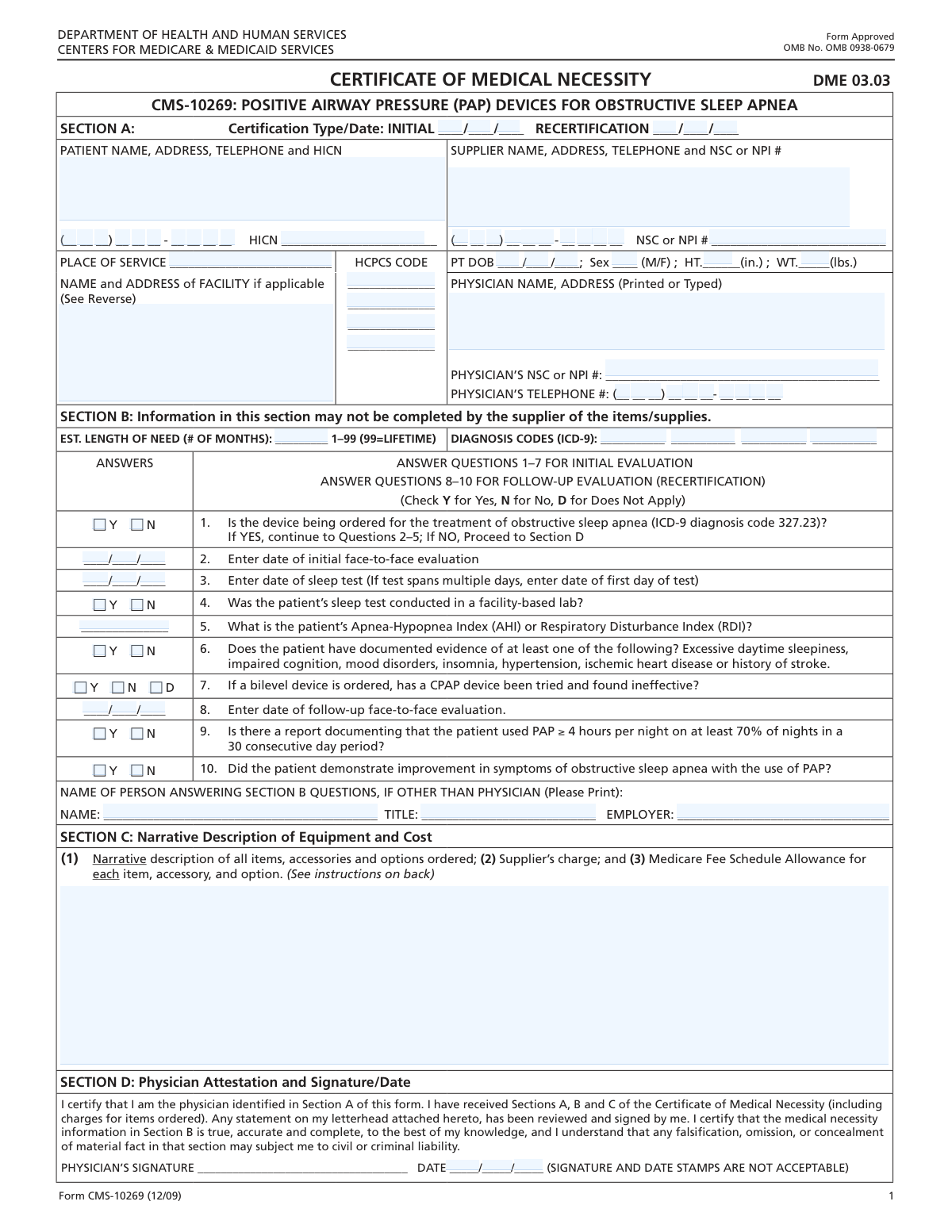
Yes! You can use AI to fill out Form CMS-10126, Certificate of Medical Necessity for Positive Airway Pressure (PAP) Devices

Form CMS-10126, the Certificate of Medical Necessity for PAP Devices, is a Medicare document completed by a physician to certify that a CPAP or bilevel device is medically necessary for a patient. It details the patient's diagnosis, sleep study results, and clinical evaluation to justify coverage and reimbursement for the equipment from the supplier. Today, this form can be filled out quickly and accurately using AI-powered services like Instafill.ai, which can also convert non-fillable PDF versions into interactive fillable forms.
Our AI automatically handles information lookup, data retrieval, formatting, and form filling.
It takes less than a minute to fill out CMS-10126 using our AI form filling.
Securely upload your data. Information is encrypted in transit and deleted immediately after the form is filled out.

Form specifications

Form name: Form CMS-10126, Certificate of Medical Necessity for Positive Airway Pressure (PAP) Devices
Number of fields: 99
Number of pages: 2
Language: English
Categories: CMS forms, Medi-Cal forms, medical certificate forms, medical forms, VA medical forms
main-image

Instafill Demo: How to fill out PDF forms in seconds with AI

How to Fill Out CMS-10126 Online for Free in 2026

Are you looking to fill out a CMS-10126 form online quickly and accurately? Instafill.ai offers the #1 AI-powered PDF filling software of 2026, allowing you to complete your CMS-10126 form in just 37 seconds or less.
Follow these steps to fill out your CMS-10126 form online using Instafill.ai:
  1. 1 Navigate to Instafill.ai and upload your CMS-10126 form or select it from the platform's template library.
  2. 2 Provide patient information, including their name, address, Health Insurance Claim Number (HICN), and relevant demographics.
  3. 3 Enter the details for the supplier and the prescribing physician, including names, addresses, and NPI numbers.
  4. 4 Input the specific diagnosis codes (ICD-9) and equipment codes (HCPCS) related to the patient's condition and the prescribed PAP device.
  5. 5 Answer the detailed clinical questions in Section B, providing information on sleep test results (AHI/RDI), face-to-face evaluations, and patient symptoms to establish medical necessity.
  6. 6 Review all AI-populated and manually entered data for accuracy, then have the physician provide their electronic signature and date.
  7. 7 Securely download, print, or share the completed CMS-10126 with the durable medical equipment (DME) supplier for processing.

Our AI-powered system ensures each field is filled out correctly, reducing errors and saving you time.

Why Choose Instafill.ai for Your Fillable CMS-10126 Form?

Speed

Complete your CMS-10126 in as little as 37 seconds.

Up-to-Date

Always use the latest 2026 CMS-10126 form version.

Cost-effective

No need to hire expensive lawyers.

Accuracy

Our AI performs 10 compliance checks to ensure your form is error-free.

Security

Your personal information is protected with bank-level encryption.

Frequently Asked Questions About Form CMS-10126

This form is a Certificate of Medical Necessity used to document the need for Positive Airway Pressure (PAP) devices for patients with conditions like obstructive sleep apnea, primarily for insurance and Medicare claims.

The form is typically filled out by the medical equipment supplier and the patient's physician. The physician must review all information, answer the medical necessity questions, and provide a final signature and date.

Select 'Initial Certification' when first ordering the PAP device. Select 'Recertification' for subsequent renewals, which requires providing follow-up information on patient compliance and symptom improvement.

The HICN is the patient's Health Insurance Claim Number, which is their Medicare number. This information is required in the 'Patient Information' section for proper billing and claim processing.

The NPI (National Provider Identifier) is a unique ID for healthcare providers, while the NSC (National Supplier Clearinghouse) number is specific to suppliers of Durable Medical Equipment. You should enter the appropriate number for the physician and the supplier in their respective sections.

Enter the estimated number of months the patient will require the device. For chronic conditions requiring long-term use, enter '99' to signify a lifetime need.

While the form specifies ICD-9, you should use the current, appropriate diagnosis codes (ICD-10) that establish medical necessity. If you are unsure, consult the payer's specific guidelines.

The Apnea-Hypopnea Index (AHI) or Respiratory Disturbance Index (RDI) measures the severity of sleep apnea and is found on the patient's official sleep study report. This value is required for initial certification.

You must have a report from the device showing the patient used it for at least 4 hours per night on 70% of nights over a 30-day period. This documentation is necessary to answer 'Yes' to Question 9.

If a bilevel device is being ordered because a CPAP was ineffective, you must check 'Yes' for Question 7. This provides the necessary justification for the more advanced equipment.

Yes, services like Instafill.ai use AI to auto-fill form fields accurately and save time. This is especially useful for entering recurring details like patient, supplier, and physician information.

You can use a service like Instafill.ai to complete the form digitally. Simply upload the PDF, and the platform will allow you to type directly into the fields, save your progress, and download the completed document.

If your PDF is not interactive, you can upload it to a service like Instafill.ai. Their technology can convert flat, non-fillable PDFs into interactive forms that you can easily complete on your computer.

This is the individual who is attesting to the medical necessity questions, often a clinician or qualified staff at the physician's office. They must provide their name, title, and employer.

Compliance CMS-10126
Validation Checks by Instafill.ai

1
Ensures Certification Type is Mutually Exclusive
This check verifies that either the 'Initial Certification Date' or the 'Recertification Date' is provided, but not both. These fields determine which sections of the form are applicable, so having both filled would create a logical conflict. If validation fails, the user must clear one of the two date fields to proceed.
2
Validates Physician Signature Date Chronology
This validation ensures the 'Physician Signature Date' is on or after the 'Initial Certification Date' or 'Recertification Date'. The physician's signature legally attests to the information on the form as of that date, so it cannot predate the services or evaluations being certified. A failure indicates a logical date error that must be corrected for the form to be legally valid.
3
Verifies Patient Health Insurance Claim Number (HICN) Format
This check validates that the 'Patient HICN' follows the required format for a Medicare Beneficiary Identifier. This number is critical for patient identification and billing with Medicare. An invalid HICN will result in claim rejection, so this check prevents submission of a non-billable form.
4
Validates NPI Number Format
This check ensures the 'Supplier NSC or NPI Number' and 'Physician NSC or NPI Number' fields contain a valid 10-digit National Provider Identifier (NPI). The NPI is a standard, unique identifier for health care providers. An incorrect NPI prevents proper identification of the supplier or physician and will lead to claim processing failures.
5
Enforces Conditional Logic for Initial Certification Questions
This validation confirms that if the 'Initial Certification Date' is filled, the related questions (1 through 7) are answered as required. Conversely, it ensures these questions are left blank if it is a recertification. This maintains the logical flow of the form, preventing irrelevant or contradictory information from being submitted.
6
Enforces Conditional Logic for Recertification Questions
This validation confirms that if the 'Recertification Date' is filled, the follow-up questions (8, 9, and 10) are answered. It also ensures these questions are left blank if it is an initial certification. This is crucial for compliance, as recertification requires specific documentation of patient adherence and symptom improvement.
7
Cross-Validates Diagnosis Code for Obstructive Sleep Apnea
If 'Question 1 Answer' is 'Yes', indicating the device is for obstructive sleep apnea, this check verifies that one of the 'Diagnosis Code' fields contains the corresponding ICD-9 code '327.23'. This ensures consistency between the stated reason for the order and the official diagnosis codes. A mismatch would likely lead to a denial of the claim for lack of medical necessity.
8
Validates 'Length of Need' Range
This check ensures the 'Length of Need in Months' field contains a whole number between 1 and 99, inclusive. This value is used to determine the duration of the equipment rental or purchase authorization. An entry outside this range is invalid and would cause processing errors or incorrect authorization periods.
9
Validates Patient Date of Birth and Age
This validation verifies that the 'Patient Date of Birth' is a valid, complete date that occurred in the past. It also checks that the resulting age is reasonable for a patient with the indicated conditions. An invalid or future date of birth is a critical data error, and an illogical age may indicate a typo that needs correction.
10
Ensures at Least One HCPCS Code is Provided
This check verifies that the 'HCPCS Code 1' field is not empty. The HCPCS code identifies the specific item or service being ordered and is essential for billing and authorization. Submitting a form without at least one HCPCS code would make it impossible to know what is being requested, leading to immediate rejection.
11
Validates Chronology of Evaluation and Certification Dates
This check ensures the 'Initial Face-to-Face Evaluation Date' and 'Sleep Test Date' occur on or before the 'Initial Certification Date'. Medical necessity must be established before a device is certified. This chronological validation is a key compliance requirement to prove the proper order of events took place.
12
Requires AHI/RDI Score for Sleep Apnea Diagnosis
If 'Question 1 Answer' is 'Yes' (for obstructive sleep apnea), this validation ensures that the 'Apnea-Hypopnea Index (AHI) or Respiratory Disturbance Index (RDI)' field is filled with a numerical value. This score is a primary clinical metric used to diagnose the severity of sleep apnea and justify the need for treatment. A missing score would result in insufficient information to approve the request.
13
Ensures Completeness of Supplier Information
This validation verifies that the 'Supplier Name and Address', 'Supplier Telephone Number', and 'Supplier NSC or NPI Number' are all provided. Complete supplier information is mandatory for identifying the entity providing the equipment and processing payments. Missing information would halt the claim process until the data is supplied.
14
Validates Patient Physical Demographics
This check ensures that the 'Patient Height' (in inches) and 'Patient Weight' (in pounds) are positive, numerical values within a realistic range for a human. While often used for context, these values can be important for determining appropriate equipment settings or sizes. Invalid entries suggest data entry errors that should be corrected for record accuracy.

Common Mistakes in Completing CMS-10126

Using Outdated or Incorrect Medical Codes

This form specifically requests ICD-9 diagnosis codes, but users often enter newer ICD-10 codes by mistake. This happens because ICD-10 is now the standard for most billing, but some legacy forms or specific payers still require the older format. Using the wrong code set or mistyping HCPCS codes will lead to immediate claim rejection and require a corrected resubmission, delaying patient care and payment. Always double-check the form's requirements for code versions before entry.

Ignoring Conditional Logic for Questions

The form contains strict conditional logic, such as only answering questions 2-7 if 'Yes' is selected for question 1. Users frequently miss these instructions and either fill out sections that should be left blank or skip required sections. This creates contradictory data that confuses processors and can invalidate the entire submission. To avoid this, carefully read the instructions for each question, which often state dependencies like 'Fill only if...'.

Mismatching Certification Type and Answers

A common error is selecting 'Initial Certification' but then filling out the recertification questions (8-10), or vice-versa. This usually happens when the user is in a hurry and doesn't distinguish between the two sections. This logical error makes it impossible to process the request, as the clinical justification criteria are different for initial versus ongoing therapy. Ensure you only complete the questions corresponding to the certification type you have selected at the top of the form.

Incorrectly Entering 'Length of Need'

The 'Length of Need' field requires a number from 1-99, with '99' specifically meaning 'lifetime'. People often write 'Lifetime' or 'Permanent' as text, which automated systems cannot process, causing an error. This mistake can halt the approval process until the form is manually corrected. To prevent this, always use the numeric code '99' to indicate a lifetime need as instructed.

Providing an Outdated Patient Identifier (HICN)

The form asks for the patient's Health Insurance Claim Number (HICN), which has been largely replaced by the Medicare Beneficiary Identifier (MBI). Users may enter an invalid HICN or incorrectly enter the newer MBI in this field, leading to identification failures and claim denials. It is critical to verify the patient's current, active Medicare ID and enter it exactly as it appears on their card. If the form is a non-fillable PDF, a tool like Instafill.ai can convert it to a fillable version to reduce transcription errors.

Incomplete Narrative Equipment Description

The 'Narrative Description of Equipment and Cost' field requires three distinct pieces of information: a description of items, the supplier's charge, and the Medicare Fee Schedule Allowance. A frequent mistake is to only provide the item description while omitting the financial details. This incompleteness will cause the form to be rejected, as the cost justification is a critical component for approval. Ensure all parts of this narrative field are filled out completely.

Illogical Date Sequencing

Users often enter dates without checking their logical order, such as putting a 'Physician Signature Date' that is earlier than the 'Initial Face-to-Face Evaluation Date'. This invalidates the attestation, as a physician cannot sign off on an evaluation that has not yet occurred. Such errors lead to automatic rejection and require the form to be re-signed and resubmitted. Always review all dates on the form to ensure they follow a logical timeline before submitting.

Using Incorrect Units for Patient Measurements

The form specifies patient height in inches and weight in pounds, but people commonly enter height in feet and inches (e.g., 5'10") or weight in kilograms. This data entry error can lead to incorrect BMI calculations and may impact the assessment of medical necessity. To avoid this, convert all measurements to the required units (total inches and total pounds) before filling out the form. AI-powered tools like Instafill.ai can help by validating formats and preventing such unit-related mistakes.

Incomplete or Mismatched Provider Information

This mistake involves providing a partial supplier or physician name, using a nickname instead of a full legal name, or entering an NPI number that does not match the provided name and address in the national registry. These discrepancies cause verification to fail, delaying the certification process significantly. Always use the full, official name of the provider and facility, and double-check that the NPI number is correct and corresponds to that entity.

Contradictory Clinical Data

An applicant might correctly indicate the diagnosis is obstructive sleep apnea (Question 1) but then enter an Apnea-Hypopnea Index (AHI) in Question 5 that is below the clinical threshold for the diagnosis. This contradiction between the stated diagnosis and the supporting clinical data will flag the form for manual review and likely lead to a request for more information or denial. Ensure all clinical values provided are consistent with the diagnoses and answers selected on the form.
Saved over 80 hours a year

“I was never sure if my IRS forms like W-9 were filled correctly. Now, I can complete the forms accurately without any external help.”

Kevin Martin Green

Your data stays secure with advanced protection from Instafill and our subprocessors

Robust compliance program

Transparent business model

You’re not the product. You always know where your data is and what it is processed for.

ISO 27001, HIPAA, and GDPR

Our subprocesses adhere to multiple compliance standards, including but not limited to ISO 27001, HIPAA, and GDPR.

Security & privacy by design

We consider security and privacy from the initial design phase of any new service or functionality. It’s not an afterthought, it’s built-in, including support for two-factor authentication (2FA) to further protect your account.

Fill out CMS-10126 with Instafill.ai

Worried about filling PDFs wrong? Instafill securely fills form-cms-10126-certificate-of-medical-necessity-for-positive-airway-pressure-pap-devices forms, ensuring each field is accurate.