Yes! You can use AI to fill out Form CMS-20027, Medicare Redetermination Request Form
Form CMS-20027 is the official Medicare Redetermination Request Form, which allows healthcare providers to formally appeal an initial claim determination made by a Medicare contractor. This is the first level of the appeals process and is essential for correcting payment errors, challenging claim denials, and ensuring proper reimbursement for services rendered. Today, this form can be filled out quickly and accurately using AI-powered services like Instafill.ai, which can also convert non-fillable PDF versions into interactive fillable forms.
Our AI automatically handles information lookup, data retrieval, formatting, and form filling.
It takes less than a minute to fill out CMS-20027 using our AI form filling.
Securely upload your data. Information is encrypted in transit and deleted immediately after the form is filled out.
Form specifications
| Form name: | Form CMS-20027, Medicare Redetermination Request Form |
| Number of fields: | 136 |
| Number of pages: | 1 |
| Language: | English |
| Categories: | CAR forms, CMS forms, Medicare forms, L.A. Care forms |
Instafill Demo: How to fill out PDF forms in seconds with AI
How to Fill Out CMS-20027 Online for Free in 2026
Are you looking to fill out a CMS-20027 form online quickly and accurately? Instafill.ai offers the #1 AI-powered PDF filling software of 2026, allowing you to complete your CMS-20027 form in just 37 seconds or less.
Follow these steps to fill out your CMS-20027 form online using Instafill.ai:
- 1 Navigate to Instafill.ai and upload or select the CMS-20027 form to begin.
- 2 Complete the provider information section, including your name, NPI, and contact details.
- 3 For each claim being appealed, enter the patient's information, Health Insurance Claim Number (HICN) or Medicare Beneficiary Identifier (MBI), and the original claim ID.
- 4 Input the specific service dates, original billed amounts, and amounts paid for each claim listed.
- 5 Clearly state the reason for the appeal and the expected outcome for each individual claim.
- 6 Check the box to indicate if you are attaching additional supporting documents, such as medical records or a letter of medical necessity.
- 7 Review all entered information across the multiple claims for accuracy, then sign and date the form before downloading for submission.
Our AI-powered system ensures each field is filled out correctly, reducing errors and saving you time.
Why Choose Instafill.ai for Your Fillable CMS-20027 Form?
Speed
Complete your CMS-20027 in as little as 37 seconds.
Up-to-Date
Always use the latest 2026 CMS-20027 form version.
Cost-effective
No need to hire expensive lawyers.
Accuracy
Our AI performs 10 compliance checks to ensure your form is error-free.
Security
Your personal information is protected with bank-level encryption.
Frequently Asked Questions About Form CMS-20027
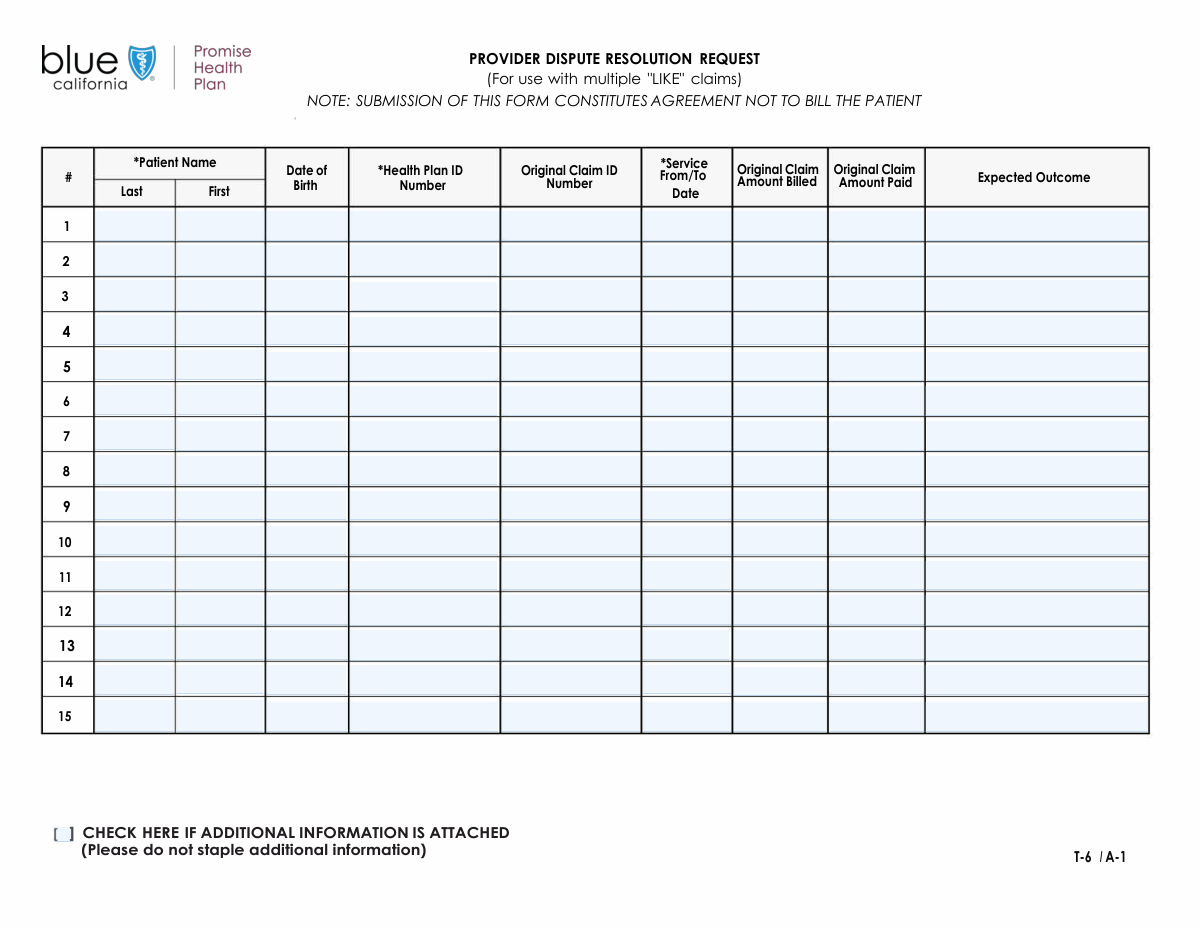
This form is used to submit details for multiple health insurance claims, likely for the purpose of review, appeal, or reconsideration. It allows you to list up to fifteen separate claims on a single document.
This form is intended for patients or healthcare providers who need to dispute, resubmit, or provide additional information for one or more previously processed health insurance claims.
No, you only need to complete the sections for the claims you are submitting. If you have only one claim, for example, just fill out the 'First Claim Details' section and leave the rest blank.
The 'Original Claim ID Number' is a unique reference number assigned by your health plan. You can typically find it on the Explanation of Benefits (EOB) statement you received for that claim.
In this field, clearly and briefly state what action you want the health plan to take. Examples include 'Re-process claim for full payment,' 'Correct payment to reflect contracted rate,' or 'Approve previously denied service.'
The 'Amount Billed' is the total cost of the service charged by your provider. The 'Amount Paid' is the portion of that bill that your health plan has already paid on the original claim, which could be $0 if it was denied.
Yes, each claim section has fields for a specific patient's name, date of birth, and Health Plan ID. This allows a provider's office or a family to submit claims for multiple individuals on one form.
This form accommodates up to fifteen claims. If you have more, you will need to complete and submit an additional copy of the form for the remaining claims.
Check this box if you are including supplementary documents with your form. This could include medical records, a detailed letter of appeal, or corrected billing statements.
Yes, services like Instafill.ai use AI to auto-fill form fields accurately and save time. This is especially helpful for a repetitive form like this, as it can pull data from your records to complete the fields for each claim.
To fill this form out online, you can use a service like Instafill.ai. Simply upload the form, and the platform will make it interactive, allowing you to type your information directly into the fields and save or print it.
If you have a non-fillable or 'flat' PDF, you can upload it to a platform like Instafill.ai. The service will automatically convert the document into an interactive, fillable form that you can easily complete on your computer.
Compliance CMS-20027
Validation Checks by Instafill.ai
1
Validate Patient Date of Birth is a realistic past date
This check ensures that the 'Patient Date of Birth' field is a valid date formatted correctly (e.g., MM/DD/YYYY) and is not in the future. It also verifies the date is not unreasonably far in the past (e.g., more than 120 years ago) to prevent typographical errors. This is critical for correct patient identification and eligibility verification, and failure would result in a request to correct the date before submission.
2
Ensure Service 'To' Date is not before Service 'From' Date
This validation applies to claim entries where service dates are provided as a range, either in one field or two separate fields ('Service From Date', 'Service To Date'). It confirms that the end date of the service period is on or after the start date. This prevents logical impossibilities in the claim data, which would cause automatic rejection during processing. If the dates are illogical, the user must correct them.
3
Verify Claim Amount Paid does not exceed Amount Billed
This check compares the 'Original Claim Amount Paid' to the 'Original Claim Amount Billed' for each claim entry. The amount paid cannot logically be greater than the total amount billed for the service. This rule prevents fundamental financial errors that would require manual intervention and delay claim processing. A validation failure would prompt the user to review and correct the entered monetary values.
4
Confirm Monetary Fields are Valid Currency Formats
This validation ensures that all fields representing money, such as 'Original Claim Amount Billed' and 'Original Claim Amount Paid', contain only valid numeric currency data. The check would permit numbers and a single decimal point for cents but would reject negative values, letters, or special characters. Proper formatting is essential for financial calculations and processing, and invalid entries would be flagged for correction.
5
Check for Claim Entry Completeness
This rule verifies that if any field within a specific claim block (e.g., 'First Claim Details') is filled out, then all core required fields for that claim are also completed. Core fields include Patient Name, Date of Birth, Claim ID, Service Date, and Amount Billed. This prevents the submission of incomplete or unusable claim data, which would otherwise be rejected. The system would highlight the missing required fields within the partially filled claim block.
6
Validate Service Date is after Patient's Date of Birth
This is a logical consistency check that confirms the 'Service From/To Date' for any claim occurs after the patient's specified 'Date of Birth'. It is impossible for a medical service to be rendered to a patient before they were born. Catching this error at the form submission stage prevents an obvious data flaw that would lead to claim denial. The user would be required to correct either the date of birth or the service date.
7
Ensure Uniqueness of Original Claim ID Numbers on the Form
This check scans all entered 'Original Claim ID Number' fields across the entire form to ensure that no two claims share the same ID. Submitting the same claim ID twice on a single form is almost always an error and can cause significant processing issues. If a duplicate ID is found, the system will alert the user to review the claim numbers and remove or correct the duplicate entry.
8
Validate Patient Name Fields for Valid Characters
This check ensures that the 'Patient First Name' and 'Patient Last Name' fields contain only valid characters, such as letters, hyphens, and apostrophes, and are free of numbers or special symbols. This helps maintain data integrity and ensures the name can be matched correctly within the processing system. An invalid character would trigger an error message asking the user to correct the name.
9
Confirm Health Plan ID Number Format
This validation checks that the 'Health Plan ID Number' adheres to the expected format, which is often a specific combination of letters and numbers of a certain length. While the exact format may vary by plan, this check prevents common typos or incorrectly entered numbers. Ensuring the ID is correctly formatted is crucial for routing the claim to the right payer and identifying the member's policy.
10
Verify at Least One Complete Claim is Submitted
This rule ensures that the form cannot be submitted if it is entirely empty. At least one of the claim sections must be fully and correctly filled out. This prevents blank or useless submissions from entering the system, saving processing time and resources. If a user tries to submit a blank form, they will receive an error message indicating that at least one claim is required.
11
Ensure Service Dates are not in the Future
This validation confirms that all 'Service From/To Date' entries are on or before the current date. Claims are for services that have already been rendered, so a future service date is a logical error. This check prevents data entry mistakes that would cause the claim to be rejected. If a future date is entered, the user will be prompted to enter a valid past or present date.
12
Check for Presence of 'Expected Outcome' Text
This validation ensures that the 'Expected Outcome' field is not left empty for any claim being submitted. This field provides critical context for why the claim is being submitted or appealed, guiding the processor on the desired resolution. A missing outcome description can lead to processing delays or incorrect handling of the claim. The system would require the user to provide this information before submission.
Common Mistakes in Completing CMS-20027
Users often confuse the 'Original Claim ID Number' with the 'Health Plan ID Number' as both are typically long alphanumeric strings. This mistake happens due to a lapse in attention when transcribing information from different source documents. Submitting the wrong number in either field will result in an immediate processing failure or rejection, as the system cannot locate the patient or the specific claim being referenced, causing significant delays.
For fields like 'Patient Date of Birth' and 'Service From/To Date', users frequently enter dates in various formats (e.g., MM-DD-YYYY, DD/MM/YY, Month DD, YYYY). This inconsistency can lead to data rejection by automated systems that expect a specific format like MM/DD/YYYY. To avoid this, always use the specified format if provided, or default to a standard MM/DD/YYYY format and double-check for typos, such as an incorrect year.
It is a common error to accidentally swap the values for 'Original Claim Amount Billed' and 'Original Claim Amount Paid'. This often occurs when filling out the form quickly, especially across the numerous repetitive claim sections. This error fundamentally misrepresents the claim's financial status, leading to incorrect processing, denial of the appeal, or requests for clarification, which delays the entire process.
The form's repetitive structure for up to fifteen claims makes it highly susceptible to data entry fatigue. Users may copy information from a previous claim section and forget to update critical details like the 'Original Claim ID Number' or 'Service Date' for the new entry. This results in submitting duplicate or incorrect claim information, causing confusion and likely rejection of the misentered claims.
In the 'Expected Outcome' free-text field, many people write generic phrases like 'reimbursement' or 'process the claim'. These descriptions lack the necessary detail for the processor to understand the specific request, such as whether it's a request for re-evaluation, a correction of a coding error, or an appeal of a denial. A vague outcome forces the processor to guess or send a request for more information, delaying resolution.
The 'Service From/To Date' fields are a frequent source of errors. Users might enter only a single date for a multi-day service, reverse the 'From' and 'To' dates, or use an unclear format in a single field (e.g., 'June 1 to June 5'). This can lead to the claim being processed for only one day of service or being rejected for invalid date logic. It's crucial to enter both dates correctly for a date range, even if the form has separate fields.
When submitting claims for multiple family members on one form, it's easy to accidentally enter one patient's name and date of birth but another family member's 'Health Plan ID Number'. This mismatch makes it impossible for the system to verify the patient's eligibility or find their records. This error guarantees the claim will be rejected and require a full correction and resubmission.
When a value is zero, such as for 'Original Claim Amount Paid' on a completely unpaid claim, users sometimes leave the field blank. However, processing systems may interpret a blank field as missing information rather than a value of zero, halting the process. To prevent this ambiguity, always enter '0' or '0.00' in numerical fields where the value is zero.
Simple misspellings or using a nickname instead of the legal name in the 'Patient First Name' or 'Last Name' fields is a very common mistake. Health insurance systems rely on an exact match between the name and the Health Plan ID on file. Any discrepancy, no matter how small, can lead to a failure to identify the patient and an automatic rejection of the claim.
The form layout is inconsistent; for example, the 'Service From/To Date' field for the ninth claim is separated from the rest of its section. This, combined with poorly labeled fields like 'text__9f24', can cause users to get confused and accidentally skip over required information. This results in an incomplete submission that cannot be processed. AI-powered tools like Instafill.ai can help by converting flat PDFs into intelligently structured fillable forms, ensuring all fields are clearly labeled and logically ordered.
Saved over 80 hours a year
“I was never sure if my IRS forms like W-9 were filled correctly. Now, I can complete the forms accurately without any external help.”
Kevin Martin Green
Your data stays secure with advanced protection from Instafill and our subprocessors

Robust compliance program
Transparent business model
You’re not the product. You always know where your data is and what it is processed for.
ISO 27001, HIPAA, and GDPR
Our subprocesses adhere to multiple compliance standards, including but not limited to ISO 27001, HIPAA, and GDPR.
Security & privacy by design
We consider security and privacy from the initial design phase of any new service or functionality. It’s not an afterthought, it’s built-in, including support for two-factor authentication (2FA) to further protect your account.
Fill out CMS-20027 with Instafill.ai
Worried about filling PDFs wrong? Instafill securely fills form-cms-20027-medicare-redetermination-request-form forms, ensuring each field is accurate.