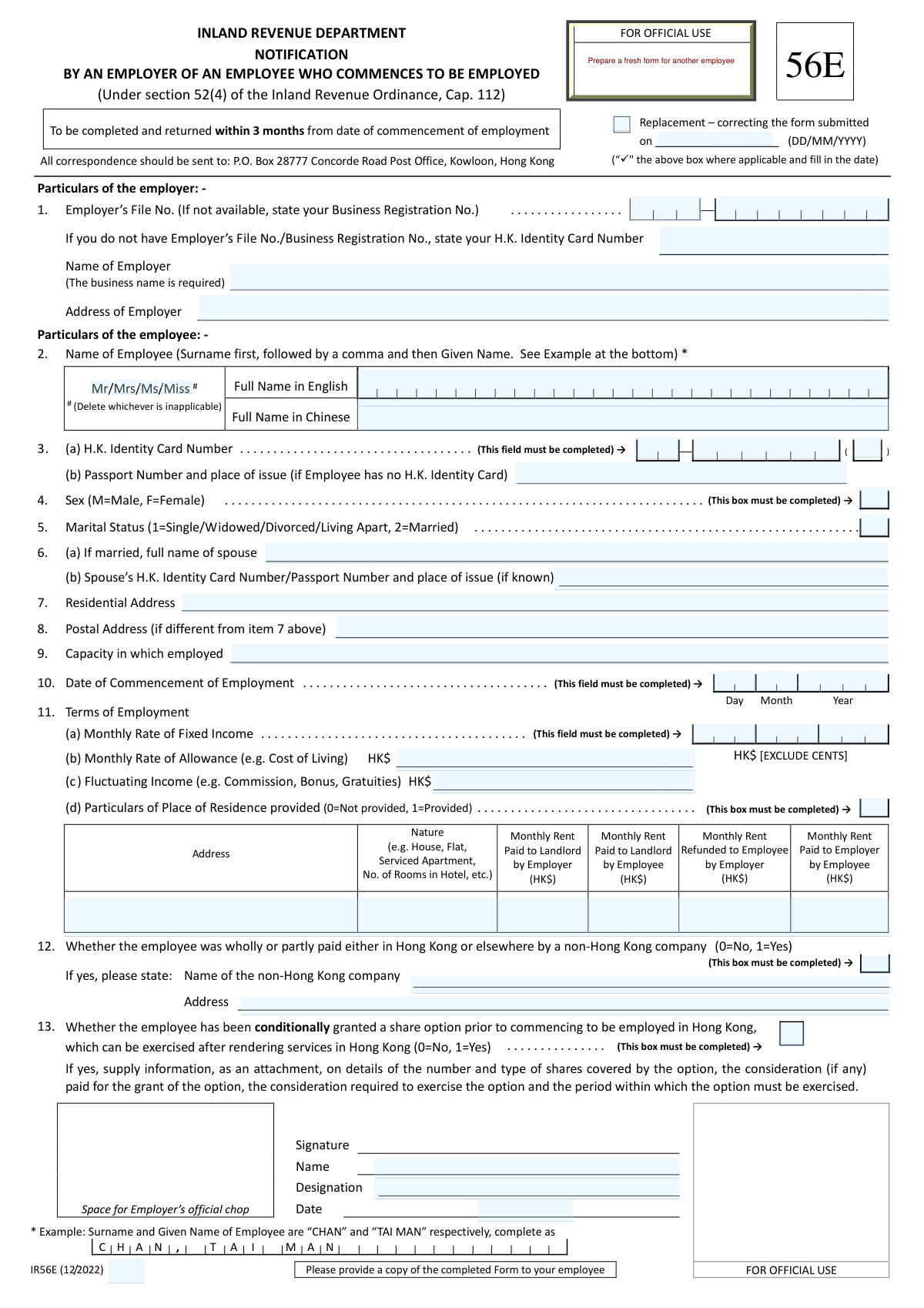
Yes! You can use AI to fill out Form IR56E, Notification by an Employer of an Employee Who Commences to be Employed
Form IR56E is a mandatory notification submitted by employers in Hong Kong to the Inland Revenue Department (IRD) when a new employee is hired. Required under Section 52(4) of the Inland Revenue Ordinance, this form provides the IRD with the employee's personal details and terms of employment for salaries tax purposes. Today, this form can be filled out quickly and accurately using AI-powered services like Instafill.ai, which can also convert non-fillable PDF versions into interactive fillable forms.
Our AI automatically handles information lookup, data retrieval, formatting, and form filling.
It takes less than a minute to fill out IR56E using our AI form filling.
Securely upload your data. Information is encrypted in transit and deleted immediately after the form is filled out.
Form specifications
| Form name: | Form IR56E, Notification by an Employer of an Employee Who Commences to be Employed |
| Number of fields: | 44 |
| Number of pages: | 1 |
| Language: | English |
| Categories: | employee forms, employer forms |
Instafill Demo: How to fill out PDF forms in seconds with AI
How to Fill Out IR56E Online for Free in 2026
Are you looking to fill out a IR56E form online quickly and accurately? Instafill.ai offers the #1 AI-powered PDF filling software of 2026, allowing you to complete your IR56E form in just 37 seconds or less.
Follow these steps to fill out your IR56E form online using Instafill.ai:
- 1 Navigate to Instafill.ai and upload your IR56E form or select it from the template library.
- 2 Provide the employer's particulars, including the Employer's File Number (or Business Registration No.) and business address.
- 3 Enter the new employee's personal details, such as their full name, HKID number, marital status, and residential address.
- 4 Fill in the employment details, including the employee's job title, commencement date, and terms of employment like fixed income and allowances.
- 5 Specify any benefits provided, such as a place of residence, and declare if the employee is paid by a non-Hong Kong company.
- 6 Review all the information auto-filled by the AI for accuracy, make any necessary corrections, and provide the employer's signature and date.
- 7 Download the completed IR56E form for submission to the Inland Revenue Department and provide a copy to your employee.
Our AI-powered system ensures each field is filled out correctly, reducing errors and saving you time.
Why Choose Instafill.ai for Your Fillable IR56E Form?
Speed
Complete your IR56E in as little as 37 seconds.
Up-to-Date
Always use the latest 2026 IR56E form version.
Cost-effective
No need to hire expensive lawyers.
Accuracy
Our AI performs 10 compliance checks to ensure your form is error-free.
Security
Your personal information is protected with bank-level encryption.
Frequently Asked Questions About Form IR56E
Form IR56E is used by employers in Hong Kong to notify the Inland Revenue Department (IRD) about a new employee. Any employer who hires a new staff member must complete and submit this form.
You must submit this form to the Inland Revenue Department within 3 months from the date your new employee commences employment.
To correct a mistake, you should fill out a new IR56E form, tick the 'Replacement' box at the top, and enter the submission date of the incorrect form you are replacing.
You must complete the fields for the employee's H.K. Identity Card number, sex, date of commencement of employment, monthly fixed income, and whether a place of residence is provided. These fields are explicitly marked as required on the form.
If the employee does not have an H.K. Identity Card, you should leave that field blank and instead provide their Passport Number and the place of issue in item 3(b).
You should report any variable or non-fixed income, such as commissions, bonuses, or gratuities, in section 11(c) for 'Fluctuating Income'.
If you provide a place of residence, you must enter '1' in the box for item 11(d) and complete the table with the property's address, nature (e.g., flat, house), and details of any rent paid by the employer or employee.
You must indicate '1' (Yes) in the box for item 12 and provide the full name and address of the non-Hong Kong company that is paying the employee.
Yes, the form explicitly states at the bottom that you should provide a copy of the completed form to your employee for their records.
All completed correspondence, including this form, should be sent to the P.O. Box address provided at the top: P.O. Box 28777 Concorde Road Post Office, Kowloon, Hong Kong.
Yes, you can use AI-powered services like Instafill.ai to accurately auto-fill form fields from your existing records, which helps save time and reduce errors.
To fill this form online, you can upload the IR56E PDF to Instafill.ai. The platform's AI will identify the fields, allowing you to fill them in interactively and save or print the completed document.
If you have a non-fillable or 'flat' PDF, you can use a service like Instafill.ai. It can convert the static PDF into an interactive, fillable form that you can complete on your computer.
The 'Residential Address' is where the employee physically lives. The 'Postal Address' is for mailing purposes and only needs to be filled out if it is different from the residential address.
Compliance IR56E
Validation Checks by Instafill.ai
1
Employer Identifier Presence
This check ensures that at least one form of employer identification is provided in Section 1. The system verifies that either the 'Employer’s File No.', 'Business Registration No.', or the employer's 'H.K. Identity Card Number' is filled. This is critical for the Inland Revenue Department to correctly identify the reporting employer. A failure would result in form rejection, as the submission cannot be linked to a specific employer entity.
2
Employee Identifier Exclusivity and Completeness
This validation confirms that Section 3 contains either a valid H.K. Identity Card Number or a Passport Number, but not neither. The form mandates the HKID field, but allows a passport as an alternative. This check prevents submissions with no primary identifier for the employee, which is essential for tax record creation and matching. If both are blank, the form is incomplete and must be corrected.
3
H.K. Identity Card Number Format
This check validates the structural format of the H.K. Identity Card Number in Section 3(a). It ensures the number conforms to the standard pattern of a one or two-letter prefix, followed by six digits, and a single alphanumeric check digit in parentheses (e.g., WX123456(A)). Correct formatting is crucial for data integrity and successful lookup in government systems. An invalid format would block processing until a valid HKID is provided.
4
Marital Status and Spouse Details Consistency
This is a logical check that links Section 5 (Marital Status) and Section 6 (Spouse's details). If the Marital Status is '2' (Married), the system verifies that the 'Spouse's Full Name' in Section 6(a) is not empty. This ensures that required dependent information is captured for accurate tax assessment. If the status is 'Married' but spouse details are missing, the submission will be flagged for completion.
5
Date of Commencement of Employment Validity
This validation ensures the 'Date of Commencement of Employment' in Section 10 is a required, valid date in the past, formatted as DD/MM/YYYY. The date cannot be in the future, as it reports on an employment that has already begun. This date is fundamental to the form's purpose, and an invalid or missing date would render the submission meaningless and lead to rejection.
6
Submission Deadline Compliance
This check verifies that the form is being submitted within the legally mandated timeframe. It calculates the difference between the current date (submission date) and the 'Date of Commencement of Employment' from Section 10. If this period exceeds 3 months, the submission is flagged as late. This is important for ensuring employer compliance with the Inland Revenue Ordinance.
7
Required Binary Field Completion
This check verifies that all mandatory binary-choice fields are completed. It specifically targets Section 4 (Sex), Section 11(d) (Place of Residence provided), Section 12 (Paid by non-HK company), and Section 13 (Share option). Each of these fields must contain one of the specified single-character codes (e.g., 'M'/'F', '0'/'1'). Missing values in these fields make the employee's profile incomplete and will halt processing.
8
Place of Residence Conditional Details
This validation is triggered based on the value in Section 11(d). If the value is '1' (indicating a place of residence is provided), the system then checks that the corresponding 'Address' and 'Nature' fields are populated. This ensures that when a housing benefit is declared, its essential details are also captured for tax calculation purposes. A failure would prompt the user to provide the missing residence details.
9
Non-Hong Kong Company Payment Conditional Details
This check enforces a conditional rule for Section 12. If the user enters '1' (Yes) to indicate the employee is paid by a non-Hong Kong company, the system validates that the 'Name of the non-Hong Kong company' and its 'Address' are provided. This information is critical for understanding complex cross-border employment arrangements. If these dependent fields are empty, the form will be considered incomplete.
10
Monthly Fixed Income Format
This validation ensures the 'Monthly Rate of Fixed Income' in Section 11(a) is a valid, non-negative numeric value. As per the form's instruction '[EXCLUDE CENTS]', the check also confirms that the entry is a whole number. This is a mandatory field, and incorrect formatting or a non-numeric value would prevent accurate calculation of the employee's income and potential tax liability.
11
Replacement Form Date Logic
This check applies if the 'Replacement' checkbox at the top of the form is ticked. It validates that the associated date field for the original submission is filled with a valid date in DD/MM/YYYY format. Furthermore, it ensures this date is before the current submission date. This logic is essential for maintaining a clear audit trail of form corrections.
12
Signature Date Logical Consistency
This validation compares the 'Date of Signature' with the 'Date of Commencement of Employment' (Section 10). The signature date must be on or after the employment commencement date. It is illogical for an employer to sign and submit this form before the employee has officially started their employment. A failure indicates a likely data entry error that needs correction.
Common Mistakes in Completing IR56E
Employers mistakenly enter an incorrect Employer's File Number, use a personal ID instead of the Business Registration Number, or mix up the order of precedence. This happens due to unfamiliarity with the required identifier or simple data entry errors. An incorrect identifier can lead to processing delays, misallocation of the employee's record, or rejection of the form, requiring resubmission. To avoid this, double-check the number against official company documents and follow the form's hierarchy: Employer's File No. first, then Business Registration No., and only then a personal HKID if the others are unavailable.
Users often fail to follow the strict format 'Surname first, followed by a comma and then Given Name' as specified in Section 2. This mistake occurs because people are accustomed to writing their name in a different order and overlook the specific instruction and example provided. Incorrect formatting can cause data matching issues within the Inland Revenue Department's systems, potentially delaying the creation or update of the employee's tax profile. Always enter the surname, then a comma, then the given name exactly as shown in the example.
The employee's Hong Kong Identity Card number in Section 3 is frequently entered incorrectly or left blank, despite being marked as a mandatory field. Common errors include transposing digits, omitting the letter prefix, or forgetting the check digit in parentheses. This critical error will almost certainly lead to the form's rejection, as the HKID is the primary identifier for the employee. Carefully transcribe the full HKID number, including all letters and the parenthesized check digit, from the employee's official card.
Several fields require a specific numeric code (e.g., Marital Status '1' or '2'; Residence Provided '0' or '1'), but users write out the word (e.g., 'Married', 'No') instead. This happens when filers rush and don't read the instructions for the field. Using the wrong format causes automated data capture to fail, requiring manual correction and delaying processing. Always use the exact numeric codes as specified in the field's instructions to ensure smooth processing.
For questions in Sections 11(d), 12, and 13, which require a '0' for 'No' or a '1' for 'Yes', people often leave the box blank if the answer is 'No'. This ambiguity forces the tax authority to treat the form as incomplete, as a blank field could mean 'No' or that the question was missed. This will result in processing delays or requests for clarification. To prevent this, you must explicitly enter '0' in these boxes if the condition does not apply.
In Section 11(b) for allowances, the form explicitly states '[EXCLUDE CENTS]', but filers often include them out of habit. This minor error can cause discrepancies in data entry and requires manual adjustment by the authorities. It demonstrates a lack of attention to detail that may trigger further scrutiny of the form. To avoid this, always round income figures to the nearest dollar as instructed for the specific field.
When an employer provides housing (Section 11d), they often correctly enter '1' but then fail to complete the detailed grid that follows. The breakdown of rent paid by the employer, employee, and any refunds is complex and frequently left incomplete or filled with ambiguous information. This missing data is crucial for calculating housing benefits and will lead to inquiries from the IRD. If housing is provided, every column in the grid must be filled out accurately, using '0' for any amounts that are not applicable.
In Section 9, 'Capacity in which employed', filers sometimes enter generic terms like 'Staff', 'Associate', or 'Consultant' instead of a specific job title like 'Senior Marketing Manager' or 'Junior Accountant'. This lack of specificity can make it difficult for the tax authority to assess the nature of the employment and income. Always use the employee's official, descriptive job title to avoid potential questions or clarifications from the IRD.
The form requires additional details if certain conditions are met, which are often forgotten. For example, if an employee is married, the spouse's details in Section 6 are required. Similarly, if payment is from a non-HK company (Section 12) or share options are granted (Section 13), the corresponding details or attachments are mandatory. Forgetting this follow-up information after checking 'Yes' or 'Married' renders the submission incomplete and will require a follow-up. AI-powered tools like Instafill.ai can help by automatically prompting for this conditional information, ensuring a complete submission.
A surprisingly common mistake is submitting the form without the authorized signature, signatory's name, date, or the official company chop (stamp). This is often an oversight during the final review before sending. An unsigned or unstamped form is legally invalid and will be immediately rejected by the Inland Revenue Department, forcing the employer to resubmit and potentially miss the 3-month deadline. Always perform a final check to ensure all authorization fields are properly completed.
Government forms are often provided as non-fillable PDFs, leading to handwritten submissions that can be illegible, contain crossed-out errors, or have formatting mistakes. This makes data entry difficult and error-prone for the tax authority, increasing processing time. Using a tool like Instafill.ai can convert such flat PDFs into smart, fillable forms. This allows for clean, typed entries, data validation, and easy correction of mistakes before printing, ensuring a professional and error-free submission.
Saved over 80 hours a year
“I was never sure if my IRS forms like W-9 were filled correctly. Now, I can complete the forms accurately without any external help.”
Kevin Martin Green
Your data stays secure with advanced protection from Instafill and our subprocessors

Robust compliance program
Transparent business model
You’re not the product. You always know where your data is and what it is processed for.
ISO 27001, HIPAA, and GDPR
Our subprocesses adhere to multiple compliance standards, including but not limited to ISO 27001, HIPAA, and GDPR.
Security & privacy by design
We consider security and privacy from the initial design phase of any new service or functionality. It’s not an afterthought, it’s built-in, including support for two-factor authentication (2FA) to further protect your account.
Fill out IR56E with Instafill.ai
Worried about filling PDFs wrong? Instafill securely fills form-ir56e-notification-by-an-employer-of-an-employee-who-commences-to-be-employed forms, ensuring each field is accurate.