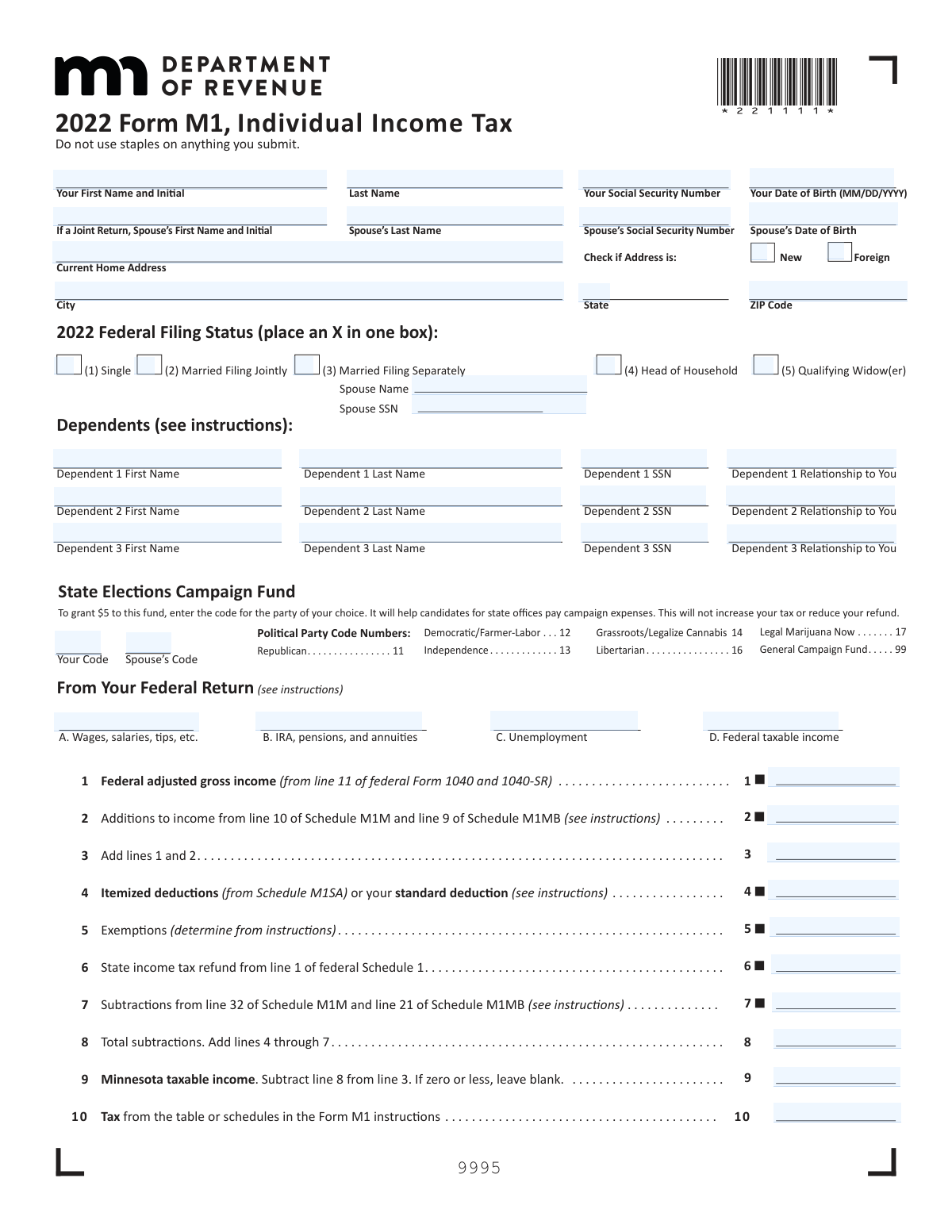
Yes! You can use AI to fill out Form M1, Individual Income Tax

Form M1 is the primary tax document used by individuals to report their income, calculate their tax liability, and file their annual income tax return with the Minnesota Department of Revenue. It is essential for determining if a taxpayer is owed a refund or has a balance due to the state, based on their income, deductions, and credits. Today, this form can be filled out quickly and accurately using AI-powered services like Instafill.ai, which can also convert non-fillable PDF versions into interactive fillable forms.
Our AI automatically handles information lookup, data retrieval, formatting, and form filling.
It takes less than a minute to fill out M1 using our AI form filling.
Securely upload your data. Information is encrypted in transit and deleted immediately after the form is filled out.

Form specifications

Form name: Form M1, Individual Income Tax
Number of pages: 2
Language: English
Categories: tax forms, individual tax forms, income forms, income tax forms
main-image

Instafill Demo: How to fill out PDF forms in seconds with AI

How to Fill Out M1 Online for Free in 2026

Are you looking to fill out a M1 form online quickly and accurately? Instafill.ai offers the #1 AI-powered PDF filling software of 2026, allowing you to complete your M1 form in just 37 seconds or less.
Follow these steps to fill out your M1 form online using Instafill.ai:
  1. 1 Navigate to Instafill.ai and upload your Form M1 or select it from the template library.
  2. 2 Provide your personal information, including your name, Social Security Number, address, and federal filing status, as prompted by the AI assistant.
  3. 3 Enter your income details, starting with your federal adjusted gross income from Form 1040, along with any additions or subtractions specific to Minnesota.
  4. 4 Input your deductions, exemptions, and any applicable tax credits from schedules like M1C or M1REF. The AI will guide you through these sections.
  5. 5 Let the AI automatically calculate your Minnesota taxable income, total tax, and final refund or amount owed based on the information you've provided.
  6. 6 Review the entire completed form for accuracy, then provide your bank account details for direct deposit of your refund, if applicable.
  7. 7 Electronically sign the form and follow the final instructions to submit your Minnesota state tax return.

Our AI-powered system ensures each field is filled out correctly, reducing errors and saving you time.

Why Choose Instafill.ai for Your Fillable M1 Form?

Speed

Complete your M1 in as little as 37 seconds.

Up-to-Date

Always use the latest 2026 M1 form version.

Cost-effective

No need to hire expensive lawyers.

Accuracy

Our AI performs 10 compliance checks to ensure your form is error-free.

Security

Your personal information is protected with bank-level encryption.

Frequently Asked Questions About Form M1

Form M1 is the 2022 Minnesota Individual Income Tax return. It is used to calculate your state income tax liability, claim any applicable deductions and credits, and determine if you will receive a refund or owe additional tax to the state.

You must file a Form M1 if you are a Minnesota resident, part-year resident, or a nonresident who received Minnesota gross income above the state's minimum filing threshold for the year. Specific rules and schedules, like the M1NR for nonresidents, apply based on your residency status.

You will need your Federal Adjusted Gross Income from line 11 of your federal Form 1040, your federal filing status, and dependent information. You are also required to attach a complete copy of your 2022 federal return and its schedules when you submit Form M1.

This is an optional program that allows you to direct $5 to a state political party or a general campaign fund. Contributing will not increase the tax you owe or reduce the amount of your refund.

Yes, part-year residents and nonresidents must complete Schedule M1NR to calculate the portion of their income that is taxable by Minnesota. You will then transfer the results from Schedule M1NR to lines 13, 13a, and 13b of your Form M1.

Your total Minnesota income tax withheld is reported on line 20 of Form M1. You must also complete and enclose Schedule M1W, which details the withholding from all your W-2s, 1099s, and other relevant forms.

To have your refund directly deposited, complete line 25 by checking either the 'Checking' or 'Savings' box and entering your bank's nine-digit routing number and your account number. Direct deposit is not available for accounts associated with foreign banks.

If you have a non-fillable or 'flat' PDF, you can use an online tool to make it interactive. Services like Instafill.ai can convert static PDFs into fillable forms that you can complete on your computer.

Yes, modern services like Instafill.ai use AI to help you fill out forms like the M1 accurately and efficiently. These tools can auto-fill your personal information and other data, saving you time and helping to prevent errors.

To use Instafill.ai, you simply upload the Form M1 PDF to their website. The AI will make the document interactive, guide you through filling out the fields, and then allow you to download the completed form for printing and mailing.

These are separate Minnesota tax schedules that you may need to complete and attach to your Form M1. For example, Schedule M1M is for income additions and subtractions, while Schedule M1C is used to claim nonrefundable credits.

Mail your completed and signed return, along with a copy of your federal return and any other required schedules, to: Minnesota Individual Income Tax, Mail Station 0010, 600 N. Robert St., St. Paul, MN 55145-0010.

Instead of staples, you should use a paperclip to keep your Form M1, your federal tax return copy, and any other required schedules and documents together. This helps ensure your return is processed smoothly without damage from staple removal.

Compliance M1
Validation Checks by Instafill.ai

1
Validates Social Security Number Format
This check ensures that the 'Taxpayer Social Security Number', 'Spouse's Social Security Number', and all 'Dependent SSN' fields contain exactly nine digits. An incorrect SSN format can lead to processing delays, rejection of the return, or misapplication of tax records. If the validation fails, the user must correct the SSN before the form can be successfully submitted.
2
Ensures Spouse Information is Complete for Married Filing Statuses
This validation verifies that if the filing status is 'Married Filing Jointly' or 'Married Filing Separately', the spouse's name and Social Security Number are provided. This information is legally required for these filing statuses to correctly process the return and associate it with the spouse. Failure to provide this information will result in a processing error and likely a rejection of the filing.
3
Verifies Calculation of Total Income (Line 3)
This check confirms that the value entered on Line 3 is the correct sum of the amounts on Line 1 (Federal adjusted gross income) and Line 2 (Additions to income). Accurate calculations are fundamental to determining the correct tax liability. If this calculation is incorrect, all subsequent lines will be wrong, leading to an inaccurate tax assessment and requiring an amended return.
4
Verifies Calculation of Total Subtractions (Line 8)
This validation ensures the amount on Line 8 is the correct sum of lines 4 through 7. This total is critical for accurately calculating the Minnesota taxable income. An error here will directly impact the taxable income on Line 9 and the final tax calculation, potentially causing the filer to overpay or underpay their taxes.
5
Validates Minnesota Taxable Income Calculation and Zero/Negative Rule (Line 9)
This check verifies that Line 9 is correctly calculated by subtracting Line 8 from Line 3. It also enforces the rule that if the result is zero or less, the field must be left blank. This is important for preventing negative income values from being processed, which could cause system errors and incorrect tax calculations on subsequent lines.
6
Ensures Mutual Exclusivity of Refund and Amount Owed
This validation confirms that a value is entered in either Line 24 (Refund) or Line 26 (Amount You Owe), but not both. A tax return can only result in a refund or a balance due, never both simultaneously. Having values in both fields indicates a major calculation error and would cause the return to be rejected.
7
Validates Completeness of Direct Deposit Information
This check ensures that if the taxpayer opts for a direct deposit by selecting either the 'Checking' or 'Savings' box on Line 25, both the Routing Number and Account Number fields are completed. Missing this information prevents the direct deposit from being processed, forcing the tax authority to issue a paper check, which significantly delays the refund. The validation fails if the account details are incomplete when a direct deposit option is chosen.
8
Validates Bank Routing Number Format
This validation verifies that the bank routing number entered for direct deposit is exactly nine digits long. This is a standard requirement for all U.S. financial institutions for electronic funds transfers. An incorrect number of digits will cause the direct deposit transaction to fail, leading to a delayed refund while a paper check is issued.
9
Validates Date of Birth Format (MM/DD/YYYY)
This check ensures that the taxpayer's and spouse's dates of birth are entered in the correct MM/DD/YYYY format. This format is crucial for system parsing and for verifying the identity of the filer against official records. An invalid date format can lead to data entry rejection or processing errors.
10
Validates State Elections Campaign Fund Code
This validation ensures that if a code is entered for the State Elections Campaign Fund, it is one of the specific, valid codes provided on the form (11, 12, 13, 14, 16, 17, 99). Using an invalid code would cause an error as the system would not know which fund to allocate the contribution to. The check prevents invalid data from being submitted, ensuring the filer's choice is correctly recorded.
11
Ensures Complete Information for Each Listed Dependent
This check verifies that for any dependent listed, all associated fields (First Name, Last Name, SSN, and Relationship) are filled out completely. Incomplete dependent information prevents the tax authority from verifying the dependent's eligibility, which can lead to the disallowance of related exemptions or credits. The form submission should be blocked until all information for a listed dependent is provided.
12
Verifies Both Signatures are Present for Joint Returns
This validation confirms that when a return is filed with the 'Married Filing Jointly' status, both the taxpayer's and the spouse's signature fields are completed. A joint return is a legal declaration by both parties, and a missing signature from either spouse invalidates the entire return. The submission will be rejected until both signatures are provided.
13
Verifies Calculation of Total Payments (Line 23)
This check ensures the value on Line 23 correctly represents the sum of Minnesota tax withheld (Line 20), estimated payments (Line 21), and refundable credits (Line 22). This total is essential for determining whether the filer will receive a refund or owes additional tax. An error on this line will lead to an incorrect refund or balance due calculation.
14
Validates Apportionment of Tax Refund
This validation ensures that if a taxpayer chooses to split their refund, the sum of the amounts on lines 28 and 29 equals the total refund amount on line 24. This prevents discrepancies in the refund disbursement and ensures the taxpayer's funds are allocated as requested. An imbalance would cause a processing hold until the filer clarifies how the refund should be handled.
15
Ensures Preparer Tax ID Number (PTIN) is Provided
This check verifies that if a paid preparer signs the return, their Preparer Tax Identification Number (PTIN) is also entered. Revenue departments require a valid PTIN for all paid preparers to identify them and ensure accountability. A return signed by a paid preparer without a PTIN will be considered improperly filed and rejected.

Common Mistakes in Completing M1

Incorrect Federal AGI Transcription

Filers often make a mistake when transferring their Federal Adjusted Gross Income (AGI) from their federal Form 1040 (line 11) to the state Form M1 (line 1). This can happen due to a simple typo or looking at the wrong line on the federal return. Since this number is the starting point for the entire state tax calculation, an error here will make almost every subsequent line incorrect, leading to processing delays and an incorrect tax assessment. Always double-check that the amount on line 1 matches your federal return exactly.

Missing Required Schedules and Federal Return

This form requires attaching multiple other documents, such as a copy of the federal return and various Minnesota schedules (M1M, M1SA, M1NR, M1C, M1W, etc.) if certain lines are filled out. People frequently forget to include one or more of these required attachments. This is a critical error that will halt the processing of the return and result in a notice from the Department of Revenue requesting the missing information, significantly delaying any refund. Create a checklist of all required documents before mailing your return.

Confusion Over Residency Status (Line 13)

A common point of confusion is the section for residency status. Full-year residents must enter the amount from line 12 on line 13 and skip lines 13a and 13b. However, part-year residents and nonresidents must complete and attach Schedule M1NR, then transfer specific amounts to lines 13, 13a, and 13b. Failing to complete and attach Schedule M1NR when required, or filling out the wrong lines for your residency status, will lead to an incorrect tax calculation and processing delays.

Mathematical Errors in Calculations

Simple arithmetic errors are extremely common on tax forms, especially on lines that require adding or subtracting multiple other lines (e.g., lines 3, 8, 9, 15, 19, and 23). A small miscalculation can throw off the final refund or amount owed, potentially leading to underpayment penalties or a smaller refund than expected. It is crucial to carefully re-check all calculations, preferably with a calculator, before finalizing the form. AI-powered tools like Instafill.ai can eliminate these errors by performing calculations automatically.

Incorrect or Incomplete Dependent Information

When listing dependents, filers sometimes omit required information like the dependent's Social Security Number (SSN), last name, or relationship. For a dependency exemption to be valid, all fields must be completed accurately and match Social Security Administration records. Leaving this information blank or providing an incorrect SSN will cause the exemption to be disallowed, increasing your taxable income and tax liability, and delaying your return's processing.

Errors in Direct Deposit Information

On line 25, filers requesting a direct deposit refund may accidentally transpose digits in their bank routing or account number. Another mistake is failing to check the correct box for 'Checking' or 'Savings'. These errors will cause the refund to be rejected by the bank and returned to the state, which will then issue a paper check, delaying the refund by several weeks. Carefully verify the numbers with your bank or a check, and note the form's instruction that the account cannot be associated with a foreign bank.

Forgetting to Sign and Date the Return

An unsigned tax return is considered invalid and will not be processed. This is a surprisingly frequent oversight, especially for paper filers. If filing a joint return, both spouses must sign and date the form for it to be valid. Forgetting a signature is a guaranteed way to have your return sent back to you, delaying its processing and any potential refund. Always perform a final check for signatures before mailing.

Mismatched Names and Social Security Numbers

The names and Social Security Numbers (SSNs) for the taxpayer, spouse, and all dependents must be entered exactly as they appear on the Social Security cards. Common mistakes include using nicknames, forgetting a middle initial, or having a name that has recently changed but not been updated with the SSA. Any mismatch will cause an electronic filing rejection or a processing delay for a paper return, as the information cannot be validated. AI form-filling tools like Instafill.ai can help by saving and consistently applying the correct personal data across forms.

Incorrect Filing Status Selection

Choosing the correct filing status is crucial as it determines your standard deduction, tax rates, and eligibility for certain credits. Filers may incorrectly select 'Head of Household' without meeting the strict requirements, or if 'Married Filing Separately,' they may forget to enter their spouse's name and SSN in the designated area. An incorrect filing status can lead to a significant miscalculation of tax owed and may trigger an audit. Always review the filing status definitions in the form instructions carefully.

Ignoring the 'Do Not Staple' Instruction

The top of the form explicitly states, 'Do not use staples on anything you submit.' Tax agencies use automated high-speed scanners to process paper returns, and staples can jam or damage these machines, as well as tear the documents themselves. This can lead to processing errors or delays. Use a paperclip to keep your documents together instead of staples to ensure your return is processed smoothly.

Omitting State-Specific Income Adjustments

Lines 2 (Additions) and 7 (Subtractions) are critical for adjusting federal income to Minnesota taxable income, but they are often overlooked. These lines require information from Schedules M1M and M1MB, which account for things like out-of-state municipal bond interest or federal bonus depreciation. Forgetting to complete these schedules and report the adjustments means you are not calculating your Minnesota income correctly, which could result in overpaying or underpaying your tax. If the form is a non-fillable PDF, a tool like Instafill.ai can make it fillable, simplifying the process of entering data from these complex schedules.
Saved over 80 hours a year

“I was never sure if my IRS forms like W-9 were filled correctly. Now, I can complete the forms accurately without any external help.”

Kevin Martin Green

Your data stays secure with advanced protection from Instafill and our subprocessors

Robust compliance program

Transparent business model

You’re not the product. You always know where your data is and what it is processed for.

ISO 27001, HIPAA, and GDPR

Our subprocesses adhere to multiple compliance standards, including but not limited to ISO 27001, HIPAA, and GDPR.

Security & privacy by design

We consider security and privacy from the initial design phase of any new service or functionality. It’s not an afterthought, it’s built-in, including support for two-factor authentication (2FA) to further protect your account.

Fill out M1 with Instafill.ai

Worried about filling PDFs wrong? Instafill securely fills form-m1-individual-income-tax forms, ensuring each field is accurate.