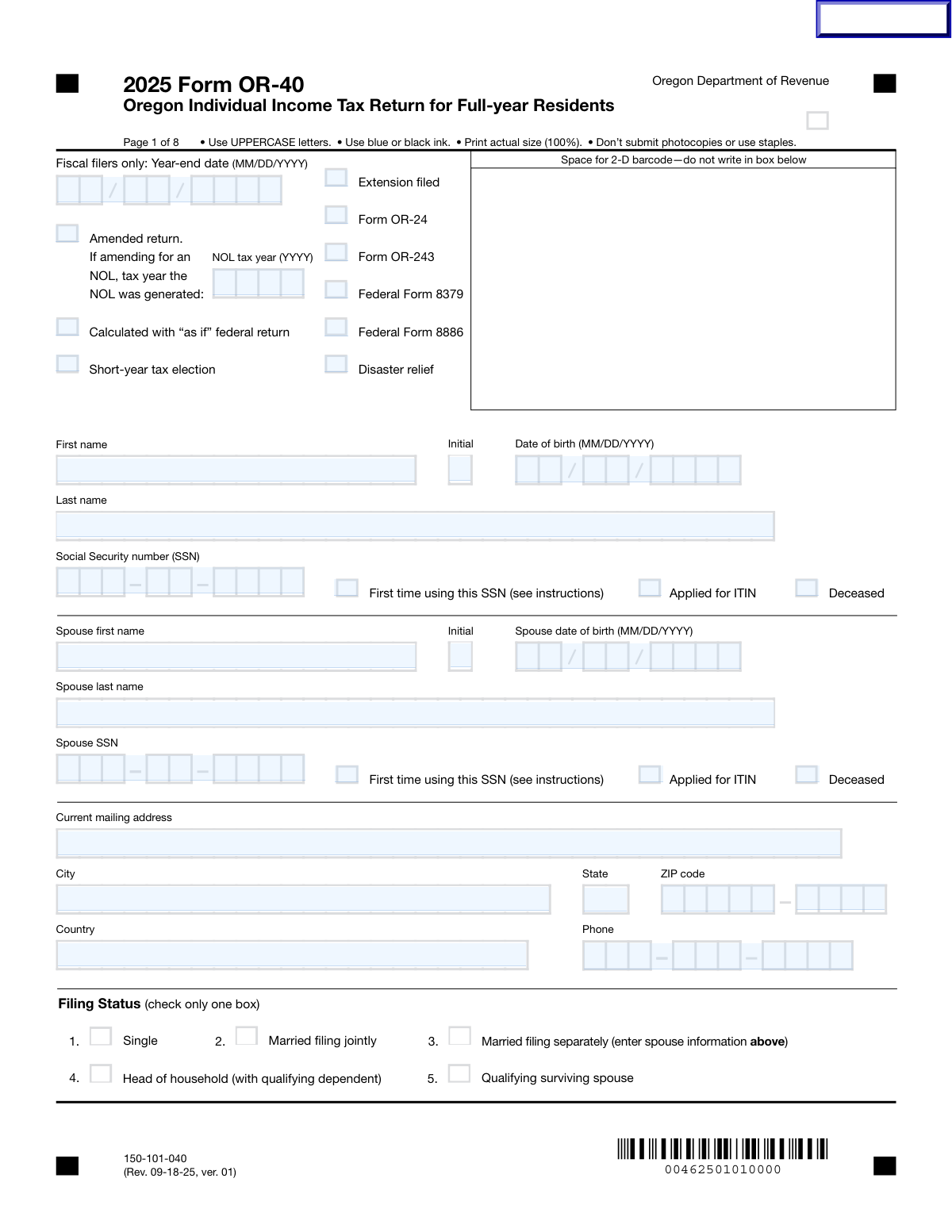
Yes! You can use AI to fill out Form OR-40, Oregon Individual Income Tax Return
Form OR-40, the Oregon Individual Income Tax Return, is the official document used by residents of Oregon to file their annual state income taxes. It is essential for reporting all sources of income, claiming eligible deductions and credits (including the unique Oregon 'kicker' surplus refund), and calculating the final tax liability or refund due to the state. Today, this form can be filled out quickly and accurately using AI-powered services like Instafill.ai, which can also convert non-fillable PDF versions into interactive fillable forms.
Our AI automatically handles information lookup, data retrieval, formatting, and form filling.
It takes less than a minute to fill out Form OR-40 using our AI form filling.
Securely upload your data. Information is encrypted in transit and deleted immediately after the form is filled out.
Form specifications
| Form name: | Form OR-40, Oregon Individual Income Tax Return |
| Number of fields: | 165 |
| Number of pages: | 8 |
| Language: | English |
| Categories: | income forms, income tax forms, individual tax forms, tax forms |
Instafill Demo: How to fill out PDF forms in seconds with AI
How to Fill Out Form OR-40 Online for Free in 2026
Are you looking to fill out a FORM OR-40 form online quickly and accurately? Instafill.ai offers the #1 AI-powered PDF filling software of 2026, allowing you to complete your FORM OR-40 form in just 37 seconds or less.
Follow these steps to fill out your FORM OR-40 form online using Instafill.ai:
- 1 Navigate to Instafill.ai and upload or select Form OR-40.
- 2 Gather all your tax documents, including W-2s, 1099s, your federal tax return (Form 1040), and records of any deductions or credits.
- 3 Use the AI assistant to accurately fill in your personal details, filing status, and information for your spouse and any dependents.
- 4 Enter your income information, starting with your Federal Adjusted Gross Income, and then list any Oregon-specific additions or subtractions.
- 5 Detail your deductions (standard or itemized) and any applicable tax credits, such as the exemption credit, political contribution credit, or Oregon Kids Credit.
- 6 Review the final tax calculation, enter your withholding and other payments, and determine your net refund or the amount you owe, including any kicker amount.
- 7 Electronically sign the form, provide preparer information if applicable, and follow the instructions to submit your completed Oregon tax return.
Our AI-powered system ensures each field is filled out correctly, reducing errors and saving you time.
Why Choose Instafill.ai for Your Fillable Form OR-40 Form?
Speed
Complete your Form OR-40 in as little as 37 seconds.
Up-to-Date
Always use the latest 2026 Form OR-40 form version.
Cost-effective
No need to hire expensive lawyers.
Accuracy
Our AI performs 10 compliance checks to ensure your form is error-free.
Security
Your personal information is protected with bank-level encryption.
Frequently Asked Questions About Form Form OR-40
This form, the Oregon Individual Income Tax Return (Form OR-40), is used by Oregon residents to calculate and file their state income taxes, report income, and claim applicable deductions and credits.
You generally need to file this form if you are an Oregon resident, a part-year resident, or a non-resident with income from Oregon sources and you meet the state's minimum income filing requirements for the tax year.
The 'kicker' is your share of the state's surplus tax revenue, which is returned to taxpayers. You enter your kicker amount on line 32, or you can elect to donate it to the State School Fund.
Your Federal AGI is taken directly from your federal tax return. You can find this amount on line 11 of federal Form 1040, 1040-SR, or 1040-NR.
In the 'Return Filing Information' section at the top of the form, there is a checkbox labeled 'Extension Filed' that you should check to indicate you have filed for an extension.
The form allows you to take the larger of either your Oregon standard deduction or your Oregon itemized deductions from Schedule OR-A. You will enter the higher amount on line 18 to maximize your deduction and lower your taxable income.
Yes, you can receive your refund via direct deposit by providing your bank's routing number and your account number in the 'Net refund' section. You must also indicate if the account is checking or savings.
For each dependent, you must provide their full name, date of birth, Social Security Number (SSN), and their relationship to you. You also need to indicate if a dependent child has a qualifying disability.
You must file an amended return. The form has a section for 'Amended Statement Details' where you need to provide a thorough explanation of the changes you are making, including the line numbers affected.
You can check this box to claim an additional exemption credit for yourself or your spouse if you meet the state's specific criteria for a severe disability. This credit can help reduce your total tax liability.
There is a specific checkbox in the 'Taxpayer Information' section labeled 'First time using SSN'. You should check this box if this is the first Oregon tax return filed using your SSN.
Yes, services like Instafill.ai use AI to accurately auto-fill form fields from your records, which can save you significant time and help prevent common errors.
Simply upload the Form OR-40 PDF to the Instafill.ai platform. The AI will make the fields interactive, allowing you to fill them out online, connect data sources to auto-fill information, and then download the completed document.
You can use a service like Instafill.ai, which is designed to convert flat, non-fillable PDFs into interactive, fillable forms online. This allows you to easily type your information directly into the fields without printing.
Compliance Form OR-40
Validation Checks by Instafill.ai
1
Validates Social Security Number (SSN) Format
This check ensures that the 'Social Security Number (SSN)' field for the taxpayer, spouse, and any dependents contains exactly nine digits. It is crucial for correctly identifying taxpayers and processing the return with the IRS and state agencies. A failure in this validation would prevent the form from being submitted, as an invalid SSN leads to immediate rejection by tax authorities.
2
Ensures Exclusive Filing Status Selection
This validation verifies that only one filing status ('Single', 'Married filing jointly', etc.) is selected. A taxpayer can only have one filing status per return, and this choice fundamentally affects calculations for deductions, credits, and tax liability. If more than one status is selected, the system will prompt the user to choose only one before proceeding.
3
Validates Conditional Requirement for Spouse Information
This check ensures that if the filing status is 'Married filing jointly' or 'Married filing separately', the spouse's first name, last name, and SSN are provided. This information is legally required for these filing statuses to validate the identity of both individuals on the return. Failure to provide this information will result in a validation error, blocking submission until the required spouse details are completed.
4
Verifies Consistency Between Date of Birth and Age-Related Checkboxes
This validation cross-references the 'Taxpayer Date of Birth' and 'Spouse Date of Birth' with the 'You were 65 or older' and 'Spouse 65 or older' checkboxes. It ensures that the checkbox is only selected if the person's calculated age is 65 or greater for the given tax year. This is important for determining eligibility for certain tax credits or a higher standard deduction, and a mismatch would cause calculation errors.
5
Ensures Dependent Count Matches Dependent Entries
This check confirms that the number entered in the 'Total Number of Dependents' field matches the number of individual dependent sections that have been filled out. This prevents discrepancies between the summary count and the detailed information provided for each dependent. An inconsistency would lead to incorrect exemption calculations and likely rejection of the return.
6
Validates Mutually Exclusive SSN and ITIN Application Status
This check ensures a taxpayer cannot provide a Social Security Number while also checking the 'Applied for ITIN' box. A person has either an SSN or is applying for/has an ITIN, but not both simultaneously. This logical check prevents contradictory information that would cause processing delays and require manual review by the tax agency.
7
Verifies 'Income After Additions' Calculation
This validation confirms that the value in 'Income After Additions' is the correct sum of 'Federal Adjusted Gross Income' and 'Total Additions'. This is a critical calculation check to ensure the tax form's arithmetic integrity from an early stage. An incorrect sum would cascade into errors in all subsequent tax liability calculations, making the entire return inaccurate.
8
Ensures Mutually Exclusive 'Net Tax Due' and 'Overpayment'
This check verifies that a value is present in either the 'Net Tax Due' field or the 'Overpayment of Tax' field, but not both. A return can result in either money owed or a refund, but it cannot be both. This validation prevents a logical impossibility and ensures the final amount is clear, preventing submission with a conflicting financial outcome.
9
Validates Conditional Requirement for Direct Deposit Information
This check ensures that the 'Routing number' and 'Account number' fields are filled out only if a refund is due ('Overpayment Less Penalty and Interest' > 0) and either the 'Checking' or 'Savings' box is selected. It prevents users from entering sensitive bank information when no refund is expected. It also ensures that if a direct deposit is requested, all necessary information is present to process it.
10
Validates Bank Routing Number Format
This check ensures the 'Routing number' field for direct deposit contains exactly nine digits. This is the standard format for all U.S. bank routing transit numbers. An incorrect number of digits would cause the direct deposit to fail, resulting in a delayed refund that would have to be mailed as a paper check.
11
Validates Conditional Requirement for Spouse's Signature Date
This validation ensures the 'Spouse Signature Date' field is completed if the filing status is 'Married filing jointly'. For a joint return to be valid, both parties must sign and date the form. Missing a spouse's signature date would invalidate the return and require correction and resubmission.
12
Ensures Dependent Information for Head of Household Status
This check verifies that if 'Head of household' is selected as the filing status, at least one qualifying dependent has been entered in the dependents section. The 'Head of household' status has specific legal requirements, including having a qualifying child or dependent. Filing under this status without listing a dependent would result in an automatic rejection or audit by the tax authority.
13
Validates Kicker Donation Logic
This check ensures that if the 'Donate kicker to State School Fund' box is checked, the 'Kicker Amount' entered on line 32 is 0. The instructions state that to donate the full kicker, the taxpayer must enter zero on the kicker line and check the donation box. This validation prevents a conflicting entry where a taxpayer claims the kicker and attempts to donate it simultaneously.
14
Validates Conditional Details for Underpayment Interest
This check ensures that if an amount is entered in the 'Interest on Underpayment of Estimated Tax' field, then either the 'Exception Number' field is filled or the 'Annualized Income Method' checkbox is selected. This provides the necessary justification or calculation method for the underpayment interest amount. Without this corresponding detail, the tax agency cannot verify the interest calculation and may reject it.
Common Mistakes in Completing Form OR-40
This mistake occurs from simple typos or transposing digits when entering the 9-digit SSN for the taxpayer, spouse, or dependents. An incorrect SSN can cause the return to be rejected, delay processing for months, and lead to the denial of key tax credits. Always double-check each SSN against the official Social Security card, and consider using a tool like Instafill.ai, which can help validate the format and prevent common entry errors.
Taxpayers often mistakenly select 'Single' when they qualify for the more advantageous 'Head of Household' status, or they may be confused about rules for other statuses. This error directly impacts the standard deduction amount, tax brackets, and credit eligibility, often resulting in overpayment of taxes. It's crucial to review the criteria for each status; AI-powered tools can guide you through a series of questions to help determine the most beneficial filing status for your situation.
Entering an incorrect routing or account number is a frequent and costly mistake, often caused by transposing digits or misreading a check. An error here will cause the direct deposit to be rejected, forcing the tax agency to mail a paper check and delaying a refund by weeks or months. Carefully verify the routing number, account number, and account type (checking/savings) with your bank before submitting your return.
The Federal AGI is the starting point for the state tax calculation, and transcription errors are common when copying the number from a federal Form 1040. Since all subsequent calculations depend on this figure, an incorrect AGI will make the entire state return inaccurate, leading to processing delays, notices, and potential penalties. Using a service that can import data directly from your federal return can eliminate this risk.
Manually calculating totals for income, deductions, and credits is prone to human error, leading to incorrect tax liability or refund amounts and subsequent notices from the tax department. If you are filling out a non-fillable PDF, these errors are even more likely. AI-powered form-filling tools like Instafill.ai can convert flat PDFs into fillable forms and perform all calculations automatically, eliminating mathematical mistakes.
Errors include misspelling a dependent's name, entering an incorrect SSN or date of birth, or claiming someone who doesn't meet the legal definition of a qualifying dependent. These mistakes can lead to the disallowance of valuable exemption credits, the Oregon Kids Credit, and the Head of Household filing status. This can trigger an audit or require repayment of refunded money with interest, so carefully verify all dependent information.
Taxpayers may not realize they have a choice between the standard deduction and itemizing, or they may incorrectly calculate their itemized deductions on Schedule OR-A. This can result in paying more tax than necessary if they fail to choose the larger, more beneficial deduction. It is essential to calculate both options and enter the larger of the two on the correct line to minimize your tax liability.
The form contains numerous checkboxes for special circumstances like 'Extension Filed', '65 or older', or 'Severe disability'. Forgetting to check a relevant box can result in the loss of credits or the assessment of penalties, while incorrectly checking a box can cause processing delays. Carefully review all checkboxes to ensure they accurately reflect your situation for the tax year.
An unsigned tax return is considered invalid and will not be processed, a simple oversight that is surprisingly common with paper filings. For 'Married filing jointly' returns, the issue is compounded as both spouses are required to sign. Forgetting a signature will halt the processing of your return and any associated refund until a properly signed copy is received by the tax agency.
The form specifies a '2-digit Month: 2-digit Day: 4-digit Year' format for the filing date and similar specific formats for dates of birth. Applicants often default to other common formats like M/D/YY, which can cause data entry errors or rejection by automated scanning systems. Using an intelligent form filler like Instafill.ai can help by automatically formatting dates correctly as you enter them, preventing these types of processing delays.
Saved over 80 hours a year
“I was never sure if my IRS forms like W-9 were filled correctly. Now, I can complete the forms accurately without any external help.”
Kevin Martin Green
Your data stays secure with advanced protection from Instafill and our subprocessors

Robust compliance program
Transparent business model
You’re not the product. You always know where your data is and what it is processed for.
ISO 27001, HIPAA, and GDPR
Our subprocesses adhere to multiple compliance standards, including but not limited to ISO 27001, HIPAA, and GDPR.
Security & privacy by design
We consider security and privacy from the initial design phase of any new service or functionality. It’s not an afterthought, it’s built-in, including support for two-factor authentication (2FA) to further protect your account.
Fill out Form OR-40 with Instafill.ai
Worried about filling PDFs wrong? Instafill securely fills form-or-40-oregon-individual-income-tax-return forms, ensuring each field is accurate.