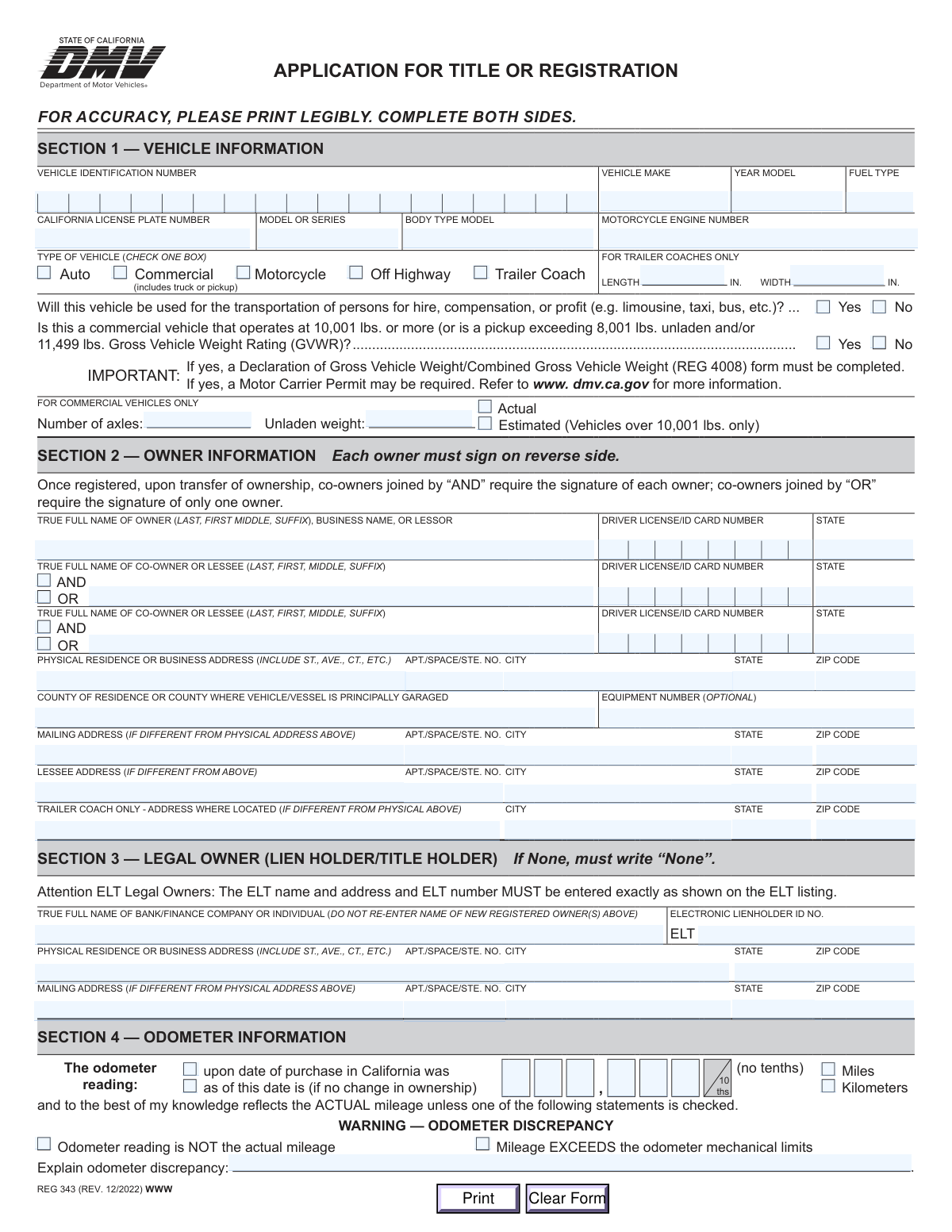
Yes! You can use AI to fill out Form REG 343, Application for Title or Registration

Form REG 343, Application for Title or Registration, is a crucial document used by the California Department of Motor Vehicles (DMV) to process applications for vehicle titling and registration. This form is necessary when purchasing a new or used vehicle, bringing a vehicle into California from another state, or making certain changes to your vehicle's record, capturing essential details about the vehicle, its owners, and any lienholders. Today, this form can be filled out quickly and accurately using AI-powered services like Instafill.ai, which can also convert non-fillable PDF versions into interactive fillable forms.
Our AI automatically handles information lookup, data retrieval, formatting, and form filling.
It takes less than a minute to fill out REG 343 using our AI form filling.
Securely upload your data. Information is encrypted in transit and deleted immediately after the form is filled out.

Form specifications

Form name: Form REG 343, Application for Title or Registration
Number of fields: 143
Number of pages: 2
Language: English
Categories: registration forms
main-image

Instafill Demo: How to fill out PDF forms in seconds with AI

How to Fill Out REG 343 Online for Free in 2026

Are you looking to fill out a REG 343 form online quickly and accurately? Instafill.ai offers the #1 AI-powered PDF filling software of 2026, allowing you to complete your REG 343 form in just 37 seconds or less.
Follow these steps to fill out your REG 343 form online using Instafill.ai:
  1. 1 Navigate to Instafill.ai and upload or select the REG 343 form.
  2. 2 Allow the AI to scan the form and identify all the required fields, such as vehicle information, owner details, and cost information.
  3. 3 Provide your information by answering simple questions in a guided, step-by-step process for sections like Vehicle Information, Owner Information, and Odometer Information.
  4. 4 Enter specific details including the Vehicle Identification Number (VIN), purchase price or market value, and dates related to the vehicle's entry and operation in California.
  5. 5 Review all the information you've provided for accuracy, then proceed to the certification section to electronically sign and date the document.
  6. 6 Download your completed, signed REG 343 form, ready for submission to the California DMV.

Our AI-powered system ensures each field is filled out correctly, reducing errors and saving you time.

Why Choose Instafill.ai for Your Fillable REG 343 Form?

Speed

Complete your REG 343 in as little as 37 seconds.

Up-to-Date

Always use the latest 2026 REG 343 form version.

Cost-effective

No need to hire expensive lawyers.

Accuracy

Our AI performs 10 compliance checks to ensure your form is error-free.

Security

Your personal information is protected with bank-level encryption.

Frequently Asked Questions About Form REG 343

The REG 343, Application for Title or Registration, is used in California to apply for a new vehicle title, register a vehicle for the first time, or transfer ownership. You will need this form when buying a new or used car, or bringing a vehicle into California from another state.

Choosing 'AND' means all listed owners must sign to sell or transfer the vehicle in the future. Selecting 'OR' is more flexible, as it allows any one of the listed owners to sign for a future sale or transfer.

The Legal Owner is the bank, finance company, or individual who has a lien on the vehicle (i.e., who you owe money to for the car). If you own the vehicle outright with no loan, you must write 'None' in this section; do not re-enter your own name.

If you received the vehicle as a gift, check the 'GIFT' box and enter the vehicle's current market value. You will also need to complete and submit a Statement of Facts (REG 256) form along with this application.

If you check 'Yes' for a commercial vehicle operating at 10,001 lbs or more, you must also complete a Declaration of Gross Vehicle Weight (REG 4008) form. The DMV also notes that a Motor Carrier Permit may be required.

Section 7 is for vehicles previously registered out-of-state. You must declare if you paid sales tax in another state, as this may be credited toward any California Use Tax you owe, and you must also indicate what you did with your old license plates.

In Section 4, you must check the box that says 'Odometer reading is NOT the actual mileage' or 'Mileage EXCEEDS the odometer mechanical limits.' You are also required to provide a brief explanation for the discrepancy in the space provided.

All registered owners must sign and date the form in Section 9, which is on the reverse side of the application. Be sure to print your name clearly and provide a contact phone number or email address.

Yes, services like Instafill.ai use AI to accurately auto-fill form fields, which can save you time and help prevent errors. This ensures your application is completed correctly before submission.

You can use Instafill.ai to complete the form online. Simply upload the REG 343 PDF, and the platform will make it an interactive, fillable form that you can complete from your computer or phone.

If you have a non-fillable or 'flat' PDF, you can upload it to a service like Instafill.ai. The tool will automatically convert it into an interactive, fillable form that you can easily complete and print.

You should have your vehicle's information (VIN, make, model, year), your driver license/ID card, details of any co-owners, information about any lienholders, and the vehicle's purchase or acquisition details, including cost and date.

Yes, if you or your spouse are on active duty, complete Section 8. You may qualify for a vehicle license fee exemption, and you should refer to the Nonresident Military (NRM) Vehicle License Fee Exemption (REG 5045) form for more details.

If you made any body type modifications, additions, or alterations, you must check 'Yes' in Section 6. You will also be required to complete and submit a Statement of Construction (REG 5036) form.

Compliance REG 343
Validation Checks by Instafill.ai

1
Validates Vehicle Identification Number (VIN) Format
This check ensures the Vehicle Identification Number (VIN) consists of exactly 17 alphanumeric characters. It also verifies that the VIN does not contain the letters 'I', 'O', or 'Q', which are not used in standard VINs. This is critical as the VIN is the unique identifier for the vehicle, and an incorrect VIN would lead to registration of the wrong vehicle or rejection of the application.
2
Ensures Conditional Completion of Trailer Coach Fields
This validation confirms that if the 'Trailer Coach' vehicle type is selected in Section 1, then the 'Length' and 'Width' fields must be filled out. These dimensions are essential for classification, fee calculation, and regulatory compliance for trailer coaches. If the vehicle type is not 'Trailer Coach', these fields should be empty.
3
Ensures Conditional Completion of Commercial Vehicle Fields
This check verifies that if the 'Commercial' vehicle type is selected, the 'Number of axles' and 'Unladen weight' fields in Section 1 are mandatory. This information is crucial for the DMV to assess correct weight fees and ensure compliance with commercial vehicle regulations. Failure to provide this information will result in an incomplete application for a commercial vehicle.
4
Verifies Co-Owner Information is Complete if Indicated
This validation ensures that if a co-owner relationship is specified by checking an 'AND' or 'OR' box in Section 2, the corresponding co-owner's 'True Full Name' and 'Driver License/ID Card Number' fields are completed. This is necessary to correctly establish legal ownership and authority on the vehicle's title. An incomplete co-owner section will lead to the rejection of the application.
5
Prevents Registered Owner from being listed as Legal Owner
This check confirms that the 'True Full Name' entered in the Legal Owner (Lienholder) section is not the same as any of the registered owner names listed in Section 2. The form explicitly prohibits this to prevent circular ownership and ensure a clear distinction between the person using the vehicle and the entity holding the financial lien. A match will cause the form to be rejected for logical inconsistency.
6
Requires Explanation for Odometer Discrepancy
This validation rule mandates that the 'Explain odometer discrepancy' text field must be filled if either the 'Odometer reading is NOT the actual mileage' or 'Mileage EXCEEDS the odometer mechanical limits' checkbox is marked. This explanation is a legal requirement for consumer protection and title branding. Failure to provide an explanation will render the odometer declaration incomplete and legally non-compliant.
7
Validates Logical Chronology of Dates
This check ensures that the dates provided in Section 5 are logical. Specifically, the 'Date Vehicle was Purchased or Acquired' must not be a future date and should generally be on or before the 'Date Vehicle First Operated in California'. This maintains a truthful and logical timeline of events, and illogical dates will cause the application to be flagged for review or rejection.
8
Enforces Exclusive Selection of Cost Information
This validation ensures that exactly one option ('Purchase', 'Gift', or 'Trade') is selected in Section 6. It also verifies that the corresponding monetary value field for the selected option is filled. This is critical for the correct calculation of Vehicle License Fees and Use Tax, and ambiguity would prevent the system from assessing the correct amount.
9
Requires Relationship for Family Member Acquisition
This check verifies that if the 'Immediate Family Member' box is checked in Section 6, the 'State Relationship' field must be completed. This information is necessary to determine eligibility for potential tax exemptions or fee waivers associated with family transfers. Without the relationship specified, the transfer cannot be processed as a family transaction.
10
Validates Completeness of Primary Owner's Physical Address
This rule checks that the primary owner's physical address in Section 2 is fully completed, including the street address, city, state, and ZIP code. This address is the official address of record for the vehicle's registration and is used for all official DMV mailings. An incomplete address will prevent the application from being processed.
11
Ensures Owner Certification is Signed and Dated
This validation confirms that the primary owner's 'Printed Name' and 'Date' fields in the certification section (Section 9) are filled out. This signature and date certify the entire application's contents under penalty of perjury, making it a legally binding document. An unsigned or undated form is invalid and will be rejected immediately.
12
Cross-Validates Vehicle Identification Number Fields
This check compares the 'Vehicle Identification Number' entered in Section 1 with the VIN entered in the verification section at the bottom of the page. The numbers must be identical to ensure data entry accuracy. A mismatch indicates a high probability of a typo, which could lead to titling and registering the wrong vehicle if not caught.
13
Requires Out-of-State Tax Amount when Applicable
This validation ensures that if the user answers 'Yes' to the question 'was Sales Tax paid to another state?' in Section 7, the corresponding 'amount of tax paid' field must be filled with a valid monetary value. This amount is required to calculate any potential credit towards California Use Tax. The application cannot be processed correctly without this figure if 'Yes' is selected.

Common Mistakes in Completing REG 343

Misunderstanding the 'AND/OR' Co-Owner Designation

Applicants often fail to grasp the legal significance of selecting 'AND' versus 'OR' for co-owners in Section 2. Choosing 'AND' requires all owners to sign for any future sale or transfer, while 'OR' allows any single owner to act alone. This mistake can lead to significant legal complications and difficulties when trying to sell the vehicle later, as a required co-owner may be unavailable. Carefully consider the implications before checking a box, as changing it requires a new titling process.

Omitting 'None' in the Legal Owner Section

When a vehicle has no loan and is owned outright, many people leave the Legal Owner (Lienholder) section blank. However, the form explicitly instructs applicants to write 'None' in this field if there is no lienholder. Leaving it blank can cause the application to be flagged as incomplete, leading to processing delays or rejection while the DMV seeks clarification. Always write 'None' to indicate there is no lien.

Incorrect or Transposed Vehicle Identification Number (VIN)

The 17-character Vehicle Identification Number (VIN) is the most critical identifier on the form, yet it's a common source of typos and transposition errors. A single incorrect digit will result in a complete mismatch with vehicle records, invalidating the entire application and requiring a new submission. To avoid this, double-check the VIN on the vehicle's dashboard or doorjamb against the number entered on the form. AI-powered tools like Instafill.ai can help by validating VIN checksums to catch errors instantly.

Misclassifying a Personal Truck as Non-Commercial

Many pickup truck owners incorrectly assume their vehicle is not 'Commercial'. The form specifies that pickups over a certain weight are considered commercial, which impacts registration fees and may require additional forms. This misunderstanding leads to incorrect fee calculations, penalties, and the need to resubmit paperwork with the correct classification. Owners should check their vehicle's GVWR and unladen weight to ensure they select the correct type.

Inaccurate Vehicle Cost Calculation

In Section 6, applicants frequently miscalculate the vehicle's cost basis for tax purposes. Common errors include excluding the value of a trade-in or including non-taxable items like insurance, finance charges, or sales tax. These mistakes can lead to overpayment or underpayment of use tax, potentially triggering an audit or requiring corrected payment and penalties. Carefully read the instructions to include only the vehicle price, accessories, and trade-in value.

Mixing Up Dates for Entry, Operation, and Residency

Section 5 contains several date fields that are easily confused: date the vehicle entered California, date it was first operated, and the date residency was established. Entering the wrong date in any of these fields can significantly impact the taxes and fees owed, especially for new residents. The residency date, in particular, is complex ('whichever occurred first'). To prevent errors, carefully review your timeline for each specific event before filling out this section.

Failing to Properly Document Odometer Status

Applicants often enter the odometer number but forget to check the corresponding boxes for 'Miles' or 'Kilometers', or fail to disclose known issues. Forgetting to check 'Odometer reading is NOT the actual mileage' or 'Mileage EXCEEDS the odometer mechanical limits' when applicable is a serious omission with legal consequences. This declaration is made under penalty of perjury, so accuracy is critical to avoid future liability.

Overlooking References to Additional Required Forms

The application contains several conditional statements that require an additional form to be submitted, such as REG 4008 for heavy vehicles or REG 256 for gifted vehicles. Applicants often check the box indicating the condition applies but fail to notice the instruction to complete and attach the other form. This results in an incomplete application package that will be returned, causing significant delays. AI-powered form fillers like Instafill.ai can help by flagging these dependencies and ensuring all necessary documents are included.

Improper Signature for a Business Entity

When a vehicle is registered to a business, the signature in Section 9 has a specific required format (e.g., 'ABC CO. by JOHN SMITH'). A common mistake is for the representative to simply sign their own name, which is insufficient and will cause the application to be rejected. The signature must legally bind the company, which requires both the company name and the authorized person's signature. Always follow the format shown in the instructions to ensure validity.

Using a P.O. Box for the Physical Address

Section 2 requires a physical address where the vehicle is principally garaged, but applicants sometimes enter a P.O. Box. DMVs require a verifiable physical location for residency and jurisdiction purposes, and P.O. Boxes are not acceptable for this field. This error will lead to the form being rejected and returned for correction. If your mailing address is a P.O. Box, enter it in the separate 'Mailing Address' section.
Saved over 80 hours a year

“I was never sure if my IRS forms like W-9 were filled correctly. Now, I can complete the forms accurately without any external help.”

Kevin Martin Green

Your data stays secure with advanced protection from Instafill and our subprocessors

Robust compliance program

Transparent business model

You’re not the product. You always know where your data is and what it is processed for.

ISO 27001, HIPAA, and GDPR

Our subprocesses adhere to multiple compliance standards, including but not limited to ISO 27001, HIPAA, and GDPR.

Security & privacy by design

We consider security and privacy from the initial design phase of any new service or functionality. It’s not an afterthought, it’s built-in, including support for two-factor authentication (2FA) to further protect your account.

Fill out REG 343 with Instafill.ai

Worried about filling PDFs wrong? Instafill securely fills form-reg-343-application-for-title-or-registration-2 forms, ensuring each field is accurate.