Yes! You can use AI to fill out Maryland Medical Care Program Provider Application
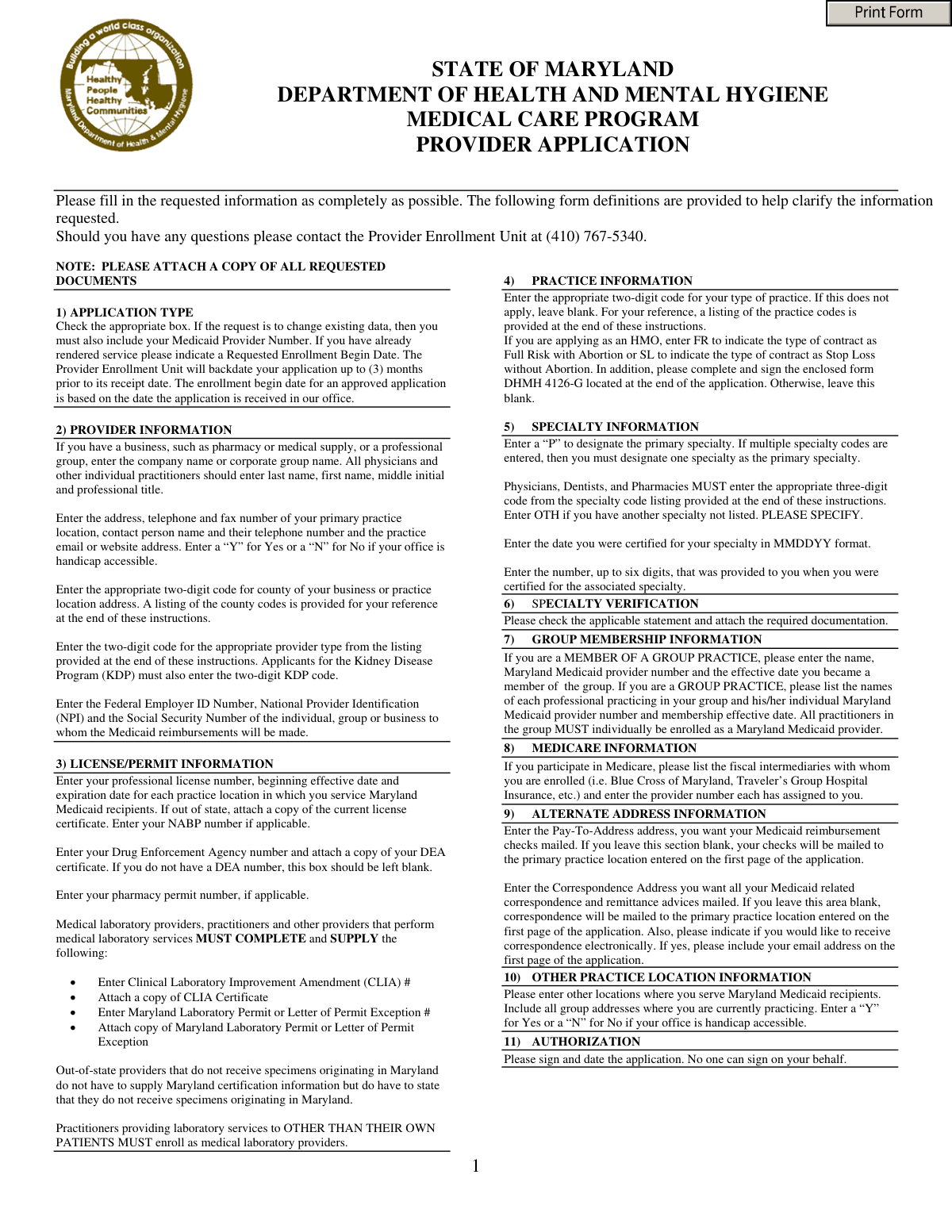
This form is an application for healthcare providers, including individuals, groups, and facilities, to enroll in or update their information with the Maryland Medical Care Program, also known as Maryland Medicaid. Completing this application is a critical step for providers to become eligible for reimbursement for services rendered to Medicaid recipients in the state. Today, this form can be filled out quickly and accurately using AI-powered services like Instafill.ai, which can also convert non-fillable PDF versions into interactive fillable forms.
Maryland Medicaid Provider Application is part of the
CAR forms, Medi-Cal forms, medical forms, medical provider forms, L.A. Care forms and VA medical forms categories on Instafill.
Our AI automatically handles information lookup, data retrieval, formatting, and form filling.
It takes less than a minute to fill out Maryland Medicaid Provider Application using our AI form filling.
Securely upload your data. Information is encrypted in transit and deleted immediately after the form is filled out.
Form specifications
| Form name: | Maryland Medical Care Program Provider Application |
| Number of pages: | 1 |
| Language: | English |
More forms in CAR forms
Instafill Demo: How to fill out PDF forms in seconds with AI
How to Fill Out Maryland Medicaid Provider Application Online for Free in 2026
Are you looking to fill out a MARYLAND MEDICAID PROVIDER APPLICATION form online quickly and accurately? Instafill.ai offers the #1 AI-powered PDF filling software of 2026, allowing you to complete your MARYLAND MEDICAID PROVIDER APPLICATION form in just 37 seconds or less.
Follow these steps to fill out your MARYLAND MEDICAID PROVIDER APPLICATION form online using Instafill.ai:
- 1 Navigate to Instafill.ai and upload or select the Maryland Medical Care Program Provider Application.
- 2 Provide your provider information, including name, practice address, contact details, NPI, and Federal Employer ID Number.
- 3 Enter your license and permit information, such as professional licenses, DEA number, and CLIA certificate details, and attach required copies.
- 4 Specify your practice and specialty information using the provided codes, and detail any group practice memberships.
- 5 Complete the Provider Ownership and Disclosure Form section, listing all individuals with ownership or control interests.
- 6 Review all the information populated by the AI for accuracy, make any necessary corrections, and provide an electronic signature to authorize the application.
- 7 Download the completed application and submit it with all necessary attachments to the Maryland Provider Enrollment unit.
Our AI-powered system ensures each field is filled out correctly, reducing errors and saving you time.
Why Choose Instafill.ai for Your Fillable Maryland Medicaid Provider Application Form?
Speed
Complete your Maryland Medicaid Provider Application in as little as 37 seconds.
Up-to-Date
Always use the latest 2026 Maryland Medicaid Provider Application form version.
Cost-effective
No need to hire expensive lawyers.
Accuracy
Our AI performs 10 compliance checks to ensure your form is error-free.
Security
Your personal information is protected with bank-level encryption.
Frequently Asked Questions About Form Maryland Medicaid Provider Application
This form is used by healthcare providers to enroll in the Maryland Medical Care Program (Medicaid) for the first time, or for currently enrolled providers to update their information.
Any individual practitioner, group of practitioners, facility, institution, or agency that provides services to Maryland Medicaid recipients and wishes to receive reimbursement must complete this application.
You must attach copies of all requested documents, which typically include your professional license, DEA certificate, CLIA certificate, and proof of specialty verification. The specific documents required depend on your provider type.
You must fill out the application to change existing data. Check the 'Existing Provider/Change' box in Section 1 and be sure to include your current Medicaid Provider Number.
Yes, the Provider Enrollment Unit can backdate an approved application up to three months prior to the date your completed application is received in their office.
All necessary codes are provided within the application's instruction pages. You will find lists for Provider Type Codes, County Codes, and Specialty Codes to help you complete the form accurately.
All practitioners in a group must be individually enrolled as a Maryland Medicaid provider. You must also complete Section 7, 'Group Membership Information,' with the group's name and provider number.
This form is required for facilities, institutions, and agencies to disclose ownership and control interests, as mandated by federal law. It is not required for individual practitioners or groups of practitioners.
Mail the completed application and all required attachments to: Systems and Operations Administration, Provider Enrollment, P.O. Box 17030, Baltimore, MD 21203.
If you have any questions, you can contact the Provider Enrollment Unit directly at (410) 767-5340 for assistance.
Yes, services like Instafill.ai use AI to auto-fill form fields accurately and save time. This can help reduce errors and streamline the application process.
You can use a service like Instafill.ai to upload the PDF. The platform makes the form fillable online, allowing you to type your information, save progress, and easily print the completed application for submission.
If you have a non-fillable PDF, you can use a tool like Instafill.ai. It can convert flat PDFs into interactive, fillable forms so you can easily type in your information before printing.
The 'Pay-To Address' is where your Medicaid reimbursement checks are mailed. The 'Correspondence Address' is for all other mail, such as remittance advices. If left blank, all mail will go to your primary practice location.
Out-of-state providers who do not receive specimens originating in Maryland are not required to have a Maryland Laboratory Permit. However, you must state this on your application and provide your CLIA Certificate Number.
Compliance Maryland Medicaid Provider Application
Validation Checks by Instafill.ai
1
Conditional Requirement for Existing Provider Number
This check ensures that if an applicant selects 'Existing Provider/ Change' in the Application Type section, they must also provide their 'Existing Provider Number'. This is crucial for correctly identifying the provider's account and applying the requested changes to the correct record. Failure to provide this number when required will prevent the system from locating the existing provider profile, leading to processing delays or rejection of the change request.
2
National Provider Identification (NPI) Number Validity
Validates that the National Provider Identification Number (NPI) is a 10-digit numeric value and conforms to the Luhn algorithm for checksum validation. This check is essential for ensuring the NPI is a legitimate, correctly-formatted number, which is required for billing and identification across healthcare systems. An invalid NPI will result in claim rejections and prevent successful enrollment.
3
Professional License Expiration Date
This validation confirms that the 'Expiration Date' for any professional license (e.g., Individual Professional, DEA) is a valid date and is not in the past. It is critical for the program to ensure that all participating providers hold a current, active license to practice. An application with an expired license indicates the provider is not currently eligible to provide services and will be rejected until a valid license is provided.
4
Provider and County Code Validation
Verifies that the 'Provider Type Code' and 'County Code' entered in the Provider Information section are valid two-digit codes that exist within the official code lists provided in the form instructions. This ensures data integrity and proper classification of the provider for reporting, reimbursement, and system routing. An invalid code would cause the application to be rejected for containing incorrect or unrecognizable data.
5
Primary Specialty Designation Logic
If the applicant enters one or more specialties in the Specialty Information section, this check ensures that exactly one of those specialties is designated as 'Primary'. The program requires a primary specialty for proper provider directory listing and for determining certain reimbursement rates. If no primary is designated, or if multiple are designated as primary, the application will be considered incomplete and returned for correction.
6
Conditional Requirement for Specialty Verification
This check confirms that if a provider lists any specialties in Section 5, they must also complete Section 6, 'Specialty Verification', by checking one of the qualifying statements. This is a regulatory requirement to prove the provider's specialist qualifications. Failure to complete this section when specialties are claimed will result in the provider not being recognized as a specialist, potentially affecting their scope of reimbursement.
7
HMO Practice Type Consistency
This validation ensures that if the 'Type of Practice' code is '50' (HMO), the 'HMO Type Category' field is also completed with one of the valid codes ('FR' or 'SL'). This provides necessary detail about the nature of the HMO contract. An application for an HMO without this specific detail is incomplete and cannot be processed correctly.
8
Laboratory Provider Enrollment Cross-Check
If an applicant answers 'Yes' to providing laboratory services for 'other than your own patients', this rule cross-references their 'Provider Type Code'. The system will verify that the provider has correctly enrolled with code '10' (Laboratories, Medical) as instructed. This prevents practitioners from billing for referred lab services, which must be billed by the performing laboratory, ensuring compliance with billing regulations.
9
Ownership Disclosure Form Applicability
This validation enforces the rule that the 'Provider Ownership and Disclosure Form' is mandatory for applicants identified as a 'Facility/Institution/Business/Agency'. Conversely, it ensures the form is not required for 'Individual Practitioners' or 'Groups of Practitioners'. This is a federal regulatory requirement (42 CFR 455.100) to ensure transparency for entities, and failure to complete it when required will lead to automatic application rejection.
10
Employer Identification Number (EIN) Format
This check validates that the 'Employer Identification Number' is a 9-digit number, typically formatted as XX-XXXXXXX. The EIN is a unique identifier for business entities required by the IRS and used for tax purposes and payment processing. An incorrectly formatted or invalid EIN will cause payment and reporting failures, so the application cannot be approved without a valid number.
11
Conditional Name Field Requirement
This rule ensures that the correct name field is populated based on the applicant type selected. If 'Individual Practitioner' is chosen, the 'Physician/Practitioner Last Name' and 'First Name' fields are mandatory. If 'Group' or 'Facility' is chosen, the 'Group/Facility/Business/Agency Name' field is mandatory, ensuring the legal name of the enrolling party is captured.
12
License Date Chronology
For each license entered in Section 3, this validation verifies that the 'Expiration Date' is chronologically later than the 'Date Issued'. This is a basic logical check to catch data entry errors and ensure the integrity of the license information provided. An illogical date sequence would flag the entry as an error and require correction before the application can proceed.
13
Mandatory Authorization Signature and Date
This check confirms that the 'Signature' and 'Date' fields in the Authorization section have been completed. The signature legally attests to the truthfulness of the application, and the date establishes when the attestation was made. An unsigned or undated application is not legally binding and will be immediately rejected as incomplete.
14
CLIA Number Requirement for Laboratory Services
If an applicant answers 'Yes' to providing any medical laboratory services for their own patients, this validation makes the 'CLIA #' field mandatory. The Clinical Laboratory Improvement Amendments (CLIA) regulate all laboratory testing and require certification for any entity performing tests. Failure to provide a CLIA number when performing lab services is a compliance violation and will halt the application process.
Common Mistakes in Completing Maryland Medicaid Provider Application
Applicants who are already enrolled but are submitting a change often check the 'Existing Provider/Change' box in Section 1 but forget to enter their Medicaid Provider Number. This happens when rushing or assuming the system will automatically link their application based on their NPI. Without this specific number, the processing office cannot locate the existing record, leading to significant delays or rejection of the change request.
The application requires specific two-digit codes for County and Provider Type, and three-digit codes for Specialty, all found in the instructions. Applicants frequently enter the full text name (e.g., 'Family Practice' instead of '029') or guess the code, leading to data entry errors and processing delays. It is crucial to carefully reference the code lists provided; AI-powered form filling tools like Instafill.ai can help prevent this by auto-populating the correct codes based on your input.
The form explicitly requires copies of numerous documents, such as professional licenses, DEA certificates, CLIA certificates, and specialty board certifications (Sections 3 & 6). A very common error is submitting the application without these attachments, which results in an incomplete application and immediate processing holds. To avoid this, create a checklist of all required documents mentioned throughout the form before submission and ensure every item is included.
In Section 5, providers with multiple specialties must designate one as primary by entering a 'P'. Many applicants either forget to designate a primary specialty or list multiple primaries, which confuses the system and can affect reimbursement rates and provider directory listings. To avoid processing delays and ensure correct enrollment, always ensure exactly one specialty is marked with a 'P'.
Applicants often get confused between applying as an 'Individual Practitioner,' 'Group,' or 'Facility' in Section 1, leading to conflicting information. For example, a solo practitioner might fill out the 'Group/Facility/Business Name' field, or a group applicant might fail to list its individual members in Section 7. This discrepancy causes confusion and requires clarification, delaying the enrollment process; carefully select your applicant type and only fill out the corresponding sections.
When a group practice applies, it must list every individual practitioner along with their individual Maryland Medicaid provider number in Section 7. A common failure is omitting this information, which is critical because all practitioners in a group must be individually enrolled first. This omission will halt the group's application until all member details are provided and verified, causing significant delays for the entire practice.
The authorization in Section 12 must be personally signed and dated by the practitioner or an authorized professional representative, as the instructions specify 'No one can sign on your behalf.' Applications are often submitted unsigned or signed by an office manager who is not an authorized representative, rendering the application legally invalid. This leads to immediate rejection and requires the form to be re-submitted correctly.
This complex disclosure form is only applicable to facilities, institutions, and businesses, not individual or group practitioners. A common mistake is for individual practitioners to fill it out unnecessarily, or for applicable entities to complete it incorrectly by miscalculating ownership percentages. This can lead to compliance issues and significant processing delays, so carefully read the definitions to determine if the form applies to your entity.
In Section 9, applicants often leave the 'Pay-To-Address' and 'Correspondence Address' fields blank, assuming payments and mail will default to a known billing address. The form states that if this section is blank, all mail will be sent to the primary practice location, which may not be ideal for financial matters. To ensure proper delivery of reimbursements and important notices, always specify the correct addresses in this section.
Providers who perform any medical laboratory services, even just for their own patients, must provide their CLIA number and, if applicable, their Maryland Laboratory Permit number and attach copies of the certificates. Many practitioners overlook this requirement in Section 3 and the addendum, assuming it only applies to standalone labs. Failure to provide this information and the necessary attachments will prevent reimbursement for any laboratory services performed.
Several sections, such as Specialty Information (Section 5), require dates to be entered in a specific MMDDYY format. Applicants often use other common formats like MM/DD/YYYY or write out the month, which can cause data entry failures in the processing system. Adhering to the specified format is essential for a smooth application process. Since this form is a non-fillable PDF, a tool like Instafill.ai can convert it to a fillable version and help enforce correct date formatting.
Saved over 80 hours a year
“I was never sure if my IRS forms like W-9 were filled correctly. Now, I can complete the forms accurately without any external help.”
Kevin Martin Green
Your data stays secure with advanced protection from Instafill and our subprocessors




Robust compliance program
Transparent business model
You’re not the product. You always know where your data is and what it is processed for.
ISO 27001, HIPAA, and GDPR
Our subprocesses adhere to multiple compliance standards, including but not limited to ISO 27001, HIPAA, and GDPR.
Security & privacy by design
We consider security and privacy from the initial design phase of any new service or functionality. It’s not an afterthought, it’s built-in, including support for two-factor authentication (2FA) to further protect your account.
Fill out Maryland Medicaid Provider Application with Instafill.ai
Worried about filling PDFs wrong? Instafill securely fills maryland-medical-care-program-provider-application forms, ensuring each field is accurate.
