Yes! You can use AI to fill out Offer to Purchase and Contract

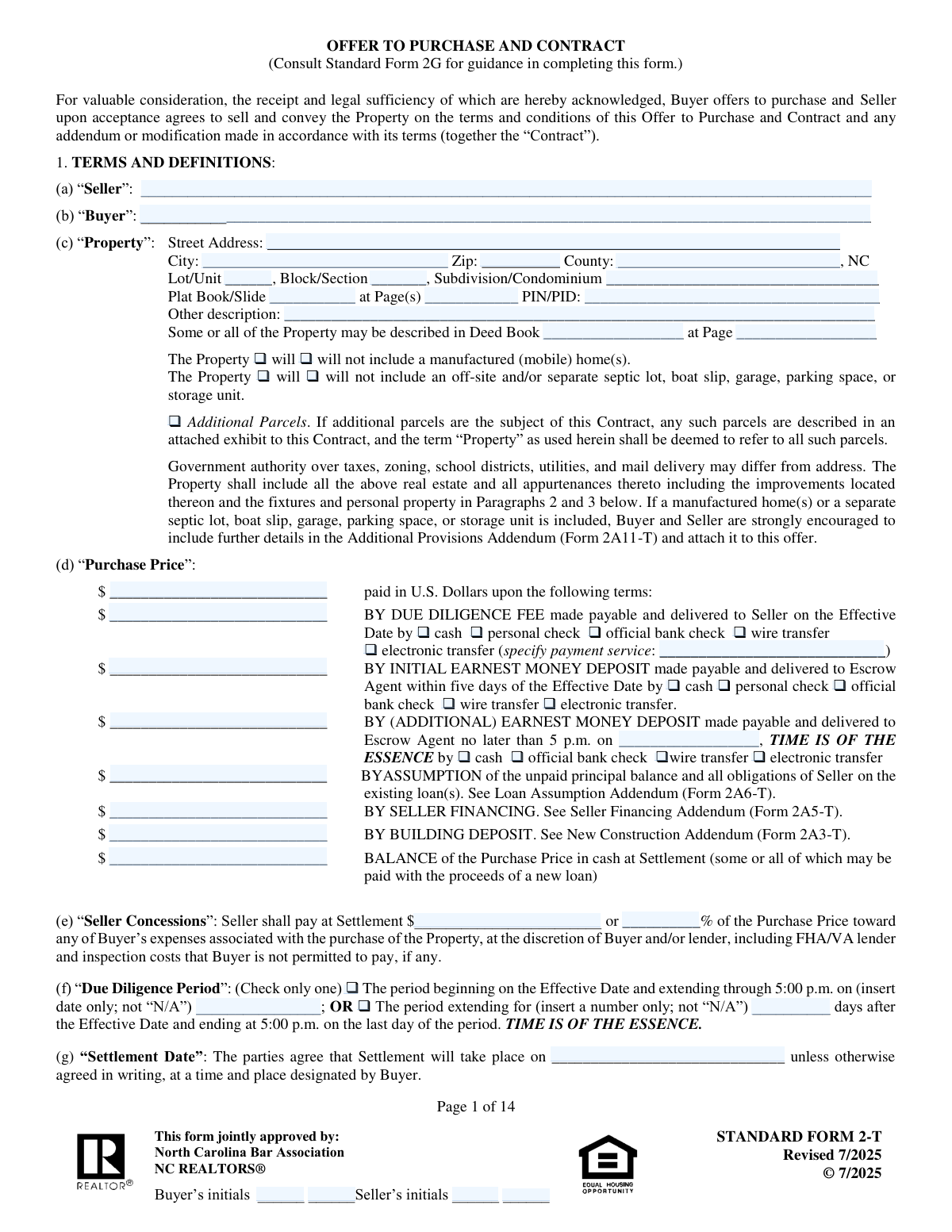
The Offer to Purchase and Contract, commonly known as Form 2-T, is the official agreement used for residential real estate transactions in North Carolina. This comprehensive document details all terms of the sale, including price, deadlines, contingencies, and property details, making it a critical component for protecting both the buyer and seller. It becomes a legally binding contract once signed by both parties. Today, this form can be filled out quickly and accurately using AI-powered services like Instafill.ai, which can also convert non-fillable PDF versions into interactive fillable forms.
Our AI automatically handles information lookup, data retrieval, formatting, and form filling.
It takes less than a minute to fill out Form 2-T using our AI form filling.
Securely upload your data. Information is encrypted in transit and deleted immediately after the form is filled out.

Form specifications

Form name: Offer to Purchase and Contract
Number of fields: 297
Number of pages: 14
Language: English
main-image

Instafill Demo: How to fill out PDF forms in seconds with AI

How to Fill Out Form 2-T Online for Free in 2026

Are you looking to fill out a FORM 2-T form online quickly and accurately? Instafill.ai offers the #1 AI-powered PDF filling software of 2026, allowing you to complete your FORM 2-T form in just 37 seconds or less.
Follow these steps to fill out your FORM 2-T form online using Instafill.ai:
  1. 1 Navigate to Instafill.ai and upload your Offer to Purchase and Contract (Form 2-T) or select it from the template library.
  2. 2 Use the AI assistant to accurately input the full legal names of the buyer(s) and seller(s), along with the complete legal description of the property, including address, PIN, and deed references.
  3. 3 Specify the financial details of the offer, including the total purchase price, due diligence fee, earnest money deposit amounts, and payment methods for each.
  4. 4 Define key dates and contingencies, such as the due diligence period end date, settlement date, and any financing or property sale contingencies.
  5. 5 Acknowledge receipt of required North Carolina disclosures (like Property and Mineral/Oil/Gas Rights) and check the boxes for all relevant addenda that will be attached to the contract.
  6. 6 Carefully review all entered information with the AI's validation checks, then proceed to have all parties (buyers, sellers, and agents) initial each page and provide their final electronic signatures to execute the agreement.

Our AI-powered system ensures each field is filled out correctly, reducing errors and saving you time.

Why Choose Instafill.ai for Your Fillable Form 2-T Form?

Speed

Complete your Form 2-T in as little as 37 seconds.

Up-to-Date

Always use the latest 2026 Form 2-T form version.

Cost-effective

No need to hire expensive lawyers.

Accuracy

Our AI performs 10 compliance checks to ensure your form is error-free.

Security

Your personal information is protected with bank-level encryption.

Frequently Asked Questions About Form Form 2-T

This is a legally binding Offer to Purchase and Contract for residential real estate. It is initiated by the Buyer to make an offer on a property and completed by both the Buyer and Seller to outline the terms of the sale.

The Due Diligence Fee is a non-refundable payment to the seller for the right to investigate the property and cancel for any reason during a set period. The Earnest Money Deposit is a good-faith deposit held in escrow and is typically applied to the purchase price at closing.

This information is located in public records, typically at the county's Register of Deeds or tax assessor's office. You can also find it on the current owner's deed or property tax statement.

This is a negotiated timeframe for the buyer to conduct inspections, secure financing, and perform any other investigations. The buyer can terminate the contract for any reason during this period and only forfeit the Due Diligence Fee.

You must check the box for 'Buyer DOES have to sell/lease other property'. This makes the contract contingent on the sale of your existing property and requires you to provide details about its listing status.

Seller Concessions are a dollar amount or percentage of the purchase price that the seller agrees to pay toward the buyer's closing costs. This helps reduce the buyer's out-of-pocket expenses at settlement.

Initialing each page confirms that you have read, understood, and agreed to the terms on that specific page. It is a standard practice in legal contracts to ensure all parties have reviewed the entire document.

You must disclose if the tank is owned or leased, its location (above/below ground), the fuel type, and its current usage status. If the tank is leased, you must provide the lessor's contact information.

The Addenda section is used to attach additional forms that become part of the contract. These forms address specific circumstances, such as FHA/VA financing, seller financing, lead-based paint disclosures, or a buyer needing to sell another property.

The Settlement Date is the day of closing, where the buyer and seller sign all final documents to transfer ownership of the property. Funds are exchanged, and the deed is officially recorded.

Yes, services like Instafill.ai use AI to help you fill out forms accurately and quickly. These tools can auto-populate your information across the document, saving you time and reducing the chance of errors.

Simply upload the form to the Instafill.ai platform. The service will automatically identify all the fields, allowing you to enter your information once and have it populated throughout the document, including all signature and initial blocks.

You can use a service like Instafill.ai to solve this problem. It can convert flat, non-fillable PDFs into interactive forms, enabling you to easily type your information directly into the fields online.

Compliance Form 2-T
Validation Checks by Instafill.ai

1
Purchase Price Component Summation
This check verifies that the sum of the purchase price components (Assumed Loan, Seller Financing, Building Deposit, and Cash Balance) equals the 'Total Purchase Price'. This is crucial for ensuring the financial breakdown of the transaction is arithmetically correct and internally consistent. If the values do not sum up correctly, it indicates a data entry error that could lead to significant closing and funding issues, so the form should be flagged for manual review.
2
Mutually Exclusive Manufactured Home Selection
This validation ensures that only one of the two checkboxes regarding a manufactured home ('Property will include' vs. 'Property will NOT include') is selected. It is logically impossible for both to be true, and leaving both unchecked creates ambiguity. This check prevents contradictory or incomplete information about a significant property feature, which is vital for appraisal and legal purposes.
3
Conditional Due Diligence Date Requirement
This check validates that the 'Due Diligence End Date' field is populated if and only if the 'Specific End Date Period' checkbox is selected. This enforces the form's conditional logic, preventing users from entering a date that has no corresponding context or leaving a required date blank. Failure to enforce this can lead to an unenforceable or ambiguous due diligence period.
4
Lead-Based Paint Addendum Requirement
This validation checks if the 'Property built prior to 1978' box is checked, and if so, confirms that the 'Lead-Based Paint Or Lead-Based Paint Hazard Addendum' box is also checked. This is a critical compliance check to ensure adherence to federal law (Residential Lead-Based Paint Hazard Reduction Act). Failure to include the required addendum for pre-1978 housing can result in legal penalties and contract invalidation.
5
FHA/VA Addendum Requirement
This check ensures that if the buyer selects an 'FHA' or 'VA' loan type, the 'FHA/VA Financing Addendum' checkbox is also marked as attached. These loan types have specific requirements and contingencies that are detailed in the mandatory addendum. Missing this check can jeopardize the buyer's financing and the validity of the contract by failing to include legally required terms.
6
Zip Code Format and Validity
This validation ensures the 'Zip Code' field in the property address contains a valid 5-digit or 9-digit (ZIP+4) US postal code. It prevents typographical errors and ensures the address is accurate for legal documents, title searches, and mailings. An invalid zip code could cause delays and miscommunication, so the system should reject non-numeric or incorrectly formatted entries.
7
Logical Date Sequence
This check verifies that the 'Settlement Date' occurs on or after the 'Due Diligence End Date'. A settlement cannot logically happen before the due diligence period concludes. This validation prevents data entry errors that would create an impossible timeline for the transaction, ensuring the contract's key dates are sequential and realistic.
8
Conditional Buyer's Other Property Contingency
This validation ensures that details about a buyer's other property (e.g., 'Other Property Address', 'Property is Under Contract') are only filled out if the 'Buyer DOES have to sell/lease other property' checkbox is selected. This prevents irrelevant data from being entered and maintains the logical integrity of the contingency clause. If the contingency is not selected, these dependent fields should be disabled or cleared.
9
Exclusive Seller Concession Entry
This check ensures that either the 'Seller Concession Percentage' or the 'Seller Concession Dollar Amount' is filled, but not both. Allowing both entries would create ambiguity about the agreed-upon concession amount. This validation forces a clear and singular definition of the seller's contribution, preventing disputes at closing.
10
Due Diligence Fee Payment Method Logic
This validation confirms that if the 'Due Diligence Fee Amount' is greater than zero, exactly one payment method (e.g., cash, personal check, wire transfer) is selected. It also ensures that if a payment method is selected, an amount is entered. This prevents incomplete or contradictory information regarding the payment of the fee, which is critical for contract execution.
11
Conditional Fuel Tank Details
This check ensures that all detailed fields related to fuel tanks (e.g., 'Tank 1 currently in use', 'Above ground', 'Owned') are only populated if the 'There is a fuel tank' checkbox is selected. This prevents stray, out-of-context data from appearing on the form. If the primary checkbox is not selected, all dependent fields should be disabled or hidden to guide the user and ensure data cleanliness.
12
Entity Signature Completeness
This validation verifies that if an 'Entity Name' is provided for either the buyer or seller, the corresponding 'Authorized Signer Name and Title' and 'Signature Date' fields are also filled. This is crucial for legal validity, as a contract with an entity requires a clear record of who is authorized to sign on its behalf. An incomplete entity signature block can render the contract unenforceable.
13
Agent Duality Consistency
This check validates the agency relationship selections. For example, if 'Dual Agent' is checked for the 'Listing Firm Information', the 'Selling Firm Information' must also indicate 'Dual Agent'. This prevents logically inconsistent agency roles, such as one firm being listed as both a seller's agent and a dual agent simultaneously, which would be a legal and ethical contradiction.
14
Required Initials Completeness Check
This validation scans the entire document to ensure that all mandatory initial fields are filled by both the buyer and seller. Initials on each page or section signify that the parties have read and acknowledged the contents. Missing initials can be grounds to dispute the contract or specific clauses, so this check is vital for ensuring the document is fully executed and legally sound.

Common Mistakes in Completing Form 2-T

Incomplete or Incorrect Property Legal Description

Users often leave fields like 'PIN/PID', 'Deed Book Number', or 'Plat Book/Slide' blank because the information is not readily available. This happens when they only have the street address but not the official county records. An incomplete legal description can halt the title search process, delay closing, or even invalidate the contract. To avoid this, gather all property documents from the county register of deeds or your real estate agent before starting the form.

Using Common Names Instead of Full Legal Names

People frequently enter nicknames or abbreviated names for the 'Buyer Name' and 'Seller Name' fields instead of their full legal names as they appear on government-issued ID and property titles. This mistake can cause significant title transfer and financing issues, as the names on the contract must match all other legal closing documents. Always use the full, official legal name for all parties involved to prevent delays and legal complications.

Mismatched Purchase Price Components

A frequent error is when the sum of the 'Assumed Loan Amount', 'Seller Financing Amount', 'Building Deposit Amount', and 'Cash Balance at Settlement' does not equal the 'Total Purchase Price'. This mathematical error often occurs due to manual calculation mistakes and can cause confusion and require contract amendments, delaying the closing process. Using a tool that automatically calculates and validates these fields can prevent such discrepancies.

Missing Required Initials on Pages

This lengthy contract requires buyer and seller initials on nearly every page to acknowledge they have read and understood the terms. It is extremely common for one or more parties to miss an initial field, especially on dense pages. Missing initials can call into question whether all parties have reviewed the entire agreement, potentially creating legal vulnerabilities or delaying acceptance. Carefully review each page's footer before signing to ensure all initial blocks are completed.

Forgetting to Attach Referenced Addenda

Users often check boxes indicating that an addendum is attached (e.g., 'FHA/VA Financing Addendum', 'Seller Financing Addendum', 'Lead-Based Paint Addendum') but then forget to include the actual document with the contract submission. This creates a legally incomplete offer, as the terms mentioned in the addendum are not officially included. To prevent this, create a checklist of all required addenda as you fill out the form and verify they are all attached before sending.

Contradictory or Ambiguous Contingency Selections

The form contains several pairs of mutually exclusive checkboxes, such as 'Buyer DOES have to sell/lease other property' and 'Buyer DOES NOT have to sell/lease other property'. Fillers sometimes check both options or neither, creating contractual ambiguity that can lead to disputes. This error usually stems from rushing through the form. It is critical to read each option carefully and select only one to create a clear, enforceable agreement.

Incorrectly Filling Out Signature Blocks for Entities

When a property is being bought or sold by an entity like an LLC or trust, users often fill out the individual signature lines instead of the 'Entity Buyer Information' or 'Entity Seller Information' sections. They may also forget to include their title (e.g., 'Manager', 'Trustee') alongside their name. This can invalidate the signature and the contract itself, as the person signing must demonstrate they have the authority to bind the entity. Always use the correct signature block and include the entity's full name and the signer's official title.

Omitting Payment Details for Fees and Deposits

After entering the 'Due Diligence Fee Amount' or 'Initial Earnest Money Deposit', people frequently forget to check the corresponding box for the payment method (e.g., 'personal check', 'wire transfer'). This leaves the seller and escrow agent uncertain about how funds will be delivered, which can delay the execution of the contract. To avoid this, ensure that for every monetary amount you enter, you also select the specific method of payment.

Failing to Complete Conditional Fields

This form has many fields that are conditional upon a checkbox being selected, such as providing the 'Other Property Address' only if the 'Buyer DOES have to sell/lease other property' box is checked. A common mistake is checking the box but then failing to provide the required follow-up information. This leaves the contract incomplete and can stall progress. AI-powered tools like Instafill.ai can help by highlighting required fields based on your selections and ensuring all necessary information is provided.

Ambiguous Seller Concession Entries

The form provides fields for seller concessions as both a 'Seller Concession Percentage' and a 'Seller Concession Dollar Amount'. Entering values in both fields can create confusion and potential disputes over which amount is correct, especially if the purchase price changes. To avoid ambiguity, decide on either a fixed dollar amount or a percentage and fill in only that one corresponding field. This ensures clarity for all parties at closing.
Saved over 80 hours a year

“I was never sure if my IRS forms like W-9 were filled correctly. Now, I can complete the forms accurately without any external help.”

Kevin Martin Green

Your data stays secure with advanced protection from Instafill and our subprocessors

Robust compliance program

Transparent business model

You’re not the product. You always know where your data is and what it is processed for.

ISO 27001, HIPAA, and GDPR

Our subprocesses adhere to multiple compliance standards, including but not limited to ISO 27001, HIPAA, and GDPR.

Security & privacy by design

We consider security and privacy from the initial design phase of any new service or functionality. It’s not an afterthought, it’s built-in, including support for two-factor authentication (2FA) to further protect your account.

Fill out Form 2-T with Instafill.ai

Worried about filling PDFs wrong? Instafill securely fills offer-to-purchase-and-contract forms, ensuring each field is accurate.