
Instafill.ai
7 days free
AI form filling · 108 fields · 3 pages · done in seconds

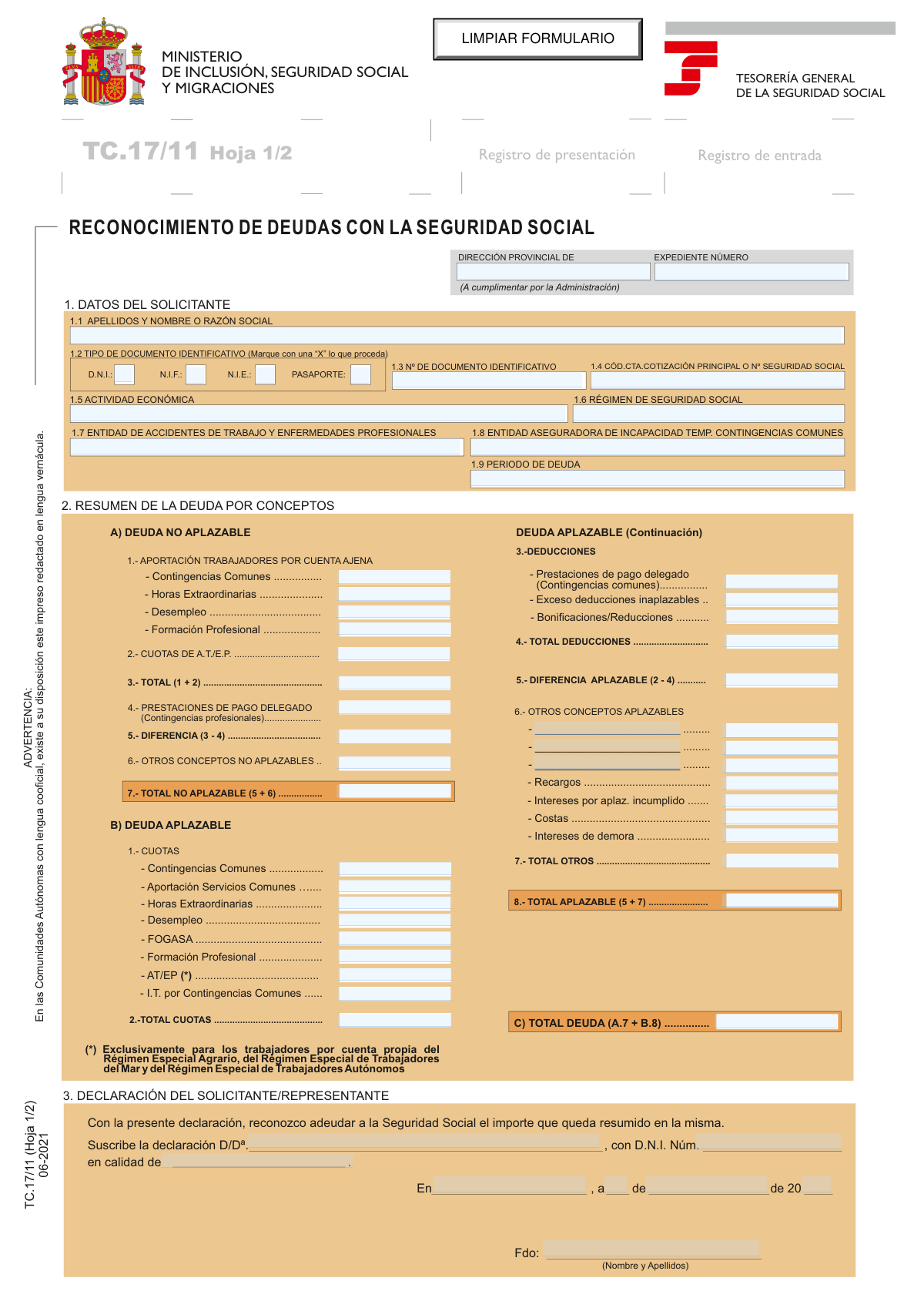
Yes! You can use AI to fill out TC. 17/11, Reconocimiento de Deudas con la Seguridad Social

Don't type 108 fields by hand. Tell our AI about yourself, or upload a document you already have, and it fills every field in seconds. You check it, then download, print or sign.
7 days free, then $19.99/month · Cancel anytime
AI fills it, no typingEncrypted, never used to train AICancel in two clicks
TC. 17/11, Reconocimiento de Deudas con la Seguridad Social, page 1
Moderate · 62/100Form Complexity Index

The AI does the filling. You just check it.

No typing into boxes, nothing to install.

Tell the AI about youAnswer a few questions in plain words, or upload a document you already have. That is all the typing there is.
AI fills every field in secondsIt puts each answer in the right box on every page, tables and checkboxes included.
Check it and downloadReview every field, change anything, then download, print or sign the PDF.

What this form asks for

The AI fills all of it, from your answers or your documents.

Form TC. 17/11, "Reconocimiento de Deudas con la Seguridad Social," is a legal declaration in Spain where an individual or company formally acknowledges outstanding debts owed to the Social Security system. This acknowledgment is a mandatory prerequisite for requesting a deferment or installment plan for the payment of said debts, detailing both deferrable and non-deferrable amounts. Today, this form can be filled out quickly and accurately using AI-powered services like Instafill.ai, which can also convert non-fillable PDF versions into interactive fillable forms.
Fillable fields108
Pages3
Sections15
Tables and lists1
Questions that depend on earlier answers1
Form Complexity IndexModerate, 62/100

The AI checks your answers before you download

15 checks built for this form, so a wrong date or a missing answer is caught before anyone else sees it.

Exclusive Identification Document Selection

This check ensures that exactly one checkbox from the 'Tipo de documento identificativo' section (D.N.I., N.I.F., N.I.E., Pasaporte) is selected. It is crucial for correctly identifying the applicant and applying the appropriate format validation to their ID number. If zero or more than one option is selected, the form submission should be rejected as the applicant's identity cannot be unambiguously determined.

Spanish Identification Number Format Validation

Validates that the 'Número de documento identificativo' conforms to the official format of the selected document type (D.N.I., N.I.E., or N.I.F.). For example, a D.N.I. must have 8 digits followed by a letter. This validation prevents data entry errors and ensures the provided ID is legally valid and can be cross-referenced in government databases, preventing processing delays or rejections.

Applicant Name/Business Name Completeness

Verifies that the 'Apellidos y nombre o Razón social' field is not empty. This field is fundamental for identifying the individual or legal entity acknowledging the debt. A missing name makes the entire debt recognition document legally void and unprocessable.

Social Security/Contribution Account Code Format

Ensures the 'Cód.Cta.Cotización Principal o Nº Seguridad Social' field is filled and follows the correct structure for a Spanish Social Security Number or Contribution Account Code. These codes are essential for linking the debt to the correct contributor's account within the Social Security system. An invalid or missing code would prevent the debt from being correctly registered and processed.

Debt Period Logical Consistency

Checks that the 'Periodo de deuda' field contains a valid date or date range that is not in the future. The debt period must logically precede the date of the declaration. This prevents nonsensical submissions and ensures the acknowledged debt corresponds to a past period of liability.

Calculation of Total Non-Deferrable Contributions (A.3)

This check verifies that the value in field 'A.3. TOTAL (1 + 2)' is the precise sum of all 'Aportación trabajadores' fields (A.1) and the 'Cuotas de A.T./E.P.' field (A.2). This is a critical subtotal for calculating the non-deferrable debt portion. A miscalculation here would lead to an incorrect final debt amount and could cause legal or financial discrepancies.

And 9 more checks
  • Calculation of Non-Deferrable Difference (A.5)
  • Calculation of Total Non-Deferrable Debt (A.7)
  • Calculation of Total Deferrable Quotas (B.2)
  • Calculation of Total Deferrable Deductions (B.4)
  • Calculation of Total Deferrable Amount (B.8)
  • Grand Total Debt Calculation (C)
  • Declarant Information Completeness
  • Signing Date Validity
  • Consistency between Applicant and Declarant

Let AI fill out your TC. 17/11

No typing. Every field filled in seconds, checked, ready to sign.

7 days free, then $19.99/month · Cancel anytime

How to Fill Out TC. 17/11 Online for Free in 2026

What the AI walks you through.

  1. Navigate to Instafill.ai, search for Form TC. 17/11, and upload your document or select the template to begin.
  2. Enter the applicant's identification details in Section 1, including full name or company name, ID number (DNI/NIE/NIF), and Social Security contribution account code.
  3. Provide details about your economic activity, Social Security regime, insurance entities for work accidents and temporary disability, and the specific period of the debt.
  4. Carefully itemize the debt in Section 2, separating non-deferrable amounts (Part A) from deferrable amounts (Part B), including all relevant contributions, quotas, and deductions.
  5. Calculate and enter the subtotals for each section and the final total debt by summing the total non-deferrable and total deferrable amounts.
  6. Complete the declaration in Section 3 by providing the declarant's name, ID number, capacity (e.g., representative), and the place and date of signing.
  7. Review all entered information for accuracy, then securely download your completed Form TC. 17/11, ready for submission to the Tesorería General de la Seguridad Social.

Common Mistakes in Completing TC. 17/11

The ones the AI is built to catch.

Incorrect Classification of Debt Types
A frequent error is incorrectly categorizing debt as 'Aplazable' (deferrable) when it is 'No Aplazable' (non-deferrable). This often happens with employee contributions (aportación de trabajadores), which employers collect but fail to remit. These funds are never eligible for deferral, and misclassifying them will lead to the rejection of the associated payment plan request and significant processing delays. Always verify against official guidance which concepts are strictly non-deferrable before filling out Section A.
Mathematical Errors in Debt Summary
The form requires multiple manual calculations to determine subtotals and totals in sections A, B, and C. Simple arithmetic mistakes when summing up contributions, applying deductions, or calculating the final total debt are extremely common. An incorrect calculation invalidates the entire debt recognition, forcing the administration to return the form for correction. To avoid this, double-check all calculations or use a calculator; AI-powered tools like Instafill.ai can perform these calculations automatically to ensure accuracy.
Inaccurate or Incomplete Identification Numbers
Entering an incorrect 'Código de cuenta de cotización' (CCC) or 'Número de Seguridad Social' (NUSS) is a critical mistake. These long numerical codes are unique identifiers, and even a single-digit error can cause the debt recognition to be rejected or misapplied to the wrong account. Similarly, errors in the DNI/NIF/NIE number can halt the process. Carefully transcribe these numbers from official documents to prevent identification failures and processing delays.
Omitting Surcharges and Interest
Applicants often focus on the principal debt (cuotas) and forget to include accrued penalties, such as 'Recargos' (surcharges) and 'Intereses de demora' (default interest) in Section B. This results in an incomplete declaration that understates the total amount owed. The Social Security administration will have to recalculate the correct total, delaying the approval of any related deferment request. It is essential to obtain an up-to-date debt statement from the administration to ensure all concepts are included.
Failure to Use the 'Hoja Resumen' (Summary Sheet)
The form includes a 'Hoja Resumen' (page 2) that must be completed if the debt spans multiple contribution accounts ('identificadores') or different Social Security Regimes. Many applicants overlook this instruction and only submit the first page, leading to an incomplete application. This omission will cause the administration to return the paperwork, requiring the applicant to fill out a separate form for each debt source and then consolidate them onto the summary sheet, significantly delaying the process.
Invalid Signatory Declaration
The declaration section is often filled out incorrectly, which can invalidate the legal recognition of the debt. Common mistakes include the signatory forgetting to specify their 'calidad de' (capacity, e.g., administrator, legal representative), or the name and ID number on the declaration not matching the person who actually signs. If a representative is signing, they must have already proven their power of attorney, or the form will be rejected. This section must be completed with precision to be legally binding.
Vague or Incorrect Debt Period
In field 1.9, 'Período de deuda', applicants sometimes enter vague information like 'last year' or fail to specify both the start and end months for a multi-month debt. The instructions require specifying the first and last month (and year) of the debt period. An ambiguous entry forces the administration to seek clarification, which delays the entire process of recognizing the debt and processing a deferral request.
Confusing Insurance Entity Information
The form asks for two separate insurance entities: the one for Work Accidents (field 1.7) and the one for Temporary Disability from common contingencies (field 1.8). Applicants frequently get these confused, enter the same entity for both when they are different, or leave one blank. This incorrect information can cause issues with the proper allocation and management of the debt record. It's important to consult company records to identify the correct 'Mutua' or 'Entidad Gestora' for each coverage type during the specified debt period.
Improper Application of Deductions
In Section B, applicants may incorrectly claim deductions for 'Bonificaciones/Reducciones' (bonuses/reductions) that they are no longer entitled to due to late payment. Another common error is miscalculating the amount of 'Prestaciones de pago delegado' (delegated payment benefits) that can be offset. These errors lead to an incorrect 'Total Aplazable' amount, which will be flagged and corrected by the administration, delaying the resolution of the debt.
Using Illegible Handwriting or Ignoring Fillable Features
The form explicitly states it should be filled out by machine or with capital letters, and the 'LIMPIAR FORMULARIO' button indicates it is a fillable PDF. However, users often print it and fill it out with illegible handwriting, leading to data entry errors by the administration. If the form is only available as a non-fillable PDF, using a tool like Instafill.ai can convert it into an interactive, fillable version, ensuring all entries are clear, properly formatted, and legible, thus preventing processing errors.

Frequently Asked Questions About TC. 17/11


Is it really free for 7 days?
Yes. You pay $0 today. Cancel before Nov 5 and you are never charged. Keep it, and it is $19.99 a month for 5 fills of your TC. 17/11.
Can I fill other forms too?
This plan is for your TC. 17/11: your own AI agent fills it as often as 5 times a month. To fill other forms and upload your own, choose a Professional plan from your account.
How do I cancel?
From your account, in two clicks, any time. No email, no call.
How does the AI fill out TC. 17/11?
You answer a few questions in plain words, or upload a document you already have. The AI reads what you give it and puts each answer into the right field of TC. 17/11, on every page, in seconds. It checks the answers against the form's own rules, and you review and change anything before you download, print or sign.
What happens to my information?
It is encrypted in transit and at rest, and it is never used to train AI.
How complex is TC. 17/11 to fill out?
TC. 17/11 has a Form Complexity Index of 62 out of 100, in the moderate tier: 108 fillable fields across 3 pages. Instafill.ai's AI fills it in under a minute, with every field there for you to review before you download.
What is the purpose of the TC. 17/11 form?
The TC. 17/11 form, 'Reconocimiento de Deudas con la Seguridad Social', is used to formally acknowledge a debt owed to the Spanish Social Security system. It is a mandatory document that must be submitted when requesting a deferral or installment plan for paying off this debt.
Who needs to fill out this form?
Any individual (like a self-employed worker) or company that has an outstanding debt with Social Security and wishes to apply for a payment deferral must complete this form. It serves as an official admission of the debt you are asking to postpone.
What is the difference between 'Deuda No Aplazable' and 'Deuda Aplazable'?
'Deuda No Aplazable' (Non-Deferrable Debt) includes contributions withheld from employees and contributions for work-related accidents, which legally cannot be postponed. 'Deuda Aplazable' (Deferrable Debt) refers to other debts like employer contributions, surcharges, and interest, for which you can request a payment plan.
Where do I get the financial figures to complete the debt summary in Section 2?
Typically, the Social Security Administration (Tesorería General de la Seguridad Social) will provide you with the detailed debt amounts. In many cases, the administration will give you the form already pre-filled with this information for you to review and sign.
When do I need to use the 'Hoja Resumen' (Summary Sheet)?
The 'Hoja Resumen' is only required if your debt is spread across multiple contribution account codes (códigos de cuenta de cotización) or different Social Security regimes. If all your debt is under a single identifier and regime, you do not need to complete this summary sheet.
What happens if I sign this form but later disagree with the debt amount?
Signing the form acknowledges the debt for the purpose of the deferral request, but it does not waive your right to dispute the amount. The form's instructions clarify that if you take action and the debt amount is officially modified, your payment plan will be adjusted accordingly.
When should I submit the TC. 17/11 form?
This form must be submitted together with your formal application for a debt deferral. Failure to include it will result in the dismissal of your deferral request.
What key information is needed for Section 1, 'Datos del Solicitante'?
You will need to provide your full name or company name, your identification document number (DNI, NIF, NIE), your main Social Security contribution code or number, and the period to which the debt applies.
Can a legal representative sign this form on my behalf?
Yes, a legal representative can sign the declaration, but they must specify the capacity in which they are signing (e.g., 'representante legal'). They must also be properly accredited as your representative with the Social Security Administration.
Can AI tools help me fill out this form?
Yes, services like Instafill.ai use AI to accurately auto-fill form fields from your saved data, which can save you time and help prevent errors. This is particularly useful for entering recurring information like your name, ID number, and Social Security code.
How can I fill out the TC. 17/11 form online using Instafill.ai?
You can upload the PDF of the TC. 17/11 form to Instafill.ai. The platform will make the document interactive, allowing you to easily type your information into the correct fields, save your progress, and download the completed form.
The PDF version of the form I downloaded is not fillable. What should I do?
You can use a service like Instafill.ai, which can convert flat, non-fillable PDFs into interactive, fillable forms. Simply upload your TC. 17/11 PDF, and the tool will make it easy for you to complete online.
How is the 'Total Deuda' (Total Debt) calculated on the form?
The total debt is calculated by adding the 'Total No Aplazable' (from section A.7) and the 'Total Aplazable' (from section B.8). This final figure in section C represents the complete amount you are acknowledging you owe.
Encrypted in transit and at restNever used to train AIDelete your forms any time

Get your TC. 17/11 filled out by AI

$0 today. Cancel before Nov 5 and you pay nothing.

Other forms like this one

Seguridad Social forms: Tesorería General de la Seguridad Social (TGSS) — Mandato / Orden de domiciliación de adeudos directos SEPA para el pago de cuotas de la Seguridad Social (TC 1/15-3, 06-2022)

SOC forms: Form SOC 295, Application for In-Home Supportive Services, Form 4137, Social Security and Medicare Tax on Unreported Tip Income, Form 8919, Uncollected Social Security and Medicare Tax, Form SS-5-FS, Application for a Social Security Card, Form SSA-4-BK, Application for Social Security Benefits, California Department of Social Services (CDSS) Community Care Licensing Child Care Forms Packet (LIC 9150, LIC 282, LIC 627, LIC 700, LIC 995A, CDPH 286, LIC 9227), Form SSA-1042S, Social Security Benefit Statement, Application for Scope of Clinical Practice (SoCP) – Application Form SoCP Only (v1.00 06/2014), Missouri Department of Social Services, Family Support Division — Application for Supplemental Nutrition Assistance Program (SNAP) (MO 886-0460 / FS-1), Form SSA-3369-BK, Work History Report (Social Security Administration), California Department of Social Services (CDSS) Community Care Licensing Division — Administrative Organization (LIC 309), California/National Apartment Association Official Form B-15, Rental Application for Residents and Occupants (May 2015) with Application Agreement, National Apartment Association (NAA) Rental Application for Residents and Occupants (Virginia) and Supplemental Rental Application for Units Under Government Regulated Affordable Housing Programs, California Association of REALTORS® (C.A.R.) Form LR, Residential Lease or Month-to-Month Rental Agreement (Revised 12/19), Pacific Gastroenterology Associates Referral Form, Chicago Residential Lease for Apartments, Condominiums, Single Family Homes, and Townhomes (Chicago Association of REALTORS®) (V13.0 2026), Form 8919, Uncollected Social Security and Medicare Tax on Wages, Liantis / RSVZ – Aanvraagformulier voor vrijstelling van sociale bijdragen als zelfstandige (artikel 17 van het koninklijk besluit nr. 38 van 27 juli 1967), Form SSA-827 (06-2024), Authorization to Disclose Information to the Social Security Administration (SSA), Tesorería General de la Seguridad Social (TGSS) — Mandato / Orden de domiciliación de adeudos directos SEPA para el pago de cuotas de la Seguridad Social (TC 1/15-3, 06-2022)

7 days free, then $19.99/month · Cancel anytime