Yes! You can use AI to fill out Toronto Hydro Data Request Form: Reporting Energy Consumption
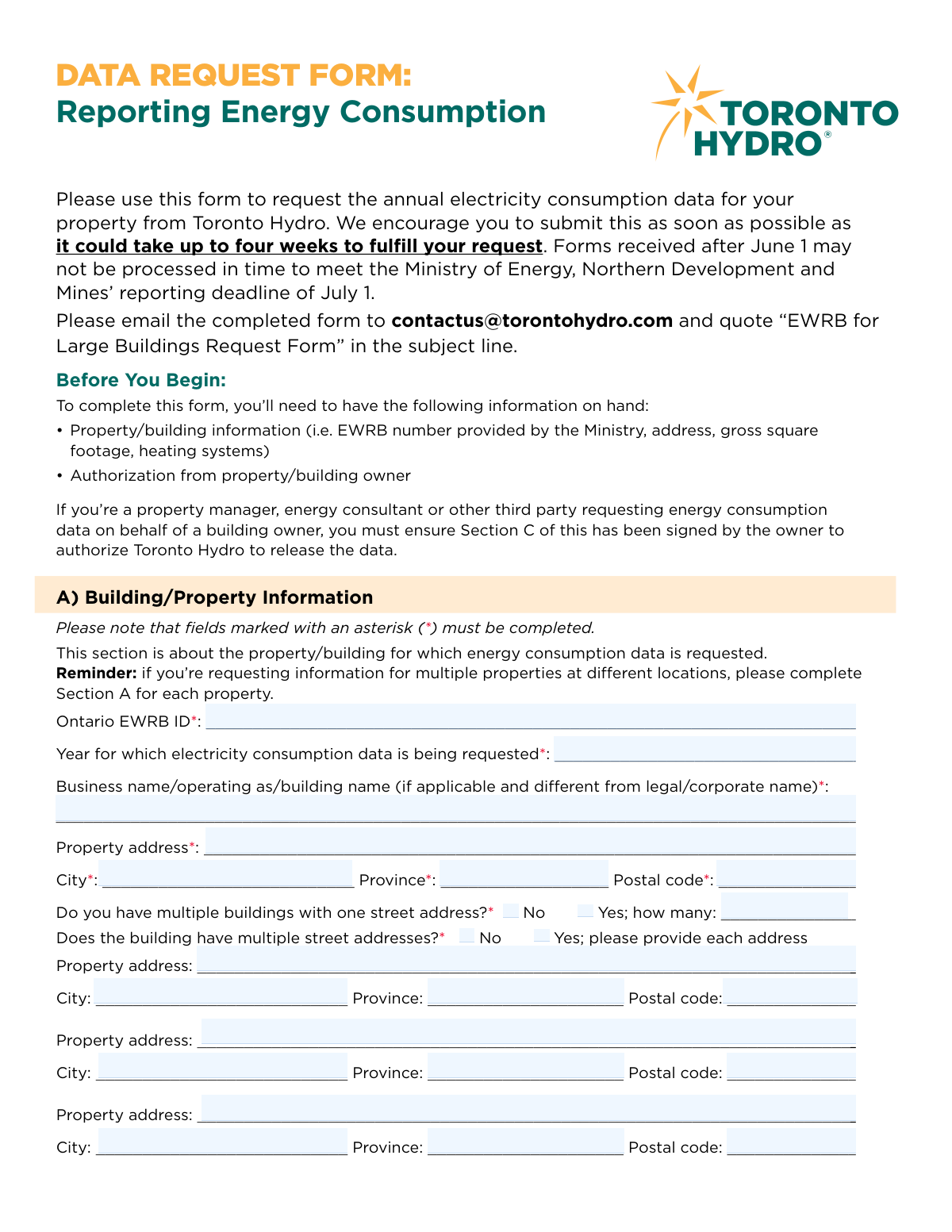
The Toronto Hydro Data Request Form for Reporting Energy Consumption is an official document for property owners or their authorized agents to request annual electricity usage data for large buildings. This information is essential for complying with the Ontario Ministry of Energy, Northern Development and Mines’ Energy and Water Reporting and Benchmarking (EWRB) initiative. Today, this form can be filled out quickly and accurately using AI-powered services like Instafill.ai, which can also convert non-fillable PDF versions into interactive fillable forms.
Our AI automatically handles information lookup, data retrieval, formatting, and form filling.
It takes less than a minute to fill out Toronto Hydro EWRB Data Request Form using our AI form filling.
Securely upload your data. Information is encrypted in transit and deleted immediately after the form is filled out.
Form specifications
| Form name: | Toronto Hydro Data Request Form: Reporting Energy Consumption |
| Number of fields: | 67 |
| Number of pages: | 3 |
| Language: | English |
Instafill Demo: How to fill out PDF forms in seconds with AI
How to Fill Out Toronto Hydro EWRB Data Request Form Online for Free in 2026
Are you looking to fill out a TORONTO HYDRO EWRB DATA REQUEST FORM form online quickly and accurately? Instafill.ai offers the #1 AI-powered PDF filling software of 2026, allowing you to complete your TORONTO HYDRO EWRB DATA REQUEST FORM form in just 37 seconds or less.
Follow these steps to fill out your TORONTO HYDRO EWRB DATA REQUEST FORM form online using Instafill.ai:
- 1 Navigate to Instafill.ai and upload the Toronto Hydro Data Request Form or select it from the available templates.
- 2 Allow the AI to process the document and identify all necessary fields across Sections A (Building Information), B (Data Requestor), C (Owner Information), and D (Additional Information).
- 3 Provide the required property details, such as the Ontario EWRB ID, address, and the year for which data is requested, and let the AI populate Section A.
- 4 Enter your information as the data requestor in Section B and the property owner's details in Section C. If you are a third party, ensure the owner's authorization is completed.
- 5 Carefully review all the information auto-filled by the AI for accuracy and completeness.
- 6 Digitally sign the form in the designated signature fields for the data requestor and property owner, and date it accordingly.
- 7 Download the completed, signed form and email it to Toronto Hydro as instructed, ensuring the subject line is correct.
Our AI-powered system ensures each field is filled out correctly, reducing errors and saving you time.
Why Choose Instafill.ai for Your Fillable Toronto Hydro EWRB Data Request Form Form?
Speed
Complete your Toronto Hydro EWRB Data Request Form in as little as 37 seconds.
Up-to-Date
Always use the latest 2026 Toronto Hydro EWRB Data Request Form form version.
Cost-effective
No need to hire expensive lawyers.
Accuracy
Our AI performs 10 compliance checks to ensure your form is error-free.
Security
Your personal information is protected with bank-level encryption.
Frequently Asked Questions About Form Toronto Hydro EWRB Data Request Form
This form is used to request annual electricity consumption data for a large building from Toronto Hydro, which is often required for the Ministry's Energy and Water Reporting and Benchmarking (EWRB) program.
Property owners, or authorized third parties like property managers and energy consultants, who need to report a building's energy consumption must complete this form to get the necessary data from Toronto Hydro.
It can take up to four weeks to fulfill your request. It is highly encouraged to submit the form as soon as possible to avoid delays, especially before the June 1st deadline for Ministry reporting.
You should email the completed form to [email protected]. Make sure to include 'EWRB for Large Buildings Request Form' in the subject line of your email.
The EWRB ID is a unique identification number provided by the Ministry for your property. You must have this number before you can complete the form.
Yes, you can request the data by filling out Section B. However, you must have the property owner complete and sign the authorization in Section C before the data can be released to you.
You can use a single form for multiple properties. You must complete a separate Section A (Building/Property Information) for each property you are requesting data for.
Incomplete forms will not be processed. Double-check that all fields marked with an asterisk (*) are filled and that all required signatures are provided to avoid delays.
The person requesting the data must sign the 'Verification of Information' at the end of the form. If the requestor is not the property owner, the owner must also sign the authorization in Section C.
Yes, services like Instafill.ai use AI to accurately auto-fill form fields from your saved information, which can save you time and help reduce errors.
You can use a service like Instafill.ai to upload the PDF. It will convert the document into an interactive, fillable format that you can complete easily on your computer.
Tools like Instafill.ai can convert flat, non-fillable PDFs into interactive forms. Simply upload the document to their platform to make it fillable online before you complete and submit it.
Compliance Toronto Hydro EWRB Data Request Form
Validation Checks by Instafill.ai
1
Ensures Property Owner Authorization for Third-Party Requests
This validation confirms that if the data requestor (Section B) is a third party and not the property owner, then the property owner's authorization in Section C is fully completed. This includes the owner's signature, printed name, and date. This is critical for data privacy and legal compliance, ensuring Toronto Hydro only releases data to authorized individuals. If this validation fails, the form cannot be processed as authorization is missing.
2
Validates the Year for Consumption Data Request
This check ensures the 'Year for which electricity consumption data is being requested' is a valid, four-digit year that has already passed. It prevents requests for the current, incomplete year or any future years, as annual consumption data is only available for completed calendar years. A failed validation would require the user to correct the year to a valid past year, for example, if submitting in 2024, the year must be 2023 or earlier.
3
Validates Canadian Postal Code Format
This check verifies that all postal code fields (for the property, data requestor, and property owner) adhere to the standard Canadian A#A #A# format. Correct formatting is essential for mail delivery and for accurately identifying property locations within the utility's database. An invalid format would trigger an error, prompting the user to correct the entry before submission.
4
Enforces Specification for 'Other' Selections
This validation rule applies to fields like 'Data Requestor Role', 'Heating type', and 'Water Heater Type'. It checks that if the 'Other' option is selected, the corresponding text field for specification is not left empty. This ensures that the submitted data is complete and actionable, avoiding ambiguity. If the specification is missing, the form submission should be blocked until the user provides the necessary details.
5
Verifies All Mandatory Fields are Completed
This is a fundamental check to ensure that all fields marked with an asterisk (*) have been filled out by the user. The form explicitly states that incomplete forms will not be processed, so this validation is the first line of defense against incomplete submissions. A failure would highlight all missing required fields to the user, preventing submission until they are all populated.
6
Matches Data Requestor's Printed Name to Signature
This validation ensures that the printed name entered in the final signature block ('Signature of data requestor') exactly matches the 'Full name of data requestor' provided in Section B. This serves as a verification step, confirming the identity of the person signing the form and taking responsibility for the accuracy of the information. A mismatch would indicate a potential error or discrepancy that must be resolved before the form is considered valid.
7
Matches Property Owner's Printed Name to Signature
This check verifies that the printed name under the property owner's signature in Section C matches the 'Full name of property owner' field at the top of Section C. This is a crucial step in validating the third-party authorization, ensuring the person who signed the authorization is the same person identified as the owner. If the names do not match, the authorization is invalid and the request cannot be processed.
8
Validates 'Number of Buildings' When Applicable
This is a conditional validation that checks the 'how many' field in Section A. If the user selects 'Yes' for the question 'Do you have multiple buildings with one street address?', this validation ensures the corresponding 'how many' field contains a numeric value greater than 1. If 'No' is selected, the field should be empty or disabled. This prevents illogical entries and ensures data integrity for properties with complex structures.
9
Ensures Additional Addresses are Provided When Indicated
This validation is triggered if the user selects 'Yes' for the question 'Does the building have multiple street addresses?'. It checks to ensure that at least the first block of additional address fields is filled out. This prevents a user from indicating multiple addresses exist without actually providing them. If the check fails, the user would be prompted to either provide the addresses or change the selection to 'No'.
10
Validates Email Address Format
This check ensures that the email address fields in Section B and Section C follow the standard '[email protected]' format. A valid email is critical for communication regarding the data request, including sending the final data or asking for clarification. This validation helps prevent typos and ensures that Toronto Hydro can successfully contact the relevant parties.
11
Checks for a Plausible 'Year Built'
This validation examines the 'Year built' field in Section D to ensure it is a plausible, four-digit year. The check would flag any years in the future or years that are unreasonably old (e.g., before 1800), as these are likely data entry errors. While not a required field, ensuring the quality of provided data is important for any subsequent analysis. A failure would result in a warning asking the user to confirm the entry.
12
Verifies Property is within Toronto Hydro's Service Area
This business rule validation checks that the property address in Section A lists 'Toronto' as the City and 'Ontario' (or 'ON') as the Province. Since the form is for Toronto Hydro, they can only provide data for properties within their service territory. This check prevents out-of-scope requests from being submitted, saving processing time for both the user and the utility. A failure would inform the user that the property appears to be outside the service area.
13
Ensures Phone Number Fields are Valid
This validation checks that the phone number fields in Section B and Section C contain a valid sequence of numbers, typically 10 digits to account for the area code. It may also check for and strip common formatting characters like parentheses or hyphens. This ensures the contact numbers are usable and correctly formatted for the utility's systems. An invalid entry would prompt the user for correction.
14
Validates Signature Date Presence and Format
This check ensures that the 'Date' fields associated with both the Data Requestor's and Property Owner's signatures are filled out and contain a valid date format (e.g., YYYY-MM-DD). The date cannot be in the future. This is important for establishing a clear timeline for the request and authorization, which can be critical for compliance and record-keeping. A missing or invalid date would block submission.
Common Mistakes in Completing Toronto Hydro EWRB Data Request Form
Third-party requestors, such as property managers or consultants, often submit the form without the property owner's signature in Section C. This happens due to oversight or difficulty coordinating with the owner, but without this explicit authorization, Toronto Hydro cannot legally release the data. This mistake leads to immediate rejection of the request and significant delays, as the entire process must be restarted after obtaining the signature.
Applicants frequently send the completed form with a generic subject line like 'Form Submission' instead of the required 'EWRB for Large Buildings Request Form'. This causes the email to be misrouted by automated filters or overlooked by the processing team, leading to major processing delays or the request being lost entirely. To avoid this, always copy and paste the exact subject line specified in the instructions to ensure your request is routed correctly and handled promptly.
In Section C, applicants often enter the property's common operating name (e.g., 'The Downtown Plaza') into the 'Full legal/corporate name' field. This mistake occurs because the operating name is more familiar, but it causes a mismatch when Toronto Hydro verifies ownership against official records. This discrepancy will halt the request until the correct legal entity name is provided, causing delays.
The Ontario EWRB ID is a unique identifier crucial for locating the property's data, but it is often entered with typos, transpositions, or is left blank if not readily available. An incorrect ID makes it impossible for Toronto Hydro to retrieve the correct data, resulting in a rejected form and wasted time. Before filling the form, locate the EWRB ID from ministry communications and carefully enter it; AI-powered tools like Instafill.ai can help by storing and accurately auto-filling such specific identifiers.
When a property has multiple buildings or street addresses, applicants may check 'Yes' in Section A but then fail to list all the required addresses or specify the number of buildings. This ambiguity forces the processing team to either send the form back for clarification or guess, causing delays and potential data errors. To prevent this, carefully read the questions and provide all necessary details in the spaces provided if you indicate the property has multiple addresses or buildings.
Applicants often focus on getting the owner's signature in Section C and completely forget to provide their own signature and date in the final verification section at the end of the form. This oversight is common due to the signature block being on the last page. An unsigned form is considered incomplete and will not be processed, invalidating the entire submission.
Applicants often misinterpret the deadlines, submitting the form after June 1 and expecting it to be processed by the July 1 ministry deadline. The form clearly states processing can take up to four weeks, meaning late submissions are at high risk of not being completed in time, causing the applicant to miss their reporting deadline. To avoid this, submit the form as early as possible, ideally well before the June 1 cutoff mentioned in the instructions.
A frequent data entry error is formatting the postal code incorrectly, such as omitting the space (e.g., 'M5V2T6' instead of 'M5V 2T6') or using lowercase letters. While it seems minor, this can cause failures in automated systems or require manual correction, slowing down the process. Using a tool like Instafill.ai can help prevent this by automatically formatting postal codes and other address data correctly according to regional standards.
When the property owner is also the data requestor, they may get confused by the two signature sections. Often, they will sign in Section C (Authorization) but neglect to also sign the final verification section, assuming one signature is sufficient. Both signatures are required to fulfill different purposes, and the owner must sign in the final section as the 'data requestor' to certify the form's accuracy and ensure it is valid.
Since the form is a PDF, people often print it, fill it out by hand, and then scan it. This can result in illegible handwriting for critical information like names, email addresses, and ID numbers, forcing the processor to reject the form. To avoid this, use a tool to make the PDF fillable or fill it digitally before printing for a signature. AI tools like Instafill.ai can convert flat PDFs into fillable forms, ensuring all text is clear, legible, and correctly placed.
Saved over 80 hours a year
“I was never sure if my IRS forms like W-9 were filled correctly. Now, I can complete the forms accurately without any external help.”
Kevin Martin Green
Your data stays secure with advanced protection from Instafill and our subprocessors

Robust compliance program
Transparent business model
You’re not the product. You always know where your data is and what it is processed for.
ISO 27001, HIPAA, and GDPR
Our subprocesses adhere to multiple compliance standards, including but not limited to ISO 27001, HIPAA, and GDPR.
Security & privacy by design
We consider security and privacy from the initial design phase of any new service or functionality. It’s not an afterthought, it’s built-in, including support for two-factor authentication (2FA) to further protect your account.
Fill out Toronto Hydro EWRB Data Request Form with Instafill.ai
Worried about filling PDFs wrong? Instafill securely fills toronto-hydro-data-request-form-reporting-energy-consumption forms, ensuring each field is accurate.