Yes! You can use AI to fill out DHCS 7107, Provider Preventable Conditions (PPC) Reporting Form
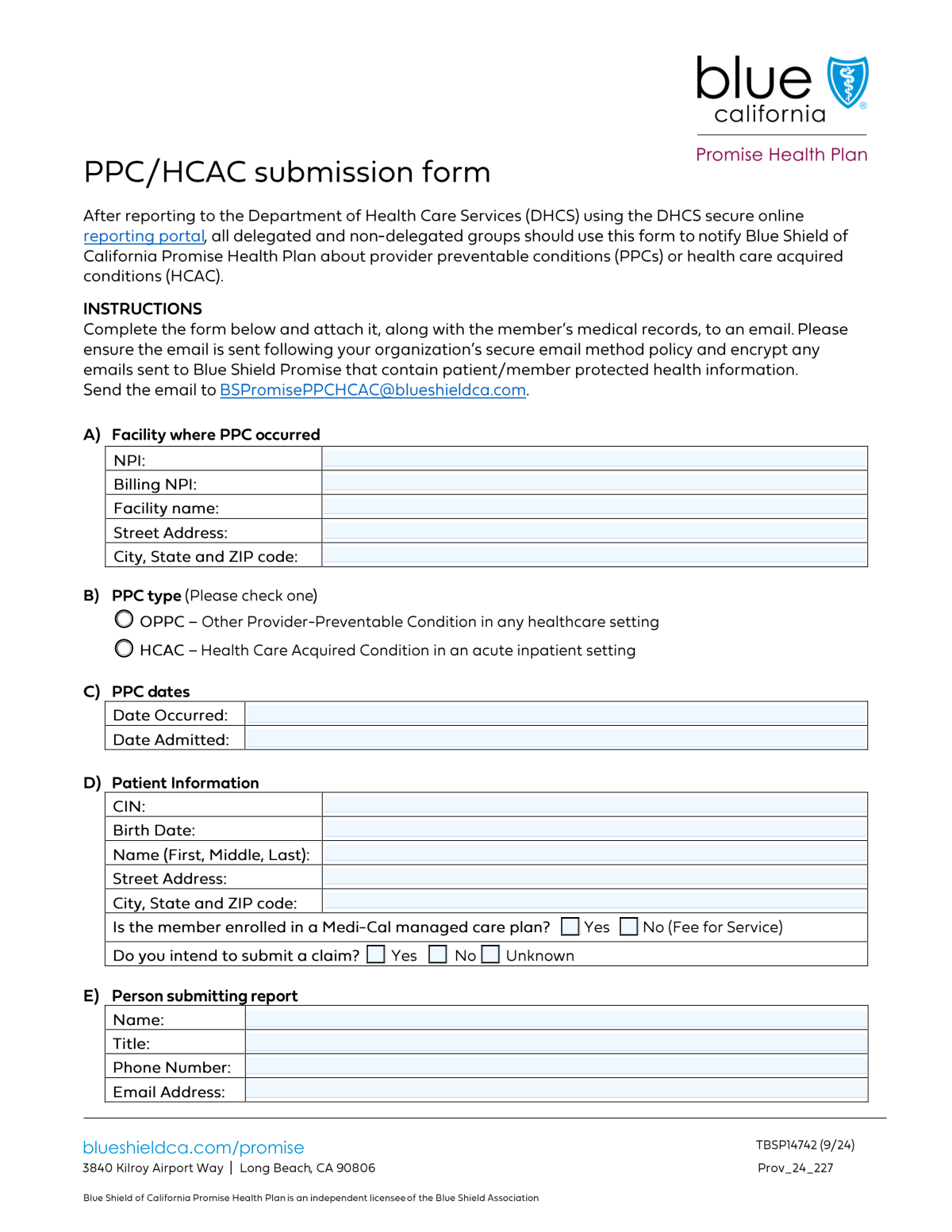
The DHCS 7107, or Provider Preventable Conditions (PPC) Reporting Form, is used by healthcare providers in California to report specific adverse medical events that occur to Medi-Cal patients. This reporting is essential for patient safety monitoring, quality improvement initiatives, and ensuring compliance with state and federal payment regulations. Today, this form can be filled out quickly and accurately using AI-powered services like Instafill.ai, which can also convert non-fillable PDF versions into interactive fillable forms.
Our AI automatically handles information lookup, data retrieval, formatting, and form filling.
It takes less than a minute to fill out DHCS 7107 using our AI form filling.
Securely upload your data. Information is encrypted in transit and deleted immediately after the form is filled out.
Form specifications
| Form name: | DHCS 7107, Provider Preventable Conditions (PPC) Reporting Form |
| Number of fields: | 23 |
| Number of pages: | 1 |
| Language: | English |
Instafill Demo: How to fill out PDF forms in seconds with AI
How to Fill Out DHCS 7107 Online for Free in 2026
Are you looking to fill out a DHCS 7107 form online quickly and accurately? Instafill.ai offers the #1 AI-powered PDF filling software of 2026, allowing you to complete your DHCS 7107 form in just 37 seconds or less.
Follow these steps to fill out your DHCS 7107 form online using Instafill.ai:
- 1 Navigate to Instafill.ai and upload your DHCS 7107 form or select it from the template library.
- 2 Use the AI assistant to accurately input the facility's information, including NPI, name, and address where the PPC occurred.
- 3 Enter the patient's details, such as their CIN, full name, date of birth, and address, and specify their Medi-Cal plan status.
- 4 Provide the relevant dates, including when the PPC occurred and when the patient was admitted.
- 5 Select the checkbox that corresponds to the specific type of Provider Preventable Condition being reported.
- 6 Fill in the contact details for the person submitting the report, including their name, title, phone, and email.
- 7 Review all the information for completeness and accuracy with the AI tool before submitting the form to the Department of Health Care Services.
Our AI-powered system ensures each field is filled out correctly, reducing errors and saving you time.
Why Choose Instafill.ai for Your Fillable DHCS 7107 Form?
Speed
Complete your DHCS 7107 in as little as 37 seconds.
Up-to-Date
Always use the latest 2026 DHCS 7107 form version.
Cost-effective
No need to hire expensive lawyers.
Accuracy
Our AI performs 10 compliance checks to ensure your form is error-free.
Security
Your personal information is protected with bank-level encryption.
Frequently Asked Questions About Form DHCS 7107
This form is used to report a Provider Preventable Condition (PPC) that occurred at a healthcare facility. It gathers essential details about the facility, the patient, the incident, and the person submitting the report.
A representative from the healthcare facility where the Provider Preventable Condition occurred is responsible for completing and submitting this form. This is often an administrator, risk manager, or other designated staff member.
The facility NPI is the National Provider Identifier for the physical location where the event occurred. The billing NPI is for the entity that handles billing, which may be a separate corporate office or third-party service.
CIN stands for Customer Identification Number, a unique identifier for the patient within their health plan (e.g., Medi-Cal). This number is typically found on the patient's insurance card or within their electronic health record.
Enter the specific calendar date on which the Provider Preventable Condition (PPC) itself happened. This may be different from the patient's admission date.
Check this box if the patient is not enrolled in a Medi-Cal managed care plan. This indicates their payment model is fee-for-service, meaning each service is billed individually.
You must provide the full name, professional title, phone number, and email address of the individual who is officially filing the report on behalf of the facility. This person will be the primary contact for any follow-up.
You should make every effort to provide complete and accurate information from the patient's record. If the information is unavailable, fill out what you can and be prepared to explain the omission if contacted.
Yes, services like Instafill.ai use AI to accurately auto-fill form fields, which can save you time and help prevent errors. This is particularly useful for entering recurring facility and provider information.
To fill this form online, upload the PDF to the Instafill.ai platform. The service will make the fields interactive, allowing you to type in your information, save your progress, and download the completed document.
If your PDF is a 'flat' or non-fillable file, you can use a tool like Instafill.ai. Simply upload the form, and it will automatically convert it into an interactive, fillable version you can complete on your computer.
The form itself does not list submission instructions. You must refer to the official guidelines provided by the governing health department or agency to find the correct mailing address, fax number, or online portal for submission.
Compliance DHCS 7107
Validation Checks by Instafill.ai
1
Validates NPI Format and Structure
This check ensures the 'NPI' and 'Billing NPI' fields each contain exactly 10 digits. It may also include a Luhn algorithm check to verify the number's internal consistency. This validation is crucial for preventing typographical errors and ensuring the identifier is structurally correct for matching with the national provider database. An invalid NPI format will trigger an error, requiring the user to correct the entry.
2
Ensures PPC Occurrence Date is Logically After Admission Date
This validation compares the 'Date Occurred' with the 'Date Admitted'. The date the Provider Preventable Condition (PPC) occurred must be on or after the patient's admission date. This is a critical logical check to ensure the timeline of events is accurate, as a PPC cannot happen before a patient is admitted. An error will be displayed if the occurrence date precedes the admission date.
3
Verifies Patient was Born Before PPC Occurrence
This check ensures the 'Date Occurred' is after the 'Patient Birth Date'. This validation prevents impossible scenarios where the event date is recorded as being before the patient was born. Maintaining logical data integrity is crucial for accurate reporting and analysis, and the system will reject submissions with an illogical date sequence.
4
Validates Patient CIN Format
This check verifies that the Patient Customer Identification Number (CIN) follows the required format, such as a specific length or character type (e.g., a 9-digit number). The CIN is a primary key for patient identification, so its accuracy is paramount for linking the report to the correct patient record. An incorrectly formatted CIN will prevent submission until corrected.
5
Requires at least one PPC Type to be Selected
This check ensures that the user has selected at least one checkbox from the 'PPC type' group (e.g., Check Box18 or Check Box19). The type of PPC is a fundamental piece of information for classifying and analyzing the report. The form cannot be submitted until a PPC type is specified, ensuring all reports are properly categorized.
6
Validates Submitter's Email Address Format
This check ensures the value entered in the 'Email Address' field conforms to the standard email format (e.g., '[email protected]'). A valid email is necessary for sending submission confirmations and for contacting the submitter if more information is needed. The form will show an error for invalid formats, preventing communication failures.
7
Validates Submitter's Phone Number Format
This validation checks that the 'Phone Number' field contains a valid 10-digit telephone number, accommodating common formats like (XXX) XXX-XXXX. Accurate contact information is vital for direct communication regarding the submitted report. The system will prompt the user to correct any entry that does not match a recognized phone number pattern.
8
Validates 5 or 9-Digit ZIP Code Format
This check ensures that the ZIP code for both the 'Facility' and 'Patient' addresses is a valid 5-digit or 9-digit (ZIP+4) format. Correctly formatted ZIP codes are essential for mail delivery, geographic analysis, and data standardization. The form will flag any non-compliant entries for correction.
9
Ensures State is a Valid Two-Letter Abbreviation
This validation verifies that the 'State' field for both facility and patient addresses contains a valid, capitalized two-letter US state or territory abbreviation. Using standardized state codes is crucial for address verification and data consistency across the system. An invalid entry will trigger an error message, potentially with a list of acceptable codes.
10
Prevents Future Dates for Admission and Occurrence
This validation ensures that the 'Date Admitted' and 'Date Occurred' are not in the future. Event dates must be in the past or the present day to be valid. This check prevents common data entry errors and ensures the report reflects an event that has already happened.
11
Ensures Patient's Full Name is Provided
This check verifies that the 'Patient Full Name' field is not empty. The patient's name is a critical identifier for the report and is necessary to associate the event with the correct individual's medical history. The form will not be accepted without this essential information.
12
Ensures Facility Name is Provided
This validation confirms that the 'Facility Name' field is not left blank. The name of the facility is essential for identifying where the incident took place and for any subsequent follow-up or regulatory action. A submission without a facility name would be incomplete and cannot be processed.
Common Mistakes in Completing DHCS 7107
Users often confuse the 'NPI' for the facility where the event occurred with the 'Billing NPI'. Entering the wrong number in these fields can lead to incorrect provider identification, claim rejections, and significant administrative delays. To avoid this, carefully verify which NPI corresponds to the physical location versus the separate billing entity before entry.
The National Provider Identifier (NPI) must be a 10-digit number. People frequently make typos, enter the wrong number of digits, or mistakenly include letters or special characters, which leads to database lookup failures. Always double-check the NPI for accuracy. AI-powered tools like Instafill.ai can help prevent this by automatically validating the NPI format during data entry.
The form requires the 'full legal name' of the facility, but submitters often use a shorter, more common name or an abbreviation. This can cause mismatches in state or federal databases, complicating the verification process. It is crucial to look up and enter the facility's complete legal name as registered.
Submitters may enter dates in various formats (e.g., DD-MM-YYYY, Month Day, YYYY) across the 'Date Occurred' and 'Date Admitted' fields. This inconsistency causes data processing errors and requires manual correction, delaying the report. Always use the standard MM/DD/YYYY format to ensure consistency and prevent processing issues.
It's a common error to mix up the date the patient was admitted to the facility with the specific date the Provider Preventable Condition (PPC) occurred. This mistake misrepresents the timeline of events, which is critical for clinical reviews and investigations. Carefully consult patient records to accurately distinguish between these two separate dates.
The Patient Customer Identification Number (CIN) is a critical and unique identifier. Simple typos, transposing digits, or confusing it with a different number like a medical record number are frequent errors. An incorrect CIN will prevent the system from identifying the correct patient, halting the entire reporting process until it is corrected.
The form asks for the 'Patient Full Name,' but submitters often provide only a first and last name, or a middle initial. This omission can lead to ambiguity and difficulty in matching the patient's record, especially if they have a common name. To ensure accurate identification, enter the patient's full name, including the complete middle name, exactly as it appears on their official records.
The label 'No (Fee for Service)' is counterintuitive, as checking it means the patient is *not* in a managed care plan and *is* covered by a fee-for-service model. This confusing phrasing leads to frequent errors in classifying the patient's payment plan. This mistake can cause major billing and reimbursement complications down the line.
The checkboxes (e.g., Check Box18, Check Box19) are used to classify the type of Provider Preventable Condition being reported. It is easy to overlook these small but critical fields, resulting in an incomplete submission that lacks essential data for analysis. Always perform a final review of the form to ensure all required checkboxes are marked before submitting.
Simple typos like a missing '@' symbol in an email, an incorrect domain, or a wrong area code in a phone number are extremely common. These errors make it impossible for the receiving agency to contact the submitter for clarifications, which can lead to the report being delayed or rejected. Using a tool like Instafill.ai can help by autofilling pre-validated contact information, and if the form is a non-fillable PDF, it can convert it into an interactive version.
Saved over 80 hours a year
“I was never sure if my IRS forms like W-9 were filled correctly. Now, I can complete the forms accurately without any external help.”
Kevin Martin Green
Your data stays secure with advanced protection from Instafill and our subprocessors

Robust compliance program
Transparent business model
You’re not the product. You always know where your data is and what it is processed for.
ISO 27001, HIPAA, and GDPR
Our subprocesses adhere to multiple compliance standards, including but not limited to ISO 27001, HIPAA, and GDPR.
Security & privacy by design
We consider security and privacy from the initial design phase of any new service or functionality. It’s not an afterthought, it’s built-in, including support for two-factor authentication (2FA) to further protect your account.
Fill out DHCS 7107 with Instafill.ai
Worried about filling PDFs wrong? Instafill securely fills dhcs-7107-provider-preventable-conditions-ppc-reporting-form forms, ensuring each field is accurate.