Yes! You can use AI to fill out Vermont Medicaid 835 ERA Enrollment Form
The Vermont Medicaid 835 ERA Enrollment Form is a document required for healthcare providers to receive electronic payment explanations (Electronic Remittance Advice) from Vermont Medicaid. By enrolling, providers can automate payment posting and reconciliation, improving billing efficiency compared to manual paper-based processes. Today, this form can be filled out quickly and accurately using AI-powered services like Instafill.ai, which can also convert non-fillable PDF versions into interactive fillable forms.
Our AI automatically handles information lookup, data retrieval, formatting, and form filling.
It takes less than a minute to fill out 835 ERA Enrollment Form using our AI form filling.
Securely upload your data. Information is encrypted in transit and deleted immediately after the form is filled out.
Form specifications
| Form name: | Vermont Medicaid 835 ERA Enrollment Form |
| Number of pages: | 1 |
| Language: | English |
More forms in Enrollment forms
Instafill Demo: How to fill out PDF forms in seconds with AI
How to Fill Out 835 ERA Enrollment Form Online for Free in 2026
Are you looking to fill out a 835 ERA ENROLLMENT FORM form online quickly and accurately? Instafill.ai offers the #1 AI-powered PDF filling software of 2026, allowing you to complete your 835 ERA ENROLLMENT FORM form in just 37 seconds or less.
Follow these steps to fill out your 835 ERA ENROLLMENT FORM form online using Instafill.ai:
- 1 Navigate to Instafill.ai and upload or select the Vermont Medicaid 835 ERA Enrollment Form from the forms library.
- 2 Use the AI assistant to accurately fill in the Provider Information section, including your name, VT Medicaid ID, NPI, and TIN/EIN.
- 3 Enter the name, phone number, and email for your primary EDI contact person.
- 4 If you use a third-party service, provide the information for your Billing Agent, Clearinghouse, or Vendor in the designated sections.
- 5 Select the reason for submission: New Enrollment, Change Enrollment, or Cancel Enrollment.
- 6 Review all entered information for accuracy, then provide a legally binding electronic signature and enter your printed name and title.
- 7 Download the completed form and submit it to the Vermont EDI Coordinator via email or mail as per the form's instructions.
Our AI-powered system ensures each field is filled out correctly, reducing errors and saving you time.
Why Choose Instafill.ai for Your Fillable 835 ERA Enrollment Form Form?
Speed
Complete your 835 ERA Enrollment Form in as little as 37 seconds.
Up-to-Date
Always use the latest 2026 835 ERA Enrollment Form form version.
Cost-effective
No need to hire expensive lawyers.
Accuracy
Our AI performs 10 compliance checks to ensure your form is error-free.
Security
Your personal information is protected with bank-level encryption.
Frequently Asked Questions About Form 835 ERA Enrollment Form
These forms are used to register providers, billing services, or clearinghouses to exchange electronic data (EDI) with Vermont Medicaid. This includes submitting claims and receiving Electronic Remittance Advice (ERA) through the official web portal.
Any entity that will use the Vermont Medicaid Web Portal to send or receive electronic transactions must complete the EDI Registration form. Providers who specifically want to receive Electronic Remittance Advice (835/ERA) must also complete the 835 ERA Enrollment Form.
If you want to receive Electronic Remittance Advice (ERA), yes. The EDI Registration form is required for all electronic transactions, and the 835 ERA Enrollment form is an additional required document to specifically activate ERAs.
You can email the signed forms to [email protected] or mail them to Gainwell Technologies, Attn: EDI Coordinator, PO Box 888, Williston, VT 05495.
The standard processing time for enrollment is 7-14 business days after the forms have been received.
To check your status, you can call Medicaid Vermont at 800-925-1706 and select Option 3 to speak with the EDI Coordinator. You can ask if your Provider ID has been linked to your Trading Partner ID.
Once approved, you MUST call your clearinghouse or billing service (e.g., Office Ally) to notify them of the approval before you start submitting claims electronically.
The form must be signed by the provider or an authorized representative of the provider. A vendor or clearinghouse is not permitted to sign on the provider's behalf.
A Trading Partner ID identifies the entity exchanging data with Vermont Medicaid. If you use a clearinghouse or billing service, you must enter their ID; if you are establishing your own new account, you can leave this field blank.
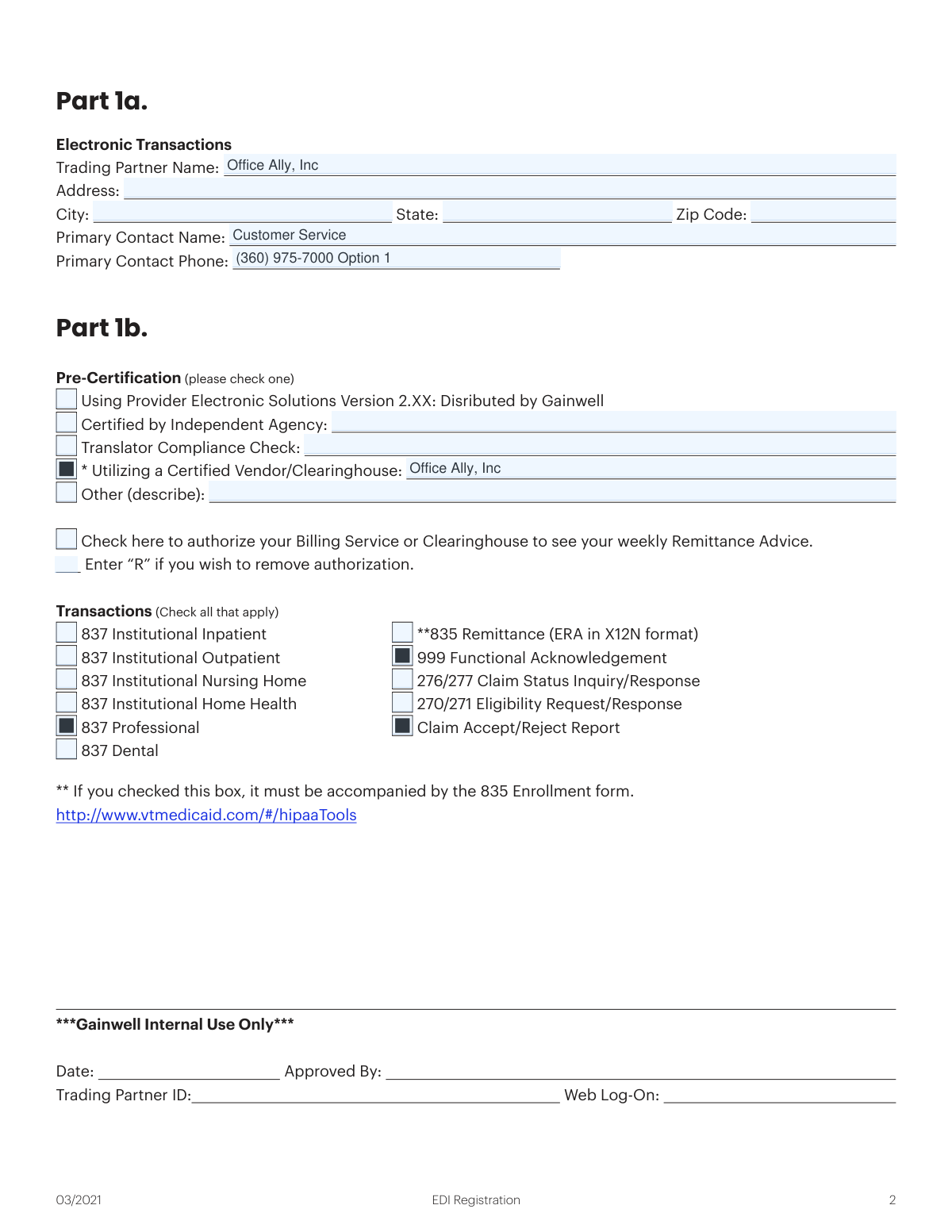
On the EDI Registration form (Part 1b), check the box to authorize your billing service or clearinghouse to see your weekly Remittance Advice. You must also complete the 835 ERA Enrollment form.
For all questions and status requests regarding these forms, you should contact the EDI Coordinator by calling 800-925-1706 and selecting Option 3.
Yes, services like Instafill.ai use AI to accurately auto-fill form fields, which can save you significant time and help prevent errors.
Simply upload the Vermont Medicaid forms to the Instafill.ai platform. The AI will identify all the fields, allowing you to enter your information once and have it populate the entire document automatically.
You can use a service like Instafill.ai, which can convert flat, non-fillable PDFs into interactive forms. This allows you to type your information directly into the fields online before printing.
Compliance 835 ERA Enrollment Form
Validation Checks by Instafill.ai
1
NPI Format and Length Validation
This check verifies that the National Provider Identifier (NPI) entered on the 835 ERA Enrollment Form consists of exactly 10 digits. The NPI is a unique, government-issued identifier essential for HIPAA standard transactions. If the NPI is not a 10-digit number, the form will be rejected as the identifier is invalid and cannot be processed by the Medicaid system.
2
TIN/EIN Format Validation
This validation ensures the Tax ID Number (TIN/EIN) on the 835 ERA Enrollment Form is a 9-digit numeric value. This number is critical for financial and tax reporting purposes and serves as a primary identifier for the business entity. An incorrectly formatted TIN/EIN will cause the enrollment to fail verification and be rejected.
3
Exclusive Submission Reason Selection
This check ensures that only one reason for submission ('New Enrollment', 'Change Enrollment', or 'Cancel Enrollment') is selected on the 835 ERA Enrollment Form. Selecting multiple options creates ambiguity, making it impossible to determine the user's intent. The form will be considered invalid and returned for correction if more than one option is chosen.
4
Conditional 835 ERA Form Requirement
This validation confirms that if the '835 Remittance (ERA in X12N format)' checkbox is selected on the EDI Registration form, a completed 835 ERA Enrollment Form is also submitted. The instructions explicitly state the 835 form is required to activate ERAs. Failure to include the accompanying form will prevent the ERA setup from being completed, even if requested on the EDI form.
5
Authorized Signature Presence and Authority
This check verifies that the 'Authorized Signature' field on the 835 ERA Enrollment Form is signed and that the 'Printed Name' and 'Title' fields are also completed. It is critical that the signature belongs to the provider or a provider representative, not a vendor or clearinghouse, as specified in the instructions. An unsigned, incomplete, or unauthorized signature will render the form legally invalid and cause immediate rejection.
6
Provider List Minimum Entry
This validation ensures that at least one provider is listed in Part 2 of the EDI Registration form, including their Provider ID and Name. A Trading Partner registration is intended to manage transactions for specific providers. A submission with an empty provider list is incomplete and will be rejected, as there are no providers to link to the Trading Partner ID.
7
Provider Transaction Authorization Check
For each provider listed in Part 2 of the EDI Registration form, this check ensures at least one transaction checkbox (e.g., 837I, 835, 270/271) is marked. This authorization is necessary to define which transactions the Trading Partner is permitted to process for that provider. A provider entry without any selected transactions is an incomplete request and will be flagged for correction.
8
Single Pre-Certification Method Selection
This validation ensures that exactly one 'Pre-Certification' method is checked in Part 1b of the EDI Registration form. The form instructs the user to 'please check one,' so selecting none or multiple methods makes it unclear how the trading partner is certifying their X12N compliance. This ambiguity will cause the registration to be paused pending clarification from the submitter.
9
Taxonomy Code Format Validation
This check verifies that the Provider Taxonomy Code on the 835 ERA Enrollment Form is a 10-character alphanumeric string, as per the form's instructions. This code is a standard HIPAA identifier used to classify the provider's specialty. An invalid format can lead to claim rejections or incorrect processing, so it must be accurate for successful enrollment.
10
Mandatory Section Completion
This validation verifies that all sections explicitly marked '(Completion Required)' on the 835 ERA Enrollment Form, such as Provider Information and Contact Information, are fully filled out. These sections contain the minimum data necessary to identify the provider and process the enrollment. An incomplete form will be returned to the sender, delaying the entire process.
11
Email Address Format Validation
This check ensures that all email address fields on both forms follow a standard format (e.g., '[email protected]'). A valid email is essential for the EDI Coordinator to communicate status updates, questions, or confirmations regarding the enrollment. An invalid email address could lead to the provider missing critical information about their submission.
12
Trading Partner ID Consistency
When a 'Change Enrollment' is submitted or both forms are filled out for an existing entity, this check ensures the Trading Partner ID is consistent across all relevant fields and forms. A mismatch in the Trading Partner ID between the EDI form (Part 2) and the 835 ERA form would create ambiguity. This validation prevents the misapplication of settings to the wrong account.
13
VT Medicaid ID Presence
This check ensures the 'VT Medicaid ID' field on the 835 ERA Enrollment Form is not empty. This ID is the primary key for linking the provider to their account within the Vermont Medicaid system. Without this specific identifier, the ERA enrollment cannot be processed for the correct provider entity.
Common Mistakes in Completing 835 ERA Enrollment Form
The instructions clearly state that to activate Electronic Remittance Advice (ERA), both the EDI Registration form and the 835 ERA Enrollment Form must be submitted. Providers often overlook this and submit only one form, assuming it's sufficient. This results in an incomplete application, preventing the setup of ERAs and causing significant processing delays. To avoid this, carefully review the checklist and ensure both documents are completed and sent together.
The 835 ERA Enrollment Form explicitly requires a signature from the provider or an authorized provider representative, not from a vendor or clearinghouse. Billing services or vendors sometimes sign on the provider's behalf, which invalidates the form. This leads to immediate rejection and requires the form to be re-submitted with the correct signature, delaying the enrollment process. Always ensure the person legally authorized to represent the provider signs the document.
On the EDI Registration form (Part 1b), there is a specific checkbox for '**835 Remittance (ERA in X12N format)'. Users frequently complete the separate 835 ERA Enrollment Form but forget to check this corresponding box on the main registration form. This oversight means the system is not flagged to process the ERA request, rendering the second form useless and preventing ERA setup. Double-check that all desired transaction types are selected in Part 1b.
Users often confuse their Provider ID with the Trading Partner ID or enter the wrong one. The instructions specify that if using a clearinghouse (like Office Ally), their Trading Partner ID must be used on the 835 ERA form. Entering the provider's own ID instead will cause the electronic remittance files to be routed incorrectly or not at all. To prevent this, confirm the correct Trading Partner ID with your clearinghouse or billing service before filling out the form.
Part 2 of the EDI Registration form requires a signature for each provider being added, yet this field is frequently left blank. This happens when a billing agent fills out the form for multiple providers and fails to obtain each required signature. An incomplete Part 2 will cause the entire registration to be rejected, as there is no proof of authorization for each provider listed. Ensure every provider line item is properly signed before submission.
The instructions contain a critical final step: after Vermont Medicaid approves the enrollment, the provider MUST call their clearinghouse (e.g., Office Ally) to notify them. Many providers assume the process is complete after state approval and skip this step. This failure to notify the clearinghouse means their system is not activated to receive the files, resulting in failed electronic claim submissions and missing remittance advice.
The provider name entered on the EDI Registration form, the 835 ERA Enrollment Form, and the name registered with Vermont Medicaid must match exactly. Discrepancies, such as using 'Jane Doe MD' on one form and 'Dr. Jane Doe Practice LLC' on another, will cause record-matching failures. This leads to rejection of the enrollment until the information is consistent across all records. Using an AI-powered tool like Instafill.ai can help maintain consistency by auto-populating saved information across related forms.
The 835 ERA Enrollment Form instructions specify using the group NPI if the provider has one. However, individuals often default to entering their personal NPI, even when billing as part of a group. This mismatch causes significant issues with payment reconciliation, as the 835 files are sorted by NPI and will not align with claims submitted under the group NPI. Always verify whether an individual or group NPI is required for the specific context.
On the 835 ERA Enrollment Form, the 'Reason for Submission' (New, Change, or Cancel Enrollment) is a required field that is often missed. When left blank, the processing team at Gainwell Technologies does not know how to handle the request, leading to delays while they contact the provider for clarification. To ensure smooth processing, always check the box that accurately reflects the purpose of your submission.
These forms are often distributed as non-fillable PDFs, forcing users to print, manually fill, and then scan them, which can lead to illegible handwriting and data entry errors. This manual process is inefficient and prone to mistakes that cause rejections. To avoid this, use a service like Instafill.ai, which can convert flat PDFs into smart, fillable forms, ensuring all data is clear, legible, and correctly formatted before submission.
Saved over 80 hours a year
“I was never sure if my IRS forms like W-9 were filled correctly. Now, I can complete the forms accurately without any external help.”
Kevin Martin Green
Your data stays secure with advanced protection from Instafill and our subprocessors




Robust compliance program
Transparent business model
You’re not the product. You always know where your data is and what it is processed for.
ISO 27001, HIPAA, and GDPR
Our subprocesses adhere to multiple compliance standards, including but not limited to ISO 27001, HIPAA, and GDPR.
Security & privacy by design
We consider security and privacy from the initial design phase of any new service or functionality. It’s not an afterthought, it’s built-in, including support for two-factor authentication (2FA) to further protect your account.
Fill out 835 ERA Enrollment Form with Instafill.ai
Worried about filling PDFs wrong? Instafill securely fills vermont-medicaid-835-era-enrollment-form forms, ensuring each field is accurate.
