Yes! You can use AI to fill out Availity Enrollment Form for Medicaid Idaho
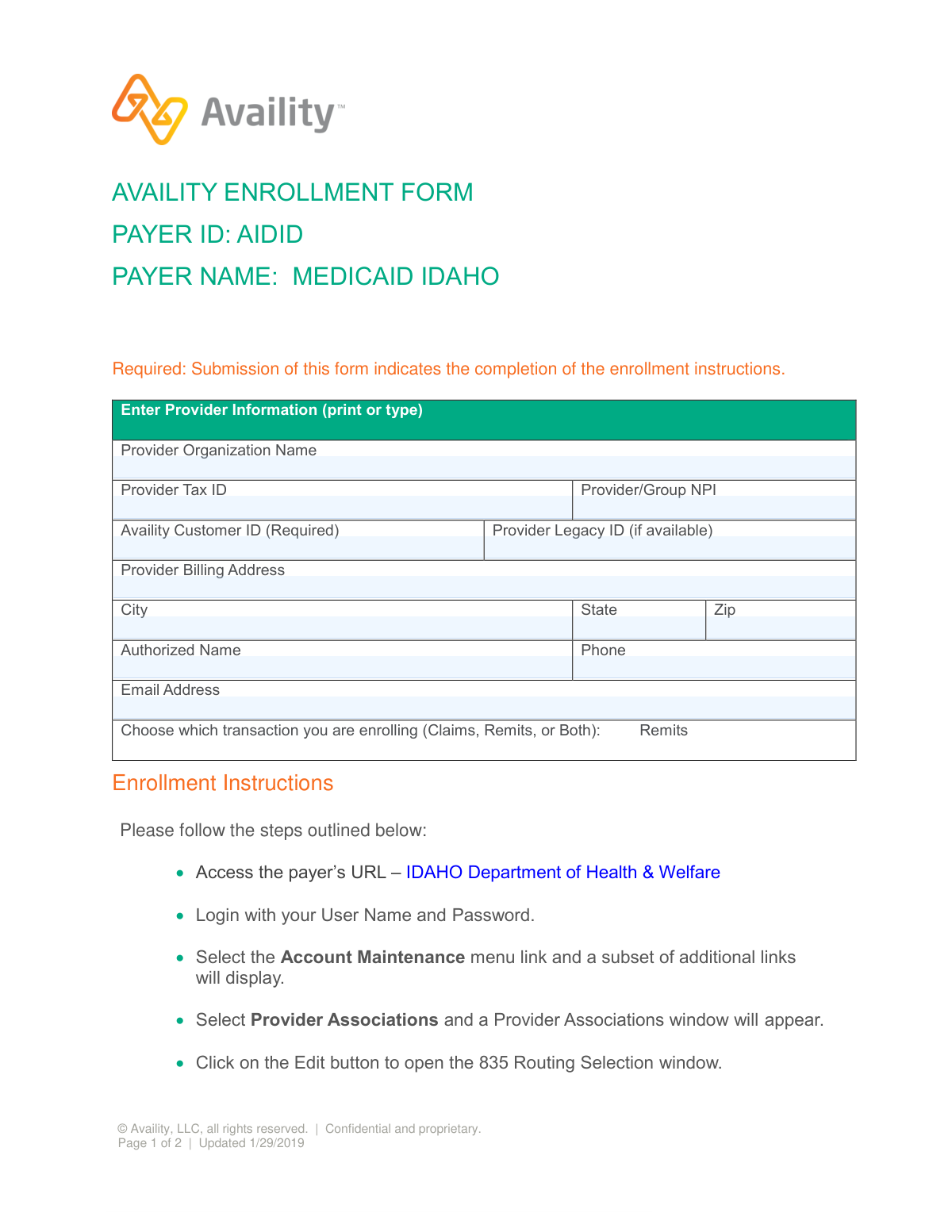
This form is used by healthcare providers to enroll with Medicaid Idaho through the Availity platform for electronic data interchange (EDI) transactions, such as claims and electronic remittance advice (ERA/835). Proper completion ensures that providers can submit claims and receive payments electronically via the Availity clearinghouse. Today, this form can be filled out quickly and accurately using AI-powered services like Instafill.ai, which can also convert non-fillable PDF versions into interactive fillable forms.
Availity Enrollment Form (AIDID) is part of the
EDI enrollment forms, enrollment forms and Medicaid forms categories on Instafill.
Our AI automatically handles information lookup, data retrieval, formatting, and form filling.
It takes less than a minute to fill out Availity Enrollment Form (AIDID) using our AI form filling.
Securely upload your data. Information is encrypted in transit and deleted immediately after the form is filled out.
Form specifications
| Form name: | Availity Enrollment Form for Medicaid Idaho |
| Number of pages: | 1 |
| Language: | English |
More forms in EDI enrollment forms
Instafill Demo: How to fill out PDF forms in seconds with AI
How to Fill Out Availity Enrollment Form (AIDID) Online for Free in 2026
Are you looking to fill out a AVAILITY ENROLLMENT FORM (AIDID) form online quickly and accurately? Instafill.ai offers the #1 AI-powered PDF filling software of 2026, allowing you to complete your AVAILITY ENROLLMENT FORM (AIDID) form in just 37 seconds or less.
Follow these steps to fill out your AVAILITY ENROLLMENT FORM (AIDID) form online using Instafill.ai:
- 1 Navigate to Instafill.ai and upload or select the Availity Enrollment Form for Medicaid Idaho.
- 2 Use the AI assistant to automatically populate your Provider Organization Name, Tax ID, and Group NPI.
- 3 Enter your required Availity Customer ID and any applicable Provider Legacy ID.
- 4 Provide your complete Provider Billing Address, including city, state, and zip code.
- 5 Input the contact information for the authorized representative, including their name, phone number, and email address.
- 6 Choose the transaction type you are enrolling for, such as Claims, Remits, or Both.
- 7 Review all entered information for accuracy, then download the completed form for submission according to the payer's instructions.
Our AI-powered system ensures each field is filled out correctly, reducing errors and saving you time.
Why Choose Instafill.ai for Your Fillable Availity Enrollment Form (AIDID) Form?
Speed
Complete your Availity Enrollment Form (AIDID) in as little as 37 seconds.
Up-to-Date
Always use the latest 2026 Availity Enrollment Form (AIDID) form version.
Cost-effective
No need to hire expensive lawyers.
Accuracy
Our AI performs 10 compliance checks to ensure your form is error-free.
Security
Your personal information is protected with bank-level encryption.
Frequently Asked Questions About Form Availity Enrollment Form (AIDID)
This form is used by healthcare providers to enroll for receiving electronic remittance advice (ERA/835 files) from Medicaid Idaho through the Availity clearinghouse. It serves as a guide and record for the required online enrollment steps.
Any healthcare provider or organization that bills Medicaid Idaho and wants to receive their electronic remittance advice (ERAs) through Availity must complete this enrollment.
No, this form is a guide for the primary enrollment steps which must be completed online. You must log in to the Idaho Department of Health & Welfare portal to select Availity for 835 routing as instructed on the form.
You will need your Provider Organization Name, Tax ID, NPI, billing address, and an authorized contact's name and email. Your Availity Customer ID is also required.
Your Availity Customer ID is assigned when you register with Availity. You can typically find this ID by logging into your Availity portal account or on previous correspondence from Availity.
This specific form and its instructions are for enrolling in electronic remittance advice (Remits). For information on enrolling for electronic claims (837) submission, you should contact Availity or Medicaid Idaho Provider Enrollment directly.
A Provider Legacy ID is an older identification number used by the payer before NPIs became standard. It is not required, but you should enter it if one is available for your organization.
For any questions about the enrollment process, you can contact Provider Enrollment at [email protected] or call 866-686-4272.
The form does not specify a standard processing time. After you complete the online steps, you can contact the Provider Enrollment phone number or email for a status update on your enrollment.
Yes, services like Instafill.ai use AI to accurately auto-fill form fields with your saved information, which can save you time and help prevent errors.
You can upload the Availity Enrollment Form PDF to the Instafill.ai platform. Its AI will identify the fields, allowing you to automatically populate your provider information from your saved profile to complete the form quickly.
If you have a non-fillable or 'flat' PDF, you can use a service like Instafill.ai. It can convert the document into an interactive, fillable form that you can complete and sign digitally.
The TPA (Trading Partner Account) User Guide is a detailed manual from Idaho Medicaid that explains how to manage your account on their portal. The form provides a link to this guide for helpful screenshots and more detailed instructions.
Compliance Availity Enrollment Form (AIDID)
Validation Checks by Instafill.ai
1
Ensures Provider Organization Name is Provided
This check verifies that the 'Provider Organization Name' field is not left blank. This name is crucial for identifying the entity enrolling for services with Medicaid Idaho and Availity. A missing name would make it impossible to process the enrollment, leading to rejection of the form.
2
Validates Provider Tax ID Format
This validation ensures the 'Provider Tax ID' is a 9-digit number, consistent with the format of a federal Employer Identification Number (EIN). This ID is essential for financial and legal identification of the provider. An invalid format will cause rejection during payer system verification and halt the enrollment process.
3
Validates Provider/Group NPI Format
This check confirms that the 'Provider/Group NPI' field contains exactly 10 digits, which is the standard format for a National Provider Identifier. The NPI is a unique identifier for healthcare providers, and an incorrect NPI will prevent proper routing of transactions like claims and remits. The form submission will be rejected if the NPI is invalid.
4
Ensures Required Availity Customer ID is Present
This validation verifies that the 'Availity Customer ID' field, explicitly marked as required, is filled out. This ID links the provider's enrollment request to their existing Availity account. Without this ID, Availity cannot associate the enrollment with the correct customer, leading to an immediate failure of the enrollment process.
5
Verifies Provider Billing Address is Complete
This check ensures that the 'Provider Billing Address' field contains a value and is not empty. The billing address is critical for correspondence, payment processing, and official records. An incomplete address will lead to communication failures and potential delays in payments, causing the enrollment to be rejected or put on hold.
6
Validates State Abbreviation Format
This check ensures the 'State' field contains a valid two-letter postal abbreviation (e.g., ID, CA, NY). Using a standardized format is crucial for address validation systems and mail delivery. An incorrect or misspelled state code will cause the address to be flagged as invalid, halting the enrollment process.
7
Validates Zip Code Format
This validation verifies that the 'Zip' code is in a valid 5-digit (NNNNN) or 9-digit (NNNNN-NNNN) format. A correct zip code is essential for mail delivery and for verifying that the city and state are consistent. An invalid zip code will cause the entire address to fail validation, resulting in the rejection of the form.
8
Cross-Validates City, State, and Zip Code
This check performs a logical verification to ensure the provided 'City', 'State', and 'Zip' code form a valid combination according to postal service data. For example, a zip code for Boise should not be paired with the state of New York. This prevents data entry errors and ensures the address is legitimate, preventing future communication and billing issues.
9
Ensures a Full Authorized Name is Provided
This validation checks that the 'Authorized Name' field is not blank and contains at least two words, representing a first and last name. This person is the official contact for the enrollment, and a full name is required for legal and communication purposes. A missing or incomplete name can lead to rejection as the authorizing party cannot be clearly identified.
10
Validates Phone Number Format
This check ensures the 'Phone' number field contains a valid 10-digit number, allowing for common formats like (NNN) NNN-NNNN or NNN-NNN-NNNN. A valid phone number is a primary contact method for resolving enrollment issues. An invalid number hinders communication, potentially delaying or causing the failure of the enrollment.
11
Validates Email Address Format
This validation verifies that the 'Email Address' follows the standard format for an email, including an '@' symbol and a domain. Email is a critical channel for enrollment status updates and official communications. An invalid email address will result in missed communications and could cause the enrollment to be abandoned.
12
Cross-references Provider Tax ID and NPI
This advanced validation checks external systems (like the NPPES NPI Registry) to confirm that the provided 'Provider Tax ID' and 'Provider/Group NPI' are associated with the same legal entity. A mismatch indicates a significant data error or potential fraud, leading to immediate rejection and investigation. This ensures the correct provider is being enrolled.
13
Ensures All Required Fields are Complete
This is a comprehensive check to ensure that no required fields on the form have been left empty before submission. Required fields include the Provider Name, Tax ID, NPI, Availity ID, and full billing address. Submitting an incomplete form wastes processing time, and this check acts as a final gatekeeper to prevent incomplete applications from entering the system.
Common Mistakes in Completing Availity Enrollment Form (AIDID)
Users mistakenly believe that submitting this form completes the enrollment process. This form is actually a cover sheet that confirms actions taken on the Idaho Department of Health & Welfare website, as detailed in the 'Enrollment Instructions'. Submitting this form without first completing the online steps will result in the enrollment never being processed, leading to significant delays in receiving electronic payments and remittances. To avoid this, carefully follow the instructions and complete all required online actions before submitting this document.
The 'Availity Customer ID' is explicitly marked as required, but providers often forget it or don't know where to find it. Leaving this field blank or entering an incorrect ID means Availity cannot link the enrollment request to the correct provider account in their system. This will cause an immediate rejection or indefinite processing delay until the correct information is provided. Before filling out the form, locate this ID within your Availity portal or on previous correspondence.
Simple data entry errors like transposing digits in the Provider Tax ID or National Provider Identifier (NPI) are very common. Using a personal SSN instead of a business Tax ID or providing a billing agent's NPI instead of the provider's will cause a data mismatch with Medicaid's records. These errors result in an automatic rejection of the enrollment, requiring a full resubmission and delaying setup. Always double-check these critical numbers against official source documents like an IRS Form W-9 or NPPES record.
Providers often enter a 'Doing Business As' (DBA) name or a specific clinic name instead of the official legal entity name associated with the Provider Tax ID. This discrepancy between the name on the form and the name registered with the IRS and Idaho Medicaid will cause a validation failure. Consequently, the enrollment will be rejected, and the provider must resubmit the form with the correct legal name, delaying the process. Ensure the name entered exactly matches what is on file with government payers.
When the form is printed and filled out by hand, poor handwriting can make critical information like the email address, phone number, or numeric IDs unreadable. This leads to data entry errors by the processing team, resulting in rejected applications, failed communications, or incorrect account setup. To prevent this, always use clear, block capital letters. Better yet, use a tool like Instafill.ai, which can convert non-fillable PDFs into digital forms to eliminate handwriting issues and ensure all data is clean and legible.
The 'Authorized Name' field is often filled out by the office staff member completing the form, who may not have the legal authority to make changes on behalf of the provider organization. If the name provided is not on the payer's list of authorized contacts, the enrollment request will be denied for security and compliance reasons. This requires the form to be corrected and resubmitted by an authorized individual, causing unnecessary delays. Always ensure the person listed is officially registered and authorized to manage the provider's account with the payer.
Entering a generic 'info@' email, a personal address, or making a simple typo in the email field is a frequent mistake. Since the payer uses email for important follow-up questions and status updates, an incorrect or unmonitored address means the provider will miss critical communications regarding their enrollment status. This can turn a simple problem that requires a quick answer into a lengthy delay. Always provide a direct, regularly monitored business email address and double-check it for accuracy.
The 'Provider/Group NPI' field can be ambiguous, leading providers to enter an individual practitioner's NPI (Type 1) when the group's organizational NPI (Type 2) is required for billing, or vice versa. This mismatch between the NPI type and the Tax ID will cause a validation failure during the payer's verification process. The enrollment will be rejected, and you will need to determine the correct NPI to use and resubmit the form. Verify with your billing department which NPI is used for claims with Idaho Medicaid.
Provider organizations may have multiple locations, and staff might accidentally enter a physical practice address instead of the official billing address on file with Idaho Medicaid. An incorrect address can cause validation to fail or important paper correspondence to be misdirected. This can significantly delay the enrollment process while the discrepancy is investigated. Always confirm and use the exact billing address registered with the payer. AI-powered tools like Instafill.ai can help by storing and auto-filling the correct, verified address across multiple forms.
Saved over 80 hours a year
“I was never sure if my IRS forms like W-9 were filled correctly. Now, I can complete the forms accurately without any external help.”
Kevin Martin Green
Your data stays secure with advanced protection from Instafill and our subprocessors




Robust compliance program
Transparent business model
You’re not the product. You always know where your data is and what it is processed for.
ISO 27001, HIPAA, and GDPR
Our subprocesses adhere to multiple compliance standards, including but not limited to ISO 27001, HIPAA, and GDPR.
Security & privacy by design
We consider security and privacy from the initial design phase of any new service or functionality. It’s not an afterthought, it’s built-in, including support for two-factor authentication (2FA) to further protect your account.
Fill out Availity Enrollment Form (AIDID) with Instafill.ai
Worried about filling PDFs wrong? Instafill securely fills availity-enrollment-form-for-medicaid-idaho forms, ensuring each field is accurate.
