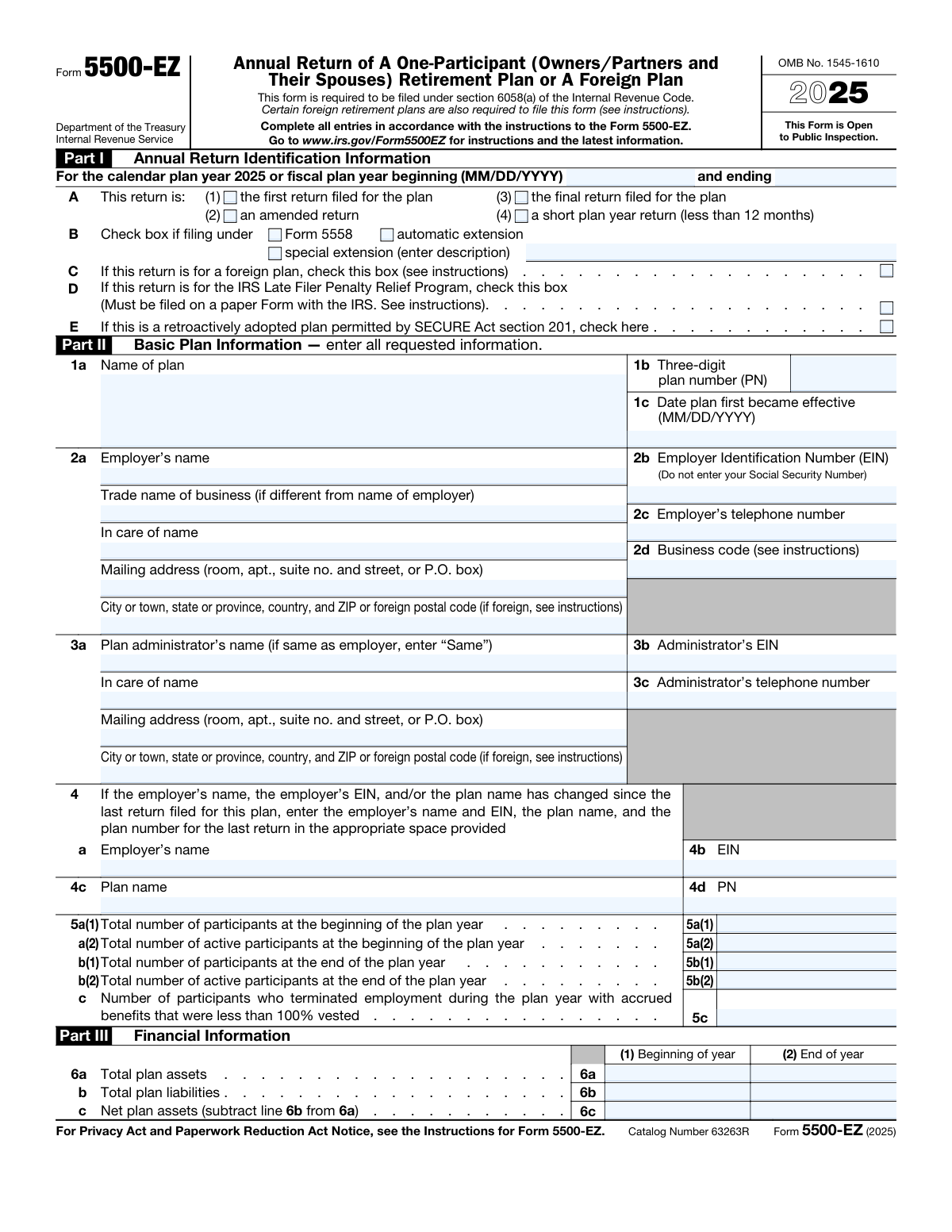
Yes! You can use AI to fill out Form 5500-EZ, Annual Return of A One-Participant (Owners/Partners and Their Spouses) Retirement Plan or A Foreign Plan

Form 5500-EZ is an annual information return filed with the Internal Revenue Service (IRS) for one-participant retirement plans, which cover only an individual or an individual and their spouse. It is required under section 6058(a) of the Internal Revenue Code to report on the plan's financial condition, investments, and operations. Today, this form can be filled out quickly and accurately using AI-powered services like Instafill.ai, which can also convert non-fillable PDF versions into interactive fillable forms.
Our AI automatically handles information lookup, data retrieval, formatting, and form filling.
It takes less than a minute to fill out Form 5500-EZ using our AI form filling.
Securely upload your data. Information is encrypted in transit and deleted immediately after the form is filled out.

Form specifications

Form name: Form 5500-EZ, Annual Return of A One-Participant (Owners/Partners and Their Spouses) Retirement Plan or A Foreign Plan
Number of pages: 2
Language: English
Categories: retirement forms, retirement plan forms
main-image

Instafill Demo: How to fill out PDF forms in seconds with AI

How to Fill Out Form 5500-EZ Online for Free in 2026

Are you looking to fill out a FORM 5500-EZ form online quickly and accurately? Instafill.ai offers the #1 AI-powered PDF filling software of 2026, allowing you to complete your FORM 5500-EZ form in just 37 seconds or less.
Follow these steps to fill out your FORM 5500-EZ form online using Instafill.ai:
  1. 1 Navigate to Instafill.ai and upload or select Form 5500-EZ.
  2. 2 Provide the annual return identification information, specifying the plan year and type of return (e.g., first, final, amended).
  3. 3 Enter basic plan information in Part II, including the plan name, employer's name, EIN, and administrator details.
  4. 4 Complete the financial information in Part III, detailing the plan's assets, liabilities, and contributions for the beginning and end of the year.
  5. 5 Fill out Part IV and V by providing plan characteristic codes and answering compliance questions regarding loans and funding.
  6. 6 Review all the information populated by the AI for accuracy, then provide your signature and date to certify the return.

Our AI-powered system ensures each field is filled out correctly, reducing errors and saving you time.

Why Choose Instafill.ai for Your Fillable Form 5500-EZ Form?

Speed

Complete your Form 5500-EZ in as little as 37 seconds.

Up-to-Date

Always use the latest 2026 Form 5500-EZ form version.

Cost-effective

No need to hire expensive lawyers.

Accuracy

Our AI performs 10 compliance checks to ensure your form is error-free.

Security

Your personal information is protected with bank-level encryption.

Frequently Asked Questions About Form Form 5500-EZ

Form 5500-EZ is an annual return used to report information about a one-participant retirement plan to the IRS. It covers the plan's financial condition, investments, and operations for the plan year.

You must file this form if you are the administrator or sponsor of a one-participant retirement plan, which covers only you (or you and your spouse) as a business owner, or partners in a partnership (and their spouses). It is also used for certain foreign retirement plans.

The form is due by the last day of the seventh month after the plan year ends. For a standard calendar year plan ending on December 31, the deadline is July 31 of the following year.

You will need your Employer Identification Number (EIN), plan details like the effective date and plan number, and financial records. This includes the total plan assets and liabilities at the start and end of the year, and details on all contributions made.

This is a number you assign to distinguish between different retirement plans sponsored by the same employer. If you only have one plan, you should use '001'.

The business code is a six-digit number that identifies your primary business activity. You can find the complete list of codes in the official Instructions for Form 5500-EZ, available on the IRS website.

Yes, you must file a final return for the year the plan was terminated. Be sure to check box A(3) in Part I to indicate that it is the final return for the plan.

You may be eligible for the IRS Late Filer Penalty Relief Program. To apply, you must check box D in Part I and file a paper version of the Form 5500-EZ directly with the IRS as per the instructions.

No, you must use an Employer Identification Number (EIN) for the employer. The form instructions specifically state not to enter your Social Security Number in this field.

In Part V, question 9, you must check 'Yes' if the plan had any participant loans. You also need to enter the total outstanding loan amount as of the end of the plan year in the corresponding amount field.

Yes, services like Instafill.ai use AI to help you complete forms like the 5500-EZ accurately and save time. These tools can auto-fill your information, reducing manual data entry and helping to prevent common errors.

Simply upload the Form 5500-EZ PDF to the Instafill.ai platform. The AI will make the form interactive, allowing you to easily type your information into the correct fields before downloading the completed document.

If your PDF is a non-fillable or 'flat' image, you can use a service like Instafill.ai. It can convert the static document into an interactive, fillable form that you can complete on your computer.

You can file Form 5500-EZ electronically using the Department of Labor's EFAST2 filing system or mail a paper copy to the IRS. Always check the latest form instructions on the IRS website for the correct submission address.

Compliance Form 5500-EZ
Validation Checks by Instafill.ai

1
Validates Employer Identification Number (EIN) Format
This check ensures the Employer Identification Number (EIN) in field 2b is a nine-digit number, formatted as XX-XXXXXXX. This is crucial for the IRS to uniquely identify the employer sponsoring the plan. An invalid format will cause the form to be rejected during processing, preventing the return from being correctly associated with the employer's account.
2
Ensures Three-Digit Plan Number (PN) Format
This validation verifies that the plan number entered in field 1b is exactly three digits (e.g., 001, 002, 123). The PN is used to differentiate between multiple retirement plans sponsored by the same employer. Failure to use the correct three-digit format can lead to the return being misfiled or overwriting data for a different plan.
3
Verifies Logical Plan Year Period
This check confirms that the 'plan year ending' date is after the 'plan year beginning' date. It also flags if the period is significantly different from one year, unless the 'short plan year return' box in section A is checked. This validation prevents illogical date entries and ensures financial and participant data corresponds to a valid and correct reporting period.
4
Confirms Plan Effective Date Precedes Plan Year
This validation ensures the 'Date plan first became effective' (field 1c) is on or before the 'plan year beginning' date. A plan's reporting year cannot start before the plan legally existed. This check maintains the chronological integrity of the filing and prevents fundamental data errors.
5
Requires Prior Filer Information on Change
If the filer indicates in question 4 that the employer's name, EIN, or plan name has changed, this check ensures that the prior information fields (4a, 4b, 4c, 4d) are completed. This is critical for the IRS to link the current return to previous filings and maintain a continuous record for the plan. Missing information can break the audit trail.
6
Validates Participant Count Consistency
This check verifies that the 'Total number of participants' (5a(1) and 5b(1)) is greater than or equal to the 'Total number of active participants' (5a(2) and 5b(2)) for both the beginning and end of the plan year. Since total participants includes active, retired, and separated individuals, it cannot be less than the active count. This prevents common data entry errors and ensures participant data is logical.
7
Verifies Net Plan Assets Calculation
This validation confirms that the value in 'Net plan assets' (line 6c) is the result of 'Total plan assets' (line 6a) minus 'Total plan liabilities' (line 6b). This check is performed for both the 'Beginning of year' and 'End of year' columns. It ensures the basic financial arithmetic is correct, and a failure indicates a data entry error that would make the financial section unreliable.
8
Requires Loan Amount if Participant Loans Exist
If the 'Yes' box for Question 9 ('did the plan have any participant loans?') is checked, this validation ensures that a non-zero dollar amount is entered in the corresponding amount field. Answering 'Yes' without providing the outstanding loan balance makes the form incomplete. This information is required for compliance monitoring of plan activities.
9
Requires Unpaid Contribution Amount for Defined Benefit Plans
If 'Yes' is checked for Question 10, indicating a defined benefit plan subject to minimum funding, this validation requires an amount to be entered on line 10a. This amount, from Schedule SB, is essential for the IRS to assess the plan's funding status. Failure to provide it makes the filing incomplete and non-compliant for this type of plan.
10
Requires Funding Details for Applicable Defined Contribution Plans
If 'Yes' is checked for Question 11 (indicating a defined contribution plan is subject to minimum funding), this validation ensures that the subsequent lines (11a through 11e) are filled out as applicable. These fields provide critical details about funding waivers, required contributions, and actual payments. Omitting this information prevents regulators from evaluating the plan's financial health.
11
Verifies Calculation of Funding Shortfall or Surplus
This check validates that the amount on line 11d is the correct result of subtracting line 11c (contributions made) from line 11b (minimum required contribution). This calculation is fundamental to determining if the employer met its funding obligations for the year. An error here would misrepresent the plan's compliance with funding rules.
12
Validates MM/DD/YYYY Date Format for All Date Fields
This check applies to all date fields on the form (e.g., plan year, effective date, waiver date) to ensure they are entered in a valid MM/DD/YYYY format. Consistent date formatting is essential for automated data processing and record-keeping. An invalid format would cause a parsing error and likely lead to the rejection of the filing.
13
Cross-references Beginning of Year Assets with Prior Year's End
This validation compares the 'Total plan assets at beginning of year' (line 6a, column 1) with the 'Total plan assets at end of year' from the previously filed return for this plan. Barring specific exceptions, these two numbers should match. A mismatch indicates a potential reporting error or a break in the continuity of the plan's financial records.
14
Flags Non-Zero End-of-Year Participants on Final Return
If the 'final return' box (A(3)) is checked, this validation flags a warning if the 'Total number of participants at the end of the plan year' (5b(1)) is greater than zero. A final return implies the plan has terminated and all assets have been distributed, so there should be no participants left. This check helps prevent filers from incorrectly marking a return as final.

Common Mistakes in Completing Form 5500-EZ

Using a Social Security Number Instead of an EIN

Sole proprietors often mistakenly enter their Social Security Number (SSN) in the Employer Identification Number (EIN) field (2b), but the form requires an EIN for the plan sponsor. This error will cause the filing to be rejected or significantly delayed as the IRS system cannot match the return to a business entity. To avoid this, always use the specific EIN assigned to your business. AI-powered tools like Instafill.ai can help prevent this by validating the format of the EIN and flagging entries that resemble an SSN.

Inconsistent Beginning and End-of-Year Asset Values

A frequent error is reporting a 'Total plan assets' value at the beginning of the year (line 6a, column 1) that does not match the end-of-year value from the prior year's filing. This discrepancy is a major red flag for auditors and can trigger an IRS inquiry or notice. To prevent this, carefully cross-reference line 6a(1) with the value reported on line 6a(2) of the previous year's Form 5500-EZ. Advanced form-filling solutions like Instafill.ai can automatically carry over end-of-year data to the next year's form, eliminating this reconciliation error.

Entering Incorrect or Outdated Plan Characteristic Codes

In Part IV, filers must enter specific two-character codes that describe the plan's features, but they often guess or use a list from a previous year, not realizing the codes can change. Using incorrect codes misrepresents the plan's operations, potentially leading to compliance issues or unnecessary IRS correspondence. Always refer to the most current year's Form 5500-EZ instructions for the official 'List of Plan Characteristics Codes.' An intelligent form filler like Instafill.ai can provide up-to-date code lists and descriptions directly within the form, ensuring accuracy.

Failing to Provide Required Details for 'Yes' Answers

The form contains several questions where a 'Yes' answer requires additional information, such as the loan amount on line 9 or attaching Schedule SB for line 10. Filers frequently check 'Yes' but forget to provide the corresponding data, which makes the filing incomplete and can result in penalties. Always review any 'Yes' answer to see if it triggers a requirement to fill in an amount or attach another schedule. Smart form platforms like Instafill.ai can automatically highlight these dependent fields, preventing incomplete submissions.

Incorrectly Calculating the Number of Participants

Filers often confuse 'active participants' (line 5a(2)) with 'total participants' (line 5a(1)), forgetting that 'total' must also include retired or separated employees with a balance in the plan. Underreporting total participants is a serious error that can affect the plan's filing requirements and trigger penalties. To avoid this, carefully review the definitions in the form instructions to ensure all eligible individuals are counted correctly. Using a tool like Instafill.ai can help by providing field-specific guidance to ensure your counts are logical.

Using Inconsistent Employer or Plan Names

The employer name (line 2a) and plan name (line 1a) must be entered exactly as they appeared on previous filings, unless a change is being formally reported in line 4. Even minor variations like 'My Co, Inc.' versus 'My Co Incorporated' can cause the IRS's automated systems to flag the return for review, delaying processing. Tools like Instafill.ai can store your plan and employer information and pre-fill it consistently each year, preventing these types of data entry errors.

Incorrectly Marking the Return as 'Final'

Filers sometimes check the 'final return' box (Part I, Box A(3)) when they decide to terminate the plan, but before all assets have been distributed. A return can only be marked as final for the plan year in which all assets have been paid out and the plan balance is zero. Filing a final return prematurely can lead to significant confusion and potential penalties if the plan still holds assets. Ensure all distributions are complete and the end-of-year asset balance is zero before checking this box.

Omitting or Using an Incorrect Business Code

Line 2d requires a specific business code identifying the employer's primary business activity, which filers often leave blank or guess. This mistake happens when filers don't consult the official instructions, which contain a detailed list of codes, and can lead to processing errors. Always look up the appropriate code in the latest 'Instructions for Form 5500-EZ.' AI-powered form fillers like Instafill.ai can integrate these code lists, allowing you to search for your business activity and select the correct code without leaving the form.

Mathematical Errors in Financial Calculations

Simple arithmetic mistakes are common in the financial section, particularly when calculating Net Plan Assets on line 6c (assets minus liabilities). These miscalculations can misrepresent the plan's financial health and may trigger IRS scrutiny. To avoid this, double-check all calculations before submitting. If the form is a non-fillable PDF, a service like Instafill.ai can convert it to a smart, fillable version with automatic calculations to eliminate these manual errors.

Submitting an Unsigned or Undated Form

An unsigned or undated return is considered incomplete and is not a valid filing, yet this oversight is surprisingly common. This will result in the IRS rejecting the form, which could lead to late-filing penalties if not corrected before the deadline. The employer or plan administrator must sign and date the form under penalties of perjury. Always perform a final review to ensure the signature and date fields are completed before submission.
Saved over 80 hours a year

“I was never sure if my IRS forms like W-9 were filled correctly. Now, I can complete the forms accurately without any external help.”

Kevin Martin Green

Your data stays secure with advanced protection from Instafill and our subprocessors

Robust compliance program

Transparent business model

You’re not the product. You always know where your data is and what it is processed for.

ISO 27001, HIPAA, and GDPR

Our subprocesses adhere to multiple compliance standards, including but not limited to ISO 27001, HIPAA, and GDPR.

Security & privacy by design

We consider security and privacy from the initial design phase of any new service or functionality. It’s not an afterthought, it’s built-in, including support for two-factor authentication (2FA) to further protect your account.

Fill out Form 5500-EZ with Instafill.ai

Worried about filling PDFs wrong? Instafill securely fills form-5500-ez-annual-return-of-a-one-participant-ownerspartners-and-their-spouses-retirement-plan-or-a-foreign-plan forms, ensuring each field is accurate.