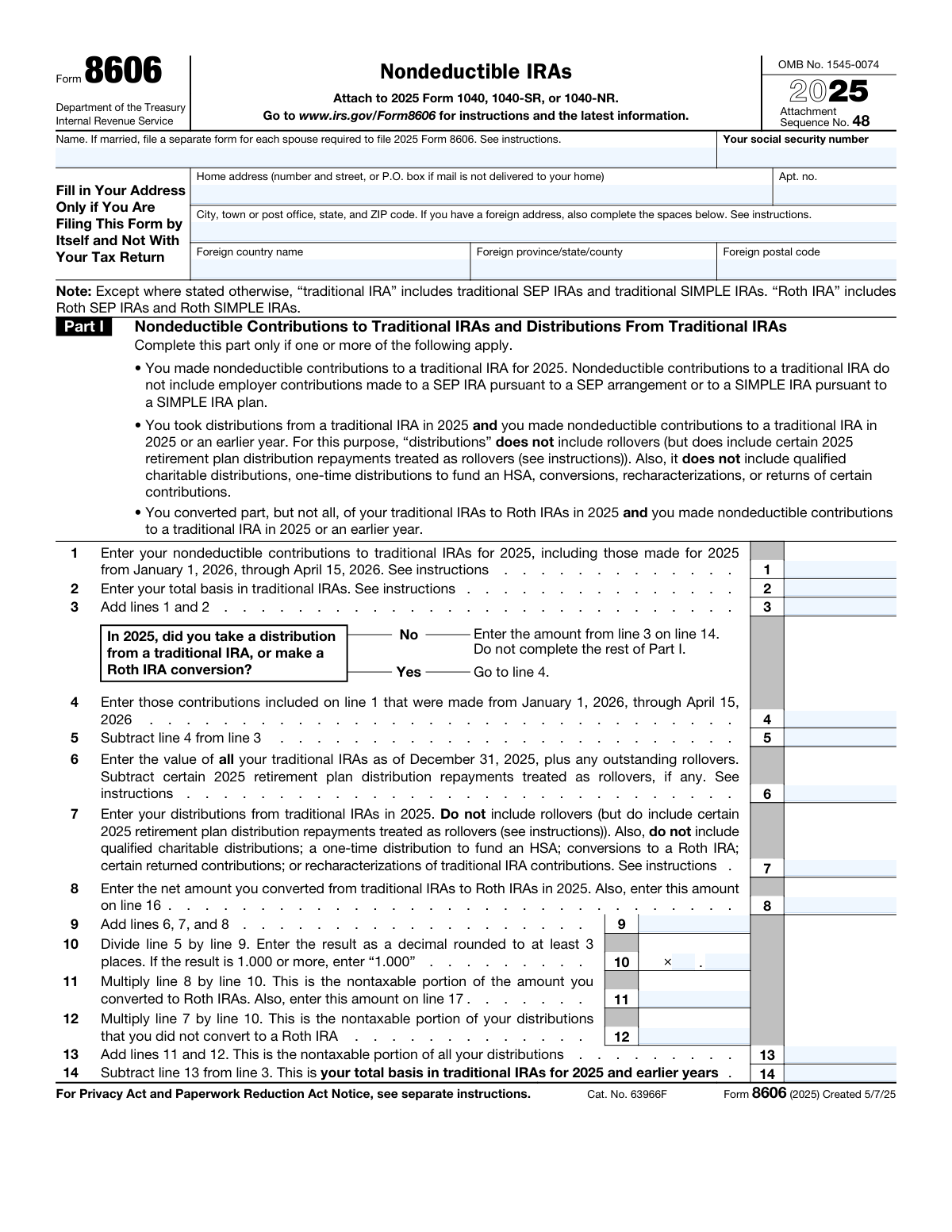
Yes! You can use AI to fill out Form 8606, Nondeductible IRAs
Form 8606, Nondeductible IRAs, is a tax form filed with the IRS to report and track after-tax (nondeductible) contributions made to traditional IRAs. It is also used to calculate the taxable portion of distributions from traditional, SEP, or SIMPLE IRAs when you have a basis in them, and to report conversions to Roth IRAs and distributions from Roth IRAs. This form is essential for ensuring you don't pay tax twice on the same money when you take distributions in retirement. Today, this form can be filled out quickly and accurately using AI-powered services like Instafill.ai, which can also convert non-fillable PDF versions into interactive fillable forms.
Our AI automatically handles information lookup, data retrieval, formatting, and form filling.
It takes less than a minute to fill out Form 8606 using our AI form filling.
Securely upload your data. Information is encrypted in transit and deleted immediately after the form is filled out.
Form specifications
| Form name: | Form 8606, Nondeductible IRAs |
| Number of pages: | 2 |
| Language: | English |
| Categories: | IRA forms |
Instafill Demo: How to fill out PDF forms in seconds with AI
How to Fill Out Form 8606 Online for Free in 2026
Are you looking to fill out a FORM 8606 form online quickly and accurately? Instafill.ai offers the #1 AI-powered PDF filling software of 2026, allowing you to complete your FORM 8606 form in just 37 seconds or less.
Follow these steps to fill out your FORM 8606 form online using Instafill.ai:
- 1 Navigate to Instafill.ai and upload your Form 8606 or select it from their template library.
- 2 Provide your personal details, including your name, Social Security number, and address, for the AI to populate the top section.
- 3 Complete Part I by entering information about your nondeductible contributions to traditional IRAs and any distributions taken during the year.
- 4 If you converted a traditional IRA to a Roth IRA, fill out Part II with the relevant conversion amounts and basis information.
- 5 If you took distributions from a Roth IRA, complete Part III by detailing the distribution amounts and calculating the taxable portion.
- 6 Review the entire form after the AI has populated the fields and calculated the totals to ensure all information is accurate and complete.
- 7 Sign and date the form if filing it by itself, then download the completed document to attach to your Form 1040, 1040-SR, or 1040-NR.
Our AI-powered system ensures each field is filled out correctly, reducing errors and saving you time.
Why Choose Instafill.ai for Your Fillable Form 8606 Form?
Speed
Complete your Form 8606 in as little as 37 seconds.
Up-to-Date
Always use the latest 2026 Form 8606 form version.
Cost-effective
No need to hire expensive lawyers.
Accuracy
Our AI performs 10 compliance checks to ensure your form is error-free.
Security
Your personal information is protected with bank-level encryption.
Frequently Asked Questions About Form Form 8606
Form 8606 is used to report nondeductible contributions to traditional IRAs, distributions from IRAs where you have a basis, conversions to Roth IRAs, and distributions from Roth IRAs. It helps you and the IRS track the after-tax money in your retirement accounts to ensure it isn't taxed twice.
You must file Form 8606 if you made nondeductible contributions to a traditional IRA, took distributions from a traditional IRA that had a basis, converted a traditional IRA to a Roth IRA, or took a distribution from a Roth IRA.
No, you cannot file a joint Form 8606. If both you and your spouse are required to file this form, each of you must complete and file a separate Form 8606 for your respective IRA activities.
You should attach Form 8606 to your annual income tax return, such as Form 1040, 1040-SR, or 1040-NR. If you aren't required to file a tax return but must file Form 8606, you can file it by itself with the IRS.
Your basis is the total amount of nondeductible (after-tax) contributions you have made to your traditional IRAs over all years. This amount is not taxed when you withdraw it because you've already paid tax on it.
You must complete Part II if you converted any amount from a traditional, SEP, or SIMPLE IRA to a Roth IRA during the tax year. This part helps calculate the taxable amount of the conversion.
Yes, you must complete Part III if you took a distribution from a Roth IRA in 2025. This section is used to determine if any portion of your Roth IRA distribution is taxable.
You should include contributions made for 2025 between January 1, 2026, and April 15, 2026, on line 1 of the form. You will also need to enter this specific amount on line 4 to ensure the calculations are correct.
You will need your IRA statements, such as Form 1099-R for distributions and Form 5498 for contributions. It is also essential to have copies of your previously filed Form 8606 to determine your existing basis.
The taxable amounts calculated on Form 8606 (lines 15c, 18, and 25c) are typically carried over and included on line 4b of your Form 1040, 1040-SR, or 1040-NR.
Yes, services like Instafill.ai use AI to accurately auto-fill form fields, which can save you time and help reduce errors. This is especially useful for tracking your IRA basis and other figures from year to year.
To fill out the form online, you can upload the PDF to Instafill.ai. The platform's AI will help you populate the fields quickly and accurately, simplifying the process.
If you have a non-fillable or 'flat' PDF, you can use a service like Instafill.ai. Their technology can convert the static PDF into an interactive, fillable form that you can complete and save online.
Compliance Form 8606
Validation Checks by Instafill.ai
1
Validates Social Security Number Format
This check ensures the 'Your social security number' field contains a valid nine-digit number, typically in the format XXX-XX-XXXX. The SSN is the primary identifier for the taxpayer, and an invalid or incorrectly formatted number will cause the IRS to reject the form. This validation is critical for associating the form with the correct taxpayer account and preventing processing delays.
2
Verifies Part I, Line 3 Calculation
This check confirms that the value on Line 3 is the exact sum of the values on Line 1 and Line 2. This calculation establishes the total basis in traditional IRAs before any distributions or conversions are accounted for. An incorrect sum will cause a cascading failure in all subsequent calculations in Part I, leading to an incorrect taxable amount and basis carryforward.
3
Enforces Part I Conditional Logic Flow
This validation enforces the workflow based on the 'Yes/No' question following Line 3. If 'No' is selected, it verifies that lines 4 through 13 are empty and that the value from Line 3 is correctly transferred to Line 14. This prevents filers from entering data in sections that do not apply to them, which simplifies the form and prevents calculation errors.
4
Validates Late Contribution Amount on Line 4
This check ensures the amount on Line 4 (contributions made between Jan 1 and Apr 15 of the following year) is less than or equal to the total contributions reported on Line 1. It is logically impossible for the portion of contributions made late to exceed the total contributions. This validation prevents a fundamental data entry error that would invalidate the basis calculation on Line 5.
5
Verifies Part I, Line 9 Total Value Calculation
This check confirms that the value on Line 9 is the correct sum of lines 6, 7, and 8. Line 9 represents the total value of all traditional IRAs and is the denominator for the crucial ratio on Line 10. An error in this sum will skew the ratio, making all subsequent nontaxable portion calculations (lines 11, 12, 13) incorrect.
6
Validates Line 10 Decimal Format and Cap
This check ensures the value on Line 10 is a decimal rounded to at least three places and is capped at '1.000' as per the form's instructions. This ratio determines the nontaxable percentage of any distributions or conversions. An improperly formatted or uncapped value will lead to incorrect calculations for the nontaxable amounts on lines 11 and 12, affecting the final taxable income.
7
Ensures Consistency Between Part I and Part II Conversions
This validation verifies that if Part I is completed, the amount on Line 16 (net conversion) is identical to the amount on Line 8, and the amount on Line 17 (basis in conversion) is identical to the amount on Line 11. This cross-reference ensures data integrity between the two parts of the form. Mismatched values indicate a calculation or data entry error and will result in an incorrect taxable amount for the conversion reported on Line 18.
8
Verifies Part II, Line 18 Taxable Amount Calculation
This check validates that the taxable amount on Line 18 is correctly calculated by subtracting Line 17 (basis) from Line 16 (total conversion), and that the result is not negative. This is the final taxable amount of the Roth conversion that must be reported on the taxpayer's Form 1040. An incorrect calculation will lead to the taxpayer reporting the wrong income, potentially resulting in an underpayment or overpayment of tax.
9
Validates Qualified First-Time Homebuyer Expense Limit on Line 20
This check ensures the amount entered on Line 20 does not exceed the statutory lifetime limit of $10,000. The form explicitly states this limit, which is a critical rule for Roth IRA distributions. Allowing a value greater than the limit would result in an improper reduction of nonqualified distributions, leading to an under-reporting of taxable income.
10
Ensures Part III Calculation Results are Not Negative
This validation checks that the results on Line 21 (Line 19 - Line 20), Line 23 (Line 21 - Line 22), and Line 25a (Line 23 - Line 24) are zero or greater. The form instructions specify entering '-0-' if a result is negative. This rule prevents negative values from being carried forward into subsequent calculations, which would be illogical and cause processing failures.
11
Enforces Part III Conditional Field Logic
This check validates that if Line 21 is zero, Line 22 and all subsequent lines in Part III are left blank. It also validates that if Line 23 is zero or less, lines 24 and 25 are skipped. This logic follows the form's explicit instructions to stop calculations when the distribution has been fully accounted for by basis. Failure to adhere to this flow can lead to erroneous entries and form rejection.
12
Validates Disaster Distribution Allocation on Line 25b
This check ensures the amount on Line 25b (attributable to qualified disaster distributions) is not greater than the amount calculated on Line 25a. A taxpayer cannot attribute more of a distribution to a disaster than the taxable portion of the distribution itself. This check prevents a logical error and ensures the final taxable amount on Line 25c is calculated correctly.
13
Validates Preparer Tax Identification Number (PTIN) Format
This check verifies that the PTIN entered in the 'Paid Preparer Use Only' section follows the required IRS format, which is a 'P' followed by eight digits. The PTIN is mandatory for all paid preparers and is used by the IRS for tracking and authorization. An invalid PTIN can lead to the rejection of the tax filing and potential penalties for the preparer.
14
Checks for Signature on Standalone Filings
This validation confirms that if the form is being filed by itself (indicated by the address section being filled out), the taxpayer's signature and date are present. A signature under penalties of perjury is legally required for the form to be considered valid by the IRS. An unsigned standalone form is incomplete and will be rejected, delaying the entire process.
Common Mistakes in Completing Form 8606
Taxpayers often forget to enter their total basis from previous years on Line 2, which should be the amount from their prior year's Form 8606, Line 14. This happens when records are not maintained, leading to the nondeductible portion of distributions being taxed again. To prevent this costly error, always save a copy of your filed Form 8606 and carry forward the basis amount each year. AI-powered tools like Instafill.ai can help manage and carry over this data from year to year.
Filers frequently confuse rollovers, conversions, and distributions, leading to incorrect entries on Lines 7 (distributions) and 8 (conversions). For example, a direct rollover between two traditional IRAs is not a reportable distribution. This mistake drastically alters the pro-rata calculation, resulting in an incorrect taxable amount and potential IRS inquiries. Carefully review your Form 1099-R and the form instructions to distinguish between these transaction types.
On Line 6, taxpayers must include the year-end value of *all* their traditional, SEP, and SIMPLE IRAs, not just the account from which a distribution was taken. This common oversight skews the crucial pro-rata calculation on Line 10. The consequence is an incorrect determination of the taxable portion of a distribution or conversion, which can lead to underpayment of taxes and penalties. Always aggregate the year-end values from all your traditional IRA accounts.
A frequent and costly mistake is not filing Form 8606 in a year when a nondeductible contribution is made, especially if there are no distributions. Without this form, the IRS has no record of your after-tax basis. When you eventually take distributions, you may be unable to prove your basis, causing the entire amount to be taxed and negating the benefit of the nondeductible contribution. Always file Form 8606 for any year you make a nondeductible contribution.
The form instructions explicitly state that if both spouses need to file Form 8606, they must file separate forms. However, couples accustomed to filing joint returns often mistakenly combine their IRA information onto a single form. This will be rejected by the IRS, requiring refiling and causing delays. Each spouse must complete their own Form 8606 with their own name, SSN, and individual IRA information.
In Part II, filers may incorrectly calculate the basis of the amount converted (Line 17), leading to an error on the taxable amount (Line 18). This often happens if they don't complete Part I correctly or misunderstand that the basis is determined pro-rata across all traditional IRA assets. This can result in overpaying or underpaying taxes on the conversion. Using an AI-powered tool like Instafill.ai can help perform these complex pro-rata calculations accurately.
In Part III, for Roth IRA distributions, the form requires separating the basis of direct contributions (Line 22) from the basis of conversions (Line 24). People often lump these together, which violates the specific ordering rules for Roth distributions where contributions are returned tax-free first. This error can cause you to incorrectly report taxable income from a nonqualified Roth distribution. Keep detailed records distinguishing between your Roth contributions and conversion amounts.
Taxpayers often get confused about contributions made between January 1 and the tax filing deadline for the *previous* tax year. They might include the amount on Line 1 but forget to also list it on Line 4 if they took a distribution during the tax year. This error affects the basis calculation for the current year's distributions, leading to an incorrect taxable amount. Always differentiate contributions made *for* the tax year from those made *in* the tax year.
The form has a dedicated signature block to be used *only* when filing Form 8606 by itself and not with a Form 1040. Taxpayers who file the form after their main tax return often forget to sign it. An unsigned form is considered invalid by the IRS, which can lead to penalties for failure to file. Always double-check for the signature requirement if you are not attaching it to your main tax return.
Many IRS forms are available online as flat, non-fillable PDFs, making them prone to manual entry errors, illegible handwriting, and calculation mistakes. Filling out a complex form like this by hand increases the likelihood of errors on nearly every line, which can lead to processing delays or incorrect tax assessments. To prevent this, use a service like Instafill.ai that can convert any PDF into an interactive, fillable form with built-in validation to ensure accuracy.
Saved over 80 hours a year
“I was never sure if my IRS forms like W-9 were filled correctly. Now, I can complete the forms accurately without any external help.”
Kevin Martin Green
Your data stays secure with advanced protection from Instafill and our subprocessors

Robust compliance program
Transparent business model
You’re not the product. You always know where your data is and what it is processed for.
ISO 27001, HIPAA, and GDPR
Our subprocesses adhere to multiple compliance standards, including but not limited to ISO 27001, HIPAA, and GDPR.
Security & privacy by design
We consider security and privacy from the initial design phase of any new service or functionality. It’s not an afterthought, it’s built-in, including support for two-factor authentication (2FA) to further protect your account.
Fill out Form 8606 with Instafill.ai
Worried about filling PDFs wrong? Instafill securely fills form-8606-nondeductible-iras-2 forms, ensuring each field is accurate.