Yes! You can use AI to fill out Delaware First Health Organizational Provider Credentialing Application
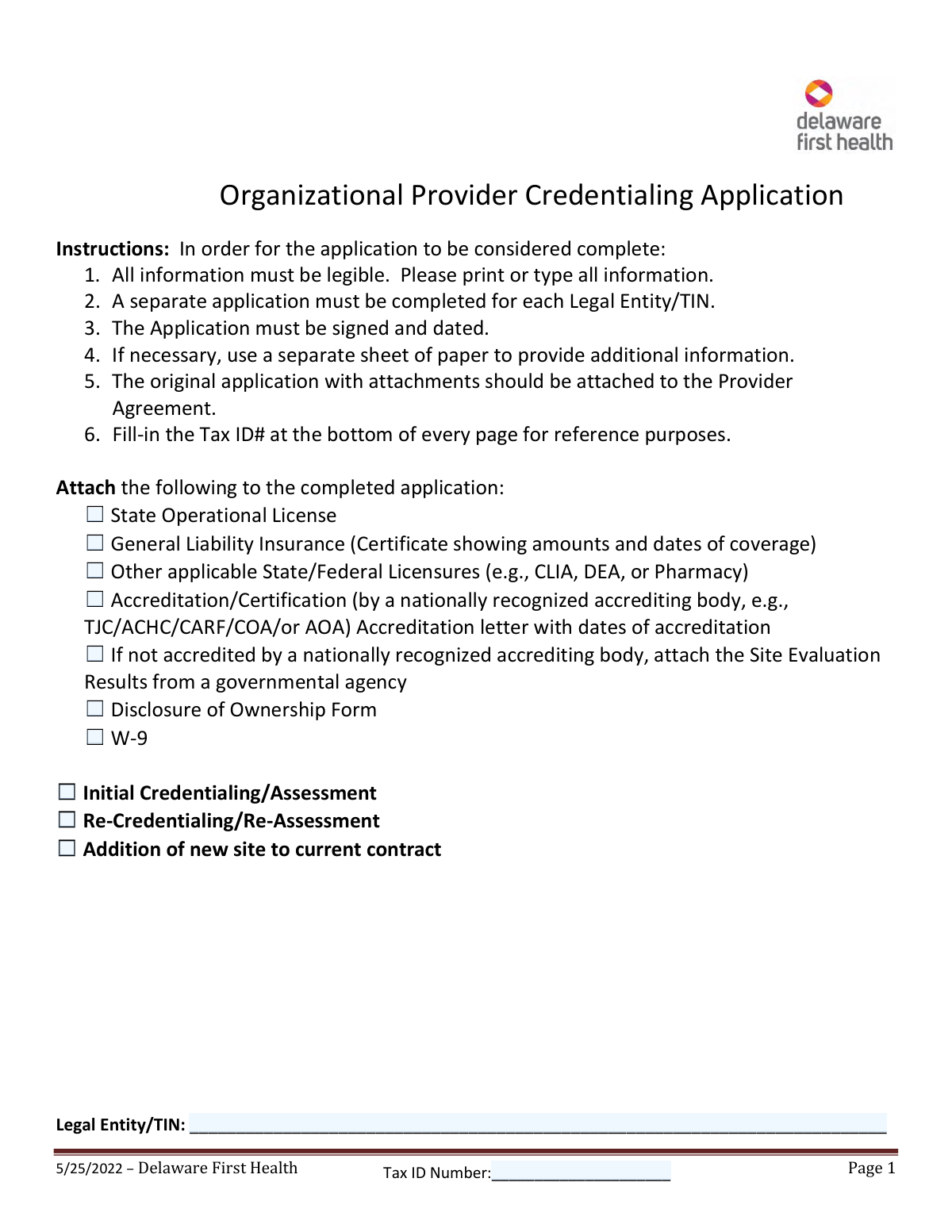
The Delaware First Health Organizational Provider Credentialing Application is a comprehensive form required for healthcare organizations seeking to become credentialed providers within the Delaware First Health network. It gathers essential details about the organization's legal structure, services offered, facility locations, liability insurance, and accreditations to ensure they meet the plan's standards. Completing this application is a critical step for any organization wishing to serve Delaware First Health members and receive reimbursement for their services. Today, this form can be filled out quickly and accurately using AI-powered services like Instafill.ai, which can also convert non-fillable PDF versions into interactive fillable forms.
DE Organizational Provider Application is part of the
credentialing forms, health forms, IRS forms and organizational forms categories on Instafill.
Our AI automatically handles information lookup, data retrieval, formatting, and form filling.
It takes less than a minute to fill out DE Organizational Provider Application using our AI form filling.
Securely upload your data. Information is encrypted in transit and deleted immediately after the form is filled out.
Form specifications
| Form name: | Delaware First Health Organizational Provider Credentialing Application |
| Number of pages: | 1 |
| Language: | English |
More forms in Credentialing forms
Instafill Demo: How to fill out PDF forms in seconds with AI
How to Fill Out DE Organizational Provider Application Online for Free in 2026
Are you looking to fill out a DE ORGANIZATIONAL PROVIDER APPLICATION form online quickly and accurately? Instafill.ai offers the #1 AI-powered PDF filling software of 2026, allowing you to complete your DE ORGANIZATIONAL PROVIDER APPLICATION form in just 37 seconds or less.
Follow these steps to fill out your DE ORGANIZATIONAL PROVIDER APPLICATION form online using Instafill.ai:
- 1 Navigate to Instafill.ai and upload the Delaware First Health Organizational Provider Credentialing Application or select it from the template library.
- 2 Allow the AI to scan the document and pre-fill known information from your secure profile, such as your organization's legal name, address, and Tax ID.
- 3 Complete the Legal Entity, Contact, and Billing Information sections, ensuring the details for your Tax ID holder and payment remittance are correct.
- 4 For each service location, fill out the detailed section covering provider type, NPI, address, hours, ADA compliance, and patient services.
- 5 Indicate all required attachments, such as licenses and insurance certificates, and complete the accreditation and sanctions questionnaires for each service location.
- 6 Carefully review all entered information across the entire application for accuracy, then proceed to the final page to electronically sign and date the Provider Responsibility Statement.
- 7 Download the completed, signed application and gather all necessary attachments to submit to Delaware First Health as instructed.
Our AI-powered system ensures each field is filled out correctly, reducing errors and saving you time.
Why Choose Instafill.ai for Your Fillable DE Organizational Provider Application Form?
Speed
Complete your DE Organizational Provider Application in as little as 37 seconds.
Up-to-Date
Always use the latest 2026 DE Organizational Provider Application form version.
Cost-effective
No need to hire expensive lawyers.
Accuracy
Our AI performs 10 compliance checks to ensure your form is error-free.
Security
Your personal information is protected with bank-level encryption.
Frequently Asked Questions About Form DE Organizational Provider Application
This form is used by healthcare organizations, such as hospitals, clinics, and agencies, to apply for credentialing to become a participating provider with Delaware First Health.
Any healthcare organization that wishes to join the Delaware First Health network must complete this application. A separate application is required for each unique Legal Entity or Tax ID Number (TIN).
You must attach several documents, including your State Operational License, General Liability Insurance certificate, a W-9 form, Disclosure of Ownership form, and any applicable accreditation letters. A complete checklist is provided on the first page.
No, you only need one application per Legal Entity/TIN. However, you must complete the 'Service Location' section for each individual NPI or physical location that is part of your application.
If your organization is not accredited by a nationally recognized body, you must attach the Site Evaluation Results from a governmental agency instead.
The original, signed application and all required attachments should be attached to your Provider Agreement for submission to Delaware First Health.
If you answer 'Yes' to any of the sanction questions, you are required to provide a full explanation on a separate sheet of paper and include it with your application.
You are required to fill in the Tax ID number at the bottom of every page for reference purposes. This helps ensure all pages of your application are correctly processed and associated with your organization.
No, the form explicitly states that a stamp signature is not acceptable. The form must be physically signed by an authorizing representative of the organization.
Yes, services like Instafill.ai use AI to accurately auto-fill form fields, which can save you time and help prevent errors when completing complex applications like this one.
You can use a platform like Instafill.ai to upload the PDF and fill it out directly in your web browser. This allows you to easily type your information before printing the document for its required signature.
If you have a flat, non-fillable PDF, services like Instafill.ai can convert it into an interactive, fillable form. This allows you to type your answers directly into the fields instead of printing and handwriting everything.
The 'Legal/Tax Address' is where your 1099 tax form will be sent. The 'Pay To Address' is where payment remittances (checks) should be mailed, and it can be different from your legal address.
Select 'Initial Credentialing' if your organization is applying to join the Delaware First Health network for the first time. Select 'Re-Credentialing' if you are already a provider and are completing your periodic renewal application.
Compliance DE Organizational Provider Application
Validation Checks by Instafill.ai
1
Federal Tax ID Number Format and Consistency
This check validates that the Federal Tax ID Number (TIN) is entered in the standard XX-XXXXXXX format. It also cross-references this number with the 'Legal Entity/TIN' field on page 1 and the 'Tax ID Number' field in the footer of every page to ensure consistency throughout the application. This is critical for correct tax reporting and entity identification. A mismatch or incorrect format will prevent submission and require the user to correct the entries.
2
National Provider Identifier (NPI) Format
Verifies that each National Provider Identifier (NPI) field contains a valid 10-digit number. This applies to all NPI fields listed under the various Provider Types and for each Service Location. The NPI is a unique identifier for health care providers, and its accuracy is essential for billing and claims processing. If an NPI is not 10 digits, the form will return an error prompting the user to enter a valid number.
3
Provider Type Selection Requirement
Ensures that at least one checkbox is selected from the 'Provider Types' list on page 2. The entire application's context depends on the type of provider being credentialed. Failure to select a provider type makes it impossible to process the application, so submission will be blocked until at least one option is chosen.
4
Conditional Sanctions Explanation
This validation checks the 'Sanctions' section on pages 6 and 9. If any question in this section is answered with 'Yes', the system must confirm that a corresponding explanation has been provided, either in a designated text field or as a separate attachment. This is crucial for risk assessment and compliance, and failure to provide a required explanation will halt the application process.
5
Insurance Coverage Date Validity
Validates the 'Coverage Dates' for the Facility Liability Insurance on page 3. The check ensures the dates are valid and that the coverage end date is in the future, confirming the organization has active liability insurance. Expired or invalid dates would indicate a lapse in required coverage, making the provider ineligible, and will result in a validation failure.
6
Accreditation Expiration Date Logic
For any accreditation or certification listed on pages 5 and 8, this check ensures that if an 'Expiration Date' is provided, it is a valid date that occurs after the 'Applied Date'. It also flags any accreditations that are already expired. This is important for verifying that the provider's qualifications are current and meet network standards. An invalid or past date will trigger a warning or error.
7
Signature and Date Requirement
Confirms that the 'Signature of Authorizing Representative' and 'Date' fields on the final page are completed. As per the form's instructions, it also flags submissions where a 'stamp signature' is detected, as they are not acceptable. A missing signature or date invalidates the authorization and legal statements, so the application cannot be considered complete without them.
8
Conditional Age Restriction Specification
On the Service Location pages, if the question 'Is your practice limited to certain ages?' is answered 'Yes', this validation ensures that at least one age range checkbox is selected or the 'Other' text field is filled out. This information is vital for patient referrals and the provider directory. If 'Yes' is selected without a specified range, the user will be prompted to provide the details.
9
Contact Information Format Validation
This check verifies that all phone number, fax number, and email address fields throughout the form are in a standard, recognizable format. For example, it checks that phone numbers contain the correct number of digits and emails include an '@' symbol and a domain. Correct contact information is essential for communication regarding the application, so malformed entries will be flagged for correction.
10
Attachment Checklist Verification
Verifies that all mandatory attachments listed on page 1 (e.g., State Operational License, W-9, General Liability Insurance) have been included. In a digital system, this would check that the corresponding checkboxes are ticked and that a file has been uploaded for each required item. Missing documentation will render the application incomplete and prevent it from being processed.
11
Service Location Address Completeness
For each Service Location section, if the 'Same as Legal Entity' checkbox for the address is not checked, this validation ensures that the 'Physical Street Address', 'City, State, Zip', and 'County' fields are all filled out. Accurate location data is fundamental for network directories, member access, and site verification. An incomplete address will block submission until the required fields are populated.
12
Legal Entity Type Selection
This validation ensures that for the 'Legal Entity Information' on page 3, either the 'Profit' or 'Non-Profit' checkbox has been selected. This status is a key piece of data for contracting and financial purposes. The application cannot be processed without this information, so the user will be required to make a selection before proceeding.
Common Mistakes in Completing DE Organizational Provider Application
The form instructions explicitly require the applicant's Tax ID Number to be written at the bottom of every single page for reference. Applicants often overlook this repetitive task, especially on a multi-page document, filling it in on the first page but forgetting the rest. An incomplete application due to this omission can lead to processing delays or rejection, as it complicates document tracking. To avoid this, perform a final check of every page footer before submission, or use a tool like Instafill.ai which can automatically populate repeated fields across all pages.
The first page lists a mandatory checklist of attachments, including State Licenses, Liability Insurance certificates, a W-9, and Disclosure of Ownership forms. Applicants frequently forget to include one or more of these crucial documents, rendering the application incomplete. This is one of the most common reasons for immediate rejection, requiring the applicant to resubmit everything and causing significant delays in the credentialing process. Create a physical or digital checklist and double-check that every required document is attached before sending.
The form provides sections for 'Service Location 1' and 'Service Location 2' and requires applicants to replicate these pages for any additional locations. A common error is to either cram multiple locations' details into one section or fail to properly fill out the 'Service Location X of Y' fields. This leads to confusion and incorrect data in the provider directory. Each location with a unique NPI needs its own complete section, and applicants must be meticulous in duplicating and numbering these pages as needed.
The signature page explicitly states that 'A stamp signature is not acceptable' and requires the handwritten signature of an authorizing representative, along with their title and the date. Applicants may use a rubber stamp out of habit or forget to include their title, which invalidates the entire application. This mistake requires a complete re-submission with the correct signature, delaying the process from the very last step. Always ensure a legally authorized individual signs by hand and fills in all associated fields.
The sanctions section on page 6 contains several critical yes/no questions. The form instructs applicants who answer 'Yes' to any question to provide a detailed explanation on a separate sheet of paper. A frequent mistake is checking 'Yes' but failing to attach the required explanation, or providing an insufficient one. This is a major red flag that halts the credentialing process until the clarification is received and reviewed, potentially leading to denial.
The very first instruction is to print or type, yet many applicants submit handwritten forms that are difficult to read. Illegible handwriting can lead to critical data entry errors for names, addresses, policy numbers, and NPIs, causing billing, directory, and credentialing problems down the line. To prevent this, the application should always be typed. Since this is a non-fillable PDF, using a tool like Instafill.ai can convert it into a fillable format, ensuring all entries are clear, legible, and professional.
This application asks for addresses and contact information in multiple places: Legal/Tax Address (for 1099s), Pay To Address (for payments), and Service Location Address. Applicants often mix these up or use the 'Same as...' checkbox incorrectly, leading to checks being sent to the wrong location or tax documents being misdirected. It is crucial to understand the purpose of each address and carefully enter the correct information in each section to avoid financial and administrative complications.
Page 2 presents a long checklist of provider types, each requiring a corresponding National Provider Identifier (NPI). Organizations often make mistakes by checking the wrong provider type box or, more commonly, entering an incorrect or transposed NPI number. This error can cause claim denials and credentialing failures, as the NPI is a primary key for identifying a provider. Carefully verify each NPI against the specific provider type being selected before submitting.
On the accreditation pages, applicants are required to do more than just check a box for the relevant agency. They must also provide the application date and expiration date for each certification and attach copies of the survey results and accreditation letters. A common mistake is to simply check the box without providing the dates or the necessary documentation. This forces the credentialing team to pause the application and request the missing information, delaying approval.
The form asks for the 'Legal Entity/TIN' on page 1 and the 'Group or Facility Name (to be displayed in the Directory)' on page 4. Applicants often use these names interchangeably, but the legal name must match the W-9 and tax documents, while the directory name is the public-facing 'Doing Business As' (DBA) name. Using the wrong name in the legal entity field can cause validation failures against tax records. AI-powered tools like Instafill.ai can help manage and correctly populate these distinct entity names from a saved profile.
Saved over 80 hours a year
“I was never sure if my IRS forms like W-9 were filled correctly. Now, I can complete the forms accurately without any external help.”
Kevin Martin Green
Your data stays secure with advanced protection from Instafill and our subprocessors




Robust compliance program
Transparent business model
You’re not the product. You always know where your data is and what it is processed for.
ISO 27001, HIPAA, and GDPR
Our subprocesses adhere to multiple compliance standards, including but not limited to ISO 27001, HIPAA, and GDPR.
Security & privacy by design
We consider security and privacy from the initial design phase of any new service or functionality. It’s not an afterthought, it’s built-in, including support for two-factor authentication (2FA) to further protect your account.
Fill out DE Organizational Provider Application with Instafill.ai
Worried about filling PDFs wrong? Instafill securely fills delaware-first-health-organizational-provider-credentialing-application forms, ensuring each field is accurate.
