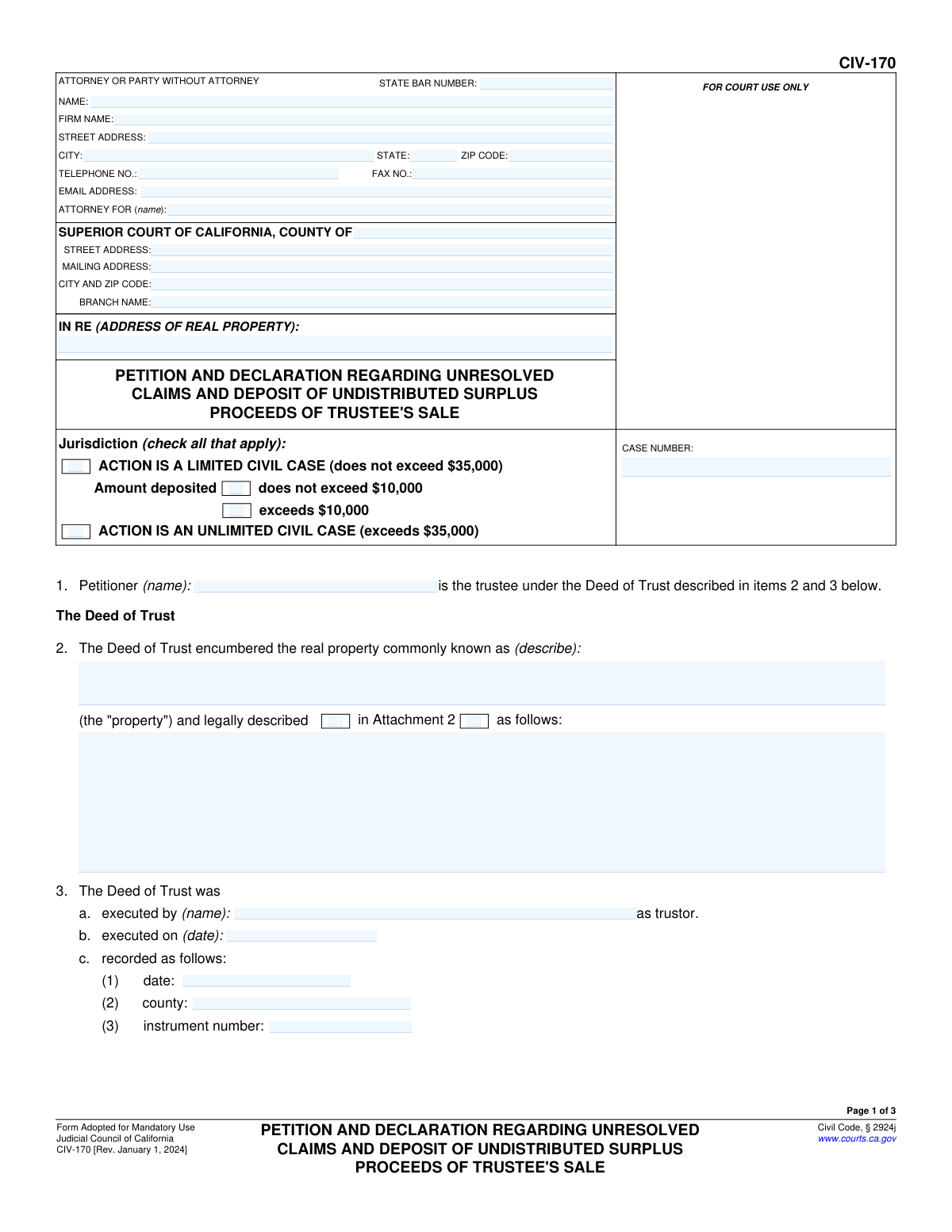
Yes! You can use AI to fill out Form CIV-170, Petition and Declaration Regarding Unresolved Claims and Deposit of Undistributed Surplus Proceeds of Trustee's Sale

Form CIV-170, Petition and Declaration Regarding Unresolved Claims and Deposit of Undistributed Surplus Proceeds of Trustee's Sale, is a legal document filed in the Superior Court of California. It is used by a trustee after a property foreclosure sale when there are surplus funds but the trustee cannot determine the priority of claims or if there is a conflict between potential claimants. This petition allows the trustee to deposit the funds with the court, which will then determine the proper distribution. Today, this form can be filled out quickly and accurately using AI-powered services like Instafill.ai, which can also convert non-fillable PDF versions into interactive fillable forms.
CIV-170 is part of the California court forms, civil court forms and court claim forms categories on Instafill.
Our AI automatically handles information lookup, data retrieval, formatting, and form filling.
It takes less than a minute to fill out CIV-170 using our AI form filling.
Securely upload your data. Information is encrypted in transit and deleted immediately after the form is filled out.

Form specifications

Form name: Form CIV-170, Petition and Declaration Regarding Unresolved Claims and Deposit of Undistributed Surplus Proceeds of Trustee's Sale
Number of fields: 83
Number of pages: 1
Language: English
main-image

Instafill Demo: How to fill out PDF forms in seconds with AI

How to Fill Out CIV-170 Online for Free in 2026

Are you looking to fill out a CIV-170 form online quickly and accurately? Instafill.ai offers the #1 AI-powered PDF filling software of 2026, allowing you to complete your CIV-170 form in just 37 seconds or less.
Follow these steps to fill out your CIV-170 form online using Instafill.ai:
  1. 1 Navigate to Instafill.ai and upload or select the CIV-170 form.
  2. 2 Use the AI assistant to accurately input court and case information, including the county, case number, and attorney details.
  3. 3 Enter the details of the Deed of Trust, the property address, and the specifics of the trustee's sale, such as the date and total sale price.
  4. 4 Document the surplus proceeds, list all potential claimants who were notified, and describe any unresolved claims or conflicts as prompted by the system.
  5. 5 Detail any distributions already made, list trustee fees and expenses, and allow the platform to help calculate the final amount to be deposited with the court.
  6. 6 Upload and attach all necessary documents, such as the trustee's sale guarantee, proof of service of notice, and descriptions of claim conflicts.
  7. 7 Review all entered information for accuracy, then electronically sign the declaration under penalty of perjury before downloading or printing the completed form for filing.

Our AI-powered system ensures each field is filled out correctly, reducing errors and saving you time.

Why Choose Instafill.ai for Your Fillable CIV-170 Form?

Speed

Complete your CIV-170 in as little as 37 seconds.

Up-to-Date

Always use the latest 2026 CIV-170 form version.

Cost-effective

No need to hire expensive lawyers.

Accuracy

Our AI performs 10 compliance checks to ensure your form is error-free.

Security

Your personal information is protected with bank-level encryption.

Frequently Asked Questions About Form CIV-170

This form is used by a trustee after a foreclosure sale to petition the court to accept a deposit of surplus funds. It is filed when the trustee cannot determine the priority of claims or when there is a conflict between potential claimants to the extra money from the sale.

The trustee who conducted the property's foreclosure sale is the one responsible for completing and filing this petition with the appropriate California Superior Court.

Surplus proceeds are the funds left over from a property's foreclosure sale after paying off the foreclosing creditor and other required costs as outlined in Civil Code section 2924k(a)(1)–(2).

A trustee's sale guarantee is a title report that identifies all recorded interests and liens on the property, which helps identify potential claimants. A copy must be attached as Attachment 5 to validate the list of notified parties.

You must attach a copy of the trustee's sale guarantee (Attachment 5) and the Proof of Service of the notice to deposit funds (Attachment 13). You may also need other attachments to describe the property, list claimants, or explain claim conflicts as indicated on the form.

In this section, you must state why you are depositing the funds with the court. You will check box 11a if you cannot determine the priority of claims or 11b if there is a direct conflict between claimants, providing a detailed explanation in the corresponding attachment.

The case is 'Limited' if the total amount of surplus proceeds being deposited is $35,000 or less. If the amount exceeds $35,000, it is an 'Unlimited' Civil Case.

Start with the available surplus proceeds (16c), then subtract any claims you have already paid (16d), your own reasonable fees and expenses (16e), and the court filing fee (16g) to arrive at the final deposit amount.

Once the funds are deposited with the court clerk, the notified claimants have 30 days to file their own claims with the court. The court will then adjudicate the conflicting claims and order the distribution of the funds.

This notice officially informs all potential claimants that you intend to deposit the surplus funds with the court. It must state the court's address and the 30-day deadline for them to file a claim for the funds.

Yes, services like Instafill.ai use AI to auto-fill form fields accurately and save time. This can be particularly helpful for ensuring all calculations and party information are entered correctly.

You can use a service like Instafill.ai to easily fill out this form online. Simply upload the form, and the platform's AI will make it interactive and help you complete the required fields quickly.

If you have a non-fillable or 'flat' PDF, you can use a tool like Instafill.ai. It can convert the flat PDF into an interactive, fillable form that you can complete and save on your computer.

Compliance CIV-170
Validation Checks by Instafill.ai

1
Verifies Financial Calculation for Remaining Surplus Proceeds
This check ensures the value in 'Remaining surplus proceeds' (Item 16f) is correctly calculated by subtracting the 'Claims paid by trustee' (16d) and 'Trustee's fees and expenses' (16e) from the 'Available surplus proceeds' (16c). This validation is critical for maintaining the financial integrity of the deposit calculation. A failure indicates a mathematical error that could lead to an incorrect deposit amount and legal complications.
2
Ensures Logical Chronology of Dates
This validation confirms that the key dates on the form are in a logical sequence: the Deed of Trust execution date (Item 3b) must be on or before the recording date (Item 3c(1)), which must be before the trustee's sale date (Item 4). This is important to establish a valid timeline of events as required by law. An illogical sequence would invalidate the premise of the petition and likely cause its rejection.
3
Validates Jurisdiction Selection Against Deposit Amount
This check cross-references the jurisdiction checkboxes with the final deposit amount in Item 16h. For example, if 'LIMITED CIVIL CASE' and 'does not exceed $10,000' are checked, the deposit amount must be $10,000 or less. This ensures the case is filed in the correct court jurisdiction, preventing procedural delays and potential dismissal for being filed improperly.
4
Confirms Consistency of Surplus Proceeds Amounts
This check verifies that the 'Available surplus proceeds' amount listed in the final calculation (Item 16c) is identical to the amount initially declared in Item 7. This consistency is crucial for transparency and accuracy in the accounting of funds from the sale. A discrepancy suggests a data entry error or miscalculation that must be corrected before the court can process the petition.
5
Verifies Final Deposit Calculation
This check validates that the final 'Deposit' amount (Item 16h) is correctly calculated by subtracting the 'Filing fee' (16g) from the 'Remaining surplus proceeds' (16f). This is the final and most critical calculation, as it determines the exact amount of money being transferred to the court. An error here would result in an incorrect deposit, causing reconciliation problems for both the trustee and the court.
6
Ensures Reason for Petition is Specified
This validation ensures that at least one of the checkboxes in Item 11 ('unable to determine priority' or 'conflict between potential claimants') is selected. The entire purpose of the petition is to explain why the trustee cannot distribute the funds, so this information is mandatory. Failure to select a reason leaves the court without the necessary context to adjudicate the claims.
7
Validates State Bar Number Format
This check ensures that the value entered in the 'STATE BAR NUMBER' field is a valid numeric format, as expected for California State Bar numbers. This helps verify the attorney's credentials and ensures the information is correctly recorded in the court's system. An invalid format could indicate a typo or an unauthorized person filing the form.
8
Confirms Presence of Trustee's Name and Signature Date
This validation checks that the trustee's name (page 3, bottom) and the signature date are both filled out. The declaration is made 'under penalty of perjury,' so the signature and date are essential for the document's legal validity. An unsigned or undated form is incomplete and will be rejected by the court clerk.
9
Verifies Total Distributed Amount Calculation
This check confirms that the total amount distributed to claimants listed in Item 14 is equal to the sum of all individual claimant payments listed below it. This serves as an internal audit to ensure the summary figure is accurate and supported by the detailed breakdown. A mismatch would indicate a calculation error that needs to be resolved before the petition is submitted.
10
Ensures Case Number Consistency Across Pages
This validation verifies that the 'CASE NUMBER' entered in the header of all three pages is identical. Maintaining a consistent case number is crucial for ensuring all pages of the document are correctly associated with each other and with the proper case file in the court system. A mismatch could lead to pages being lost or misfiled, delaying the case.
11
Confirms Consistency of Total Sale Price
This check ensures the 'Trustee's sale proceeds' amount in the final calculation (Item 16a) is identical to the 'total sale price' declared in Item 6. This cross-reference validation prevents data entry errors between different sections of the form. Any discrepancy would undermine the credibility of the financial accounting presented in the petition.
12
Validates Completeness of Petitioner Information
This check ensures that the petitioner's name in Item 1 is not empty. The petitioner is the central party bringing this action before the court, so their identity is a fundamental and required piece of information. A missing petitioner name would render the form legally incomplete and result in immediate rejection.
13
Validates Date Field Formats
This check ensures that all date fields (e.g., Item 3b, 3c(1), 4) are entered in a valid and recognizable date format, such as MM/DD/YYYY. Proper formatting is essential for data integrity and for the court's electronic filing and case management systems to correctly interpret the information. An invalid format can cause data import errors and processing delays.
14
Flags Missing Trustee's Sale Guarantee Attachment
This validation checks for the presence of 'Attachment 5', which the form text explicitly states 'must be attached'. The trustee's sale guarantee is a critical piece of evidence that supports the information in the petition. Submitting the form without this required attachment would make the petition incomplete and likely lead to its rejection pending submission of the missing document.

Common Mistakes in Completing CIV-170

Forgetting Mandatory Attachments

This form explicitly requires several attachments, such as the Trustee's Sale Guarantee (Attachment 5), the legal property description (Attachment 2), and the Proof of Service (Attachment 13). Filers often overlook these requirements, leading to an incomplete submission. An incomplete petition will be rejected by the court clerk, forcing a refiling and causing significant delays in resolving the surplus funds issue. To avoid this, create a checklist of all required attachments before filing to ensure the packet is complete.

Incorrect Calculation of Deposit Amount

The multi-step financial calculation in Item 16 is highly prone to arithmetic errors. A mistake in calculating the available surplus, subtracting paid claims, or deducting trustee's fees will result in an incorrect final deposit amount. Since this amount is the core of the petition, any error will cause the court to reject the filing or require an amendment. Carefully double-check all figures and calculations before signing the form to ensure accuracy.

Misclassifying Case Jurisdiction

Filers often incorrectly select the case jurisdiction, checking 'Limited Civil Case' when it should be 'Unlimited,' or vice versa. The determination is based on the amount of surplus proceeds being deposited, with the threshold typically being $35,000. This mistake can lead to paying the wrong filing fee and having the case assigned to the incorrect court department, resulting in rejection and the need to start the filing process over.

Omitting the Legal Property Description

A frequent error is providing only the common street address for the property in Item 2 while failing to include the full legal description as Attachment 2. For real property matters, a street address is legally insufficient; the court requires the precise legal description found on the deed. This omission will result in the filing being rejected as incomplete. Always obtain the legal description from the Deed of Trust or title report and attach it as a separate page.

Insufficient Detail on Claim Disputes

In Item 11, simply checking the box for a conflict between claimants or an inability to determine priority is not enough. Filers must provide a detailed explanation in the corresponding attachment (11a or 11b). Submitting a vague or non-existent explanation prevents the court from understanding the issue, which can lead to requests for more information or denial of the petition. The attachment must clearly identify the claimants and the specific nature of the conflict.

Inconsistent Information Across Pages

The form requires repeating the 'IN RE' property address and the Case Number in the header of all three pages. It is common for filers to fill this out on the first page but forget on subsequent pages, or to introduce typos. This inconsistency can cause clerical errors and confusion, potentially leading to pages being misfiled. AI-powered form filling tools like Instafill.ai can prevent this by automatically populating repeated fields consistently across the entire document.

Failing to Justify Trustee's Fees and Costs

Petitioners often enter a total for trustee's fees and expenses in Item 15 without providing the required itemized breakdown in Attachment 15. The court needs to verify that the fees are 'reasonable' under the Civil Code, and a lump sum without justification is insufficient. This can lead to the court challenging the fees and reducing the amount awarded to the trustee. Always attach a detailed list itemizing all fees and costs incurred.

Errors in Deed of Trust Recording Details

The specific details of the Deed of Trust in Item 3, such as the recording date and instrument number, must be exact. People often make transcription errors when copying this information from source documents. An incorrect instrument number or date can create legal ambiguity about the underlying transaction, potentially causing the court to question the petition's validity and request a corrected filing. This data should be carefully verified against the official recorded document.

Using an Obsolete Version of the Form

California Judicial Council forms are updated periodically, indicated by the revision date (e.g., 'Rev. January 1, 2024'). Using an outdated version of the CIV-170 form is a common reason for automatic rejection by the court clerk. Old forms may lack newly required information or contain outdated legal citations. Before starting, always confirm you have the most current version from the official California Courts website.

Illegible or Poorly Formatted Submissions

When a form is only available as a non-fillable PDF, people may print it and complete it by hand, resulting in illegible entries. Poor handwriting can cause data entry errors by court staff and make it difficult for the judge to review, leading to delays or rejection. To ensure clarity, it is best to use a fillable version. If one is not available, AI-powered tools like Instafill.ai can convert the flat PDF into a fillable format, ensuring all entries are typed, legible, and correctly placed.

Missing Signature or Date

Forgetting to sign or date the declaration on page 3 is a simple but critical mistake. An unsigned or undated declaration is invalid and has no legal effect, which will cause the entire petition to be rejected. The filer must sign under penalty of perjury, and the date is essential for establishing when the declaration was made. Always perform a final review to ensure the trustee (and attorney, if applicable) has signed and dated the form in the correct places.
Saved over 80 hours a year

“I was never sure if my IRS forms like W-9 were filled correctly. Now, I can complete the forms accurately without any external help.”

Kevin Martin Green

Your data stays secure with advanced protection from Instafill and our subprocessors

Robust compliance program

Transparent business model

You’re not the product. You always know where your data is and what it is processed for.

ISO 27001, HIPAA, and GDPR

Our subprocesses adhere to multiple compliance standards, including but not limited to ISO 27001, HIPAA, and GDPR.

Security & privacy by design

We consider security and privacy from the initial design phase of any new service or functionality. It’s not an afterthought, it’s built-in, including support for two-factor authentication (2FA) to further protect your account.

Fill out CIV-170 with Instafill.ai

Worried about filling PDFs wrong? Instafill securely fills form-civ-170-petition-and-declaration-regarding-unresolved-claims-and-deposit-of-undistributed-surplus-proceeds-of forms, ensuring each field is accurate.

Related forms by category

California court forms Judicial Council of California Form SC-105, Request for Court Order and Answer (Small Claims), Judicial Council of California Form SC-120, Defendant’s Claim and ORDER to Go to Small Claims Court (Small Claims), Judicial Council of California Form SER-001, Request for Sheriff to Serve Court Papers, Judicial Council of California Form SER-001, Request for Sheriff to Serve Court Papers, Affidavit for Collection of Personal Property California Probate Code Section 13100, Form POS-040, Proof of Service—Civil, Declaration of Facts of Death (California Superior Court), declaration-of-marriage-for-court-proceeding-california-family-law, ADOPT-200, Adoption Request, ADOPT-200, Stepparent Adoption Request, ADOPT-210, Adoption Agreement, ADOPT-310, Contact After Adoption Agreement, Judicial Council of California Form ADOPT-200, Adoption Request, Form ADR-107, Mediation Attendance Sheet, Form ADR-110, Order Appointing Referee, Form ADR-109, Stipulation or Motion for Order Appointing Referee, Form ADR-102, Request for Trial De Novo After Judicial Arbitration, Form ADR-108, Referee's Report (Code Civ. Proc., §§ 638, 639), Form ADR-106, Petition to Confirm, Correct, or Vacate Contractual Arbitration Award, Form ADR-104, Rejection of Award and Request for Trial After Attorney-Client Fee Arbitration · + 268 more →
civil court forms Petition for Leave to Proceed In Forma Pauperis (Court of Common Pleas of Lehigh County, Pennsylvania, Civil Division), Designation of Record on Appeal (Civil) (Maricopa County Justice Courts, Arizona) (Form APP 8150-702), Certificate of Service (Civil Court Claim), Pfändungs- und Überweisungsbeschluss (Garnishment and Transfer Order) – German Civil Enforcement Court Form, AOPC 308A, Civil Complaint, Form MC 03, Answer, Civil, Form POS-040, Proof of Service—Civil, ONTARIO Form 8: Application (General), Form ATJ 601.9, Application for Waiver of Court Fees (Civil), Nevada Justice / Municipal Civil Court Cover Sheet, Form MC 01, Summons, Form MC 10, Judgment, Civil, Form MC 99, Motion and Affidavit to Set Aside Default (Civil), Form MC 281a, Civil Mediator Application, Ex Parte Motion and Order to Renew Civil Judgment, AO 88B, Subpoena to Produce Documents, Information, or Objects or to Permit Inspection of Premises in a Civil Action, Form APP-031A, Application for Extension of Time to File Brief (Civil Case), Civil Appeal Case Information Statement, Form APP-014, Appellant's Proposed Statement on Appeal (Unlimited Civil Case), form-app-015-respondents-proposed-corrections-toadditions-to-appellants-proposed-settled-statement-unlimited-civil-case · + 55 more →
court claim forms Form SC-100, Plaintiff's Claim and ORDER to Go to Small Claims Court, Judicial Council of California Form SC-105, Request for Court Order and Answer (Small Claims), SC-120, Defendant’s Claim and ORDER to Go to Small Claims Court (Small Claims), SC-105, Request for Court Order and Answer (Small Claims), Judicial Council of California Form SC-120, Defendant’s Claim and ORDER to Go to Small Claims Court (Small Claims), Form SC-100, Plaintiff’s Claim and ORDER to Go to Small Claims Court, Certificate of Service (Civil Court Claim), Form N161, Appellant’s notice (All appeals except small claims track appeals and appeals to the Family Division of the High Court), Plaintiff's Claim and ORDER to Go to Small Claims Court (SC-100), Form N161, Appellant's Notice (All appeals except small claims track appeals and appeals to the Family Division of the High Court), Form SC-100A, Other Plaintiffs or Defendants (Attachment to Plaintiff's Claim and ORDER to Go to Small Claims Court), Form N461: Claim for judicial review, Statement of Small Claim and Notice, Trial Court of Massachusetts, State of Michigan, Form MC 25, Notice of Intent to Escheat Unclaimed Personal Property, Form MC 35, Complaint, Claim and Delivery, Form MC 36, Motion for Possession Pending Judgment, Claim and Delivery, Order of Possession Pending Judgment, Claim and Delivery, Form MC 38, Bond, Claim and Delivery, Form MC 39, Judgment, Claim and Delivery, Form MC 55, Claim of Appeal · + 17 more →