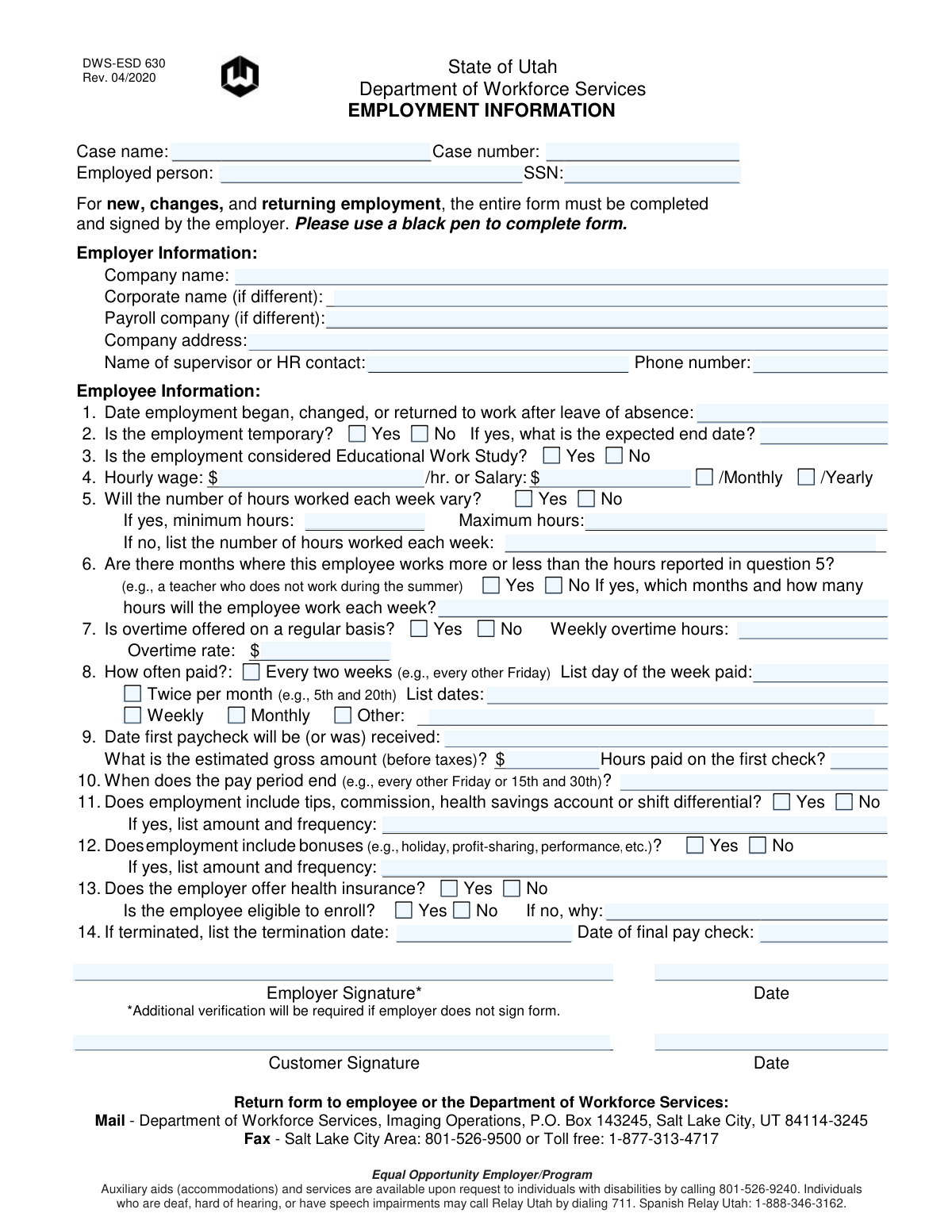
Yes! You can use AI to fill out Form DWS-ESD 630, Employment Information

Form DWS-ESD 630, Employment Information, is a document used by the Utah Department of Workforce Services to gather and verify detailed information about an individual's employment status, wages, hours, and pay schedule. This information is crucial for determining eligibility and benefit amounts for various assistance programs managed by the department. Today, this form can be filled out quickly and accurately using AI-powered services like Instafill.ai, which can also convert non-fillable PDF versions into interactive fillable forms.
DWS-ESD 630 is part of the employment forms category on Instafill.
Our AI automatically handles information lookup, data retrieval, formatting, and form filling.
It takes less than a minute to fill out DWS-ESD 630 using our AI form filling.
Securely upload your data. Information is encrypted in transit and deleted immediately after the form is filled out.

Form specifications

Form name: Form DWS-ESD 630, Employment Information
Number of fields: 61
Number of pages: 1
Language: English
main-image

Instafill Demo: How to fill out PDF forms in seconds with AI

How to Fill Out DWS-ESD 630 Online for Free in 2026

Are you looking to fill out a DWS-ESD 630 form online quickly and accurately? Instafill.ai offers the #1 AI-powered PDF filling software of 2026, allowing you to complete your DWS-ESD 630 form in just 37 seconds or less.
Follow these steps to fill out your DWS-ESD 630 form online using Instafill.ai:
  1. 1 Navigate to Instafill.ai and upload or select the DWS-ESD 630 form to begin.
  2. 2 Provide the case name, case number, and the employed person's name and SSN in the designated fields.
  3. 3 Enter the complete Employer Information, including company name, address, and the name and phone number of a supervisor or HR contact.
  4. 4 Fill out the Employee Information section, detailing the start date, compensation (hourly or salary), and pay frequency.
  5. 5 Specify the number of hours worked, whether they vary, and if overtime, bonuses, or other types of compensation are included.
  6. 6 Answer the questions regarding health insurance availability and eligibility for the employee.
  7. 7 Once all sections are complete, have the employer and/or customer sign and date the form before submitting it to the Department of Workforce Services.

Our AI-powered system ensures each field is filled out correctly, reducing errors and saving you time.

Why Choose Instafill.ai for Your Fillable DWS-ESD 630 Form?

Speed

Complete your DWS-ESD 630 in as little as 37 seconds.

Up-to-Date

Always use the latest 2026 DWS-ESD 630 form version.

Cost-effective

No need to hire expensive lawyers.

Accuracy

Our AI performs 10 compliance checks to ensure your form is error-free.

Security

Your personal information is protected with bank-level encryption.

Frequently Asked Questions About Form DWS-ESD 630

This form is used by the Utah Department of Workforce Services to verify an individual's employment details, such as wages, hours, and pay schedule. The information is necessary to determine eligibility and calculate amounts for various assistance programs.

The employer must complete and sign the form to verify the employment information. The employee (referred to as 'Customer') provides the form to their employer and must also sign it before it is submitted.

The form states that additional verification will be required if the employer does not sign. You should still complete your portion, sign it, and submit the form to the Department of Workforce Services, who will then likely follow up to verify the information.

The completed and signed form can be mailed to the Department of Workforce Services, Imaging Operations, P.O. Box 143245, Salt Lake City, UT 84114-3245. Alternatively, you can fax it to 801-526-9500 (Salt Lake City area) or toll-free to 1-877-313-4717.

For question 5, your employer should check 'Yes' to indicate that hours vary. They should then enter the minimum and maximum number of hours you are expected to work in a typical week.

The 'Employed person' is the name of the individual whose job information is being reported. The 'Case name' is the official name associated with your file at the Department of Workforce Services, which may be your name or a household name.

Your employer should check 'Yes' for question 2 ('Is the employment temporary?') and write in the expected end date of the job. This informs the department that the income is for a limited duration.

This information helps the Department of Workforce Services understand when your income will begin and the initial gross amount you will receive. It is crucial for accurately calculating your benefits from the start of your employment.

If you have a flat, non-fillable PDF, you can use a service like Instafill.ai. It uses AI to convert the document into an interactive, fillable form so you can type your information directly before printing it for signatures.

Yes, services like Instafill.ai can use AI to accurately auto-fill your personal information, saving you time. However, your employer must still provide and verify the specific employment details and provide a signature.

Simply upload the Employment Information form to the Instafill.ai platform. The AI will identify the fields, allowing you to type in your information, and then you can download the completed form to be printed for signatures.

You should provide your employer with your Case Name and Case Number, which can be found on other documents from the Department of Workforce Services. Your employer will use their payroll records to complete the rest of the form.

The form includes options for 'Every two weeks' and 'Twice per month'. If none of the standard options apply, your employer should check 'Other' and write a brief explanation of the pay schedule on the line provided.

This form can also be used to report the end of a job. If your employment has ended, your former employer would fill out the termination date and final paycheck information to officially notify the department.

Compliance DWS-ESD 630
Validation Checks by Instafill.ai

1
Validates Social Security Number Format
This check ensures the 'SSN' field is entered in a valid format, such as XXX-XX-XXXX or XXXXXXXXX. The SSN is a critical unique identifier for the employee, and an incorrect format can lead to data mismatches and processing failures. If the format is invalid, the system should prevent submission and prompt the user for correction.
2
Ensures Exclusive Selection of Hourly or Salary Compensation
This validation verifies that the user has entered a value for either 'Hourly wage' or 'Salary', but not both. Providing both values is logically inconsistent and creates ambiguity in calculating the employee's total pay. A failed validation should trigger an error message requiring the user to clarify the single correct method of compensation.
3
Requires End Date for Temporary Employment
This check ensures that if 'Is the employment temporary?' is marked 'Yes', the 'Expected end date' field must be completed with a valid date. This date is critical for determining the duration of benefits and for case management planning. A missing end date for temporary employment would result in incomplete data and require manual follow-up.
4
Requires Min/Max Hours for Varying Work Schedules
This validation confirms that if 'Will the number of hours worked each week vary?' is answered 'Yes', then at least one of the 'Minimum hours' or 'Maximum hours' fields is completed. This information is essential for estimating a range of potential earnings for eligibility calculations. If the 'Yes' box is checked but no hours are provided, the system cannot accurately project income and should prompt the user for the information.
5
Validates Logical Range for Minimum and Maximum Hours
This check ensures that if both 'Minimum hours' and 'Maximum hours' are provided, the value for 'Maximum hours' is greater than or equal to the value for 'Minimum hours'. An inverted range is a logical impossibility that would lead to incorrect income calculations and reporting errors. The system should reject submissions where the minimum hours exceed the maximum hours.
6
Requires Fixed Hours When Schedule is Not Variable
This validation ensures that if 'Will the number of hours worked each week vary?' is answered 'No', the field for the fixed 'number of hours worked each week' is filled with a numeric value. This fixed number is the primary basis for all income calculations for the employee. If 'No' is selected and the hours field is empty, the form is incomplete and cannot be processed.
7
Requires Rate and Hours for Regular Overtime
This check verifies that if 'Is overtime offered on a regular basis?' is marked 'Yes', both the 'Weekly overtime hours' and 'Overtime rate' fields are completed. This information is necessary for accurately calculating total potential income, including supplemental pay. Failure to provide these details when overtime is indicated would lead to an underestimation of earnings and require manual correction.
8
Validates Termination and Final Pay Date Sequence
This validation ensures that if a 'Termination date' is provided, the 'Date of final pay check' is on or after the termination date. A final paycheck cannot logically be issued before an employee's last day of work. This check prevents data entry errors that could complicate final wage calculations and case closure procedures.
9
Enforces Completion of Pay Frequency Details
This check ensures that when a specific pay frequency is selected (e.g., 'Every two weeks' or 'Twice per month'), the corresponding detail field ('List day of the week paid' or 'List dates') is filled. This information is crucial for forecasting the employee's cash flow and determining benefit eligibility dates. An incomplete pay schedule prevents accurate income projection and should trigger a validation error.
10
Requires Reason if Not Eligible for Health Insurance
This validation confirms that if the employer offers health insurance ('Yes') but the employee is not eligible to enroll ('No'), the 'If no, why' reason field is provided. This detail is vital for determining eligibility for other health coverage programs or subsidies. A missing reason makes it impossible to assess the employee's full situation and would require manual follow-up.
11
Validates First Paycheck Date Relative to Start Date
This check ensures the 'Date first paycheck will be (or was) received' is on or after the 'Date employment began'. An employee cannot be paid before they have started working, so this validation catches logical date entry errors. This is important for correctly timing the start of income reporting and preventing processing mistakes.
12
Ensures Core Identifier Fields are Complete
This validation verifies that essential fields like 'Employed person', 'SSN', 'Company name', and 'Date employment began' are not empty. These fields are the minimum required information to identify the employee, the employer, and the employment event. A submission missing any of this core data is fundamentally incomplete and cannot be processed.
13
Requires Details for Additional Pay Components
This check ensures that if the user answers 'Yes' to question 11 ('Does employment include tips, commission...') or question 12 ('Does employment include bonuses...'), the corresponding 'list amount and frequency' field is filled out. This supplemental income is a critical part of the employee's total compensation and must be documented for accurate calculations. A 'Yes' answer without details would render the income information incomplete.
14
Requires Salary Basis if Salary Amount is Provided
This validation ensures that if a 'Salary amount' is entered, either the 'Monthly' or 'Yearly' checkbox is also selected. The salary amount is meaningless without knowing the period it covers, which is essential for converting it to a standard income figure. This check prevents ambiguity and ensures the salary can be correctly used in program calculations.

Common Mistakes in Completing DWS-ESD 630

Confusing 'Every Two Weeks' with 'Twice Per Month'

Filers often misunderstand the difference between being paid every two weeks (bi-weekly, 26 paychecks per year) and twice per month (semi-monthly, 24 paychecks per year). This mistake, along with forgetting to list the specific pay day or dates, leads to incorrect income calculations and can affect benefit eligibility. It is crucial to confirm the exact pay schedule with the payroll department before filling out this section.

Leaving Conditional Fields Blank

The form contains many questions that require additional details if 'Yes' is selected, such as for temporary work, variable hours, overtime, and bonuses. A frequent mistake is checking 'Yes' but failing to provide the required follow-up information like an end date, min/max hours, or overtime rate. This incomplete data makes the form unusable and requires the agency to contact the employer for clarification, delaying the process.

Incorrectly Reporting Salary vs. Hourly Wage

People often get confused when reporting compensation, sometimes entering an hourly wage in the salary field or vice-versa. Another common error is entering a salary amount but checking the wrong pay basis, such as putting a monthly figure next to the 'Yearly' checkbox. These errors directly impact income verification and can lead to inaccurate benefit assessments.

Providing Incomplete First Paycheck Information

Question 9 asks for three distinct pieces of information about the first paycheck: the date, the estimated gross amount, and the hours paid. Filers frequently omit the 'Hours paid' on the first check, providing only the date and amount. This missing detail is essential for the agency to verify the start of employment and the initial pay rate, and its absence can stall the case.

Using Vague Terms for Variable Hours or Pay

When asked to describe variable hours, tips, or bonuses, filers often write unhelpful terms like 'varies' or 'as needed' instead of providing the requested numerical ranges, frequencies, or estimated amounts. This vague information is insufficient for the agency to make an accurate income projection. Providing specific details, such as 'minimum 20, maximum 35 hours' or '$50-$100 in tips weekly', is necessary to avoid delays.

Confusing Pay Period End Date with Payday

Question 10 asks for the 'pay period end' date, which is different from the 'payday' requested in Question 8. Filers often mistakenly enter the payday in both fields. This distinction is critical for agencies to correctly allocate earnings to specific timeframes, and confusing the two can result in miscalculated benefits.

Failing to Complete All Parts of the Health Insurance Section

The health insurance section (Question 13) has multiple dependent questions that are often missed. For example, an employer might check 'Yes' that insurance is offered but then fail to answer whether the employee is eligible. If the employee is not eligible, leaving the reason blank is another common omission that forces the agency to follow up for the missing information.

Submitting the Form Without a Signature and Date

A form submitted without any signature is invalid, yet this is a common oversight. Furthermore, even when a signature is present, the date next to it is often forgotten. The signature and date are required to certify the information and establish a timeline, and their absence will result in the form being rejected.

Incorrectly Identifying Employer Entities

The form asks for the 'Company name', 'Corporate name', and 'Payroll company' separately. Filers may not know the difference and list the same name for all, even when a separate payroll provider or parent company is used. This can create verification problems if the name on the employee's pay stub does not match the primary name listed on the form.

Entering an Incorrect SSN or Case Number

Simple typographical errors, like transposing digits in the Social Security Number or Case Number, are extremely common but have serious consequences. A single wrong digit can lead to mismatched records, significant processing delays, or an inability to link the form to the correct file. AI-powered tools like Instafill.ai can help prevent these errors by validating number formats and allowing for easy review before submission. Since this form is a non-fillable PDF, Instafill.ai can also convert it into an interactive, fillable version to reduce manual entry mistakes.
Saved over 80 hours a year

“I was never sure if my IRS forms like W-9 were filled correctly. Now, I can complete the forms accurately without any external help.”

Kevin Martin Green

Your data stays secure with advanced protection from Instafill and our subprocessors

Robust compliance program

Transparent business model

You’re not the product. You always know where your data is and what it is processed for.

ISO 27001, HIPAA, and GDPR

Our subprocesses adhere to multiple compliance standards, including but not limited to ISO 27001, HIPAA, and GDPR.

Security & privacy by design

We consider security and privacy from the initial design phase of any new service or functionality. It’s not an afterthought, it’s built-in, including support for two-factor authentication (2FA) to further protect your account.

Fill out DWS-ESD 630 with Instafill.ai

Worried about filling PDFs wrong? Instafill securely fills form-dws-esd-630-employment-information forms, ensuring each field is accurate.