Yes! You can use AI to fill out Form T2201, Disability Tax Credit Certificate

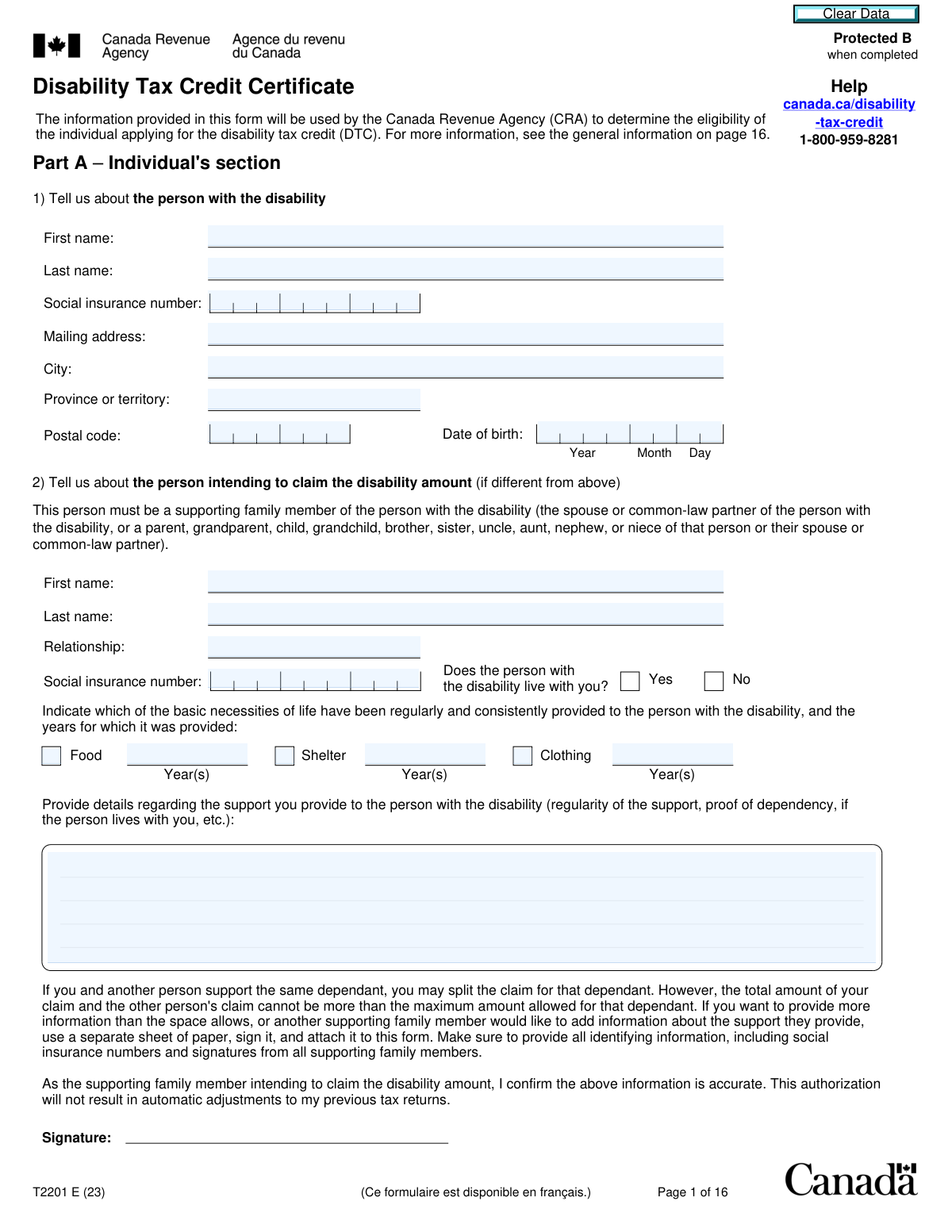
Form T2201, the Disability Tax Credit Certificate, is a Canada Revenue Agency (CRA) form used to determine if an individual is eligible for the Disability Tax Credit (DTC). The form requires information from both the applicant (Part A) and a qualified medical practitioner (Part B) to certify a severe and prolonged impairment. Approval of this certificate can significantly reduce the amount of income tax payable by the person with the disability or their supporting family member. Today, this form can be filled out quickly and accurately using AI-powered services like Instafill.ai, which can also convert non-fillable PDF versions into interactive fillable forms.
Our AI automatically handles information lookup, data retrieval, formatting, and form filling.
It takes less than a minute to fill out T2201 using our AI form filling.
Securely upload your data. Information is encrypted in transit and deleted immediately after the form is filled out.

Form specifications

Form name: Form T2201, Disability Tax Credit Certificate
Number of fields: 411
Number of pages: 16
Language: English
Categories: credit forms, disability forms, tax forms
main-image

Instafill Demo: How to fill out PDF forms in seconds with AI

How to Fill Out T2201 Online for Free in 2026

Are you looking to fill out a T2201 form online quickly and accurately? Instafill.ai offers the #1 AI-powered PDF filling software of 2026, allowing you to complete your T2201 form in just 37 seconds or less.
Follow these steps to fill out your T2201 form online using Instafill.ai:
  1. 1 Navigate to Instafill.ai and upload or select Form T2201, the Disability Tax Credit Certificate.
  2. 2 Use the AI assistant to accurately complete Part A, providing personal details for the individual with the disability and the person intending to claim the credit.
  3. 3 Review and sign the authorization in Part A, which allows the CRA to consult with your medical practitioner.
  4. 4 Provide the form to your qualified medical practitioner (e.g., doctor, optometrist, psychologist) to complete the detailed medical information in Part B.
  5. 5 Ensure your medical practitioner signs and completes the 'Certification' section on the final page of the form.
  6. 6 Once both Part A and Part B are complete, review the entire form for accuracy and make a copy for your records.
  7. 7 Submit the completed and signed Form T2201 to the Canada Revenue Agency (CRA) either online through your CRA My Account or by mail to the appropriate tax centre.

Our AI-powered system ensures each field is filled out correctly, reducing errors and saving you time.

Why Choose Instafill.ai for Your Fillable T2201 Form?

Speed

Complete your T2201 in as little as 37 seconds.

Up-to-Date

Always use the latest 2026 T2201 form version.

Cost-effective

No need to hire expensive lawyers.

Accuracy

Our AI performs 10 compliance checks to ensure your form is error-free.

Security

Your personal information is protected with bank-level encryption.

Frequently Asked Questions About Form T2201

This form is used to apply for the Disability Tax Credit (DTC) from the Canada Revenue Agency (CRA). It provides the CRA with information about your impairment so they can determine if you are eligible for this non-refundable tax credit.

The form is split into two parts. Part A must be completed by the person with the disability or their legal representative, while Part B must be completed and certified by a qualified medical practitioner.

Yes, a supporting family member, such as a spouse, parent, or child, can claim the disability amount if the person with the disability is dependent on them for basic necessities like food, shelter, or clothing. This is detailed in Section 2 of Part A.

No, your medical practitioner's role is to provide medical information about your impairment in Part B. The Canada Revenue Agency (CRA) makes the final decision on your eligibility based on the criteria set out in the Income Tax Act.

You can scan and submit the completed form online through your CRA My Account, which is the fastest method. Alternatively, you can mail the physical form to the tax centre address provided on the last page.

Yes, in Part A, you can ask the CRA to automatically adjust your tax returns for all previous applicable years once your eligibility is approved. This allows you to receive credits for past years where you were eligible.

An 'inordinate amount of time' is generally interpreted as taking at least three times longer to perform a basic activity of daily living compared to someone of a similar age without the impairment. This must be the case even with the use of appropriate therapy, devices, and medication.

This applies if you have limitations in two or more categories (e.g., walking and dressing) that may not be severe enough on their own to qualify. If the combined effect of these limitations is equivalent to a marked restriction in one category, you may still be eligible for the DTC.

You are responsible for paying any fees your medical practitioner charges for filling out Part B of the form. You may be able to claim these fees as medical expenses on your income tax return.

The CRA will review your application and may contact your medical practitioner if more information is needed. Afterwards, they will send you a Notice of Determination by mail to inform you of their decision.

Yes, services like Instafill.ai use AI to help you accurately auto-fill the fields in Part A, saving you time and helping to prevent errors. Part B must still be completed and signed by your medical practitioner.

Simply upload the T2201 form to the Instafill.ai platform. The AI will make the form fillable, and you can provide your information to have Part A completed quickly and easily before taking it to your doctor.

If you have a non-fillable or 'flat' PDF, you can use a service like Instafill.ai. It can instantly convert the PDF into an interactive, fillable form that you can complete on your computer.

Compliance T2201
Validation Checks by Instafill.ai

1
Social Insurance Number (SIN) Validation
This check ensures that the Social Insurance Number (SIN) entered for both the person with the disability (Part A-1) and the claimant (Part A-2, if applicable) is a valid 9-digit number. It should verify the format and potentially use a checksum algorithm (like the Luhn algorithm) to detect common typos. This is critical for correctly identifying individuals in the CRA system and linking the application to the correct tax records; failure means the application cannot be processed.
2
Patient Name Consistency Across Form
This validation verifies that the 'Patient's name' entered at the top of each page in the medical practitioner's section (Part B) is an exact match to the 'First name' and 'Last name' provided in the individual's section (Part A-1). This consistency is crucial to ensure that the medical information is correctly associated with the applicant. A mismatch could lead to processing delays, rejection, or privacy breaches if the information is linked to the wrong individual.
3
Practitioner Authority for Certified Impairment
This check cross-references the type of medical practitioner who signed the certification on page 16 with the impairment sections they completed in Part B. For example, if the 'Hearing' section is filled out, the certifying practitioner must be a Medical doctor, Nurse practitioner, or Audiologist. This ensures the form is certified by a professional with the appropriate qualifications for the specific disability, which is a legal requirement for the form's validity.
4
Mandatory Narrative Field Completion
This validation ensures that any mandatory free-text field, such as the 'Provide examples' boxes in the impairment sections (e.g., Walking, Speaking, Mental functions), is not left empty when that section is being used to claim an impairment. These narrative descriptions provide essential context for the CRA to assess the severity and nature of the impairment beyond simple checkboxes. An empty mandatory field would render the section incomplete and likely result in a request for more information or rejection of the claim for that impairment.
5
Conditional Logic for Impairment Questions
This check enforces the dependency of questions within the impairment sections. For example, in the 'Walking' section, questions 6 through 9 should only be answerable if question 5 ('Is your patient unable to walk, or do they take an inordinate amount of time...') is answered 'Yes'. This prevents contradictory or illogical submissions and ensures the data collected is coherent. If this validation fails, the form contains logically inconsistent information that cannot be properly assessed.
6
Life-Sustaining Therapy Eligibility Criteria
For applications prior to 2021 under 'Life-sustaining therapy', this check validates that the 'times per week' is at least 2 and the 'hours per week' is at least 14. These are explicit minimum thresholds for eligibility defined on the form. Submitting a form that does not meet these minimums would result in an automatic ineligibility determination for this category, so validating this upfront saves time for both the applicant and the CRA.
7
Chronological Date Validation
This check ensures all dates on the form are logical. The 'Date of birth' must be in the past, the 'Date' of signature must be on or after the date of birth, and any 'Year patient became impaired' must be after the birth year and not in the future. Furthermore, if a 'Year' of improvement is given, it must be later than the year the impairment began. This prevents nonsensical data entry and ensures the timeline of the disability is coherent.
8
Mandatory Signature and Authorization Presence
This validation confirms that the mandatory signature fields in Part A (Individual's authorization) and Part B (Practitioner's certification) are completed. The form explicitly states it will not be processed if these signatures are missing. For a digital form, this would mean a required digital signature or a checked authorization box, without which the form cannot be submitted.
9
Cumulative Effect Prerequisite Check
If the 'Cumulative effect of significant limitations' section on page 14 is filled out, this validation confirms that at least two impairment categories have been checked in question 1. The entire premise of this section is based on the combined effect of two or more limitations. Failure to select at least two categories makes the rest of the section invalid and the claim under this provision cannot be assessed.
10
Occupational Therapist Scope Limitation
This check is a specific cross-validation for the 'Cumulative effect' section. If the certifying practitioner is an Occupational Therapist (as indicated on page 16), this rule ensures that the limitations checked on page 14 are only 'Walking', 'Feeding', and/or 'Dressing', as per the footnote. An OT certifying limitations outside this scope (e.g., Vision or Hearing) would make the certification invalid for those specific impairments.
11
Claimant Section Completeness
This check ensures that if any information is entered in Part A, Section 2 ('Tell us about the person intending to claim...'), then the First name, Last name, Relationship, and Social insurance number fields are all mandatory and must be filled. This section is optional overall, but if it is used, it must be complete. This prevents incomplete submissions where the identity and relationship of the claimant are unclear, which would halt the processing of their claim.
12
Canadian Postal Code Format
This validation checks that the 'Postal code' field in Part A-1 follows the standard Canadian format of 'A1A 1A1' (letter-number-letter, space, number-letter-number). This is important for data quality and to ensure the CRA's notice of determination and other correspondence can be successfully mailed to the applicant. An invalid format could lead to returned mail and significant delays in communication.

Common Mistakes in Completing T2201

Missing Signature of the Applicant or Legal Representative

Applicants often focus on getting the medical practitioner's signature and overlook their own mandatory signature in Part A, Section 4. The Canada Revenue Agency (CRA) will not process an unsigned form, leading to immediate rejection and significant delays. Always perform a final review to ensure all required signature fields in both Part A and Part B are completed before submission.

Failing to Request Automatic Reassessment of Prior Tax Years

In Part A, Section 3, many applicants either miss the question or select 'No' to adjusting previous tax returns, fearing it will be complicated. This is a costly mistake, as they forfeit potentially large retroactive refunds for past eligible years. To avoid a cumbersome manual adjustment process later, you should select 'Yes' if the impairment began in a prior year to authorize the CRA to automatically apply the credit.

Insufficient Detail in Medical Practitioner's Mandatory Descriptions

Medical practitioners sometimes fill out checkboxes but provide minimal or no detail in the mandatory text fields asking for examples of the impairment's effects (e.g., on walking, dressing, etc.). Eligibility is based on the *effects* of a condition, not just the diagnosis, so without these specific examples, the CRA cannot assess the claim properly and will likely deny it. Ensure the practitioner provides concrete, functional examples of how the impairment restricts daily activities.

Incorrectly Calculating Time for Life-Sustaining Therapy

When claiming for life-sustaining therapy, applicants and practitioners often miscalculate the required 14 hours per week by including ineligible activities like travel, exercise, or recovery time. The form explicitly lists what activities count, and failure to adhere to these rules will lead to the claim being denied. To prevent this, carefully track and document only the time spent on eligible activities like administering therapy or setting up equipment.

Inaccurate 'Year of Impairment Onset'

A medical practitioner may mistakenly enter the year of initial diagnosis instead of the year the impairment became severe enough to meet the Disability Tax Credit (DTC) criteria. This can prevent the applicant from receiving retroactive credits for all eligible years. The patient should discuss their medical history with the practitioner to help them pinpoint the correct year the severe and prolonged impairment began.

Incomplete Information for the Person Claiming the Credit

If a family member is claiming the credit on behalf of the person with the disability, they often fail to completely fill out Section 2 of Part A. It is critical to clearly state the relationship and provide a detailed description of the support provided (food, shelter, clothing) to establish dependency. Incomplete information can cause the CRA to deny the transfer of the credit, delaying financial relief.

Incorrect or Missing Social Insurance Number (SIN)

A simple typo or omission of the Social Insurance Number (SIN) for either the person with the disability or the claimant is a frequent error. The SIN is the primary identifier for the CRA, and without a correct, valid number, the application cannot be linked to the correct tax file and will be returned. Using an AI-powered tool like Instafill.ai can help prevent this by validating the format of the SIN and ensuring critical fields are not left blank.

Misapplication of 'Cumulative Effect' Criteria

Applicants and practitioners often misunderstand when to use the 'Cumulative effect of significant limitations' section. If a person's impairments in two or more areas are significant but don't meet the 'marked restriction' threshold in any single category, this section should be used. Filling out the wrong section can lead to a denial because no single impairment seems severe enough on its own, causing the applicant to miss a valid path to eligibility.

Practitioner Certifying an Inappropriate Impairment Category

The form requires specific types of medical practitioners to certify certain impairments (e.g., an audiologist for hearing, an optometrist for vision). An application may be rejected if a general practitioner certifies a section that requires a specialist's assessment. To avoid delays and rejection, ensure the correct specialist completes and signs the section corresponding to their area of expertise.

Submitting an Incomplete Form Packet

Miscommunication can lead to the applicant submitting only their portion (Part A) without the practitioner's assessment (Part B), or vice-versa. The CRA requires both parts to be filled out, signed, and submitted together as a single application. Submitting an incomplete packet will halt the process until all pages are received, causing major delays. Since this form is often a non-fillable PDF, a tool like Instafill.ai can convert it into a smart, fillable version, making it easier to manage and ensure all sections are completed before submission.
Saved over 80 hours a year

“I was never sure if my IRS forms like W-9 were filled correctly. Now, I can complete the forms accurately without any external help.”

Kevin Martin Green

Your data stays secure with advanced protection from Instafill and our subprocessors

Robust compliance program

Transparent business model

You’re not the product. You always know where your data is and what it is processed for.

ISO 27001, HIPAA, and GDPR

Our subprocesses adhere to multiple compliance standards, including but not limited to ISO 27001, HIPAA, and GDPR.

Security & privacy by design

We consider security and privacy from the initial design phase of any new service or functionality. It’s not an afterthought, it’s built-in, including support for two-factor authentication (2FA) to further protect your account.

Fill out T2201 with Instafill.ai

Worried about filling PDFs wrong? Instafill securely fills form-t2201-disability-tax-credit-certificate forms, ensuring each field is accurate.