Yes! You can use AI to fill out Medicaid Delaware ERA Enrollment
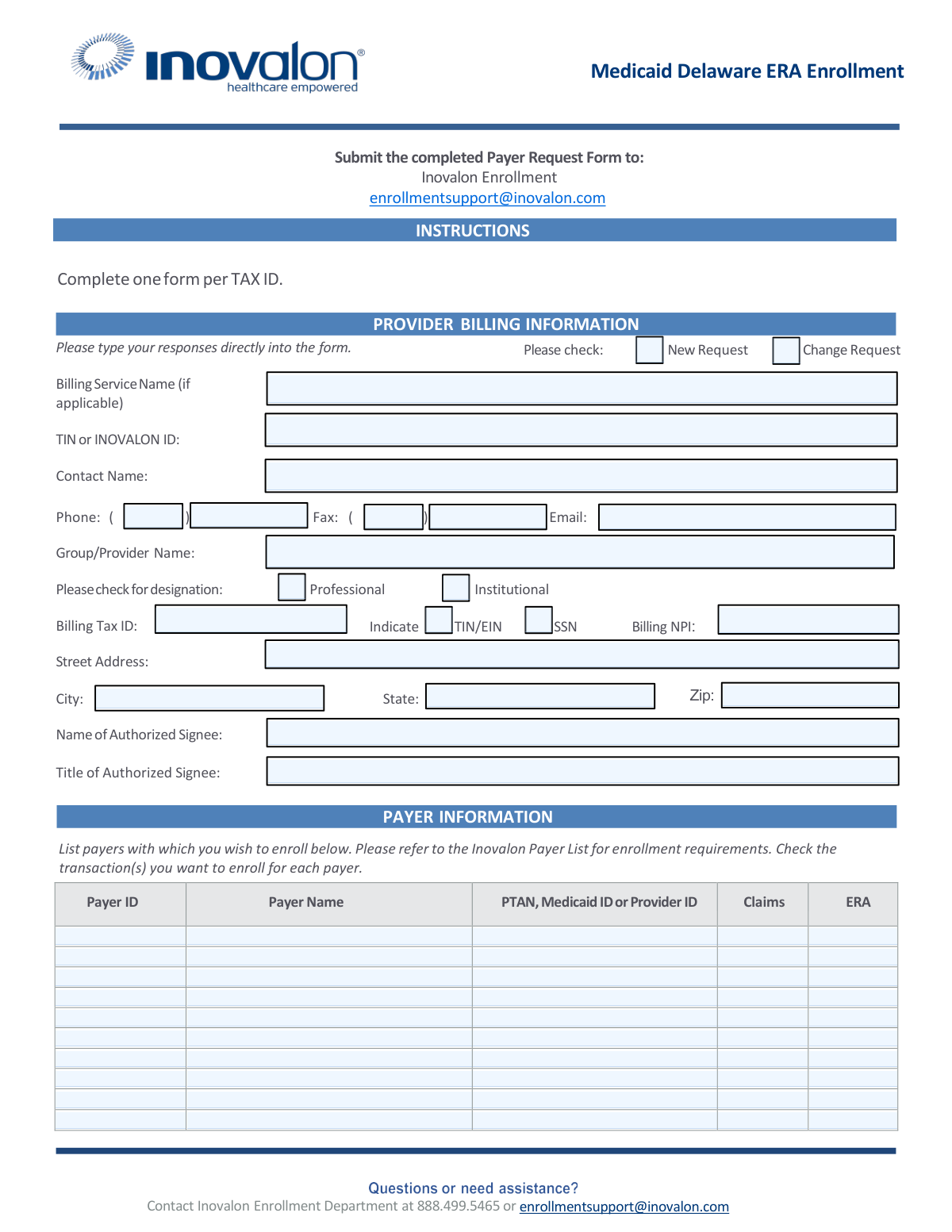
This form is a Payer Request Form for healthcare providers in Delaware to enroll for Electronic Remittance Advice (ERA) with Medicaid. Completing this allows providers to receive payment explanations electronically, which streamlines the billing and reimbursement process. Today, this form can be filled out quickly and accurately using AI-powered services like Instafill.ai, which can also convert non-fillable PDF versions into interactive fillable forms.
Delaware ERA Enrollment is part of the
EDI enrollment forms, enrollment forms and Medicaid forms categories on Instafill.
Our AI automatically handles information lookup, data retrieval, formatting, and form filling.
It takes less than a minute to fill out Delaware ERA Enrollment using our AI form filling.
Securely upload your data. Information is encrypted in transit and deleted immediately after the form is filled out.
Form specifications
| Form name: | Medicaid Delaware ERA Enrollment |
| Number of pages: | 1 |
| Language: | English |
More forms in EDI enrollment forms
Instafill Demo: How to fill out PDF forms in seconds with AI
How to Fill Out Delaware ERA Enrollment Online for Free in 2026
Are you looking to fill out a DELAWARE ERA ENROLLMENT form online quickly and accurately? Instafill.ai offers the #1 AI-powered PDF filling software of 2026, allowing you to complete your DELAWARE ERA ENROLLMENT form in just 37 seconds or less.
Follow these steps to fill out your DELAWARE ERA ENROLLMENT form online using Instafill.ai:
- 1 Navigate to Instafill.ai and upload or select the Medicaid Delaware ERA Enrollment form.
- 2 Provide your provider billing information, including contact name, phone, email, Tax ID (TIN), and Billing NPI.
- 3 Indicate whether you are submitting a new request or a change request for your enrollment.
- 4 Enter the specific payer information for each payer you wish to enroll with, including the Payer ID, Payer Name, and your Provider ID.
- 5 Check the boxes to select the transactions you want to enroll for, such as Claims and ERA.
- 6 Enter the name and title of the authorized individual who can sign on behalf of the provider or group.
- 7 Review all the information populated by the AI for accuracy, then submit the completed form to the Inovalon Enrollment department via email as instructed.
Our AI-powered system ensures each field is filled out correctly, reducing errors and saving you time.
Why Choose Instafill.ai for Your Fillable Delaware ERA Enrollment Form?
Speed
Complete your Delaware ERA Enrollment in as little as 37 seconds.
Up-to-Date
Always use the latest 2026 Delaware ERA Enrollment form version.
Cost-effective
No need to hire expensive lawyers.
Accuracy
Our AI performs 10 compliance checks to ensure your form is error-free.
Security
Your personal information is protected with bank-level encryption.
Frequently Asked Questions About Form Delaware ERA Enrollment
This form is used by healthcare providers to enroll for Electronic Remittance Advice (ERA) with Delaware Medicaid and other specified payers. This allows you to receive payment explanations electronically instead of on paper.
Any professional or institutional healthcare provider who bills payers and wishes to receive electronic remittance advice (ERA) should complete this form. A separate form must be completed for each unique Tax ID.
You should email the completed and signed Payer Request Form to the Inovalon Enrollment Department at [email protected].
You must list each payer you want to enroll with, including their Payer ID, Payer Name, and your specific Provider ID for that payer (e.g., PTAN or Medicaid ID). You also need to check the box for the transaction type you are enrolling in, such as ERA.
The form has space for up to ten payers. If you need to enroll with more, you should make a copy of the form and continue your list on the additional page(s).
You will need your provider billing information, including your Tax ID (TIN/EIN or SSN), Billing NPI, and contact details. You also need a list of payers you wish to enroll with, along with their Payer IDs and your provider identification numbers for each.
You must log in to the Delaware Medical Assistance Provider Portal, navigate to 'Manage Accounts,' select the 'Trading Partner Xref' tab, and enter the Trading Partner ID: 945393154. This step is required to link your account for electronic transactions.
For assistance, you can contact the Inovalon Enrollment Department by phone at 888.499.5465 or by email at [email protected].
You should complete the form using the provider information (group or individual) that is currently on file with the payers you are enrolling with. Ensure the Tax ID and NPI match what the payer has registered for you.
Check 'Change Request' if you are updating existing information, such as your billing address or contact person, or adding/removing payers from your current ERA setup. 'New Request' is for first-time enrollment.
Yes, services like Instafill.ai use AI to accurately auto-fill form fields, which can save you time and help reduce errors. These tools can pull your information from a secure profile to populate the form instantly.
Simply upload the Medicaid Delaware ERA Enrollment form to the Instafill.ai platform. The AI will identify the fields, and you can then fill them out interactively or have the system auto-fill them from your saved profile information.
If your PDF is a flat, non-fillable image, you can use a service like Instafill.ai. It can convert the non-fillable PDF into an interactive, fillable form that you can complete and sign online.
Compliance Delaware ERA Enrollment
Validation Checks by Instafill.ai
1
Ensures Request Type is Selected
Checks that either the 'New Request' or 'Change Request' checkbox is selected, but not both. This is a mandatory choice that dictates the entire workflow for processing the enrollment. Failure to select a single, valid option will result in the form being rejected as the processing path is ambiguous.
2
Validates Billing Tax ID Format and Selection
Verifies that either 'TIN/EIN' or 'SSN' is selected and that the provided 'Billing Tax ID' matches the corresponding 9-digit format. This ID is the primary legal and financial identifier for the provider. An invalid or incorrectly formatted Tax ID will lead to immediate rejection and failed payment processing.
3
Verifies Billing NPI Format
Ensures the 'Billing NPI' is a valid 10-digit number. The National Provider Identifier (NPI) is a standard, unique identifier for health care providers, and an incorrect NPI will cause all electronic transactions to fail. This check prevents submission of a syntactically incorrect NPI.
4
Confirms Provider Designation Selection
Validates that either 'Professional' or 'Institutional' is selected to designate the provider type. This classification is fundamental for billing and claims processing, as different rules apply to each. Submitting without a clear designation makes it impossible to correctly configure the provider's account.
5
Validates Contact Email Address Format
Checks that the value entered in the 'Email' field follows the standard [email protected] format. This is the primary method for the enrollment department to send status updates, requests for additional information, and confirmation notices. An invalid email address will halt communication and delay or prevent enrollment completion.
6
Ensures At Least One Payer is Specified
Verifies that at least one complete payer row is filled out in the 'PAYER INFORMATION' section. The form's instructions explicitly state that enrollments without specified payers will be returned. This check ensures the form has a clear purpose and is not submitted empty.
7
Validates Payer Row Completeness
For any row in the Payer Information table where data has been entered, this check ensures that all associated fields ('Payer ID', 'Payer Name', 'PTAN, Medicaid ID or Provider ID') are also filled. An incomplete payer entry is ambiguous and cannot be processed by the enrollment team. This prevents partial, unusable data from being submitted.
8
Ensures Payer Transaction Selection
For each completed payer row, this validation confirms that at least one of the transaction checkboxes ('Claims' or 'ERA') has been selected. The purpose of the form is to enroll for these specific electronic transactions. A payer entry without a selected transaction is incomplete and serves no purpose.
9
Checks for Completeness of Required Provider Information
This check ensures that all mandatory fields in the 'PROVIDER BILLING INFORMATION' section are filled, including 'Group/Provider Name', 'Contact Name', and the full billing address ('Street Address', 'City', 'State', 'Zip'). Missing information prevents the creation of a complete and accurate provider profile and will cause the form to be returned.
10
Validates Authorized Signee Information
Verifies that both the 'Name of Authorized Signee' and 'Title of Authorized Signee' fields are completed. This information is legally required to confirm that the request is submitted by an individual with the authority to act on behalf of the provider or organization. Missing signee information invalidates the request and will lead to rejection.
11
Validates US Phone Number Format
This check ensures the 'Phone' number is entered in a valid 10-digit US format, such as (XXX) XXX-XXXX or XXX-XXX-XXXX. A valid phone number is critical for the enrollment department to contact the provider for urgent questions or to resolve issues quickly. An incorrectly formatted number can cause significant delays if direct communication is needed.
12
Validates Zip Code Format
Ensures the 'Zip' code is a valid 5-digit or 9-digit (ZIP+4) numeric format. An accurate ZIP code is essential for verifying the provider's location and ensuring any physical mail is delivered correctly. Incorrect ZIP codes can lead to failed address validation and returned mail.
13
Ensures Primary Identifier is Provided
Validates that the 'TIN or INOVALON ID' field at the top of the form is completed. This appears to be a primary identifier for Inovalon's internal tracking system, separate from the billing tax ID. A missing value could prevent the form from being logged and processed correctly.
Common Mistakes in Completing Delaware ERA Enrollment
The form instructions explicitly state to complete one form per Tax ID. Providers or billing services managing multiple entities may attempt to consolidate them onto a single form to save time, but this violates the core requirement. This will lead to immediate rejection of the form, as the entire enrollment process is tied to a single Tax ID. To avoid this, a separate form must be meticulously completed for each unique Tax ID number requiring ERA enrollment.
The 'Group/Provider Name' entered must exactly match the name on file with the payer. This mistake often occurs when using a DBA ('doing business as') name, a slightly different legal name, or including/excluding 'Inc.' or 'LLC' incorrectly. A mismatch will cause the payer's system to fail to find the provider's account, halting the enrollment process. Always verify the exact name registered with the payer before filling out the form.
In the 'Payer Information' section, the form requires a 'PTAN, Medicaid ID or Provider ID' for each payer. Applicants often get confused and enter the wrong type of ID (e.g., NPI instead of the required Medicaid ID) or leave it blank. Without this specific identifier, the payer cannot link the ERA request to the correct provider account, resulting in enrollment failure for that payer. Refer to the Inovalon Payer List or contact the payer directly to confirm the correct ID to use.
For each payer listed, the applicant must check the 'Claims' and/or 'ERA' box to specify which transactions to enroll for. Since this is an 'ERA Enrollment' form, forgetting to check the 'ERA' box defeats the form's purpose and will cause it to be returned. This simple oversight happens when filers are rushing through the table. Double-check that at least the 'ERA' box is checked for every payer you intend to enroll with.
The form includes a critical, separate instruction to log into the Delaware Medical Assistance Provider Portal and add Trading Partner ID 945393154. Many applicants focus only on filling out and submitting the PDF, completely missing this external step. Failure to add the trading partner in the portal will prevent the electronic data connection from being established, meaning no ERAs will be received even if the form is processed correctly. Complete this online step immediately before or after submitting the form.
Next to the 'Billing Tax ID' field are checkboxes for 'TIN/EIN' and 'SSN'. Filers may enter the correct number but forget to check the corresponding box, or they may check the wrong one (e.g., checking SSN for a corporate EIN). This ambiguity or error forces manual verification and can delay processing. Always ensure you check the box that correctly classifies the Tax ID number you have provided.
The instructions clearly state, 'Please type your responses directly into the form.' Some users may print the form and fill it out by hand, leading to illegible entries that cause data entry errors and processing delays. If the original PDF is not fillable, it can be a source of frustration. To avoid this, use tools that can make a PDF fillable, such as Instafill.ai, which can convert flat PDFs into interactive forms and help ensure all data is typed and clear.
The 'Name of Authorized Signee' and 'Title' fields must be completed by an individual with the legal authority to enter into agreements on behalf of the provider entity. Often, an office manager or billing clerk without this authority signs the form, which can invalidate the entire application if audited. Ensure the person signing is listed as an authorized representative in the company's legal or provider enrollment documents.
The form explicitly warns that if no payers are specified, the form will be returned. Applicants sometimes complete the 'Provider Billing Information' at the top and, in their haste, forget to fill out the 'Payer Information' table at the bottom. This renders the submission useless, as the processing agent has no information on which enrollments to perform. Always complete the Payer Information section with at least one payer.
The form requires checking a box for 'Professional' or 'Institutional' designation. This choice dictates how claims and remittances are processed and must align with the provider's enrollment type with the payer. An incorrect selection can lead to enrollment in the wrong system, causing payment and reconciliation problems down the line. Verify the correct designation for the provider's NPI and Tax ID before making a selection.
Saved over 80 hours a year
“I was never sure if my IRS forms like W-9 were filled correctly. Now, I can complete the forms accurately without any external help.”
Kevin Martin Green
Your data stays secure with advanced protection from Instafill and our subprocessors




Robust compliance program
Transparent business model
You’re not the product. You always know where your data is and what it is processed for.
ISO 27001, HIPAA, and GDPR
Our subprocesses adhere to multiple compliance standards, including but not limited to ISO 27001, HIPAA, and GDPR.
Security & privacy by design
We consider security and privacy from the initial design phase of any new service or functionality. It’s not an afterthought, it’s built-in, including support for two-factor authentication (2FA) to further protect your account.
Fill out Delaware ERA Enrollment with Instafill.ai
Worried about filling PDFs wrong? Instafill securely fills medicaid-delaware-era-enrollment forms, ensuring each field is accurate.
