Yes! You can use AI to fill out Mileage Reimbursement Request for FMS

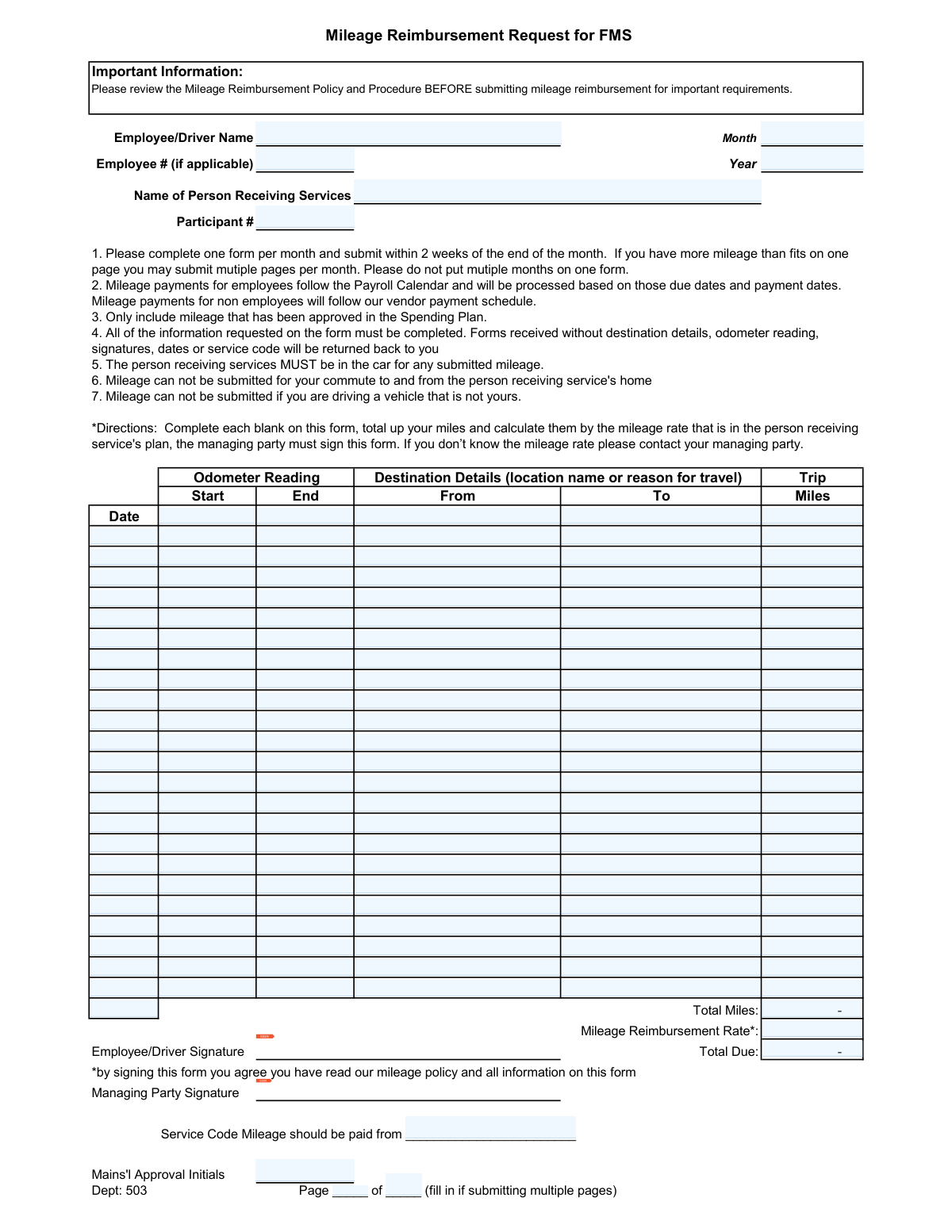
This form is a detailed log for employees and drivers to request reimbursement for mileage accumulated while transporting a person receiving services. It requires meticulous tracking of each trip, including dates, odometer readings, destinations, and total miles, to ensure proper payment according to the approved spending plan. Today, this form can be filled out quickly and accurately using AI-powered services like Instafill.ai, which can also convert non-fillable PDF versions into interactive fillable forms.
Our AI automatically handles information lookup, data retrieval, formatting, and form filling.
It takes less than a minute to fill out FMS Mileage Reimbursement Request using our AI form filling.
Securely upload your data. Information is encrypted in transit and deleted immediately after the form is filled out.

Form specifications

Form name: Mileage Reimbursement Request for FMS
Number of pages: 1
Language: English
main-image

Instafill Demo: How to fill out PDF forms in seconds with AI

How to Fill Out FMS Mileage Reimbursement Request Online for Free in 2026

Are you looking to fill out a FMS MILEAGE REIMBURSEMENT REQUEST form online quickly and accurately? Instafill.ai offers the #1 AI-powered PDF filling software of 2026, allowing you to complete your FMS MILEAGE REIMBURSEMENT REQUEST form in just 37 seconds or less.
Follow these steps to fill out your FMS MILEAGE REIMBURSEMENT REQUEST form online using Instafill.ai:
  1. 1 Navigate to Instafill.ai and upload or select the Mileage Reimbursement Request form.
  2. 2 Use the AI assistant to automatically fill in your name, employee number (if applicable), the month and year, and the name and participant number of the person receiving services.
  3. 3 For each trip taken during the month, enter the date, start and end odometer readings, destination details (from/to), and the total miles for the trip.
  4. 4 After logging all trips, provide the total miles for the month. The AI can help calculate this sum automatically from the individual trip entries.
  5. 5 Enter the specified mileage reimbursement rate and the service code. The system can then calculate the total amount due.
  6. 6 Review all the information for accuracy, then add your electronic signature and request the managing party's signature.
  7. 7 Download, print, or submit the completed and signed reimbursement form as required.

Our AI-powered system ensures each field is filled out correctly, reducing errors and saving you time.

Why Choose Instafill.ai for Your Fillable FMS Mileage Reimbursement Request Form?

Speed

Complete your FMS Mileage Reimbursement Request in as little as 37 seconds.

Up-to-Date

Always use the latest 2026 FMS Mileage Reimbursement Request form version.

Cost-effective

No need to hire expensive lawyers.

Accuracy

Our AI performs 10 compliance checks to ensure your form is error-free.

Security

Your personal information is protected with bank-level encryption.

Frequently Asked Questions About Form FMS Mileage Reimbursement Request

This form is used to request reimbursement for mileage expenses incurred while transporting a person receiving services for approved travel under the FMS program.

Any employee or driver who uses their personal vehicle to transport a person receiving services and wishes to be reimbursed for the mileage.

You must submit the form for a given month within two weeks of that month's end. A separate form is required for each month.

No, mileage for your commute to and from the home of the person receiving services is not eligible for reimbursement.

For each trip, you must record the date, start and end odometer readings, the 'From' and 'To' destinations, and the total miles driven.

Forms that are missing required information, such as destination details, odometer readings, signatures, dates, or the service code, will be returned to you for completion.

Yes, the policy requires that the person receiving services must be in the car for any mileage you submit for reimbursement.

The reimbursement rate is located in the person's service plan. If you do not know the rate, you must contact the managing party.

If you have more trips than fit on a single page, you can submit multiple pages for the same month. Be sure to fill in the 'Page __ of __' section on each page.

Mileage payments for employees follow the standard Payroll Calendar. Payments for non-employees follow the vendor payment schedule.

No, the form states that you cannot submit mileage for reimbursement if you are driving a vehicle that is not yours.

Yes, services like Instafill.ai use AI to help you accurately auto-fill form fields with your saved information, which saves time and helps prevent errors.

You can use a service like Instafill.ai to upload the PDF. The platform will make the fields fillable online, allowing you to type your information, perform calculations, and sign electronically.

If you have a non-fillable PDF, you can upload it to a service like Instafill.ai. It can convert the flat PDF into an interactive, fillable form that you can easily complete on your device.

Compliance FMS Mileage Reimbursement Request
Validation Checks by Instafill.ai

1
Trip Date within Reimbursement Period
This check verifies that the date entered for each trip falls within the single calendar month and year specified in the form's header. This is crucial for enforcing the 'one form per month' policy and ensuring accurate financial reporting for the correct period. If a trip date is outside the specified month, the form will be rejected for correction to prevent cross-period billing.
2
Odometer Reading Logical Consistency
For each trip row, this validation ensures the 'Odometer End' value is strictly greater than the 'Odometer Start' value. This is a fundamental logic check to confirm that the vehicle moved forward and the mileage is positive. An invalid entry, such as a start reading higher than the end, indicates a data entry error and will prevent submission until corrected.
3
Trip Miles Calculation Accuracy
This check automatically calculates the difference between the 'Odometer End' and 'Odometer Start' readings and compares it to the user-entered 'Miles' value for that trip. This validation confirms the mathematical accuracy of each line item, preventing manual calculation errors and potential fraud. A mismatch will flag the row, requiring the user to correct either the odometer readings or the miles.
4
Total Miles Summation Verification
This validation ensures that the 'Total Miles' field is the correct sum of all individual 'Miles' values from every trip row on the form. It serves as a final check on the aggregated mileage, preventing clerical errors in addition that could lead to incorrect payment. If the sum does not match the total, the form will be flagged for recalculation.
5
Total Due Calculation Verification
This check validates that the 'Total Due' amount is the correct product of the 'Total Miles' and the 'Mileage Reimbursement Rate'. This is a critical financial control to ensure the final reimbursement amount is calculated accurately based on the approved rate and total distance. If the calculation is incorrect, the form will be returned to prevent over or underpayment.
6
Required Header Fields Completion
This check confirms that essential identifying information, including 'Employee/Driver Name', 'Name of Person Receiving Services', 'Month', and 'Year', are all filled out. These fields are mandatory for processing, routing, and archiving the reimbursement request correctly. An incomplete header will result in the form being immediately rejected.
7
Required Footer Fields Completion
This validation ensures that all mandatory fields in the footer section, specifically 'Mileage Reimbursement Rate', 'Service Code', 'Employee/Driver Signature', and 'Managing Party Signature', are present. These fields are required for authorization, payment calculation, and proper fund allocation. Missing any of these fields will halt the approval process and require the user to complete the form.
8
Trip Row Integrity
This check ensures that if any single field within a trip row is filled out, all other fields in that same row (Date, Odometer Start/End, Miles, From, To) must also be complete. This prevents partial or ambiguous trip entries that cannot be processed. The system will flag incomplete rows and require the user to either finish the entry or clear the row entirely.
9
Odometer Sequence Chronology
This validation compares the 'Odometer Start' of a trip with the 'Odometer End' of the chronologically preceding trip. The start reading of a new trip should not be less than the end reading of the previous one, as this would imply the vehicle's mileage went backward. This helps detect data entry errors, out-of-order entries, or potential fraudulent claims.
10
Pagination Logic Validation
This check validates the 'Page __ of __' fields. If the 'Total Pages' value is greater than 1, it ensures the 'Page Number' field is also filled and that its value is less than or equal to the 'Total Pages' value. This is important for ensuring all pages of a multi-page submission are accounted for during processing. An error here could lead to lost pages and incomplete claims.
11
Year Format Validation
This check ensures the 'Year' field is a valid four-digit number (e.g., 2024). This prevents ambiguous or incorrect entries like '24' or '202O', which could cause processing and archival errors. If the format is invalid, the user will be prompted to enter a correct four-digit year.
12
Reimbursement Rate Format
This validation confirms that the 'Mileage Reimbursement Rate' is a positive numerical value, formatted correctly as a decimal. It prevents non-numeric entries or negative values that would make the 'Total Due' calculation impossible or incorrect. This ensures that a valid, auditable rate is used for payment.
13
Signature Presence Check
This check verifies that both the 'Employee/Driver Signature' and 'Managing Party Signature' fields are not empty. These signatures signify that the driver attests to the accuracy of the information and that the managing party has approved the expense. Missing signatures indicate a lack of authorization, and the form will be considered incomplete and invalid for payment.
14
Service Code Presence
This validation ensures the 'Service Code' field is filled out. This code is critical for the accounting department to allocate the reimbursement expense to the correct budget or funding source. A missing service code will cause the form to be returned, as the payment cannot be processed without this information.

Common Mistakes in Completing FMS Mileage Reimbursement Request

Mathematical Errors in Totals and Calculations

Manually adding up the 'Total Miles' column and then multiplying by the reimbursement rate to get the 'Total Due' is highly prone to error. A simple mistake in addition or multiplication leads to an incorrect payment amount, requiring the form to be returned for correction and delaying reimbursement. To avoid this, use a calculator and double-check all figures before submission. AI-powered tools like Instafill.ai can prevent this entirely by performing calculations automatically, ensuring accuracy.

Missing or Vague Destination Details

Users often enter vague descriptions like 'appointment' or 'store' in the 'From' and 'To' columns instead of specific location names or addresses. The form instructions explicitly state that forms without sufficient destination details will be returned. This ambiguity prevents proper auditing and leads to processing delays. Always record the full name of the location (e.g., 'Dr. Smith's Office, 123 Main St.' or 'Target Supercenter') to ensure the trip's purpose is clear.

Forgetting Required Signatures or Service Code

It is extremely common for users to submit the form without their own signature, the managing party's signature, or the 'Service Code'. These are not optional fields; they are required for authorization and to allocate the expense to the correct budget. A missing signature or code renders the form incomplete and immediately halts the payment process until the information is obtained. Always perform a final review to ensure all signature and code fields are complete before submitting.

Inconsistent or Missing Odometer Readings

The form requires both start and end odometer readings for every trip, but users often forget to record them in real-time, leading to missing data or illogical entries (e.g., an end reading lower than the start). Since the instructions state forms without odometer readings will be returned, this is a critical error that guarantees a delay. To prevent this, get in the habit of logging the odometer immediately before and after each trip. If the form is a non-fillable PDF, a tool like Instafill.ai can convert it into a fillable version for easier digital record-keeping.

Combining Multiple Months on a Single Form

In an attempt to consolidate paperwork, people often include trips from two different months (e.g., late January and early February) on one form. The instructions explicitly forbid this, as expenses must be processed within their respective monthly periods for accounting purposes. This mistake causes the form to be rejected, forcing the user to separate the trips and resubmit on two different forms, significantly delaying payment for both. Always start a fresh form for each new month.

Claiming Non-Reimbursable Commute Miles

A frequent error is claiming mileage for the initial drive from the employee's home to the service recipient's location, or the final drive home. The policy clearly states this commute is not reimbursable. Including these miles will result in the form being adjusted or rejected, causing payment delays and confusion. To avoid this, your mileage log should only begin after you have arrived for your duties and start transporting the client.

Using an Incorrect or Missing Reimbursement Rate

The mileage rate is specific to the person receiving services and can change. Users may guess the rate, use an old one, or leave the field blank, assuming the processor knows it. This results in an incorrect 'Total Due' calculation and forces the processing department to halt payment while they track down the correct rate. Before completing the form, always confirm the current, approved mileage rate with your managing party.

Submitting Ineligible Trips

The policy has strict rules, such as the person receiving services MUST be in the car and the driver must be using their own vehicle. Users sometimes mistakenly claim mileage for errands run on behalf of the client (but without the client present) or for trips made in a borrowed car. These trips are ineligible and will be struck from the log during review, resulting in a lower-than-expected reimbursement. Carefully review the policy to ensure every trip you log is eligible.

Incorrect Page Numbering for Multi-Page Submissions

When a month's mileage log spans multiple pages, users often forget to fill out the 'Page ___ of ___' fields. This creates uncertainty for the processor, who cannot be sure if they have received the complete submission. A missing page means missing reimbursement, and it requires extra communication to resolve. To ensure your full claim is processed, always complete the pagination fields on every page of your submission.
Saved over 80 hours a year

“I was never sure if my IRS forms like W-9 were filled correctly. Now, I can complete the forms accurately without any external help.”

Kevin Martin Green

Your data stays secure with advanced protection from Instafill and our subprocessors

Robust compliance program

Transparent business model

You’re not the product. You always know where your data is and what it is processed for.

ISO 27001, HIPAA, and GDPR

Our subprocesses adhere to multiple compliance standards, including but not limited to ISO 27001, HIPAA, and GDPR.

Security & privacy by design

We consider security and privacy from the initial design phase of any new service or functionality. It’s not an afterthought, it’s built-in, including support for two-factor authentication (2FA) to further protect your account.

Fill out FMS Mileage Reimbursement Request with Instafill.ai

Worried about filling PDFs wrong? Instafill securely fills mileage-reimbursement-request-for-fms forms, ensuring each field is accurate.