Yes! You can use AI to fill out Montana Healthcare Programs Provider Enrollment Application
This application is for individual healthcare practitioners and organizations to enroll as providers with Montana's public healthcare programs, including Medicaid and the Children’s Health Insurance Program (CHIP). Completing this form is a critical step for providers who wish to offer services to and receive reimbursement for treating eligible members in Montana. Today, this form can be filled out quickly and accurately using AI-powered services like Instafill.ai, which can also convert non-fillable PDF versions into interactive fillable forms.
Montana Provider Enrollment Application is part of the
CAR forms, enrollment application forms, enrollment forms, health care forms, health forms, healthcare enrollment forms, healthcare forms, healthcare provider forms, provider enrollment forms and L.A. Care forms categories on Instafill.
Our AI automatically handles information lookup, data retrieval, formatting, and form filling.
It takes less than a minute to fill out Montana Provider Enrollment Application using our AI form filling.
Securely upload your data. Information is encrypted in transit and deleted immediately after the form is filled out.
Form specifications
| Form name: | Montana Healthcare Programs Provider Enrollment Application |
| Number of pages: | 1 |
| Language: | English |
More forms in CAR forms
Instafill Demo: How to fill out PDF forms in seconds with AI
How to Fill Out Montana Provider Enrollment Application Online for Free in 2026
Are you looking to fill out a MONTANA PROVIDER ENROLLMENT APPLICATION form online quickly and accurately? Instafill.ai offers the #1 AI-powered PDF filling software of 2026, allowing you to complete your MONTANA PROVIDER ENROLLMENT APPLICATION form in just 37 seconds or less.
Follow these steps to fill out your MONTANA PROVIDER ENROLLMENT APPLICATION form online using Instafill.ai:
- 1 Navigate to Instafill.ai and upload or select the Montana Healthcare Programs Provider Enrollment Application.
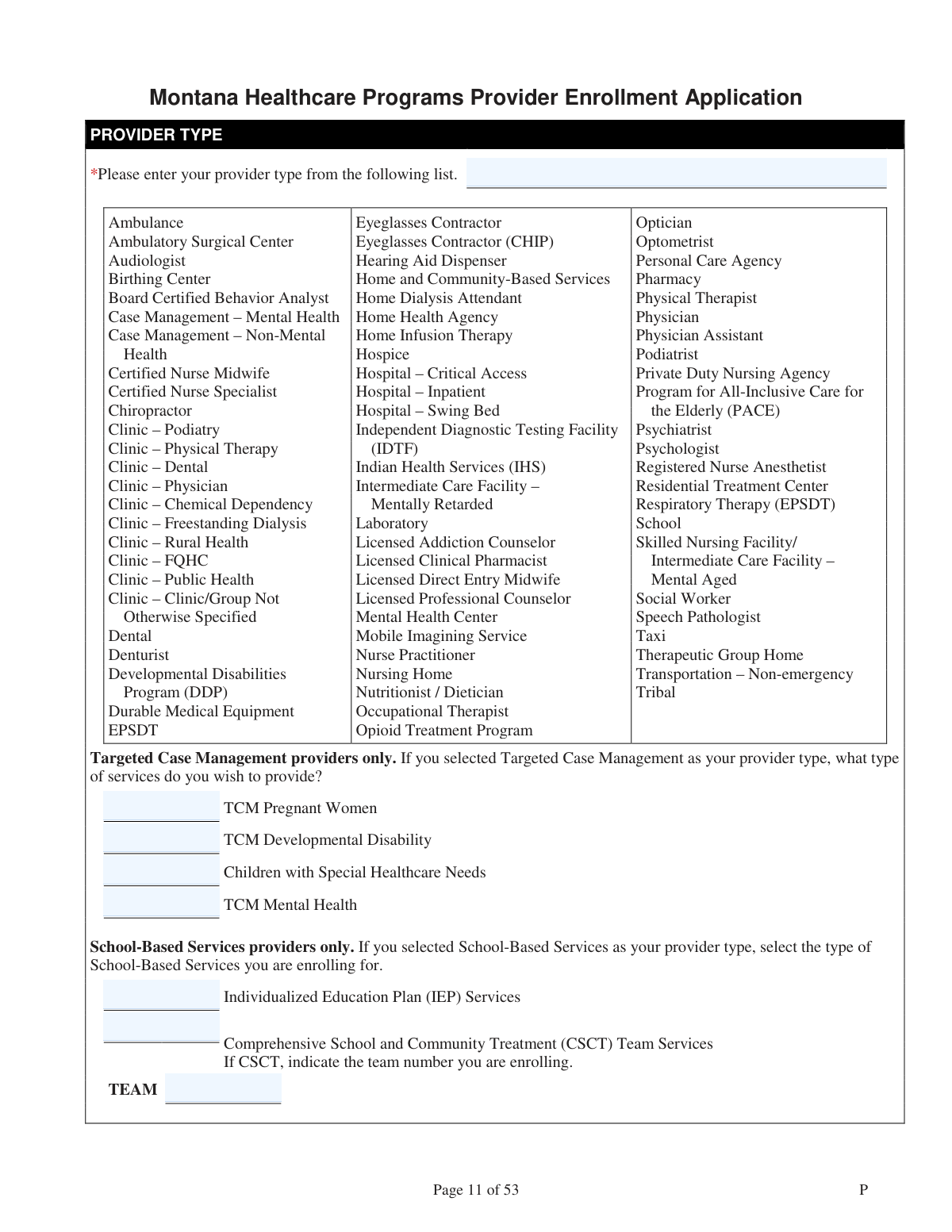
- 2 Specify your provider type, taxonomy codes, and the program you wish to enroll in (Medicaid, CHIP, or both).
- 3 Enter your National Provider Identifier (NPI) and provide identification details for either an individual provider (name, SSN, DOB) or an organization (name, EIN).
- 4 Input your physical practice address, contact information, and details about your professional licenses and board certifications.
- 5 Disclose ownership type, information about owners or controlling individuals, and details of any subsidiary or joint venture businesses.
- 6 Provide information on previous provider numbers, tax IDs, Medicare enrollment status, and select your payment and remittance advice preferences.
- 7 Review all the information you've entered for accuracy, provide contact details for the application, and then submit the completed form as required by the Montana Healthcare Programs.
Our AI-powered system ensures each field is filled out correctly, reducing errors and saving you time.
Why Choose Instafill.ai for Your Fillable Montana Provider Enrollment Application Form?
Speed
Complete your Montana Provider Enrollment Application in as little as 37 seconds.
Up-to-Date
Always use the latest 2026 Montana Provider Enrollment Application form version.
Cost-effective
No need to hire expensive lawyers.
Accuracy
Our AI performs 10 compliance checks to ensure your form is error-free.
Security
Your personal information is protected with bank-level encryption.
Frequently Asked Questions About Form Montana Provider Enrollment Application
This form is used by healthcare providers, both individuals and organizations, to enroll with Montana Healthcare Programs. This allows them to be reimbursed for providing services to members of programs like Medicaid and the Children’s Health Insurance Program (CHIP).
Yes, a 10-digit NPI is required for most healthcare providers. If you are an 'atypical provider' and do not have an NPI, you can indicate this on the form to be assigned a new provider number.
You can choose to enroll in Medicaid only. Dental providers have the additional options to enroll in the Healthy Montana Kids (HMK)/CHIP program only, or in both Medicaid and HMK/CHIP.
If you are a solo practitioner enrolling under your own Social Security Number (SSN), complete the 'Individual Provider Name' section. If you are enrolling as a clinic, group, or corporation with an Employer Identification Number (EIN), complete the 'Organization Name' section.
This section must be completed for each person or entity with a 5% or greater ownership interest, as well as for each managing employee or agent. The form provides detailed definitions to help you identify all required individuals.
Yes, if your practice address is not in Montana, you must specify your desired enrollment period (e.g., 3 months, indefinite). You are also required to provide the expiration date for any out-of-state professional licenses you list.
The primary document is the completed application itself. However, if you answer 'Yes' to certain questions, like being a CMS-designated 'Provider-Based Facility,' you must attach supporting documentation such as your CMS designation letter.
If you have previously billed Montana Medicaid or HMK/CHIP, you must disclose your previous provider number(s) and tax ID(s) in the designated sections. Providing this information is critical for proper re-enrollment.
Payments are issued via weekly Electronic Funds Transfer (EFT). If you have extenuating circumstances that prevent you from using EFT, you must submit a signed letter requesting a waiver to receive paper checks.
You must provide at least one contact email address so the enrollment team can contact you with any questions about your application. Including the email of the person filling out the form is recommended to avoid processing delays.
Yes, services like Instafill.ai use AI to accurately auto-fill form fields with your information. This can save you significant time and help prevent common errors when completing long applications like this one.
You can easily fill out this form online by uploading the PDF to a platform like Instafill.ai. The service makes the document interactive, allowing you to type directly into the fields and save your progress.
If you have a non-fillable or 'flat' PDF, you can use a service like Instafill.ai to convert it into an interactive, fillable form. This allows you to complete the application on your computer without needing to print it.
Taxonomy codes are used to classify your provider type and specialty. You are required to enter up to three codes that accurately represent your practice or services.
Compliance Montana Provider Enrollment Application
Validation Checks by Instafill.ai
1
Provider Type Conditional Logic
Validates that if 'Targeted Case Management' or 'School-Based Services' is selected as the provider type, the corresponding sub-type questions are answered. This ensures complete and accurate categorization of the provider's services. Failure to provide this information will result in an incomplete application and prevent proper routing and service setup.
2
NPI or Atypical Provider Declaration
Ensures that a provider either enters a valid 10-digit National Provider Identifier (NPI) or explicitly checks the 'I am an atypical provider, and I do not have an NPI' box. It prevents submissions where both are provided or neither is provided for a healthcare provider. This is critical for federal and state identification requirements; an invalid submission will be rejected.
3
Mutually Exclusive Program Enrollment for Non-Dental Providers
This check verifies that if the provider type is not 'Dental', 'Denturist', or a dental-related clinic, they cannot select 'Healthy Montana Kids (HMK)/CHIP only' or 'Both Medicaid and HMK/CHIP'. These options are explicitly reserved for dental providers only. Selecting these options incorrectly would lead to enrollment in the wrong program or rejection of the application.
4
Individual vs. Organization Completeness
Validates that either the 'Individual Provider Name' and 'SSN' fields are filled, or the 'Organization Name' and 'EIN' fields are filled, but not both sets as primary identifiers. This check ensures the application clearly defines the enrolling entity as either a person or a business. Ambiguity here can lead to incorrect tax reporting and payment processing.
5
Physical Address PO Box Prohibition
This validation confirms that the string entered in the 'Physical or Practice Address' fields does not contain 'P.O. Box', 'PO Box', or similar variations. A physical location is a regulatory requirement for many provider types for site visits and emergency contact. An application with a P.O. Box as a physical address will be rejected until a valid street address is provided.
6
Out-of-State Enrollment Period Requirement
Checks if the 'State' in the 'Physical or Practice Address' is any state other than Montana ('MT'). If it is, this validation ensures that one of the options under 'Desired Enrollment Period' is selected. This is necessary for managing temporary or out-of-state provider access correctly, and failure to specify the enrollment period will halt the application process.
7
Minimum Email Address Requirement
Verifies that at least one complete email entry (Email Type and Email Address) is provided in the 'Contact Email Addresses' section. The form explicitly states this is a mandatory requirement for communication regarding the application. If no email is provided, the form submission will fail, as the program needs a reliable electronic method to contact the provider.
8
License Sanction Explanation
This check is triggered if the applicant answers 'Yes' to 'Have you had any action or sanction against your license?'. It validates that at least one reason (e.g., Revoked, Suspended) is selected and that if 'Other' is chosen, an explanation is provided in the corresponding text field. This is crucial for credentialing, and an incomplete explanation will delay the application.
9
Board Certification Conditional Requirement
If the applicant answers 'Yes' to 'Are you board certified?', this validation ensures that the certification type, certification date, and certification number fields are all completed. This information is used to verify credentials and specialties. An application claiming certification without providing details will be considered incomplete and returned to the applicant.
10
Tax Reporting Status and Identifier Consistency
This validation ensures that if 'Individual' is selected for 'Tax Reporting Status,' the 'Individual Filing Information' (Last Name, First Name, Social Security Number) is completed. Conversely, if 'Organization' is selected, the 'Business Filing Information' (Organization Name, FEIN/EIN) must be filled. This is critical for aligning payments with IRS records, and a mismatch will lead to payment failures.
11
Ownership Information Completeness
Verifies that at least one person is added to the 'Ownership/Control Information' section as required. It also checks that for each owner listed, all mandatory fields (marked with an asterisk, such as Name, DOB, SSN, Address) are filled out. This disclosure is a federal requirement, and an application lacking this information cannot be processed.
12
CLIA Number Requirement for Lab Services
If the applicant answers 'Yes' to 'Do you bill laboratory services?', this check validates that at least one 'CLIA Number' and its associated 'CLIA Type,' 'Effective Date,' and 'Expiration Date' are provided. A valid, unexpired CLIA certification is legally required to bill for lab services. Submitting an application to bill for lab services without a valid CLIA number will result in the rejection of those billing privileges.
13
Date Range Logical Consistency
This check applies to all date range fields, such as 'License Expiration Date' and 'Specific Dates of Service'. It ensures that the 'End Date' or 'Expiration Date' is not chronologically earlier than the 'Begin Date' or 'Effective Date'. Illogical dates would cause system errors and indicate a data entry mistake that must be corrected before processing.
14
Conditional Explanation for Sanction History
Verifies that if a user answers 'Yes' to having been 'sanctioned, debarred, suspended, excluded, or convicted,' the 'If yes, enter explanation' field is not empty. This disclosure is a critical part of the background check for program integrity. Failure to provide a required explanation for a positive answer will flag the application as incomplete and require manual intervention.
Common Mistakes in Completing Montana Provider Enrollment Application
Applicants often enter a 'doing business as' (DBA) name or a slightly different version of their legal name in the Tax Reporting section. The form requires the name to match IRS records exactly for the specified SSN or EIN to ensure successful payment processing. Any discrepancy can lead to payment rejections and significant delays in enrollment while the information is corrected. To avoid this, double-check the legal name registered with the IRS and enter it precisely; AI-powered tools like Instafill.ai can help by storing and accurately populating this critical information across all forms.
The 'Ownership/Control Information' section is complex and legally dense, causing many applicants to overlook required individuals. People often fail to list all persons with a 5% or greater direct/indirect ownership stake, or forget to include all managing employees as defined by the form. This omission violates federal disclosure requirements and is a common reason for application rejection, requiring a complete and time-consuming refiling. Carefully read the definitions on page 16 and ensure every qualifying individual is listed to prevent this critical error.
The form explicitly states that P.O. boxes are not acceptable for the 'Physical or Practice Address.' Despite this warning, applicants frequently enter a P.O. Box out of habit, as it's their primary mailing address. This will result in an immediate request for correction, delaying the enrollment process, as a verifiable physical location is required for credentialing and site visit purposes. Always provide a valid street address for the practice location to ensure compliance.
Applicants who select specific provider types, such as 'Targeted Case Management' or 'School-Based Services,' often miss the mandatory follow-up questions on the same page. This happens because they focus on the main list and overlook the smaller, indented sections that apply only to their selection. Failure to provide this required detail will render the application incomplete and halt processing. To avoid this, carefully review the entire page after making a selection; if the form is a non-fillable PDF, a tool like Instafill.ai can convert it into an interactive version that can help highlight these conditional fields.
When re-enrolling, providers often forget or neglect to list their previous Montana Medicaid or HMK/CHIP provider numbers. The form highlights this as 'critical' because it's necessary to link the new enrollment to the existing provider history for continuity of claims and data. Omitting this information can lead to the creation of a duplicate, unlinked provider file, causing significant billing disruptions and administrative problems. Always locate and enter all previous provider numbers to ensure a seamless re-enrollment process.
Applicants frequently get confused about whether to fill out the 'Individual Provider Name' section or the 'Organization Name' section. A solo practitioner might incorrectly fill out the organization fields, or an employee of a group might put the group's name in the individual fields. This leads to mismatches between the name, the NPI (Type 1 vs. Type 2), and the tax ID (SSN vs. EIN), causing validation failures and processing delays. Ensure you are filling out the correct section based on whether you are enrolling as an individual practitioner or as a business entity.
The form states, 'You must enter at least one... contact email address,' yet applicants sometimes leave this section blank, assuming other contact info is sufficient. This is a required field, and its omission will make the application incomplete, stopping the review process. An email address is essential for receiving timely updates, questions about the application, and other critical electronic correspondence. Always provide at least one valid email address, preferably for the person completing the form.
Providers may be unsure of their specific Healthcare Provider Taxonomy Codes and either leave the field blank or enter an incorrect one. These codes are crucial for classifying the provider's specialty and are used directly in claims processing and network directories. Submitting the wrong code can lead to claim denials and incorrect provider categorization. Providers should verify their taxonomy codes through the National Plan and Provider Enumeration System (NPPES) or their specialty board before filling out the application.
In the 'Current Professional License Information' section, some applicants may incorrectly answer 'No' to having had any action or sanction against their license, either through oversight or fear of denial. This is a critical attestation, and failing to disclose a sanction is considered a material omission that can lead to immediate application denial and exclusion from the program. It is imperative to answer this question truthfully and provide all required explanations and documentation for any past actions.
The application defaults to Electronic Funds Transfer (EFT) and requires a signed letter explaining extenuating circumstances to request a waiver for paper checks. Applicants often miss this instruction and simply leave the EFT information blank, assuming this will trigger paper check delivery. This will halt the payment setup process entirely, leading to a delay in receiving any reimbursement until the issue is resolved by either providing EFT details or submitting a formal waiver request.
Saved over 80 hours a year
“I was never sure if my IRS forms like W-9 were filled correctly. Now, I can complete the forms accurately without any external help.”
Kevin Martin Green
Your data stays secure with advanced protection from Instafill and our subprocessors




Robust compliance program
Transparent business model
You’re not the product. You always know where your data is and what it is processed for.
ISO 27001, HIPAA, and GDPR
Our subprocesses adhere to multiple compliance standards, including but not limited to ISO 27001, HIPAA, and GDPR.
Security & privacy by design
We consider security and privacy from the initial design phase of any new service or functionality. It’s not an afterthought, it’s built-in, including support for two-factor authentication (2FA) to further protect your account.
Fill out Montana Provider Enrollment Application with Instafill.ai
Worried about filling PDFs wrong? Instafill securely fills montana-healthcare-programs-provider-enrollment-application forms, ensuring each field is accurate.
