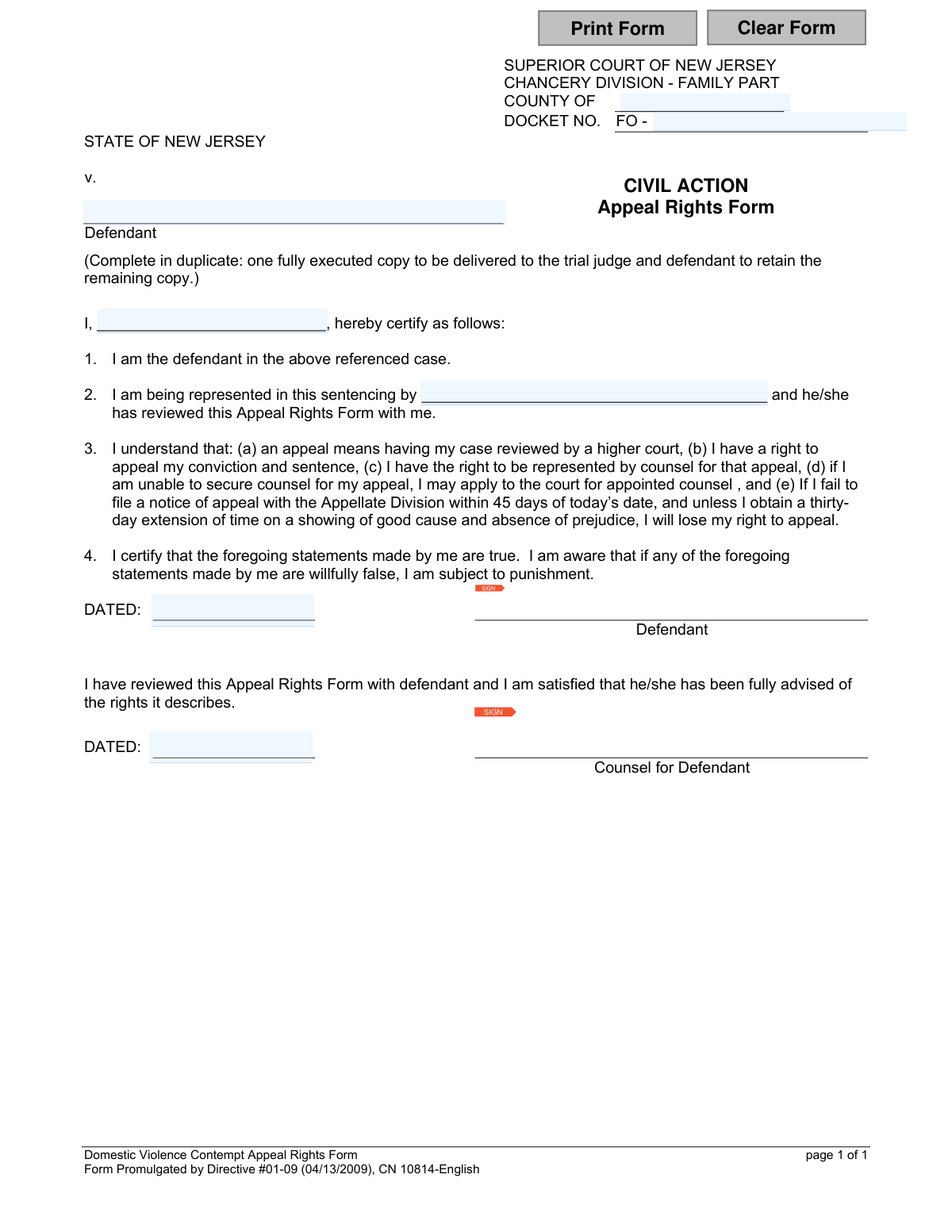
Yes! You can use AI to fill out New Jersey Appeal Rights Form - Domestic Violence Contempt
This form is a legal document used in the Superior Court of New Jersey, Family Part, for defendants in domestic violence contempt cases. It serves as a certification that the defendant has been fully advised of their rights, including the right to appeal their conviction and sentence, the right to legal counsel for the appeal, and the 45-day deadline for filing. Today, this form can be filled out quickly and accurately using AI-powered services like Instafill.ai, which can also convert non-fillable PDF versions into interactive fillable forms.
CN 10814 is part of the
court appeal forms, domestic violence forms and New Jersey forms categories on Instafill.
Our AI automatically handles information lookup, data retrieval, formatting, and form filling.
It takes less than a minute to fill out CN 10814 using our AI form filling.
Securely upload your data. Information is encrypted in transit and deleted immediately after the form is filled out.
Form specifications
| Form name: | New Jersey Appeal Rights Form - Domestic Violence Contempt |
| Number of fields: | 11 |
| Number of pages: | 1 |
| Language: | English |
Instafill Demo: How to fill out PDF forms in seconds with AI
How to Fill Out CN 10814 Online for Free in 2026
Are you looking to fill out a CN 10814 form online quickly and accurately? Instafill.ai offers the #1 AI-powered PDF filling software of 2026, allowing you to complete your CN 10814 form in just 37 seconds or less.
Follow these steps to fill out your CN 10814 form online using Instafill.ai:
- 1 Navigate to Instafill.ai and upload or select the New Jersey Appeal Rights Form (CN 10814).
- 2 Provide your personal details, including your full name as the defendant.
- 3 Enter the specific case information, such as the County and the full Docket Number.
- 4 Input the name of your legal counsel who reviewed the appeal rights with you.
- 5 Carefully read and acknowledge the statements outlining your appeal rights, the process, and the critical 45-day filing deadline.
- 6 Electronically sign and date the form in the defendant's section. Your counsel will also need to sign and date their respective section.
- 7 Review the entire completed form for accuracy, then download, print, or share the executed copies as required by the court.
Our AI-powered system ensures each field is filled out correctly, reducing errors and saving you time.
Why Choose Instafill.ai for Your Fillable CN 10814 Form?
Speed
Complete your CN 10814 in as little as 37 seconds.
Up-to-Date
Always use the latest 2026 CN 10814 form version.
Cost-effective
No need to hire expensive lawyers.
Accuracy
Our AI performs 10 compliance checks to ensure your form is error-free.
Security
Your personal information is protected with bank-level encryption.
Frequently Asked Questions About Form CN 10814
This form's purpose is to officially document that you, the defendant, have been informed of your right to appeal a conviction and sentence in a domestic violence contempt case. It serves as a signed acknowledgment that you understand the appeal process and its deadlines.
The defendant in a domestic violence contempt case must complete and sign this form. It is reviewed and co-signed by the defendant's legal counsel.
You must file a notice of appeal with the Appellate Division within 45 days of your sentencing date. If you miss this deadline, you will lose your right to appeal unless you get a 30-day extension for a valid reason.
The form states that you have the right to be represented by counsel for your appeal. If you are unable to secure a lawyer on your own, you may apply to the court to have counsel appointed for you.
You will need to provide the county, the court docket number (FO-), your full name as the defendant, and the name of the attorney who is representing you.
The form must be completed in duplicate. One fully executed copy is given to the trial judge, and you, the defendant, must retain the other copy for your records.
No, signing this form does not start an appeal. It only certifies that you understand your rights; you must still file a separate 'notice of appeal' with the Appellate Division within the 45-day deadline to begin the process.
An appeal means you are asking a higher court, in this case the Appellate Division, to review the trial court's proceedings and decision for any legal errors. This higher court has the authority to uphold, reverse, or modify the original conviction or sentence.
If you fail to file a notice of appeal within 45 days, you will lose your right to appeal. The form notes you may be able to get a 30-day extension, but only by showing 'good cause and absence of prejudice'.
This is a legal warning that if you willfully provide false information on this form, you can be charged with a crime like perjury. You are certifying under penalty of law that the statements you make are true.
Yes, you can use AI-powered services like Instafill.ai to help you accurately auto-fill your information onto the form. This can help save time and reduce the chance of errors.
To fill this form out online, you can use a service like Instafill.ai. Simply upload the PDF to their platform, and you can type your information directly into the fields before printing for signature.
If you have a non-fillable or 'flat' PDF, you can use a tool like Instafill.ai. It can convert the non-fillable PDF into an interactive, fillable form that you can complete on your computer.
Compliance CN 10814
Validation Checks by Instafill.ai
1
Ensures County Name is Provided
This check verifies that the 'CntyName' field is not empty. The county is a critical piece of information for identifying the specific Superior Court jurisdiction handling the case. A missing county name would make the form legally incomplete and prevent it from being filed correctly, leading to processing delays or rejection.
2
Validates County Name against NJ County List
This check ensures the value entered in the 'CntyName' field matches one of the 21 official counties in New Jersey. This is important for data integrity and routing the document to the correct courthouse. An invalid county name, such as a misspelling or a non-existent county, would cause filing errors and require manual correction.
3
Ensures Docket Number is Provided
This validation confirms that the 'DocketNum' field is filled out. The docket number is the unique identifier for a legal case, and its absence would make it impossible to associate the appeal rights form with the correct case file. The form would be considered invalid and rejected until the docket number is supplied.
4
Validates Docket Number Format
This check verifies that the 'DocketNum' field follows the court-mandated format, which appears to be the 'FO' prefix followed by a specific sequence of numbers or characters. Correct formatting is essential for the court's electronic and manual filing systems to recognize and process the document. An incorrectly formatted docket number can lead to misfiling or the inability to locate the case record.
5
Ensures Defendant's Name is Complete
This check ensures the 'DefName' field, representing the defendant's full name, is not empty. The defendant is the subject of the legal proceeding and the individual whose rights are being documented. A missing name makes the form ambiguous and legally insufficient, as it fails to identify who is certifying their understanding of their appeal rights.
6
Ensures Counsel's Name is Provided
This validation verifies that the 'RepName' field, for the name of the defendant's legal counsel, is filled in. The form includes a certification from the counsel stating they have reviewed the rights with the defendant. A missing counsel name invalidates this crucial part of the certification process and may call into question whether the defendant was properly advised.
7
Verifies Defendant's Signature is Present
This check confirms that the 'Sig' field contains a signature from the defendant. The defendant's signature is the legal attestation that they have read, understood, and acknowledged their appeal rights as described in the form. An unsigned form has no legal weight and fails to prove the defendant was properly informed, which could be grounds for a future appeal.
8
Verifies Counsel's Signature is Present
This check confirms that the 'Sig2' field contains a signature from the defendant's counsel. The counsel's signature corroborates that they have fulfilled their duty to review the appeal rights with their client. The absence of this signature undermines the integrity of the process and could indicate a procedural failure.
9
Validates Defendant's Signature Date Format
This check ensures the 'SigDt' field contains a date in a valid, standard format (e.g., MM/DD/YYYY). A properly formatted date is crucial for accurately calculating the 45-day appeal deadline mentioned in the form. An invalid format could lead to ambiguity or errors in determining when the appeal window closes.
10
Validates Counsel's Signature Date Format
This check ensures the 'Sig2Dt' field contains a date in a valid, standard format (e.g., MM/DD/YYYY). Data consistency is important for legal documents, and ensuring the counsel's signature date is properly formatted prevents data entry errors. This date supports the timeline of when the defendant was officially advised of their rights.
11
Ensures Signature Dates are Logically Consistent
This validation compares the defendant's signature date ('SigDt') with the counsel's signature date ('Sig2Dt') to ensure they are identical. The form signing is typically a single event where both parties are present. Discrepancies between the dates could indicate a procedural irregularity that may need to be reviewed or corrected.
12
Verifies Signature Dates are Not in the Future
This check ensures that both 'SigDt' and 'Sig2Dt' are not future dates. A future date is a logical impossibility and a clear indicator of a data entry error. Submitting a form with a future date would invalidate the document and require immediate correction, as the date of signature is a statement of fact about a past event.
13
Ensures Consistency of Defendant's Name
This check compares the defendant's name in the case caption ('DefName') with the name entered in the certification body ('I, [name], hereby certify...'). The names should match to ensure the person identified in the case is the same person signing the certification. A mismatch could indicate a significant clerical error or that the wrong person is signing the form.
Common Mistakes in Completing CN 10814
The form pre-fills the docket number with 'FO -', but filers often omit this prefix or transcribe the rest of the number incorrectly from other court documents. An incorrect docket number can lead to significant delays, misfiling of the appeal notice, or outright rejection by the court clerk. To avoid this, carefully copy the entire docket number, including the 'FO' prefix, from the official judgment of conviction.
The 'COUNTY OF' field is located at the top of the form and is frequently overlooked, especially when someone is rushing. Leaving this field blank renders the form incomplete and can cause it to be returned, delaying the filing process. Always ensure the county where the case was heard is clearly printed in the designated space before signing.
The defendant's name is required in two places: in the case caption and in the certification line ('I, [Defendant Name]...'). A common error is using a nickname or abbreviation in one spot and a full legal name in the other, or having a typo in one of the entries. This inconsistency can create legal ambiguity, so it's crucial to use the full, official name as it appears on court records in both locations.
Critical information like names, dates, and docket numbers written illegibly can cause court staff to make data entry errors, leading to filing mistakes and delays. Since this form is often provided as a non-fillable PDF, poor penmanship is a frequent issue. To prevent this, print all information in clear, block letters or use a tool like Instafill.ai, which can convert flat PDFs into electronically fillable forms to ensure perfect legibility.
This form contains two separate date fields, one for the defendant and one for the counsel, which are often filled incorrectly, with the wrong format, or left blank. The defendant's signature date is critically important as it marks the start of the 45-day window to file an appeal. An incorrect or missing date can create ambiguity about the appeal deadline, potentially jeopardizing the right to appeal.
The form has two distinct signature blocks: one for the defendant and another for the 'Counsel for Defendant'. In a stressful or hurried situation, the defendant may accidentally sign on the attorney's line, or vice versa. This simple mistake invalidates the certifications on the form and requires it to be filled out and signed all over again, wasting valuable time.
The most severe mistake is not a data entry error but a failure of comprehension, where the defendant signs the form without fully understanding its implication. Signing this form acknowledges that the 45-day countdown for filing an appeal has officially begun. Missing this deadline, even by one day, typically results in the permanent loss of the right to appeal the conviction or sentence.
The form explicitly instructs the user to 'Complete in duplicate' and for the defendant to retain a copy, but this step is often forgotten. Failing to keep a fully executed copy leaves the defendant without a personal record of their acknowledged rights and, most importantly, the date the appeal clock started. Always make a physical or digital copy of the signed form before it is submitted to the court.
In paragraph 2, the defendant must certify who is representing them and that this form was reviewed with them. Defendants may forget their attorney's full legal name, misspell it, or leave the field blank entirely. This creates an incomplete record and can raise questions about whether the defendant was properly advised of their rights, potentially complicating the case file.
When filling out a PDF version of the form, people sometimes type their name on the signature line instead of providing a valid signature. Unless a court has a specific electronic filing system that allows for digital signatures, a typed name is not a legal signature and will lead to the form's rejection. To avoid this, the form should be printed and physically signed with a pen, a process that can be streamlined by using form-filling tools like Instafill.ai to populate the data before printing.
Saved over 80 hours a year
“I was never sure if my IRS forms like W-9 were filled correctly. Now, I can complete the forms accurately without any external help.”
Kevin Martin Green
Your data stays secure with advanced protection from Instafill and our subprocessors

Robust compliance program
Transparent business model
You’re not the product. You always know where your data is and what it is processed for.
ISO 27001, HIPAA, and GDPR
Our subprocesses adhere to multiple compliance standards, including but not limited to ISO 27001, HIPAA, and GDPR.
Security & privacy by design
We consider security and privacy from the initial design phase of any new service or functionality. It’s not an afterthought, it’s built-in, including support for two-factor authentication (2FA) to further protect your account.
Fill out CN 10814 with Instafill.ai
Worried about filling PDFs wrong? Instafill securely fills new-jersey-appeal-rights-form-domestic-violence-contempt forms, ensuring each field is accurate.