Yes! You can use AI to fill out Provider Participation Enrollment Form - DHHS
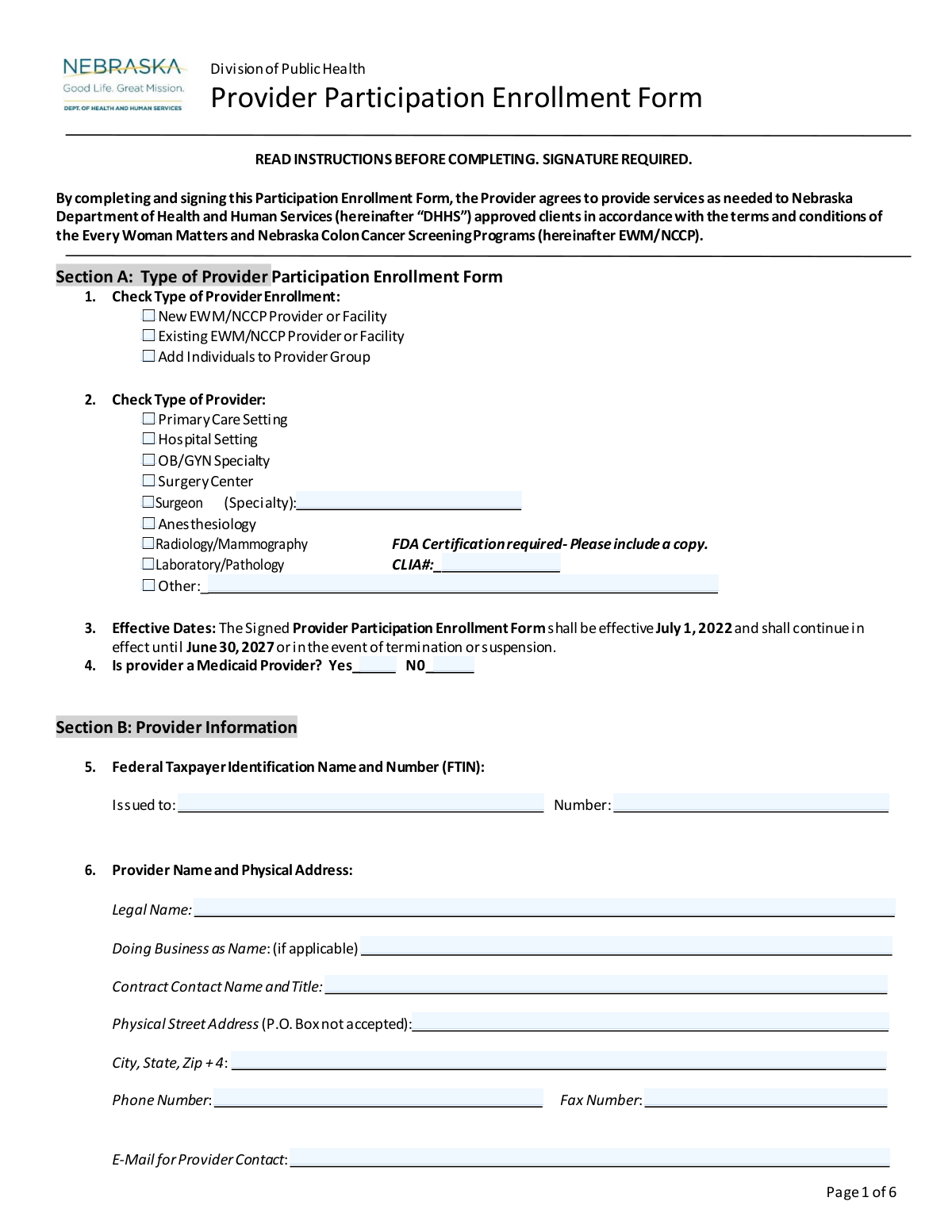
This is the Provider Participation Enrollment Form for the Nebraska Department of Health and Human Services (DHHS). It allows healthcare providers and facilities to register to provide services to clients approved by the Every Woman Matters and Nebraska Colon Cancer Screening Programs. Completing this form is essential for providers to become part of the state's network and receive payment for authorized services. Today, this form can be filled out quickly and accurately using AI-powered services like Instafill.ai, which can also convert non-fillable PDF versions into interactive fillable forms.
DHHS Provider Enrollment Form is part of the
enrollment forms and provider enrollment forms categories on Instafill.
Our AI automatically handles information lookup, data retrieval, formatting, and form filling.
It takes less than a minute to fill out DHHS Provider Enrollment Form using our AI form filling.
Securely upload your data. Information is encrypted in transit and deleted immediately after the form is filled out.
Form specifications
| Form name: | Provider Participation Enrollment Form - DHHS |
| Number of pages: | 1 |
| Language: | English |
More forms in Enrollment forms
Instafill Demo: How to fill out PDF forms in seconds with AI
How to Fill Out DHHS Provider Enrollment Form Online for Free in 2026
Are you looking to fill out a DHHS PROVIDER ENROLLMENT FORM form online quickly and accurately? Instafill.ai offers the #1 AI-powered PDF filling software of 2026, allowing you to complete your DHHS PROVIDER ENROLLMENT FORM form in just 37 seconds or less.
Follow these steps to fill out your DHHS PROVIDER ENROLLMENT FORM form online using Instafill.ai:
- 1 Navigate to Instafill.ai and upload the DHHS Provider Participation Enrollment Form or select it from the template library.
- 2 Use the AI assistant to complete Section A (Type of Enrollment) and Section B (Provider Information), including your legal name, address, and Federal Taxpayer Identification Number (FTIN).
- 3 Fill in Section C with your billing information, noting that a completed Form W-9 is also required.
- 4 Provide details about your scope of services, primary contacts, and language translation capabilities in Section D.
- 5 If applicable, list all affiliated/satellite locations in Section E and individual professionals within your group in Section F.
- 6 Carefully review all entered information for accuracy, then proceed to the signature section to read the terms and provide your authorized signature.
- 7 Download the completed and signed form for your records and submit it to the Nebraska DHHS as instructed.
Our AI-powered system ensures each field is filled out correctly, reducing errors and saving you time.
Why Choose Instafill.ai for Your Fillable DHHS Provider Enrollment Form Form?
Speed
Complete your DHHS Provider Enrollment Form in as little as 37 seconds.
Up-to-Date
Always use the latest 2026 DHHS Provider Enrollment Form form version.
Cost-effective
No need to hire expensive lawyers.
Accuracy
Our AI performs 10 compliance checks to ensure your form is error-free.
Security
Your personal information is protected with bank-level encryption.
Frequently Asked Questions About Form DHHS Provider Enrollment Form
This form is used by healthcare providers and facilities to enroll in the Nebraska Department of Health and Human Services (DHHS) Every Woman Matters (EWM) and Nebraska Colon Cancer Screening Programs (NCCP).
Any healthcare provider, group practice, or facility, such as a hospital or specialty clinic, that wants to provide services to clients approved by the EWM/NCCP programs must complete this form to participate.
You must return a completed Form W-9 with your signed enrollment form. Additionally, radiology and mammography providers must include a copy of their FDA certification, and laboratories must provide their CLIA number.
Select "New" if you are enrolling for the first time, "Existing" if you are updating information for a provider already in the program, or "Add Individuals" if you are an existing group adding new professionals.
Use Section E, "Affiliated/Satellite Locations," to list all other sites operating under the same Federal Taxpayer Identification Number (FTIN). If you need more space, you can attach additional pages with the required information for each site.
Yes, in Section F, you must provide the name, specialty, credentials, and license number for each individual professional who is part of the group and will be providing services under this agreement.
No, the form specifies in Section B that a P.O. Box is not accepted for the physical street address. You must provide the physical location of your facility.
You can specify a different billing contact and address in Section C, "Billing Information." Use questions 9 and 10 to provide the correct "Pay to" name, address, and contact for billing inquiries.
The agreement becomes effective on July 1, 2022, and remains in effect until June 30, 2027, unless it is terminated or suspended by either the provider or DHHS.
The form must be signed by the provider or an authorized official of the facility. The signature certifies that you understand the terms and that all information provided is accurate and complete.
The form does not list a submission address, so you should return it to the DHHS office or contact person who provided it to you. Be sure to retain a copy for your records as instructed on the form.
Yes, you can use services like Instafill.ai, which leverage AI to accurately auto-fill form fields from your saved information, saving time and helping to prevent errors.
To fill this form out online, you can use a service like Instafill.ai. Simply upload the PDF to their platform to type your information, check boxes, and add your digital signature before downloading.
If you have a non-fillable or 'flat' PDF, tools like Instafill.ai can convert it into an interactive, fillable form. This allows you to complete and sign it digitally without having to print it.
Compliance DHHS Provider Enrollment Form
Validation Checks by Instafill.ai
1
Validates Federal Taxpayer Identification Number (FTIN) Format
This check ensures the Federal Taxpayer Identification Number in Section B is entered in the correct 9-digit format, typically XX-XXXXXXX. This is critical for accurate tax reporting and payment processing by DHHS. An invalid format will prevent the provider from being correctly identified in financial systems, leading to submission rejection.
2
Ensures CLIA Number is Provided for Laboratories
This validation confirms that if 'Laboratory/Pathology' is selected as the provider type in Section A, the corresponding CLIA# field is not empty. The Clinical Laboratory Improvement Amendments (CLIA) number is a federal requirement for all facilities performing laboratory testing on human specimens. Failure to provide a required CLIA number will result in the form being rejected as the provider cannot be verified for compliance.
3
Verifies Physical Address and Prohibits P.O. Boxes
This check validates that the 'Physical Street Address' field in Section B is complete and does not contain 'P.O. Box' or similar variations. A physical location is required for site verification, credentialing, and emergency contact purposes. Submissions with a P.O. Box will be flagged for correction, as it does not meet the requirement for a physical service location.
4
Validates National Provider Identifier (NPI) Structure
This check ensures that any National Provider Identifier (NPI) number entered in Section E is exactly 10 digits and conforms to the standard format. The NPI is a unique identifier for health care providers used in standard transactions like health care claims. An invalid NPI will cause claim rejections and prevent proper tracking of services, so the form cannot be processed until it is corrected.
5
Checks for Logical Consistency Between Services Performed and Services Referred
This validation compares the checkboxes in Section D, Question 12 ('Services Performed') and Question 13 ('Will Accept Referrals'). It ensures that any service selected for referral acceptance is also selected as a service performed at the facility. A provider cannot accept referrals for a service they are not equipped to perform, and a mismatch indicates a logical error that must be corrected.
6
Conditional Requirement for 'Other' Text Fields
This rule checks that if an 'Other' checkbox is selected in fields like 'Type of Provider' (Section A) or 'Translation Services' (Section D), the adjacent text field for specification is not left blank. This information is necessary to properly categorize the provider or their services. An empty specification field makes the 'Other' selection meaningless and will require the user to provide the missing detail.
7
Ensures Individual Professionals are Listed for Group Additions
This validation is triggered if 'Add Individuals to Provider Group' is checked in Section A. It ensures that at least one professional's information is completed in Section F. If the form indicates individuals are being added, but none are listed, the submission is incomplete and cannot be processed.
8
Validates Signature Date
This check confirms that the date entered next to the provider's signature is a valid date and is not in the future. The signature date legally marks when the provider agreed to the terms. An invalid or future date would render the agreement's timing ambiguous and legally questionable, thus invalidating the submission.
9
Verifies Completeness of Individual Professional Details
For each individual professional listed in Section F, this check ensures that the Name, Primary Specialty, and License/Certification Number fields are all filled out. This complete information is essential for credentialing and verifying each practitioner within the group. Incomplete entries for any professional will halt the processing of the form until all required data is supplied.
10
Validates Email and Phone Number Formats
This check scans all email and phone number fields throughout the form to ensure they match standard formats (e.g., '[email protected]' for email, 10 digits for phone). Correct contact information is vital for all communications, from billing inquiries to clinical concerns. Incorrectly formatted data will be rejected to prevent communication failures.
11
Conditional Requirement for Translation Service Details
If 'Yes' is selected for 'Translation Services Available' in Section D, this rule verifies that at least one specific language or service type (e.g., 'Spanish', 'Language Line Services') is also checked. Simply stating that services are available is insufficient for client referral purposes. The form will be considered incomplete without specific details on the types of translation services offered.
12
Conditional Requirement for Surgeon Specialty
This validation ensures that if 'Surgeon' is selected as a 'Type of Provider' in Section A, the corresponding 'Specialty' text field is filled in. This information is critical for understanding the scope of surgical services the provider offers and for appropriate client referrals. The submission will be flagged as incomplete if the specialty is not specified.
13
Requires Selection for Core Provider Type Questions
This check ensures that at least one option is selected for 'Type of Provider Enrollment' (Question 1) and 'Type of Provider' (Question 2). These selections are fundamental to understanding the purpose of the submission and the nature of the provider. Failure to make a selection in these areas makes it impossible to process the form correctly.
14
Verifies Attachment Requirement for Radiology/Mammography Providers
This rule checks for an indication that an FDA Certification document has been included if 'Radiology/Mammography' is selected in Section A. The form explicitly states this certification is required for this provider type to ensure compliance with federal safety and quality standards. The system should flag submissions lacking this required documentation for follow-up before approval.
Common Mistakes in Completing DHHS Provider Enrollment Form
Applicants often overlook the instruction on Page 2 requiring a completed Form W-9 to be returned with the enrollment form. This is a critical omission because the W-9 is necessary to set up the provider for payment in the state's financial system. Failure to include a completed W-9 will result in an immediate rejection of the application, halting the enrollment process until the correct documentation is received.
The signature of an authorized official on Page 6 is frequently missing, undated, or illegible. This happens when the person filling out the form is not the authorized signatory and forgets to have it signed, or they rush through the final page. An unsigned or improperly signed form is legally invalid and cannot be processed, requiring the entire form to be returned and resubmitted, causing significant delays.
In Section B, applicants sometimes enter a P.O. Box for the physical address, despite the form explicitly stating 'P.O. Box not accepted.' This mistake occurs because a P.O. Box is often the primary mailing address for a business, but this field requires the actual location where services are rendered. Using a P.O. Box will lead to the form being returned for correction, as a physical location is required for credentialing and site verification purposes.
Sections E and F, which require listing affiliated sites and individual professionals, are often submitted with missing information like NPI numbers, license numbers, or contact details. This usually happens with large groups where gathering all the data is complex, and they fail to attach additional pages when necessary. Incomplete listings prevent those specific sites or professionals from being credentialed, meaning they cannot be reimbursed for services until the missing information is provided.
In Section A, providers checking 'Radiology/Mammography' or 'Laboratory/Pathology' often forget to include a copy of their FDA Certification or their CLIA number, respectively. These are mandatory requirements for these specific, highly regulated specialties. Submitting the form without this proof of certification will render the application incomplete, preventing the provider from being approved for those services until the documentation is supplied.
The 'Legal Name' in Section B must exactly match the name the 'Federal Taxpayer Identification Number' (FTIN) was issued to in Section 5. Providers sometimes enter their 'Doing Business As' (DBA) name or a slight variation of the legal name, causing a mismatch in the payment system. This discrepancy can lead to failed payments and significant administrative and tax-related complications. It is crucial to reference the original IRS documentation for the FTIN to ensure the names match perfectly.
Applicants often get confused in Section C, especially when the billing address or contact differs from the primary provider information in Section B. They may leave the 'Pay to Name and Mailing Address' blank, assuming it defaults to the physical address, even when payments should go elsewhere. This results in checks or payment notifications being sent to the wrong location or contact person, causing payment delays and confusion.
Since this form is a flat PDF, it must be printed and filled out by hand, often leading to illegible entries for names, addresses, and license numbers. Poor handwriting can cause data entry errors on the receiving end, leading to misspelled names or invalid provider numbers in the system. To avoid this, print clearly in block letters or use a tool like Instafill.ai, which can convert non-fillable PDFs into fillable forms, allowing you to type directly and ensure clarity.
In Section A, an existing provider might mistakenly check 'New Provider' or a new facility might check 'Add Individuals to Provider Group.' This error often stems from a misunderstanding of the enrollment categories and their specific requirements. Selecting the wrong type can route the application through the incorrect workflow, causing processing delays as staff must manually re-categorize the submission and potentially request different information.
The form repeatedly asks for 'City, State, Zip + 4,' but applicants frequently provide only the standard 5-digit zip code. While this may seem minor, the +4 code allows for more precise mail routing, which is important for official correspondence and payments. Omitting it indicates a lack of attention to detail, which can prompt reviewers to scrutinize the rest of the form. AI-powered form fillers like Instafill.ai can automatically find and enter the complete Zip+4 code.
Saved over 80 hours a year
“I was never sure if my IRS forms like W-9 were filled correctly. Now, I can complete the forms accurately without any external help.”
Kevin Martin Green
Your data stays secure with advanced protection from Instafill and our subprocessors




Robust compliance program
Transparent business model
You’re not the product. You always know where your data is and what it is processed for.
ISO 27001, HIPAA, and GDPR
Our subprocesses adhere to multiple compliance standards, including but not limited to ISO 27001, HIPAA, and GDPR.
Security & privacy by design
We consider security and privacy from the initial design phase of any new service or functionality. It’s not an afterthought, it’s built-in, including support for two-factor authentication (2FA) to further protect your account.
Fill out DHHS Provider Enrollment Form with Instafill.ai
Worried about filling PDFs wrong? Instafill securely fills provider-participation-enrollment-form-dhhs forms, ensuring each field is accurate.
