Yes! You can use AI to fill out R.I.S. Payment Form - Credit Card and Check Payment Authorization
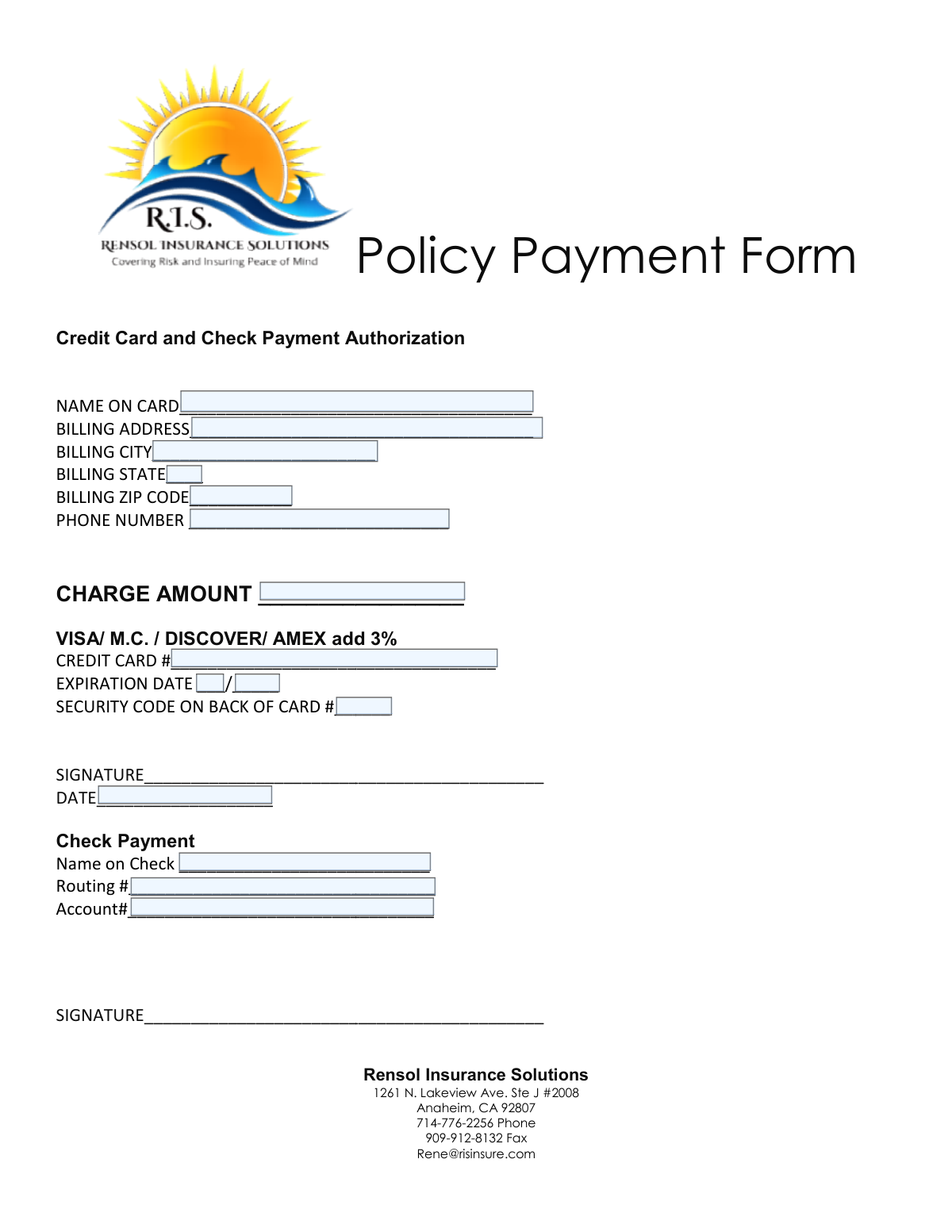
This form, provided by Rensol Insurance Solutions (R.I.S.), is a payment authorization document that allows clients to pay for their policies via credit card or check. It collects the necessary billing and payment details to process a transaction securely. Completing this form ensures that payments are correctly applied to the client's account. Today, this form can be filled out quickly and accurately using AI-powered services like Instafill.ai, which can also convert non-fillable PDF versions into interactive fillable forms.
R.I.S. Payment Form is part of the
payment authorization forms category on Instafill.
Our AI automatically handles information lookup, data retrieval, formatting, and form filling.
It takes less than a minute to fill out R.I.S. Payment Form using our AI form filling.
Securely upload your data. Information is encrypted in transit and deleted immediately after the form is filled out.
Form specifications
| Form name: | R.I.S. Payment Form - Credit Card and Check Payment Authorization |
| Number of fields: | 15 |
| Number of pages: | 1 |
| Language: | English |
More forms in Payment authorization forms
Instafill Demo: How to fill out PDF forms in seconds with AI
How to Fill Out R.I.S. Payment Form Online for Free in 2026
Are you looking to fill out a R.I.S. PAYMENT FORM form online quickly and accurately? Instafill.ai offers the #1 AI-powered PDF filling software of 2026, allowing you to complete your R.I.S. PAYMENT FORM form in just 37 seconds or less.
Follow these steps to fill out your R.I.S. PAYMENT FORM form online using Instafill.ai:
- 1 Navigate to Instafill.ai and upload or select the R.I.S. Payment Form.
- 2 Choose your payment method by selecting either the 'Credit Card' or 'Check Payment' section.
- 3 Enter your personal and billing information, including your name, address, and phone number.
- 4 Input the specific payment details, such as your credit card number and expiration date or your bank routing and account numbers.
- 5 Clearly state the charge amount you are authorizing.
- 6 Carefully review all the information you have entered to ensure its accuracy.
- 7 Provide your digital signature and the current date to finalize the payment authorization.
Our AI-powered system ensures each field is filled out correctly, reducing errors and saving you time.
Why Choose Instafill.ai for Your Fillable R.I.S. Payment Form Form?
Speed
Complete your R.I.S. Payment Form in as little as 37 seconds.
Up-to-Date
Always use the latest 2026 R.I.S. Payment Form form version.
Cost-effective
No need to hire expensive lawyers.
Accuracy
Our AI performs 10 compliance checks to ensure your form is error-free.
Security
Your personal information is protected with bank-level encryption.
Frequently Asked Questions About Form R.I.S. Payment Form
This form is used to authorize a one-time payment to Rensol Insurance Solutions for your insurance policy. You can use it to pay via credit card or directly from your checking account.
Any client of Rensol Insurance Solutions who wishes to make a policy payment using a credit card or by authorizing a withdrawal from a checking account should complete this form.
You will need the exact charge amount for your policy payment. Depending on your payment method, you'll also need your credit card details or your bank routing and account numbers.
Rensol Insurance Solutions adds a 3% processing fee to all payments made with a credit card. This fee is to cover the transaction costs associated with processing credit card payments.
No, you only need to complete the section for your chosen payment method. Fill out either the credit card authorization or the check payment authorization, but not both.
You can submit the signed form by faxing it to 909-912-8132 or by emailing it to [email protected]. Always confirm receipt if you are concerned about a payment deadline.
For Visa, Mastercard, and Discover, the security code is the 3-digit number on the back of your card. For American Express, it is the 4-digit number on the front of the card.
To pay by check, you must provide the name on the check, your bank's 9-digit routing number, and your account number. A signature is also required to authorize the transaction.
Yes, a signature is mandatory to authorize the payment. Your form will not be processed without a valid signature in the section corresponding to your chosen payment method.
The charge amount is the payment due for your insurance policy. If you are unsure of the exact amount, please contact Rensol Insurance Solutions at 714-776-2256 before completing the form.
Yes, services like Instafill.ai use AI to accurately auto-fill form fields with your saved information. This can save you time and help prevent errors when entering your details.
Simply upload the R.I.S. Payment Form to the Instafill.ai platform. The AI will make the fields fillable, and you can click to automatically populate your saved personal and payment information before downloading.
If you have a non-fillable PDF, you can use a service like Instafill.ai to convert it into an interactive, fillable form. This allows you to easily type your information directly into the fields online.
Compliance R.I.S. Payment Form
Validation Checks by Instafill.ai
1
Credit Card Number Format and Luhn Check
This validation verifies that the credit card number consists of 15-16 digits and passes the Luhn algorithm (mod 10 check). This is a primary check to catch typos and obviously invalid numbers before submitting to a payment gateway. If the number fails this validation, it is mathematically invalid and the transaction will be rejected.
2
Credit Card Expiration Date Validity
Ensures the expiration date is in a valid MM/YY or MM/YYYY format and represents a future date. Processing a payment with an expired card is impossible and will always result in a decline from the payment processor. This check prevents easily avoidable transaction failures and provides immediate feedback to the user.
3
Security Code (CVV) Format
Validates that the security code (CVV/CVC) is a 3- or 4-digit number. This is a critical field for card-not-present transaction security and is required by payment processors. Submitting a value with an incorrect format (e.g., too many or too few digits, or non-numeric characters) will cause the authorization to fail.
4
Bank Routing Number Format
This check ensures the routing number provided for check payment is exactly 9 digits long. This is a strict requirement for the Automated Clearing House (ACH) network used for e-check processing. Any number that is not exactly 9 digits is invalid and will cause the entire transaction to be rejected by the bank.
5
Payment Method Completeness
Verifies that at least one payment method (Credit Card or Check) is fully and correctly filled out. The form cannot be processed without valid payment details. This check ensures that the user does not submit the form without providing the necessary information to complete either a credit card charge or a bank draft.
6
Charge Amount Format
This validation confirms that the 'CHARGE AMOUNT' field contains a positive, non-zero numerical value. It prevents users from entering text, negative numbers, or zero, which are invalid for a payment transaction. Failure to provide a valid, positive amount would result in a processing error as no payment can be collected.
7
Billing Zip Code Format
Ensures the billing ZIP code is in a valid 5-digit (NNNNN) or 9-digit (NNNNN-NNNN) format. The ZIP code is a key component of the Address Verification System (AVS) used by credit card processors to combat fraud. An incorrectly formatted or mismatched ZIP code can lead to a transaction being declined.
8
Billing State Abbreviation
Validates that the 'BILLING STATE' field contains a valid 2-letter US state abbreviation. This ensures data consistency and is also used in AVS checks for credit card transactions. An invalid entry can cause AVS failure and makes customer records inaccurate.
9
Phone Number Format
Checks if the phone number adheres to a standard US format (e.g., 10 digits, possibly with parentheses or hyphens). This ensures the business has a valid contact number for the customer in case of payment issues or questions. An improperly formatted number may be unusable for communication.
10
Card Type and CVV Length Consistency
This check cross-references the credit card number to determine its type (e.g., AMEX) and verifies the CVV length is appropriate (4 digits for AMEX, 3 for Visa/MC/Discover). This catches common user errors where the wrong CVV is entered for a specific card type. An inconsistency will cause the payment processor to reject the transaction.
11
Signature Presence
Verifies that a signature has been provided in the corresponding signature field for the chosen payment method. The signature represents the customer's authorization for the payment. A missing signature makes the authorization incomplete and could create legal or compliance issues for the business.
12
Conditional Field Requirement
This validation ensures that if a user begins filling out a payment section, all required fields for that section are completed. For example, if a 'CREDIT CARD #' is entered, then 'NAME ON CARD', 'EXPIRATION DATE', and 'SECURITY CODE' become mandatory. This prevents incomplete submissions that are guaranteed to fail during processing.
Common Mistakes in Completing R.I.S. Payment Form
The form notes 'add 3%' for credit card payments, which is a frequent source of error. Users often forget to add this fee or miscalculate the total, leading to an incorrect payment amount. This results in underpayment, which delays policy activation and requires follow-up from the insurance agency. To prevent this, carefully calculate the total amount (original charge + 3% fee) before filling out the form, or contact the agency to confirm the final charge.
A frequent error is entering a home or mailing address instead of the specific billing address associated with the credit card. Payment systems use an Address Verification System (AVS) to match this information, and a mismatch will cause the transaction to be declined. This delays the payment and can jeopardize policy coverage. Always double-check that the address entered is the one where you receive your credit card statements.
Users sometimes enter the policyholder's name on the 'NAME ON CARD' or 'Name on Check' line, even if the payment method belongs to a spouse, parent, or business. This discrepancy between the name provided and the name on the actual payment method can cause the transaction to be flagged for fraud or declined by the processor. To avoid this, you must enter the name exactly as it appears on the physical credit card or check being used for the payment.
This form is often printed, filled out by hand, and then scanned or faxed, making illegible handwriting a major issue. Poorly written numbers in the credit card or bank account fields can be easily misread, leading to failed transactions and payment delays. To avoid this, print clearly in block letters. For better results, use a tool like Instafill.ai which can convert this non-fillable PDF into a fillable version, allowing you to type your information for perfect clarity.
When manually entering the 9-digit routing number and the longer bank account number from a check, it is very easy to transpose digits or make a typo. This type of error will cause the ACH transaction to fail and can result in returned payment fees from both your bank and the payee. To prevent this, carefully double-check the numbers against the source check before submitting the form. AI-powered form filling tools like Instafill.ai can also help by using validation rules to check for the correct number of digits.
The form requires a signature to legally authorize the payment, but it's a commonly missed step. Applicants often focus on the payment details and forget to sign, rendering the authorization invalid. An unsigned form cannot be processed, leading to significant delays and potential policy cancellation for non-payment. Always review the entire form for all required signature lines before considering it complete.
The form specifies the security code is on the 'BACK OF CARD', which is true for Visa, Mastercard, and Discover, but not for American Express, which has its 4-digit code on the front. This confusion can lead to users entering the wrong code or leaving the field blank, causing the transaction to fail. To avoid a declined payment, verify the location of the CVV/CVC for your specific card type and enter it correctly.
The form's expiration date field `___/_____` is ambiguous, leaving it unclear whether a two-digit (YY) or four-digit (YYYY) year is required. This ambiguity leads to inconsistent entries and can cause payment processing failures if the format doesn't match what the payment gateway expects. To be safe and avoid a declined payment, it is best practice to enter the full four-digit year (e.g., 03/2027).
People sometimes fill out forms from memory and accidentally provide details for an expired credit card or an old billing address. This is especially common if they have recently moved or received a replacement card from their bank. Using outdated information guarantees a declined transaction, halting the payment process until the correct, current details are provided. Always have the physical card in hand when filling out the form to ensure all information is current.
Saved over 80 hours a year
“I was never sure if my IRS forms like W-9 were filled correctly. Now, I can complete the forms accurately without any external help.”
Kevin Martin Green
Your data stays secure with advanced protection from Instafill and our subprocessors




Robust compliance program
Transparent business model
You’re not the product. You always know where your data is and what it is processed for.
ISO 27001, HIPAA, and GDPR
Our subprocesses adhere to multiple compliance standards, including but not limited to ISO 27001, HIPAA, and GDPR.
Security & privacy by design
We consider security and privacy from the initial design phase of any new service or functionality. It’s not an afterthought, it’s built-in, including support for two-factor authentication (2FA) to further protect your account.
Fill out R.I.S. Payment Form with Instafill.ai
Worried about filling PDFs wrong? Instafill securely fills ris-payment-form-credit-card-and-check-payment-authorization forms, ensuring each field is accurate.
