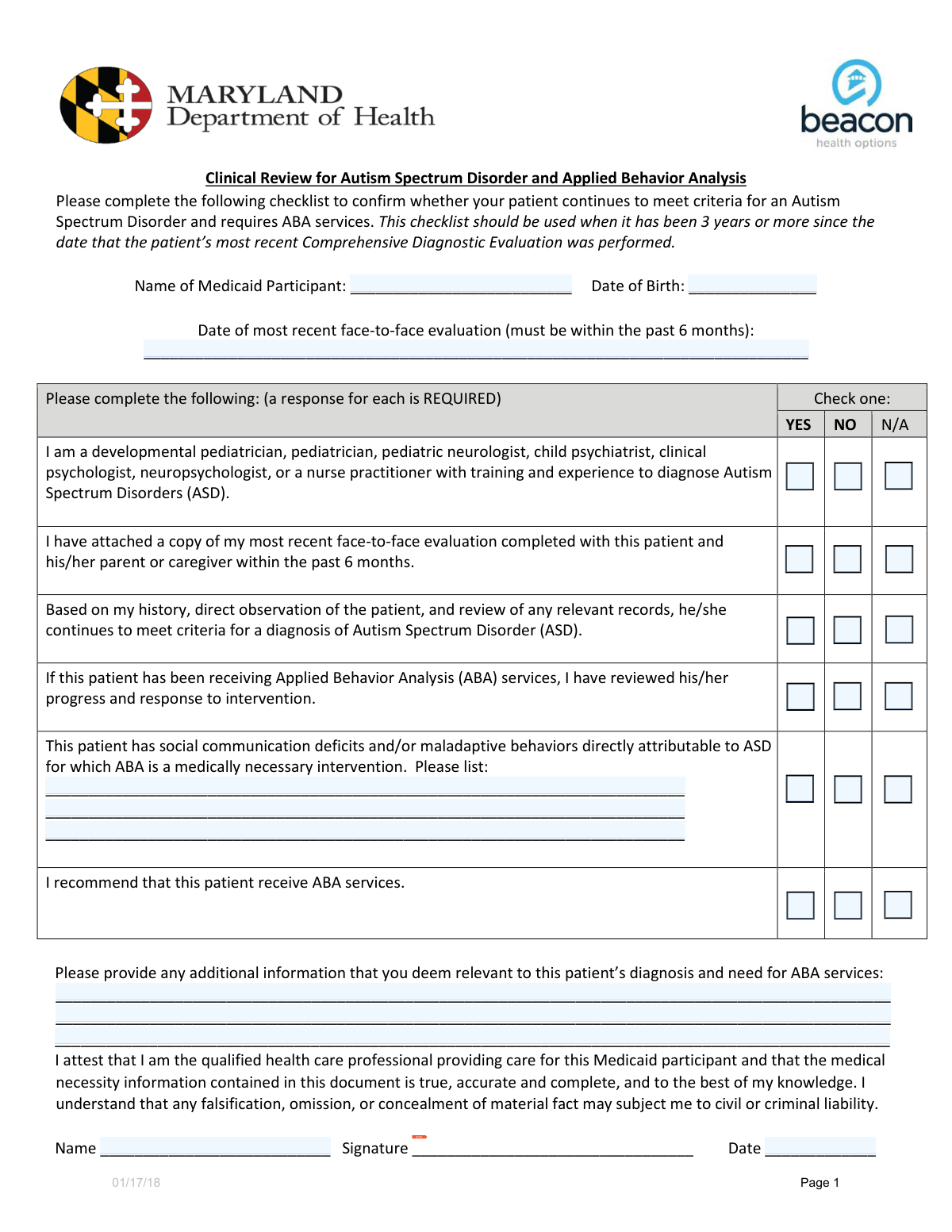
Yes! You can use AI to fill out Attestation for Applied Behavior Analysis (ABA) Services

The Attestation for Applied Behavior Analysis (ABA) Services is a critical medical document used by providers to formally recommend ABA therapy for patients with Autism Spectrum Disorder. It verifies the patient's diagnosis, details the specific deficits or behaviors that make ABA medically necessary, and serves as the official referral for Medicaid authorization. Today this form can be filled out quickly and accurately using AI-powered services like Instafill.ai, which can also convert non-fillable PDF versions into interactive fillable forms.
Our AI automatically handles information lookup, data retrieval, formatting, and form filling.
It takes less than a minute to fill out ABA Services Attestation using our AI form filling.
Securely upload your data. Information is encrypted in transit and deleted immediately after the form is filled out.

Form specifications

Form name: Attestation for Applied Behavior Analysis (ABA) Services
Number of fields: 32
Number of pages: 1
Language: English
Categories: ABA forms
main-image

Instafill Demo: How to fill out PDF forms in seconds with AI

How to Fill Out ABA Services Attestation Online for Free in 2026

Are you looking to fill out a ABA SERVICES ATTESTATION form online quickly and accurately? Instafill.ai offers the #1 AI-powered PDF filling software of 2026, allowing you to complete your ABA SERVICES ATTESTATION form in just 37 seconds or less.
Follow these steps to fill out your ABA SERVICES ATTESTATION form online using Instafill.ai:
  1. 1 Navigate to Instafill.ai and upload the Attestation for ABA Services form.
  2. 2 Use the AI assistant to accurately fill in the Medicaid participant's personal details, including name, date of birth, and the date of the last face-to-face evaluation.
  3. 3 Describe the specific ASD-related deficits and maladaptive behaviors that establish the medical necessity for ABA services.
  4. 4 Complete the provider attestation section by checking the appropriate boxes regarding your qualifications, the patient's diagnostic status, and your recommendation for ABA services.
  5. 5 Provide any additional clinical information relevant to the patient's diagnosis and need for ABA services in the designated text area.
  6. 6 Enter your name as the attesting provider, electronically sign the document, and add the current date to finalize the attestation.

Our AI-powered system ensures each field is filled out correctly, reducing errors and saving you time.

Why Choose Instafill.ai for Your Fillable ABA Services Attestation Form?

Speed

Complete your ABA Services Attestation in as little as 37 seconds.

Up-to-Date

Always use the latest 2026 ABA Services Attestation form version.

Cost-effective

No need to hire expensive lawyers.

Accuracy

Our AI performs 10 compliance checks to ensure your form is error-free.

Security

Your personal information is protected with bank-level encryption.

Frequently Asked Questions About Form ABA Services Attestation

This form is used by a healthcare provider to attest that Applied Behavior Analysis (ABA) services are medically necessary for a Medicaid participant with an Autism Spectrum Disorder (ASD) diagnosis.

A qualified healthcare provider who has evaluated the patient must complete this form. The 'Attesting Provider' is responsible for filling out the information, signing, and dating the document.

You must attach a copy of the patient's most recent face-to-face evaluation, which must have been conducted within the past six months. You need to check the corresponding 'Yes' box to confirm it's attached.

In this section, you should list specific social communication deficits and/or maladaptive behaviors that are attributable to ASD. These examples serve as justification for the medical necessity of ABA services.

You only need to list the specific deficits and behaviors if you have checked 'Yes' for the attestation 'ASD-related deficits/behaviors make ABA medically necessary'.

If you are not qualified to diagnose ASD per the listed credentials, you should check the 'No' box for that question. You can still complete the form based on your review of the patient's history and existing diagnostic records.

Yes, if the patient is already receiving ABA, you must review their progress and response to the intervention. You then need to check the 'Yes' box for the 'If receiving ABA, progress/response reviewed' attestation.

Use this space to provide any other clinical details that support the patient's diagnosis and need for ABA services. This could include co-occurring conditions, specific environmental factors, or other observations relevant to the case.

The form requires you to make a formal recommendation based on your clinical judgment. You must select 'Yes', 'No', or 'N/A' for the 'Recommend patient receive ABA services' attestation.

The 'Attestation Date' is the date you sign the form. The 'Most Recent Face-to-Face Evaluation Date' is the date the patient's last in-person evaluation was completed, which must be within the last 6 months.

Yes, services like Instafill.ai use AI to accurately auto-fill form fields from patient records, which can save you significant time and reduce errors. You are still responsible for reviewing all information and providing your clinical signature.

Simply upload the form to the Instafill.ai platform. The AI will identify the fields, allowing you to connect to your data source to auto-fill the information, then review, sign, and download the completed document.

You can use a service like Instafill.ai, which can convert flat, non-fillable PDFs into interactive, fillable forms. This allows you to easily type your information directly into the fields online without printing.

Compliance ABA Services Attestation
Validation Checks by Instafill.ai

1
Ensures Date of Birth is a valid past date
This check validates that the 'Date of Birth' field contains a properly formatted date (e.g., MM/DD/YYYY) and that the date is before the current date. This is crucial for verifying patient identity and eligibility for age-specific services. If the date is invalid or in the future, the form submission will be rejected for correction.
2
Verifies Attestation Date is logical and not in the future
This validation ensures the 'Attestation Date' is a valid date that is on or after the 'Most Recent Face-to-Face Evaluation Date' and not set to a future date. This confirms the provider is attesting to information that is current at the time of signing. An illogical or future date would invalidate the attestation and require the provider to correct the date before submission.
3
Conditional Requirement for ASD Deficits/Behaviors
This check enforces that if the 'ASD-related deficits/behaviors make ABA medically necessary — Yes' box is checked, then at least one entry must be made in the 'ASD Deficits/Maladaptive Behaviors' list. This is critical for substantiating the medical necessity claim with specific clinical examples. Failure to provide this detail when required will result in an incomplete submission and a request for more information.
4
Consistency between Evaluation Date and Attachment Status
This validation cross-references the 'Most Recent Face-to-Face Evaluation Date' with the 'Most recent face-to-face evaluation attached' checkbox. If the 'Yes' box is checked, the system verifies that the evaluation date is within the last 6 months from the attestation date. This ensures that the supporting documentation being attached is current and relevant as per policy. A mismatch will trigger an error, prompting the user to either update the date or attach the correct document.
5
Logical Consistency for ABA Recommendation
This check ensures that if 'ASD-related deficits/behaviors make ABA medically necessary' is marked 'Yes', then the 'Recommend patient receive ABA services' field must also be 'Yes'. It is logically inconsistent for a provider to state that a service is medically necessary but not recommend it. A mismatch would flag the form for review to resolve the contradiction.
6
Ensures Evaluation Date is after Patient's Birth Date
A fundamental sanity check to verify that the 'Most Recent Face-to-Face Evaluation Date' occurs after the participant's 'Date of Birth'. This prevents impossible data entry errors, such as an evaluation happening before the patient was born. An error here indicates a significant data entry mistake that must be corrected.
7
Exclusive Selection for 'Qualified Clinician' Status
This validation ensures that exactly one option ('Yes', 'No', or 'N/A') is selected for the 'Qualified clinician to diagnose ASD' question. This prevents ambiguity or conflicting information regarding the provider's qualifications. If zero or more than one option is selected, the form will be considered invalid and the user will be prompted to make a single selection.
8
Contradiction Check for Diagnosis and Medical Necessity
This check verifies that if 'Patient continues to meet ASD diagnostic criteria' is marked as 'No', then 'ASD-related deficits/behaviors make ABA medically necessary' cannot be 'Yes'. A patient who no longer meets the diagnostic criteria for ASD cannot have ASD-attributable deficits that require medical intervention. This prevents clinically and logically inconsistent submissions.
9
Completeness Check for Medicaid Participant Name
This validation ensures that the 'Medicaid Participant Name' field is not left blank. The participant's full name is a fundamental identifier required for processing the form, linking it to the correct patient record, and verifying eligibility. A missing name will result in an immediate rejection of the form until the required information is provided.
10
Completeness Check for Attesting Provider Name
This check validates that the 'Attesting Provider Name' field is filled out. The name of the attesting provider is legally required to identify the responsible healthcare professional and validate the authenticity of the form. A submission without a provider name is incomplete and cannot be processed.
11
Presence of Provider Signature
This validation confirms that the 'Signature' field has been completed, either through a digital signature, an uploaded image, or a drawn signature. The provider's signature is a legal attestation that the information provided is accurate and true. A missing signature renders the document invalid and legally non-binding, requiring the provider to sign before it can be accepted.
12
Exclusive Selection for 'Evaluation Attached' Status
This validation ensures that for the question 'Most recent face-to-face evaluation attached (within past 6 months)', one and only one of the options ('Yes', 'No', or 'N/A') is selected. This is a standard check for radio button groups to ensure a clear and unambiguous response is recorded. The form cannot be submitted until a single choice is made.

Common Mistakes in Completing ABA Services Attestation

Missing Signature or Attestation Date

Providers often rush and overlook the final signature and date fields, which are crucial for validation. An unsigned or undated form is legally invalid and will be immediately rejected, causing significant delays in the approval of ABA services. Always perform a final review of the form, specifically checking the signature and date lines before submission.

Contradictory Checkbox Selections

A common error is selecting conflicting options, such as checking 'No' for 'Patient continues to meet ASD diagnostic criteria' while also checking 'Yes' for 'Recommend patient receive ABA services'. These contradictions create confusion and will lead to the form being returned for clarification, delaying the patient's care. Carefully review all checkbox selections to ensure they present a logical and consistent clinical picture.

Missing Required Deficit/Behavior Descriptions

Users may check 'Yes' for 'ASD-related deficits/behaviors make ABA medically necessary' but then fail to list the specific deficits in the provided lines. This omission makes it impossible for the reviewer to validate the medical necessity claim, resulting in a request for more information or denial. If you affirm necessity, you must provide at least two specific, observable behaviors or deficits in the corresponding fields.

Using Vague or Non-Clinical Language

In the 'ASD Deficits/Maladaptive Behaviors' section, providers sometimes use general terms like 'acts out' or 'has trouble socializing' instead of specific, clinical descriptions. Such vague language does not provide sufficient justification for medical necessity and weakens the application. Use precise, objective language (e.g., 'Engages in hand-biting when frustrated,' 'Avoids eye contact and does not respond to peer initiations') to clearly document the need for services.

Forgetting to Include a Required Attachment

A frequent procedural mistake is checking 'Yes' to indicate that the 'Most recent face-to-face evaluation' is attached, but then failing to actually include the document with the submission. This results in an incomplete application that cannot be processed until the missing document is received, causing unnecessary delays. Create a checklist for all required documents and double-check that all attachments are included before sending the form.

Mismatch Between Evaluation Date and Attachment Requirement

An error occurs when the 'Most Recent Face-to-Face Evaluation Date' is older than six months, which conflicts with the requirement implied by the 'Most recent face-to-face evaluation attached (within past 6 months)' checkbox. This inconsistency immediately flags the form for review and likely rejection. Ensure the date entered in the text field is recent and aligns with the six-month requirement for the attached evaluation.

Using Incorrect or Inconsistent Date Formats

Fields like 'Date of Birth' and 'Evaluation Date' are often filled with inconsistent formats (e.g., MM/DD/YY vs. MM-DD-YYYY), leading to data entry errors and processing delays. This happens when manually typing dates without paying attention to a standard format. To avoid this, use a consistent MM/DD/YYYY format throughout the form; AI-powered tools like Instafill.ai can automatically validate and format dates correctly.

Entering Incomplete or Incorrect Names

Using nicknames, initials, or misspelling the 'Medicaid Participant Name' or 'Attesting Provider Name' can cause matching errors in the system. This can delay verification of eligibility and provider credentials, stalling the entire approval process. Always use the full, legal name as it appears on official documents like the Medicaid card and provider licenses.

Omitting Important Context in Additional Information

The 'Additional Relevant Clinical Information' section is often left blank, even when there is important context that could strengthen the case for ABA services. This is a missed opportunity to provide a holistic view of the patient's needs, co-occurring conditions, or specific environmental factors. Use this space to add any details that support the checkboxes and clinical descriptions provided elsewhere on the form.

Illegible Handwriting on Non-Digital Forms

If the form is a non-fillable PDF that must be printed and filled out by hand, illegible handwriting is a major issue. Unclear names, dates, or clinical descriptions can be misinterpreted or deemed invalid, leading to processing errors and delays. If a form is not digitally fillable, it's best to write slowly and clearly in block letters, or use a tool like Instafill.ai which can convert flat PDFs into fillable forms to prevent this issue entirely.
Saved over 80 hours a year

“I was never sure if my IRS forms like W-9 were filled correctly. Now, I can complete the forms accurately without any external help.”

Kevin Martin Green

Your data stays secure with advanced protection from Instafill and our subprocessors

Robust compliance program

Transparent business model

You’re not the product. You always know where your data is and what it is processed for.

ISO 27001, HIPAA, and GDPR

Our subprocesses adhere to multiple compliance standards, including but not limited to ISO 27001, HIPAA, and GDPR.

Security & privacy by design

We consider security and privacy from the initial design phase of any new service or functionality. It’s not an afterthought, it’s built-in, including support for two-factor authentication (2FA) to further protect your account.

Fill out ABA Services Attestation with Instafill.ai

Worried about filling PDFs wrong? Instafill securely fills attestation-for-applied-behavior-analysis-aba-services forms, ensuring each field is accurate.