Yes! You can use AI to fill out Broker's Market Analysis

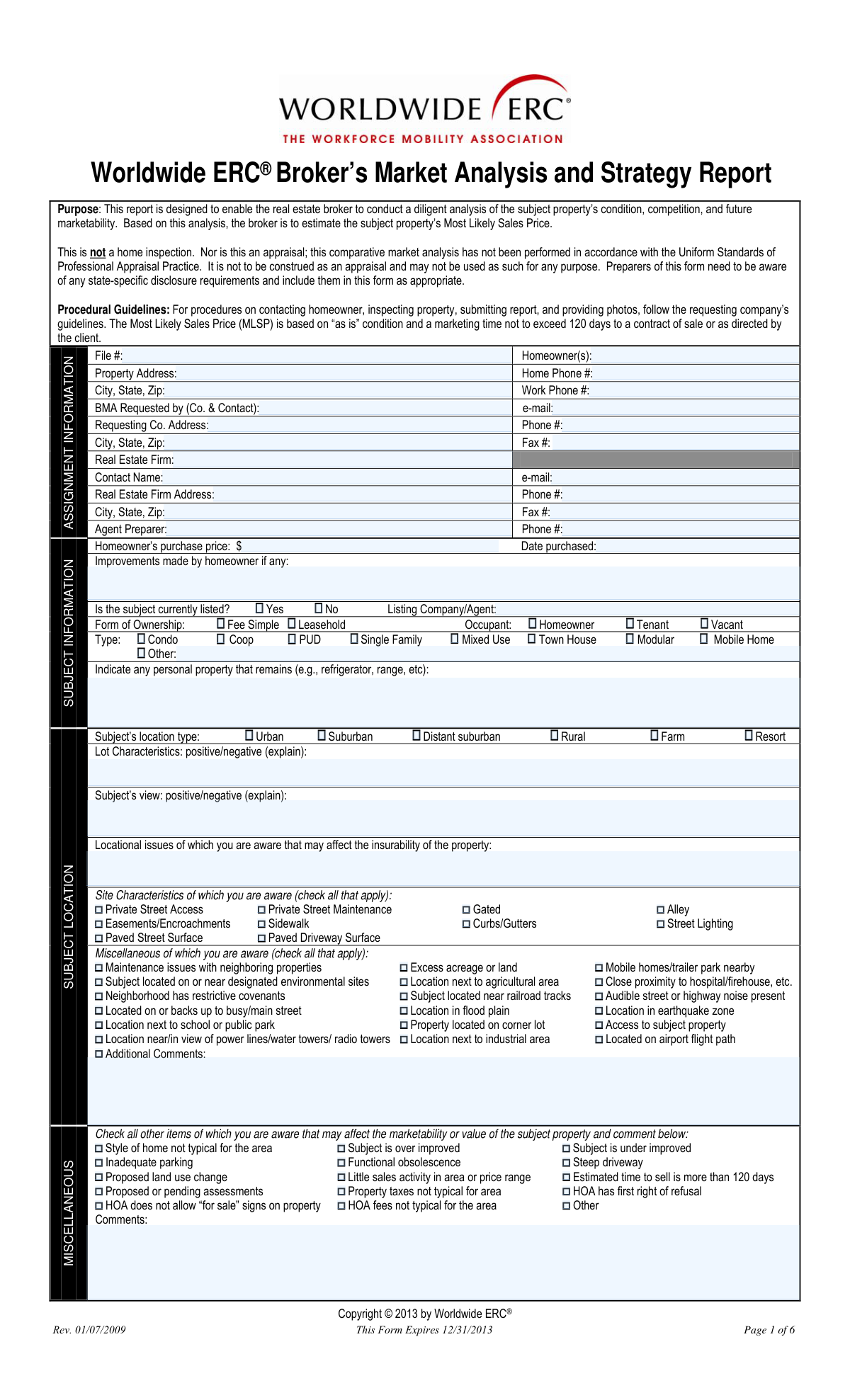
A Broker's Market Analysis (BMA) is a detailed report prepared by a real estate broker or agent to estimate the value of a specific property. This document is crucial for sellers to set a competitive list price, for buyers to make informed offers, and for lenders in certain situations. The BMA provides an in-depth look at the property's condition, features, and the current state of the local market, including comparisons to similar active and sold properties. Today, this comprehensive form can be filled out quickly and accurately using AI-powered services like Instafill.ai, which can also convert non-fillable PDF versions into interactive fillable forms.
Our AI automatically handles information lookup, data retrieval, formatting, and form filling.
It takes less than a minute to fill out BMA using our AI form filling.
Securely upload your data. Information is encrypted in transit and deleted immediately after the form is filled out.

Form specifications

Form name: Broker's Market Analysis
Number of fields: 1349
Number of pages: 6
Language: English
Categories: broker forms
main-image

Instafill Demo: How to fill out PDF forms in seconds with AI

How to Fill Out BMA Online for Free in 2026

Are you looking to fill out a BMA form online quickly and accurately? Instafill.ai offers the #1 AI-powered PDF filling software of 2026, allowing you to complete your BMA form in just 37 seconds or less.
Follow these steps to fill out your BMA form online using Instafill.ai:
  1. 1 Navigate to Instafill.ai and upload or select the Broker's Market Analysis form.
  2. 2 Use the AI assistant to input homeowner, requesting company, and detailed subject property information, including its physical characteristics and history.
  3. 3 Complete the detailed property condition assessment, noting any deferred maintenance, and provide estimated costs for interior and exterior repairs.
  4. 4 Provide a comprehensive analysis of the neighborhood and broader market area, including property value trends, inventory absorption rates, and economic conditions.
  5. 5 Enter detailed information for competing listings and comparable sales, using the AI to help pull data and perform side-by-side comparisons of features, condition, and pricing.
  6. 6 Conclude the analysis by determining the Most Likely Sales Price (MLSP), suggesting a list price, and outlining marketing strategies and potential challenges.
  7. 7 Review the entire report for accuracy and completeness, then have the preparing agent electronically sign and date the document to finalize the analysis.

Our AI-powered system ensures each field is filled out correctly, reducing errors and saving you time.

Why Choose Instafill.ai for Your Fillable BMA Form?

Speed

Complete your BMA in as little as 37 seconds.

Up-to-Date

Always use the latest 2026 BMA form version.

Cost-effective

No need to hire expensive lawyers.

Accuracy

Our AI performs 10 compliance checks to ensure your form is error-free.

Security

Your personal information is protected with bank-level encryption.

Frequently Asked Questions About Form BMA

This form is a Broker's Market Analysis used by real estate agents to provide a detailed evaluation of a property's value. It analyzes the property's condition, the local market, and compares it to competing listings and recent sales.

A licensed real estate agent or broker, referred to as the 'Agent Preparer', is responsible for inspecting the property and completing this report for the homeowner and requesting company.

The 'Competing Listings' section is for properties currently for sale that a buyer might consider instead of the subject property. 'Comparable Sales' are similar properties that have recently sold and are used to determine the subject's market value.

While not always required, you should provide realistic cost estimates based on your professional experience and knowledge of local pricing. It is good practice to note if your estimates are not based on formal bids from contractors.

If direct comparables are unavailable, use the most similar properties you can find and make adjustments, explaining your reasoning in the comments sections. You can also expand your search area or look at older sales, and detail these circumstances in the 'Broader Market Area' section.

This information can typically be obtained by contacting the Homeowners Association (HOA) or its property management company directly. If the information is not applicable or you cannot obtain it, you should note that accordingly.

The MLSP is your professional opinion of what the property will likely sell for in its current 'as-is' condition. This conclusion should be based on your complete analysis of the comparable sales, competing listings, and market conditions detailed in the report.

List specific obstacles to the sale, such as a busy street or dated interior, in the 'Challenges' section. In 'Creative Marketing Ideas,' propose concrete actions to overcome these challenges, like virtual staging or targeted social media ads.

Yes, services like Instafill.ai use AI to auto-fill many form fields accurately, such as property details and contact information, which saves time. Your professional expertise is still essential for the analysis, valuation, and strategy sections.

You can use a service like Instafill.ai to upload the form and fill it out directly in your web browser. These tools allow you to easily type information, check boxes, and add a digital signature before saving or printing.

Services like Instafill.ai can convert flat, non-fillable PDFs into interactive, fillable forms. Simply upload your document to their platform, and it will automatically detect and create fillable fields for you to complete.

You should gather MLS data for at least three competing listings and three comparable sales, your notes from the property inspection, and any information provided by the homeowner about improvements and the original purchase.

Compliance BMA
Validation Checks by Instafill.ai

1
Validates Phone and Fax Number Formats
This check ensures that all phone and fax number fields across the form adhere to a standard 10-digit format (e.g., (XXX) XXX-XXXX or XXXXXXXXXX). It is crucial for ensuring that contact information for homeowners, companies, and agents is valid and usable for communication. If a number is entered in an incorrect format, the system will prompt the user to correct it before submission.
2
Validates Email Address Structure
This validation verifies that all email address fields are in a standard format (e.g., [email protected]). This is essential for ensuring that communications, such as sending the final report, can be successfully delivered. An invalid entry would trigger an error message, preventing the submission of unusable contact information.
3
Ensures Logical Date Chronology
This check validates the logical sequence of dates throughout the form. For example, it ensures the 'Date Purchased' is not in the future and that a 'Closing Date' for a comparable sale occurs on or after its 'Under Contract Date'. This prevents data entry errors and maintains the integrity of the timeline for property transactions, which is critical for accurate analysis.
4
Conditional Requirement for Listing Agent Details
This validation enforces a rule that if the 'Currently Listed - Yes' checkbox is selected for the subject property, the 'Listing Company/Agent' field must be filled out. This is a logical dependency that ensures complete information is captured when a property is known to be actively on the market. If the condition is not met, the form will display an error and prevent submission until the required agent information is provided.
5
Enforces Description for Checked Condition Issues
This rule validates that for every property condition checkbox that is selected (e.g., 'Evidence of pet damage', 'Incomplete construction', 'Suspected structural problems'), the corresponding description field is not empty. This ensures that simply flagging an issue is followed up with the necessary details for a complete and understandable report. Failure to provide a description would prompt the user for more information before proceeding.
6
Verifies Total Repair Cost Calculation
This check automatically calculates the sum of all individual interior repair cost fields and verifies that it matches the value entered in 'Total Estimated Cost for Interior Repairs'. A similar check is performed for exterior repairs. This validation ensures mathematical accuracy and data integrity, preventing manual calculation errors that could affect the property's valuation. A mismatch would trigger a warning or an auto-correction.
7
Validates Owner vs. Investor Percentage Sum
This check ensures that the sum of 'Owners Percentage' and 'Investors Percentage' equals exactly 100% when entered. This is a critical data point for understanding the stability and rules of a common interest development. If the sum is not 100, it indicates a data entry error, and the form should prevent submission until the values are corrected.
8
Ensures Single Selection for Mutually Exclusive Choices
This validation applies to several groups of checkboxes that should be mutually exclusive, such as 'Currently Listed - Yes/No', 'Financing Issues - Yes/No', and property value trends ('Increasing'/'Stable'/'Decreasing'). It ensures that only one option within each group can be selected. This prevents the submission of contradictory data and ensures clarity in the final report.
9
Validates Price Range Logic
This validation ensures that the 'Minimum Price' value is less than or equal to the 'Maximum Price' value in the 'Price Range' section. This simple check prevents illogical data entry that would make the price range data unusable for analysis. An error would be flagged if the minimum price exceeds the maximum price, forcing the user to correct the entry.
10
Enforces Detail for 'Other' Selections
This is a global check across the form. Whenever an 'Other' checkbox or radio button is selected (e.g., 'Other Property Type', 'Other Means of Financing', 'Other HOA Fee Items'), the corresponding text field for description must be filled. This prevents users from selecting 'Other' without providing the necessary clarification, which would result in incomplete and ambiguous data.
11
Conditional Requirement for Financing Issues Comment
This validation rule ensures that if the 'Yes' checkbox under 'Financing Issues' is selected, the 'Financing Issues Comment' text field must be filled out. This is important for capturing critical details about potential problems that could derail a sale. Without this check, a user could indicate there are issues without providing the necessary context for the report's audience.
12
Validates Competing Listings Breakdown Percentages
This validation checks that the sum of 'New Homes Percentage', 'Resale Percentage', 'REO/Foreclosure Percentage', and 'Corporate Percentage' equals 100%. This ensures the statistical breakdown of competing listings is complete and accurate. A failure would indicate a miscalculation or incomplete data entry, requiring the user to correct the percentages before submission.
13
Validates Zip Code Format
This check ensures that all zip code fields ('Property City, State, Zip', 'Requesting Company City, State, Zip', etc.) contain a valid 5-digit or 9-digit (ZIP+4) numeric format. Correct zip codes are essential for accurate location services, mapping, and data aggregation. The system should reject entries that do not conform to the standard format.
14
Sales Price vs. Final List Price Sanity Check
For all comparable sales, this validation compares the 'Sales Price' to the 'Final List Price'. If the sales price is drastically different (e.g., more than 50% higher or lower) than the list price, it triggers a soft warning asking the user to confirm the values are correct. This helps catch significant typos or data entry errors that could improperly skew the market analysis, without blocking legitimate but unusual sales.
15
Requires HOA Details for Common Interest Developments
This check validates that if a property type is a common interest development (e.g., Condo, PUD, Coop), then essential HOA fields like 'HOA Fees Amount' and the fee frequency (Monthly, Quarterly, etc.) must be completed. This information is critical to the property's valuation and a buyer's cost of ownership. The form would be considered incomplete without these details for the specified property types.

Common Mistakes in Completing BMA

Incomplete Conditional Entries

This form contains numerous conditional fields, such as checking a box for 'Evidence of pet damage' which then requires a 'Pet Damage Description'. A frequent mistake is checking the box but failing to provide the mandatory follow-up description or cost estimate. This leaves critical gaps in the property assessment, forcing reviewers to make assumptions or request clarification, which delays the analysis process. To avoid this, carefully review each checked box and ensure any dependent fields are completed; AI-powered tools like Instafill.ai can automatically highlight these required follow-up fields to ensure no information is missed.

Inconsistent Data in Comparative Sections

The form requires detailed, repetitive data entry for multiple competing listings and comparable sales. Users often make consistency errors, such as rating a competing property's 'Location' as 'Inferior' but then entering data (e.g., 'Proximity to Subject' as 0.1 miles) that contradicts this rating. These inconsistencies undermine the credibility of the analysis and suggest a lack of thoroughness. It is crucial to review the comparative data as a whole to ensure the ratings and the factual data tell a consistent story.

Vague or Non-Specific Narrative Descriptions

Fields like 'Subject Neighborhood Description', 'Lot Characteristics Explanation', and 'Challenges to Selling Property' require detailed, specific narratives. A common error is to use vague terms like 'typical for the area,' 'good,' or 'needs work' without providing concrete details. This provides no real value to the reader and defeats the purpose of the field. To be effective, describe specific features, such as 'Neighborhood is 90% single-family homes with a community pool' instead of 'nice neighborhood.'

Mathematical and Calculation Errors

The form asks for several calculated values, such as 'Total Estimated Cost for Interior Repairs' and the 'Inventory Absorption Rate'. Users often manually enter these totals without verifying their accuracy, leading to totals that do not match the sum of the itemized costs provided elsewhere. This error immediately calls the accuracy of the entire report into question. Always use a calculator to sum itemized costs before entering a total, and double-check calculations like the inventory absorption rate (Active Listings / Average Monthly Sales).

Forgetting to Specify 'Other' Categories

Many sections, such as 'Heating System' or 'Exterior Finish', include an 'Other' checkbox with a corresponding text field for specification. A very common oversight is checking 'Other' but leaving the text field blank. This makes the data point incomplete and unusable for analysis, as the reviewer has no idea what 'Other' refers to. To prevent this, make it a rule to immediately fill the specification field anytime an 'Other' box is checked.

Confusing Competing Listings with Comparable Sales

This form distinguishes between 'Competing Listings' (active on the market) and 'Comparable Sales' (already sold), which are fundamentally different data sets for market analysis. A significant mistake is mixing them up, for instance, by entering a 'Sales Price' for a competing listing or a 'Current List Price' for a comparable sale. This error invalidates the comparison and demonstrates a misunderstanding of basic appraisal principles. Carefully check the section heading before entering data for each property.

Mismatched Percentage Breakdowns

Fields like 'Owner to Investor Ratio' and the 'Competing Listings Breakdown' (New, Resale, REO, Corporate) require percentages that must sum to 100%. Users frequently input numbers that do not add up correctly, which indicates either a calculation error or an incomplete understanding of the market composition. This damages the credibility of the market analysis. Always verify that percentage components sum to exactly 100% before moving on.

Missing Critical Property Identifiers

For a market analysis to be verifiable, unique identifiers are essential. A critical mistake is omitting the 'MLS Number' for competing listings and comparable sales. Without this number, it is nearly impossible for a reviewer to independently verify the data, look up property photos, or assess the validity of the comparison. Always ensure that every property listed in the comparative sections has a correct and complete MLS number.

Incorrect Formatting of Numerical Data

Data processing systems often require specific numerical formats. Users frequently enter monetary values with dollar signs and commas (e.g., '$550,000') or use text like 'k' for thousands (e.g., '550k') when the system expects a simple integer ('550000'). This can lead to data import failures or incorrect calculations. To avoid this, enter only digits in numerical fields unless otherwise specified. AI-powered form-filling tools like Instafill.ai can help by automatically formatting data into the correct format required by each field.

Contradictory Checkbox Selections

With hundreds of checkboxes, it's easy to make contradictory selections. For example, a user might check both 'Currently Listed - Yes' and 'Currently Listed - No', or select both 'Increasing' and 'Stable' for property value trends. This type of error creates ambiguity and requires manual follow-up to clarify the user's intent. A careful final review of all checkbox selections is necessary to catch and correct these simple but impactful mistakes. If the form is a non-fillable PDF, a tool like Instafill.ai can convert it to a smart, fillable version with built-in validation to prevent such errors.
Saved over 80 hours a year

“I was never sure if my IRS forms like W-9 were filled correctly. Now, I can complete the forms accurately without any external help.”

Kevin Martin Green

Your data stays secure with advanced protection from Instafill and our subprocessors

Robust compliance program

Transparent business model

You’re not the product. You always know where your data is and what it is processed for.

ISO 27001, HIPAA, and GDPR

Our subprocesses adhere to multiple compliance standards, including but not limited to ISO 27001, HIPAA, and GDPR.

Security & privacy by design

We consider security and privacy from the initial design phase of any new service or functionality. It’s not an afterthought, it’s built-in, including support for two-factor authentication (2FA) to further protect your account.

Fill out BMA with Instafill.ai

Worried about filling PDFs wrong? Instafill securely fills brokers-market-analysis forms, ensuring each field is accurate.