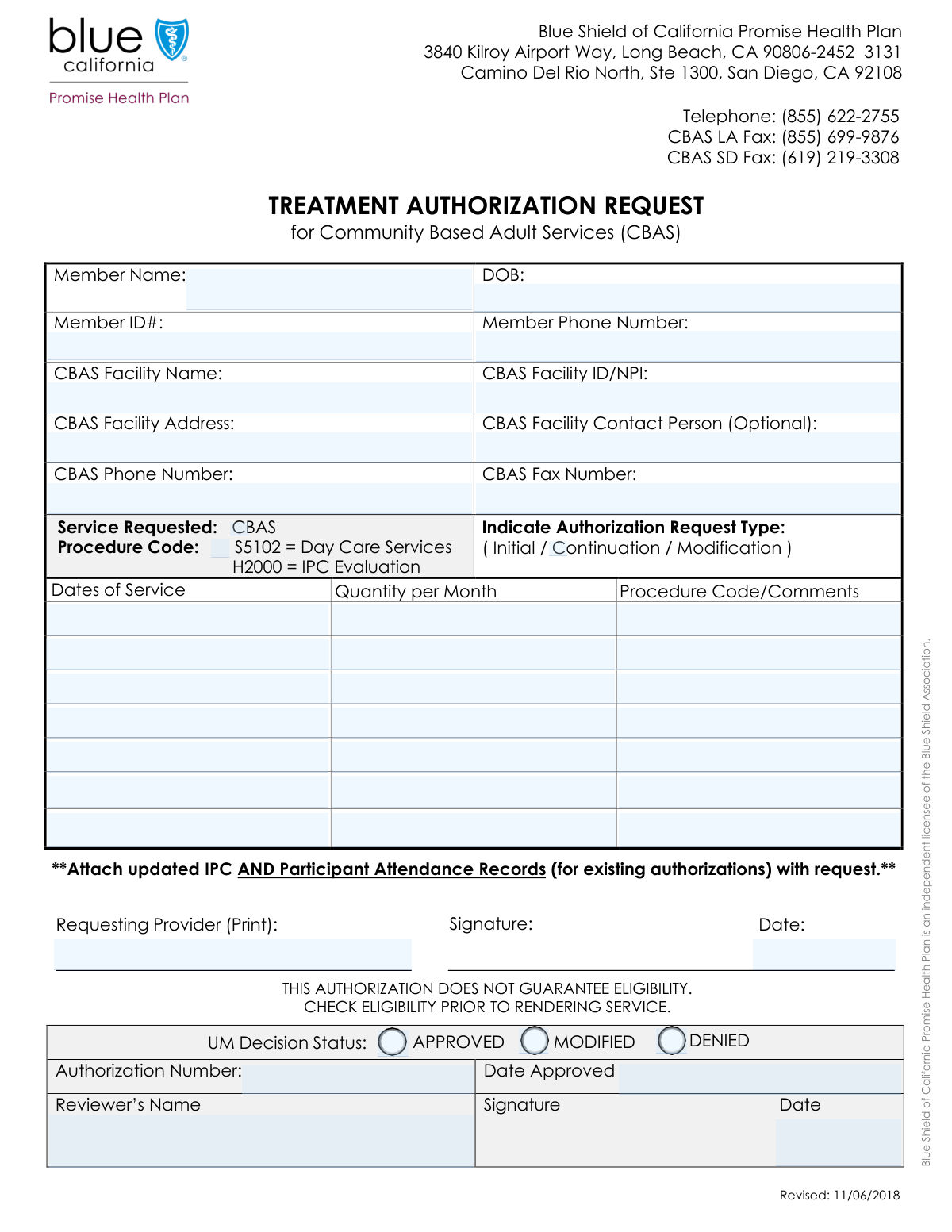
Yes! You can use AI to fill out Community Based Adult Services (CBAS) Treatment Authorization Request
The Community Based Adult Services (CBAS) Treatment Authorization Request is a formal document submitted by healthcare providers to a health plan to get pre-approval for providing CBAS to a patient. It is a crucial step in the utilization management process, ensuring that the requested services are medically necessary and covered under the member's plan before they are rendered, which prevents billing issues. Today this form can be filled out quickly and accurately using AI-powered services like Instafill.ai, which can also convert non-fillable PDF versions into interactive fillable forms.
Our AI automatically handles information lookup, data retrieval, formatting, and form filling.
It takes less than a minute to fill out CBAS Authorization Request using our AI form filling.
Securely upload your data. Information is encrypted in transit and deleted immediately after the form is filled out.
Form specifications
| Form name: | Community Based Adult Services (CBAS) Treatment Authorization Request |
| Number of fields: | 43 |
| Number of pages: | 1 |
| Language: | English |
| Categories: | authorization forms, service authorization forms |
Instafill Demo: How to fill out PDF forms in seconds with AI
How to Fill Out CBAS Authorization Request Online for Free in 2026
Are you looking to fill out a CBAS AUTHORIZATION REQUEST form online quickly and accurately? Instafill.ai offers the #1 AI-powered PDF filling software of 2026, allowing you to complete your CBAS AUTHORIZATION REQUEST form in just 37 seconds or less.
Follow these steps to fill out your CBAS AUTHORIZATION REQUEST form online using Instafill.ai:
- 1 Navigate to Instafill.ai and upload or select the CBAS Treatment Authorization Request form.
- 2 Use the AI assistant to automatically fill in the Member Information section, including their name, date of birth, and Member ID number.
- 3 Provide the CBAS Facility Information, such as the facility name, NPI number, and address, letting the AI pre-fill any known details.
- 4 Detail the Authorization Request by specifying the service dates, quantity per month, and relevant procedure codes (like S5102) for each service line item.
- 5 Enter the Requesting Provider's name and the date of the request in the designated fields.
- 6 Review all the information populated by the AI for accuracy and completeness, making any necessary corrections before finalizing the document.
- 7 Securely download, print, or share the completed authorization request form directly from the platform.
Our AI-powered system ensures each field is filled out correctly, reducing errors and saving you time.
Why Choose Instafill.ai for Your Fillable CBAS Authorization Request Form?
Speed
Complete your CBAS Authorization Request in as little as 37 seconds.
Up-to-Date
Always use the latest 2026 CBAS Authorization Request form version.
Cost-effective
No need to hire expensive lawyers.
Accuracy
Our AI performs 10 compliance checks to ensure your form is error-free.
Security
Your personal information is protected with bank-level encryption.
Frequently Asked Questions About Form CBAS Authorization Request
This is a Treatment Authorization Request form for Community Based Adult Services (CBAS). It should be completed by a healthcare provider or CBAS facility staff on behalf of a member to request pre-approval for services.
You will need the member's full name, date of birth, primary phone number, and their unique Member ID number to complete this section.
Check this box if the member has a previous authorization for these services that is expiring, and you are requesting to continue them. For a brand new service request, you would typically leave this unchecked.
Use the service rows to detail each request. Enter the specific dates of service, the quantity per month (e.g., number of days), and the relevant procedure code, such as S5102 for Day Care Services.
Yes, the form includes multiple service rows, which can be used to request authorization for different service periods or types on a single submission.
These sections are for internal use only and will be completed by the Utilization Management (UM) reviewer. They will indicate if the request is approved, modified, or denied and provide the official authorization number.
The CBAS Facility ID is a specific identification number for the facility, while the NPI (National Provider Identifier) is a standard, unique identifier for health care providers. You can enter either number in the 'CBAS Facility ID/NPI' field.
You should submit the completed form to the member's health plan or the designated Utilization Management department. Refer to your provider handbook for the correct fax number or submission portal.
Yes, services like Instafill.ai use AI to auto-fill form fields accurately and save time. This is particularly useful for entering recurring information like provider and facility details.
To fill this form online, upload the PDF to the Instafill.ai platform. The AI will make the fields interactive, allowing you to type your information, save your progress, and download the completed document.
If your PDF is a flat, non-fillable image, you can use a tool like Instafill.ai. It can convert the document into an interactive, fillable form that you can easily complete on your computer.
Enter the specific procedure code for the service you are requesting, such as 'S5102'. You can also use this space to add brief, relevant comments if necessary.
Submitting a form with missing information, such as the Member ID or CBAS Facility NPI, can lead to processing delays or a denial of the request. It is important to ensure all required fields are completed accurately.
Compliance CBAS Authorization Request
Validation Checks by Instafill.ai
1
Validates Member's Date of Birth
This check ensures the 'Date of Birth' field contains a valid date in a standard format (e.g., MM/DD/YYYY) and that the date is in the past, not the future. This is critical for verifying member identity and eligibility for age-specific services. A submission with an invalid or future date would be rejected to prevent processing errors.
2
Ensures Member Phone Number Format is Valid
This validation verifies that the 'Member Phone Number' follows a standard 10-digit format, with or without common separators like parentheses or hyphens. Correct formatting is crucial for ensuring the member can be contacted regarding their authorization request. If the format is invalid, the system should flag the field for correction to prevent communication failures.
3
Validates CBAS Facility ID/NPI Format
This check ensures the 'CBAS Facility ID/NPI' is a valid 10-digit National Provider Identifier (NPI) or matches a known internal facility ID format. The NPI is a unique identifier essential for claims processing, billing, and regulatory compliance. An invalid identifier would cause the authorization request to be rejected or delayed until the correct NPI is provided.
4
Requires At Least One Complete Service Request Row
This validation confirms that at least one of the seven service rows contains complete information, including 'Service Dates', 'Quantity per Month', and a 'Procedure Code'. An authorization request cannot be processed without a specified service being requested. If no service rows are filled out, the form is considered incomplete and will be returned to the submitter.
5
Validates Service Date Range Chronology
This check verifies that for each 'Service Dates' entry, the start date occurs on or before the end date. It prevents logically impossible date ranges from being submitted for authorization. An invalid range would cause confusion in scheduling and billing, so the form must be corrected before it can be processed.
6
Logical Check Between Request Date and Service Dates
This validation ensures the 'Request Date' is not significantly after the service period has ended, which is particularly important for non-retroactive authorizations. This check prevents the submission of stale or logically inconsistent requests that may violate timely filing rules. A request submitted too late might be automatically denied or require additional justification.
7
Ensures Only One UM Decision Status is Selected
This validation confirms that only one of the 'Approved', 'Modified', or 'Denied' checkboxes under 'UM Decision Status' is selected. A request cannot be simultaneously approved and denied, so selecting multiple options creates an ambiguous and invalid state. The form should be rejected if more than one status is checked to enforce a clear and actionable decision.
8
Conditional Requirement for Authorization Details
This check ensures that the 'Authorization Number' and 'Date Approved' fields are filled out if the 'UM Decision Status' is 'Approved' or 'Modified'. These details are irrelevant for a denied request but are mandatory for an approved or modified one to be considered complete. Failure to provide this information upon approval would render the authorization record incomplete and unusable for claims processing.
9
Validates Chronological Order of Request and Review Dates
This validation verifies that the 'Review Date' is on or after the 'Request Date'. A review cannot logically occur before the request has been submitted. This check maintains the integrity of the process timeline and ensures accurate record-keeping for auditing and compliance purposes.
10
Validates Service Quantity per Month is a Positive Integer
This check ensures that the 'Quantity per Month' field in each populated service row contains a positive whole number. The quantity represents the number of service units, which cannot be zero, negative, or a fraction. This validation is critical for accurate billing and for understanding the scope of the requested services.
11
Ensures All Required Member Information is Provided
This validation checks that 'Member Name', 'Date of Birth', and 'Member ID Number' are all filled in. This core information is essential for uniquely identifying the member in the system and verifying their eligibility for services. An incomplete member profile will halt the authorization process immediately until the missing data is supplied.
12
Requires Reviewer Information When a Decision is Made
This validation ensures that if any 'UM Decision Status' is selected ('Approved', 'Modified', or 'Denied'), the 'Reviewer's Name' and 'Review Date' fields must be filled. This is crucial for accountability and auditing, as it documents who made the decision and when. A decision without an associated reviewer is considered incomplete and invalid.
13
Procedure Code S5102 Consistency Check
This validation checks if the 'Procedure Code S5102' checkbox is marked, and if so, ensures that 'S5102' is listed in at least one of the 'Procedure Code / Comments' fields in the service rows. This cross-field check ensures consistency between the high-level service selection and the detailed service lines. A mismatch could indicate a data entry error and would require clarification before the authorization can be processed.
14
Completeness of Requesting Provider Information
This check verifies that the 'Requesting Provider Name' and 'Request Date' fields are both completed. This information is mandatory to identify who submitted the request and when it was submitted for tracking and communication purposes. An anonymous or undated request cannot be processed and will be rejected.
Common Mistakes in Completing CBAS Authorization Request
Users often mistype the Member ID Number by transposing digits or entering an incomplete number. This error leads to a failure to match the member in the system, causing an immediate rejection of the authorization request and significant delays in processing. To prevent this, carefully double-check the number against the member's official ID card. AI-powered tools like Instafill.ai can help by validating number formats and lengths to catch potential errors before submission.
When renewing an existing authorization, providers frequently forget to check the 'Continuation' box. The system then processes the request as a new service, which has different documentation requirements and review criteria, often leading to a denial or a gap in service authorization. Always confirm if the request is for ongoing services and ensure the 'Continuation' box is checked to ensure proper processing.
Entering an incorrect or outdated National Provider Identifier (NPI) or facility ID is a critical error, often due to using old records. An invalid ID prevents the system from identifying the provider, resulting in automatic rejection of the request and subsequent payment failure. Maintaining an updated record of provider information is crucial; tools like Instafill.ai can store and auto-fill correct, verified provider data to avoid this.
This mistake occurs when the 'Quantity per Month' does not logically align with the 'Service Dates' provided, such as requesting 20 units for a date range spanning only 10 days. This discrepancy flags the request for a manual review, which can cause significant delays or an outright denial. Always ensure the quantity requested accurately reflects the number of service days within the specified period.
Applicants sometimes mistakenly complete the 'UM Decision Status' or 'Authorization Details' sections, which are reserved for the internal review team. This happens when a user attempts to fill every single field on the form. This action invalidates the submission, as it appears to be pre-approved or pre-denied, forcing the form to be returned and the process to be restarted.
Providers may enter a member's nickname or initials in the 'Member Name' field instead of the full legal name that appears on their insurance card. This creates a data mismatch in the payer's system, preventing them from locating the member's file. This simple error can cause the entire authorization to be delayed or rejected until the name is corrected to match official records.
In the service rows, users may enter the wrong procedure code, use a deprecated one, or mix text comments in the 'Procedure Code' field. Automated processing systems rely on exact codes like 'S5102' for routing and approval. Any deviation will cause the system to reject the line item or the entire request, requiring manual correction and resubmission.
When filling out the form for multiple services or date ranges, it is easy to make copy-paste errors, resulting in duplicated dates or quantities that don't match the intended service. For example, the dates for the 'Second Service Row' might be identical to the first by mistake. This leads to an incorrect authorization that must be cancelled and resubmitted, delaying both care and payment.
Users often enter dates in various formats (e.g., 01-JAN-2024, 2024/01/15) instead of a standard MM/DD/YYYY format, or they simply mistype the day or year. Inconsistent formatting can cause data import failures or lead to misinterpretation of the service period. AI-powered form fillers like Instafill.ai can automatically standardize date formats, and if the form is a non-fillable PDF, it can convert it to an interactive version to ensure data is entered correctly.
An incomplete 'CBAS Facility Address', such as a missing suite number or an incorrect ZIP code, is a frequent oversight. This error can lead to important physical mail, including approval or denial notices, being returned as undeliverable. This causes communication breakdowns and delays in resolving issues with the authorization request.
Saved over 80 hours a year
“I was never sure if my IRS forms like W-9 were filled correctly. Now, I can complete the forms accurately without any external help.”
Kevin Martin Green
Your data stays secure with advanced protection from Instafill and our subprocessors

Robust compliance program
Transparent business model
You’re not the product. You always know where your data is and what it is processed for.
ISO 27001, HIPAA, and GDPR
Our subprocesses adhere to multiple compliance standards, including but not limited to ISO 27001, HIPAA, and GDPR.
Security & privacy by design
We consider security and privacy from the initial design phase of any new service or functionality. It’s not an afterthought, it’s built-in, including support for two-factor authentication (2FA) to further protect your account.
Fill out CBAS Authorization Request with Instafill.ai
Worried about filling PDFs wrong? Instafill securely fills community-based-adult-services-cbas-treatment-authorization-request forms, ensuring each field is accurate.