Yes! You can use AI to fill out FA-31: Provider Enrollment Application
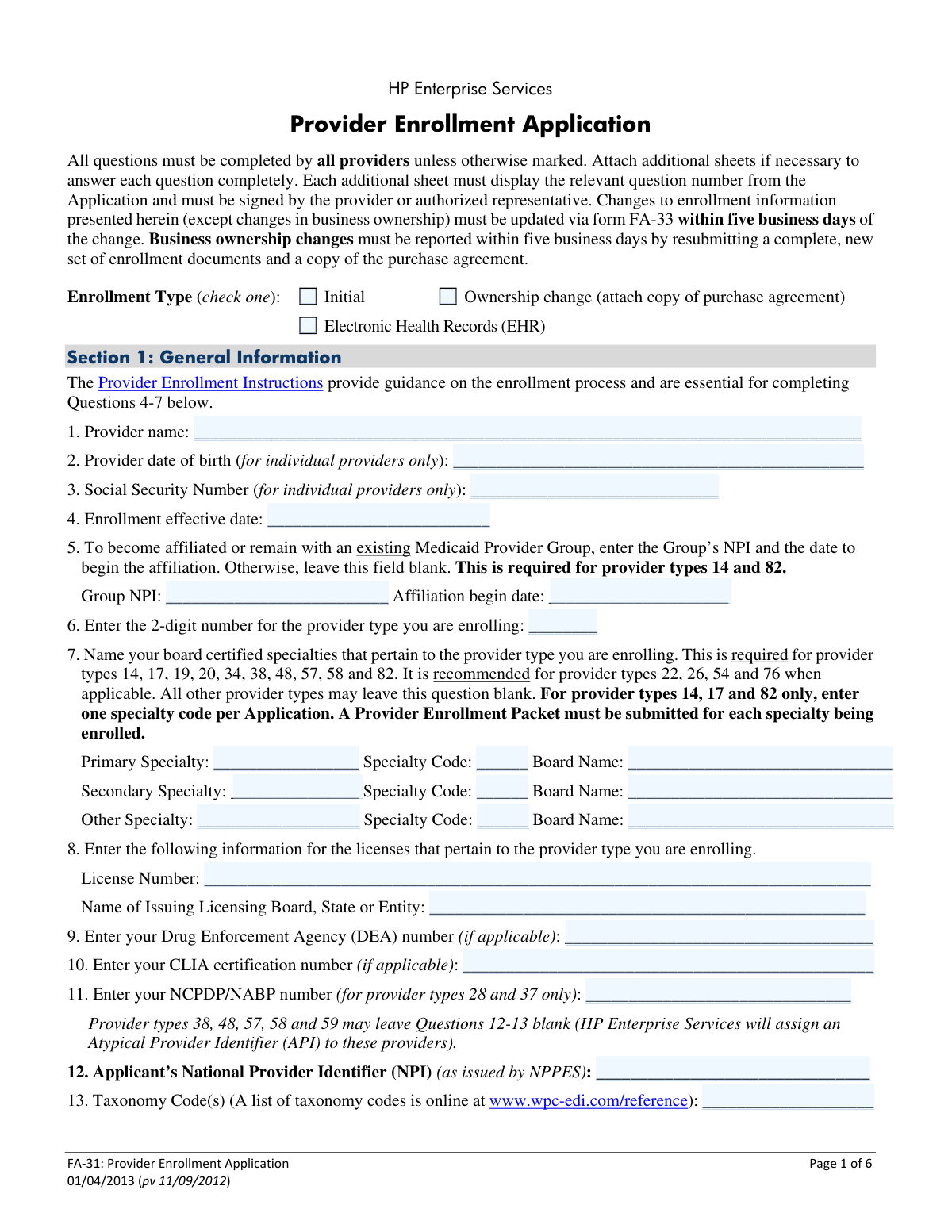
Form FA-31, the Provider Enrollment Application, is a required document for healthcare providers, groups, and facilities wishing to participate in the Nevada Medicaid and Nevada Check Up programs. It collects essential information about the provider's identity, business structure, tax details, and professional background to establish eligibility for reimbursement. Today, this form can be filled out quickly and accurately using AI-powered services like Instafill.ai, which can also convert non-fillable PDF versions into interactive fillable forms.
FA-31 is part of the
enrollment application forms, enrollment forms and provider enrollment forms categories on Instafill.
Our AI automatically handles information lookup, data retrieval, formatting, and form filling.
It takes less than a minute to fill out FA-31 using our AI form filling.
Securely upload your data. Information is encrypted in transit and deleted immediately after the form is filled out.
Form specifications
| Form name: | FA-31: Provider Enrollment Application |
| Number of pages: | 1 |
| Language: | English |
More forms in Enrollment application forms
Instafill Demo: How to fill out PDF forms in seconds with AI
How to Fill Out FA-31 Online for Free in 2026
Are you looking to fill out a FA-31 form online quickly and accurately? Instafill.ai offers the #1 AI-powered PDF filling software of 2026, allowing you to complete your FA-31 form in just 37 seconds or less.
Follow these steps to fill out your FA-31 form online using Instafill.ai:
- 1 Navigate to Instafill.ai and upload or select the Nevada FA-31 Provider Enrollment Application.
- 2 Use the AI assistant to automatically populate Section 1 with your general provider information, including name, NPI, provider type, and specialty codes.
- 3 Complete Section 2 by providing your tax and business information, service address, and payment details, including the Electronic Funds Transfer (EFT) authorization.
- 4 Fill out Section 3, the background and disclosure section, by answering questions about ownership, legal history, and any previous sanctions.
- 5 If applicable, complete the sections for specific provider types, such as facilities, DME providers, or provider groups.
- 6 Carefully review all entered information for accuracy, then e-sign the declaration on the application and the accompanying Nevada Medicaid Provider Contract.
- 7 Download the completed application packet, attach all required supporting documents as per the checklist (e.g., licenses, voided check), and submit it to Nevada Medicaid.
Our AI-powered system ensures each field is filled out correctly, reducing errors and saving you time.
Why Choose Instafill.ai for Your Fillable FA-31 Form?
Speed
Complete your FA-31 in as little as 37 seconds.
Up-to-Date
Always use the latest 2026 FA-31 form version.
Cost-effective
No need to hire expensive lawyers.
Accuracy
Our AI performs 10 compliance checks to ensure your form is error-free.
Security
Your personal information is protected with bank-level encryption.
Frequently Asked Questions About Form FA-31
This form is used by healthcare providers to apply for initial enrollment, re-enroll, or report an ownership change to participate in the Nevada Medicaid and Nevada Check Up programs.
Any individual provider, provider group, or facility that wants to provide services to Nevada Medicaid recipients must complete this application. Existing providers must also use this form to re-enroll every 36 months.
To continue as a Nevada Medicaid Provider, you must submit a new Enrollment Application and Nevada Provider Contract every 36 months from your approval date.
You must submit all documents listed on the Provider Enrollment Checklist for your specific provider type, found on the Nevada Medicaid website. This typically includes licenses, certifications, and a voided check for EFT.
No, individual providers can skip questions specifically marked for billing groups and businesses, such as questions 21-30 (business information) and 37-42 (ownership disclosure).
Yes, all providers must accept payments via EFT. You must complete the authorization in question 36 and attach an original voided check or a letter from your bank.
You must report business ownership changes within five business days by submitting a completely new set of enrollment documents, including this application and a copy of the purchase agreement.
The Service Address is the physical location where you see patients. The Mail-To address is for general correspondence, and the Pay-To address is where paper checks are sent during EFT setup.
Your application will be returned if it is incomplete or has errors, which will delay your enrollment. Use the 'Application Review' checklist to ensure all applicable questions are answered before you submit.
Yes, the form requires an original signature in dark blue or black ink. The signature date must be within 60 days of when you submit the application packet.
If the PDF is not interactive, you can use a service like Instafill.ai to convert it into a fillable form. This allows you to type your information directly into the fields before printing for submission.
Yes, services like Instafill.ai use AI to accurately auto-fill form fields from your saved profile. This can save you significant time and help reduce errors when completing the application.
You can upload the form to Instafill.ai, which makes it digitally fillable. You can then type your answers, use AI to auto-fill information, and securely save your progress online before downloading the completed form.
Compliance FA-31
Validation Checks by Instafill.ai
1
NPI Format and Validity
This check ensures the National Provider Identifier (NPI) entered in Question 12 is a 10-digit number. It is crucial because the NPI is the standard unique identifier for health care providers in administrative and financial transactions. If the NPI is incorrectly formatted or invalid, claims processing and provider identification will fail, delaying or preventing enrollment and payment.
2
Service Address is a Physical Location
This validation verifies that the Service Address in Question 31 is a physical street address and not a P.O. Box. The form explicitly states this requirement, as the service location must be a verifiable physical site where patients are seen. An invalid address could lead to application rejection and issues with site verification or audits.
3
Conditional Requirement for Group Affiliation
This check enforces a rule based on provider type. If the provider type entered in Question 6 is '14' or '82', the system must verify that the Group NPI and Affiliation begin date in Question 5 are both completed. This is important for ensuring that providers who must be affiliated with a group are correctly linked for billing and credentialing purposes.
4
Signature Date Recency
This validation confirms that the signature date in the 'Declaration' section on page 6 is within 60 days of the application's submission date. This rule ensures that the information provided is current and the provider's attestation is recent at the time of processing. An outdated signature will cause the application to be returned, delaying the enrollment process.
5
Tax Identifier and Entity Type Consistency
This check validates that the Tax Identifier in Question 19 (SSN or Federal Tax ID) is appropriate for the entity type selected in Question 14. For example, a 'Corporation' must provide a Federal Tax ID, whereas an 'Individual provider' may use an SSN. This is critical for correct tax reporting to the IRS and prevents mismatches that would cause financial and legal complications.
6
Conditional Requirement for Disclosure Explanations
This validation ensures that for any 'Yes/No' disclosure question (e.g., Q38, Q45, Q47), a 'Yes' answer triggers a requirement for the corresponding explanation fields to be filled. Missing details for a 'Yes' answer makes it impossible to assess potential risks or eligibility issues related to sanctions, criminal history, or exclusions. Incomplete disclosures will halt the application pending further information.
7
Provider Type and Specialty Requirement
This check verifies that if a provider type requiring a specialty (e.g., 14, 17, 19, 20) is entered in Question 6, then the 'Primary Specialty' fields in Question 7 are completed. This is essential for proper credentialing and ensuring the provider is correctly categorized for service authorizations and billing. Failure to provide a required specialty will result in an incomplete application.
8
EFT Information Completeness
This validation checks the logic in Question 36 regarding Electronic Funds Transfer (EFT). If the provider does not check the box to receive payment through an existing group NPI, the system must confirm that a bank account number is entered and an attachment (voided check or bank letter) is present. Since EFT is mandatory, failure to provide this information will prevent the setup of payments and may lead to termination of enrollment.
9
Individual vs. Business Field Logic
This check ensures that questions designated for businesses only (Questions 21-30) are left blank if the applicant selected 'Individual provider' in Question 14. This prevents individual providers from being burdened with irrelevant questions and reduces data entry errors. It also ensures that business entities provide the necessary operational details.
10
Date of Birth Validity for Individual Providers
This validation confirms that the 'Provider date of birth' in Question 2 is entered only for individual providers, is in a valid MM/DD/YYYY format, and represents a plausible age (e.g., over 18). This is a basic identity verification step and is crucial for background checks and preventing fraudulent applications. An invalid or future date would immediately flag the application for review or rejection.
11
Cross-Form Legal Name Consistency
This check ensures the 'Legal Name as Registered with the Internal Revenue Service (IRS)' from Question 17 exactly matches the 'Legal Business Name' on the Provider Contract (page 5). This alignment is critical for ensuring the legal and financial agreements are tied to the correct entity as registered with the IRS. A mismatch can cause contract invalidation and significant payment and tax reporting issues.
12
Ownership Percentage Validation
For each person listed in the ownership disclosure (Question 37), this check verifies that the 'Percentage of ownership' is a numeric value. It also flags entries that are not greater than 0 or are over 100. This information is required for federal reporting and to understand the controlling interests of the entity, and incorrect data can lead to compliance failures.
13
Conditional Requirement for NCPDP/NABP Number
This validation enforces that if the provider type in Question 6 is '28' (Pharmacy) or '37' (DME Pharmacy), the NCPDP/NABP number in Question 11 must be filled out. This number is a required industry identifier for pharmacy-related claims and transactions. Without it, the provider cannot be properly enrolled or reimbursed for pharmacy services.
14
Address County Field Completion
This check verifies that the 'COUNTY' part of the address is filled in for the Service Address (Q31) and any other provided addresses. County information is often used for determining service areas, regional reimbursement rates, and for statistical reporting. Omitting the county can lead to data processing errors and application delays.
Common Mistakes in Completing FA-31
Applicants often enter their 'Doing Business As' (DBA) name or a slight variation in the 'Legal Name' field (Question 17). This mismatch with the name associated with their Tax ID on IRS records will cause validation failures. Consequently, the application will be rejected, and the issuance of 1099 tax forms will be delayed or incorrect. To avoid this, applicants must enter the exact legal name registered with the IRS and use AI-powered tools like Instafill.ai to cross-reference and validate this information automatically.
In Questions 6 and 7, providers must enter specific 2-digit provider type codes and corresponding specialty codes. Applicants may not know their codes, guess, or fail to provide one for each specialty they are enrolling. This error is critical as it directly impacts how services are categorized and reimbursed, leading to claim denials and processing delays. Always consult the official Nevada Medicaid provider manuals or use a tool like Instafill.ai, which can help select the correct, up-to-date codes based on your provider profile.
This form is a flat, non-fillable PDF, forcing applicants to print and complete it by hand. Poor or rushed handwriting can make critical information like names, NPIs, and license numbers impossible to read accurately. This leads to errors in the provider's file, claim rejections, and often requires the provider to resubmit the entire application. To prevent this, print legibly in all caps using black ink, or use a tool like Instafill.ai which can convert the non-fillable PDF into a fillable version, allowing you to type your answers for perfect clarity.
The EFT section (Question 36) requires an original voided check or a formal bank letter; it explicitly forbids photocopies and deposit slips. Many applicants attach a photocopy for convenience or a deposit slip, which are not accepted and will halt the payment setup process. This mistake directly delays all reimbursements, as EFT is mandatory. To avoid this, tape an original voided check directly onto the form or obtain a signed letter from your bank containing the routing and account numbers.
Question 31 explicitly states that the service address must be a physical street address where services are rendered, not a P.O. Box. Applicants sometimes enter a P.O. Box out of habit, but this is not compliant with enrollment requirements. Using a P.O. Box will cause the application to be returned for correction, delaying the entire enrollment process. Always provide the full street address, including the county, for the location where patients are seen.
When enrolling as a group, Question 59 requires every individual provider being affiliated to physically sign the form with an original signature. Coordinating and collecting these signatures can be a logistical challenge, often resulting in missing or photocopied signatures. An application submitted without all required original signatures is considered incomplete and will be rejected, preventing the group and its members from billing Medicaid. Ensure each provider signs the same original document before submission.
The declaration on page 6 and the associated contract must be signed and dated within 60 days of submission. Applicants sometimes prepare the packet far in advance, causing the signature date to become 'stale.' This is a simple administrative error that leads to automatic rejection, forcing the applicant to re-sign, re-date, and resubmit the entire package. Always check the signature date just before mailing the application to ensure it is within the 60-day window.
The application repeatedly refers to provider-specific 'Enrollment Checklists' which list all required attachments, such as licenses and certifications. Applicants often overlook this requirement or forget to include one or more necessary documents. An incomplete packet will be returned, significantly delaying the enrollment timeline. Before submitting, locate the correct checklist for your provider type on the Nevada Medicaid website and meticulously verify that every required document is included.
Question 37 requires detailed information for every person with 5% or more ownership, which can be complex for large practices. Applicants frequently miss listing all relevant individuals, forget to include SSNs/Tax IDs, or fail to disclose other businesses owned by these individuals. Incomplete disclosure can lead to application rejection and potential fraud investigations. To prevent this, carefully gather all required information for every owner and use additional signed sheets if necessary.
Questions 45-49 require full disclosure of any criminal convictions, sanctions, or professional license revocations for any owner or manager. Applicants may be tempted to omit this information, but background checks are standard procedure, and non-disclosure is considered falsification. This leads to immediate denial and potential debarment from the program. It is essential to answer these questions truthfully and completely, providing all requested details on attached sheets if necessary.
Saved over 80 hours a year
“I was never sure if my IRS forms like W-9 were filled correctly. Now, I can complete the forms accurately without any external help.”
Kevin Martin Green
Your data stays secure with advanced protection from Instafill and our subprocessors




Robust compliance program
Transparent business model
You’re not the product. You always know where your data is and what it is processed for.
ISO 27001, HIPAA, and GDPR
Our subprocesses adhere to multiple compliance standards, including but not limited to ISO 27001, HIPAA, and GDPR.
Security & privacy by design
We consider security and privacy from the initial design phase of any new service or functionality. It’s not an afterthought, it’s built-in, including support for two-factor authentication (2FA) to further protect your account.
Fill out FA-31 with Instafill.ai
Worried about filling PDFs wrong? Instafill securely fills fa-31-provider-enrollment-application forms, ensuring each field is accurate.
