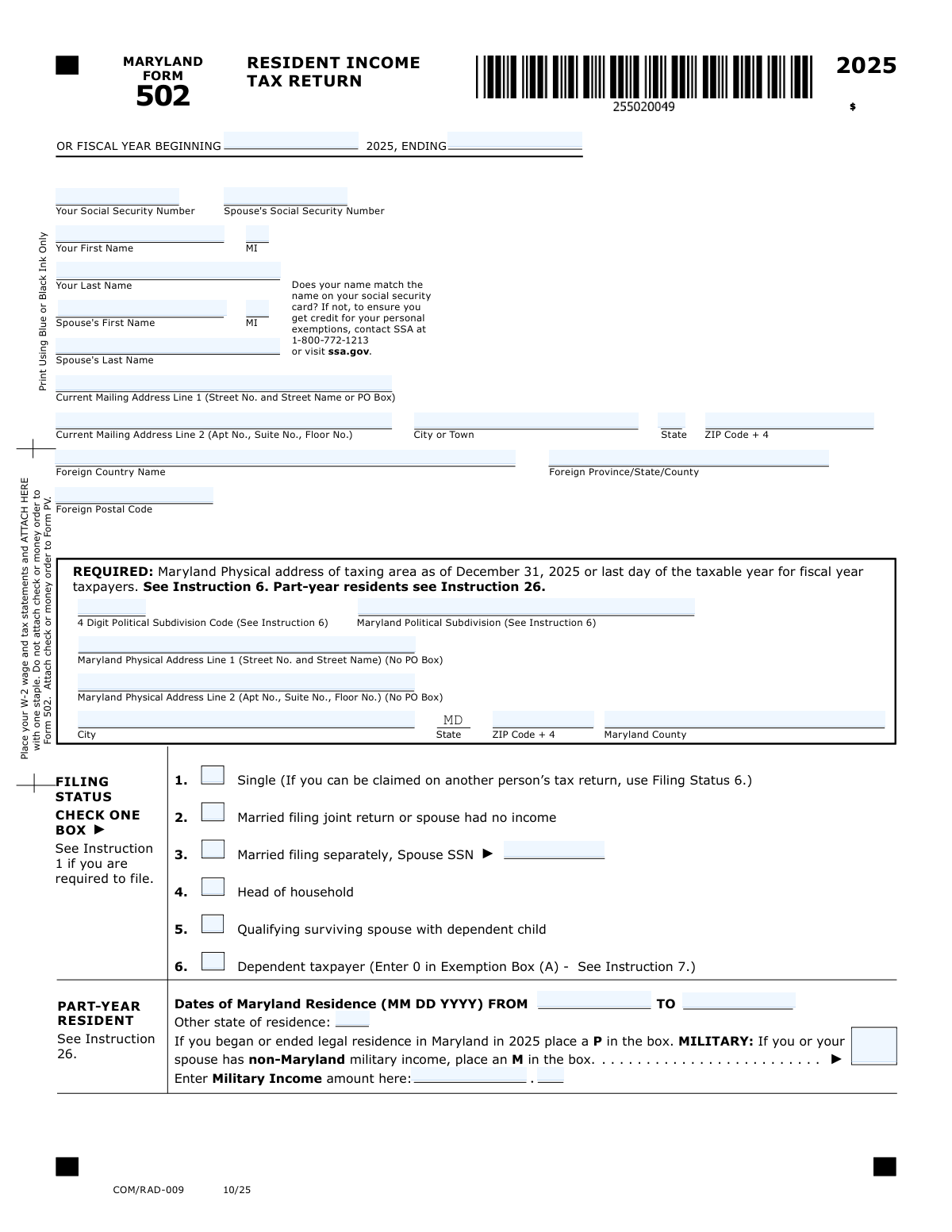
Yes! You can use AI to fill out Form 502, Maryland Resident Income Tax Return
Form 502, the Maryland Resident Income Tax Return, is the primary document used by Maryland residents to file their annual state and local income taxes with the Comptroller of Maryland. It is essential for reporting all sources of income, claiming exemptions and deductions, and calculating the final tax liability or refund amount for the tax year. This comprehensive form covers everything from personal information and filing status to specific Maryland additions, subtractions, and credits. Today, this form can be filled out quickly and accurately using AI-powered services like Instafill.ai, which can also convert non-fillable PDF versions into interactive fillable forms.
Our AI automatically handles information lookup, data retrieval, formatting, and form filling.
It takes less than a minute to fill out Form 502 using our AI form filling.
Securely upload your data. Information is encrypted in transit and deleted immediately after the form is filled out.
Form specifications
| Form name: | Form 502, Maryland Resident Income Tax Return |
| Number of fields: | 187 |
| Number of pages: | 4 |
| Language: | English |
| Categories: | income forms, income tax forms, tax forms |
Instafill Demo: How to fill out PDF forms in seconds with AI
How to Fill Out Form 502 Online for Free in 2026
Are you looking to fill out a FORM 502 form online quickly and accurately? Instafill.ai offers the #1 AI-powered PDF filling software of 2026, allowing you to complete your FORM 502 form in just 37 seconds or less.
Follow these steps to fill out your FORM 502 form online using Instafill.ai:
- 1 Navigate to Instafill.ai and upload or select the Maryland Form 502.
- 2 Provide your personal information, including names, Social Security numbers, and address, allowing the AI to populate the relevant fields.
- 3 Select your filing status, enter exemption details, and provide information about your Maryland residency and health care coverage.
- 4 Input your financial data, starting with your federal Adjusted Gross Income, and then use the guided prompts to enter Maryland-specific income additions and subtractions.
- 5 Choose your deduction method (standard or itemized) and enter any applicable tax credits for which you qualify; the AI will help with calculations.
- 6 Review the automatically calculated total tax, payments, and balance due or overpayment. If you are due a refund, enter your direct deposit information.
- 7 Securely sign the form, download the completed document, and follow the provided instructions for filing with the Comptroller of Maryland.
Our AI-powered system ensures each field is filled out correctly, reducing errors and saving you time.
Why Choose Instafill.ai for Your Fillable Form 502 Form?
Speed
Complete your Form 502 in as little as 37 seconds.
Up-to-Date
Always use the latest 2026 Form 502 form version.
Cost-effective
No need to hire expensive lawyers.
Accuracy
Our AI performs 10 compliance checks to ensure your form is error-free.
Security
Your personal information is protected with bank-level encryption.
Frequently Asked Questions About Form Form 502
This form is the Maryland Resident Income Tax Return, used to report your income, calculate your state and local taxes, and determine if you owe additional tax or are due a refund from the Comptroller of Maryland.
You generally must file this form if you are a Maryland resident or were a part-year resident who is required to file a federal income tax return. It is also used by non-residents who earn income from Maryland sources.
This is a four-digit code identifying your county or Baltimore City for local tax purposes. The form instructions, specifically Instruction 6, provide a list of these codes to help you find the correct one for your physical address.
You must enter the start and end dates of your Maryland residency for the tax year in the designated fields. You should also enter 'P' in the 'Part-Year / Military Indicator' box and report income received during your period of nonresidence on the appropriate line.
You must check the box indicating you lack health care coverage and provide your date of birth. You can also authorize the Comptroller to share your information with the Maryland Health Connection to check your eligibility for low-cost health care.
The standard deduction is a fixed dollar amount, while itemized deductions are specific expenses from your federal Schedule A. You must check the box for the method you choose and enter the corresponding deduction amount on Line 17.
To get a direct deposit, check the box on line 53a to authorize it and provide your bank's routing number, your account number, and specify whether it is a checking or savings account.
These are adjustments made to your federal adjusted gross income (AGI) to calculate your Maryland AGI, as some income is taxed differently by the state. For example, you must add interest from other states' bonds and may be able to subtract certain pension income.
The codes for other additions to your income are found in Instruction 12 of the form's official instructions. You must enter the appropriate code letter(s) and the corresponding dollar amount on line 5.
Yes, services like Instafill.ai use AI to auto-fill form fields accurately and save time. These tools can pull your information from various sources to populate the form quickly and help reduce errors.
Simply upload the form to the Instafill.ai platform, where its AI will identify all the fields. You can then connect your data, and the system will automatically populate the form with your information for you to review and finalize.
If you have a non-fillable PDF, you can use a service like Instafill.ai. It is designed to convert flat, non-interactive PDFs into interactive, fillable forms that you can complete easily on your computer.
To claim dependent exemptions, you must first complete and attach Form 502B, the Dependents' Information Form. You will then transfer the total number of dependents and the calculated exemption amount from Form 502B onto this main tax form.
Your mailing address is where you receive correspondence, while your Maryland physical address (which cannot be a P.O. Box) is required to determine your correct local tax rate. Both are necessary if they are different.
Compliance Form 502
Validation Checks by Instafill.ai
1
Validates Social Security Number Format
This check ensures that the 'Your social security number' and 'Spouse's Social Security Number' fields are entered in a valid format, either as a nine-digit number (XXXXXXXXX) or with hyphens (XXX-XX-XXXX). It prevents data entry errors for a critical identifier used for processing the tax return. Failure to provide a correctly formatted SSN will result in a rejection of the form submission until corrected.
2
Ensures Fiscal Year Period is Logical
This validation confirms that the 'Fiscal Year Begin Date' is before the 'Fiscal Year End Date'. It also checks that the duration between the two dates constitutes a valid fiscal period, typically one full year. This is crucial for defining the correct tax period and preventing nonsensical date ranges that would make tax calculation impossible.
3
Verifies Mutually Exclusive Filing Status
This check ensures that only one filing status checkbox (e.g., 'Single', 'Married filing joint return', 'Head of household') is selected. Since a taxpayer can only have one filing status per return, this validation prevents contradictory or ambiguous information. If more than one status is selected, the user will be prompted to choose only the single, most appropriate status.
4
Conditional Requirement for Spouse's Information
This validation enforces that if the filing status is 'Married filing joint return' or 'Married filing separately', the 'Spouse's First Name', 'Spouse's Last Name', and 'Spouse's Social Security Number' fields must be completed. This is necessary to correctly identify both individuals on the return for joint processing or cross-referencing separate returns. The submission will be blocked if this required information is missing for a married filing status.
5
Validates Consistency Between US and Foreign Addresses
This check ensures that a filer provides either a US address or a foreign address, but not both. If the 'Foreign Country' field is filled, then the domestic 'State' and 'ZIP Code +4' fields should be empty, and vice-versa. This prevents conflicting address information and ensures the mailing address is clear and unambiguous for correspondence and refunds.
6
Prohibits PO Box in Maryland Physical Address
This validation specifically checks the 'Maryland Street Address (No PO Box)' field to ensure it does not contain 'PO Box' or similar variations. A physical address is required for determining the correct local taxing jurisdiction, which cannot be established with a PO Box. If a PO Box is detected, the user will be required to enter a valid physical street address.
7
Validates Part-Year Residency Fields
This check verifies that if a 'Residence End Date' is provided, the 'Part‑Year / Military Indicator' is set to 'P' and the 'Other State of Residence' field is filled. This ensures that individuals who were not full-year Maryland residents provide all necessary information to correctly calculate their part-year tax liability. An incomplete entry would lead to incorrect tax assessment.
8
Conditional Entry for Military Income
This validation ensures that the 'Military Income - Dollars' and 'Military Income - Cents' fields are only populated if the 'Part‑Year / Military Indicator' field is set to 'M'. This prevents stray data entry and ensures that military income is only reported when the filer has explicitly indicated they have non-Maryland military income. Incorrect entries would be flagged for removal.
9
Verifies Exemption Count Calculation
This check confirms that the number entered in the 'Yourself and Spouse - Count' field accurately reflects the number of checkboxes selected for the 'Yourself' and 'Spouse' exemptions. This simple arithmetic validation prevents clerical errors in the exemption section. A mismatch would trigger an error, prompting the user to correct the count before proceeding.
10
Requires Date of Birth for No Health Coverage Claim
This validation ensures that if the 'If you do not have health care coverage' checkbox is checked, the corresponding 'Your date of birth (No coverage)' field is filled with a valid date. The same logic applies to the spouse's checkbox and date of birth field. This information is required by the state to verify identity and assess potential eligibility for health care programs.
11
Validates Total Additions Calculation
This check verifies that the 'Total federal AGI and Maryland additions' (Line 7) is the correct sum of 'Adjusted Gross Income (federal)' (Line 1) and 'Total additions' (Line 6). This ensures the mathematical accuracy of the form's income section before further calculations are made. A miscalculation here would invalidate the entire tax computation that follows.
12
Ensures Proper Deduction Method Selection
This validation confirms that the user has selected either the 'Standard deduction method' or the 'Itemized Deduction Method' checkbox, but not both. Furthermore, if 'Itemized Deduction Method' is chosen, it verifies that the 'Federal itemized deductions (Line 17a)' field is populated. This logic guides the user to correctly report their deductions according to their chosen method.
13
Prevents Contradictory Balance Due and Overpayment
This check ensures that the form does not contain values greater than zero in both the 'Balance due' (Line 47) and 'Overpayment' (Line 48) fields simultaneously. A return can only result in one of these outcomes, so having both indicates a major calculation error. The system would flag this as a critical error requiring recalculation of the total tax liability and payments.
14
Verifies Overpayment Distribution
This validation confirms that the sum of the 'Amount of overpayment TO BE APPLIED TO 2026 ESTIMATED TAX' (Line 49) and the 'Amount of overpayment TO BE REFUNDED TO YOU' (Line 50) exactly equals the total 'Overpayment' (Line 48). This is a critical check to ensure the filer's entire overpayment is accounted for and allocated as requested. Any discrepancy would halt processing until the amounts are reconciled.
15
Conditional Requirement for Direct Deposit Information
This check ensures that if the direct deposit authorization box ('53a. Check if you authorize...') is checked, then the 'Routing Number', 'Account Number', and an account type ('checking' or 'savings') are all provided. This prevents refund delays caused by incomplete bank information. If the box is checked but the details are missing, the user will be prompted to either provide the information or uncheck the box.
16
Validates Preparer's PTIN Format
This check validates that the 'Preparer’s PTIN' field, if filled, follows the legally required format, which is a capital 'P' followed by eight digits (e.g., P12345678). This is essential for regulatory compliance and identifying the paid preparer responsible for the return. An invalid format would be rejected to ensure the preparer's credentials are properly recorded.
Common Mistakes in Completing Form 502
This form requires a specific four-digit code for the Maryland political subdivision, which must be looked up in the tax instructions. Filers often guess, use a ZIP code, or leave it blank, leading to incorrect local tax calculations and processing delays. To avoid this, carefully consult the form instructions to find the precise code for your county or city. AI-powered tools like Instafill.ai can automatically populate the correct code based on your physical address, preventing this common error.
The form has separate sections for the 'Current Mailing Address' and the 'Maryland Physical Address.' A common error is entering a P.O. Box in the physical address field, which is not allowed and is used to determine local tax liability. This can result in an incorrect tax assessment and return rejection. Always enter your actual street address in the physical address section and use the mailing address section for P.O. Boxes or alternative mailing locations.
The form requires names and Social Security Numbers to be entered exactly as they appear on the Social Security card. Filers may use nicknames, forget a middle initial, or transpose SSN digits, causing a mismatch with the Social Security Administration's database. This is a primary cause for return rejection, delayed refunds, and denial of claimed exemptions or credits. Using a secure tool like Instafill.ai can help by storing your information correctly and populating it consistently across forms, reducing the risk of typos.
Filers who were not full-year Maryland residents often make mistakes in the part-year section. Common errors include forgetting to enter the dates of Maryland residency, failing to report income earned during the non-resident period, or using the wrong indicator ('P' for part-year vs. 'M' for military). These mistakes lead to an incorrect calculation of Maryland-sourced income and tax liability, potentially triggering an audit or notice.
When reporting 'Other additions' (Line 5) or subtractions from Form 502SU (Line 13), filers must enter specific code letters from the instructions to identify the type of income adjustment. People frequently enter the dollar amount but forget to include the corresponding code. Without the code, the tax agency cannot validate the adjustment, which will likely be disallowed, increasing your tax due and causing processing delays. Smart form fillers can prompt you for the required codes when you enter a corresponding dollar amount.
The Maryland tax calculation begins with the Adjusted Gross Income from the federal return. A simple data entry mistake when copying this number to Line 1 of the state form will cause every subsequent calculation to be incorrect. This can lead to a significant underpayment or overpayment of tax, resulting in penalties or a delayed refund. Using an AI tool like Instafill.ai that can pull data from other documents helps eliminate these manual transcription errors.
Typos in the routing number (which must be 9 digits) or the bank account number are extremely common when requesting a direct deposit refund. This mistake can cause the refund to be rejected by the bank, sent to the wrong account, or delayed for weeks while a paper check is issued instead. To prevent this, carefully copy the numbers from a check or your online banking portal. AI-powered tools like Instafill.ai can validate the format of routing numbers and help prevent typos by auto-filling saved bank information.
The exemptions section requires checking boxes for yourself, your spouse, and dependents, and then correctly summing the counts and corresponding dollar amounts in separate fields. Filers often make simple arithmetic errors or forget to include exemptions for age (65 or over) or blindness. An incorrect exemption amount directly impacts your taxable income and final tax liability. AI form fillers like Instafill.ai can automatically perform these calculations based on the boxes you check, eliminating simple arithmetic mistakes.
Many financial fields on this form are split into separate boxes for dollars and cents, a format that can lead to errors. People might enter a decimal in the dollar field, place the cents value in the dollar field, or misalign the numbers entirely. This can change a $123.45 entry into $12,345, drastically altering the tax calculation. If the form is a non-fillable PDF, a tool like Instafill.ai can convert it to a fillable version with properly formatted fields to prevent this type of data entry error.
This form requires filers to address their health care coverage status, including checking a box and providing a date of birth if uncovered. It's easy to overlook this section, especially the authorization to share information with the Maryland Health Connection. Missing this information can result in follow-up correspondence from the state and a missed opportunity to be pre-screened for low-cost health care. Always review this section carefully before signing.
Saved over 80 hours a year
“I was never sure if my IRS forms like W-9 were filled correctly. Now, I can complete the forms accurately without any external help.”
Kevin Martin Green
Your data stays secure with advanced protection from Instafill and our subprocessors

Robust compliance program
Transparent business model
You’re not the product. You always know where your data is and what it is processed for.
ISO 27001, HIPAA, and GDPR
Our subprocesses adhere to multiple compliance standards, including but not limited to ISO 27001, HIPAA, and GDPR.
Security & privacy by design
We consider security and privacy from the initial design phase of any new service or functionality. It’s not an afterthought, it’s built-in, including support for two-factor authentication (2FA) to further protect your account.
Fill out Form 502 with Instafill.ai
Worried about filling PDFs wrong? Instafill securely fills form-502-maryland-resident-income-tax-return forms, ensuring each field is accurate.