Yes! You can use AI to fill out Form DE 24, Change of Employer Account Information
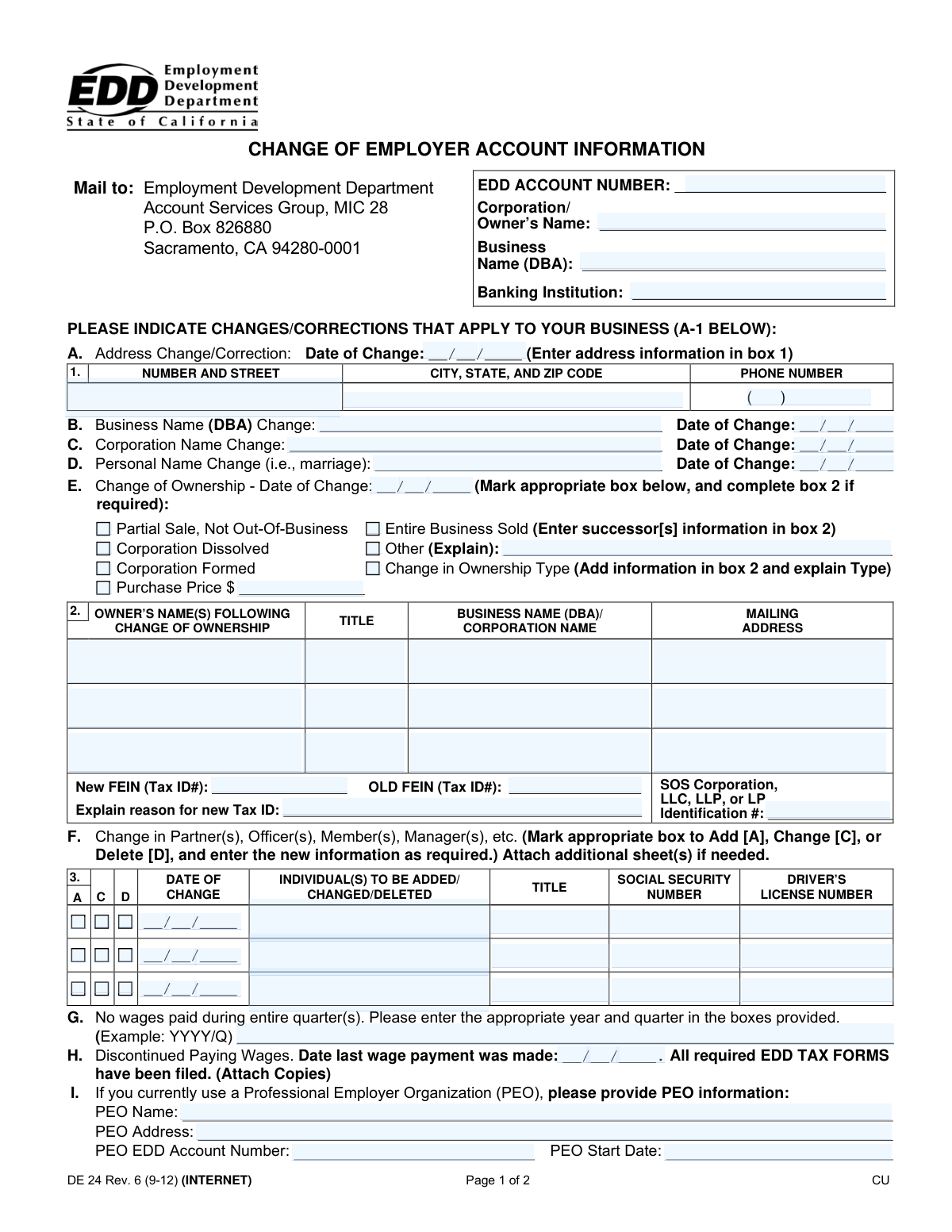
Form DE 24, Change of Employer Account Information, is a document used by businesses in California to notify the Employment Development Department (EDD) of significant updates to their employer account. These changes can include a new business address, a change in business or corporation name, a change in ownership, or updates to partner or officer information. Keeping this information current is crucial for maintaining compliance with state employment tax regulations. Today, this form can be filled out quickly and accurately using AI-powered services like Instafill.ai, which can also convert non-fillable PDF versions into interactive fillable forms.
DE 24 is part of the
employer forms category on Instafill.
Our AI automatically handles information lookup, data retrieval, formatting, and form filling.
It takes less than a minute to fill out DE 24 using our AI form filling.
Securely upload your data. Information is encrypted in transit and deleted immediately after the form is filled out.
Form specifications
| Form name: | Form DE 24, Change of Employer Account Information |
| Number of fields: | 99 |
| Number of pages: | 2 |
| Filled form examples: | Form DE 24 Examples |
| Language: | English |
More forms in Employer forms
Instafill Demo: How to fill out PDF forms in seconds with AI
How to Fill Out DE 24 Online for Free in 2026
Are you looking to fill out a DE 24 form online quickly and accurately? Instafill.ai offers the #1 AI-powered PDF filling software of 2026, allowing you to complete your DE 24 form in just 37 seconds or less.
Follow these steps to fill out your DE 24 form online using Instafill.ai:
- 1 Navigate to Instafill.ai and upload or select Form DE 24, Change of Employer Account Information.
- 2 Enter your basic employer account information, including your EDD Account Number, Corporation/Owner's Name, and Business Name (DBA).
- 3 Indicate the specific changes that apply to your business by checking the appropriate boxes, such as address change, name change, or change of ownership.
- 4 Follow the AI-guided prompts to fill in the required details for each selected change, such as new addresses, successor information, or new partner details.
- 5 Report any changes to your wage payment status, such as discontinuing wages or going out of business, if applicable.
- 6 Carefully review all the information you have entered for accuracy and completeness.
- 7 Sign and date the form, providing your printed name and title, before submitting it to the Employment Development Department.
Our AI-powered system ensures each field is filled out correctly, reducing errors and saving you time.
Why Choose Instafill.ai for Your Fillable DE 24 Form?
Speed
Complete your DE 24 in as little as 37 seconds.
Up-to-Date
Always use the latest 2026 DE 24 form version.
Cost-effective
No need to hire expensive lawyers.
Accuracy
Our AI performs 10 compliance checks to ensure your form is error-free.
Security
Your personal information is protected with bank-level encryption.
Frequently Asked Questions About Form DE 24
The DE 24 form is used to report changes to your business information to the California Employment Development Department (EDD). This includes updates to your address, business name, ownership, or wage payment status.
Any employer with a California EDD account number must file this form to report any changes to their business account information. It ensures the EDD has the most current details for your business.
You only need to fill out the top identification section with your EDD account number and business name, then complete Section A for the address change. Finally, sign and date the form on page 2.
A Business Name (DBA) change (Section B) is for your operating name, while a Corporation Name change (Section C) is for the legal name of your corporation. You should report the change that aligns with your official business registration.
If you sold your entire business, you must check the appropriate box in Section E, provide the date of the sale, and enter the new owner's (successor's) information in box 2. This includes their name, title, and contact details.
If you have stopped paying wages for one or more entire quarters but may resume in the future, you should report the specific quarters in Section G. Use Section H if you have permanently discontinued paying wages.
Mail the completed and signed form to the Employment Development Department, Account Services Group, MIC 28, P.O. Box 826880, Sacramento, CA 94280-0001.
Yes, the EDD encourages employers to use e-Services for Business to manage their payroll tax account online. You can update addresses, file reports, and make other changes through their portal at https://eddservices.edd.ca.gov.
The form must be signed by an officer, owner, member, general partner, or an authorized agent who has a power of attorney on file with the EDD. Signatures from other third parties are not accepted.
The form provides space for three changes in Section F. If you have more changes to report, you must attach an additional sheet with all the required information for each individual.
Yes, services like Instafill.ai use AI to accurately auto-fill form fields with your saved information, which can save you time and help prevent errors.
Upload the DE 24 PDF to the Instafill.ai platform. The AI will make the form fillable, and you can use its features to automatically populate your business information before printing for signature.
Services like Instafill.ai can convert flat, non-fillable PDFs into interactive, fillable forms. This allows you to easily type your information into the fields on your computer before printing.
Your EDD Account Number is an eight-digit number assigned to your business by the EDD. You can find it on previous EDD correspondence, such as tax forms, payment coupons, or notices.
Compliance DE 24
Validation Checks by Instafill.ai
1
EDD Account Number Format
This check verifies that the 'EDD Account Number' is entered in the correct format (e.g., an 8-digit number, potentially with hyphens). It is crucial for correctly identifying the employer's account in the system. If the format is incorrect, the system will reject the submission and prompt the user to enter a valid account number, preventing processing errors and delays.
2
At Least One Change Indicated
This validation ensures that the user has selected at least one type of change from sections A through J. The purpose of the form is to report changes, so a submission with no changes indicated is invalid. If no change is selected, the user will be prompted to select the change that applies to their business before they can submit the form.
3
Conditional Requirement for Change Details
This check ensures that if a user indicates a specific change (e.g., checks the box for 'Address Change/Correction'), they must also fill out the corresponding required fields (e.g., 'Date of Change' and the address fields in box 1). This prevents incomplete submissions that cannot be processed. Failure to provide the necessary details will result in an error message highlighting the missing information.
4
Change of Ownership Successor Information
This validation is triggered if the user checks 'Entire Business Sold' or 'Change in Ownership Type' in Section E. It verifies that the successor information in box 2 (Owner's Name, Title, Address, etc.) is completed. This information is legally required to transfer tax responsibilities correctly. If box 2 is empty, the form submission will be blocked until the successor details are provided.
5
SSN Format Validation
This check validates that any Social Security Number entered in Section F for partners or officers follows the standard 9-digit format (XXX-XX-XXXX). Correct SSN formatting is essential for accurate identification and record-keeping. An invalid format will trigger an error, asking the user to correct the entry before proceeding.
6
Signature Date Chronology
This validation compares the 'Signature Date' at the bottom of the form with all other 'Date of Change' fields. It ensures the signature date is on or after the latest change date reported on the form. This confirms that the signatory is attesting to changes that have already occurred. If the signature date precedes a change date, an error will be displayed to correct the inconsistency.
7
No Wages Paid Quarter Format
This check specifically targets Section G, 'No wages paid during entire quarter(s)'. It validates that the entry strictly follows the 'YYYY/Q' format, where YYYY is a valid four-digit year and Q is a single digit from 1 to 4. This ensures data integrity for payroll reporting. An incorrect format will result in a validation error, with instructions on how to format the entry correctly.
8
Out of Business Forwarding Address Requirement
This is a logical consistency check that links Section J ('Out of Business') with Section A-1 ('Address Change'). If a user indicates the business is out of business, this validation ensures that the address fields in box A-1 are filled out to serve as a forwarding address for final correspondence. If Section J is filled but A-1 is empty, the user will be prompted to provide a forwarding address.
9
FEIN Consistency and Justification
This check verifies that the 'New FEIN' and 'Old FEIN' entered in Section E are not identical, as this would not constitute a change. Furthermore, if a 'New FEIN' is provided, it ensures that the 'Explain reason for new Tax ID' field is not empty. This is critical for understanding the nature of the business structure change. A failed validation will require the user to correct the FEINs or provide the necessary explanation.
10
Partner/Officer Action Selection
For each row used in Section F ('Change in Partner(s), Officer(s), etc.'), this validation ensures that exactly one action checkbox (Add, Change, or Delete) is selected. Submitting a row with no action or multiple actions is ambiguous and cannot be processed. The system will flag any row that does not have one unique action selected and require the user to make a correction.
11
Signature Block Completion
This validation confirms that all fields in the signature block ('Signature', 'Print Name', 'Title', 'Phone Number', and 'Date') are completed. The signature and accompanying information are required to certify the form's contents under penalty of perjury. An incomplete signature block will prevent form submission, as it would render the document legally invalid.
12
Future Date Prevention
This is a global check applied to all date fields on the form, such as 'Date of Change', 'Date last wage payment was made', and 'Out of Business' date. It ensures that no entered date is in the future, as the form is intended to report changes that have already occurred. If a future date is detected, the system will display an error and require the user to enter a date that is today or in the past.
13
Other Explanation Field Requirement
This validation applies to Section E, 'Change of Ownership'. If the 'Other (Explain)' checkbox is marked, this check ensures the corresponding text explanation field is not left empty. This is important because the 'Other' category requires clarification to be processed correctly by the agency. If the checkbox is ticked but the explanation is missing, the user will be prompted to provide details.
14
Purchase Price Format
This check validates that the 'Purchase Price' entered in Section E is a valid numerical or currency format. It should not contain non-numeric characters (except for currency symbols and decimal points). This ensures data quality for financial reporting related to the sale of a business. An invalid entry will trigger an error message requesting a valid monetary value.
Common Mistakes in Completing DE 24
Users often forget to include their EDD Account Number or enter it with transposed digits. This number is the primary identifier for the business, and without the correct one, the EDD cannot process any changes to the account. This results in the form being rejected and returned, causing significant delays. Always double-check the number against previous EDD correspondence before submitting.
People frequently enter the 'Doing Business As' (DBA) name in the 'Corporation/Owner’s Name' field, or vice versa. These are legally distinct, and the form requires them in separate fields at the top. This error can lead to incorrect legal records and confusion in identifying the responsible entity. Ensure the legal entity name is in the 'Corporation/Owner's Name' field and the trade name is in the 'Business Name (DBA)' field.
When reporting a change of ownership (Section E), a common mistake is checking a box like 'Entire Business Sold' without completing the mandatory successor information in Box 2. The EDD cannot process a transfer of ownership without knowing who the new owner is. This oversight renders the submission incomplete and requires the EDD to contact the filer for more information, halting the process.
Section H, 'Discontinued Paying Wages,' explicitly states that all required EDD tax forms must have been filed and requires copies to be attached. Filers often check this box but neglect to include the supporting documentation. This leads to an automatic rejection of the request until the necessary documents are provided, delaying the account update or closure.
The signature block has strict requirements: only an officer, owner, member, general partner, or an authorized agent with a Power of Attorney on file can sign. A common error is having an office manager, bookkeeper, or other third party sign without the proper authority. The form clearly states these signatures will not be accepted, making the entire submission invalid and requiring a new, correctly signed form.
In Section F, users often fill in the details for a partner or officer but forget to check one of the crucial boxes: 'A' (Add), 'C' (Change), or 'D' (Delete). This ambiguity forces the EDD to guess the intended action or, more likely, return the form for clarification. To avoid this, always explicitly mark the intended action for each individual listed in this section.
Nearly every section on the form, from an address change to going out of business, requires an associated 'Date of Change'. Filers frequently provide the new information but omit the effective date of that change. Without this date, the EDD cannot accurately update the account records for the correct time period, leading to processing delays and potential compliance issues.
When a business selects Section J, 'Out of Business (Without a Successor),' the form instructs them to provide a forwarding address in Box A-1. Many people miss this instruction and leave the address section blank. This prevents the EDD from sending final tax documents, potential refunds, or other critical closing correspondence to the correct location.
The form includes several fields, such as 'Other (Explain)' in Section E and 'Explain reason for new Tax ID,' that require a written explanation. A frequent mistake is checking the 'Other' box or listing a new FEIN without providing the mandatory clarification in the corresponding text field. This makes the submission incomplete and requires follow-up from the EDD, delaying the entire process.
This form is often available as a flat, non-fillable PDF, leading users to print it and fill it out by hand. This can result in illegible handwriting, which causes data entry errors, or missed fields. Using an AI-powered tool like Instafill.ai can convert the non-fillable PDF into an interactive, fillable version, ensuring all entries are clear, properly formatted, and validated to prevent common mistakes before submission.
Saved over 80 hours a year
“I was never sure if my IRS forms like W-9 were filled correctly. Now, I can complete the forms accurately without any external help.”
Kevin Martin Green
Your data stays secure with advanced protection from Instafill and our subprocessors

Robust compliance program
Transparent business model
You’re not the product. You always know where your data is and what it is processed for.
ISO 27001, HIPAA, and GDPR
Our subprocesses adhere to multiple compliance standards, including but not limited to ISO 27001, HIPAA, and GDPR.
Security & privacy by design
We consider security and privacy from the initial design phase of any new service or functionality. It’s not an afterthought, it’s built-in, including support for two-factor authentication (2FA) to further protect your account.
Fill out DE 24 with Instafill.ai
Worried about filling PDFs wrong? Instafill securely fills form-de-24-change-of-employer-account-information forms, ensuring each field is accurate.



