Yes! You can use AI to fill out Office of Medical Assistance Programs Electronic Remittance Advice (ERA) Enrollment Application
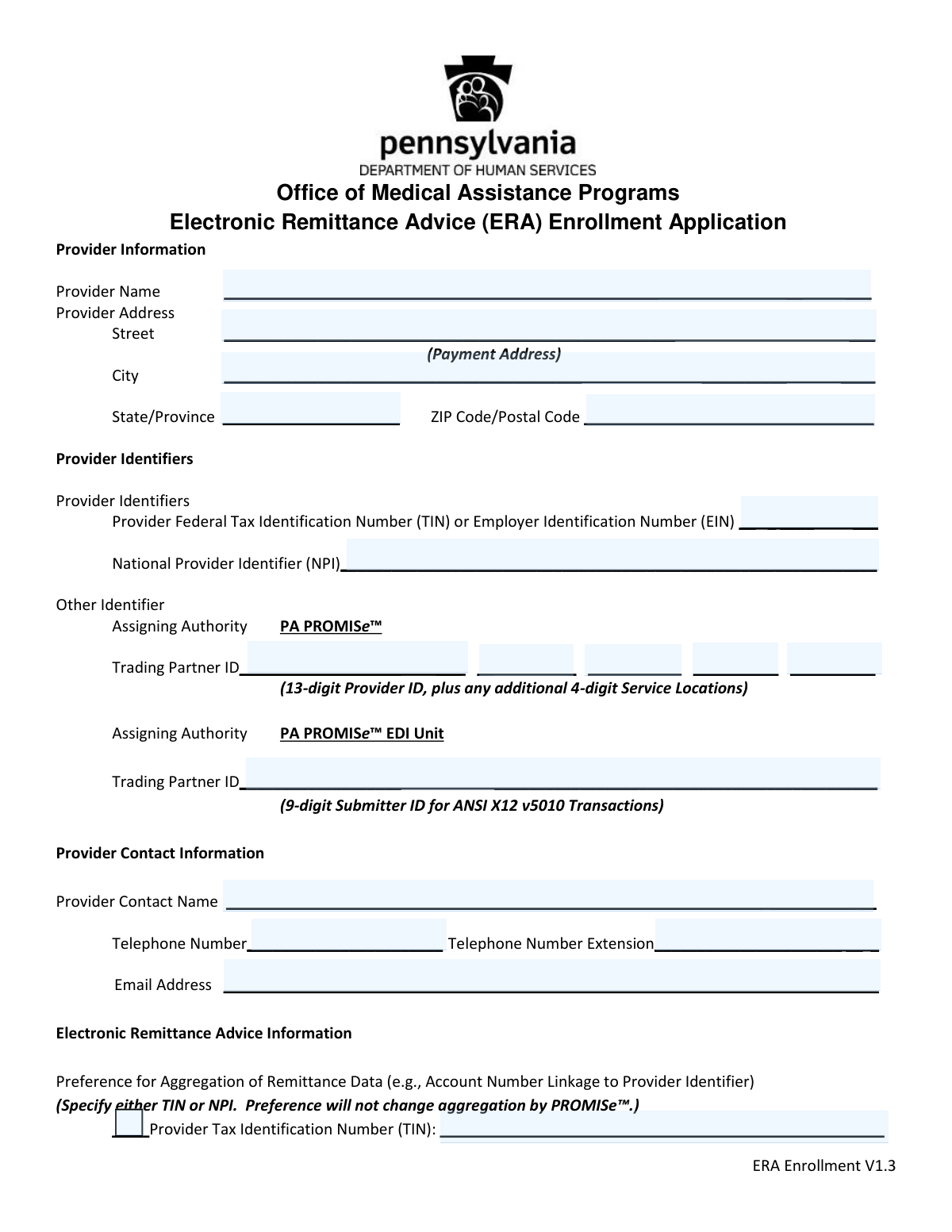
This form is an application for healthcare providers in Pennsylvania to enroll in the Electronic Remittance Advice (ERA) program with the Office of Medical Assistance Programs. By completing this form, providers can receive payment explanations electronically from Medicaid via the PA PROMISe™ system, which streamlines the reconciliation of claims. Today, this form can be filled out quickly and accurately using AI-powered services like Instafill.ai, which can also convert non-fillable PDF versions into interactive fillable forms.
MCDPA ERA Enrollment Application is part of the
enrollment application forms, enrollment forms, Medi-Cal forms, medical assistance forms, medical forms and VA medical forms categories on Instafill.
Our AI automatically handles information lookup, data retrieval, formatting, and form filling.
It takes less than a minute to fill out MCDPA ERA Enrollment Application using our AI form filling.
Securely upload your data. Information is encrypted in transit and deleted immediately after the form is filled out.
Form specifications
| Form name: | Office of Medical Assistance Programs Electronic Remittance Advice (ERA) Enrollment Application |
| Number of pages: | 1 |
| Language: | English |
More forms in Enrollment application forms
Instafill Demo: How to fill out PDF forms in seconds with AI
How to Fill Out MCDPA ERA Enrollment Application Online for Free in 2026
Are you looking to fill out a MCDPA ERA ENROLLMENT APPLICATION form online quickly and accurately? Instafill.ai offers the #1 AI-powered PDF filling software of 2026, allowing you to complete your MCDPA ERA ENROLLMENT APPLICATION form in just 37 seconds or less.
Follow these steps to fill out your MCDPA ERA ENROLLMENT APPLICATION form online using Instafill.ai:
- 1 Navigate to Instafill.ai and upload or select the MCDPA ERA Enrollment Application.
- 2 Provide your Provider Information, including the legal name and payment address, for the AI to populate the corresponding fields.
- 3 Enter your unique Provider Identifiers, such as the Federal Tax Identification Number (TIN), National Provider Identifier (NPI), and PA PROMISe™ Trading Partner ID.
- 4 Input the name, phone number, and email for the designated provider contact person.
- 5 Specify your preferred method of retrieval (e.g., Clearinghouse) and fill in the clearinghouse's information if applicable.
- 6 Select the reason for submission: New Enrollment, Change Enrollment, or Cancel Enrollment.
- 7 Review all the information auto-filled by the AI, then provide an authorized signature and the submission date before downloading the completed form to mail.
Our AI-powered system ensures each field is filled out correctly, reducing errors and saving you time.
Why Choose Instafill.ai for Your Fillable MCDPA ERA Enrollment Application Form?
Speed
Complete your MCDPA ERA Enrollment Application in as little as 37 seconds.
Up-to-Date
Always use the latest 2026 MCDPA ERA Enrollment Application form version.
Cost-effective
No need to hire expensive lawyers.
Accuracy
Our AI performs 10 compliance checks to ensure your form is error-free.
Security
Your personal information is protected with bank-level encryption.
Frequently Asked Questions About Form MCDPA ERA Enrollment Application
This form allows healthcare providers to enroll with Pennsylvania Medicaid to receive their payment explanations electronically. This is known as an Electronic Remittance Advice (ERA).
Any healthcare provider who bills Pennsylvania Medicaid and wants to receive their remittance advice electronically, either through a clearinghouse or directly, must complete this enrollment.
You can enroll online via the PA PROMISe™ Internet Portal, which is the recommended method. Alternatively, you can complete the paper application and mail it, but it requires an original signature and takes longer to process.
The standard processing time for an ERA enrollment application is four weeks. If you haven't received your ERAs after five weeks, you should contact the Provider Assistance Center.
You can check your status by logging into the PA PROMISe™ provider portal or by sending an email to [email protected]. Your email should include your provider number, the submitter ID, and the date you submitted the form.
When enrolling, you will need your clearinghouse's information, such as their Submitter ID, name, and contact details. For Office Ally, the Submitter ID is 245179154.
Mail the completed form with an original signature to: HPE BDCM PAMMIS, ERA Enrollment, MS 2-400, 1250 Camp Hill Bypass, Suite 100, Camp Hill, PA 17011-3700. Remember that copies will not be accepted.
The 13-digit Trading Partner ID is your unique Medical Assistance Identification Number. The 9-digit Trading Partner ID is the Submitter ID for your clearinghouse or the entity that will retrieve the ERA files.
Yes, you can include multiple service locations on a single enrollment form. For a large number of locations, you can attach a separate sheet listing all of them.
Incomplete applications will not be processed, which will delay your enrollment. Ensure all fields are completed legibly in black or blue ink and that the form has an original signature.
Yes, services like Instafill.ai use AI to auto-fill form fields accurately and save time. This can help reduce errors and ensure your application is completed correctly.
You can upload the PDF to Instafill.ai, which will make the form fillable online. The AI can then help you populate the fields with your saved information, after which you can download and print the completed form for submission.
You can use a service like Instafill.ai to convert the non-fillable PDF into an interactive, fillable form. This allows you to easily type your information into the fields before printing.
Compliance MCDPA ERA Enrollment Application
Validation Checks by Instafill.ai
1
Validates Provider Federal Tax ID (TIN/EIN) Format
This check ensures that the Provider Federal Tax Identification Number (TIN) or Employer Identification Number (EIN) consists of exactly nine digits. This is critical for correctly identifying the provider for tax and payment purposes. Submissions with an incorrectly formatted TIN/EIN will be rejected as the provider cannot be uniquely and legally identified by the system.
2
Validates National Provider Identifier (NPI) Format
This check verifies that the National Provider Identifier (NPI) is a 10-digit numeric value. The NPI is a standard, federally-assigned identifier for health care providers, and an incorrect format will prevent the system from linking the enrollment to the correct provider in national databases. The application will be rejected if the NPI is not a valid 10-digit number.
3
Validates PA PROMISe™ Trading Partner ID Format
This check ensures the Trading Partner ID under the 'PA PROMISe™' assigning authority is exactly 13 digits long. This specific ID is the Medical Assistance Identification Number and is essential for routing information within the Pennsylvania Medicaid system. If the ID is not 13 digits, the enrollment cannot be processed for the specified provider location.
4
Validates Submitter ID Format
This check confirms that the Trading Partner ID under the 'PA PROMISe™ EDI Unit' assigning authority is a 9-digit number. This ID, also known as the Submitter ID, is used to access the electronic bulletin board system for retrieving remittance advice. An invalid format will prevent the clearinghouse or provider from accessing their ERA files, defeating the purpose of the enrollment.
5
Ensures State Abbreviation is a 2-Character Code
This validation verifies that the 'State' field in the provider's payment address contains a standard two-character code. Using a standardized state code is necessary for mail delivery and address verification systems. An invalid entry could lead to processing delays or returned mail, and the form will be considered incomplete.
6
Validates ZIP Code Format
This check ensures the 'ZIP Code/Postal Code' field contains either a 5-digit or 9-digit numeric value. A valid ZIP code is mandatory for the U.S. Postal Service to deliver correspondence and is a key part of a valid payment address. Forms with an invalid ZIP code format will be rejected due to having an incomplete or unverifiable address.
7
Validates Submission Date Format (CCYYMMDD)
This check enforces that the 'Submission Date' is entered in the strict CCYYMMDD format (e.g., 20231027). This specific format is required for unambiguous date parsing and record-keeping. If the date is not in the correct format, the system will reject the submission to prevent data entry errors and ensure audit trail integrity.
8
Ensures Exclusive Selection for 'Reason for Submission'
This validation ensures that exactly one option ('New Enrollment', 'Change Enrollment', or 'Cancel Enrollment') is selected. Selecting more than one or none at all creates ambiguity about the provider's intent. The form will be returned as incomplete if this rule is not met, as the system cannot determine which action to perform.
9
Requires Clearinghouse Information when 'Clearinghouse' is selected
This is a conditional logic check. If 'Clearinghouse' is selected as the 'Method of Retrieval', this validation ensures that the 'Clearinghouse Name', 'Contact Name', 'Telephone Number', and 'Email Address' fields are all completed. This information is essential for the health plan to establish a connection with the correct third-party vendor. Failure to provide these details will result in an incomplete application that cannot be processed.
10
Requires Description for 'Other' Retrieval Method
This check verifies that if 'Other' is selected as the 'Method of Retrieval', the adjacent text field for describing the method is not empty. The system needs to understand the non-standard retrieval method to determine if it's supported. An empty description makes the selection meaningless and will cause the application to be flagged for manual review or rejection.
11
Verifies Presence of Authorized Signature
This check confirms that the 'Written Signature' field is not blank. The signature legally authorizes the action requested on the form (new, change, or cancel enrollment) and confirms the identity of the submitter. An unsigned form is not legally binding and will be rejected immediately.
12
Ensures Submission Authorization Block is Complete
This validation verifies that the 'Printed Name of Person Submitting Enrollment' and 'Printed Title of Person Submitting Enrollment' fields are both filled out. This information is required to identify and verify the authority of the individual who signed the form. An incomplete authorization block can invalidate the submission, leading to its rejection.
13
Validates Provider Contact Email Address Format
This check ensures the email address provided in the 'Provider Contact Information' section follows a standard format (e.g., '[email protected]'). A valid email is crucial for communicating any issues or confirmations regarding the ERA enrollment. An invalid email format will cause the form to fail validation to ensure a reliable point of contact is established.
14
Ensures Provider Legal Name is Provided
This validation confirms that the 'Provider Name' field is not empty. The instructions specify the 'complete legal name' is required to accurately identify the institution, corporate entity, or individual provider for enrollment. A missing provider name makes the entire form invalid, and it will be rejected.
Common Mistakes in Completing MCDPA ERA Enrollment Application
The form instructions explicitly state that 'original signatures are required and copies will not be accepted.' Providers often mistakenly mail a photocopy after signing, which leads to immediate application rejection and restarts the entire enrollment timeline. To prevent this, always ensure the document being mailed has the original, wet ink signature. This is one of the most common reasons for processing delays.
The form requires the 13-digit Medical Assistance ID plus all associated 4-digit Service Location codes. A frequent error is entering only the 13-digit ID and omitting the service locations, which must be listed on the same line or an attached sheet. This oversight results in ERAs not being established for all practice locations, causing significant payment reconciliation problems down the line. Always review the example and include all relevant location codes.
The 'Submission Date' field has a strict 'CCYYMMDD' format requirement. Applicants often default to more common formats like MM/DD/YYYY, which can cause automated processing systems to reject the form or lead to data entry errors. This simple mistake can delay enrollment by weeks. AI-powered form filling tools like Instafill.ai can automatically validate and apply the correct date format, preventing this error.
The 'Provider Name' field must contain the complete legal name of the entity as registered with the IRS and NPI registry, not a 'Doing Business As' (DBA) name. Using a DBA or an abbreviated name will cause a mismatch with the provider's TIN/EIN, resulting in application failure. Always verify and use the exact legal name to ensure successful validation.
When 'Clearinghouse' is selected as the retrieval method, all corresponding fields—name, contact, phone, and email—must be filled out completely. Applicants often check the box but leave this section blank, assuming the payer knows their clearinghouse. This incomplete information makes it impossible for the payer to route the ERA file, halting the enrollment process until the data is provided.
The form requires a choice between 'New Enrollment,' 'Change Enrollment,' or 'Cancel Enrollment.' It is a very common oversight to leave all three boxes unchecked. Without this selection, the processing staff does not know what action to perform, which will cause the form to be rejected or discarded, forcing the provider to start over.
The 9-digit Submitter ID (Trading Partner ID) is unique to the entity retrieving the ERA files. While the packet provides the ID for Office Ally, providers using a different clearinghouse must obtain the correct ID from that specific vendor. Entering the wrong ID is a critical error that guarantees the ERA delivery will fail. Always confirm this ID with your clearinghouse before submission.
The instructions specify the 'Provider Address' must be the designated payment address on file with Medicaid. Applicants sometimes incorrectly enter a physical practice location or an administrative office address. This can cause verification mismatches and result in critical financial documents and correspondence being sent to the wrong location, leading to confusion and delays.
The form must be typed or printed legibly in black or blue ink. Forms with illegible handwriting are frequently rejected because they cannot be accurately scanned or keyed into the system. This forces a complete resubmission, restarting the 4-week processing clock. Since the provided PDF is not fillable, using a tool like Instafill.ai to convert it into a fillable version ensures all entries are perfectly legible and professional.
The Provider Federal Tax ID (TIN) and National Provider Identifier (NPI) are the primary keys for identifying the provider in the system. A simple data entry mistake, like transposing two numbers, is a frequent error that leads to an immediate validation failure and rejection of the application. It is crucial to carefully proofread these long numeric identifiers before signing and submitting the form.
Saved over 80 hours a year
“I was never sure if my IRS forms like W-9 were filled correctly. Now, I can complete the forms accurately without any external help.”
Kevin Martin Green
Your data stays secure with advanced protection from Instafill and our subprocessors




Robust compliance program
Transparent business model
You’re not the product. You always know where your data is and what it is processed for.
ISO 27001, HIPAA, and GDPR
Our subprocesses adhere to multiple compliance standards, including but not limited to ISO 27001, HIPAA, and GDPR.
Security & privacy by design
We consider security and privacy from the initial design phase of any new service or functionality. It’s not an afterthought, it’s built-in, including support for two-factor authentication (2FA) to further protect your account.
Fill out MCDPA ERA Enrollment Application with Instafill.ai
Worried about filling PDFs wrong? Instafill securely fills office-of-medical-assistance-programs-electronic-remittance-advice-era-enrollment-application forms, ensuring each field is accurate.
