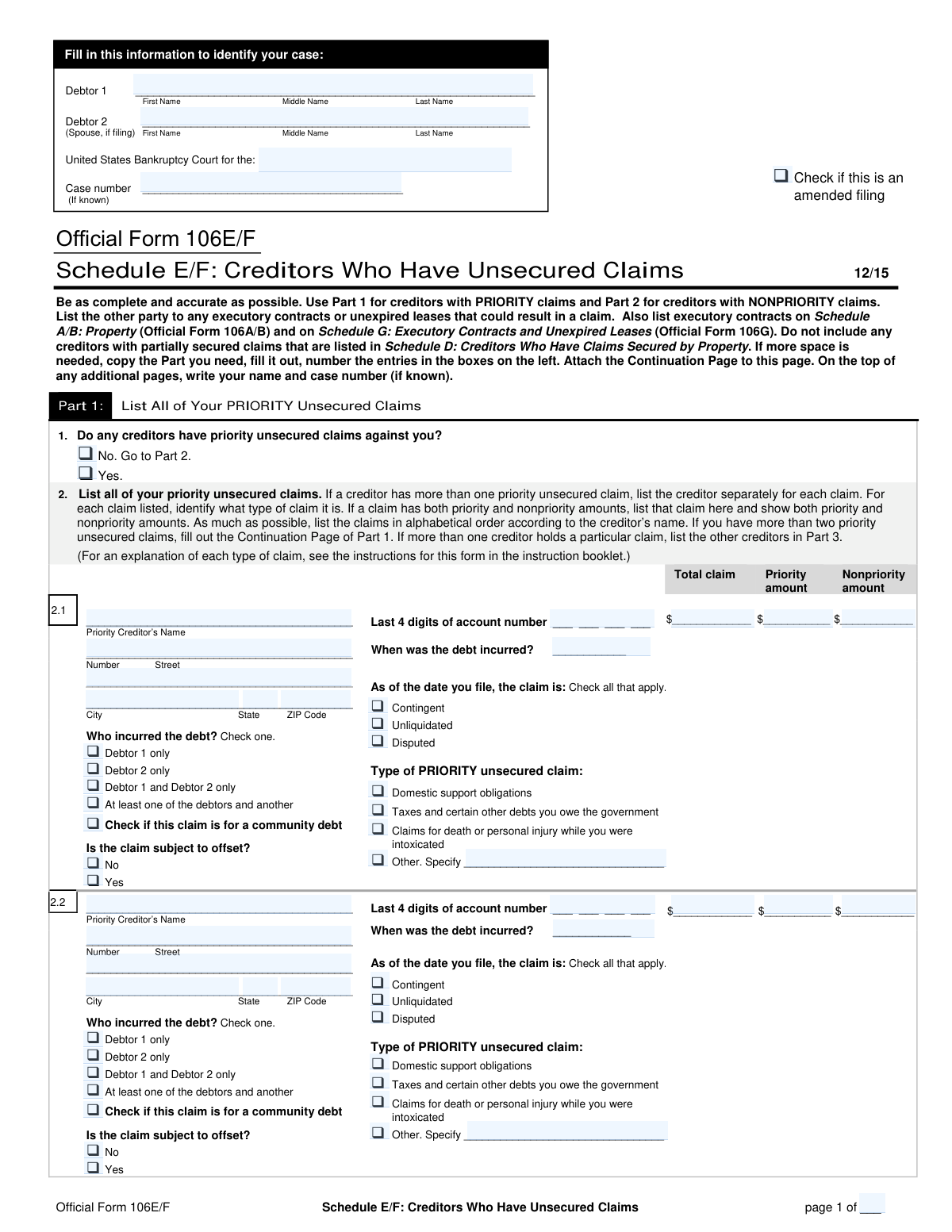
Yes! You can use AI to fill out Official Form 106E/F, Schedule E/F: Creditors Who Have Unsecured Claims
Official Form 106E/F, also known as Schedule E/F, is a vital component of a bankruptcy petition used to list all creditors who hold unsecured claims against the debtor. This includes both priority claims (like certain taxes and domestic support obligations) and nonpriority claims (like credit card debt and medical bills), ensuring they are properly addressed in the bankruptcy proceedings. Today, this form can be filled out quickly and accurately using AI-powered services like Instafill.ai, which can also convert non-fillable PDF versions into interactive fillable forms.
Our AI automatically handles information lookup, data retrieval, formatting, and form filling.
It takes less than a minute to fill out Form 106E/F using our AI form filling.
Securely upload your data. Information is encrypted in transit and deleted immediately after the form is filled out.
Form specifications
| Form name: | Official Form 106E/F, Schedule E/F: Creditors Who Have Unsecured Claims |
| Number of fields: | 390 |
| Number of pages: | 6 |
| Language: | English |
More forms in Credit forms
Instafill Demo: How to fill out PDF forms in seconds with AI
How to Fill Out Form 106E/F Online for Free in 2026
Are you looking to fill out a FORM 106E/F form online quickly and accurately? Instafill.ai offers the #1 AI-powered PDF filling software of 2026, allowing you to complete your FORM 106E/F form in just 37 seconds or less.
Follow these steps to fill out your FORM 106E/F form online using Instafill.ai:
- 1 Navigate to Instafill.ai and upload or select Form 106E/F, Schedule E/F.
- 2 Provide your case identification information, including debtor names and the bankruptcy court district and case number.
- 3 In Part 1, list all priority unsecured claims. The AI will guide you in entering each creditor's name, address, claim amount, and the specific type of priority debt.
- 4 In Part 2, list all nonpriority unsecured claims. Enter the details for each creditor, including account numbers, total claim amounts, and the nature of the debt (e.g., student loan, credit card).
- 5 Use Part 3 to add any other parties that need to be notified about a specific debt, such as collection agencies or attorneys, linking them to the original creditor.
- 6 Review the automatically calculated totals for both priority and nonpriority claims in Part 4 to ensure accuracy.
- 7 Once all information is verified, securely download, print, or e-file your completed Schedule E/F directly from the platform.
Our AI-powered system ensures each field is filled out correctly, reducing errors and saving you time.
Why Choose Instafill.ai for Your Fillable Form 106E/F Form?
Speed
Complete your Form 106E/F in as little as 37 seconds.
Up-to-Date
Always use the latest 2026 Form 106E/F form version.
Cost-effective
No need to hire expensive lawyers.
Accuracy
Our AI performs 10 compliance checks to ensure your form is error-free.
Security
Your personal information is protected with bank-level encryption.
Frequently Asked Questions About Form Form 106E/F
This form, likely Schedule E/F for a bankruptcy case, is used to list all of your unsecured creditors. It separates them into priority claims (like taxes and domestic support) and nonpriority claims (like credit cards and medical bills).
Any individual or married couple (Debtor 1 and Debtor 2) filing for bankruptcy must complete this form to declare all their unsecured debts. It is a required part of the bankruptcy petition.
Priority claims are specific debts, such as certain taxes or domestic support obligations, that are required by law to be paid first from any available funds. Nonpriority claims are general unsecured debts like credit cards or personal loans that are addressed after priority claims.
A 'contingent' claim depends on a future event, 'unliquidated' means the exact amount owed has not been determined, and 'disputed' means you disagree with the creditor about the existence or amount of the debt. Check these boxes to accurately describe the status of each claim.
If you do not know the exact amount of a claim, you should check the 'Unliquidated' box. You should still provide your best estimate of the amount owed based on the information you have.
The form includes continuation pages that you can use to list additional creditors. You must use these pages to ensure every single priority and nonpriority unsecured creditor is listed in your filing.
You must list any other party involved with the debt, such as a collection agency or an attorney for the creditor, in the 'additional notified parties' section. This ensures all relevant parties receive legal notice of your bankruptcy case.
A claim is 'subject to offset' if the creditor also owes you money, which could potentially be used to reduce your debt to them. For example, this could apply if you have a bank account with a bank to whom you also owe a loan.
A community debt is a debt incurred during a marriage in a community property state, for which both spouses are typically responsible. You should check this box if the debt applies to the marital community under your state's laws.
For each creditor, you must provide their full name and mailing address, the last four digits of the account number, the date the debt was incurred, and the total amount of the claim. You also need to specify the status and type of the claim.
You should check the 'Amended filing' box only if you are submitting this form to correct or update information you provided in a previous filing. This signals to the court that this version replaces the one submitted earlier.
Yes, services like Instafill.ai use AI to auto-fill form fields accurately and save time. This is particularly useful for a form like this that requires entering similar information for multiple creditors.
To use Instafill.ai, you upload the PDF form to their platform. The AI technology helps you fill out the information efficiently, populating repetitive data like your name and case number across all pages automatically.
If you have a non-fillable or 'flat' PDF, you can use a service like Instafill.ai. Their platform can convert the document into an interactive, fillable form, allowing you to easily type your information into the correct fields online.
Compliance Form 106E/F
Validation Checks by Instafill.ai
1
Priority Claim Amount Summation
This check verifies that for each priority claim listed, the sum of the 'Priority Amount' and the 'Nonpriority Amount' equals the 'Total Claim Amount'. This is crucial for maintaining the financial integrity of the filing and ensuring the debt is correctly categorized. If the amounts do not add up, the submission will be flagged for correction to prevent inaccurate reporting to the court.
2
Conditional Requirement for Creditor Details
This validation ensures that if the 'Yes (Priority Unsecured Claims Exist)' checkbox is selected, at least one full priority creditor entry (including name, address, and claim amounts) is completed. This prevents a submission where the filer indicates they have priority claims but fails to provide the necessary details. A failure would prompt the user to either add a creditor or select 'No'.
3
Exclusive Selection for Claim Existence
This check ensures that for questions like 'Priority Unsecured Claims Exist (Yes/No)', the user can only select one option, either 'Yes' or 'No', but not both. This prevents contradictory data entry that would make the form's logic impossible to process. If both are selected, an error is triggered, forcing the user to make a single, clear choice.
4
Debtor 2 Liability Consistency
This validation checks if the 'Debtor 2 Full Name' field is empty. If it is, the system will prevent any claim from being assigned to 'Debtor 2 only' or 'Debtor 1 and Debtor 2 only'. This logical check ensures that liability is not assigned to a non-existent or non-filing party. An error would require the user to either add Debtor 2's information or correct the liability assignment for the claim.
5
Conditional 'Other' Claim Type Specification
This check validates that whenever an 'Other (specify)' checkbox is selected for a claim type, the corresponding text field for describing that claim type is not left empty. This rule ensures that all 'Other' categorizations are properly explained for clarity and legal sufficiency. Failure to provide a description will result in a validation error, requiring the user to specify the claim type.
6
Date Debt Incurred Format and Plausibility
This validation ensures that all 'Date Debt Incurred' fields are entered in a valid date format (e.g., MM/DD/YYYY) and that the date is not in the future. This maintains data quality and prevents logically impossible entries. An invalid format or a future date would trigger an error, requiring the user to input a correct and past or present date.
7
Account Number Last 4 Digits Format
This check verifies that any field for 'Last 4 Digits of Account Number' contains exactly four numeric digits. This standardizes the data format for partial account numbers, which is important for identification purposes while protecting sensitive information. Entries with more or fewer than four digits, or containing non-numeric characters, will be rejected.
8
Creditor ZIP Code Format
This validation ensures that all 'ZIP Code' fields for creditor addresses conform to a valid 5-digit or 9-digit (ZIP+4) format. Correctly formatted ZIP codes are essential for mail delivery and ensuring that legal notices reach the intended creditors. An invalid format would prompt the user to correct the entry before submission.
9
Total Priority Claims Calculation
This check verifies that the value entered in 'Line 6e Total priority unsecured claims' is the correct sum of the amounts from lines 6a, 6b, 6c, and 6d. This serves as a final cross-check on the summary page to ensure arithmetical accuracy in the totals. A mismatch would indicate a calculation error on the form and require correction.
10
Total Nonpriority Claims Calculation
This validation ensures that the value in 'Line 6j Nonpriority Unsecured Claims Total' correctly equals the sum of the amounts from lines 6f, 6g, 6h, and 6i. This check confirms the accuracy of the summarized nonpriority claim totals. If the calculated sum does not match the entered total, the form will be flagged for review.
11
Debtor Responsibility Exclusive Selection
For each individual claim, this check ensures that exactly one of the debtor responsibility options (e.g., 'Debtor 1 only', 'Debtor 2 only', 'Debtor 1 and Debtor 2 only', 'At least one debtor and another') is selected. This prevents ambiguity regarding who is liable for the debt. If zero or more than one option is checked, the user will be required to make a single selection.
12
Case Identification Consistency Across Pages
This validation confirms that the 'Debtor 1' name and 'Case number' are identical in the header/footer sections of every page of the document. This is a critical check to ensure that all pages belong to the same filing and prevent pages from different cases from being mixed up. A mismatch would halt processing until the discrepancy is resolved.
13
Creditor Address Block Completeness
This check ensures that if a 'Creditor Street Address' is provided for any claim, the corresponding 'City', 'State', and 'ZIP Code' fields are also filled out. A partial address is unusable for sending legal notices, so this rule enforces the collection of a complete mailing address. If any part of the core address is missing, the user will be prompted to complete it.
14
Notified Party Linkage Requirement
This validation ensures that for every 'Additional notified party' listed, both the 'Original creditor entry line number' and a corresponding part selection ('Part 1' or 'Part 2' checkbox) are provided. This is essential to correctly link the notified party (like a collection agency) to the specific creditor and debt they are associated with. Missing this linkage information would make the entry ambiguous and trigger a validation failure.
Common Mistakes in Completing Form 106E/F
Filers often misclassify debts, listing a nonpriority claim (like a credit card or medical bill) in the priority section, or vice versa. This happens due to a misunderstanding of legal definitions for priority debts, which include specific categories like domestic support and recent taxes. Incorrect categorization can lead to the bankruptcy plan being rejected or debts being treated improperly by the court, potentially jeopardizing their discharge. To avoid this, carefully review the definitions for each claim type before listing them.
For certain priority claims, only a portion of the total debt is entitled to priority status, with the remainder being nonpriority. Filers frequently make errors by either listing the full amount as priority or failing to ensure that the 'Priority Amount' and 'Nonpriority Amount' fields sum up to the 'Total Claim Amount'. This leads to mathematical inconsistencies that can trigger scrutiny from the trustee and require filing an amendment. Always double-check that the sum of the parts equals the whole for each claim.
The legal terms 'Contingent,' 'Unliquidated,' and 'Disputed' are often misunderstood and checked incorrectly. A filer might mark a debt as 'disputed' because they disagree with it morally, not because there is a legitimate legal dispute over its validity or amount. Such errors misrepresent the nature of the debt, which can lead to legal challenges from creditors and complicate the bankruptcy process. It is crucial to understand that these terms have specific legal meanings that must be applied correctly.
A frequent and critical mistake is entering an incomplete or incorrect address for a creditor, often by using a payment address instead of the specific address for legal notices. If a creditor does not receive proper notice of the bankruptcy filing, the associated debt may not be discharged, allowing the creditor to resume collection efforts after the case closes. To prevent this, use the most recent creditor statement to find the correct address for correspondence or legal notices and verify its completeness.
When a debt has been sold to a debt buyer or is being handled by a collection agency, filers often list only the original creditor and forget to add the other entities in the 'Additional Notified Parties' section. This failure means the collection agency or attorney won't be formally notified of the bankruptcy's automatic stay. Consequently, they may illegally continue collection activities, causing significant stress and legal complications for the debtor. Always list every party involved with a debt to ensure all collection stops.
The form requires filers to sum up various claim categories on a summary page. It is extremely common for individuals to make simple addition errors or forget to include claims listed on continuation pages when calculating these totals. An incorrect summary can cause the court clerk to reject the entire filing, leading to delays and requiring the submission of a corrected, amended document. Using a calculator and carefully cross-referencing all pages is essential to ensure accuracy.
In a joint filing, it is vital to specify whether a debt belongs to 'Debtor 1 only,' 'Debtor 2 only,' or is a joint liability. Filers often overlook these checkboxes or incorrectly assume all debts are joint, which may not be the case. This mistake can affect which debtor's obligations are discharged and can lead to future credit reporting inaccuracies for the wrongly assigned party. Reviewing original loan agreements or account statements is the best way to determine and correctly report liability.
The form contains specific formatting requirements, such as providing only the 'Last 4 Digits of Account Number' or using a consistent date format. Filers often enter the full account number, creating a privacy risk, or use ambiguous date formats (e.g., 2/3/24). These errors can lead to data processing issues or the public disclosure of sensitive information. To avoid this, carefully follow all instructions in parentheses. AI-powered form-filling tools like Instafill.ai can help prevent these errors by automatically validating and formatting data correctly.
Many sections of the form are conditional, requiring further details only if a 'Yes' or 'Other' box is checked. A common mistake is to check the box but then neglect to provide the mandatory explanation or details in the subsequent fields. This results in an incomplete filing that will be questioned by the bankruptcy trustee and will likely require an amendment to fix. Always ensure that if you check a box like 'Other (specify),' you fill in the required description. If the form is a non-fillable PDF, a tool like Instafill.ai can convert it to a smart, fillable version that can help guide you through this logic.
Saved over 80 hours a year
“I was never sure if my IRS forms like W-9 were filled correctly. Now, I can complete the forms accurately without any external help.”
Kevin Martin Green
Your data stays secure with advanced protection from Instafill and our subprocessors

Robust compliance program
Transparent business model
You’re not the product. You always know where your data is and what it is processed for.
ISO 27001, HIPAA, and GDPR
Our subprocesses adhere to multiple compliance standards, including but not limited to ISO 27001, HIPAA, and GDPR.
Security & privacy by design
We consider security and privacy from the initial design phase of any new service or functionality. It’s not an afterthought, it’s built-in, including support for two-factor authentication (2FA) to further protect your account.
Fill out Form 106E/F with Instafill.ai
Worried about filling PDFs wrong? Instafill securely fills official-form-106ef-schedule-ef-creditors-who-have-unsecured-claims-3 forms, ensuring each field is accurate.