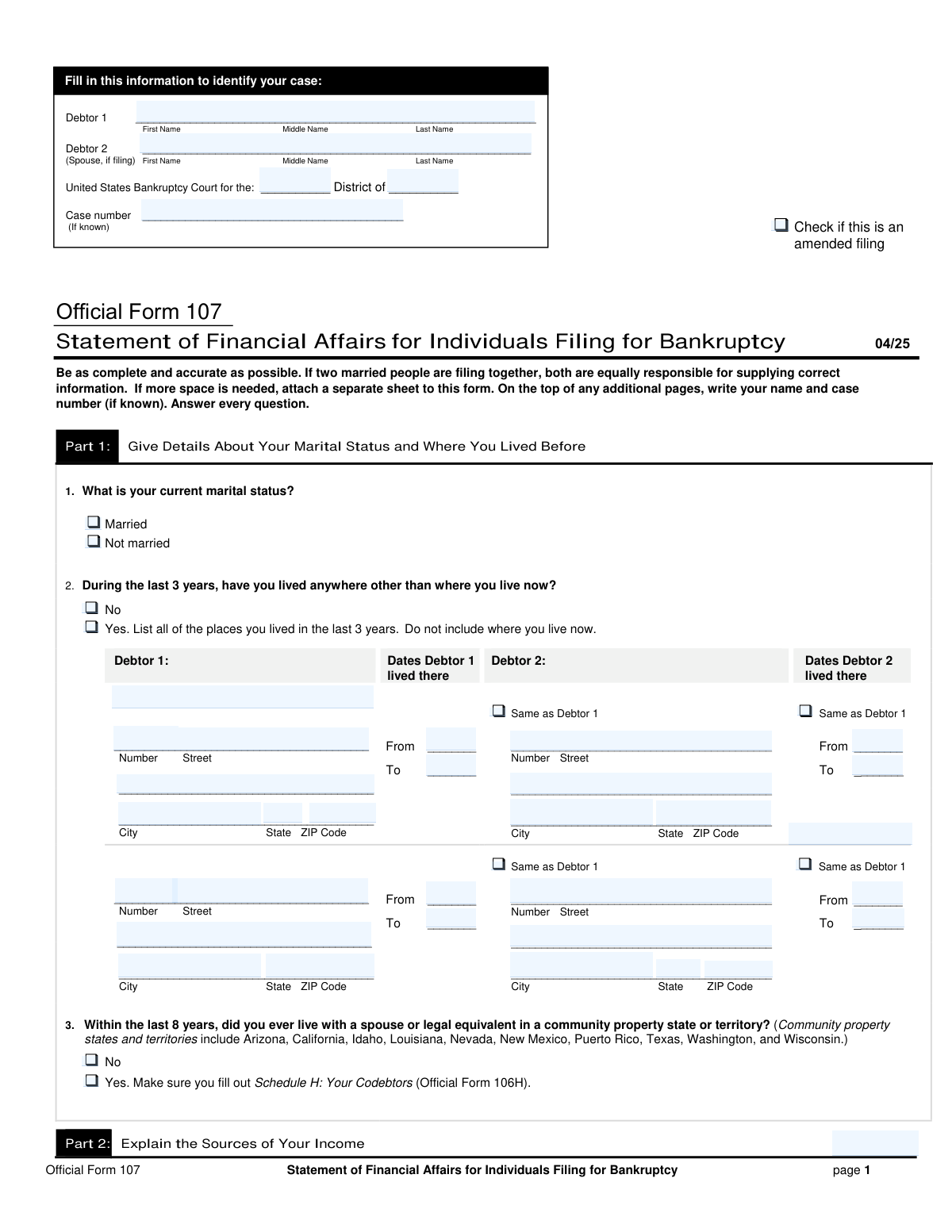
Yes! You can use AI to fill out Official Form 107, Statement of Financial Affairs for Individuals Filing for Bankruptcy
Official Form 107, Statement of Financial Affairs for Individuals Filing for Bankruptcy, is a critical document in the bankruptcy process that requires debtors to disclose their financial history for a specified period before filing. It covers details about income, payments to creditors, property transfers, and other financial transactions, providing transparency to the court, the trustee, and creditors. Today, this comprehensive form can be filled out quickly and accurately using AI-powered services like Instafill.ai, which can also convert non-fillable PDF versions into interactive fillable forms.
Form 107 is part of the
bankruptcy forms, financial forms, IRS forms, NJ state forms, PA state forms and state ID forms categories on Instafill.
Our AI automatically handles information lookup, data retrieval, formatting, and form filling.
It takes less than a minute to fill out Form 107 using our AI form filling.
Securely upload your data. Information is encrypted in transit and deleted immediately after the form is filled out.
Form specifications
| Form name: | Official Form 107, Statement of Financial Affairs for Individuals Filing for Bankruptcy |
| Number of fields: | 111 |
| Number of pages: | 2 |
| Language: | English |
More forms in Bankruptcy forms
Instafill Demo: How to fill out PDF forms in seconds with AI
How to Fill Out Form 107 Online for Free in 2026
Are you looking to fill out a FORM 107 form online quickly and accurately? Instafill.ai offers the #1 AI-powered PDF filling software of 2026, allowing you to complete your FORM 107 form in just 37 seconds or less.
Follow these steps to fill out your FORM 107 form online using Instafill.ai:
- 1 Navigate to Instafill.ai and upload or select Form 107, the Statement of Financial Affairs.
- 2 Provide personal and case identification details for Debtor 1 and Debtor 2 (if applicable), including names, court information, and case number.
- 3 Answer questions about your marital status, residence history for the last 3 years, and any time spent in community property states over the last 8 years.
- 4 Detail all income from employment and business operations for the current year and the two previous calendar years, specifying sources and gross amounts for each debtor.
- 5 Disclose any other income received during the same periods from sources other than employment or business, such as support payments, government benefits, or rental income.
- 6 Complete the remaining sections of the form, which cover payments to creditors, property transfers, gifts, losses, and involvement in lawsuits.
- 7 Carefully review all entered information for accuracy and completeness before signing and dating the declaration under penalty of perjury.
Our AI-powered system ensures each field is filled out correctly, reducing errors and saving you time.
Why Choose Instafill.ai for Your Fillable Form 107 Form?
Speed
Complete your Form 107 in as little as 37 seconds.
Up-to-Date
Always use the latest 2026 Form 107 form version.
Cost-effective
No need to hire expensive lawyers.
Accuracy
Our AI performs 10 compliance checks to ensure your form is error-free.
Security
Your personal information is protected with bank-level encryption.
Frequently Asked Questions About Form Form 107
This form appears to be part of a bankruptcy filing, designed to collect detailed information about your prior residences and all sources of income for the past several years.
Debtor 1 is the primary individual filing for bankruptcy. Debtor 2 is typically their spouse, if they are filing for bankruptcy jointly.
Gross income is your total earnings from a source before any taxes, deductions, or other expenses are taken out. You should report the full amount earned, not your take-home pay.
This includes any income from self-employment, freelance work, or any business you own and operate. You must report this income even if it's from a part-time activity or side gig.
This is any income you received that was not from employment or operating a business, such as rental income, royalties, or payments from a trust. Do not list income here that you already reported in the employment section.
The form allows for this scenario. Simply leave the checkbox for 'Debtor 2 address same as Debtor 1' unchecked and fill in Debtor 2's separate prior address information in the designated fields.
If you had no income from employment, business, or other sources during a required period, you must check the 'No' box at the beginning of the relevant income section (Question 4 or 5).
This form provides space for two prior addresses. If you have lived at more addresses in the last three years, you will need to attach a separate sheet with the additional information in the same format.
Community property states have specific laws about how assets and debts are divided between spouses. The court needs this information to correctly handle the assets and liabilities in your bankruptcy case.
Provide the most accurate dates you can recall for when you moved in and out of your prior residences. You can use documents like old lease agreements or utility bills to help you remember.
If you need to submit an updated version, you must check the 'Amended filing' box at the top of the page. This indicates to the court that you are correcting previously submitted information.
Yes, services like Instafill.ai use AI to accurately auto-fill form fields from your saved data, which can save you significant time and reduce errors on complex legal documents.
You can use a service like Instafill.ai to upload the form and fill it out on their secure online platform. This allows you to easily enter, save, and manage your information digitally.
If you have a non-fillable or 'flat' PDF, you can use a tool like Instafill.ai to convert it into an interactive, fillable form. This allows you to type your answers directly into the fields instead of printing and writing by hand.
Compliance Form 107
Validation Checks by Instafill.ai
1
Mutually Exclusive Marital Status
This validation ensures that a user cannot select both 'Married' and 'Not married' checkboxes simultaneously. These options are mutually exclusive, and selecting both would create a logical contradiction in the filer's status. If a user tries to check the second box, the first one should be unchecked, or an error should be displayed to force a single choice.
2
Debtor 2 Presence Based on Marital Status
This check verifies that if the 'Married' checkbox is selected, the 'Debtor 2 Full Name' field is populated. It is crucial for legal and financial accuracy in a joint filing that the spouse's information is included. If 'Married' is checked but Debtor 2's name is missing, the form submission should be blocked with a message prompting the user to either provide the spouse's name or change the marital status.
3
Conditional Prior Address Requirement
This validation ensures that if the user checks 'Yes' for 'Lived Elsewhere in Last 3 Years', they must provide details for at least the first prior address (e.g., 'Debtor 1 Prior Address Line 1'). This is a conditional requirement to ensure the form is complete and provides the necessary residency history for legal review. A failure would trigger an error message indicating that prior address details are missing.
4
Prior Address Date Chronology
This check validates that for any given prior address, the 'Lived There From' date is chronologically before the 'Lived There To' date. This prevents logical errors in the timeline of residency, which is critical for establishing jurisdiction and other legal facts. If the 'From' date is after the 'To' date, an error should be flagged, forcing the user to correct the date range.
5
Prior Address Date Range (Last 3 Years)
This validation confirms that all dates entered in the 'Lived There From' and 'Lived There To' fields fall within the last three years from the date of filing. The form specifically asks for addresses within this period, so any dates outside this range are invalid and could lead to incorrect legal declarations. The system should calculate the three-year window and reject any dates that do not comply.
6
Debtor 2 Prior Address Redundancy Check
This check ensures that if the 'Debtor 2 address same as Debtor 1' checkbox is checked for a prior address row, the separate address fields for Debtor 2 (e.g., 'Debtor 2 Prior Street Address') are left empty or disabled. This prevents redundant and potentially conflicting data entry. If the box is checked and an address is also entered, the system should flag an error and ask the user to either clear the fields or uncheck the box.
7
ZIP Code Format Validation
This validation ensures that all ZIP code fields (e.g., 'Debtor 1 Prior ZIP Code') contain a valid 5-digit or 9-digit (ZIP+4) numeric format. Correctly formatted ZIP codes are essential for mail delivery, location verification, and data integrity. An invalid entry should trigger an error message specifying the required format (e.g., 'Please enter a 5 or 9 digit ZIP code').
8
Conditional Income Details Requirement
This check verifies that if 'Yes (fill in the details)' is selected for Question 4 (Employment/Business Income), then at least one income amount field (e.g., 'Debtor 1 gross employment/business income') contains a value. This ensures that a 'Yes' response is substantiated with the required financial data. If 'Yes' is checked but no income figures are provided, the form should be considered incomplete and an error should be shown.
9
Income Source and Amount Correlation
This validation ensures that if an income amount is entered for a specific period (e.g., 'Debtor 1 gross income (last calendar year)'), then a corresponding income source checkbox for that debtor and period (e.g., 'Wages...' or 'Operating a business...') is also checked. This links the reported income to its source, which is necessary for a complete financial picture. A failure would prompt the user to specify the source of the reported income.
10
Calendar Year Sequence Logic
This check validates the logical sequence of the reported years in the income section. The year entered for 'Last calendar year (YYYY)' must be one year before the current year, and the year for 'Calendar Year Before Last - Year' must be two years before the current year. This ensures the financial data is correctly attributed to the proper timeframes. If the years are incorrect or out of sequence, the system should flag an error.
11
Case Number Format
This validation checks that the 'Case Number' field, if filled, adheres to the standard format for U.S. Bankruptcy Court case numbers (e.g., YY-NNNNN-ABC). While the format can vary slightly by district, a general pattern check helps prevent typographical errors and ensures the case can be correctly identified. An invalid format should trigger a warning or error with an example of the expected format.
12
Debtor Name Consistency Check
This validation verifies that the name entered in 'Debtor 1 Full Name (Case Identification)' at the top of the form is identical to the name in the 'Debtor 1 full name' field elsewhere on the page. This cross-field check ensures consistency and prevents discrepancies in the primary filer's identity across the document. A mismatch should prompt the user to correct the information to ensure uniformity.
13
Conditional Other Income Requirement
This check ensures that if 'Yes. Fill in the details.' is selected for Question 5 (Other Income), then at least one 'Other Income Source' and its corresponding 'Gross Amount' field are populated. This rule enforces completeness for affirmative answers, ensuring that the declaration of other income is supported by specific details. If 'Yes' is checked without any details, an error should prevent submission.
14
Mutually Exclusive Yes/No Selection
This validation applies to all pairs of Yes/No checkboxes, such as for 'Lived Elsewhere in Last 3 Years' or 'Community Property State'. It ensures that only one option in each pair can be selected at a time. This is a fundamental data integrity rule that prevents ambiguous or contradictory answers on the form. If a user selects one, the other should be automatically deselected or an error should prevent selecting both.
Common Mistakes in Completing Form 107
Filers often struggle to recall exact move-in and move-out dates for all residences within the last three years, leading to gaps or estimations. This can happen due to the difficulty of finding old records. Inaccurate or incomplete residency history can raise questions about the filer's eligibility for filing in a specific district and may delay the case. To avoid this, gather lease agreements or utility bills to confirm dates before filling out the form, and ensure every address within the 3-year window is listed chronologically.
The checkboxes for 'Debtor 2 address same as Debtor 1' and 'Debtor 2 dates lived there same as Debtor 1' are a common source of confusion. Filers may check these boxes incorrectly or forget to provide Debtor 2's separate address history when they lived apart. This results in an incomplete or inaccurate record for Debtor 2, which can cause the form to be rejected. Carefully review each prior address and determine if Debtor 2's information is identical or needs to be entered separately for that specific time period.
The form requires income data for three distinct periods: 'current year to filing,' 'last calendar year,' and 'calendar year before last.' People frequently confuse these, for instance, by providing data for the last 12 months instead of the 'last calendar year' (Jan 1 - Dec 31). This error leads to incorrect financial disclosures, which can have serious legal consequences in a bankruptcy case. Always use tax documents (like W-2s or 1099s) for calendar year data and recent pay stubs for the 'current year to filing' period to ensure accuracy.
The form explicitly asks for 'gross' income, which is the total amount earned before any taxes or deductions. A very common mistake is to enter net (take-home) pay instead. This significantly underreports income and can be viewed as a material misrepresentation to the court, potentially jeopardizing the bankruptcy discharge. Always refer to the gross pay figure on your pay stubs or your total income before adjustments on tax forms.
Filers often check 'Yes' to a question, such as having other income or prior addresses, but then fail to fill out the required detailed information in the subsequent fields. This leaves the form incomplete and will almost certainly lead to a deficiency notice from the court, delaying the case. To prevent this, treat a 'Yes' answer as a trigger to meticulously complete the entire corresponding section; if the section does not apply, ensure the 'No' box is checked. AI-powered tools like Instafill.ai can help by highlighting required fields based on your answers, preventing such omissions.
The form requires the 'full legal name' including first, middle, and last names. People often use nicknames, initials, or omit their middle name out of habit. Using an incomplete or informal name can cause identification issues and mismatches with other legal documents, leading to processing delays or rejection. Ensure the name entered matches exactly what is on your government-issued identification, such as a driver's license or social security card.
The form separates 'Employment/Business Income' (Question 4) from 'Other Income' (Question 5). Filers may incorrectly categorize income, such as listing freelance/1099 income under 'Other Income' when it should be under 'Operating a business,' or vice-versa for things like rental income. This misclassification can confuse the trustee and lead to additional scrutiny of your financial affairs. Carefully read the descriptions for each section to ensure income from all sources is reported in the correct category.
The question about living in a community property state within the last 8 years is a legal question that many filers misunderstand. They may not know which states are community property states (e.g., AZ, CA, ID, LA, NV, NM, TX, WA, WI) or miscalculate the 8-year lookback period. An incorrect answer can have significant implications for how assets and debts are treated in the bankruptcy, especially concerning a non-filing spouse. If unsure, you should research the list of community property states or consult with an attorney.
This lengthy form requires entering the same information, like debtor names and the case number, in multiple places (e.g., header, footer, specific questions). It is easy to make a typo or enter slightly different versions, creating inconsistencies. Such discrepancies can cause confusion and processing errors. To avoid this, fill out the information once and then carefully copy-paste or double-check it in all other locations. Using a tool like Instafill.ai can automate this, ensuring consistency across the entire document.
In the income sections, filers are required to both check a box indicating the type of income (e.g., 'Wages, commissions, bonuses, tips') and enter the corresponding dollar amount. A frequent error is entering the income amount but forgetting to check the box that describes its source. This makes the entry ambiguous and incomplete, requiring clarification later. Always ensure that for every income amount you list, you have also checked the appropriate box identifying its source for both Debtor 1 and Debtor 2.
Saved over 80 hours a year
“I was never sure if my IRS forms like W-9 were filled correctly. Now, I can complete the forms accurately without any external help.”
Kevin Martin Green
Your data stays secure with advanced protection from Instafill and our subprocessors

Robust compliance program
Transparent business model
You’re not the product. You always know where your data is and what it is processed for.
ISO 27001, HIPAA, and GDPR
Our subprocesses adhere to multiple compliance standards, including but not limited to ISO 27001, HIPAA, and GDPR.
Security & privacy by design
We consider security and privacy from the initial design phase of any new service or functionality. It’s not an afterthought, it’s built-in, including support for two-factor authentication (2FA) to further protect your account.
Fill out Form 107 with Instafill.ai
Worried about filling PDFs wrong? Instafill securely fills official-form-107-statement-of-financial-affairs-for-individuals-filing-for-bankruptcy forms, ensuring each field is accurate.