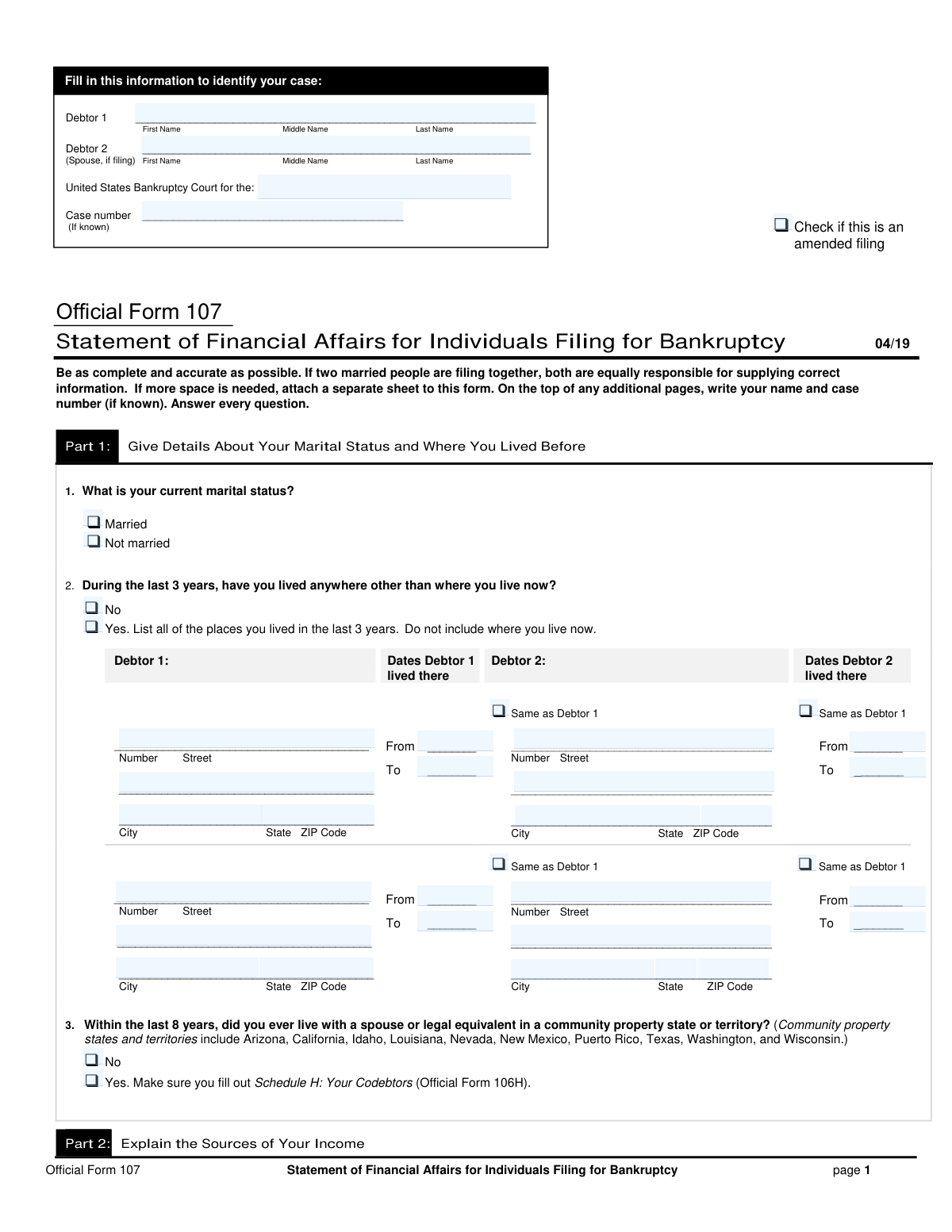
Yes! You can use AI to fill out Official Form 107, Statement of Financial Affairs for Individuals Filing for Bankruptcy

Official Form B 107, the Statement of Financial Affairs for Individuals Filing for Bankruptcy, is a comprehensive document required by the U.S. Bankruptcy Courts. It provides a detailed overview of the debtor's financial history, including income, payments to creditors, property transfers, gifts, lawsuits, and business connections for a specific period before filing. This information is crucial for the trustee and the court to assess the debtor's financial situation and ensure a fair process. Today, this form can be filled out quickly and accurately using AI-powered services like Instafill.ai, which can also convert non-fillable PDF versions into interactive fillable forms.
B 107 is part of the bankruptcy forms, financial forms, IRS forms, NJ state forms, PA state forms and state ID forms categories on Instafill.
Our AI automatically handles information lookup, data retrieval, formatting, and form filling.
It takes less than a minute to fill out B 107 using our AI form filling.
Securely upload your data. Information is encrypted in transit and deleted immediately after the form is filled out.

Form specifications

Form name: Official Form 107, Statement of Financial Affairs for Individuals Filing for Bankruptcy
Number of fields: 604
Number of pages: 12
Language: English
main-image

Instafill Demo: How to fill out PDF forms in seconds with AI

How to Fill Out B 107 Online for Free in 2026

Are you looking to fill out a B 107 form online quickly and accurately? Instafill.ai offers the #1 AI-powered PDF filling software of 2026, allowing you to complete your B 107 form in just 37 seconds or less.
Follow these steps to fill out your B 107 form online using Instafill.ai:
  1. 1 Navigate to Instafill.ai and upload or select Form B 107, the Statement of Financial Affairs.
  2. 2 Provide your personal and case identification details, including your name, spouse's name (if applicable), court district, and case number.
  3. 3 Use the AI-guided prompts to disclose your income from employment, business operations, and other sources for the current and previous two calendar years.
  4. 4 Detail all relevant financial transactions, such as payments to creditors, payments to insiders, gifts, property transfers, repossessions, and lawsuits within the specified look-back periods.
  5. 5 Answer questions about any business connections, safe deposit boxes, stored property, and environmental law liabilities.
  6. 6 Carefully review all the information auto-filled by the AI for accuracy and completeness, then electronically sign and date the form to certify its truthfulness.
  7. 7 Download your completed and signed Form B 107, ready for filing with the bankruptcy court.

Our AI-powered system ensures each field is filled out correctly, reducing errors and saving you time.

Why Choose Instafill.ai for Your Fillable B 107 Form?

Speed

Complete your B 107 in as little as 37 seconds.

Up-to-Date

Always use the latest 2026 B 107 form version.

Cost-effective

No need to hire expensive lawyers.

Accuracy

Our AI performs 10 compliance checks to ensure your form is error-free.

Security

Your personal information is protected with bank-level encryption.

Frequently Asked Questions About Form B 107

This form, officially known as Form 107, provides the bankruptcy court with a detailed overview of your financial history. It requires you to disclose information about your income, payments to creditors, property transfers, and other financial transactions from the past several years.

Anyone filing for personal bankruptcy, referred to as the 'Debtor', must complete this form. If you are filing jointly with a spouse, you will both provide your information, often designated as Debtor 1 and Debtor 2.

You must report your gross income, which is the total amount you earned before any taxes or deductions were taken out. The form asks for income from employment, business operations, and other sources for the current year-to-date, the last full calendar year, and the calendar year before that.

An insider is a relative, partner, or business in which you have a significant ownership stake. The court requires you to disclose payments to insiders made within one year of filing to ensure you haven't unfairly paid back friends or family ahead of other creditors.

Consumer debts are incurred for personal, family, or household purposes, like credit cards or car loans. If your debts are primarily consumer, you must report payments over $600 to any single creditor in the 90 days before filing; otherwise, the threshold is higher.

You must list all addresses where you have lived in the last 3 years. If you and your spouse (Debtor 2) had different prior addresses, you will uncheck the 'Same as Debtor 1' box and fill in the separate address information for Debtor 2.

Yes, you must report any connection to a business within the last 4 years before filing. This includes being a sole proprietor, partner, or officer, even if the business is now closed.

The court needs a complete picture of your financial activities leading up to the bankruptcy filing. You must report any financial accounts that were closed, sold, or transferred within 1 year of your filing date, including the final balance.

Yes, you must report any property that was repossessed, foreclosed, garnished, or seized within 1 year before you filed for bankruptcy. You will need to provide the creditor's name, the date of the event, and the property's value.

You only need to report gifts if the total value given to a single person exceeded $600 within the 2 years before you filed for bankruptcy. You do not need to list small, incidental gifts that fall below this total amount per person.

You should check the 'Amended filing' box if you are submitting a corrected or updated version of a Statement of Financial Affairs that you have already filed with the court. Do not check this box if this is the first time you are submitting the form for your case.

Yes, services like Instafill.ai use AI to accurately auto-fill form fields from your documents, which can save you significant time and help prevent errors. This is especially useful for a detailed form like the Statement of Financial Affairs.

Simply upload the form to the Instafill.ai platform, and its AI will identify the fields and help you fill them in. You can then review the information, make any necessary edits, and download the completed document.

If you have a non-fillable or 'flat' PDF, you can use a service like Instafill.ai to convert it into an interactive, fillable form. This allows you to easily type your information directly into the fields online.

Compliance B 107
Validation Checks by Instafill.ai

1
Exclusive Marital Status Selection
This check ensures that only one of the 'Married' or 'Not married' checkboxes is selected. A debtor cannot be both married and not married at the same time. If both options are selected, the form submission should be flagged for review or rejected, prompting the user to choose only the single, correct option.
2
Conditional Prior Residence Disclosure
This validation verifies that if the 'Yes' box for 'Lived Somewhere Else in Last 3 Years' is checked, then the address details for at least one prior residence are provided. Conversely, if 'No' is checked, the prior residence sections must be empty. This prevents incomplete disclosures when required and ensures extraneous data is not provided when not applicable.
3
Prior Residence Date Chronology
This check validates that for each prior residence listed, the 'Start Date' is chronologically before the 'End Date'. An end date that precedes a start date is a logical impossibility and indicates a data entry error. This validation is crucial for establishing a clear and accurate timeline of the debtor's residency history.
4
Debtor 2 Prior Address Consistency
This validation ensures that if the 'Same as Debtor 1 (address)' checkbox is checked for a prior residence, the separate address fields for Debtor 2 are disabled and left blank. If the box is unchecked and a Debtor 2 is listed on the case, the Debtor 2 address fields become required. This prevents the submission of redundant or conflicting address information for co-debtors.
5
Employment Income Disclosure Trigger
This check confirms that if the user selects 'Yes' to having 'Employment/Business Income', then at least one income type checkbox (e.g., 'Wages, commissions...') is checked and a corresponding gross income amount is entered for at least one debtor. Answering 'Yes' without providing any specific income details is an incomplete answer. The validation should prompt the user to either provide the income details or change the answer to 'No'.
6
Income Year Chronological Accuracy
This validation compares the years entered for 'Last Calendar Year' and 'Calendar Year Before Last' against the current filing date. The 'Last Calendar Year' must be the year immediately preceding the current year, and the 'Calendar Year Before Last' must be the year before that. This ensures the income history is reported for the correct, distinct, and legally required time periods.
7
Creditor Payment Threshold Verification
This check validates the logic in Question 6 regarding payments to creditors. If 'Yes — paid a creditor a total of $600+ (consumer debts)' is checked, the 'Total Amount Paid' for at least one listed creditor must be $600 or more. This ensures the filer is correctly identifying and reporting payments that exceed the legal disclosure thresholds, preventing under-reporting.
8
Exclusive Lawsuit Status Selection
This validation ensures that for each lawsuit listed in Question 9, only one status checkbox—'Pending,' 'On appeal,' or 'Concluded'—is selected. A single case cannot simultaneously exist in multiple states. This check prevents ambiguous or contradictory information about the status of legal proceedings, which is critical for the bankruptcy trustee's assessment.
9
Mandatory Creditor Payment Details
This check ensures that if the user answers 'Yes' to paying a creditor more than the specified threshold in Question 6, the corresponding details section for at least one creditor must be completed. This includes the creditor's name, total amount paid, and payment date. A 'Yes' answer without any supporting details is an incomplete and non-compliant response that must be corrected.
10
'Other' Category Specification Requirement
This validation rule applies wherever an 'Other' checkbox is present with an accompanying text field, such as in 'Payment Purpose - Other'. It ensures that if the 'Other' option is selected, the user must provide a description in the associated text field. This prevents ambiguity and ensures all payments, properties, or items are properly categorized and understood by the court.
11
Date Format and Plausibility
This check verifies that all date fields are entered in a valid format (e.g., MM/DD/YYYY) and represent real, plausible dates. It specifically checks that dates, especially signature dates, are not in the future. This is a fundamental data integrity check to ensure the accuracy and validity of the timeline of events presented in the form.
12
Business Connection Detail Requirement
This validation ensures that if a user checks any specific business connection type in Question 27 (e.g., 'Sole proprietor'), the master 'Yes (check all that apply above)' checkbox is also selected and the details for at least one business are filled out. It prevents a user from indicating a business connection without providing the required information about that business. If 'No (none of the above applies)' is checked, the business details section must be empty.
13
Debtor 2 and Marital Status Consistency
This validation checks for logical consistency between the presence of a second debtor and the filer's marital status. If a name is entered for 'Debtor 2 Full Name (spouse, if filing)', the 'Married' checkbox should also be selected. This helps prevent filings where a spouse is listed but the marital status is incorrectly marked as 'Not married,' which could cause legal and processing complications.
14
Gift Value Threshold Confirmation
This check verifies that if the user answers 'Yes. Fill in the details for each gift.' in Question 13, the data entered supports this answer. The total value of gifts listed for at least one recipient must be greater than $600. This ensures the filer understands the question and provides data consistent with their affirmative answer, preventing incomplete or contradictory information.
15
Bankruptcy Case Number Formatting
This validation checks that the entered 'Case number' conforms to the expected format for the U.S. Bankruptcy Court (e.g., YY-NNNNN). While formats can vary by district, they typically follow a standard pattern. This ensures the case can be correctly identified and linked within the court's system, preventing processing delays or errors due to a malformed case identifier.

Common Mistakes in Completing B 107

Reporting Net Income Instead of Gross Income

Filers often mistakenly enter their take-home pay (net income) instead of their total earnings before any taxes or deductions (gross income). This happens because people are more familiar with their net pay from bank deposits. Incorrect income reporting can lead to inaccurate calculations for the means test, potentially jeopardizing case eligibility and causing delays or dismissal. To avoid this, carefully review pay stubs and tax documents for gross earnings, and consider using AI-powered tools like Instafill.ai which can help extract the correct figures from uploaded documents.

Omitting 'Insider' Payments

Many people fail to report payments made to 'insiders' within one year of filing, often because they don't understand the broad definition of an insider, which includes relatives, business partners, and corporations they control. A common example is repaying a loan to a family member, which must be disclosed. Failure to report these payments can be viewed as preferential treatment and may lead the bankruptcy trustee to 'claw back' the funds from the recipient, creating legal issues for both the filer and their relative.

Forgetting to List Closed Financial Accounts

The form requires listing all financial accounts closed, sold, or transferred within the last year, but filers often focus only on their active accounts and forget to include these. This oversight can raise red flags for the trustee, who will want to know why the account was closed and where the funds went. To prevent this, review bank statements from the past 12-18 months and use form-filling tools like Instafill.ai that can prompt you for this specific information, ensuring all financial history is accurately reported.

Inaccurate Prior Residence History

Filers must list every address they have lived at for the past three years, but they often make mistakes with dates or forget short-term residences. For joint filers (Debtor 1 and Debtor 2), the complexity increases, leading to confusion when filling out separate address histories. Inaccurate residency information can affect which state's exemption laws apply and can cause delays or require amendments. It is crucial to create a precise timeline of all addresses before starting the form.

Failing to Disclose All Gifts and Transfers

The form requires disclosing gifts over $600 to any one person and any property sold or transferred outside the ordinary course of business within the last two years. People often forget small, regular gifts that add up or don't think selling a car to a friend for a low price counts as a reportable transfer. Hiding or forgetting these transactions is a serious error that can result in denial of bankruptcy discharge, as the trustee needs to ensure assets were not improperly given away to avoid paying creditors.

Confusing Creditor Payment Thresholds

Question 6 has different reporting thresholds for payments made to creditors within 90 days of filing: $600 for consumer debts and a higher amount (e.g., $6,825) for non-consumer debts. Filers frequently misunderstand the distinction between debt types or apply the wrong threshold, leading to under-reporting or over-reporting. This error can cause the trustee to question the accuracy of the entire filing. AI-powered tools can help by applying conditional logic to guide users through these complex questions.

Incomplete Business Disclosures

The form asks for any connection to a business within the last four years, including being a sole proprietor, partner, or officer. Filers often neglect to list defunct businesses, side hustles, or minor LLCs they were a part of, thinking they are no longer relevant. This omission is a significant error, as the trustee must evaluate all potential business assets and liabilities. A thorough review of personal and financial history from the last four years is necessary to ensure complete disclosure.

Contradictory Yes/No Answers and Conditional Fields

This form is filled with conditional logic, where answering 'Yes' to a question requires filling out a detailed sub-section. A frequent mistake is checking 'No' but filling in the details anyway, or checking 'Yes' and leaving the required fields blank. This creates confusion and signals carelessness, prompting scrutiny from the court. If the form is a non-fillable PDF, tools like Instafill.ai can convert it into an interactive version with smart logic to prevent these contradictory entries.

Omitting Minor or Concluded Lawsuits

Filers are required to list any lawsuit they were a party to within the last year, but often forget about cases that have been concluded, dismissed, or seemed minor, such as small claims court or a settled collection suit. They may also forget they were a plaintiff in a case. The trustee needs a complete picture of all legal entanglements, as they could involve potential assets (from a settlement) or liabilities. It is critical to list every single case, regardless of its status or outcome.

Forgetting to Report All Sources of 'Other Income'

Beyond regular employment, the form requires reporting 'Other Income' from sources like alimony, child support, rental income, freelance work, or even regular cash contributions from family. People often forget these less-formal income streams, especially if they are irregular or not reported on a W-2. This under-reporting can lead to a dismissal of the case if discovered, as it misrepresents the filer's true financial situation. A careful review of all bank deposits and financial records is essential to capture every income source.
Saved over 80 hours a year

“I was never sure if my IRS forms like W-9 were filled correctly. Now, I can complete the forms accurately without any external help.”

Kevin Martin Green

Your data stays secure with advanced protection from Instafill and our subprocessors

Robust compliance program

Transparent business model

You’re not the product. You always know where your data is and what it is processed for.

ISO 27001, HIPAA, and GDPR

Our subprocesses adhere to multiple compliance standards, including but not limited to ISO 27001, HIPAA, and GDPR.

Security & privacy by design

We consider security and privacy from the initial design phase of any new service or functionality. It’s not an afterthought, it’s built-in, including support for two-factor authentication (2FA) to further protect your account.

Fill out B 107 with Instafill.ai

Worried about filling PDFs wrong? Instafill securely fills official-form-107-statement-of-financial-affairs-for-individuals-filing-for-bankruptcy-1 forms, ensuring each field is accurate.