
Yes! You can use AI to fill out Real Estate Property Information and Listing Data Form
Don't type 1148 fields by hand. Tell our AI about yourself, or upload a document you already have, and it fills every field in seconds. You check it, then download, print or sign.
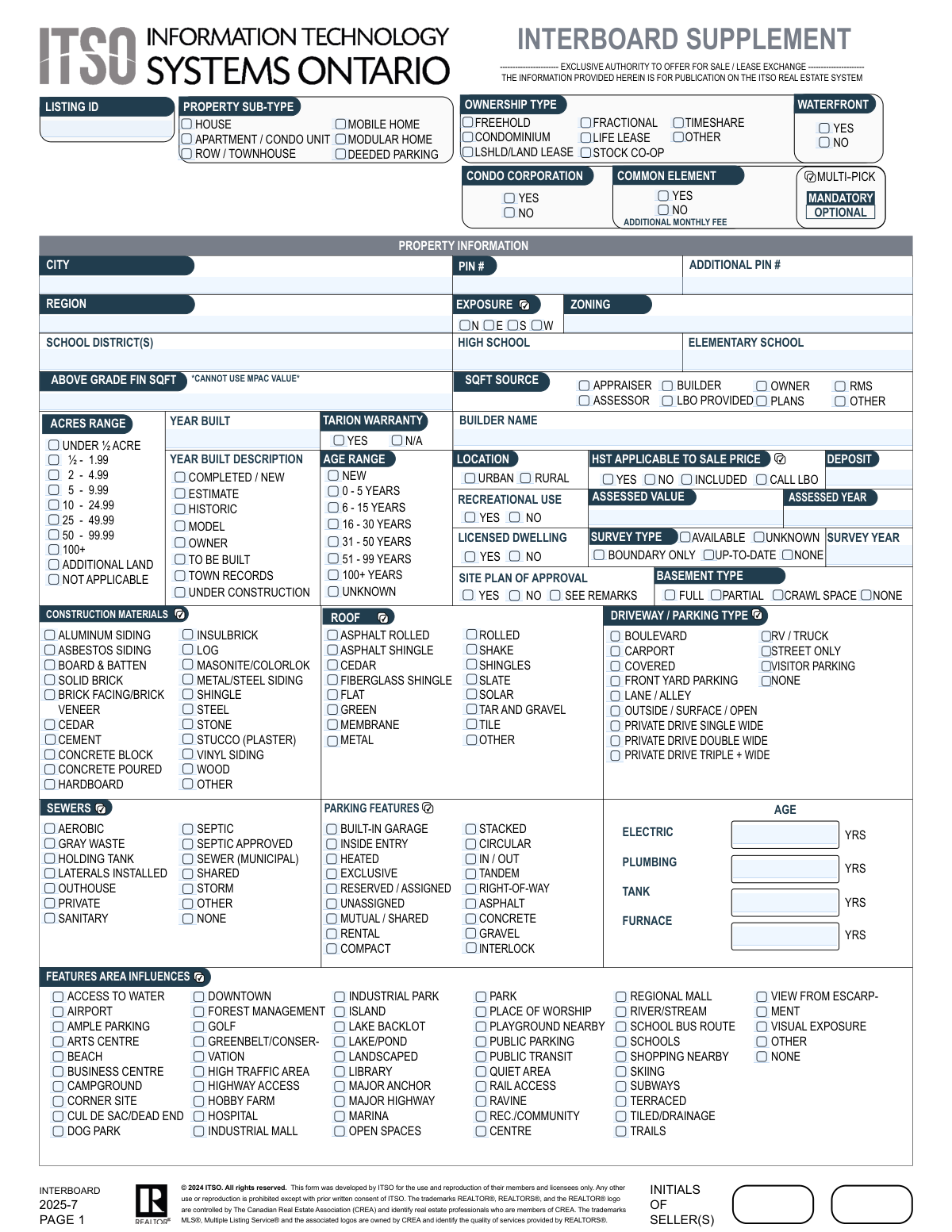
The AI does the filling. You just check it.
No typing into boxes, nothing to install.
What this form asks for
The AI fills all of it, from your answers or your documents.
The AI checks your answers before you download
12 checks built for this form, so a wrong date or a missing answer is caught before anyone else sees it.
This validation ensures that if the 'Ownership Type' is selected as 'CONDOMINIUM', then the 'Condo Corporation' field must be marked as 'YES'. This maintains logical consistency across related fields, as a condominium property is by definition part of a condominium corporation. If this check fails, the user is prompted to correct either the ownership type or the condo corporation status to ensure data accuracy for legal and search purposes.
This check cross-references the 'Year Built' with the selected 'Age Range'. It calculates the property's age based on the current year and the 'Year Built' value, and verifies that it falls within the selected age bracket (e.g., 0-5 years, 6-15 years). This prevents contradictory information that could mislead potential buyers or cause data analysis errors. A mismatch would require the user to correct either the year or the age range.
This validation rule checks the 'Year Built' field. The year entered cannot be in the future unless the 'Year Built Description' is marked as 'To Be Built' or 'Under Construction'. This is crucial for preventing data entry errors and accurately representing the property's current state. If a future year is entered for an existing home, the submission is rejected and the user must provide a valid past or present year.
This check ensures that if the 'Tarion Warranty' field is marked as 'YES', then the 'Builder Name' text field must be completed. A Tarion warranty is tied to the builder of a new home, making the builder's name essential information when a warranty is claimed to be active. Failure to provide the builder's name when a warranty is indicated will block submission until the information is supplied.
This validation requires that if a value is entered into the 'Above Grade Finished SQFT' field, at least one option from the 'SQFT Source Options' group must be selected. The source of square footage data is critical for establishing its reliability and is often a legal requirement in property listings. If the square footage is provided without a source, the form will prompt the user to select one before proceeding.
This rule verifies that only one 'Property Sub-Type' (e.g., HOUSE, APARTMENT / CONDO UNIT, ROW / TOWNHOUSE) is selected. A property cannot be both a detached house and a condo unit simultaneously, so enforcing a single choice is essential for data integrity. If more than one option is checked, the system will return an error and require the user to select only the single, most accurate sub-type.
And 6 more checks
- Exclusive Ownership Type Selection
- Features Area Influences 'None' Exclusivity
- Conditional Offer Remarks Entry
- Assessed Value and Year Correlation
- Year Built Format and Plausibility
- Exclusive Acres Range Selection
Let AI fill out your Real Estate Listing Data Form
No typing. Every field filled in seconds, checked, ready to sign.
How to Fill Out Real Estate Listing Data Form Online for Free in 2026
What the AI walks you through.
- Navigate to Instafill.ai and upload or select the Real Estate Listing Data Form.
- Allow the AI to scan and identify all the fields on the form, including text boxes, checkboxes, and sections for property details, legal information, and room dimensions.
- Gather all necessary property documents, such as deeds, surveys, tax assessments, and previous listing information.
- Answer the AI's prompts for each section, providing details like property type, ownership, square footage, construction materials, and area influences.
- The AI will automatically populate the correct fields and check the appropriate boxes for property features, parking, utilities, and other detailed specifications based on your input.
- Review the completed form for accuracy, ensuring all details from the property's location and PIN to the specific showing instructions and special agreements are correct.
- Securely download, print, or share the completed Real Estate Listing Data Form with the relevant parties.
Common Mistakes in Completing Real Estate Listing Data Form
The ones the AI is built to catch.
Confusing Property Sub-Type with Ownership Type
Contradictory 'Year Built' and 'Age Range' Data
Entering an Incorrect or Incomplete PIN
Misattributing the Source of Square Footage
Providing Vague or Incomplete Showing Instructions
Failing to Complete Conditional Fields
Underutilizing the 'Features Area Influences' Section
Inconsistent Formatting of Room Dimensions
Making Contradictory Yes/No Selections
Forgetting to Sync Assessed Value with Assessed Year
Frequently Asked Questions About Real Estate Listing Data Form
Is it really free for 7 days?
Can I fill other forms too?
How do I cancel?
How does the AI fill out Real Estate Listing Data Form?
What happens to my information?
How complex is Real Estate Listing Data Form to fill out?
What is the purpose of this form?
Who is responsible for filling out this form?
Where can I find the Property Identifier Number (PIN)?
What is the difference between 'Freehold' and 'Condominium' ownership?
What do I do if I don't know the exact square footage?
What if I don't know the age of the furnace or plumbing system?
Can I select multiple options in the 'Features Area Influences' section?
What are all the fields like 'hidRoom1Lvl' and 'chkOpt_AddFeatA1_1' for?
What documents should I have ready before starting this form?
What should I enter in the 'Showing Instructions' field?
Can I use an AI tool to help me fill out this extensive form?
How can I fill out this form online using Instafill.ai?
The PDF version of this form I have is not fillable. What can I do?
Get your Real Estate Listing Data Form filled out by AI
$0 today. Cancel before Nov 4 and you pay nothing.
Other forms like this one
real estate forms: Form 593, Real Estate Withholding, Form 1099-S, Proceeds From Real Estate Transactions, Inland Residential Real Estate Services LLC Application for Lease (Form 4301, Rev. 11/14), New licence application – Form 1–1 (IND), Application for an individual’s licence (Real estate agent, property auctioneer, resident letting agent, motor dealer, chattel auctioneer, field agent), Texas Real Estate Commission (TREC) One to Four Family Residential Contract (Resale) (TREC No. 20-18), City of Harvey Real Estate Transfer Declaration & Application (with Certificate for Exemption), Alaska Residential Real Estate Purchase Agreement, Form 21, Residential Purchase and Sale Agreement, Form L-4260, Property Transfer Affidavit, Form TC201, Income and Expense Schedule for Rent Producing Properties, Memorandum of Contract, Notice of Transfer Forms Packet, Oklahoma Real Estate Commission Tenancy Guidelines (01-01-2026), Oklahoma Real Estate Commission Residential Property Condition Disclosure Exemption Form (RPCD EXEMPTION FORM), Oklahoma Real Estate Commission Residential Lease, Oklahoma Real Estate Commission Tenant Flood Notice (01-01-2026), Oklahoma Real Estate Commission Property Data Form (Residential), Oklahoma Real Estate Commission Pet Addendum, Oklahoma Real Estate Commission Lease Application, Oklahoma Real Estate Commission Keys and Re-Keying Addendum
estate forms: Form 593, Real Estate Withholding, Form 1099-S, Proceeds From Real Estate Transactions, Inland Residential Real Estate Services LLC Application for Lease (Form 4301, Rev. 11/14), New licence application – Form 1–1 (IND), Application for an individual’s licence (Real estate agent, property auctioneer, resident letting agent, motor dealer, chattel auctioneer, field agent), Judicial Council of California Form DE-111, Petition for Probate (Probate—Decedents Estates), Texas Real Estate Commission (TREC) One to Four Family Residential Contract (Resale) (TREC No. 20-18), City of Harvey Real Estate Transfer Declaration & Application (with Certificate for Exemption), Judicial Council of California Form DE-120, Notice of Hearing—Decedent's Estate or Trust, Form DE-160/GC-040, Inventory and Appraisal (Declaration of Representative/Guardian/Conservator or Small Estate Claimant and Declaration of Probate Referee), Judicial Council of California Form DE-120, Notice of Hearing—Decedent's Estate or Trust, Fidelity Change of Account Ownership — Mutual Fund Only Accounts (Changing to a Trust, Estate, Guardian, or Conservator Account), Fidelity Change of Account Registration — Changing to a Trust, Estate, Guardian, or Conservator Brokerage Account, Valuing Your Estate Worksheet (from Vanguard's 'Understanding the basics of estate planning' guide), Alaska Residential Real Estate Purchase Agreement, Merrill Edge Self-Directed Trust and Estate Cash Management Account (CMA Account) Account Application Booklet and Agreements, Affidavit for Collection of Personal Property California Probate Code Section 13100, Oklahoma Real Estate Commission Tenancy Guidelines (01-01-2026), Oklahoma Real Estate Commission Residential Property Condition Disclosure Exemption Form (RPCD EXEMPTION FORM), Oklahoma Real Estate Commission Residential Lease, Oklahoma Real Estate Commission Tenant Flood Notice (01-01-2026)
PA state forms: Form 1095-A, Health Insurance Marketplace Statement, Form W-2, Wage and Tax Statement, Form 593, Real Estate Withholding, Form 8938, Statement of Specified Foreign Financial Assets, Form CMS-2567, Statement of Deficiencies, Form 1098, Mortgage Interest Statement, Form 1098-T, Tuition Statement, Form 1099-S, Proceeds From Real Estate Transactions, Form 1098-E, Student Loan Interest Statement, Form DS-3053, Statement of Consent, Form DS-86, Statement of Non-Receipt of a U.S. Passport, Form DS-86, Statement of Non-Receipt of a U.S. Passport, Form 108, Statement of Intention, Form 107, Statement of Financial Affairs, Form 121, Statement About Your SSNs, Form 122A-1, Chapter 7 Statement of Current Monthly Income, Center for Infertility & Reproductive Surgery – New Patient Questionnaire and Patient/Guarantor Statement (Brigham and Women’s Hospital, Department of Obstetrics and Gynecology), Adult Travel Document Application for Stateless and Protected Persons in Canada (16 years of age or over) (PPTC 190), Form W-8IMY (Rev. October 2021), Certificate of Foreign Intermediary, Foreign Flow-Through Entity, or Certain U.S. Branches for United States Tax Withholding and Reporting, Form W-2, Wage and Tax Statement (2025)
property forms: Form GST524, GST/HST New Residential Rental Property Rebate, Form GST524, GST/HST New Residential Rental Property Rebate, Form GST524, GST/HST New Residential Rental Property Rebate, Form GST524, GST/HST New Residential Rental Property Rebate, Form GST524, GST/HST New Residential Rental Property Rebate, Form 4562, Depreciation and Amortization (Including Information on Listed Property), New licence application – Form 1–1 (IND), Application for an individual’s licence (Real estate agent, property auctioneer, resident letting agent, motor dealer, chattel auctioneer, field agent), Form 4562 (2025), Depreciation and Amortization (Including Information on Listed Property), ACORD 140 (2014/12), Property Section (Attach to ACORD 125), Florida Supreme Court Approved Family Law Form 12.901(b)(3), Petition for Dissolution of Marriage with No Dependent or Minor Child(ren) or Property (02/18), New York State Department of State (Division of Licensing Services) Property Condition Disclosure Statement (DOS-1614-f), Martial Arts Studio General Liability and Property Application (Fitness and Wellness Insurance / Philadelphia Insurance Companies) (03/2011), Washington Single-Family Property Term Lease & Security Deposit Receipt (WA Single-Family Lease) | Revised 10/08/2025, TC201, Income and Expense Schedule for Rent-Producing Property, Form L-4260, Property Transfer Affidavit, Affidavit for Collection of Personal Property California Probate Code Section 13100, FARM LIABILITY / LIMITED PROPERTY - APPLICATION, DCMA Guidebook for Government Contract Property Administration, Official Form 106D, Schedule D: Creditors Who Have Claims Secured by Property, Official Form 206A/B, Schedule A/B: Assets — Real and Personal Property
NJ state forms: Form 1095-A, Health Insurance Marketplace Statement, Form W-2, Wage and Tax Statement, Form 593, Real Estate Withholding, Form 8938, Statement of Specified Foreign Financial Assets, Form CMS-2567, Statement of Deficiencies, Form 1098, Mortgage Interest Statement, Form 1098-T, Tuition Statement, Form 1099-S, Proceeds From Real Estate Transactions, Form 1098-E, Student Loan Interest Statement, Form DS-3053, Statement of Consent, Form DS-86, Statement of Non-Receipt of a U.S. Passport, Form DS-86, Statement of Non-Receipt of a U.S. Passport, Form 108, Statement of Intention, Form 107, Statement of Financial Affairs, Form 121, Statement About Your SSNs, Form 122A-1, Chapter 7 Statement of Current Monthly Income, Center for Infertility & Reproductive Surgery – New Patient Questionnaire and Patient/Guarantor Statement (Brigham and Women’s Hospital, Department of Obstetrics and Gynecology), Adult Travel Document Application for Stateless and Protected Persons in Canada (16 years of age or over) (PPTC 190), Form W-8IMY (Rev. October 2021), Certificate of Foreign Intermediary, Foreign Flow-Through Entity, or Certain U.S. Branches for United States Tax Withholding and Reporting, Form W-2, Wage and Tax Statement (2025)
state ID forms: Application for Renewal or Duplicate of Alabama Driver License or ID card, Form 1095-A, Health Insurance Marketplace Statement, Form W-2, Wage and Tax Statement, Form 593, Real Estate Withholding, Form 8938, Statement of Specified Foreign Financial Assets, Form CMS-2567, Statement of Deficiencies, Form 1098, Mortgage Interest Statement, Form 1098-T, Tuition Statement, Form 1099-S, Proceeds From Real Estate Transactions, Form 1098-E, Student Loan Interest Statement, Form DS-3053, Statement of Consent, Form DS-86, Statement of Non-Receipt of a U.S. Passport, Form 108, Statement of Intention, Form 107, Statement of Financial Affairs, Form 121, Statement About Your SSNs, Form 122A-1, Chapter 7 Statement of Current Monthly Income, Center for Infertility & Reproductive Surgery – New Patient Questionnaire and Patient/Guarantor Statement (Brigham and Women’s Hospital, Department of Obstetrics and Gynecology), Adult Travel Document Application for Stateless and Protected Persons in Canada (16 years of age or over) (PPTC 190), Form W-8IMY (Rev. October 2021), Certificate of Foreign Intermediary, Foreign Flow-Through Entity, or Certain U.S. Branches for United States Tax Withholding and Reporting, Form W-2, Wage and Tax Statement (2025)
Let AI fill out your Real Estate Listing Data Form
Your trial starts once a card is added. You pay nothing before Nov 4.
Our AI already knows this form, all 1148 fields of it. Skip the typing: tell it about yourself, or upload what you have, and it fills the whole form in seconds.
- AI fills every field on all 5 pages, checkboxes included
- No typing into boxes: answer a few questions, or upload a document you already have, an old copy of this form, a photo of a document
- The AI checks the answers; you review and change anything before you download
- Download the finished PDF, print it, or sign it online
- Encrypted, and never used to train AI
Cancel before Nov 4 and you pay nothing.
A card is needed to start the trial. Cancel in two clicks from your account.
Terms · Privacy