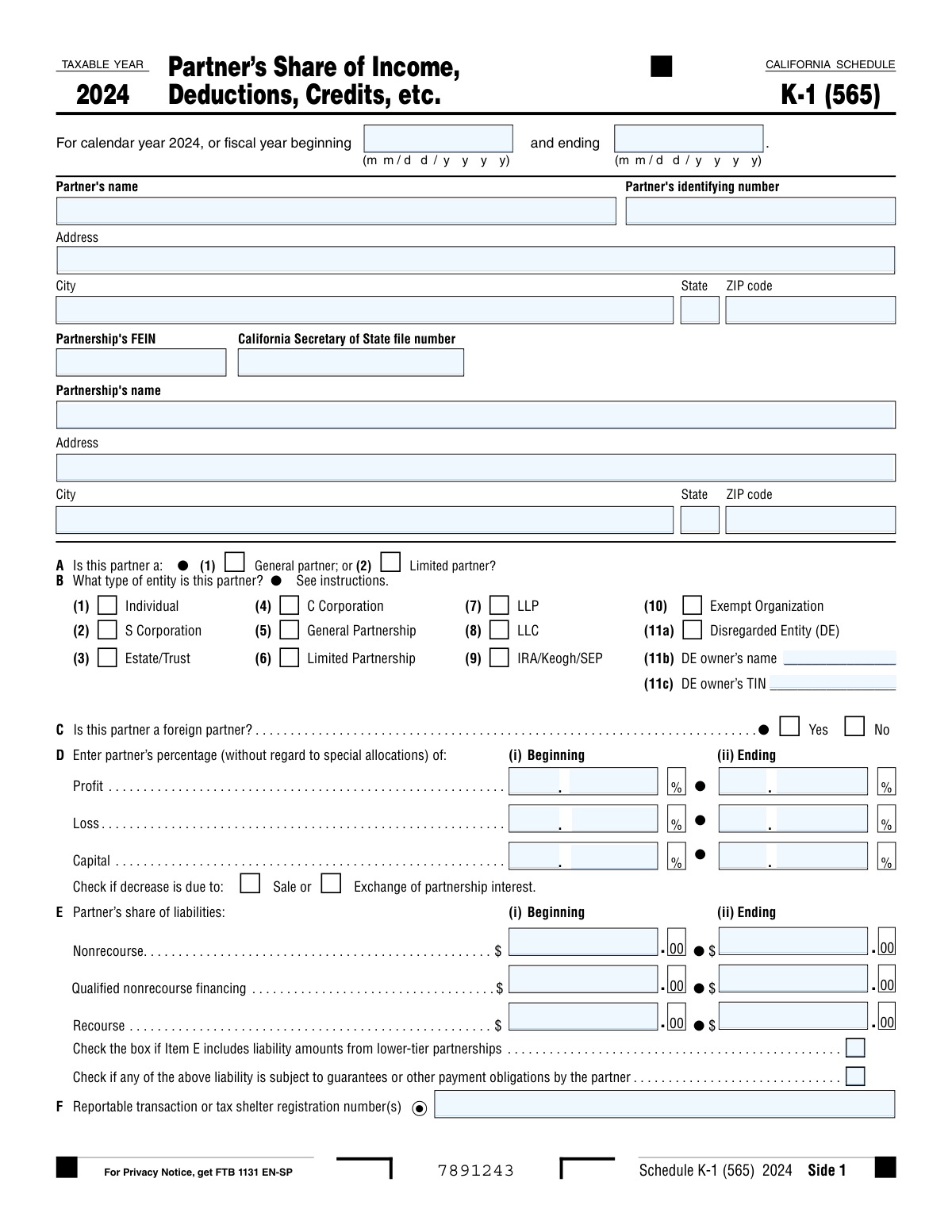
Yes! You can use AI to fill out California Schedule K-1 (565), Partner's Share of Income, Deductions, Credits, etc.

California Schedule K-1 (565) is a state tax document that partnerships file to report the individual share of income, losses, deductions, and credits for each partner. This information is essential for partners to accurately complete their own California state income tax returns, as it details their specific financial stake and tax responsibilities from the partnership's activities. Today, this form can be filled out quickly and accurately using AI-powered services like Instafill.ai, which can also convert non-fillable PDF versions into interactive fillable forms.
Our AI automatically handles information lookup, data retrieval, formatting, and form filling.
It takes less than a minute to fill out Schedule K-1 (565) using our AI form filling.
Securely upload your data. Information is encrypted in transit and deleted immediately after the form is filled out.

Form specifications

Form name: California Schedule K-1 (565), Partner's Share of Income, Deductions, Credits, etc.
Number of pages: 4
Language: English
Categories: income forms, credit forms
main-image

Instafill Demo: How to fill out PDF forms in seconds with AI

How to Fill Out Schedule K-1 (565) Online for Free in 2026

Are you looking to fill out a SCHEDULE K-1 (565) form online quickly and accurately? Instafill.ai offers the #1 AI-powered PDF filling software of 2026, allowing you to complete your SCHEDULE K-1 (565) form in just 37 seconds or less.
Follow these steps to fill out your SCHEDULE K-1 (565) form online using Instafill.ai:
  1. 1 Navigate to Instafill.ai and upload or select the California Schedule K-1 (565) form.
  2. 2 Provide the partner's and partnership's identification details, including names, addresses, and tax ID numbers (TIN/FEIN).
  3. 3 Answer the initial questions about the partner's status, such as entity type, residency, and whether they are a general or limited partner.
  4. 4 Enter the partner's percentage share of profit, loss, and capital, as well as their share of the partnership's liabilities at the beginning and end of the year.
  5. 5 Use the AI-assisted interface to input the distributive share items, including income, deductions, credits, and AMT items, filling in both federal amounts and any California-specific adjustments.
  6. 6 Carefully review all the information auto-populated by the AI, verifying the accuracy of calculations for total amounts under California law and California-source amounts.
  7. 7 Securely download, print, or save the completed Schedule K-1 (565) for your records and for filing with your state tax return.

Our AI-powered system ensures each field is filled out correctly, reducing errors and saving you time.

Why Choose Instafill.ai for Your Fillable Schedule K-1 (565) Form?

Speed

Complete your Schedule K-1 (565) in as little as 37 seconds.

Up-to-Date

Always use the latest 2026 Schedule K-1 (565) form version.

Cost-effective

No need to hire expensive lawyers.

Accuracy

Our AI performs 10 compliance checks to ensure your form is error-free.

Security

Your personal information is protected with bank-level encryption.

Frequently Asked Questions About Form Schedule K-1 (565)

The Schedule K-1 (565) is a California state tax form used by partnerships to report each partner's share of the partnership's income, deductions, credits, and other tax items. Partners use the information on this form to complete their own California tax returns.

The partnership is responsible for preparing a Schedule K-1 (565) for each of its partners. The partnership then provides this form to the partner, who uses it to prepare their personal or business tax return.

Column (b) shows your share of items as reported on your federal K-1, while column (c) shows the adjustments needed to conform to California tax law. The sum of these two columns is your total California amount, shown in column (d).

You should use the information from your Schedule K-1 (565), especially the amounts in columns (d) and (e), to report your share of the partnership's activity on your California income tax return. Keep the form for your records, but do not attach it to your return unless specifically required.

This indicates that the legal partner is an entity, such as a single-member LLC, that is ignored for tax purposes. The form must also list the name and taxpayer ID number of the actual owner who is responsible for reporting the income or loss.

A 'final' K-1 is issued for the year you completely dispose of your interest in the partnership. An 'amended' K-1 is issued by the partnership to correct an error on a Schedule K-1 that was previously sent to you.

Your share of the partnership's liabilities generally increases your tax basis in the partnership. This is important for determining the amount of partnership losses you can deduct and the taxability of any distributions you receive.

This section tracks the changes in your investment in the partnership on a tax basis throughout the year. It shows your beginning balance, adds contributions and income, and subtracts distributions and losses to calculate your ending capital account balance.

This column is critical for non-resident partners, as it isolates the portion of income, deductions, and credits derived from California sources, which is what they are taxed on by California. Residents may also need this information for calculating certain tax credits.

Guaranteed payments are payments made by the partnership to a partner for services rendered or for the use of capital, calculated without regard to the partnership's income. These are generally treated as ordinary income to the receiving partner.

Yes, services like Instafill.ai use AI to help partnerships auto-fill form fields accurately and save time. This streamlines the process of preparing K-1s for all partners.

Your partnership can use a service like Instafill.ai to complete these forms digitally. Simply upload the PDF, and the AI will make the fields interactive, allowing you to easily enter all the required partner and financial information.

If you have a non-fillable or 'flat' PDF, you can use a tool like Instafill.ai to instantly convert it into an interactive, fillable form. This allows you to type information directly into the fields before printing or saving the document.

You should verify that your personal information, including your name and identifying number (SSN or EIN), is correct. You should also check the partnership's identifying information and your ownership percentages in Item D.

Compliance Schedule K-1 (565)
Validation Checks by Instafill.ai

1
Disregarded Entity Information Completeness
This check verifies that if the 'Disregarded Entity (DE)' box is checked in Item B, then the 'DE owner’s name' and 'DE owner’s TIN' fields are both populated. This is crucial for correctly identifying the ultimate taxpayer responsible for the DE's share of income. If validation fails, the form is incomplete and cannot be processed, as the tax liability cannot be assigned to the correct entity or individual.
2
Capital Account Balance Calculation
This validation ensures the mathematical accuracy of the 'Analysis of partner's tax basis capital account' in Item L. It confirms that the 'Capital account at end of year' (column f) equals the beginning balance (a) plus contributions (b) and net income (c) and other increases (d), minus withdrawals (e). An incorrect calculation can lead to an inaccurate tax basis, affecting the partner's future tax filings. Failure will trigger an error requiring the filer to correct the amounts.
3
Distributive Share Item Summation
This check validates the calculations for each income, deduction, and credit line item on Side 2 and 3. It confirms that the amount in column (d), 'Total amounts using California law,' is the correct sum of column (b), 'Amounts from federal Schedule K-1,' and column (c), 'California adjustments.' This ensures that federal-to-state reconciliations are arithmetically correct. If the sum is incorrect, the filing will be rejected for mathematical errors.
4
Partner Identifying Number Format
This validation checks that the 'Partner's identifying number' is in a valid format, such as a 9-digit Social Security Number (SSN), Individual Taxpayer Identification Number (ITIN), or Employer Identification Number (EIN). This number is the primary key for matching the K-1 to the partner's tax return. An invalid format will cause the form to be rejected, as the FTB cannot process a return without a valid taxpayer ID.
5
Partnership FEIN Format
This check ensures the 'Partnership's FEIN' is entered in the correct 9-digit format (XX-XXXXXXX). The FEIN is essential for identifying the issuing partnership and linking the K-1 to the main partnership return (Form 565). A malformed FEIN will prevent the system from processing the document and may lead to notices for both the partnership and the partner.
6
Fiscal Year Period Logic
This validation confirms that the 'Tax period end date' is on or after the 'Tax period begin date'. This is a fundamental check to ensure the reporting period is logical and valid. An inverted or illogical date range would make the entire form's financial data meaningless and will result in an immediate rejection of the submission.
7
Partner Role Selection Exclusivity
This check ensures that for Item A, exactly one box is checked, indicating the partner is either a 'General partner' or a 'Limited partner,' but not both or neither. A partner's role determines their liability and material participation rules, making this a critical and required piece of information. A failure to select one and only one option will mark the form as incomplete.
8
Partner Entity Type Selection Requirement
This validation verifies that exactly one entity type is selected in Item B. The partner's entity type dictates how the income is taxed and reported on their own return, making this a mandatory field. If no box or multiple boxes are checked, the form cannot be processed correctly and will be flagged as having a critical error.
9
Built-in Gain/Loss Conditional Requirement
This check verifies that if 'Yes' is selected for Item J ('Did this partner contribute property with a built-in gain or loss?'), then the corresponding fields in Item K for 'Beginning' and 'Ending' unrecognized Section 704(c) gain or loss are populated. This information is required to properly track the tax basis of contributed property. If Item J is 'Yes' but Item K is empty, the submission is considered incomplete.
10
Decrease in Ownership Interest Justification
This validation checks for logical consistency in Item D. If the 'Sale' or 'Exchange of partnership interest' box is checked, the system verifies that at least one of the partner's percentages (Profit, Loss, or Capital) shows a decrease from 'Beginning' to 'Ending'. Checking these boxes without a corresponding decrease is illogical. This prevents erroneous reporting of a sale or exchange.
11
Apportionment Factor Sanity Check
This check validates the data in Item C on Side 4, 'Partner’s distributive share of the partnership's property, payroll, and sales.' It ensures that for each factor (Property, Payroll, Sales), the 'Total within California' amount is less than or equal to the 'Total within and outside California' amount. An amount within California cannot exceed the total amount, and a failure indicates a data entry error that must be corrected.
12
Guaranteed Payments Summation Check
This validation ensures that for each column (b, c, d, e), the amount on Line 4c 'Total guaranteed payments' is equal to the sum of Line 4a 'Guaranteed payments for services' and Line 4b 'Guaranteed payments for capital'. This confirms the internal consistency of the reported payment figures. A mismatch indicates a calculation error that needs to be fixed before the form can be accepted.
13
Attachment Requirement for 'Other' Categories
This check identifies if an amount is entered in lines that require an attached schedule, such as 11a ('Other portfolio income (loss)'), 11b ('Total other income'), 11c ('Total other loss'), or 13f ('Other deductions'). If any of these fields are non-zero, the system flags the submission to verify that the corresponding explanatory schedule is attached. Missing attachments can delay processing or lead to the disallowance of the reported income or deduction.
14
California Residency Status Completeness
This validation ensures that in Item I, either 'Yes' or 'No' is selected to indicate if the partner is a resident of California. This status is critical for determining the partner's California tax liability, as residents are taxed on all income while non-residents are generally taxed only on California-source income. Failure to answer this question makes it impossible to determine the correct tax treatment.

Common Mistakes in Completing Schedule K-1 (565)

Incomplete Disregarded Entity (DE) Information

Filers often check box 11a to indicate the partner is a Disregarded Entity but then fail to provide the required owner's name and Taxpayer Identification Number (TIN) in fields 11b and 11c. This omission makes the filing incomplete, as the tax liability flows through to the DE's owner, whose identity is now missing. To avoid this, always complete the owner information sections immediately after identifying a partner as a DE. AI-powered tools like Instafill.ai can enforce these conditional rules, preventing submission until all required fields are completed.

Incorrect Formatting of Percentage Shares

In Item D, the form requires profit, loss, and capital percentages to be split into two separate fields for the whole and fractional parts. A common error is entering the full percentage (e.g., '25.5') into one box or using a percent sign, which can cause data entry rejection or misinterpretation by the tax authority. To prevent this, carefully enter the digits before the decimal in the left box and the digits after the decimal in the right box. Using a smart form-filling tool can automate this formatting.

Capital Account Analysis Calculation Error

In Item L, 'Analysis of partner's tax basis capital account,' the ending capital account in column (f) must equal the sum of columns (a) through (e). People frequently make manual calculation errors, causing the total to be incorrect. This discrepancy is a red flag that can lead to questions from the FTB and indicates a potential error in tracking the partner's basis. Always use a calculator or software to verify the math; tools like Instafill.ai can perform these calculations automatically to ensure accuracy.

Ignoring California-Specific Adjustments

A frequent mistake is copying the federal amounts from Schedule K-1 (Form 1065) in column (b) directly to the 'Total amounts using California law' in column (d), leaving the 'California adjustments' in column (c) blank. California tax law has many differences from federal law (e.g., depreciation), and these must be accounted for in column (c). Failure to do so results in an incorrect statement of California income and potential underpayment of tax. Always review the specific instructions for each line item to determine if a California adjustment is needed.

Forgetting to Attach Required Schedules or Statements

Several lines on the form, such as 11a/b/c (Other Income/Loss), 13f (Other Deductions), and 15f (Other Credits), explicitly state 'Attach schedule' or 'Attach statement.' Similarly, Item J requires a statement if the partner contributed property with a built-in gain or loss. Forgetting to include these required attachments makes the return incomplete and will cause processing delays and correspondence from the FTB. To avoid this, create a checklist of all required attachments as you fill out the form.

Incorrect Partner or Partnership Identifying Numbers

Entering an incorrect Partner's Identifying Number (SSN/TIN), Partnership FEIN, or California Secretary of State file number is a critical error. Simple typos or transpositions can cause the K-1 to be rejected or fail to be matched with the partner's individual tax return, leading to automated notices, penalties, and significant delays. Always double-verify these numbers against official source documents before filing. AI-powered tools like Instafill.ai can use validation algorithms to check for correct formatting and length, reducing the chance of such errors.

Omitting California Source Amounts for Non-Residents

When a partner is not a resident of California (Item I is 'No'), it is crucial to accurately complete column (e), 'California source amounts and credits.' Many preparers mistakenly leave this column blank or simply copy the totals from column (d). This leads to an incorrect calculation of the partner's California tax liability. The partnership must properly determine and report the portion of each income or loss item that is derived from California sources. This is especially critical for the partner's personal tax filing.

Failing to Mark 'Final' or 'Amended' K-1 Status

In Item H, preparers often overlook checking the 'final' or 'amended' box. If a partner disposed of their entire interest during the year, the 'final' box must be checked to inform the tax agency. If the K-1 is being filed to correct a previous version, the 'amended' box is required. Missing these designations creates administrative confusion for both the FTB and the partner, potentially leading to unnecessary inquiries about future filings or incorrect record-keeping.

Inconsistent Beginning and Ending Balances

The 'Beginning' of year amounts for liabilities (Item E) and the partner's capital account (Item L) should precisely match the 'Ending' of year amounts from the prior year's Schedule K-1. Filers sometimes enter incorrect data or fail to carry over the numbers properly, creating a discrepancy that can trigger an audit or review. To avoid this, always have the prior year's K-1 on hand for reference when preparing the current year's form. This ensures continuity and consistency in reporting.

Misclassifying Partner Entity Type

In Item B, selecting the wrong entity type for the partner, such as marking 'Individual' for a single-member LLC that is a disregarded entity, can cause significant processing and tax issues. Each entity type has different reporting requirements and tax implications, and an incorrect selection can affect the partner's tax return. It is essential to confirm the partner's correct legal and tax classification before completing this section. If the form is a non-fillable PDF, a tool like Instafill.ai can convert it to a smart, fillable version with guidance to help select the correct options.
Saved over 80 hours a year

“I was never sure if my IRS forms like W-9 were filled correctly. Now, I can complete the forms accurately without any external help.”

Kevin Martin Green

Your data stays secure with advanced protection from Instafill and our subprocessors

Robust compliance program

Transparent business model

You’re not the product. You always know where your data is and what it is processed for.

ISO 27001, HIPAA, and GDPR

Our subprocesses adhere to multiple compliance standards, including but not limited to ISO 27001, HIPAA, and GDPR.

Security & privacy by design

We consider security and privacy from the initial design phase of any new service or functionality. It’s not an afterthought, it’s built-in, including support for two-factor authentication (2FA) to further protect your account.

Fill out Schedule K-1 (565) with Instafill.ai

Worried about filling PDFs wrong? Instafill securely fills california-schedule-k-1-565-partners-share-of-income-deductions-credits-etc forms, ensuring each field is accurate.